-
Spring续集
6.2、转发视图
SpringMVC中默认的转发视图是InternalResourceView SpringMVC中创建转发视图的情况:
当控制器方法中所设置的视图名称以"forward:"为前缀时,创建InternalResourceView视图,此时的视图名称不会被SpringMVC配置文件中所配置的视图解析器解析,而是会将前缀"forward:“去掉,剩余部 分作为最终路径通过转发的方式实现跳转
例如"forward:/”,“forward:/employee”@RequestMapping("/testForward") public String testForward(){ return "forward:/testHello"; }- 1
- 2
- 3
- 4

注:
重定向视图在解析时,会先将redirect:前缀去掉,然后会判断剩余部分是否以/开头,若是则会自动拼接上下文路径
6.4、视图控制器view-controller
当控制器方法中,仅仅用来实现页面跳转,即只需要设置视图名称时,可以将处理器方法使用view- controller标签进行表示<!-- path:设置处理的请求地址 view-name:设置请求地址所对应的视图名称 --> <mvc:view-controller path="/testView" view-name="success"></mvc:view-controller>- 1
- 2
- 3
- 4
- 5
注: 当SpringMVC中设置任何一个view-controller时,其他控制器中的请求映射将全部失效,此时需 要在SpringMVC的核心配置文件中设置开启mvc注解驱动的标签: <mvc:annotation-driven />- 1
- 2
- 3
7、RESTful
7.1、RESTful简介
REST:Representational State Transfer,表现层资源状态转移。
①资源
资源是一种看待服务器的方式,即,将服务器看作是由很多离散的资源组成。每个资源是服务器上一个 可命名的抽象概念。因为资源是一个抽象的概念,所以它不仅仅能代表服务器文件系统中的一个文件、 数据库中的一张表等等具体的东西,可以将资源设计的要多抽象有多抽象,只要想象力允许而且客户端 应用开发者能够理解。与面向对象设计类似,资源是以名词为核心来组织的,首先关注的是名词。一个 资源可以由一个或多个URI来标识。URI既是资源的名称,也是资源在Web上的地址。对某个资源感兴趣的客户端应用,可以通过资源的URI与其进行交互。
②资源的表述
资源的表述是一段对于资源在某个特定时刻的状态的描述。可以在客户端-服务器端之间转移(交
换)。资源的表述可以有多种格式,例如HTML/XML/JSON/纯文本/图片/视频/音频等等。资源的表述格式可以通过协商机制来确定。请求-响应方向的表述通常使用不同的格式。
③状态转移
状态转移说的是:在客户端和服务器端之间转移(transfer)代表资源状态的表述。通过转移和操作资源的表述,来间接实现操作资源的目的。
7.2、RESTful的实现
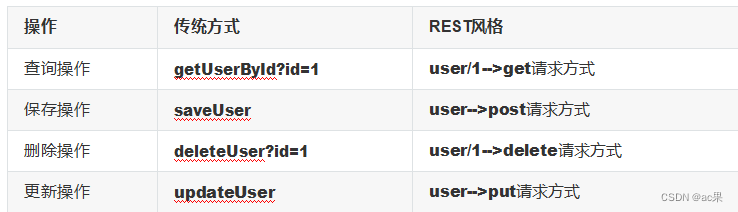
具体说,就是 HTTP 协议里面,四个表示操作方式的动词:GET、POST、PUT、DELETE。
它们分别对应四种基本操作:GET 用来获取资源,POST 用来新建资源,PUT 用来更新资源,DELETE 用来删除资源。
REST 风格提倡 URL 地址使用统一的风格设计,从前到后各个单词使用斜杠分开,不使用问号键值对方式携带请求参数,而是将要发送给服务器的数据作为 URL 地址的一部分,以保证整体风格的一致性。
7.3、HiddenHttpMethodFilter
由于浏览器只支持发送get和post方式的请求,那么该如何发送put和delete请求呢?
SpringMVC 提供了 HiddenHttpMethodFilter 帮助我们将 POST 请求转换为 DELETE 或 PUT 请求HiddenHttpMethodFilter 处 理 put 和 delete 请 求 的 条 件 :
a>当前请求的请求方式必须为post b>当前请求必须传输请求参数_method
满足以上条件,HiddenHttpMethodFilter 过滤器就会将当前请求的请求方式转换为请求参数
_method的值,因此请求参数_method的值才是最终的请求方式
在web.xml中注册HiddenHttpMethodFilter<filter> <filter-name>HiddenHttpMethodFilter</filter-name> <filter-class>org.springframework.web.filter.HiddenHttpMethodFilter</filter- class> </filter> <filter-mapping> <filter-name>HiddenHttpMethodFilter</filter-name> <url-pattern>/*- 1
- 2
- 3
- 4
- 5
- 6
- 7
- 8
- 9
注:
目前为止,SpringMVC中提供了两个过滤器:CharacterEncodingFilter和
HiddenHttpMethodFilter
在web.xml中注册时,必须先注册CharacterEncodingFilter,再注册HiddenHttpMethodFilter 原因:
在 CharacterEncodingFilter 中通过 request.setCharacterEncoding(encoding) 方法设置字符集的
request.setCharacterEncoding(encoding) 方法要求前面不能有任何获取请求参数的操作而 HiddenHttpMethodFilter 恰恰有一个获取请求方式的操作:String paramValue = request.getParameter(this.methodParam);- 1
- 2
、RESTful案例
8.1、准备工作
和传统 CRUD 一样,实现对员工信息的增删改查。搭建环境
准备实体类package com.softeem.mvc.bean; public class Employee { private Integer id; private String lastName; private String email; //1 male, 0 female private Integer gender; public Integer getId() { return id; } public void setId(Integer id) { this.id = id; } public String getLastName() { return lastName; } public void setLastName(String lastName) { this.lastName = lastName; } public String getEmail() { return email; } public void setEmail(String email) { this.email = email; } public Integer getGender() { return gender; } public void setGender(Integer gender) { this.gender = gender; } public Employee(Integer id, String lastName, String email, Integer gender) { super(); this.id = id; this.lastName = lastName; this.email = email; this.gender = gender; } public Employee() { } }- 1
- 2
- 3
- 4
- 5
- 6
- 7
- 8
- 9
- 10
- 11
- 12
- 13
- 14
- 15
- 16
- 17
- 18
- 19
- 20
- 21
- 22
- 23
- 24
- 25
- 26
- 27
- 28
- 29
- 30
- 31
- 32
- 33
- 34
- 35
- 36
- 37
- 38
- 39
- 40
- 41
- 42
- 43
- 44
- 45
- 46
- 47
- 48
- 49
准备dao模拟数据
package com.softeem.mvc.dao; import java.util.Collection; import java.util.HashMap; import java.util.Map; import com.softeem.mvc.bean.Employee; import org.springframework.stereotype.Repository; @Repository public class EmployeeDao { private static Map<Integer, Employee> employees = null; static{ employees = new HashMap<Integer, Employee>(); employees.put(1001, new Employee(1001, "E-AA", "aa@163.com", 1)); employees.put(1002, new Employee(1002, "E-BB", "bb@163.com", 1)); employees.put(1003, new Employee(1003, "E-CC", "cc@163.com", 0)); employees.put(1004, new Employee(1004, "E-DD", "dd@163.com", 0)); employees.put(1005, new Employee(1005, "E-EE", "ee@163.com", 1)); } private static Integer initId = 1006; public void save(Employee employee){ if(employee.getId() == null){ employee.setId(initId++); } employees.put(employee.getId(), employee); } public Collection<Employee> getAll(){ return employees.values(); } public Employee get(Integer id){ return employees.get(id); } public void delete(Integer id){ employees.remove(id); } }- 1
- 2
- 3
- 4
- 5
- 6
- 7
- 8
- 9
- 10
- 11
- 12
- 13
- 14
- 15
- 16
- 17
- 18
- 19
- 20
- 21
- 22
- 23
- 24
- 25
- 26
- 27
- 28
- 29
- 30
- 31
- 32
- 33
- 34
- 35
- 36
- 37
- 38
8.2、功能清单

8.3、具体功能:访问首页
①配置view-controller<mvc:view-controller path="/" view-name="index"/>- 1
②创建页面
<!DOCTYPE html> <html lang="en" xmlns:th="http://www.thymeleaf.org"> <head> <meta charset="UTF-8" > <title>Title</title> </head> <body> <h1>首页</h1> <a th:href="@{/employee}">访问员工信息</a> </body> </html>- 1
- 2
- 3
- 4
- 5
- 6
- 7
- 8
- 9
- 10
- 11
- 12
8.4、具体功能:查询所有员工数据
①控制器方法@RequestMapping(value = "/employee", method = RequestMethod.GET) public String getEmployeeList(Model model){ Collection<Employee> employeeList = employeeDao.getAll(); model.addAttribute("employeeList", employeeList); return "employee_list"; }- 1
- 2
- 3
- 4
②创建employee_list.html
<!DOCTYPE html> <html lang="en" xmlns:th="http://www.thymeleaf.org"> <head> <meta charset="UTF-8"> <title>Employee Info</title> <script type="text/javascript" th:src="@{/static/js/vue.js}"></script> </head> <body> <table border="1" cellpadding="0" cellspacing="0" style="text-align: center;" id="dataTable"> <tr> <th colspan="5">Employee Info</th> </tr> <tr> <th>id</th> <th>lastName</th> <th>email</th> <th>gender</th> <th>options(<a th:href="@{/toAdd}">add</a>)</th> </tr> <tr th:each="employee : ${employeeList}"> <td th:text="${employee.id}"></td> <td th:text="${employee.lastName}"></td> <td th:text="${employee.email}"></td> <td th:text="${employee.gender}"></td> <td> <a class="deleteA" @click="deleteEmployee" th:href="@{'/employee/'+${employee.id}}">delete</a> <a th:href="@{'/employee/'+${employee.id}}">update</a> </td> </tr> </table> </body> </html>- 1
- 2
- 3
- 4
- 5
- 6
- 7
- 8
- 9
- 10
- 11
- 12
- 13
- 14
- 15
- 16
- 17
- 18
- 19
- 20
- 21
- 22
- 23
- 24
- 25
- 26
- 27
- 28
- 29
- 30
- 31
- 32
- 33
- 34
8.5、具体功能:删除
①创建处理delete请求方式的表单<!-- 作用:通过超链接控制表单的提交,将post请求转换为delete请求 --> <form id="delete_form" method="post"> <!-- HiddenHttpMethodFilter要求:必须传输_method请求参数,并且值为最终的请求方式 --> <input type="hidden" name="_method" value="delete"/> </form>- 1
- 2
- 3
- 4
- 5
②删除超链接绑定点击事件
引入vue.js
<script type="text/javascript" th:src="@{/static/js/vue.js}"></script>- 1
删除超链接
<a class="deleteA" @click="deleteEmployee" th:href="@{'/employee/'+${employee.id}}">delete</a>- 1
通过vue处理点击事件
<script type="text/javascript"> var vue = new Vue({ el:"#dataTable", methods:{ //event表示当前事件 deleteEmployee:function (event) { //通过id获取表单标签 var delete_form = document.getElementById("delete_form"); //将触发事件的超链接的href属性为表单的action属性赋值delete_form.action = event.target.href; //提交表单delete_form.submit(); //阻止超链接的默认跳转行为event.preventDefault(); } } }); </script>- 1
- 2
- 3
- 4
- 5
- 6
- 7
- 8
- 9
- 10
- 11
- 12
- 13
③控制器方法
@RequestMapping(value = "/employee/{id}", method = RequestMethod.DELETE) public String deleteEmployee(@PathVariable("id") Integer id){ employeeDao.delete(id); return "redirect:/employee"; }- 1
- 2
- 3
- 4
8.6、具体功能:跳转到添加数据页面
①配置view-controller<mvc:view-controller path="/toAdd" view-name="employee_add"></mvc:view- controller>- 1
②创建employee_add.html
<!DOCTYPE html> <html lang="en" xmlns:th="http://www.thymeleaf.org"> <head> <meta charset="UTF-8"> <title>Add Employee</title> </head> <body> <form th:action="@{/employee}" method="post"> lastName:<input type="text" name="lastName"><br> email:<input type="text" name="email"><br> gender:<input type="radio" name="gender" value="1">male <input type="radio" name="gender" value="0">female<br> <input type="submit" value="add"><br> </form> </body> </html>- 1
- 2
- 3
- 4
- 5
- 6
- 7
- 8
- 9
- 10
- 11
- 12
- 13
- 14
- 15
8.7、具体功能:执行保存
①控制器方法@RequestMapping(value = "/employee", method = RequestMethod.POST) public String addEmployee(Employee employee){ employeeDao.save(employee); return "redirect:/employee"; }- 1
- 2
- 3
8.8、具体功能:跳转到更新数据页面
①修改超链接<a th:href="@{'/employee/'+${employee.id}}">update</a>- 1
- 2
②控制器方法
@RequestMapping(value = "/employee/{id}", method = RequestMethod.GET) public String getEmployeeById(@PathVariable("id") Integer id, Model model){ Employee employee = employeeDao.get(id); model.addAttribute("employee", employee); return "employee_update"; }- 1
- 2
- 3
③创建employee_update.html
<!DOCTYPE html> <html lang="en" xmlns:th="http://www.thymeleaf.org"> <head> <meta charset="UTF-8"> <title>Update Employee</title> </head> <body> <form th:action="@{/employee}" method="post"> <input type="hidden" name="_method" value="put"> <input type="hidden" name="id" th:value="${employee.id}"> lastName:<input type="text" name="lastName" th:value="${employee.lastName}"> <br> email:<input type="text" name="email" th:value="${employee.email}"><br> <!-- th:field="${employee.gender}"可用于单选框或复选框的回显 若单选框的value和employee.gender的值一致,则添加checked="checked"属性 --> gender:<input type="radio" name="gender" value="1" th:field="${employee.gender}">male <input type="radio" name="gender" value="0" th:field="${employee.gender}">female<br> <input type="submit" value="update"><br> </form> </body> </html>- 1
- 2
- 3
- 4
- 5
- 6
- 7
- 8
- 9
- 10
- 11
- 12
- 13
- 14
- 15
- 16
- 17
- 18
- 19
- 20
- 21
- 22
- 23
- 24
- 25
8.9、具体功能:执行更新
①控制器方法@RequestMapping(value = "/employee", method = RequestMethod.PUT) public String updateEmployee(Employee employee){ employeeDao.save(employee); return "redirect:/employee"; }- 1
- 2
- 3
9、SpringMVC处理ajax请求
9.1、@RequestBody
@RequestBody可以获取请求体信息,使用@RequestBody注解标识控制器方法的形参,当前请求的请 求体就会为当前注解所标识的形参赋值<!--此时必须使用post请求方式,因为get请求没有请求体--> <form th:action="@{/test/RequestBody}" method="post"> 用户名:<input type="text" name="username"><br> 密码:<input type="password" name="password"><br> <input type="submit"> </form>- 1
- 2
- 3
- 4
- 5
- 6
@RequestMapping("/test/RequestBody") public String testRequestBody(@RequestBody String requestBody){ System.out.println("requestBody:"+requestBody); return "success"; }- 1
- 2
- 3
- 4
- 5
输出结果:
requestBody:username=admin&password=123456
9.2、@RequestBody获取json格式的请求参数
在使用了axios发送ajax请求之后,浏览器发送到服务器的请求参数有两种格式:
1、name=value&name=value…,此时的请求参数可以通过request.getParameter()获取,对应
SpringMVC中,可以直接通过控制器方法的形参获取此类请求参数
2、{key:value,key:value,…},此时无法通过request.getParameter()获取,之前我们使用操作
json的相关jar包gson或jackson处理此类请求参数,可以将其转换为指定的实体类对象或map集 合。在SpringMVC中,直接使用@RequestBody注解标识控制器方法的形参即可将此类请求参数 转换为java对象
使用@RequestBody获取json格式的请求参数的条件:
1、导入jackson的依赖<dependency> <groupId>com.fasterxml.jackson.core</groupId> <artifactId>jackson-databind</artifactId> <version>2.12.1</version> </dependency>- 1
- 2
- 3
- 4
- 5
- 6
2、SpringMVC的配置文件中设置开启mvc的注解驱动
<!--开启mvc的注解驱动--> <mvc:annotation-driven />- 1
- 2
3、在控制器方法的形参位置,设置json格式的请求参数要转换成的java类型(实体类或map)的参数,并使用@RequestBody注解标识
<input type="button" value="测试@RequestBody获取json格式的请求参数" @click="testRequestBody()"><br> <script type="text/javascript" th:src="@{/js/vue.js}"></script> <script type="text/javascript" th:src="@{/js/axios.min.js}"></script> <script type="text/javascript"> var vue = new Vue({ el:"#app", methods:{ testRequestBody(){ axios.post( "/SpringMVC/test/RequestBody/json", {username:"admin",password:"123456"} ).then(response=>{ console.log(response.data); }); } } }); </script>- 1
- 2
- 3
- 4
- 5
- 6
- 7
- 8
- 9
- 10
- 11
- 12
- 13
- 14
- 15
//将json格式的数据转换为map集合@RequestMapping("/test/RequestBody/json") public void testRequestBody(@RequestBody Map<String, Object> map, HttpServletResponse response) throws IOException { System.out.println(map); //{username=admin, password=123456} response.getWriter().print("hello,axios"); } //将json格式的数据转换为实体类对象@RequestMapping("/test/RequestBody/json") public void testRequestBody(@RequestBody User user, HttpServletResponse response) throws IOException { System.out.println(user); //User{id=null, username='admin', password='123456', age=null, gender='null'} response.getWriter().print("hello,axios"); }- 1
- 2
- 3
- 4
- 5
- 6
- 7
- 8
- 9
- 10
- 11
9.3、@ResponseBody
@ResponseBody用于标识一个控制器方法,可以将该方法的返回值直接作为响应报文的响应体响应到浏览器@RequestMapping("/testResponseBody") public String testResponseBody(){ //此时会跳转到逻辑视图success所对应的页面 return "success"; } @RequestMapping("/testResponseBody") @ResponseBody public String testResponseBody(){ //此时响应浏览器数据success return "success"; }- 1
- 2
- 3
- 4
- 5
- 6
- 7
- 8
- 9
9.4、@ResponseBody响应浏览器json数据
服务器处理ajax请求之后,大多数情况都需要向浏览器响应一个java对象,此时必须将java对象转换为json字符串才可以响应到浏览器,之前我们使用操作json数据的jar包gson或jackson将java对象转换为json字符串。在SpringMVC中,我们可以直接使用@ResponseBody注解实现此功能
@ResponseBody响应浏览器json数据的条件:
1、导入jackson的依赖<dependency> <groupId>com.fasterxml.jackson.core</groupId> <artifactId>jackson-databind</artifactId> <version>2.12.1</version> </dependency>- 1
- 2
- 3
- 4
- 5
- 6
2、SpringMVC的配置文件中设置开启mvc的注解驱动
<!--开启mvc的注解驱动--> <mvc:annotation-driven />- 1
- 2
3、使用@ResponseBody注解标识控制器方法,在方法中,将需要转换为json字符串并响应到浏览器的java对象作为控制器方法的返回值,此时SpringMVC就可以将此对象直接转换为json字符串并响应到 浏览器
<input type="button" value="测试@ResponseBody响应浏览器json格式的数据" @click="testResponseBody()"><br> <script type="text/javascript" th:src="@{/js/vue.js}"></script> <script type="text/javascript" th:src="@{/js/axios.min.js}"></script> <script type="text/javascript"> var vue = new Vue({ el:"#app", methods:{ testResponseBody(){ axios.post("/SpringMVC/test/ResponseBody/json").then(response=>{ console.log(response.data); }); } } }); </script> //响应浏览器list集合@RequestMapping("/test/ResponseBody/json") @ResponseBody public List<User> testResponseBody(){ User user1 = new User(1001,"admin1","123456",23,"男"); User user2 = new User(1002,"admin2","123456",23,"男"); User user3 = new User(1003,"admin3","123456",23,"男"); List<User> list = Arrays.asList(user1, user2, user3); return list; } //响应浏览器map集合@RequestMapping("/test/ResponseBody/json") @ResponseBody public Map<String, Object> testResponseBody(){ User user1 = new User(1001,"admin1","123456",23,"男"); User user2 = new User(1002,"admin2","123456",23,"男"); User user3 = new User(1003,"admin3","123456",23,"男"); Map<String, Object> map = new HashMap<>(); map.put("1001", user1); map.put("1002", user2); map.put("1003", user3); return map; } //响应浏览器实体类对象@RequestMapping("/test/ResponseBody/json") @ResponseBody public User testResponseBody(){ return user; }- 1
- 2
- 3
- 4
- 5
- 6
- 7
- 8
- 9
- 10
- 11
- 12
- 13
- 14
- 15
- 16
- 17
- 18
- 19
- 20
- 21
- 22
- 23
- 24
- 25
- 26
- 27
- 28
- 29
- 30
9.5、@RestController注解
@RestController注解是springMVC提供的一个复合注解,标识在控制器的类上,就相当于为类添加了
@Controller注解,并且为其中的每个方法添加了@ResponseBody注解
10、文件上传和下载10.1、文件下载
ResponseEntity用于控制器方法的返回值类型,该控制器方法的返回值就是响应到浏览器的响应报文,使用ResponseEntity实现下载文件的功能@RequestMapping("/testDown") public ResponseEntity<byte[]> testResponseEntity(HttpSession session) throws IOException { //获取ServletContext对象 ServletContext servletContext = session.getServletContext(); //获取服务器中文件的真实路径 String realPath = servletContext.getRealPath("/static/img/1.jpg"); //创建输入流 InputStream is = new FileInputStream(realPath); //创建字节数组 byte[] bytes = new byte[is.available()]; //将流读到字节数组中is.read(bytes); //创建HttpHeaders对象设置响应头信息 MultiValueMap<String, String> headers = new HttpHeaders(); //设置要下载方式以及下载文件的名字 headers.add("Content-Disposition", "attachment;filename=1.jpg"); //设置响应状态码 HttpStatus statusCode = HttpStatus.OK; //创建ResponseEntity对象 ResponseEntity<byte[]> responseEntity = new ResponseEntity<>(bytes, headers, statusCode); //关闭输入流 is.close(); return responseEntity; }- 1
- 2
- 3
- 4
- 5
- 6
- 7
- 8
- 9
- 10
- 11
- 12
- 13
- 14
- 15
- 16
- 17
- 18
- 19
- 20
- 21
- 22
- 23
10.2、文件上传
文件上传要求form表单的请求方式必须为post,并且添加属性enctype=“multipart/form-data”
SpringMVC中将上传的文件封装到MultipartFile对象中,通过此对象可以获取文件相关信息 上传步骤:
①添加依赖:<!-- https://mvnrepository.com/artifact/commons-fileupload/commons-fileupload -- > <dependency> <groupId>commons-fileupload</groupId> <artifactId>commons-fileupload</artifactId> <version>1.3.1</version> </dependency>- 1
- 2
- 3
- 4
- 5
- 6
- 7
- 8
②在SpringMVC的配置文件中添加配置:
<!--必须通过文件解析器的解析才能将文件转换为MultipartFile对象--> <bean id="multipartResolver" class="org.springframework.web.multipart.commons.CommonsMultipartResolver"> </bean>- 1
- 2
- 3
③控制器方法:
@RequestMapping("/testUp") public String testUp(MultipartFile photo, HttpSession session) throws IOException { //获取上传的文件的文件名 String fileName = photo.getOriginalFilename(); //处理文件重名问题 String hzName = fileName.substring(fileName.lastIndexOf(".")); fileName = UUID.randomUUID().toString() + hzName; //获取服务器中photo目录的路径 ServletContext servletContext = session.getServletContext(); String photoPath = servletContext.getRealPath("photo"); File file = new File(photoPath); if(!file.exists()){ file.mkdir(); } String finalPath = photoPath + File.separator + fileName; //实现上传功能 photo.transferTo(new File(finalPath)); return "success"; }- 1
- 2
- 3
- 4
- 5
- 6
- 7
- 8
- 9
- 10
- 11
- 12
- 13
- 14
- 15
- 16
11、拦截器
11.1、拦截器的配置
SpringMVC中的拦截器用于拦截控制器方法的执行
SpringMVC中的拦截器需要实现HandlerInterceptor
SpringMVC的拦截器必须在SpringMVC的配置文件中进行配置:<bean class="com.softeem.interceptor.FirstInterceptor"></bean> <ref bean="firstInterceptor"></ref> <!-- 以上两种配置方式都是对DispatcherServlet所处理的所有的请求进行拦截 --> <mvc:interceptor> <mvc:mapping path="/**"/> <mvc:exclude-mapping path="/testRequestEntity"/> <ref bean="firstInterceptor"></ref> </mvc:interceptor> <!-- 以上配置方式可以通过ref或bean标签设置拦截器,通过mvc:mapping设置需要拦截的请求,通过 mvc:exclude-mapping设置需要排除的请求,即不需要拦截的请求 -->- 1
- 2
- 3
- 4
- 5
- 6
- 7
- 8
- 9
- 10
- 11
- 12
11.2、拦截器的三个抽象方法
SpringMVC中的拦截器有三个抽象方法:
preHandle:控制器方法执行之前执行preHandle(),其boolean类型的返回值表示是否拦截或放行,返 回true为放行,即调用控制器方法;返回false表示拦截,即不调用控制器方法
postHandle: 控 制 器 方 法 执 行 之 后 执 行 postHandle() afterCompletion:处理完视图和模型数据,渲染视图完毕之后执行afterCompletion()
11.3、多个拦截器的执行顺序①若每个拦截器的preHandle()都返回true
此时多个拦截器的执行顺序和拦截器在SpringMVC的配置文件的配置顺序有关:
preHandle()会按照配置的顺序执行,而postHandle()和afterCompletion()会按照配置的反序执行
②若某个拦截器的preHandle()返回了false
preHandle()返回false和它之前的拦截器的preHandle()都会执行,postHandle()都不执行,返回false
的拦截器之前的拦截器的afterCompletion()会执行
12、异常处理器12.1、基于配置的异常处理
SpringMVC提供了一个处理控制器方法执行过程中所出现的异常的接口:HandlerExceptionResolver
HandlerExceptionResolver接口的实现类有:DefaultHandlerExceptionResolver和SimpleMappingExceptionResolver
SpringMVC提供了自定义的异常处理器SimpleMappingExceptionResolver,使用方式:<bean class="org.springframework.web.servlet.handler.SimpleMappingExceptionResolver"> <property name="exceptionMappings"> <props> <!-- properties的键表示处理器方法执行过程中出现的异常 properties的值表示若出现指定异常时,设置一个新的视图名称,跳转到指定页面 --> <prop key="java.lang.ArithmeticException">error</prop> </props> </property> <!-- exceptionAttribute属性设置一个属性名,将出现的异常信息在请求域中进行共享 --> <property name="exceptionAttribute" value="ex"></property> </bean>- 1
- 2
- 3
- 4
- 5
- 6
- 7
- 8
- 9
- 10
- 11
- 12
- 13
- 14
- 15
12.2、基于注解的异常处理
//@ControllerAdvice将当前类标识为异常处理的组件@ControllerAdvice public class ExceptionController { //@ExceptionHandler用于设置所标识方法处理的异常@ExceptionHandler(ArithmeticException.class) //ex表示当前请求处理中出现的异常对象 public String handleArithmeticException(Exception ex, Model model){ model.addAttribute("ex", ex); return "error"; } }- 1
- 2
- 3
- 4
- 5
- 6
- 7
- 8
- 9
- 10
- 11
13、注解配置SpringMVC
使用配置类和注解代替web.xml和SpringMVC配置文件的功能
13.1、创建初始化类,代替web.xml
在Servlet3.0环境中,容器会在类路径中查找实现javax.servlet.ServletContainerInitializer接口的类, 如果找到的话就用它来配置Servlet容器。 Spring提供了这个接口的实现,名为
SpringServletContainerInitializer,这个类反过来又会查找实现WebApplicationInitializer的类并将配 置的任务交给它们来完成。Spring3.2引入了一个便利的WebApplicationInitializer基础实现,名为AbstractAnnotationConfigDispatcherServletInitializer,当我们的类扩展了
AbstractAnnotationConfigDispatcherServletInitializer并将其部署到Servlet3.0容器的时候,容器会自动发现它,并用它来配置Servlet上下文。public class WebInit extends AbstractAnnotationConfigDispatcherServletInitializer { /** *指定spring的配置类 *@return */ @Override protected Class<?>[] getRootConfigClasses() { return new Class[]{SpringConfig.class}; } /** *指定SpringMVC的配置类 *@return */ @Override protected Class<?>[] getServletConfigClasses() { return new Class[]{WebConfig.class}; } /** *指定DispatcherServlet的映射规则,即url-pattern *@return */ @Override protected String[] getServletMappings() { return new String[]{"/"}; } /** *添加过滤器 *@return */ @Override protected Filter[] getServletFilters() { CharacterEncodingFilter encodingFilter = new CharacterEncodingFilter(); encodingFilter.setEncoding("UTF-8"); encodingFilter.setForceRequestEncoding(true); HiddenHttpMethodFilter hiddenHttpMethodFilter = new HiddenHttpMethodFilter(); return new Filter[]{encodingFilter, hiddenHttpMethodFilter}; } }- 1
- 2
- 3
- 4
- 5
- 6
- 7
- 8
- 9
- 10
- 11
- 12
- 13
- 14
- 15
- 16
- 17
- 18
- 19
- 20
- 21
- 22
- 23
- 24
- 25
- 26
- 27
- 28
- 29
- 30
- 31
- 32
- 33
- 34
- 35
- 36
- 37
- 38
- 39
- 40
13.2、创建SpringConfig配置类,代替spring的配置文件
@Configuration public class SpringConfig { //ssm整合之后,spring的配置信息写在此类中 }- 1
- 2
- 3
- 4
13.3、创建WebConfig配置类,代替SpringMVC的配置文件
@Configuration //扫描组件@ComponentScan("com.softeem.mvc.controller") //开启MVC注解驱动@EnableWebMvc public class WebConfig implements WebMvcConfigurer { //使用默认的servlet处理静态资源@Override public void configureDefaultServletHandling(DefaultServletHandlerConfigurer configurer) { configurer.enable(); } //配置文件上传解析器@Bean public CommonsMultipartResolver multipartResolver(){ return new CommonsMultipartResolver(); } //配置拦截器@Override public void addInterceptors(InterceptorRegistry registry) { FirstInterceptor firstInterceptor = new FirstInterceptor(); registry.addInterceptor(firstInterceptor).addPathPatterns("/**"); } //配置视图控制 /*@Override public void addViewControllers(ViewControllerRegistry registry) { registry.addViewController("/").setViewName("index"); }*/ //配置异常映射 /*@Override public void configureHandlerExceptionResolvers(Listresolvers) { SimpleMappingExceptionResolver exceptionResolver = new SimpleMappingExceptionResolver(); Properties prop = new Properties(); prop.setProperty("java.lang.ArithmeticException", "error"); //设置异常映射exceptionResolver.setExceptionMappings(prop); //设置共享异常信息的键exceptionResolver.setExceptionAttribute("ex"); resolvers.add(exceptionResolver); }*/ //配置生成模板解析器@Bean public ITemplateResolver templateResolver() { WebApplicationContext webApplicationContext = ContextLoader.getCurrentWebApplicationContext(); // ServletContextTemplateResolver需要一个ServletContext作为构造参数,可通过 WebApplicationContext 的方法获得 ServletContextTemplateResolver templateResolver = new ServletContextTemplateResolver( webApplicationContext.getServletContext()); templateResolver.setPrefix("/WEB-INF/templates/"); templateResolver.setSuffix(".html"); templateResolver.setCharacterEncoding("UTF-8"); templateResolver.setTemplateMode(TemplateMode.HTML); return templateResolver; } //生成模板引擎并为模板引擎注入模板解析器@Bean public SpringTemplateEngine templateEngine(ITemplateResolver templateResolver) { SpringTemplateEngine templateEngine = new SpringTemplateEngine(); templateEngine.setTemplateResolver(templateResolver); return templateEngine; } //生成视图解析器并未解析器注入模板引擎@Bean public ViewResolver viewResolver(SpringTemplateEngine templateEngine) { ThymeleafViewResolver viewResolver = new ThymeleafViewResolver(); viewResolver.setCharacterEncoding("UTF-8"); viewResolver.setTemplateEngine(templateEngine); return viewResolver; } }- 1
- 2
- 3
- 4
- 5
- 6
- 7
- 8
- 9
- 10
- 11
- 12
- 13
- 14
- 15
- 16
- 17
- 18
- 19
- 20
- 21
- 22
- 23
- 24
- 25
- 26
- 27
- 28
- 29
- 30
- 31
- 32
- 33
- 34
- 35
- 36
- 37
- 38
- 39
- 40
- 41
- 42
- 43
- 44
- 45
- 46
- 47
- 48
- 49
- 50
- 51
- 52
- 53
- 54
- 55
- 56
- 57
- 58
- 59
- 60
- 61
- 62
13.4、测试功能
@RequestMapping("/") public String index(){ return "index"; }- 1
- 2
- 3
14、SpringMVC执行流程
14.1、SpringMVC常用组件
DispatcherServlet:前端控制器,不需要工程师开发,由框架提供
作用:统一处理请求和响应,整个流程控制的中心,由它调用其它组件处理用户的请求
HandlerMapping:处理器映射器,不需要工程师开发,由框架提供
作用:根据请求的url、method等信息查找Handler,即控制器方法
Handler:处理器,需要工程师开发
作用:在DispatcherServlet的控制下Handler对具体的用户请求进行处理
HandlerAdapter:处理器适配器,不需要工程师开发,由框架提供 作用:通过HandlerAdapter对处理器(控制器方法)进行执行
ViewResolver:视图解析器,不需要工程师开发,由框架提供
作用:进行视图解析,得到相应的视图,例如:ThymeleafView、InternalResourceView、
RedirectView
View:视图
作用:将模型数据通过页面展示给用户14.2、DispatcherServlet初始化过程
DispatcherServlet 本质上是一个 Servlet,所以天然的遵循 Servlet 的生命周期。所以宏观上是 Servlet
生命周期来进行调度。

①初始化WebApplicationContext
所在类:org.springframework.web.servlet.FrameworkServletprotected WebApplicationContext initWebApplicationContext() { WebApplicationContext rootContext = WebApplicationContextUtils.getWebApplicationContext(getServletContext()); WebApplicationContext wac = null; if (this.webApplicationContext != null) { // A context instance was injected at construction time -> use it wac = this.webApplicationContext; if (wac instanceof ConfigurableWebApplicationContext) { ConfigurableWebApplicationContext cwac = (ConfigurableWebApplicationContext) wac; if (!cwac.isActive()) { // The context has not yet been refreshed -> provide services such as id, etc parent -> set parent // setting the parent context, setting the application context if (cwac.getParent() == null) { // The context instance was injected without an explicit // the root application context (if any; may be null) as the cwac.setParent(rootContext); } configureAndRefreshWebApplicationContext(cwac); } } } if (wac == null) { // No context instance was injected at construction time -> see if one // has been registered in the servlet context. If one exists, it is assumed } // that the parent context (if any) has already been set and that the // user has performed any initialization such as setting the context id wac = findWebApplicationContext(); if (wac == null) { // No context instance is defined for this servlet -> create a local one // 创建WebApplicationContext wac = createWebApplicationContext(rootContext); } if (!this.refreshEventReceived) { // Either the context is not a ConfigurableApplicationContext with refresh // support or the context injected at construction time had already been // refreshed -> trigger initial onRefresh manually here. synchronized (this.onRefreshMonitor) { // 刷新WebApplicationContext onRefresh(wac); } } if (this.publishContext) { // Publish the context as a servlet context attribute. // 将IOC容器在应用域共享 String attrName = getServletContextAttributeName(); getServletContext().setAttribute(attrName, wac); } return wac; }- 1
- 2
- 3
- 4
- 5
- 6
- 7
- 8
- 9
- 10
- 11
- 12
- 13
- 14
- 15
- 16
- 17
- 18
- 19
- 20
- 21
- 22
- 23
- 24
- 25
- 26
- 27
- 28
- 29
- 30
- 31
- 32
- 33
- 34
- 35
- 36
- 37
- 38
- 39
- 40
- 41
- 42
- 43
- 44
- 45
- 46
- 47
- 48
- 49
- 50
- 51
- 52
- 53
- 54
- 55
- 56
- 57
- 58
- 59
- 60
- 61
- 62
- 63
- 64
- 65
- 66
- 67
- 68
- 69
- 70
- 71
- 72
- 73
- 74
- 75
- 76
- 77
- 78
- 79
- 80
- 81
- 82
- 83
- 84
- 85
- 86
- 87
- 88
- 89
- 90
- 91
②创建WebApplicationContext
所在类:org.springframework.web.servlet.FrameworkServletprotected WebApplicationContext createWebApplicationContext(@Nullable ApplicationContext parent) { Class<?> contextClass = getContextClass(); if (!ConfigurableWebApplicationContext.class.isAssignableFrom(contextClass)) { throw new ApplicationContextException( "Fatal initialization error in servlet with name '" + getServletName() + "': custom WebApplicationContext class [" + contextClass.getName() + "] is not of type ConfigurableWebApplicationContext"); } // 通过反射创建 IOC 容器对象 ConfigurableWebApplicationContext wac = (ConfigurableWebApplicationContext) BeanUtils.instantiateClass(contextClass); wac.setEnvironment(getEnvironment()); // 设置父容器 wac.setParent(parent); String configLocation = getContextConfigLocation(); if (configLocation != null) { wac.setConfigLocation(configLocation); } configureAndRefreshWebApplicationContext(wac); return wac; }- 1
- 2
- 3
- 4
- 5
- 6
- 7
- 8
- 9
- 10
- 11
- 12
- 13
- 14
- 15
- 16
- 17
- 18
- 19
- 20
- 21
- 22
③DispatcherServlet初始化策略
FrameworkServlet创建WebApplicationContext后,刷新容器,调用onRefresh(wac),此方法在DispatcherServlet中进行了重写,调用了initStrategies(context)方法,初始化策略,即初始化
DispatcherServlet的各个组件
所在类:org.springframework.web.servlet.DispatcherServletprotected void initStrategies(ApplicationContext context) { initMultipartResolver(context); initLocaleResolver(context); initThemeResolver(context); initHandlerMappings(context); initHandlerAdapters(context); initHandlerExceptionResolvers(context); initRequestToViewNameTranslator(context); initViewResolvers(context); initFlashMapManager(context); }- 1
- 2
- 3
14.3、DispatcherServlet调用组件处理请求
①processRequest()
FrameworkServlet重写HttpServlet中的service()和doXxx(),这些方法中调用了processRequest(request, response)
所在类:org.springframework.web.servlet.FrameworkServletprotected final void processRequest(HttpServletRequest request, HttpServletResponse response) throws ServletException, IOException { long startTime = System.currentTimeMillis(); Throwable failureCause = null; LocaleContext previousLocaleContext = LocaleContextHolder.getLocaleContext(); LocaleContext localeContext = buildLocaleContext(request); RequestAttributes previousAttributes = RequestContextHolder.getRequestAttributes(); ServletRequestAttributes requestAttributes = buildRequestAttributes(request, response, previousAttributes); WebAsyncManager asyncManager = WebAsyncUtils.getAsyncManager(request); asyncManager.registerCallableInterceptor(FrameworkServlet.class.getName(), new RequestBindingInterceptor()); initContextHolders(request, localeContext, requestAttributes); try { // 执行服务,doService()是一个抽象方法,在DispatcherServlet中进行了重写 doService(request, response); } catch (ServletException | IOException ex) { failureCause = ex; throw ex; } catch (Throwable ex) { failureCause = ex; throw new NestedServletException("Request processing failed", ex); } finally { resetContextHolders(request, previousLocaleContext, previousAttributes); if (requestAttributes != null) { requestAttributes.requestCompleted(); } logResult(request, response, failureCause, asyncManager); publishRequestHandledEvent(request, response, startTime, failureCause); } }- 1
- 2
- 3
- 4
- 5
- 6
- 7
- 8
- 9
- 10
- 11
- 12
- 13
- 14
- 15
- 16
- 17
- 18
- 19
- 20
- 21
- 22
- 23
- 24
- 25
- 26
- 27
- 28
- 29
- 30
- 31
- 32
- 33
- 34
- 35
- 36
②doService()
所在类:org.springframework.web.servlet.DispatcherServlet@Override protected void doService(HttpServletRequest request, HttpServletResponse response) throws Exception { logRequest(request); // Keep a snapshot of the request attributes in case of an include, // to be able to restore the original attributes after the include. Map- 1
- 2
- 3
- 4
- 5
- 6
- 7
- 8
- 9
- 10
- 11
- 12
- 13
- 14
- 15
- 16
- 17
- 18
- 19
- 20
- 21
- 22
- 23
- 24
- 25
- 26
- 27
- 28
- 29
- 30
- 31
- 32
- 33
- 34
- 35
- 36
- 37
- 38
- 39
- 40
- 41
- 42
- 43
- 44
- 45
- 46
- 47
- 48
- 49
- 50
- 51
③doDispatch()
所在类:org.springframework.web.servlet.DispatcherServletprotected void doDispatch(HttpServletRequest request, HttpServletResponse response) throws Exception { HttpServletRequest processedRequest = request; HandlerExecutionChain mappedHandler = null; boolean multipartRequestParsed = false; WebAsyncManager asyncManager = WebAsyncUtils.getAsyncManager(request); try { ModelAndView mv = null; Exception dispatchException = null; try { processedRequest = checkMultipart(request); multipartRequestParsed = (processedRequest != request); // Determine handler for the current request. /* mappedHandler:调用链 包含handler、interceptorList、interceptorIndex handler:浏览器发送的请求所匹配的控制器方法 interceptorList:处理控制器方法的所有拦截器集合 interceptorIndex:拦截器索引,控制拦截器afterCompletion()的执行 */ mappedHandler = getHandler(processedRequest); if (mappedHandler == null) { noHandlerFound(processedRequest, response); return; } // Determine handler adapter for the current request. // 通过控制器方法创建相应的处理器适配器,调用所对应的控制器方法 HandlerAdapter ha = getHandlerAdapter(mappedHandler.getHandler()); // Process last-modified header, if supported by the handler. String method = request.getMethod(); boolean isGet = "GET".equals(method); if (isGet || "HEAD".equals(method)) { long lastModified = ha.getLastModified(request, mappedHandler.getHandler()); if (new ServletWebRequest(request, response).checkNotModified(lastModified) && isGet) { return; } } // 调用拦截器的preHandle() if (!mappedHandler.applyPreHandle(processedRequest, response)) { return; } // Actually invoke the handler. // 由处理器适配器调用具体的控制器方法,最终获得ModelAndView对象 mv = ha.handle(processedRequest, response, mappedHandler.getHandler()); if (asyncManager.isConcurrentHandlingStarted()) { return; } applyDefaultViewName(processedRequest, mv); // 调 用 拦 截 器 的 postHandle() mappedHandler.applyPostHandle(processedRequest, response, mv); } catch (Exception ex) { dispatchException = ex; well, } catch (Throwable err) { // As of 4.3, we're processing Errors thrown from handler methods as // making them available for @ExceptionHandler methods and other scenarios. dispatchException = new NestedServletException("Handler dispatch failed", err); } // 后续处理:处理模型数据和渲染视图 processDispatchResult(processedRequest, response, mappedHandler, mv, dispatchException); } catch (Exception ex) { triggerAfterCompletion(processedRequest, response, mappedHandler, ex); } catch (Throwable err) { triggerAfterCompletion(processedRequest, response, mappedHandler, new NestedServletException("Handler processing failed", err)); } finally { if (asyncManager.isConcurrentHandlingStarted()) { // Instead of postHandle and afterCompletion if (mappedHandler != null) { mappedHandler.applyAfterConcurrentHandlingStarted(processedRequest, response); } } else { // Clean up any resources used by a multipart request. if (multipartRequestParsed) { cleanupMultipart(processedRequest); } } } }- 1
- 2
- 3
- 4
- 5
- 6
- 7
- 8
- 9
- 10
- 11
- 12
- 13
- 14
- 15
- 16
- 17
- 18
- 19
- 20
- 21
- 22
- 23
- 24
- 25
- 26
- 27
- 28
- 29
- 30
- 31
- 32
- 33
- 34
- 35
- 36
- 37
- 38
- 39
- 40
- 41
- 42
- 43
- 44
- 45
- 46
- 47
- 48
- 49
- 50
- 51
- 52
- 53
- 54
- 55
- 56
- 57
- 58
- 59
- 60
- 61
- 62
- 63
- 64
- 65
- 66
- 67
- 68
- 69
- 70
- 71
- 72
- 73
- 74
- 75
- 76
- 77
- 78
- 79
- 80
- 81
- 82
- 83
- 84
- 85
- 86
- 87
- 88
- 89
- 90
- 91
- 92
- 93
- 94
- 95
- 96
- 97
- 98
- 99
④processDispatchResult()
private void processDispatchResult(HttpServletRequest request, HttpServletResponse response,@Nullable HandlerExecutionChain mappedHandler, @Nullable ModelAndView mv, @Nullable Exception exception) throws Exception { boolean errorView = false; if (exception != null) { if (exception instanceof ModelAndViewDefiningException) { logger.debug("ModelAndViewDefiningException encountered", exception); } mv = ((ModelAndViewDefiningException) exception).getModelAndView(); : null); else { Object handler = (mappedHandler != null ? mappedHandler.getHandler() mv = processHandlerException(request, response, handler, exception); errorView = (mv != null); } } // Did the handler return a view to render? if (mv != null && !mv.wasCleared()) { // 处理模型数据和渲染视图 render(mv, request, response); if (errorView) { WebUtils.clearErrorRequestAttributes(request); } } else { if (logger.isTraceEnabled()) { logger.trace("No view rendering, null ModelAndView returned."); } } if (WebAsyncUtils.getAsyncManager(request).isConcurrentHandlingStarted()) { // Concurrent handling started during a forward return; } if (mappedHandler != null) { // Exception (if any) is already handled.. // 调 用 拦 截 器 的 afterCompletion() mappedHandler.triggerAfterCompletion(request, response, null); } }- 1
- 2
- 3
- 4
- 5
- 6
- 7
- 8
- 9
- 10
- 11
- 12
- 13
- 14
- 15
- 16
- 17
- 18
- 19
- 20
- 21
- 22
- 23
- 24
- 25
- 26
- 27
- 28
- 29
- 30
- 31
- 32
- 33
- 34
- 35
- 36
- 37
- 38
- 39
- 40
- 41
- 42
- 43
- 44
- 45
- 46
- 47
- 48
- 49
- 50
- 51
- 52
- 53
- 54
- 55
- 56
14.4、SpringMVC的执行流程
1)用户向服务器发送请求,请求被SpringMVC 前端控制器 DispatcherServlet捕获。
2)DispatcherServlet对请求URL进行解析,得到请求资源标识符(URI),判断请求URI对应的映射:
a)不存在
i.再判断是否配置了mvc:default-servlet-handler
ii.如果没配置,则控制台报映射查找不到,客户端展示404错误


iii.如果有配置,则访问目标资源(一般为静态资源,如:JS,CSS,HTML),找不到客户端也会展示404 错误


b)存在则执行下面的流程
3)根据该URI,调用HandlerMapping获得该Handler配置的所有相关的对象(包括Handler对象以及
Handler对象对应的拦截器),最后以HandlerExecutionChain执行链对象的形式返回。
4)DispatcherServlet 根据获得的Handler,选择一个合适的HandlerAdapter。
5)如果成功获得HandlerAdapter,此时将开始执行拦截器的preHandler(…)方法【正向】
6)提取Request中的模型数据,填充Handler入参,开始执行Handler(Controller)方法,处理请求。在填充Handler的入参过程中,根据你的配置,Spring将帮你做一些额外的工作:
a)HttpMessageConveter: 将请求消息(如Json、xml等数据)转换成一个对象,将对象转换为指定的响应信息
b)数据转换:对请求消息进行数据转换。如String转换成Integer、Double等
c)数据格式化:对请求消息进行数据格式化。 如将字符串转换成格式化数字或格式化日期等
d)数据验证: 验证数据的有效性(长度、格式等),验证结果存储到BindingResult或Error中
7)Handler执行完成后,向DispatcherServlet 返回一个ModelAndView对象。
8)此时将开始执行拦截器的postHandle(…)方法【逆向】。
9)根据返回的ModelAndView(此时会判断是否存在异常:如果存在异常,则执行
HandlerExceptionResolver进行异常处理)选择一个适合的ViewResolver进行视图解析,根据Model
和View,来渲染视图。
10)渲染视图完毕执行拦截器的afterCompletion(…)方法【逆向】。
11)将渲染结果返回给客户端。四、SSM整合
4.1、ContextLoaderListenerSpring提供了监听器ContextLoaderListener,实现ServletContextListener接口,可监听
ServletContext的状态,在web服务器的启动,读取Spring的配置文件,创建Spring的IOC容器。web
应用中必须在web.xml中配置<listener> <!-- 配置Spring的监听器,在服务器启动时加载Spring的配置文件 Spring配置文件默认位置和名称:/WEB-INF/applicationContext.xml 可通过上下文参数自定义Spring配置文件的位置和名称 --> <listener- class>org.springframework.web.context.ContextLoaderListener</listener-class> </listener> <!--自定义Spring配置文件的位置和名称--> <context-param> <param-name>contextConfigLocation</param-name> <param-value>classpath:spring.xml</param-value> </context-param>- 1
- 2
- 3
- 4
- 5
- 6
- 7
- 8
- 9
- 10
- 11
- 12
- 13
4.2、准备工作
①创建Maven Module
②导入依赖<packaging>war</packaging> <properties> <spring.version>5.3.1</spring.version> </properties> <dependencies> <dependency> <groupId>org.springframework</groupId> <artifactId>spring-context</artifactId> <version>${spring.version}</version> </dependency> <dependency> <groupId>org.springframework</groupId> <artifactId>spring-beans</artifactId> <version>${spring.version}</version> </dependency> <!--springmvc--> <dependency> <groupId>org.springframework</groupId> <artifactId>spring-web</artifactId> <version>${spring.version}</version> </dependency> <dependency> <groupId>org.springframework</groupId> <artifactId>spring-webmvc</artifactId> <version>${spring.version}</version> </dependency> <dependency> <groupId>org.springframework</groupId> <artifactId>spring-jdbc</artifactId> <version>${spring.version}</version> </dependency> <dependency> <groupId>org.springframework</groupId> <artifactId>spring-aspects</artifactId> <version>${spring.version}</version> </dependency> <dependency> <groupId>org.springframework</groupId> <artifactId>spring-test</artifactId> <version>${spring.version}</version> </dependency> <!-- Mybatis核心 --> <dependency> <groupId>org.mybatis</groupId> <artifactId>mybatis</artifactId> <version>3.5.7</version> </dependency> <!--mybatis和spring的整合包--> <dependency> <groupId>org.mybatis</groupId> <artifactId>mybatis-spring</artifactId> <version>2.0.6</version> </dependency> <!-- 连接池 --> <dependency> <groupId>com.alibaba</groupId> <artifactId>druid</artifactId> <version>1.0.9</version> </dependency> <!-- junit测试 --> <dependency> <groupId>junit</groupId> <artifactId>junit</artifactId> <version>4.12</version> <scope>test</scope> </dependency> <!-- MySQL驱动 --> <dependency> <groupId>mysql</groupId> <artifactId>mysql-connector-java</artifactId> <version>8.0.16</version> </dependency> <!-- log4j日志 --> <dependency> <groupId>log4j</groupId> <artifactId>log4j</artifactId> <version>1.2.17</version> </dependency> <!-- https://mvnrepository.com/artifact/com.github.pagehelper/pagehelper --> <dependency> <groupId>com.github.pagehelper</groupId> <artifactId>pagehelper</artifactId> <version>5.2.0</version> </dependency> <!-- 日志 --> <dependency> <groupId>ch.qos.logback</groupId> <artifactId>logback-classic</artifactId> <version>1.2.3</version> </dependency> <!-- ServletAPI --> <dependency> <groupId>javax.servlet</groupId> <artifactId>javax.servlet-api</artifactId> <version>3.1.0</version> <scope>provided</scope> </dependency> <dependency> <groupId>com.fasterxml.jackson.core</groupId> <artifactId>jackson-databind</artifactId> <version>2.12.1</version> </dependency> <dependency> <groupId>commons-fileupload</groupId> <artifactId>commons-fileupload</artifactId> <version>1.3.1</version> </dependency> <!-- Spring5和Thymeleaf整合包 --> <dependency> <groupId>org.thymeleaf</groupId> <artifactId>thymeleaf-spring5</artifactId> <version>3.0.12.RELEASE</version> </dependency> </dependencies>- 1
- 2
- 3
- 4
- 5
- 6
- 7
- 8
- 9
- 10
- 11
- 12
- 13
- 14
- 15
- 16
- 17
- 18
- 19
- 20
- 21
- 22
- 23
- 24
- 25
- 26
- 27
- 28
- 29
- 30
- 31
- 32
- 33
- 34
- 35
- 36
- 37
- 38
- 39
- 40
- 41
- 42
- 43
- 44
- 45
- 46
- 47
- 48
- 49
- 50
- 51
- 52
- 53
- 54
- 55
- 56
- 57
- 58
- 59
- 60
- 61
- 62
- 63
- 64
- 65
- 66
- 67
- 68
- 69
- 70
- 71
- 72
- 73
- 74
- 75
- 76
- 77
- 78
- 79
- 80
- 81
- 82
- 83
- 84
- 85
- 86
- 87
- 88
- 89
- 90
- 91
- 92
- 93
- 94
- 95
- 96
- 97
- 98
- 99
- 100
- 101
- 102
- 103
- 104
- 105
- 106
- 107
- 108
- 109
- 110
- 111
- 112
- 113
- 114
- 115
- 116
③创建表
CREATE TABLE `t_emp` ( `emp_id` int(11) NOT NULL AUTO_INCREMENT, `emp_name` varchar(20) DEFAULT NULL, `age` int(11) DEFAULT NULL, `sex` char(1) DEFAULT NULL, `email` varchar(50) DEFAULT NULL, PRIMARY KEY (`emp_id`) ) ENGINE=InnoDB DEFAULT CHARSET=utf8- 1
- 2
- 3
- 4
- 5
- 6
- 7
4.3、配置web.xml
<!-- 配置Spring的编码过滤器 --> <filter> <filter-name>CharacterEncodingFilter</filter-name> <filter- class>org.springframework.web.filter.CharacterEncodingFilter</filter-class> <init-param> <param-name>encoding</param-name> <param-value>UTF-8</param-value> </init-param> <init-param> <param-name>forceEncoding</param-name> <param-value>true</param-value> </init-param> </filter> <filter-mapping> <filter-name>CharacterEncodingFilter</filter-name> <url-pattern>/*HiddenHttpMethodFilter org.springframework.web.filter.HiddenHttpMethodFilter HiddenHttpMethodFilter /* DispatcherServlet org.springframework.web.servlet.DispatcherServlet contextConfigLocation classpath:SpringMVC.xml 1 DispatcherServlet / contextConfigLocation classpath:Spring.xml org.springframework.web.context.ContextLoaderListener - 1
- 2
- 3
- 4
- 5
- 6
- 7
- 8
- 9
- 10
- 11
- 12
- 13
- 14
- 15
- 16
- 17
- 18
- 19
- 20
- 21
- 22
- 23
- 24
- 25
- 26
- 27
- 28
- 29
- 30
- 31
- 32
- 33
- 34
- 35
- 36
- 37
- 38
- 39
- 40
- 41
- 42
- 43
- 44
- 45
- 46
- 47
- 48
- 49
- 50
- 51
- 52
- 53
- 54
4.4、创建SpringMVC的配置文件并配置
<!--扫描组件--> <context:component-scan base-package="com.softeem.ssm.controller"> </context:component-scan> <!--配置视图解析器--> <bean id="viewResolver" class="org.thymeleaf.spring5.view.ThymeleafViewResolver"> <property name="order" value="1"/> <property name="characterEncoding" value="UTF-8"/> <property name="templateEngine"> <bean class="org.thymeleaf.spring5.SpringTemplateEngine"> <property name="templateResolver"> <bean class="org.thymeleaf.spring5.templateresolver.SpringResourceTemplateResolver"> <!-- 视图前缀 --> <property name="prefix" value="/WEB-INF/templates/"/> <!-- 视图后缀 --> <property name="suffix" value=".html"/> <property name="templateMode" value="HTML5"/> <property name="characterEncoding" value="UTF-8" /> </bean> </property> </bean> </property> </bean> <!-- 配置访问首页的视图控制 --> <mvc:view-controller path="/" view-name="index"></mvc:view-controller> <!-- 配置默认的servlet处理静态资源 --> <mvc:default-servlet-handler /> <!-- 开启MVC的注解驱动 --> <mvc:annotation-driven />- 1
- 2
- 3
- 4
- 5
- 6
- 7
- 8
- 9
- 10
- 11
- 12
- 13
- 14
- 15
- 16
- 17
- 18
- 19
- 20
- 21
- 22
- 23
- 24
- 25
- 26
- 27
- 28
- 29
- 30
- 31
- 32
4.5、搭建MyBatis环境
①创建属性文件jdbc.properties
jdbc.user=root jdbc.password=123456 jdbc.url=jdbc:mysql://localhost:3306/ssm?serverTimezone=UTC jdbc.driver=com.mysql.cj.jdbc.Driver- 1
- 2
②创建MyBatis的核心配置文件mybatis-config.xml
<?xml version="1.0" encoding="UTF-8" ?> <!DOCTYPE configuration PUBLIC "-//mybatis.org//DTD Config 3.0//EN" "http://mybatis.org/dtd/mybatis-3-config.dtd"> <configuration> <settings> <!--将下划线映射为驼峰--> <setting name="mapUnderscoreToCamelCase" value="true"/> </settings> <plugins> <!--配置分页插件--> <plugin interceptor="com.github.pagehelper.PageInterceptor"></plugin> </plugins> </configuration>- 1
- 2
- 3
- 4
- 5
- 6
- 7
- 8
- 9
- 10
- 11
- 12
- 13
- 14
- 15
- 16
- 17
- 18
③创建Mapper接口和映射文件
public interface EmployeeMapper { List<Employee> getEmployeeList(); }- 1
- 2
- 3
- 4
<?xml version="1.0" encoding="UTF-8" ?> <!DOCTYPE mapper PUBLIC "-//mybatis.org//DTD Mapper 3.0//EN" "http://mybatis.org/dtd/mybatis-3-mapper.dtd"> <mapper namespace="com.softeem.ssm.mapper.EmployeeMapper"> <select id="getEmployeeList" resultType="Employee"> select * from t_emp </select> </mapper>- 1
- 2
- 3
- 4
- 5
- 6
- 7
- 8
- 9
- 10
④创建日志文件log4j.xml
<?xml version="1.0" encoding="UTF-8" ?> <!DOCTYPE log4j:configuration SYSTEM "log4j.dtd"> <log4j:configuration xmlns:log4j="http://jakarta.apache.org/log4j/"> <appender name="STDOUT" class="org.apache.log4j.ConsoleAppender"> <param name="Encoding" value="UTF-8" /> <layout class="org.apache.log4j.PatternLayout"> <param name="ConversionPattern" value="%-5p %d{MM-dd HH:mm:ss,SSS} %m (%F:%L) \n" /> </layout> </appender> <logger name="java.sql"> <level value="debug" /> </logger> <logger name="org.apache.ibatis"> <level value="info" /> </logger> <root> <level value="debug" /> <appender-ref ref="STDOUT" /> </root> </log4j:configuration>- 1
- 2
- 3
- 4
- 5
- 6
- 7
- 8
- 9
- 10
- 11
- 12
- 13
- 14
- 15
- 16
- 17
- 18
- 19
- 20
- 21
- 22
- 23
- 24
- 25
4.6、创建Spring的配置文件并配置
<?xml version="1.0" encoding="UTF-8"?> <beans xmlns="http://www.springframework.org/schema/beans" xmlns:xsi="http://www.w3.org/2001/XMLSchema-instance" xmlns:context="http://www.springframework.org/schema/context" xsi:schemaLocation="http://www.springframework.org/schema/beans http://www.springframework.org/schema/beans/spring-beans.xsd http://www.springframework.org/schema/context https://www.springframework.org/schema/context/spring-context.xsd"> <!--扫描组件--> <context:component-scan base-package="com.softeem.ssm"> <context:exclude-filter type="annotation" expression="org.springframework.stereotype.Controller"/> </context:component-scan> <!-- 引入jdbc.properties --> <context:property-placeholder location="classpath:jdbc.properties"> </context:property-placeholder> <!-- 配置Druid数据源 --> <bean id="dataSource" class="com.alibaba.druid.pool.DruidDataSource"> <property name="driverClassName" value="${jdbc.driver}"></property> <property name="url" value="${jdbc.url}"></property> <property name="username" value="${jdbc.username}"></property> <property name="password" value="${jdbc.password}"></property> </bean> <!-- 配置用于创建SqlSessionFactory的工厂bean --> <bean class="org.mybatis.spring.SqlSessionFactoryBean"> <!-- 设置MyBatis配置文件的路径(可以不设置) --> <property name="configLocation" value="classpath:mybatis-config.xml"> </property> <!-- 设置数据源 --> <property name="dataSource" ref="dataSource"></property> <!-- 设置类型别名所对应的包 --> <property name="typeAliasesPackage" value="com.softeem.ssm.pojo"> </property> <!-- 设置映射文件的路径 若映射文件所在路径和mapper接口所在路径一致,则不需要设置 --> <!-- <property name="mapperLocations" value="classpath:mapper/*.xml"> </property> --> </bean> <!-- 配置mapper接口的扫描配置 由mybatis-spring提供,可以将指定包下所有的mapper接口创建动态代理 并将这些动态代理作为IOC容器的bean管理 --> <bean class="org.mybatis.spring.mapper.MapperScannerConfigurer"> <property name="basePackage" value="com.softeem.ssm.mapper"></property> </bean> </beans>- 1
- 2
- 3
- 4
- 5
- 6
- 7
- 8
- 9
- 10
- 11
- 12
- 13
- 14
- 15
- 16
- 17
- 18
- 19
- 20
- 21
- 22
- 23
- 24
- 25
- 26
- 27
- 28
- 29
- 30
- 31
- 32
- 33
- 34
- 35
- 36
- 37
- 38
- 39
- 40
- 41
- 42
- 43
- 44
- 45
- 46
- 47
- 48
- 49
- 50
- 51
- 52
- 53
4.7、测试功能
①创建组件
实体类Employeepublic class Employee { private Integer empId; private String empName; private Integer age; private String sex; private String email; public Employee() { } public Employee(Integer empId, String empName, Integer age, String sex, String email) { this.empId = empId; this.empName = empName; this.age = age; this.sex = sex; this.email = email; } public Integer getEmpId() { return empId; } public void setEmpId(Integer empId) { this.empId = empId; } public String getEmpName() { return empName; } public void setEmpName(String empName) { this.empName = empName; } public Integer getAge() { return age; } public void setAge(Integer age) { this.age = age; } public String getSex() { return sex; } public void setSex(String sex) { this.sex = sex; } public String getEmail() { return email; } public void setEmail(String email) { this.email = email; } }- 1
- 2
- 3
- 4
- 5
- 6
- 7
- 8
- 9
- 10
- 11
- 12
- 13
- 14
- 15
- 16
- 17
- 18
- 19
- 20
- 21
- 22
- 23
- 24
- 25
- 26
- 27
- 28
- 29
- 30
- 31
- 32
- 33
- 34
- 35
- 36
- 37
- 38
- 39
- 40
- 41
- 42
- 43
- 44
- 45
- 46
- 47
- 48
- 49
- 50
- 51
- 52
- 53
- 54
- 55
- 56
- 57
- 58
- 59
- 60
- 61
- 62
- 63
- 64
- 65
- 66
- 67
- 68
- 69
- 70
- 71
- 72
- 73
创建控制层组件EmployeeController
@Controller public class EmployeeController { @Autowired private EmployeeService employeeService; @RequestMapping(value = "/employee/page/{pageNum}", method = RequestMethod.GET) public String getEmployeeList(Model model, @PathVariable("pageNum") Integer pageNum){ PageInfo<Employee> page = employeeService.getEmployeeList(pageNum); model.addAttribute("page", page); return "employee_list"; } }- 1
- 2
- 3
- 4
- 5
- 6
- 7
- 8
- 9
- 10
- 11
- 12
- 13
创建接口EmployeeService
public interface EmployeeService { PageInfo<Employee> getEmployeeList(Integer pageNum); }- 1
- 2
- 3
- 4
创建实现类EmployeeServiceImpl
@Service public class EmployeeServiceImpl implements EmployeeService { @Autowired private EmployeeMapper employeeMapper; @Override public PageInfo<Employee> getEmployeeList(Integer pageNum) { PageHelper.startPage(pageNum, 4); List<Employee> list = employeeMapper.getEmployeeList(); PageInfo<Employee> page = new PageInfo<>(list, 5); return page; } }- 1
- 2
- 3
- 4
- 5
- 6
- 7
- 8
- 9
- 10
- 11
- 12
②创建页面
<!DOCTYPE html> <html lang="en" xmlns:th="http://www.thymeleaf.org"> <head> <meta charset="UTF-8"> <title>Employee Info</title> <link rel="stylesheet" th:href="@{/static/css/index_work.css}"> </head> <body> <table> <tr> <th colspan="6">Employee Info</th> </tr> <tr> <th>emp_id</th> <th>emp_name</th> <th>age</th> <th>sex</th> <th>email</th> <th>options</th> </tr> <tr th:each="employee : ${page.list}"> <td th:text="${employee.empId}"></td> <td th:text="${employee.empName}"></td> <td th:text="${employee.age}"></td> <td th:text="${employee.sex}"></td> <td th:text="${employee.email}"></td> <td> <a href="">delete</a> <a href="">update</a> </td> </tr> <tr> <td colspan="6"> <span th:if="${page.hasPreviousPage}"> <a th:href="@{/employee/page/1}">首页</a> <a th:href="@{'/employee/page/'+${page.prePage}}">上一页</a> </span> <span th:each="num : ${page.navigatepageNums}"> <a th:if="${page.pageNum==num}" th:href="@{'/employee/page/'+${num}}" th:text="'['+${num}+']'" style="color: red;"></a> <a th:if="${page.pageNum!=num}" th:href="@{'/employee/page/'+${num}}" th:text="${num} "></a> </span> <span th:if="${page.hasNextPage}"> <a th:href="@{'/employee/page/'+${page.nextPage}}">下一页</a> <a th:href="@{'/employee/page/'+${page.pages}}">末页</a> </span> </td> </tr> </table> </body> </html>- 1
- 2
- 3
- 4
- 5
- 6
- 7
- 8
- 9
- 10
- 11
- 12
- 13
- 14
- 15
- 16
- 17
- 18
- 19
- 20
- 21
- 22
- 23
- 24
- 25
- 26
- 27
- 28
- 29
- 30
- 31
- 32
- 33
- 34
- 35
- 36
- 37
- 38
- 39
- 40
- 41
- 42
- 43
- 44
- 45
- 46
- 47
- 48
- 49
- 50
- 51
- 52
- 53
- 54
- 55
③访问测试分页功能
localhost:8080/employee/page/1 -
相关阅读:
Angular学习笔记:路由
简单网络管理协议SNMP
Proteus仿真--VB上位机程序控制DS1302时钟仿真(Proteus仿真+程序)
深度学习--实战 LeNet5
【线性代数】MIT Linear Algebra Lecture 6: Column space and nullspace
Python基础(一)
UniApp文件上传(SpringBoot+Minio)
opencv项目9---利用YOLOv3实现对物体的实时检测
【MATLAB第76期】基于MATLAB的代表性样本筛选方法合集(针对多输入单输出数据)
Pytest接口自动化测试实战演练
- 原文地址:https://blog.csdn.net/weixin_45459209/article/details/132869087
