-
springboot基础--实现默认登录页面
1、搭建项目
依赖中 多加入thymeleaf依赖
<dependencies> <dependency> <groupId>org.springframework.bootgroupId> <artifactId>spring-boot-starter-thymeleafartifactId> dependency> <dependency> <groupId>org.springframework.bootgroupId> <artifactId>spring-boot-starter-webartifactId> dependency> <dependency> <groupId>org.springframework.bootgroupId> <artifactId>spring-boot-starter-testartifactId> <scope>testscope> dependency> dependencies>- 1
- 2
- 3
- 4
- 5
- 6
- 7
- 8
- 9
- 10
- 11
- 12
- 13
- 14
- 15
- 16
- 17
- 18
application.properties
#关闭thymeleaf的缓存,避免开发过程中修改页面不生效的情况,在部署的时候可以取消 spring.thymeleaf.cache=false- 1
- 2
2、导入静态资源

src/main/resources/templates/login.html
DOCTYPE html> <html lang="en" xmlns:th="http://www.thymeleaf.org"> <head> <meta charset="UTF-8"> <title>登陆页面title> <script src="https://cdn.staticfile.org/jquery/3.2.1/jquery.min.js">script> <link rel="stylesheet" href="https://cdn.staticfile.org/twitter-bootstrap/4.1.0/css/bootstrap.min.css"> <script src="https://cdn.staticfile.org/popper.js/1.12.5/umd/popper.min.js">script> <script src="https://cdn.staticfile.org/twitter-bootstrap/4.1.0/js/bootstrap.min.js">script> head> <body> <div class="container"> <h2>登录h2> <form method="post" action="#" th:action="@{/user/login}"> <div class="form-group has-feedback"> <label for="用户名">用户名:label> <input th:value="${username}" type="text" name="username" class="form-control" id="username" placeholder="请输入用户名"> div> <div class="form-group has-feedback"> <label for="pwd">密码:label> <input type="password" name="password" class="form-control" id="pwd" placeholder="请输入密码"> <span th:text="${login_error}" class="glyphicon glyphicon-envelope form-control-feedback">span> div> <div class="form-check"> <label class="form-check-label"> <input class="form-check-input" type="checkbox"> 记住我 label> div> <button type="submit" class="btn btn-primary">登录button> <button type="button" class="btn btn-primary">注册button> form> div> body> html>- 1
- 2
- 3
- 4
- 5
- 6
- 7
- 8
- 9
- 10
- 11
- 12
- 13
- 14
- 15
- 16
- 17
- 18
- 19
- 20
- 21
- 22
- 23
- 24
- 25
- 26
- 27
- 28
- 29
- 30
- 31
- 32
- 33
- 34
- 35
- 36
- 37
- 38
src/main/resources/templates/list.html
DOCTYPE html> <html lang="en" xmlns:th="http://www.thymeleaf.org"> <head> <meta charset="UTF-8"> <title>Titletitle> <title>登陆页面title> <script src="https://cdn.staticfile.org/jquery/3.2.1/jquery.min.js">script> <link rel="stylesheet" href="https://cdn.staticfile.org/twitter-bootstrap/4.1.0/css/bootstrap.min.css"> <script src="https://cdn.staticfile.org/popper.js/1.12.5/umd/popper.min.js">script> <script src="https://cdn.staticfile.org/twitter-bootstrap/4.1.0/js/bootstrap.min.js">script> <script> $(function(){ $("button:contains('删除')").click(function(){ $.post("/user/delete",{"id":this.id}); $(this).parent().parent().remove(); }); $("button:contains('修改')").click(function(){ //弹出修改窗口 $('#myModal').modal(); //把User对象转成json对象 var jsonObj = JSON.parse($(this).attr("id")); //为修改页面进行赋值 $('#txt_id').val(jsonObj['id']); $('#txt_username').val(jsonObj['username']); $('#txt_password').val(jsonObj['password']); $('#txt_name').val(jsonObj['name']); $('#txt_userSex').val(jsonObj['userSex']); }); }) //添加的方法 function add() { //弹出新建窗口 $('#myModal1').modal(); } script> head> <body> <div class="container"> <table class="table table-dark table-hover"> <thead> <tr> <th>idth> <th>用户名th> <th>密码th> <th>真实姓名th> <th>性别th> <th>删除th> <th>修改th> tr> thead> <tbody> <tr th:each="users:${list}"> <td th:text="${users.id}">td> <td th:text="${users.username}">td> <td th:text="${users.password}">td> <td th:text="${users.name}">td> <td th:text="${users.userSex}">td> <th><button th:id="${users.id}" onclick="return confirm('你确定要删除这条数据吗?')">删除button>th> <th><button th:id="${users}">修改button>th> tr> tbody> table> <button onclick="add()">添加button> <div class="modal fade" id="myModal1" tabindex="-1" role="dialog" aria-labelledby="myModalLabel"> <div class="modal-dialog" role="document"> <div class="modal-content"> <form method="post" action="#" th:action="@{/add.do}"> <div class="modal-header"> <button type="button" class="close" data-dismiss="modal" aria-label="Close"><span aria-hidden="true">×span>button> <h4 class="modal-title" id="myModalLabel1">添加h4> div> <div class="modal-body"> <div class="form-group"> <label for="txt_username">用户名label> <input type="text" name="username" class="form-control" placeholder="用户名"> div> <div class="form-group"> <label for="txt_password">密码label> <input type="password" name="password" class="form-control" placeholder="密码"> div> <div class="form-group"> <label for="txt_name">真实姓名label> <input type="text" name="name" class="form-control" placeholder="真实姓名"> div> <div class="form-group"> <label for="txt_userSex">性别label> <input type="text" name="userSex" class="form-control" placeholder="性别"> div> div> <div class="modal-footer"> <button type="button" class="btn btn-default" data-dismiss="modal"><span class="glyphicon glyphicon-remove" aria-hidden="true">span>关闭button> <input type="submit" value="保存" id="btn_submit1" class="btn btn-primary" /><span class="glyphicon glyphicon-floppy-disk" aria-hidden="true">span> div> form> div> div> div> <div class="modal fade" id="myModal" tabindex="-1" role="dialog" aria-labelledby="myModalLabel"> <div class="modal-dialog" role="document"> <div class="modal-content"> <form method="post" action="#" th:action="@{/update.do}"> <div class="modal-header"> <button type="button" class="close" data-dismiss="modal" aria-label="Close"><span aria-hidden="true">×span>button> <h4 class="modal-title" id="myModalLabel">修改h4> div> <div class="modal-body"> <input type="text" name="id" id="txt_id" hidden="true"> <div class="form-group"> <label for="txt_username">用户名label> <input type="text" name="username" class="form-control" id="txt_username" placeholder="用户名"> div> <div class="form-group"> <label for="txt_password">密码label> <input type="password" name="password" class="form-control" id="txt_password" placeholder="密码"> div> <div class="form-group"> <label for="txt_name">真实姓名label> <input type="text" name="name" class="form-control" id="txt_name" placeholder="真实姓名"> div> <div class="form-group"> <label for="txt_userSex">性别label> <input type="text" name="userSex" class="form-control" id="txt_userSex" placeholder="性别"> div> div> <div class="modal-footer"> <button type="button" class="btn btn-default" data-dismiss="modal"><span class="glyphicon glyphicon-remove" aria-hidden="true">span>关闭button> <input type="submit" value="保存" id="btn_submit" class="btn btn-primary" /><span class="glyphicon glyphicon-floppy-disk" aria-hidden="true">span> div> form> div> div> div> div> body> html>- 1
- 2
- 3
- 4
- 5
- 6
- 7
- 8
- 9
- 10
- 11
- 12
- 13
- 14
- 15
- 16
- 17
- 18
- 19
- 20
- 21
- 22
- 23
- 24
- 25
- 26
- 27
- 28
- 29
- 30
- 31
- 32
- 33
- 34
- 35
- 36
- 37
- 38
- 39
- 40
- 41
- 42
- 43
- 44
- 45
- 46
- 47
- 48
- 49
- 50
- 51
- 52
- 53
- 54
- 55
- 56
- 57
- 58
- 59
- 60
- 61
- 62
- 63
- 64
- 65
- 66
- 67
- 68
- 69
- 70
- 71
- 72
- 73
- 74
- 75
- 76
- 77
- 78
- 79
- 80
- 81
- 82
- 83
- 84
- 85
- 86
- 87
- 88
- 89
- 90
- 91
- 92
- 93
- 94
- 95
- 96
- 97
- 98
- 99
- 100
- 101
- 102
- 103
- 104
- 105
- 106
- 107
- 108
- 109
- 110
- 111
- 112
- 113
- 114
- 115
- 116
- 117
- 118
- 119
- 120
- 121
- 122
- 123
- 124
- 125
- 126
- 127
- 128
- 129
- 130
- 131
- 132
- 133
- 134
- 135
- 136
- 137
- 138
- 139
- 140
- 141
127.0.0.1:8080/login.html 进行页面访问,但是无法访问,因为templates下的文件都是被保护的
只能通过controller的方式访问

通过control访问
import org.springframework.stereotype.Controller; import org.springframework.web.bind.annotation.RequestMapping; @Controller public class LoginController { @RequestMapping("/test") public String test(){ return "login"; } }- 1
- 2
- 3
- 4
- 5
- 6
- 7
- 8
- 9
- 10
- 11
- 12
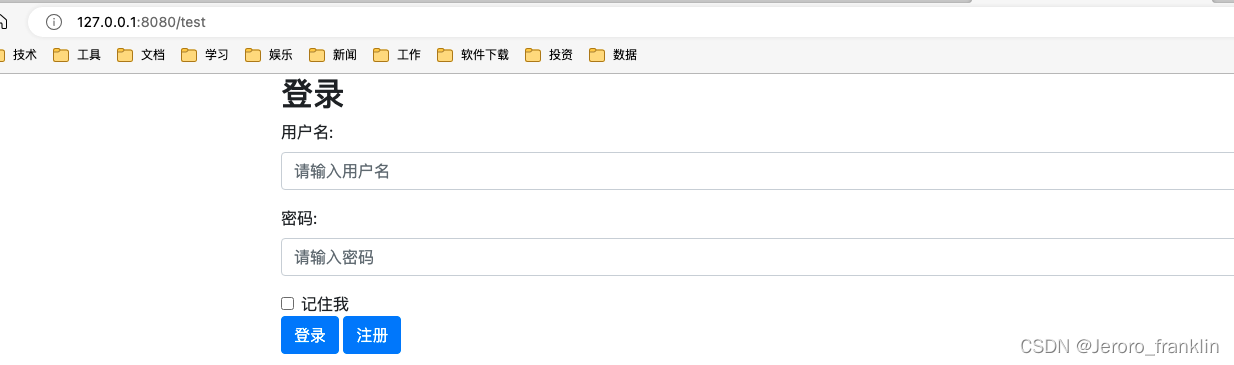
http://127.0.0.1:8080/test 访问测试成功
3、 自定义mvc配置方式默认主页
src/main/java/com/franklin/springbootwebdemo/config/WebMvcConfig.java
通过修改WebMvcConfigure的默认设置来指定页面的默认访问方式
1、构建一个配置类,实现WebMvcConfigurer接口, 重写addViewControllers方法;
2、添加自定义页面的默认主页映射: addViewController().setViewName()import org.springframework.context.annotation.Configuration; import org.springframework.web.servlet.config.annotation.ViewControllerRegistry; import org.springframework.web.servlet.config.annotation.WebMvcConfigurer; @Configuration public class WebMvcConfig implements WebMvcConfigurer { @Override public void addViewControllers(ViewControllerRegistry registry) { //转发 registry.addViewController("/").setViewName("login.html"); // registry.addViewController("/main.html").setViewName("/list.do"); //重定向 // registry.addRedirectViewController("/main.html","list.do"); } }- 1
- 2
- 3
- 4
- 5
- 6
- 7
- 8
- 9
- 10
- 11
- 12
- 13
- 14
- 15
- 16
- 17
- 18
- 19
测试 访问登录http://127.0.0.1:8080/

注意此时http://127.0.0.1:8080/test 还可以访问成功
4、升级controller
package com.franklin.springbootwebdemo.controller; import com.franklin.springbootwebdemo.entity.Users; import com.franklin.springbootwebdemo.repository.UsersRepository; import org.springframework.beans.factory.annotation.Autowired; import org.springframework.stereotype.Controller; import org.springframework.ui.ModelMap; import org.springframework.web.bind.annotation.RequestMapping; import org.thymeleaf.util.StringUtils; import javax.servlet.http.HttpSession; @Controller public class LoginController { @Autowired private UsersRepository usersRepository; @RequestMapping("/user/login") public String login(ModelMap map, Users users, HttpSession session){ map.addAttribute("username",users.getUsername()); //进行用户名密码的校验 if(!StringUtils.isEmpty(users.getUsername())&&!StringUtils.isEmpty(users.getPassword())&& "zhangsan".equals(users.getUsername())&&"123456".equals(users.getPassword())){ //登录成功,把当前user对象注入到session中,进入拦截器里配置 session.setAttribute("userInfo",users); return "list"; }else{ map.addAttribute("login_error","用户名密码错误"); return "login"; } } }- 1
- 2
- 3
- 4
- 5
- 6
- 7
- 8
- 9
- 10
- 11
- 12
- 13
- 14
- 15
- 16
- 17
- 18
- 19
- 20
- 21
- 22
- 23
- 24
- 25
- 26
- 27
- 28
- 29
- 30
- 31
- 32
- 33
- 34
- 35
5、 repository类
src/main/java/com/hckj/managersystemdemo/repository/UsersRepository.java
package com.franklin.springbootwebdemo.repository; import com.franklin.springbootwebdemo.entity.Users; import java.util.List; public interface UsersRepository { List<Users> findAll(); int deleteUserById(int id); }- 1
- 2
- 3
- 4
- 5
- 6
- 7
- 8
- 9
- 10
- 11
- 12
- 13
src/main/java/com/hckj/managersystemdemo/repository/UserRepositoryImp.java
package com.franklin.springbootwebdemo.repository; import com.franklin.springbootwebdemo.entity.Users; import org.springframework.stereotype.Repository; import java.util.ArrayList; import java.util.Collections; import java.util.Iterator; import java.util.List; @Repository public class UserRepositoryImp implements UsersRepository { static List<Users> users = new ArrayList<>(); static{ Collections.addAll(users,new Users(1001,"zhangsan","123456","张三","男"), new Users(1002,"lisi","123456","李四","女"), new Users(1003,"wangwu","123456","王五","男"), new Users(1004,"zhaoliu","123456","赵柳","女"), new Users(1005,"wangba","123456","网吧","男")); } @Override public List<Users> findAll() { return users; } @Override public int deleteUserById(int id) { int num = 0; Iterator<Users> iterator = users.iterator(); while(iterator.hasNext()){ Users users = iterator.next(); if (users.getId()==id){ iterator.remove(); num = 1; } } return num; } }- 1
- 2
- 3
- 4
- 5
- 6
- 7
- 8
- 9
- 10
- 11
- 12
- 13
- 14
- 15
- 16
- 17
- 18
- 19
- 20
- 21
- 22
- 23
- 24
- 25
- 26
- 27
- 28
- 29
- 30
- 31
- 32
- 33
- 34
- 35
- 36
- 37
- 38
- 39
- 40
- 41
- 42
登录http://127.0.0.1:8080/ 输入账号:admin 密码12345

登录http://127.0.0.1:8080/ 输入账号:zhangsan 密码123456

6、第二次升级controller
@Controller public class LoginController { @Autowired private UsersRepository usersRepository; @RequestMapping("/user/login") public String login(ModelMap map, Users users, HttpSession session){ map.addAttribute("username",users.getUsername()); //进行用户名密码的校验 if(!StringUtils.isEmpty(users.getUsername())&&!StringUtils.isEmpty(users.getPassword())&& "zhangsan".equals(users.getUsername())&&"123456".equals(users.getPassword())){ //登录成功,把当前user对象注入到session中,进入拦截器里配置 session.setAttribute("userInfo",users); return "redirect:/user/list"; }else{ map.addAttribute("login_error","用户名密码错误"); return "login.html"; } } @RequestMapping("/user/list") public String show(ModelMap map){ List<Users> list = usersRepository.findAll(); map.addAttribute("list",list); return "list.html"; } }- 1
- 2
- 3
- 4
- 5
- 6
- 7
- 8
- 9
- 10
- 11
- 12
- 13
- 14
- 15
- 16
- 17
- 18
- 19
- 20
- 21
- 22
- 23
- 24
- 25
- 26
- 27
- 28
- 29
登录http://127.0.0.1:8080/ 输入账号:zhangsan 密码123456

7、数据展示和删除
<script> $(function(){ $("button:contains('删除')").click(function(){ $.post("/user/delete",{"id":this.id}); $(this).parent().parent().remove(); }); $("button:contains('修改')").click(function(){ //弹出修改窗口 $('#myModal').modal(); //把User对象转成json对象 var jsonObj = JSON.parse($(this).attr("id")); //为修改页面进行赋值 $('#txt_id').val(jsonObj['id']); $('#txt_username').val(jsonObj['username']); $('#txt_password').val(jsonObj['password']); $('#txt_name').val(jsonObj['name']); $('#txt_userSex').val(jsonObj['userSex']); }); }) //添加的方法 function add() { //弹出新建窗口 $('#myModal1').modal(); } script>- 1
- 2
- 3
- 4
- 5
- 6
- 7
- 8
- 9
- 10
- 11
- 12
- 13
- 14
- 15
- 16
- 17
- 18
- 19
- 20
- 21
- 22
- 23
- 24
- 25
8、第三次 升级controller
src/main/java/com/hckj/managersystemdemo/controller/LoginController.java
加入
@RequestMapping("/user/list") public String show(ModelMap map){ List<Users> list = usersRepository.findAll(); map.addAttribute("list",list); return "list.html"; } @RequestMapping("/user/delete") public String delete(int id){ usersRepository.deleteUserById(id); return "list"; }- 1
- 2
- 3
- 4
- 5
- 6
- 7
- 8
- 9
- 10
- 11
- 12
9、拦截器
src/main/java/com/hckj/managersystemdemo/intercept/LoginHandlerIntercept.java
package com.franklin.springbootwebdemo.intercept; import com.franklin.springbootwebdemo.entity.Users; import org.springframework.web.servlet.HandlerInterceptor; import javax.servlet.http.HttpServletRequest; import javax.servlet.http.HttpServletResponse; public class LoginHandlerIntercept implements HandlerInterceptor { @Override public boolean preHandle(HttpServletRequest request, HttpServletResponse response, Object handler) throws Exception { Users users = (Users) request.getSession().getAttribute("userInfo"); if (users!=null){ return true; }else{ request.setAttribute("login_error","请先登录"); request.getRequestDispatcher("/").forward(request,response); return false; } } }- 1
- 2
- 3
- 4
- 5
- 6
- 7
- 8
- 9
- 10
- 11
- 12
- 13
- 14
- 15
- 16
- 17
- 18
- 19
- 20
- 21
- 22
- 23
- 24
- 25
- 26
- 27
- 28
src/main/java/com/franklin/springbootwebdemo/config/WebMvcConfig.java
加入
@Override public void addInterceptors(InterceptorRegistry registry) { registry.addInterceptor(new LoginHandlerIntercept()).addPathPatterns("/**").excludePathPatterns("/","/eitilogin.html","/user/login","/css/**","js/**","img/**"); }- 1
- 2
- 3
- 4
- 5
- 6
测试
访问http://127.0.0.1:8080/user/list 都是跳转到登录界面,测试通过

-
相关阅读:
基于FPGA的任意字节数(单字节、多字节)的串口(UART)发送(含源码工程)
寻找链表的入环节点和相交节点问题
c++内存对齐
【计算机视觉40例】案例35:人脸对齐
【ES专题】ElasticSearch搜索进阶
GitHub官方出手,一针见血。Spring Boot趣味实战手册来袭(彩版)
基于Durid解析SQL语法树获取单查询该查询的最终输出字段
Linux Top 详细介绍,包含task排序
策略路由和路由策略
.NET 6 在已知拓扑路径的情况下使用 Dijkstra,A*算法搜索最短路径
- 原文地址:https://blog.csdn.net/weixin_39213232/article/details/132997238
