-
不知道有用没用的Api
1、encodeURIComponent('https://www.baidu.com/?name=啊啊啊')

decodeURIComponent('https%3A%2F%2Fwww.baidu.com%2F%3Fname%3D%E5%95%8A%E5%95%8A%E5%95%8A')

2、encodeURI('https://www.baidu.com/?name=啊啊啊')

decodeURI('https://www.baidu.com/?name=%E5%95%8A%E5%95%8A%E5%95%8A')

3、文件夹的读写
- <!DOCTYPE html>
- <html lang="en">
- <head>
- <meta charset="UTF-8" />
- <meta http-equiv="X-UA-Compatible" content="IE=edge" />
- <meta name="viewport" content="width=device-width, initial-scale=1.0" />
- <title>Document</title>
- </head>
- <body>
- <button id="btn">open</button>
- <script>
- const btn = document.querySelector("#btn");
- btn.onclick = function () {
- showDirectoryPicker().then(async (result) => {
- console.log(result.entries().next());
- for await (let item of result.entries()) {
- console.log(item);
- }
- });
- };
- </script>
- </body>
- </html>
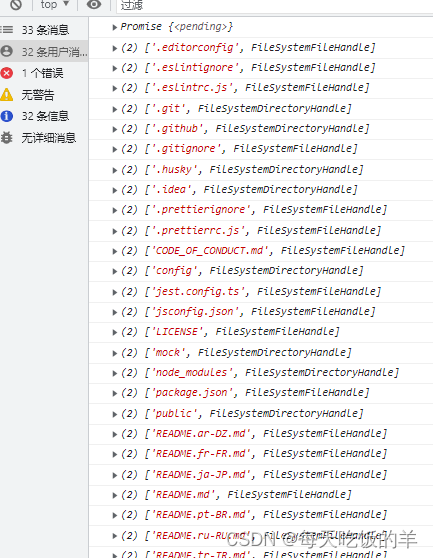
4、单文件的读写,这个实际开发用到了(真香),再也不用input了(样式不好看)
文件上传:
- class="upload" @click="uploadFile">上传.log文件进行解析
- async uploadFile() {
- try{
- const arrFileHandle = await window.showOpenFilePicker({});
- let fileName = await arrFileHandle[0].getFile();
- console.log(fileName);
- let blob = fileName.slice(0, fileName.size)
- console.log(blob);
- }catch(e){return}
- },

当打开了文件选择框,但不选择文件后会报promise的错,使用try...catch...包裹
到后期发现这个Api对浏览器的兼容性不是太好,
还是使用用input标签吧,但input标签的样式不太好改,于是将input设置diaplay:none,然后使用自定义的按钮去调用input的click事件
- <div
- class="clickBtn"
- @click="clickBtn"
- >
- 上传内容
- </div>
- <input
- type="file"
- id="fileInput"
- @change="handleFileChange"
- style="display: none"
- />
- clickBtn(){
- console.log("clickFackBtn");
- document.getElementById('fileInput').click()
- },
- handleFileChange(event) {
- const file = event.target.files[0];
- console.log(file);
- },
-
相关阅读:
QT雷达扫描图
使用TypeScript和jsdom库实现自动化数据抓取
Git 分支合并情况
C#基础学习(二十三)_窗体与事件
C中结构体释放问题
JS--数组类型 Array 1
Flink sql 写ddl连接kafka
3.4bochs的调试方法
vue路由&无痕浏览&nodeJS环境配置&ElementUI简介
哈希应用之布隆过滤器
- 原文地址:https://blog.csdn.net/m0_47999208/article/details/132890635
