-
windows10搭建llama大模型
背景
随着人工时代的到来及日渐成熟,大模型已慢慢普及,可以为开发与生活提供一定的帮助及提升工作及生产效率。所以在新的时代对于开发者来说需要主动拥抱变化,主动成长。
LLAMA介绍
llama全称:Large Language Model Meta AI是由meta(原facebook)开源的一个聊天对话大模型。根据参数规模,Meta提供了70亿、130亿、330亿和650亿四种不同参数规模的LLaMA模型,并使用20种语言进行了训练。与现有最佳的大型语言模型相比,LLaMA模型在性能上具有竞争力。
官网:https://github.com/facebookresearch/llama注意:本文是llama不是llama2,原理一致!
硬件要求
硬件名称
要求
备注
磁盘
单盘最少120g以上
模型很大的
内存 最少16g 最好32g gpu 可以没有 当然最好有(要英伟达的) 安装软件
涉及软件版本
软件名称
版本
备注
anaconda3
conda 22.9.0
https://www.anaconda.com/
python
3.9.16
anaconda自带
peft
0.2.0
参数有效微调
sentencepiece
0.1.97
分词算法
transformers
4.29.2
下载有点久
git
2.40.1
torch
2.0.1
mingw
用window安装
protobuf
3.19.0
cuda
https://blog.csdn.net/zcs2632008/article/details/127025294
有gpu才需要安装
anaconda3安装
安装这个anaconda建议不要在c盘,除非你的c盘够大。
请参考:https://blog.csdn.net/scorn_/article/details/106591160?ops_request_misc=%257B%2522request%255Fid%2522%253A%2522168601805516800197073452%2522%252C%2522scm%2522%253A%252220140713.130102334..%2522%257D&request_id=168601805516800197073452&biz_id=0&utm_medium=distribute.pc_search_result.none-task-blog-2~all~sobaiduend~default-1-106591160-null-null.142^v88^control,239^v2^insert_chatgpt&utm_term=windows10%E5%AE%89%E8%A3%85anaconda3%E6%95%99%E7%A8%8B&spm=1018.2226.3001.4187
创建环境
- conda create -n llama python=3.9.16
- conda init
进入环境
- conda info -e
- conda activate llama

后面验证python

peft安装
pip install peft==0.2.0
transformers安装
注意:这个会很大~有点久~
conda install transformers==4.29.2
安装git
https://blog.csdn.net/dou3516/article/details/121740303

安装torch
pip install torch==2.0.1
安装mingw
win+r输入powershell

遇到禁止执行脚本问题:(如果没有异常请跳出这步)
参考
https://blog.csdn.net/weixin_43999496/article/details/115871373

配置权限
- get-executionpolicy
- set-executionpolicy RemoteSigned
然后输入Y

安装 mingw
iex "& {$(irm get.scoop.sh)} -RunAsAdmin"

安装好后分别运行下面两个命令(添加库):
scoop bucket add extrasscoop bucket add main
输入命令安装mingw
scoop install mingw
安装:protobuf
pip install protobuf==3.19.0
项目配置
下载代码
需要下载两个模型, 一个是原版的LLaMA模型, 一个是扩充了中文的模型, 后续会进行一个合并模型的操作
原版模型下载地址(要代理):https://ipfs.io/ipfs/Qmb9y5GCkTG7ZzbBWMu2BXwMkzyCKcUjtEKPpgdZ7GEFKm/
备用:nyanko7/LLaMA-7B at main
下载不了的话,请关注【技术趋势】回复llama1获取。
创建文件夹

git lfs install下载中文模型
git clone https://huggingface.co/ziqingyang/chinese-alpaca-lora-7b
补充Linux图:

下载羊驼模型(有点大)
先建一个文件夹:path_to_original_llama_root_dir

在里面再建一个7B文件夹并把tokenizer.model挪进来。


7B里面放的内容

最终需要的内容如下:

合并模型
下载:convert_llama_weights_to_hf.py
📎convert_llama_weights_to_hf.py
或将以下代码放到
- # Copyright 2022 EleutherAI and The HuggingFace Inc. team. All rights reserved.
- #
- # Licensed under the Apache License, Version 2.0 (the "License");
- # you may not use this file except in compliance with the License.
- # You may obtain a copy of the License at
- #
- # http://www.apache.org/licenses/LICENSE-2.0
- #
- # Unless required by applicable law or agreed to in writing, software
- # distributed under the License is distributed on an "AS IS" BASIS,
- # WITHOUT WARRANTIES OR CONDITIONS OF ANY KIND, either express or implied.
- # See the License for the specific language governing permissions and
- # limitations under the License.
- import argparse
- import gc
- import json
- import math
- import os
- import shutil
- import warnings
- import torch
- from transformers import LlamaConfig, LlamaForCausalLM, LlamaTokenizer
- try:
- from transformers import LlamaTokenizerFast
- except ImportError as e:
- warnings.warn(e)
- warnings.warn(
- "The converted tokenizer will be the `slow` tokenizer. To use the fast, update your `tokenizers` library and re-run the tokenizer conversion"
- )
- LlamaTokenizerFast = None
- """
- Sample usage:
- ```
- python src/transformers/models/llama/convert_llama_weights_to_hf.py \
- --input_dir /path/to/downloaded/llama/weights --model_size 7B --output_dir /output/path
- ```
- Thereafter, models can be loaded via:
- ```py
- from transformers import LlamaForCausalLM, LlamaTokenizer
- model = LlamaForCausalLM.from_pretrained("/output/path")
- tokenizer = LlamaTokenizer.from_pretrained("/output/path")
- ```
- Important note: you need to be able to host the whole model in RAM to execute this script (even if the biggest versions
- come in several checkpoints they each contain a part of each weight of the model, so we need to load them all in RAM).
- """
- INTERMEDIATE_SIZE_MAP = {
- "7B": 11008,
- "13B": 13824,
- "30B": 17920,
- "65B": 22016,
- }
- NUM_SHARDS = {
- "7B": 1,
- "13B": 2,
- "30B": 4,
- "65B": 8,
- }
- def compute_intermediate_size(n):
- return int(math.ceil(n * 8 / 3) + 255) // 256 * 256
- def read_json(path):
- with open(path, "r") as f:
- return json.load(f)
- def write_json(text, path):
- with open(path, "w") as f:
- json.dump(text, f)
- def write_model(model_path, input_base_path, model_size):
- os.makedirs(model_path, exist_ok=True)
- tmp_model_path = os.path.join(model_path, "tmp")
- os.makedirs(tmp_model_path, exist_ok=True)
- params = read_json(os.path.join(input_base_path, "params.json"))
- num_shards = NUM_SHARDS[model_size]
- n_layers = params["n_layers"]
- n_heads = params["n_heads"]
- n_heads_per_shard = n_heads // num_shards
- dim = params["dim"]
- dims_per_head = dim // n_heads
- base = 10000.0
- inv_freq = 1.0 / (base ** (torch.arange(0, dims_per_head, 2).float() / dims_per_head))
- # permute for sliced rotary
- def permute(w):
- return w.view(n_heads, dim // n_heads // 2, 2, dim).transpose(1, 2).reshape(dim, dim)
- print(f"Fetching all parameters from the checkpoint at {input_base_path}.")
- # Load weights
- if model_size == "7B":
- # Not sharded
- # (The sharded implementation would also work, but this is simpler.)
- loaded = torch.load(os.path.join(input_base_path, "consolidated.00.pth"), map_location="cpu")
- else:
- # Sharded
- loaded = [
- torch.load(os.path.join(input_base_path, f"consolidated.{i:02d}.pth"), map_location="cpu")
- for i in range(num_shards)
- ]
- param_count = 0
- index_dict = {"weight_map": {}}
- for layer_i in range(n_layers):
- filename = f"pytorch_model-{layer_i + 1}-of-{n_layers + 1}.bin"
- if model_size == "7B":
- # Unsharded
- state_dict = {
- f"model.layers.{layer_i}.self_attn.q_proj.weight": permute(
- loaded[f"layers.{layer_i}.attention.wq.weight"]
- ),
- f"model.layers.{layer_i}.self_attn.k_proj.weight": permute(
- loaded[f"layers.{layer_i}.attention.wk.weight"]
- ),
- f"model.layers.{layer_i}.self_attn.v_proj.weight": loaded[f"layers.{layer_i}.attention.wv.weight"],
- f"model.layers.{layer_i}.self_attn.o_proj.weight": loaded[f"layers.{layer_i}.attention.wo.weight"],
- f"model.layers.{layer_i}.mlp.gate_proj.weight": loaded[f"layers.{layer_i}.feed_forward.w1.weight"],
- f"model.layers.{layer_i}.mlp.down_proj.weight": loaded[f"layers.{layer_i}.feed_forward.w2.weight"],
- f"model.layers.{layer_i}.mlp.up_proj.weight": loaded[f"layers.{layer_i}.feed_forward.w3.weight"],
- f"model.layers.{layer_i}.input_layernorm.weight": loaded[f"layers.{layer_i}.attention_norm.weight"],
- f"model.layers.{layer_i}.post_attention_layernorm.weight": loaded[f"layers.{layer_i}.ffn_norm.weight"],
- }
- else:
- # Sharded
- # Note that in the 13B checkpoint, not cloning the two following weights will result in the checkpoint
- # becoming 37GB instead of 26GB for some reason.
- state_dict = {
- f"model.layers.{layer_i}.input_layernorm.weight": loaded[0][
- f"layers.{layer_i}.attention_norm.weight"
- ].clone(),
- f"model.layers.{layer_i}.post_attention_layernorm.weight": loaded[0][
- f"layers.{layer_i}.ffn_norm.weight"
- ].clone(),
- }
- state_dict[f"model.layers.{layer_i}.self_attn.q_proj.weight"] = permute(
- torch.cat(
- [
- loaded[i][f"layers.{layer_i}.attention.wq.weight"].view(n_heads_per_shard, dims_per_head, dim)
- for i in range(num_shards)
- ],
- dim=0,
- ).reshape(dim, dim)
- )
- state_dict[f"model.layers.{layer_i}.self_attn.k_proj.weight"] = permute(
- torch.cat(
- [
- loaded[i][f"layers.{layer_i}.attention.wk.weight"].view(n_heads_per_shard, dims_per_head, dim)
- for i in range(num_shards)
- ],
- dim=0,
- ).reshape(dim, dim)
- )
- state_dict[f"model.layers.{layer_i}.self_attn.v_proj.weight"] = torch.cat(
- [
- loaded[i][f"layers.{layer_i}.attention.wv.weight"].view(n_heads_per_shard, dims_per_head, dim)
- for i in range(num_shards)
- ],
- dim=0,
- ).reshape(dim, dim)
- state_dict[f"model.layers.{layer_i}.self_attn.o_proj.weight"] = torch.cat(
- [loaded[i][f"layers.{layer_i}.attention.wo.weight"] for i in range(num_shards)], dim=1
- )
- state_dict[f"model.layers.{layer_i}.mlp.gate_proj.weight"] = torch.cat(
- [loaded[i][f"layers.{layer_i}.feed_forward.w1.weight"] for i in range(num_shards)], dim=0
- )
- state_dict[f"model.layers.{layer_i}.mlp.down_proj.weight"] = torch.cat(
- [loaded[i][f"layers.{layer_i}.feed_forward.w2.weight"] for i in range(num_shards)], dim=1
- )
- state_dict[f"model.layers.{layer_i}.mlp.up_proj.weight"] = torch.cat(
- [loaded[i][f"layers.{layer_i}.feed_forward.w3.weight"] for i in range(num_shards)], dim=0
- )
- state_dict[f"model.layers.{layer_i}.self_attn.rotary_emb.inv_freq"] = inv_freq
- for k, v in state_dict.items():
- index_dict["weight_map"][k] = filename
- param_count += v.numel()
- torch.save(state_dict, os.path.join(tmp_model_path, filename))
- filename = f"pytorch_model-{n_layers + 1}-of-{n_layers + 1}.bin"
- if model_size == "7B":
- # Unsharded
- state_dict = {
- "model.embed_tokens.weight": loaded["tok_embeddings.weight"],
- "model.norm.weight": loaded["norm.weight"],
- "lm_head.weight": loaded["output.weight"],
- }
- else:
- state_dict = {
- "model.norm.weight": loaded[0]["norm.weight"],
- "model.embed_tokens.weight": torch.cat(
- [loaded[i]["tok_embeddings.weight"] for i in range(num_shards)], dim=1
- ),
- "lm_head.weight": torch.cat([loaded[i]["output.weight"] for i in range(num_shards)], dim=0),
- }
- for k, v in state_dict.items():
- index_dict["weight_map"][k] = filename
- param_count += v.numel()
- torch.save(state_dict, os.path.join(tmp_model_path, filename))
- # Write configs
- index_dict["metadata"] = {"total_size": param_count * 2}
- write_json(index_dict, os.path.join(tmp_model_path, "pytorch_model.bin.index.json"))
- config = LlamaConfig(
- hidden_size=dim,
- intermediate_size=compute_intermediate_size(dim),
- num_attention_heads=params["n_heads"],
- num_hidden_layers=params["n_layers"],
- rms_norm_eps=params["norm_eps"],
- )
- config.save_pretrained(tmp_model_path)
- # Make space so we can load the model properly now.
- del state_dict
- del loaded
- gc.collect()
- print("Loading the checkpoint in a Llama model.")
- model = LlamaForCausalLM.from_pretrained(tmp_model_path, torch_dtype=torch.float16, low_cpu_mem_usage=True)
- # Avoid saving this as part of the config.
- del model.config._name_or_path
- print("Saving in the Transformers format.")
- model.save_pretrained(model_path)
- shutil.rmtree(tmp_model_path)
- def write_tokenizer(tokenizer_path, input_tokenizer_path):
- # Initialize the tokenizer based on the `spm` model
- tokenizer_class = LlamaTokenizer if LlamaTokenizerFast is None else LlamaTokenizerFast
- print(f"Saving a {tokenizer_class.__name__} to {tokenizer_path}.")
- tokenizer = tokenizer_class(input_tokenizer_path)
- tokenizer.save_pretrained(tokenizer_path)
- def main():
- parser = argparse.ArgumentParser()
- parser.add_argument(
- "--input_dir",
- help="Location of LLaMA weights, which contains tokenizer.model and model folders",
- )
- parser.add_argument(
- "--model_size",
- choices=["7B", "13B", "30B", "65B", "tokenizer_only"],
- )
- parser.add_argument(
- "--output_dir",
- help="Location to write HF model and tokenizer",
- )
- args = parser.parse_args()
- if args.model_size != "tokenizer_only":
- write_model(
- model_path=args.output_dir,
- input_base_path=os.path.join(args.input_dir, args.model_size),
- model_size=args.model_size,
- )
- spm_path = os.path.join(args.input_dir, "tokenizer.model")
- write_tokenizer(args.output_dir, spm_path)
- if __name__ == "__main__":
- main()
执行格式转换命令
python convert_llama_weights_to_hf.py --input_dir path_to_original_llama_root_dir --model_size 7B --output_dir path_to_original_llama_hf_dir注意:这一步有点久(很长时间)
会报的错:


会在目录中生成一个新目录:path_to_original_llama_hf_dir

执行模型合并命令
下载以下文件到llama目录
📎merge_llama_with_chinese_lora.py

执行合并模型命令
python merge_llama_with_chinese_lora.py --base_model path_to_original_llama_hf_dir --lora_model chinese-alpaca-lora-7b --output_dir path_to_output_dir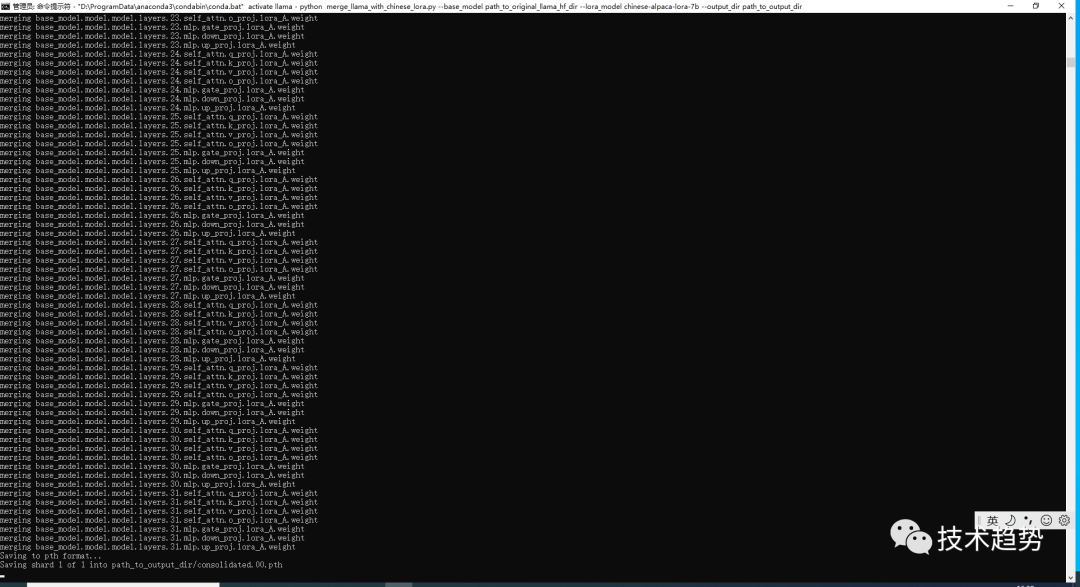

会生成一个目录:path_to_output_dir


下载模型
在llama目录下载代码如下:
git clone http://github.com/ggerganov/llama.cpp遇到报错

解决办法执行命令
git config --global --unset http.proxy编译模型&转换格式
编译文件
注意:由于前端我是用powershell方式进行安装所以用第一种方式
- #进入 llama.app
- cd llama.app
- #通过powershell安装的mingw进行编译
- cmake . -G "MinGW Makefiles"
- #进行构建
- cmake --build . --config Release


或
- #进入 llama.app
- cd llama.app
- #创建 build文件夹
- mkdir build
- #进入build
- cd build
- #编译
- cmake ..
- #构建
- cmake --build . --config Release
移动文件配置
在 llama.app 目录中新建目录 zh-models
将path_to_output_dir文件夹内的consolidated.00.pth和params.json文件放入上面格式中的位置
将path_to_output_dir文件夹内的tokenizer.model文件放在跟7B文件夹同级的位置
最终如下:


转换格式
注意:到 llama.cpp 目录
将 .pth模型权重转换为ggml的FP16格式
生成文件路径为zh-models/7B/ggml-model-f16.bin,执行命令如下:
python convert-pth-to-ggml.py zh-models/7B/ 1
生成结果


对FP16模型进行4-bit量化
执行命令:
D:\ai\llama\llama.cpp\bin\quantize.exe ./zh-models/7B/ggml-model-f16.bin ./zh-models/7B/ggml-model-q4_0.bin 2生成量化模型文件路径为zh-models/7B/ggml-model-q4_0.bin


运行模型
- cd D:\ai\llama\llama.cpp
- D:\ai\llama\llama.cpp\bin\main.exe -m zh-models/7B/ggml-model-q4_0.bin --color -f prompts/alpaca.txt -ins -c 2048 --temp 0.2 -n 256 --repeat_penalty 1.3
结果

最后
我知道很多同学可能觉得学习大模型需要懂python有一定的难度,当然我是建议先学习好一个语言后再去学习其它语言,其实按照我过来的经验,我觉得python或java都好,语言语法都差不多,只是一个工具只是看我们要不要用。毕竟有java后端的基础再去学python,本人两周基本就上手了。当然还是建议有一个主线,再展开,而不是出什么学什么,真没必要。但是对于技术来说要看价值及发展,有可能现在很流行的技术半年或几年后就过了。当然也不是完全说固步自封,一切看自身条件(阶段、能力、意愿、时间等)、社会发展、价值等。
参考文章:
https://zhuanlan.zhihu.com/p/617952293
https://zhuanlan.zhihu.com/p/632102048?utm_id=0
https://www.bilibili.com/read/cv24984542/
-
相关阅读:
Java第5章 抽象类与接口
异地局域网对接:异地组网原理与实操
Mysql 数据库开发简介与选择
微服务框架入门(springcloud)
【 java 常用类】你不知道的String
TikTok的媒体革命:新闻业如何适应短视频时代?
Python语义分割与街景识别(3):数据集准备
重组件的优化和页面渲染十万条数据
C++ Reference: Standard C++ Library reference: C Library: cwchar: wctob
【 STM32Fxx串口问题-发送时间-发送字节拉长-每一位与下一位也拉长->>记录问题以及解决方式-复盘】
- 原文地址:https://blog.csdn.net/qq_16498553/article/details/132798058
