-
【软件测试】selenium3
自动化测试的概念
自动化测试指软件测试的自动化,在预设状态下运行应用程序或者系统,预设条件包括正常和异常,最
后评估运行结果。将人为驱动的测试行为转化为机器执行的过程。自动化测试就相当于将人工测试手段进行转换,让代码去执行。提高测试效率,保障软件质量。 自动化测试不能完全代替手工测试。通常是代替那些操作重复性比较高。
常见自动化测试的分类:
- 单元测试
- 接口测试
- UI自动化测试:分为移动端,网页端的自动化测试。

selenium 简介
-
selenium是什么:selenium是用来做web自动化测试框架
-
selenium特点:支持各种浏览器,支持各种平台,支持各种语言 (Python,Java,C#,JS,Ruby…),有丰富的API
selenium原理:

- 自动化脚本:通过idea写的代码
- 浏览器驱动:软件和硬件间的交互
其中配置的时候java环境变量配置好的话,chromedriver放到jdk目录中的bin包中。
<dependencies> <dependency> <groupId>org.seleniumhq.seleniumgroupId> <artifactId>selenium-javaartifactId> <version>3.141.59version> dependency> dependencies>- 1
- 2
- 3
- 4
- 5
- 6
- 7
- 8
如果报错403添加:
ChromeOptions options = new ChromeOptions(); // 允许所有请求 options.addArguments("--remote-allow-origins=*");- 1
- 2
- 3
public static void main(String[] args) { ChromeOptions options = new ChromeOptions(); // 允许所有请求 options.addArguments("--remote-allow-origins=*"); WebDriver webDriver = new ChromeDriver(options); // 打开百度首页 webDriver.get("https://www.baidu.com"); }- 1
- 2
- 3
- 4
- 5
- 6
- 7
- 8
selenium API
定位元素
CSS定位
public static void main(String[] args) { ChromeOptions options = new ChromeOptions(); // 允许所有请求 options.addArguments("--remote-allow-origins=*"); WebDriver webDriver = new ChromeDriver(options); // 打开百度首页 webDriver.get("https://www.baidu.com"); //找到百度搜索输入框 WebElement element = webDriver.findElement(By.cssSelector(".s_ipt")); //输入软件测试 element.sendKeys("软件测试"); }- 1
- 2
- 3
- 4
- 5
- 6
- 7
- 8
- 9
- 10
- 11
- 12
XPath 定位

代码:
public static void main(String[] args) { ChromeOptions options = new ChromeOptions(); // 允许所有请求 options.addArguments("--remote-allow-origins=*"); WebDriver webDriver = new ChromeDriver(options); // 打开百度首页 webDriver.get("https://www.baidu.com"); //找到百度搜索输入框 WebElement element = webDriver.findElement(By.xpath("//*[@id=\"kw\"]")); //输入软件测试 element.sendKeys("软件测试"); }- 1
- 2
- 3
- 4
- 5
- 6
- 7
- 8
- 9
- 10
- 11
- 12
定位元素findElement()
css 选择语法:
- id选择器: #id
- 类选择: .class
- 标签选择: 标签名
- 后代选择器: 父级选择器 子级选择器
xpath
- 绝对路径: /html/head/title(不常用)相对路径
- 相对路径+索引: //form/span[1]/input
- 相对路径+属性值: //input[@class="s_ipt”]
- 相对路径+通配符: //* [@*=“su”]
- 相对路径+文本匹配://a[text()=“新闻”]
CSS选择器的效率更高
执行一个简单的测试
public class Main { public static void main(String[] args) throws InterruptedException { int flg = 0; ChromeOptions options = new ChromeOptions(); // 允许所有请求 options.addArguments("--remote-allow-origins=*"); WebDriver webDriver = new ChromeDriver(options); // 打开百度首页 webDriver.get("https://www.baidu.com"); //找到百度搜索输入框 WebElement element = webDriver.findElement(By.xpath("//*[@id=\"kw\"]")); //输入软件测试 element.sendKeys("软件测试"); //找到百度一下按钮 //点击 webDriver.findElement(By.cssSelector("#su")).click(); sleep(3000); //校验 List<WebElement> elements = webDriver.findElements(By.cssSelector("a em")); for (int i = 0; i < elements.size(); i++) { //System.out.println(elements.get(i).getText());//获取文本,并打印 //如果返回的结果有软件测试,证明测试通过,否则测试不通过 if (elements.get(i).getText().contains("软件")){ System.out.println("测试通过"); flg = 1; break; } } if (flg == 0){ System.out.println("测试不通过"); } } }- 1
- 2
- 3
- 4
- 5
- 6
- 7
- 8
- 9
- 10
- 11
- 12
- 13
- 14
- 15
- 16
- 17
- 18
- 19
- 20
- 21
- 22
- 23
- 24
- 25
- 26
- 27
- 28
- 29
- 30
- 31
- 32
- 33
操作测试对象
- click 点击对象
- send_keys 在对象上模拟按键输入
- clear 清除对象输入的文本内容
- submit 提交
- text 用于获取元素的文本信息
- getAttribute:获取元素属性信息
清空文本框:
public static void main(String[] args) throws InterruptedException { ChromeOptions options = new ChromeOptions(); // 允许所有请求 options.addArguments("--remote-allow-origins=*"); WebDriver webDriver = new ChromeDriver(options); // 打开百度首页 webDriver.get("https://www.baidu.com"); //找到百度搜索输入框 WebElement element = webDriver.findElement(By.cssSelector("#kw")); //输入软件测试 element.sendKeys("软件测试"); //找到百度一下按钮 //点击百度一下按钮 webDriver.findElement(By.cssSelector("#su")).click(); sleep(3000); //清空百度搜索输入框中的数据 webDriver.findElement(By.cssSelector("#kw")).clear(); }- 1
- 2
- 3
- 4
- 5
- 6
- 7
- 8
- 9
- 10
- 11
- 12
- 13
- 14
- 15
- 16
- 17
- 18
submit 提交:
- 如果点击的元素放在form标签中,此时使用submit实现的效果和click是一样的
- 如果点击的元素放在非form标签中,此时使用submit报错
public class Main { public static void main(String[] args) throws InterruptedException { //因为点击的是百度中新闻超链接.这个超链接没有放到form标签中. //所以submit之后会报错 ChromeOptions options = new ChromeOptions(); // 允许所有请求 options.addArguments("--remote-allow-origins=*"); WebDriver webDriver = new ChromeDriver(options); // 打开百度首页 webDriver.get("https://www.baidu.com"); //找到新闻链接 webDriver.findElement(By.xpath("//*[@id=\"s-top-left\"]/a[1]")).submit(); } }- 1
- 2
- 3
- 4
- 5
- 6
- 7
- 8
- 9
- 10
- 11
- 12
- 13
- 14
getAttribute:获取元素属性信息
public class Main { public static void main(String[] args) throws InterruptedException { //因为点击的是百度中新闻超链接.这个超链接没有放到form标签中. //所以submit之后会报错 ChromeOptions options = new ChromeOptions(); // 允许所有请求 options.addArguments("--remote-allow-origins=*"); WebDriver webDriver = new ChromeDriver(options); // 打开百度首页 webDriver.get("https://www.baidu.com"); //找到新闻链接 String su = webDriver.findElement(By.cssSelector("#su")).getAttribute("value"); if (su.equals("百度一下")){ System.out.println("测试通过"); }else { System.out.println(su + "测试不通过"); } } }- 1
- 2
- 3
- 4
- 5
- 6
- 7
- 8
- 9
- 10
- 11
- 12
- 13
- 14
- 15
- 16
- 17
- 18
- 19
添加等待
-
sleep强制等待
-
隐式等待:隐式地等待并非一个固定的等待时间,当脚本执行到某个元素定位时,如果元素可以定位,则继续执行;如果元素定位不到,则它以轮询的方式不断的判断元素是否被定位到。直到超出设置的时长 。隐式等待等待的是整个页面的元素。
假设等待3天时间:
如果等待时间3天时间,强制等待一直等待,等待的时间3天。隐式等待,最长等待3天时间,如果在3天之内获取到页面上的元素,此时执行下面的代码。如果等待3天时间还是没有找到这个元素,此时报错。public class Main { public static void main(String[] args) throws InterruptedException { ChromeOptions options = new ChromeOptions(); // 允许所有请求 options.addArguments("--remote-allow-origins=*"); WebDriver webDriver = new ChromeDriver(options); // 打开百度首页 webDriver.get("https://www.baidu.com"); //找到百度搜索输入框 WebElement element = webDriver.findElement(By.cssSelector("#kw")); //输入软件测试 element.sendKeys("软件测试"); //找到百度一下按钮 //点击百度一下按钮 webDriver.findElement(By.cssSelector("#su")).click(); webDriver.manage().timeouts().implicitlyWait(3,TimeUnit.DAYS);//隐式等待,等待三天 //清空百度搜索输入框中的数据 webDriver.findElement(By.cssSelector("#kw")).clear(); } }- 1
- 2
- 3
- 4
- 5
- 6
- 7
- 8
- 9
- 10
- 11
- 12
- 13
- 14
- 15
- 16
- 17
- 18
- 19
- 20
显示等待:指定等待某一个元素
public class Main { public static void main(String[] args) throws InterruptedException { //创建驱动 WebDriver webDriver = new ChromeDriver(); // 打开百度首页 webDriver.get("https://www.baidu.com"); //判断元素是否可以被点击 WebDriverWait wait = new WebDriverWait(webDriver,3000);//显示等待 wait.until(ExpectedConditions.elementToBeClickable(By.cssSelector("#bottom_layer > div > p:nth-child(6) > a"))); wait.until(ExpectedConditions.titleIs("百度一下,你就知道"));//判断网页标题是不是:百度一下,你就知道 } }- 1
- 2
- 3
- 4
- 5
- 6
- 7
- 8
- 9
- 10
- 11
- 12
打印信息
- 打印URL:getCurrentUrl()
- 打印Title:getTitle();
public class Main { public static void main(String[] args) throws InterruptedException { ChromeOptions options = new ChromeOptions(); // 允许所有请求 options.addArguments("--remote-allow-origins=*"); WebDriver webDriver = new ChromeDriver(options); // 打开百度首页 webDriver.get("https://www.baidu.com"); String url = webDriver.getCurrentUrl();//获取url String title = webDriver.getTitle(); if (url.equals("https://www.baidu.com/") && title.equals("百度一下,你就知道")){ System.out.println("当前页面URL:" + url + ",当前页面title:" +title); System.out.println("测试通过"); }else { System.out.println("当前页面URL:" + url + ",当前页面title:" +title); System.out.println("测试不通过"); } } }- 1
- 2
- 3
- 4
- 5
- 6
- 7
- 8
- 9
- 10
- 11
- 12
- 13
- 14
- 15
- 16
- 17
- 18
- 19
浏览器的操作
- 浏览器前进
- 浏览器后退
- 浏览器滚动条操作
- 浏览器最大化
- 浏览器全屏
- 浏览器设置大小
public class Main { public static void main(String[] args) throws InterruptedException { //创建驱动 WebDriver webDriver = new ChromeDriver(); // 打开百度首页 webDriver.get("https://www.baidu.com"); //搜索521 webDriver.findElement(By.cssSelector("#kw")).sendKeys("521"); sleep(3000); //强制等待3秒 webDriver.findElement(By.cssSelector("#su")).click(); sleep(3000); //浏览器后退 webDriver.navigate().back(); sleep(3000); //强制等待3秒 webDriver.navigate().refresh(); sleep(3000); //浏览器前进 webDriver.navigate().forward(); sleep(3000); //滑动到浏览器最下面 ((JavascriptExecutor)webDriver).executeScript("document.documentElement.scrollTop=10000"); webDriver.manage().window().maximize();//浏览器最大化 sleep(3000); webDriver.manage().window().fullscreen();//浏览器全屏 sleep(3000); webDriver.manage().window().setSize(new Dimension(600,1000));//设置浏览器的宽高 } }- 1
- 2
- 3
- 4
- 5
- 6
- 7
- 8
- 9
- 10
- 11
- 12
- 13
- 14
- 15
- 16
- 17
- 18
- 19
- 20
- 21
- 22
- 23
- 24
- 25
- 26
- 27
- 28
- 29
- 30
#将浏览器滚动条滑到最顶端 document.documentElement.scrollTop=0 #将浏览器滚动条滑到最底端 document.documentElement.scrollTop=10000 #将浏览器滚动条滑到最底端, 示例 js="var q=document.documentElement.scrollTop=10000" driver.execute_script(js)- 1
- 2
- 3
- 4
- 5
- 6
- 7
键盘事件
- send_keys(Keys.CONTROL,‘a’) #全选(Ctrl+A)
- send_keys(Keys.CONTROL,‘c’) #复制(Ctrl+C)
- send_keys(Keys.CONTROL,‘x’) #剪贴(Ctrl+X)
- send_keys(Keys.CONTROL,‘v’) #粘贴(Ctrl+V)
public class Main { public static void main(String[] args) throws InterruptedException { //创建驱动 WebDriver webDriver = new ChromeDriver(); // 打开百度首页 webDriver.get("https://www.baidu.com"); //搜索521 webDriver.findElement(By.cssSelector("#kw")).sendKeys("教师节"); sleep(3000); //control + A webDriver.findElement(By.cssSelector("#kw")).sendKeys(Keys.CONTROL,"A"); sleep(3000); //control + X webDriver.findElement(By.cssSelector("#kw")).sendKeys(Keys.CONTROL,"X"); sleep(3000); //control + V webDriver.findElement(By.cssSelector("#kw")).sendKeys(Keys.CONTROL,"V"); sleep(3000); } }- 1
- 2
- 3
- 4
- 5
- 6
- 7
- 8
- 9
- 10
- 11
- 12
- 13
- 14
- 15
- 16
- 17
- 18
- 19
- 20
鼠标事件
- context_click() 右击
- double_click() 双击
- drag_and_drop() 拖动
- move_to_element() 移动
public class Main { public static void main(String[] args) throws InterruptedException { //创建驱动 WebDriver webDriver = new ChromeDriver(); // 打开百度首页 webDriver.get("https://www.baidu.com"); //搜索521 webDriver.findElement(By.cssSelector("#kw")).sendKeys("教师节"); webDriver.findElement(By.cssSelector("#su")).click(); sleep(3000); //找到图片按钮 WebElement webElement = webDriver.findElement(By.cssSelector("#s_tab > div > a.s-tab-item.s-tab-item_1CwH-.s-tab-pic_p4Uej.s-tab-pic")); //鼠标右击 Actions actions = new Actions(webDriver); sleep(3000); actions.moveToElement(webElement).contextClick().perform(); } }- 1
- 2
- 3
- 4
- 5
- 6
- 7
- 8
- 9
- 10
- 11
- 12
- 13
- 14
- 15
- 16
- 17
- 18
定位一组元素
选中复选框中的元素,而选中单选框的元素:
Checkbox checkbox
- 1
- 2
- 3
- 4
- 5
- 6
- 7
- 8
- 9
- 10
- 11
- 12
- 13
- 14
- 15
- 16
- 17
- 18
- 19
- 20
- 21
- 22
- 23
- 24
- 25
- 26
- 27
- 28
- 29
- 30
- 31
- 32
- 33
- 34
- 35
- 36
- 37
- 38
- 39
- 40
- 41
- 42
- 43
全选复选框代码
public class Main { public static void main(String[] args) throws InterruptedException { //创建驱动 WebDriver webDriver = new ChromeDriver(); // 打开网页 webDriver.get("http://localhost:8080/test01.html"); webDriver.manage().timeouts().implicitlyWait(3,TimeUnit.DAYS); ListwebElements = webDriver.findElements(By.cssSelector("input")); for (int i = 0; i < webElements.size(); i++) { //如果每个元素type值等于checkbox进行点击 //getAttribute获取页面上元素属性值,里面的type是当前元素属性 if (webElements.get(i).getAttribute("type").equals("checkbox")){ webElements.get(i).click(); }else { //否则什么也不操作 } } } } - 1
- 2
- 3
- 4
- 5
- 6
- 7
- 8
- 9
- 10
- 11
- 12
- 13
- 14
- 15
- 16
- 17
- 18
- 19
多层框架
test02.html:
<html> <head> <meta http-equiv="content-type" content="text/html;charset=utf-8" /> <title>frametitle> <script type="text/javascript">$(document).ready(function(){ }); script> head> <body> <div class="row-fluid"> <div class="span10 well"> <h3>frameh3> <iframe id="f1" src="inner.html" width="800", height="600">iframe> div> div> body> html>- 1
- 2
- 3
- 4
- 5
- 6
- 7
- 8
- 9
- 10
- 11
- 12
- 13
- 14
- 15
- 16
- 17
- 18
- 19
inner.html
<html> <head> <meta http-equiv="content-type" content="text/html;charset=utf-8" /> <title>innertitle> head> <body> <div class="row-fluid"> <div class="span6 well"> <h3>innerh3> <iframe id="f2" src="https://www.baidu.com/" width="700"height="500">iframe> <a href="javascript:alert('watir-webdriver better than selenium webdriver;')">clicka> div> div> body> html>- 1
- 2
- 3
- 4
- 5
- 6
- 7
- 8
- 9
- 10
- 11
- 12
- 13
- 14
- 15
- 16
java代码:
public class Main { public static void main(String[] args) throws InterruptedException { //创建驱动 WebDriver webDriver = new ChromeDriver(); // 打开网页 webDriver.get("http://localhost:8080/test02.html"); webDriver.switchTo().frame("f1"); webDriver.findElement(By.cssSelector("body > div > div > a")).click(); } }- 1
- 2
- 3
- 4
- 5
- 6
- 7
- 8
- 9
- 10
多层窗口定位
下拉框处理
test03.html:
- 1
- 2
- 3
- 4
- 5
- 6
- 7
- 8
- 9
- 10
- 11
- 12
- 13
- 14
public class Main { public static void main(String[] args) throws InterruptedException { //创建驱动 WebDriver webDriver = new ChromeDriver(); // 打开网页 webDriver.get("http://localhost:8080/test03.html"); WebElement webElement = webDriver.findElement(By.cssSelector("#ShippingMethod")); Select select = new Select(webElement); select.selectByIndex(3);//通过下标选择 select.selectByValue("12.51");//通过value选择 } }- 1
- 2
- 3
- 4
- 5
- 6
- 7
- 8
- 9
- 10
- 11
- 12
alert、confirm、prompt 的处理
test04.html:
<!DOCTYPE html> <html lang="en"> <head> <meta charset="UTF-8"> <title>Title</title> </head> <body> <button onclick="Click()">这是一个弹窗</button> </body> <script type="text/javascript"> function Click() { let name = prompt("请输入姓名:"); let parent = document.querySelector("body"); let child = document.createElement("div"); child.innerHTML = name; parent.appendChild(child) } </script> </html>- 1
- 2
- 3
- 4
- 5
- 6
- 7
- 8
- 9
- 10
- 11
- 12
- 13
- 14
- 15
- 16
- 17
- 18
- 19
java代码:
public class Main { public static void main(String[] args) throws InterruptedException { //创建驱动 WebDriver webDriver = new ChromeDriver(); // 打开网页 webDriver.get("http://localhost:8080/test04.html"); WebElement webElement = webDriver.findElement(By.cssSelector("button")); webDriver.findElement(By.cssSelector("button")).click(); sleep(3000); //alert弹窗的取消 webDriver.switchTo().alert().dismiss(); sleep(3000); //点击按钮 webDriver.findElement(By.cssSelector("button")).click(); //在alert弹窗中输入张三 webDriver.switchTo().alert().sendKeys("张三"); //alert弹窗的确认 sleep(3000); webDriver.switchTo().alert().accept(); } }- 1
- 2
- 3
- 4
- 5
- 6
- 7
- 8
- 9
- 10
- 11
- 12
- 13
- 14
- 15
- 16
- 17
- 18
- 19
- 20
- 21
上传文件操作
test05.html
Title - 1
- 2
- 3
- 4
- 5
- 6
- 7
- 8
- 9
- 10
java代码:
public class Main { public static void main(String[] args) throws InterruptedException { //创建驱动 WebDriver webDriver = new ChromeDriver(); // 打开网页 webDriver.get("http://localhost:8080/test05.html"); WebElement webElement = webDriver.findElement(By.cssSelector("input")); webDriver.findElement(By.cssSelector("input")).sendKeys("D:\\Program Files\\test.c"); } }- 1
- 2
- 3
- 4
- 5
- 6
- 7
- 8
- 9
- 10
关闭浏览器
public class Main { public static void main(String[] args) throws InterruptedException { //创建驱动 WebDriver webDriver = new ChromeDriver(); // 打开网页 webDriver.get("https://www.baidu.com"); webDriver.findElement(By.cssSelector("#s-top-left > a:nth-child(1)")).click(); sleep(4000); // webDriver.quit(); webDriver.close(); } }- 1
- 2
- 3
- 4
- 5
- 6
- 7
- 8
- 9
- 10
- 11
- 12
浏览器quit,和close之间的区别:
- quit关闭了整个浏览器,close只是关闭了当前的页面
- quit清空缓存,close不会清空缓存
切换窗口
public class Main { public static void main(String[] args) throws InterruptedException { //创建驱动 WebDriver webDriver = new ChromeDriver(); // 打开网页 webDriver.get("https://www.baidu.com"); webDriver.findElement(By.cssSelector("#s-top-left > a:nth-child(1)")).click(); //getWindowHandles()获取所有的窗口句柄 //getWindowHandle()获取的get打开的页面窗口句柄 Sethandles = webDriver.getWindowHandles(); String targrt_handle = "";//找到最后一个页面 for (String handle:handles) { targrt_handle = handle; } sleep(4000); webDriver.switchTo().window(targrt_handle); webDriver.findElement(By.cssSelector("#ww")).sendKeys("新闻联播"); webDriver.findElement(By.cssSelector("#s_btn_wr")).click(); } } - 1
- 2
- 3
- 4
- 5
- 6
- 7
- 8
- 9
- 10
- 11
- 12
- 13
- 14
- 15
- 16
- 17
- 18
- 19
- 20
截图
引入依赖:
去maven仓库搜索:commons-io
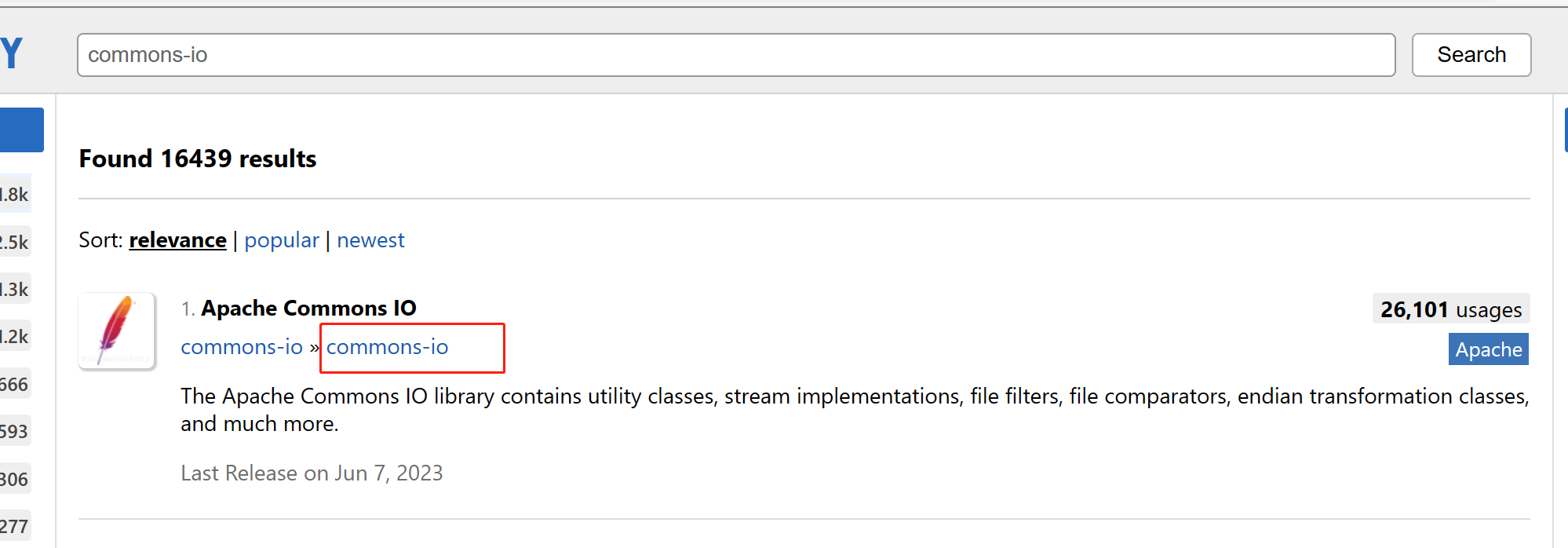
点进去之后随便选择maven复制(最好是选择使用量多的)
如果引入maven失败可以尝试这样:

java代码:
public class Main { public static void main(String[] args) throws InterruptedException, IOException { //创建驱动 WebDriver webDriver = new ChromeDriver(); // 打开网页 webDriver.get("https://www.baidu.com"); webDriver.findElement(By.cssSelector("#kw")).sendKeys("软件测试"); webDriver.findElement(By.cssSelector("#su")).click(); sleep(3000); File file = ((TakesScreenshot)webDriver).getScreenshotAs(OutputType.FILE); FileUtils.copyFile(file, new File("D://20230911jietu.png")); } }- 1
- 2
- 3
- 4
- 5
- 6
- 7
- 8
- 9
- 10
- 11
- 12
- 13
-
相关阅读:
xlua源码分析(三)C#访问lua的映射
铁路轨道设备概述1:铁路轨道基础设备
k8s客户端fabric8基本使用
AntPathMatcher路径匹配器,Ant风格的URL
Air780E涂鸦云远程开关-LuatOS
写一个函数del,用来删除动态链表中指定的节点
git中如何获取远程仓库的最新代码?
因子分析模型介绍、matlab案例我国上市公司盈利能力与资本结构的实证分析
系列二、Lock接口
RH850 G3KH异常处理简述
- 原文地址:https://blog.csdn.net/weixin_66409969/article/details/132832572
