-
vue中computed计算属性与methods方法的区别
computed计算属性 vs methods方法
1、computed计算属性
- 作用:封装了一段对于数据的处理,求得一个结果。
- 语法:
- 写在computed配置项中
- 作为属性,直接使用→this.计算属性{{计算属性}}
2、methods方法:
- 作用:给实例提供一个方法,调用以处理业务逻辑。
- 语法:
- 写在methods配置项中
- 作为方法,需要调用→this.方法名(){{方法名()}}@事件名=“方法名”
3、computed缓存特性(提升性能)
- 计算属性会对计算出来的结果进行缓存,再次使用直接读取缓存,依赖项变化了,会自动重新计算→并再次缓存
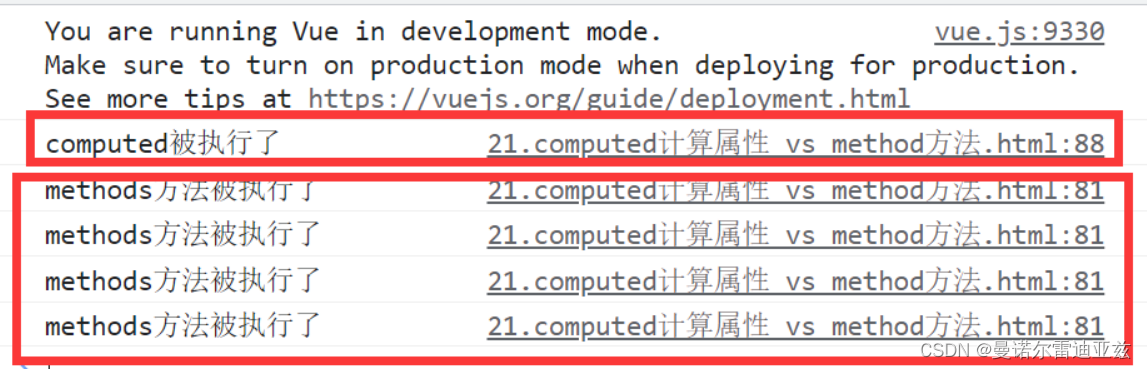
通俗的来讲,computed被多次调用的时候,因为存在缓存特性,数据没有发生变化的时候,就会在缓存中查找计算值。发生变化之后又会重新执行computed。
4、demo测试对比:
DOCTYPE html> <html lang="en"> <head> <meta charset="UTF-8"> <meta http-equiv="X-UA-Compatible" content="IE=edge"> <meta name="viewport" content="width=device-width, initial-scale=1.0"> <title>Documenttitle> <style> table { border: 1px solid #000; text-align: center; width: 300px; } th, td { border: 1px solid #000; } h3 { position: relative; } span { position: absolute; left: 145px; top: -4px; width: 16px; height: 16px; color: white; font-size: 12px; text-align: center; border-radius: 50%; background-color: #e63f32; } style> head> <body> <div id="app"> <h3>小黑的礼物清单🛒<span>{{totalCount}}span>h3> <h3>小黑的礼物清单🛒<span>{{totalCount}}span>h3> <h3>小黑的礼物清单🛒<span>{{totalCount}}span>h3> <h3>小黑的礼物清单🛒<span>{{totalCount}}span>h3> <h3>小黑的礼物清单🛒<span>{{totalCountMethod()}}span>h3> <h3>小黑的礼物清单🛒<span>{{totalCountMethod()}}span>h3> <h3>小黑的礼物清单🛒<span>{{totalCountMethod()}}span>h3> <h3>小黑的礼物清单🛒<span>{{totalCountMethod()}}span>h3> <table> <tr> <th>名字th> <th>数量th> tr> <tr v-for="(item, index) in list" :key="item.id"> <td>{{ item.name }}td> <td>{{ item.num }}个td> tr> table> <p>礼物总数:{{ totalCount }} 个p> div> <script src="https://cdn.jsdelivr.net/npm/vue@2.7.14/dist/vue.js">script> <script> const app = new Vue({ el: '#app', data: { // 现有的数据 list: [ { id: 1, name: '篮球', num: 3 }, { id: 2, name: '玩具', num: 2 }, { id: 3, name: '铅笔', num: 5 }, ] }, methods: { totalCountMethod() { console.log("methods方法被执行了"); let total = this.list.reduce((sum, item) => sum + item.num, 0) return total } }, computed: { totalCount() { console.log("computed被执行了"); let total = this.list.reduce((sum, item) => sum + item.num, 0) return total } } }) script> body> html>- 1
- 2
- 3
- 4
- 5
- 6
- 7
- 8
- 9
- 10
- 11
- 12
- 13
- 14
- 15
- 16
- 17
- 18
- 19
- 20
- 21
- 22
- 23
- 24
- 25
- 26
- 27
- 28
- 29
- 30
- 31
- 32
- 33
- 34
- 35
- 36
- 37
- 38
- 39
- 40
- 41
- 42
- 43
- 44
- 45
- 46
- 47
- 48
- 49
- 50
- 51
- 52
- 53
- 54
- 55
- 56
- 57
- 58
- 59
- 60
- 61
- 62
- 63
- 64
- 65
- 66
- 67
- 68
- 69
- 70
- 71
- 72
- 73
- 74
- 75
- 76
- 77
- 78
- 79
- 80
- 81
- 82
- 83
- 84
- 85
- 86
- 87
- 88
- 89
- 90
- 91
- 92
- 93
- 94
- 95
- 96
- 97
- 98
控制台输出情况:
-
相关阅读:
[附源码]JAVA毕业设计衡水特产展销系统(系统+LW)
能链科技子公司上海能链获颁高新技术企业资质
java毕业设计的大学宿舍管理系统mybatis+源码+调试部署+系统+数据库+lw
vscode 代码片段
保驾“双十一” 博睿数据助力电商零售迎高峰无烦忧
2022过半,Node你会用了吗
ubuntu20.4执行apt-get update报错404 Not Found [IP: 185.125.190.36 80] 最佳解决方案
一个比 ping 更强大、更牛逼的命令行工具
[Azure - VM] 解决办法:无法通过SSH连接VM,解决错误:This service allows sftp connections only.
力扣:152. 乘积最大子数组(Python3)
- 原文地址:https://blog.csdn.net/m0_63144319/article/details/132829676
