-
Linux之shell条件测试
目录
案例2 --- 取出/etc/passwd 文件的第6行内容
案例3 --- 编写脚本,功能:显示root目录下的文件信息,之后建立一个名为aa的目录,在aa目录下新建文件bb.txt,并增加bb.txt的x执行权限
案例4 --- 编写脚本test7.sh, 从键盘读入x,y值,计算和值后输出结果
案例5 --- 编写脚本test8.sh,给定文件/etc/sos/sos.conf,判断此文件是否有空白行,有则输出空白行的行数,无则输出信息表示无空白行
案例6 --- 编写脚本test9.sh,显示所有用户,选择一个用户输入,若id为0表示管理员,否则为普通账户
案例7 --- 如果/var/log/messages 文件行数大于50行,则显示“好大一个文件”,否则显示“还能接受”
作用
为了能够正确处理Shell程序运行过程中遇到的各种情况,Linux Shell提供了一组测试运算符
通过这些运算符,Shell程序能够判断某种或者几个条件是否成立
条件测试在各种流程控制语句,例如判断语句和循环语句中发挥了重要的作用,所以了解和掌握这些条件测试是非常重要的
基本用法
格式:
格式1 --- test -参数 条件表达式
格式2 --- [ 条件表达式 ] # 注意:[]的左右要有空格
格式3 --- [[ 条件表达式 ]] # 注意:[]的左右要有空格
格式4 --- ((条件表达式))test单独使用,判断条件为真,echo¥?返回0,假返回1
test与[[ ]]等价
[[ ]]是扩展命令,可以使用通配符等进行模式匹配,&& || >< 等操作符可以直接应用于双括号中,但不能用于单括号中
案例
-f 用法
- [root@localhost ~]# test -f /etc/passwd # -f测试文件是否为普通文件
- [root@localhost ~]# echo $?
- 0 # 状态码为0,表示上例命令执行正确,文件存在
- [root@localhost ~]# test -f /etc/aaaa
- [root@localhost ~]# echo $?
- 1 # 状态码为1,表示上例命令执行错误,文件不存在

- [root@localhost ~]# test -f /etc/passwd && echo yes || echo no
- yes
- [root@localhost ~]# test -f /etc/aaaa && echo yes || echo no
- no

[ ] 用法
- [root@localhost ~]# [ -f /etc/hosts ]
- [root@localhost ~]# echo $?
- 0
- [root@localhost ~]# [ -f /etc/aaaa ]
- [root@localhost ~]# echo $?
- 1

- [root@localhost ~]# [ -f /etc/hosts ] && echo "存在" || echo "不存在"
- 存在
- [root@localhost ~]# [ -f /etc/aaa ] && echo "存在" || echo "不存在"
- 不存在

[[]] 用法
- [root@localhost ~]# [[ 3 > 2 || 1 > 2 ]] && echo "正确" || echo "不正确"
- 正确

(()) 语法
- [root@localhost ~]# ((3>5)) && echo 1 || echo 0
- 0
- [root@localhost ~]# ((9.5>5)) && echo 1 || echo 0
- -bash: ((: 9.5>5: syntax error: invalid arithmetic operator (error token is ".5>5")

文件测试
参数
参数 作用 -b 文件名 检测文件是否是块设备文件,是返回 true -c 文件名 是否是字符设备文件 -d 文件名 是否是目录 -f 文件名 是否是普通文件(既不是目录,也不是设备文件) -S 文件名 是否为socket文件 -P 文件名 是否为管道符文件 -L 文件名 是否为链接文件 -u 文件名 是否有suid的权限 -s 文件名 是否为空(文件大小是否大于0),不为空返回 true -e 文件名 检测文件(包括目录)是否存在,如果是,则返回 true -r 文件名 检测文件是否可读,如果是,则返回 true。 -w 文件名 检测文件是否可写,如果是,则返回 true -x 文件名 检测文件是否可执行,如果是,则返回 true f1 -nt f2 文件f1比文件f2新则为真(根据文件修改时间计算) f1 -ot f2 文件f1比文件f2旧则为真(根据文件修改时间计算) 案例
- [root@localhost ~]# [ -b /etc/name0n1 ] && echo 1 || echo 0
- 0
- [root@localhost ~]# [ -L /dev/cdrom ] && echo 1 || echo 1
- 1
- [root@localhost ~]# [ -e /test ] && echo 1 || echo 1
- 1

编写脚本,测试文件是否存在,不存在则创建
- [root@localhost test]# vim test1.sh
- #!/bin/bash
- read -p "请输入文件名:" file
- if test -e $file
- then
- echo "$file 文件存在"
- else
- echo "$file 文件不存在"
- read -p "是否需要创建(yes or no)" flag
- if [ $flag == "yes" ]
- then
- touch "$file"
- ls -l $file
- fi
- fi
- [root@localhost test]# bash test1.sh
- 请输入文件名:/test/test4.sh
- [root@localhost test]# bash test1.sh
- 请输入文件名:/test/test2.sh
- 是否需要创建(yes or no)yes
- -rw-r--r--. 1 root root 0 Sep 10 19:28 /test/test2.sh
- [root@localhost test]# ls

整数测试
作用
用于比较两个数值的大小关系,操作的对象时数值
操作符
在[ ]以及 test 中使用的比较符号 在(( ))和 [[ ]] 中使用比符号 说明 -eg == 或 = 相等,全拼为 equal -ne != 不相等,全拼为 not equal -gt > 大于,全拼为 greater than -ge >= 大于等于,全拼为 greater equal -It < 小于,全拼为 less than -le <= 小于等于,全拼为 less equal 案例
- [root@localhost test]# [ 5 -gt 3 ] && echo yes || echo no
- yes
- [root@localhost test]# test 2 -lt 1 && echo yes || echo no
- no
- [root@localhost test]# (( 5 > 3 )) && echo yes || echo no
- yes

系统用户个数小于50的则输出信息
- [root@localhost test]# [ $(cat /etc/passwd | wc -l ) -lt 50 ] && echo "用户数小于
- 50"
逻辑操作符
符号
在[]和 test 中使用的操作符 在[[ ]] 和(())中用符 说明 -a && and,与,两端都为真,则结果为真 -o || or,或,两端有一个为真,则结果为真 ! ! not,非,两端相反,则结果为真
案例
- [root@localhost ~]# [ -f /etc/passwd -a -f /etc/services ] && echo yes || echo no
- [root@localhost ~]# [ -f /etc/host -a -f /etc/services ] && echo yes || echo no
- [root@localhost ~]# ((5>3 && 3>2)) && echo 1 || echo 0

命令分隔符
符号 说明 cmd1;cmd2 以独立的进程依次执行cmd1和cmd2 (cmd1;cmd2) 在同一进程中依次执行cmd1和cmd2 cmd1&cmd2 cmd1和cmd2同时执行,分属于不同的进程 cmd1&&cmd2 当cmd1为真时,则执行cmd2 cmd1||cmd2 当cmd1不为真时,则执行cmd2 cmd& 后台执行 案例分析
案例1 --- 判断当前已登录的账户数,超过5个则输出信息
[root@localhost ~]# [ $(who | cut -d " " -f1 | sort -u | wc -l) -gt 5 ] && echo "账户数过多" || echo "账户数较少"
案例2 --- 取出/etc/passwd 文件的第6行内容
- [root@localhost ~]# head -6 /etc/passwd | tail -1
- [root@localhost ~]# sed -n 6p /etc/passwd

案例3 --- 编写脚本,功能:显示root目录下的文件信息,之后建立一个名为aa的目录,在aa目录下新建文件bb.txt,并增加bb.txt的x执行权限
- [root@localhost ~]# vim mkf.sh
- #!/bin/bash
- ls -l /root
- mkdir /root/aa
- touch /root/aa/bb.txt
- chmod +x /root/aa/bb.txt
- [root@localhost ~]# bash mkf.sh

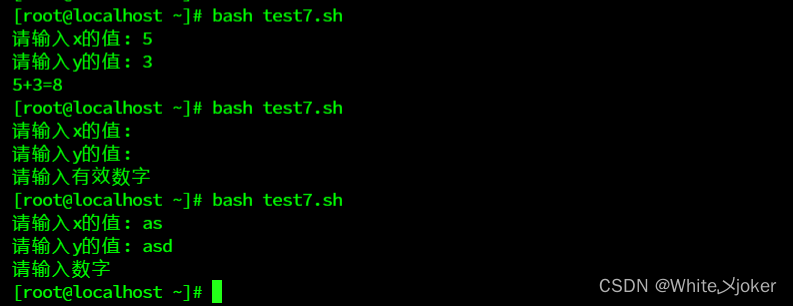
案例4 --- 编写脚本test7.sh, 从键盘读入x,y值,计算和值后输出结果
- [root@localhost ~]# vim test7.sh
- #!/bin/bash
- read -p "请输入x的值: " x
- read -p "请输入y的值: " y
- if [ -n "$x" -a -n "$y" ] # -n 判断是否为空 -a 与
- then
- if [[ "$x" =~ ^[0-9]+$ ]] && [[ "$y" =~ ^[0-9]+$ ]]
- # =~ 是一个正则表达式匹配运算符,用于测试左边的字符串是否匹配右边
- # ^[0-9]+$ 是一个正则表达式模式,它表示一个字符串应该由一个或多个数字字符组成
- then
- sum=$[x+y]
- echo "$x+$y=$sum"
- else
- echo "请输入数字"
- fi
- else
- echo "请输入有效数字"
- fi
测试
案例5 --- 编写脚本test8.sh,给定文件/etc/sos/sos.conf,判断此文件是否有空白行,有则输出空白行的行数,无则输出信息表示无空白行
- [root@localhost ~]# vim test8.sh
- #!/bin/bash
- read -p "请输入要统计的文件名:" file
- num=$(grep ^$ $file | wc -l)
- if (($num>0))
- then
- echo "$file含有空白行,行数为:$num行,位置如下:"
- grep -n ^$ $file
- else
- echo "$file,此文件不包含空白行"
- fi
测试

案例6 --- 编写脚本test9.sh,显示所有用户,选择一个用户输入,若id为0表示管理员,否则为普通账户
- [root@localhost ~]# vim test9.sh
- #!/bin/bash
- cat /etc/passwd | cut -d ":" -f1 | sort -u
- read -p "请输入一个账户:" us
- if (($(id -u $us)==0))
- then
- echo "此用户为管理员"
- else
- echo "此用户为普通账户"
- fi
测试


案例7 --- 如果/var/log/messages 文件行数大于50行,则显示“好大一个文件”,否则显示“还能接受”
[root@localhost ~]# (($(cat /var/log/messages | wc -l )>50 )) && echo "好大一个文 件" || echo "还能接受"
-
相关阅读:
Hadoop-Yarn-NodeManager如何计算Linux系统上的资源信息
PostgreSQL数据库分区裁剪——constraint exclusion
unity游戏画质设置功能实现
2022年重庆成人本科可以考研吗?
凯利公式 - Kelly formula
个人申请专利的费用是多少?
CentOS 常见命令详解
DTC趋势 | 2022年值得关注的10个DTC趋势
MyBatis-Plus入门使用小案例
Java项目:电器商城系统(java+SSM+JSP+jQuery+javascript+Mysql)
- 原文地址:https://blog.csdn.net/qq_57289939/article/details/132800278
