-
iOS开发Swift-12-列表UI,TableViewController,动态响应Button勾选-待办事项App(1)
1.创建新项目

为项目添加图标

2.将Table View Controller添加到界面中

将箭头移动到Table View上来,代表它是首页(根页面).选中ViewController,点击Delete,对它进行删除.将代码ViewController.swift也删除掉.

新建一个Cocoa Touch Class.


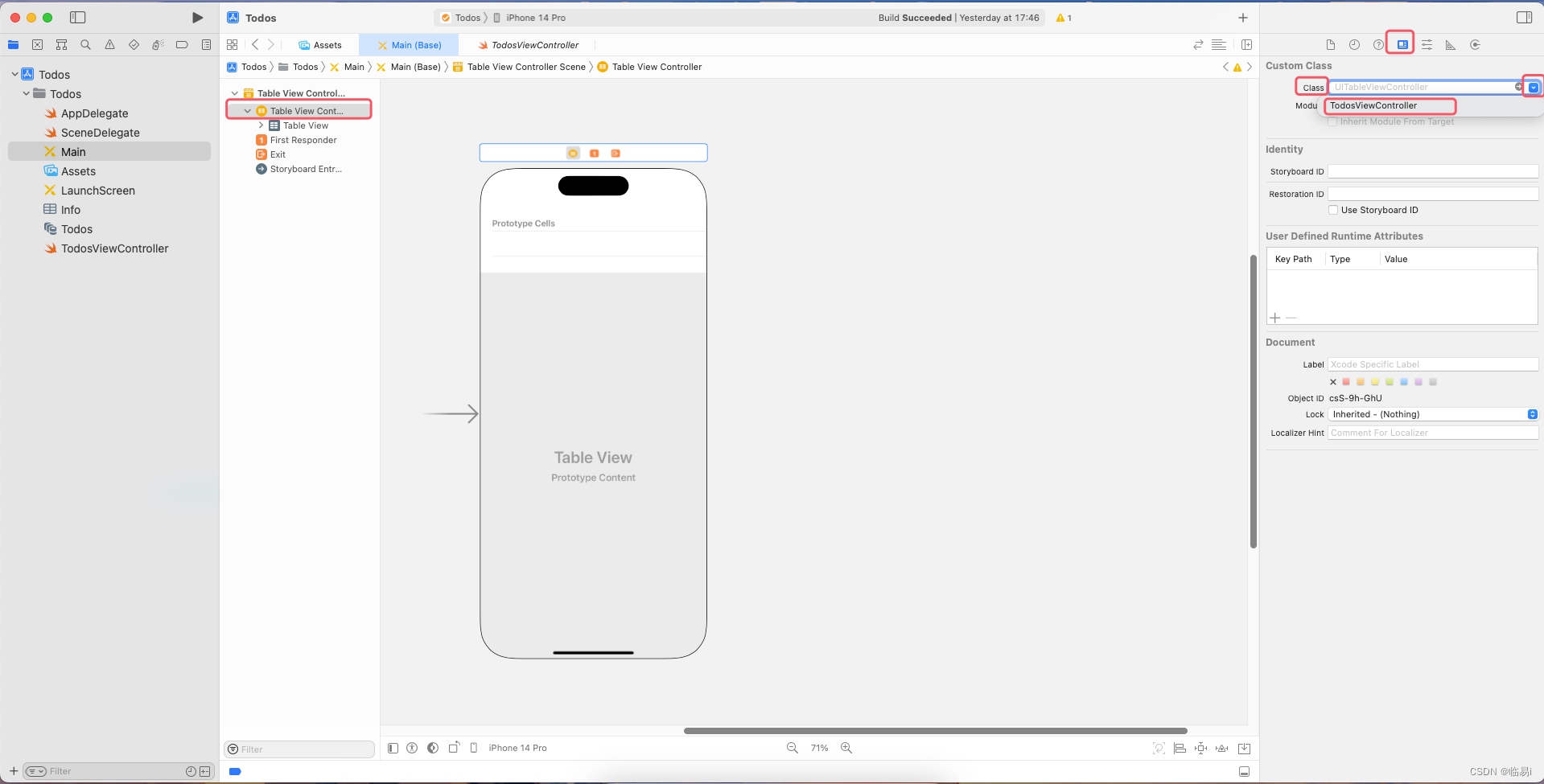
将TableViewController的class设置成TodosViewController.
2.为cell取名为TodoCellID.

3.创建一个Button,将Button的Image改为circle.创建一个Lable,将Lable的Lines改为0,可以自动换行.将Button和Lable放到同一个StackView里,设置约束为垂直居中.

为Button设定宽高约束,为Stack View设定上下左右约束,设定Stack View的Allgnment为Center(所有字样居中),Distribution为Fill,Spacing(Button与Lable的间距)为12.

4.创建一个UITableViewCell类型的swift,用于动态响应Button勾选以及文本的变化.

选择TodoCellID的Class为TodoCell.

5.创建一个Swift文件Todo.把他放到Modle文件夹下.

设定默认待办事项,并编码,使其展示在app首页上.
TodosViewController:
import UIKit class TodosViewController: UITableViewController { let todos = [ Todo(name: "学习iOS课程的基础课", checked: false), Todo(name: "学习iOS课程的零基础赏月App开发", checked: false), Todo(name: "学习iOS课程的零基础木琴App开发", checked: false), Todo(name: "学习iOS课程的零基础和风天气App开发", checked: false), Todo(name: "学习iOS课程的零基础待办事项App开发", checked: false), Todo(name: "学习iOS课程的小红书App开发", checked: false) ] override func viewDidLoad() { super.viewDidLoad() // Uncomment the following line to preserve selection between presentations // self.clearsSelectionOnViewWillAppear = false // Uncomment the following line to display an Edit button in the navigation bar for this view controller. // self.navigationItem.rightBarButtonItem = self.editButtonItem } // MARK: - Table view data source //配置TableView的一些数据 override func numberOfSections(in tableView: UITableView) -> Int { // #warning Incomplete implementation, return the number of sections return 1 //总共有1个分类 } override func tableView(_ tableView: UITableView, numberOfRowsInSection section: Int) -> Int { // #warning Incomplete implementation, return the number of rows return todos.count //总共有10个待办事项 } override func tableView(_ tableView: UITableView, cellForRowAt indexPath: IndexPath) -> UITableViewCell { //此函数会根据上面两个函数(总共分类数和总共待办事项数)返回的内容多次执行 let cell = tableView.dequeueReusableCell(withIdentifier: kTodoCellID , for: indexPath) as! TodoCell // // Configure the cell... // //配置主标题的文本 // var contentConfiguration = cell.defaultContentConfiguration() // contentConfiguration.text = "昵称" //主标题 // contentConfiguration.secondaryText = "个性签名" //副标题 // contentConfiguration.image = UIImage(systemName: "star") //图片 // cell.contentConfiguration = contentConfiguration cell.todoLable.text = todos[indexPath.row].name return cell } /* // Override to support conditional editing of the table view. override func tableView(_ tableView: UITableView, canEditRowAt indexPath: IndexPath) -> Bool { // Return false if you do not want the specified item to be editable. return true } */ /* // Override to support editing the table view. override func tableView(_ tableView: UITableView, commit editingStyle: UITableViewCell.EditingStyle, forRowAt indexPath: IndexPath) { if editingStyle == .delete { // Delete the row from the data source tableView.deleteRows(at: [indexPath], with: .fade) } else if editingStyle == .insert { // Create a new instance of the appropriate class, insert it into the array, and add a new row to the table view } } */ //事件函数 //当对每一行进行排序时需要调用的方法 override func tableView(_ tableView: UITableView, moveRowAt fromIndexPath: IndexPath, to: IndexPath) { } override func tableView(_ tableView: UITableView, didSelectRowAt indexPath: IndexPath) { } /* // Override to support conditional rearranging of the table view. override func tableView(_ tableView: UITableView, canMoveRowAt indexPath: IndexPath) -> Bool { // Return false if you do not want the item to be re-orderable. return true } */ // MARK: - Navigation // In a storyboard-based application, you will often want to do a little preparation before navigation override func prepare(for segue: UIStoryboardSegue, sender: Any?) { // Get the new view controller using segue.destination. // Pass the selected object to the new view controller. } }- 1
- 2
- 3
- 4
- 5
- 6
- 7
- 8
- 9
- 10
- 11
- 12
- 13
- 14
- 15
- 16
- 17
- 18
- 19
- 20
- 21
- 22
- 23
- 24
- 25
- 26
- 27
- 28
- 29
- 30
- 31
- 32
- 33
- 34
- 35
- 36
- 37
- 38
- 39
- 40
- 41
- 42
- 43
- 44
- 45
- 46
- 47
- 48
- 49
- 50
- 51
- 52
- 53
- 54
- 55
- 56
- 57
- 58
- 59
- 60
- 61
- 62
- 63
- 64
- 65
- 66
- 67
- 68
- 69
- 70
- 71
- 72
- 73
- 74
- 75
- 76
- 77
- 78
- 79
- 80
- 81
- 82
- 83
- 84
- 85
- 86
- 87
- 88
- 89
- 90
- 91
- 92
- 93
- 94
- 95
- 96
- 97
- 98
- 99
- 100
- 101
- 102
TodoCell:
import UIKit class TodoCell: UITableViewCell { @IBOutlet weak var checkBoxBtn: UIButton! @IBOutlet weak var todoLable: UILabel! override func awakeFromNib() { super.awakeFromNib() // Initialization code } override func setSelected(_ selected: Bool, animated: Bool) { super.setSelected(selected, animated: animated) // Configure the view for the selected state } }- 1
- 2
- 3
- 4
- 5
- 6
- 7
- 8
- 9
- 10
- 11
- 12
- 13
- 14
- 15
- 16
- 17
- 18
Todo:
import Foundation struct Todo{ //结构体.struck:值类型,class:引用类型. strack不需要再额外写构造器,因为系统已经自动生成. var name: String //文本 var checked: Bool //是否已经完成 } //相当于class的: //class Todo{ // var name = "" // var checked = false // init(name: String, checked: Bool){ // self.name = name // self.checked = checked // } //}- 1
- 2
- 3
- 4
- 5
- 6
- 7
- 8
- 9
- 10
- 11
- 12
- 13
- 14
- 15
- 16
启动测试:

6.实现checkBox这个Button被选中之后变色.
将Button的Tint改为Clear Color.使选中后的淡蓝色消失.


TodosViewController:
import UIKit class TodosViewController: UITableViewController { let todos = [ Todo(name: "学习iOS课程的基础课", checked: false), Todo(name: "学习iOS课程的零基础赏月App开发", checked: false), Todo(name: "学习iOS课程的零基础木琴App开发", checked: false), Todo(name: "学习iOS课程的零基础和风天气App开发", checked: false), Todo(name: "学习iOS课程的零基础待办事项App开发", checked: false), Todo(name: "学习iOS课程的小红书App开发", checked: false) ] override func viewDidLoad() { super.viewDidLoad() // Uncomment the following line to preserve selection between presentations // self.clearsSelectionOnViewWillAppear = false // Uncomment the following line to display an Edit button in the navigation bar for this view controller. // self.navigationItem.rightBarButtonItem = self.editButtonItem } // MARK: - Table view data source //配置TableView的一些数据 override func numberOfSections(in tableView: UITableView) -> Int { // #warning Incomplete implementation, return the number of sections return 1 //总共有1个分类 } override func tableView(_ tableView: UITableView, numberOfRowsInSection section: Int) -> Int { // #warning Incomplete implementation, return the number of rows return todos.count //总共有10个待办事项 } override func tableView(_ tableView: UITableView, cellForRowAt indexPath: IndexPath) -> UITableViewCell { //此函数会根据上面两个函数(总共分类数和总共待办事项数)返回的内容多次执行 let cell = tableView.dequeueReusableCell(withIdentifier: kTodoCellID , for: indexPath) as! TodoCell // // Configure the cell... // //配置主标题的文本 // var contentConfiguration = cell.defaultContentConfiguration() // contentConfiguration.text = "昵称" //主标题 // contentConfiguration.secondaryText = "个性签名" //副标题 // contentConfiguration.image = UIImage(systemName: "star") //图片 // cell.contentConfiguration = contentConfiguration cell.checkBoxBtn.isSelected = todos[indexPath.row].checked //将cell的是否被选中属性改为todos的当前行的checked属性 cell.todoLable.text = todos[indexPath.row].name return cell } /* // Override to support conditional editing of the table view. override func tableView(_ tableView: UITableView, canEditRowAt indexPath: IndexPath) -> Bool { // Return false if you do not want the specified item to be editable. return true } */ /* // Override to support editing the table view. override func tableView(_ tableView: UITableView, commit editingStyle: UITableViewCell.EditingStyle, forRowAt indexPath: IndexPath) { if editingStyle == .delete { // Delete the row from the data source tableView.deleteRows(at: [indexPath], with: .fade) } else if editingStyle == .insert { // Create a new instance of the appropriate class, insert it into the array, and add a new row to the table view } } */ //事件函数 //当对每一行进行排序时需要调用的方法 override func tableView(_ tableView: UITableView, moveRowAt fromIndexPath: IndexPath, to: IndexPath) { } override func tableView(_ tableView: UITableView, didSelectRowAt indexPath: IndexPath) { } /* // Override to support conditional rearranging of the table view. override func tableView(_ tableView: UITableView, canMoveRowAt indexPath: IndexPath) -> Bool { // Return false if you do not want the item to be re-orderable. return true } */ // MARK: - Navigation // In a storyboard-based application, you will often want to do a little preparation before navigation override func prepare(for segue: UIStoryboardSegue, sender: Any?) { // Get the new view controller using segue.destination. // Pass the selected object to the new view controller. } }- 1
- 2
- 3
- 4
- 5
- 6
- 7
- 8
- 9
- 10
- 11
- 12
- 13
- 14
- 15
- 16
- 17
- 18
- 19
- 20
- 21
- 22
- 23
- 24
- 25
- 26
- 27
- 28
- 29
- 30
- 31
- 32
- 33
- 34
- 35
- 36
- 37
- 38
- 39
- 40
- 41
- 42
- 43
- 44
- 45
- 46
- 47
- 48
- 49
- 50
- 51
- 52
- 53
- 54
- 55
- 56
- 57
- 58
- 59
- 60
- 61
- 62
- 63
- 64
- 65
- 66
- 67
- 68
- 69
- 70
- 71
- 72
- 73
- 74
- 75
- 76
- 77
- 78
- 79
- 80
- 81
- 82
- 83
- 84
- 85
- 86
- 87
- 88
- 89
- 90
- 91
- 92
- 93
- 94
- 95
- 96
- 97
- 98
- 99
- 100
- 101
- 102
- 103
- 104
- 105
- 106
TodoCell:
import UIKit class TodoCell: UITableViewCell { @IBOutlet weak var checkBoxBtn: UIButton! @IBOutlet weak var todoLable: UILabel! override func awakeFromNib() { //每个cell加载出来之后执行的函数 //dequeueReusableCell -> awakeFromNib -> dequeueReusableCell后面的内容 super.awakeFromNib() // Initialization code checkBoxBtn.setImage(UIImage(systemName: "checkmark.circle.fill"), for: .selected) }//设定了当前button被选中之后里边的图片 override func setSelected(_ selected: Bool, animated: Bool) { super.setSelected(selected, animated: animated) // Configure the view for the selected state } }- 1
- 2
- 3
- 4
- 5
- 6
- 7
- 8
- 9
- 10
- 11
- 12
- 13
- 14
- 15
- 16
- 17
- 18
- 19
- 20
- 21
- 22
7.实现checkBox这个Lable被选中之后字体变灰色.
TodosViewController:
import UIKit class TodosViewController: UITableViewController { let todos = [ Todo(name: "学习iOS课程的基础课", checked: false), Todo(name: "学习iOS课程的零基础赏月App开发", checked: true), Todo(name: "学习iOS课程的零基础木琴App开发", checked: false), Todo(name: "学习iOS课程的零基础和风天气App开发", checked: false), Todo(name: "学习iOS课程的零基础待办事项App开发", checked: false), Todo(name: "学习iOS课程的小红书App开发", checked: false) ] override func viewDidLoad() { super.viewDidLoad() // Uncomment the following line to preserve selection between presentations // self.clearsSelectionOnViewWillAppear = false // Uncomment the following line to display an Edit button in the navigation bar for this view controller. // self.navigationItem.rightBarButtonItem = self.editButtonItem } // MARK: - Table view data source //配置TableView的一些数据 override func numberOfSections(in tableView: UITableView) -> Int { // #warning Incomplete implementation, return the number of sections return 1 //总共有1个分类 } override func tableView(_ tableView: UITableView, numberOfRowsInSection section: Int) -> Int { // #warning Incomplete implementation, return the number of rows return todos.count //总共有10个待办事项 } override func tableView(_ tableView: UITableView, cellForRowAt indexPath: IndexPath) -> UITableViewCell { //此函数会根据上面两个函数(总共分类数和总共待办事项数)返回的内容多次执行 let cell = tableView.dequeueReusableCell(withIdentifier: kTodoCellID , for: indexPath) as! TodoCell // // Configure the cell... // //配置主标题的文本 // var contentConfiguration = cell.defaultContentConfiguration() // contentConfiguration.text = "昵称" //主标题 // contentConfiguration.secondaryText = "个性签名" //副标题 // contentConfiguration.image = UIImage(systemName: "star") //图片 // cell.contentConfiguration = contentConfiguration cell.checkBoxBtn.isSelected = todos[indexPath.row].checked //将cell的是否被选中属性改为todos的当前行的checked属性 cell.todoLable.text = todos[indexPath.row].name cell.todoLable.textColor = todos[indexPath.row].checked ? .tertiaryLabel : .label //三元运算符.根据是否被选中进行判断,如果被选中的话变成浅色,未被选中就是原来的Lable Color. return cell } /* // Override to support conditional editing of the table view. override func tableView(_ tableView: UITableView, canEditRowAt indexPath: IndexPath) -> Bool { // Return false if you do not want the specified item to be editable. return true } */ /* // Override to support editing the table view. override func tableView(_ tableView: UITableView, commit editingStyle: UITableViewCell.EditingStyle, forRowAt indexPath: IndexPath) { if editingStyle == .delete { // Delete the row from the data source tableView.deleteRows(at: [indexPath], with: .fade) } else if editingStyle == .insert { // Create a new instance of the appropriate class, insert it into the array, and add a new row to the table view } } */ //事件函数 //当对每一行进行排序时需要调用的方法 override func tableView(_ tableView: UITableView, moveRowAt fromIndexPath: IndexPath, to: IndexPath) { } override func tableView(_ tableView: UITableView, didSelectRowAt indexPath: IndexPath) { } /* // Override to support conditional rearranging of the table view. override func tableView(_ tableView: UITableView, canMoveRowAt indexPath: IndexPath) -> Bool { // Return false if you do not want the item to be re-orderable. return true } */ // MARK: - Navigation // In a storyboard-based application, you will often want to do a little preparation before navigation override func prepare(for segue: UIStoryboardSegue, sender: Any?) { // Get the new view controller using segue.destination. // Pass the selected object to the new view controller. } }- 1
- 2
- 3
- 4
- 5
- 6
- 7
- 8
- 9
- 10
- 11
- 12
- 13
- 14
- 15
- 16
- 17
- 18
- 19
- 20
- 21
- 22
- 23
- 24
- 25
- 26
- 27
- 28
- 29
- 30
- 31
- 32
- 33
- 34
- 35
- 36
- 37
- 38
- 39
- 40
- 41
- 42
- 43
- 44
- 45
- 46
- 47
- 48
- 49
- 50
- 51
- 52
- 53
- 54
- 55
- 56
- 57
- 58
- 59
- 60
- 61
- 62
- 63
- 64
- 65
- 66
- 67
- 68
- 69
- 70
- 71
- 72
- 73
- 74
- 75
- 76
- 77
- 78
- 79
- 80
- 81
- 82
- 83
- 84
- 85
- 86
- 87
- 88
- 89
- 90
- 91
- 92
- 93
- 94
- 95
- 96
- 97
- 98
- 99
- 100
- 101
- 102
- 103
- 104
- 105
启动测试:

-
相关阅读:
SaaS CRM系统的优势,与本地部署相比哪个更方便?
BUG:AttributeError: ‘GLMChineseTokenizer‘ object has no attribute ‘sp_model’
R语言作业wine 数据
海康Visionmaster-通讯管理:使用 Modbus TCP 通讯 协议与流程交互
【LeetCode-36】有效的数独
21年毕业,转行软件测试,薪资10K+,好运气都藏在你的实力里
手机浏览器看视频加载太慢怎么办,这5招用了提速快
面试题:项目中是如何使用ES(elasticsearch)的?如何优化的?数据量多少?
Access denied for user ‘root‘@‘localhost‘ (using password:YES) 解决方案(禅道相关)
linux-conda环境安装教程
- 原文地址:https://blog.csdn.net/LYly_B/article/details/132800662
