-
Nginx中实现自签名SSL证书生成与配置
一.相关介绍
1.生成步骤
(1)生成私钥(Private Key):使用 OpenSSL 工具生成一个私钥文件,用于加密和解密传输的数据。
(2)生成证书签名请求(Certificate Signing Request,CSR):使用 OpenSSL 工具生成一个 CSR 文件,其中包含你的服务器公钥和相关的信息,以便用于生成证书。
(3)自签名证书生成:使用 OpenSSL 工具根据 CSR 文件和私钥生成自签名的 SSL 证书文件。
(4)Nginx 配置修改:在 Nginx 配置文件中进行相应的修改,包括指定 SSL 证书文件路径、私钥文件路径以及其他相关的 SSL 配置项。
总:Nginx 就可以使用自签名 SSL 证书来启用 HTTPS,实现加密和安全的通信。需要注意的是,自签名 SSL 证书不会受到公信任的证书颁发机构(Certificate Authority)认可,因此浏览器会显示安全警告。在生产环境中,建议使用由受信任的证书颁发机构签发的证书来获得更高的安全性和可信度。- 1
2.相关名词介绍
(1)私钥(Key)生成:使用 OpenSSL 工具的 “genrsa” 命令生成私钥文件,其中私钥是用于加密和解密数据的关键。
(2)公钥(CSR)生成:使用私钥文件生成证书签名请求(Certificate Signing Request,CSR),其中包含公钥和其他相关信息。这个公钥将被用于生成证书,并在浏览器连接时进行身份验证。
(3)证书(CRT)生成:证书由公钥(CSR)和签名组成。签名可以是自签名的,也可以是由受信任的证书颁发机构(CA)签名的。通过使用私钥(Key)与公钥(CSR)进行签名,最终生成证书(CRT)文件。
(4)服务器证书(server.crt):生成的证书文件就是服务器证书,通常命名为 “server.crt”。
(5)签名过程:签名是使用私钥(Key)与公钥(CSR)进行证书生成的过程。私钥用于对公钥进行签名,以确保证书的完整性和身份验证。
二.Nginx中实现自签名SSL证书生成与配置
1.私钥生成
#关闭防火墙及安全机制 systemctl stop firewalld.service setenforce 0- 1
- 2
- 3
#在root用户的家目录下执行 cd ~ #使用ssl生成私钥名为 server.key openssl genrsa -des3 -out server.key 1024 #回车,输入自定义的密码文本,此处设置为12345 #输入两次- 1
- 2
- 3
- 4
- 5
- 6

#查看生成的私钥 cat server.key- 1
- 2

2.公钥生成
#基于创建的server.key私钥创建server.csr公钥 openssl req -new -key server.key -out server.csr #查看私钥加密的内容 openssl req -text -in server.csr -noout- 1
- 2
- 3
- 4


3.生成解密的私钥key
#基于server.key私钥生成server.key.unsecure的解密私钥 openssl rsa -in server.key -out server.key.unsecure- 1
- 2

4.签名生成证书
方法1: #方法1需要输入密码,私钥密码为12345 openssl x509 -req -days 1000 -in server.csr -signkey server.key -out server.crt #使用私钥和公钥生成server.crt签名证书,-days为1000天 -in指定公钥,-signkey指定私钥,生成的前面证书为server.crt 方法2: openssl x509 -req -days 1000 -in server.csr -signkey server.key.unsecure -out server1.crt #使用解密私钥和公钥生成server.crt签名证书,-days为1000天 -in指定公钥,-signkey指定解密后的私钥,生成的前面证书为server.crt- 1
- 2
- 3
- 4
- 5
- 6
- 7


#查看证书的内容,server.crt内容 openssl x509 -text -in server.crt -noout- 1
- 2
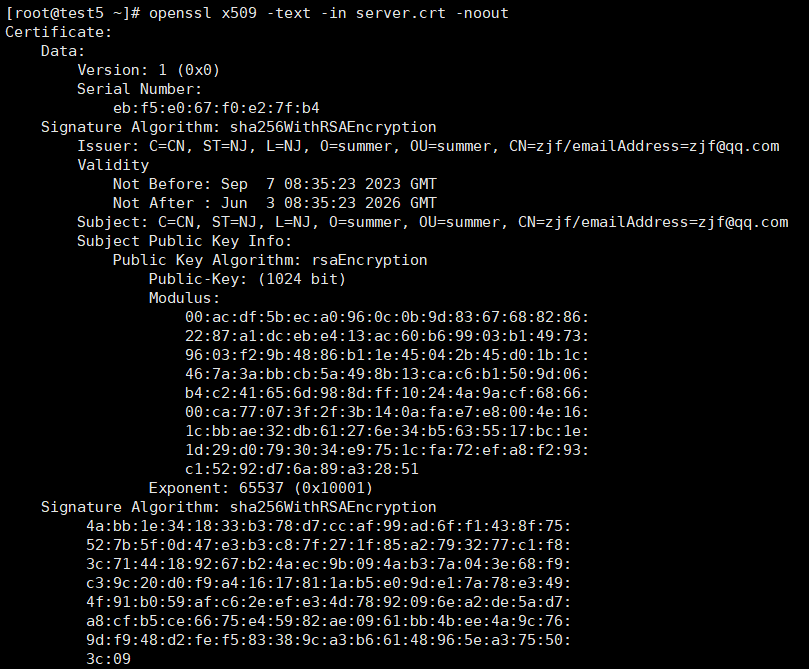
5.配置证书并验证
#安装额外源 并安装启动nginx yum install epel-release -y yum install nginx -y systemctl start nginx vim /etc/nginx/nginx.conf #编辑nginx主配置文件文件末尾添加内容如下 server { listen 443 ssl ; server_name localhost ; ssl_certificate "/root/server.key"; ssl_certificate_key "/root/server.key.unsecure"; } #创建一个新的server模块,注意要在http模块里面,listen表示监听端口,server_name写主机地址或localhost都可以,ssl_certificate是签名证书的路径,ssl_certificate_key是私钥的路径,本文私钥路径写了解密后的私钥,写加密时的私钥有报错- 1
- 2
- 3
- 4
- 5
- 6
- 7
- 8
- 9
- 10
- 11
- 12
- 13
- 14
#重启nginx到浏览器上访问验证 systemctl start nginx- 1
- 2
报错信息:
[root@test5 ~]# systemctl restart nginx
Job for nginx.service failed because the control process exited with error code. See “systemctl status nginx.service” and “journalctl -xe” for details.
[root@test5 ~]# systemctl status nginx.service
● nginx.service - The nginx HTTP and reverse proxy server
Loaded: loaded (/usr/lib/systemd/system/nginx.service; disabled; vendor preset: disabled)
Active: failed (Result: exit-code) since 四 2023-09-07 17:47:46 CST; 15s ago
Process: 54283 ExecStart=/usr/sbin/nginx (code=exited, status=0/SUCCESS)
Process: 55399 ExecStartPre=/usr/sbin/nginx -t (code=exited, status=1/FAILURE)
Process: 55397 ExecStartPre=/usr/bin/rm -f /run/nginx.pid (code=exited, status=0/SUCCESS)
Main PID: 54285 (code=exited, status=0/SUCCESS)9月 07 17:47:46 test5 systemd[1]: Starting The nginx HTTP and reverse proxy se…
9月 07 17:47:46 test5 nginx[55399]: nginx: [emerg] cannot load certificate key…e)
9月 07 17:47:46 test5 nginx[55399]: nginx: configuration file /etc/nginx/nginx…ed
9月 07 17:47:46 test5 systemd[1]: nginx.service: control process exited, code=…=1
9月 07 17:47:46 test5 systemd[1]: Failed to start The nginx HTTP and reverse p…r.
9月 07 17:47:46 test5 systemd[1]: Unit nginx.service entered failed state.
9月 07 17:47:46 test5 systemd[1]: nginx.service failed.
Hint: Some lines were ellipsized, use -l to show in full.解决方案:里面使用解密后的私钥文件路径
vim /etc/nginx/nginx.conf
ssl_certificate “/root/server.crt”;
systemctl start nginx- 1
6.登录
https://192.168.198.15/


-
相关阅读:
mybatisplus Lambda函数转属性名
mysql备份工具innobackupex迁移恢复数据
[word] 怎么把word表格里的字放在正中间? #职场发展#知识分享#知识分享
redis的原理和源码-事件机制的介绍和源码解析(eventloop、fileevent、timeevent)
「PAT乙级真题解析」Basic Level 1108 String复读机 (问题分析+完整步骤+伪代码描述+提交通过代码)
高性能 低功耗Cortex-A53核心板 | i.MX8M Mini
2023年天津天狮学院专升本市场营销专业《管理学》考试大纲
韩顺平java510-515要点笔记
kafka的“直接内存映射技术”,有没有内存修改数据的问题?
【test】文章测试
- 原文地址:https://blog.csdn.net/Katie_ff/article/details/132743356