-
SpringBoot项目通过分词器生成词云
前言
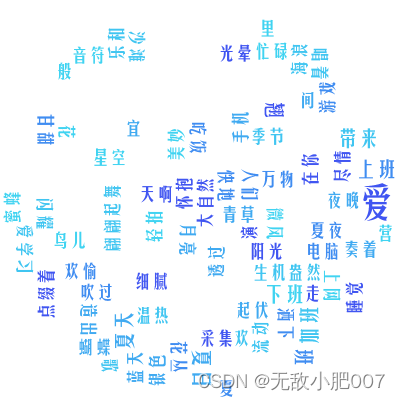
公司项目涉及到员工任务管理,需要从员工任务中获取任务信息生成个人词云图,可以把员工任务中较为高频的词语突出展示。
一、词云是什么?
词云就是对文本中出现频率较高的“关键词”予以视觉上的突出,形成“关键词云层” 或“关键词渲染”,从而过滤掉大量的文本信息,使浏览网页者只要一眼扫过文本就可以领略文本的主旨。
二、使用步骤
1.引入依赖
<dependency> <groupId>cn.shenyanchao.ik-analyzergroupId> <artifactId>ik-analyzerartifactId> <version>9.0.0version> dependency> <dependency> <groupId>com.kennycasongroupId> <artifactId>kumo-coreartifactId> <version>1.28version> dependency> <dependency> <groupId>com.kennycasongroupId> <artifactId>kumo-tokenizersartifactId> <version>1.28version> dependency> <dependency> <groupId>org.springframework.bootgroupId> <artifactId>spring-boot-starter-webartifactId> dependency> <dependency> <groupId>org.projectlombokgroupId> <artifactId>lombokartifactId> <optional>trueoptional> dependency>- 1
- 2
- 3
- 4
- 5
- 6
- 7
- 8
- 9
- 10
- 11
- 12
- 13
- 14
- 15
- 16
- 17
- 18
- 19
- 20
- 21
- 22
- 23
- 24
- 25
- 26
- 27
- 28
- 29
- 30
- 31
2.application.yml
server: port: 8088 # 关闭日志输出 (可选) logging: level: com.kennycason.kumo.WordCloud: OFF- 1
- 2
- 3
- 4
- 5
- 6
- 7
3.Controller
import com.chendi.mydemo.utils.IkAnalyzerUtils; import com.chendi.mydemo.utils.WorkCloudUtil; import org.springframework.web.bind.annotation.GetMapping; import org.springframework.web.bind.annotation.RestController; import java.util.ArrayList; import java.util.List; import java.util.Map; @RestController public class TestController { @GetMapping("/") public void test() { List<String> list = new ArrayList<>(); list.add("爱购物,爱手机,爱电脑,爱上网"); list.add("爱学习,爱游戏,爱吃饭,爱睡觉"); list.add("爱上班,爱下班,爱加班,爱翘班"); list.add("爱上班,爱下班,爱加班,爱翘班"); list.add("夏天的阳光明媚灿烂,\n" + "大自然万物生机盎然。\n" + "清晨的微风吹过花丛,\n" + "点缀着青草和蓝天。\n" + "\n" + "蝴蝶翩翩起舞在花间,\n" + "蜜蜂忙碌采集甘甜。\n" + "鸟儿欢快地歌唱着,\n" + "为夏日带来欢欣和欢愉。\n" + "\n" + "海浪轻拍沙滩起伏,\n" + "沙粒细腻温热宜走。\n" + "阳光透过水面璀璨,\n" + "让海洋如银河般流动。\n" + "\n" + "夏日的夜晚星空闪耀,\n" + "月亮洒下银色光晕。\n" + "夏虫的音符演奏着,\n" + "营造出夏夜的美妙。\n" + "\n" + "夏天啊,你是如此迷人,\n" + "给人们带来快乐和欢欣。\n" + "在你的怀抱里,我们尽情享受,\n" + "夏天,你是美丽的季节!"); Map<String, Integer> wordMap = IkAnalyzerUtils.wordCloud(list, 0); WorkCloudUtil.generateWriteImage(wordMap); } }- 1
- 2
- 3
- 4
- 5
- 6
- 7
- 8
- 9
- 10
- 11
- 12
- 13
- 14
- 15
- 16
- 17
- 18
- 19
- 20
- 21
- 22
- 23
- 24
- 25
- 26
- 27
- 28
- 29
- 30
- 31
- 32
- 33
- 34
- 35
- 36
- 37
- 38
- 39
- 40
- 41
- 42
- 43
- 44
- 45
- 46
- 47
- 48
- 49
4.分词工具类
import org.wltea.analyzer.core.IKSegmenter; import org.wltea.analyzer.core.Lexeme; import java.io.IOException; import java.io.StringReader; import java.util.*; /** * 解析工具类 */ public class IkAnalyzerUtils { /** * 拆分词云 * * @param list 需要拆分的词云集合 * @param quantity 结果集取的数量 */ public static String wordCloudParsing(List<String> list, Integer quantity) { Map<String,Integer> result = wordCloud(list,quantity); StringBuilder str = new StringBuilder(); result.forEach((k, v) -> { String value = " " + k; str.append(value); }); return str.toString().trim(); } /** * 拆分词云 * * @param list 需要拆分的词云集合 * @param quantity 结果集取的数量 */ public static List<Map<String,Object>> wordCloudList(List<String> list, Integer quantity) { Map<String,Integer> result = wordCloud(list,quantity); List<Map<String,Object>> mapList = new LinkedList<>(); result.forEach((k, v) -> { Map<String,Object> map = new HashMap<>(16); map.put("name",k); map.put("value",v); mapList.add(map); }); Collections.reverse(mapList); return mapList; } /** * 拆分词云 * * @param list 需要拆分的词云集合 * @param quantity 结果集取的数量 */ public static Map<String,Integer> wordCloud(List<String> list, Integer quantity) { StringReader reader = new StringReader(String.join(",", list)); IKSegmenter ikSegmenter = new IKSegmenter(reader, true); Map<String, Integer> map = null; try { Lexeme lexeme; map = new HashMap<>(16); while ((lexeme = ikSegmenter.next()) != null) { String str = lexeme.getLexemeText(); Integer num = map.get(str); if (num != null && num > 0) { map.put(str, num + 1); } else { map.put(str, 1); } } reader.close(); } catch (IOException e) { e.printStackTrace(); } Map<String, Integer> result = new LinkedHashMap<>(); if (quantity != null && quantity > 0) { map.entrySet().stream().sorted(Map.Entry.comparingByValue()).limit(quantity) .forEachOrdered(item -> result.put(item.getKey(), item.getValue())); } else { map.entrySet().stream().sorted(Map.Entry.comparingByValue()) .forEachOrdered(item -> result.put(item.getKey(), item.getValue())); } return result; } }- 1
- 2
- 3
- 4
- 5
- 6
- 7
- 8
- 9
- 10
- 11
- 12
- 13
- 14
- 15
- 16
- 17
- 18
- 19
- 20
- 21
- 22
- 23
- 24
- 25
- 26
- 27
- 28
- 29
- 30
- 31
- 32
- 33
- 34
- 35
- 36
- 37
- 38
- 39
- 40
- 41
- 42
- 43
- 44
- 45
- 46
- 47
- 48
- 49
- 50
- 51
- 52
- 53
- 54
- 55
- 56
- 57
- 58
- 59
- 60
- 61
- 62
- 63
- 64
- 65
- 66
- 67
- 68
- 69
- 70
- 71
- 72
- 73
- 74
- 75
- 76
- 77
- 78
- 79
- 80
- 81
- 82
- 83
- 84
- 85
4.词云生成工具类、支持输出文件和字节流
import com.kennycason.kumo.CollisionMode; import com.kennycason.kumo.WordCloud; import com.kennycason.kumo.WordFrequency; import com.kennycason.kumo.bg.CircleBackground; import com.kennycason.kumo.font.KumoFont; import com.kennycason.kumo.font.scale.SqrtFontScalar; import com.kennycason.kumo.nlp.FrequencyAnalyzer; import com.kennycason.kumo.nlp.tokenizers.ChineseWordTokenizer; import com.kennycason.kumo.palette.ColorPalette; import lombok.SneakyThrows; import java.awt.*; import java.io.ByteArrayInputStream; import java.io.ByteArrayOutputStream; import java.io.InputStream; import java.util.ArrayList; import java.util.List; import java.util.Map; public class WorkCloudUtil { @SneakyThrows public static InputStream generateImageStream(Map<String, Integer> wordMap) { WordCloud wordCloud = generateWordCloud(wordMap); //输出字节流 ByteArrayOutputStream out =new ByteArrayOutputStream(); wordCloud.writeToStreamAsPNG(out); return new ByteArrayInputStream(out.toByteArray()); } @SneakyThrows public static void generateWriteImage(Map<String, Integer> wordMap) { WordCloud wordCloud = generateWordCloud(wordMap); wordCloud.writeToFile("D:\\chendi\\cd.png"); } public static WordCloud generateWordCloud(Map<String, Integer> wordMap){ if (wordMap == null || wordMap.size() == 0) { return null; } final FrequencyAnalyzer frequencyAnalyzer = new FrequencyAnalyzer(); frequencyAnalyzer.setWordFrequenciesToReturn(600); frequencyAnalyzer.setMinWordLength(2); frequencyAnalyzer.setWordTokenizer(new ChineseWordTokenizer()); final List<WordFrequency> wordFrequencies = new ArrayList<>(); for (Map.Entry<String, Integer> entry : wordMap.entrySet()) { wordFrequencies.add(new WordFrequency(entry.getKey(), entry.getValue())); } Font font = FontUtil.getFont("/static/fonts/QingNiaoHuaGuangJianMeiHei-2.ttf"); //设置图片分辨率 final Dimension dimension = new Dimension(400, 400); //此处的设置采用内置常量即可,生成词云对象 final WordCloud wordCloud = new WordCloud(dimension, CollisionMode.PIXEL_PERFECT); //设置边界及字体 wordCloud.setPadding(2); wordCloud.setBackgroundColor(Color.WHITE); //设置背景图层为圆形,设置圆形的大小 wordCloud.setBackground(new CircleBackground(200)); //设置词云显示的三种颜色,越靠前设置表示词频越高的词语的颜色 wordCloud.setColorPalette(new ColorPalette(new Color(0x4055F1), new Color(0x408DF1), new Color(0x40AAF1), new Color(0x40C5F1), new Color(0x40D3F1), new Color(0xFFFFFF))); //设置字体的大小 wordCloud.setFontScalar(new SqrtFontScalar(10, 40)); wordCloud.setKumoFont(new KumoFont(font)); wordCloud.build(wordFrequencies); //设置背景图片,如果想要固定的形状,就插入这个形状的图片 //wordCloud.setBackground(new PixelBoundryBackground("E:\\星星/star.jpg")); return wordCloud; } }- 1
- 2
- 3
- 4
- 5
- 6
- 7
- 8
- 9
- 10
- 11
- 12
- 13
- 14
- 15
- 16
- 17
- 18
- 19
- 20
- 21
- 22
- 23
- 24
- 25
- 26
- 27
- 28
- 29
- 30
- 31
- 32
- 33
- 34
- 35
- 36
- 37
- 38
- 39
- 40
- 41
- 42
- 43
- 44
- 45
- 46
- 47
- 48
- 49
- 50
- 51
- 52
- 53
- 54
- 55
- 56
- 57
- 58
- 59
- 60
- 61
- 62
- 63
- 64
- 65
- 66
- 67
- 68
- 69
- 70
- 71
- 72
注意
处理中文需要宿主机有中文字体包、如果宿主机不支持中文,请下载一个中文字体包
本文指定使用的就是QingNiaoHuaGuangJianMeiHei-2.ttf字体
百度一下、找不到私信我发你QingNiaoHuaGuangJianMeiHei-2.ttf字体包
-
相关阅读:
算法竞赛备赛之贪心算法训练提升,贪心算法基础掌握
@PostConstruct注解详解
基于深度学习的网络物理系统故障检测与诊断(第一部分,Python)
大数据算法系列6:面试题与ACM题选讲2
易点易动固定资产管理系统:提升企业固定资产领用效率的智慧选择
chromium114添加新的语言国际化支持
linux安装opencv
lua学习笔记
Class加载过程
leeetcode_2530 执行k次操作后的最大分数
- 原文地址:https://blog.csdn.net/weixin_45549188/article/details/132617046