-
对极几何与三角化求3D空间坐标
一,使用对极几何约束求R,T

- void find_feature_matches(const Mat &img_1, const Mat &img_2,
- std::vector
&keypoints_1, - std::vector
&keypoints_2, - std::vector
&matches) { - //-- 初始化
- Mat descriptors_1, descriptors_2;
- // used in OpenCV3
- Ptr
detector = ORB::create(); - Ptr
descriptor = ORB::create(); - // use this if you are in OpenCV2
- // Ptr
detector = FeatureDetector::create ( "ORB" ); - // Ptr
descriptor = DescriptorExtractor::create ( "ORB" ); - Ptr
matcher = DescriptorMatcher::create("BruteForce-Hamming"); - //-- 第一步:检测 Oriented FAST 角点位置
- detector->detect(img_1, keypoints_1);
- detector->detect(img_2, keypoints_2);
- //-- 第二步:根据角点位置计算 BRIEF 描述子
- descriptor->compute(img_1, keypoints_1, descriptors_1);
- descriptor->compute(img_2, keypoints_2, descriptors_2);
- //-- 第三步:对两幅图像中的BRIEF描述子进行匹配,使用 Hamming 距离
- vector
match; - // BFMatcher matcher ( NORM_HAMMING );
- matcher->match(descriptors_1, descriptors_2, match);
- //-- 第四步:匹配点对筛选
- double min_dist = 10000, max_dist = 0;
- //找出所有匹配之间的最小距离和最大距离, 即是最相似的和最不相似的两组点之间的距离
- for (int i = 0; i < descriptors_1.rows; i++) {
- double dist = match[i].distance;
- if (dist < min_dist) min_dist = dist;
- if (dist > max_dist) max_dist = dist;
- }
- printf("-- Max dist : %f \n", max_dist);
- printf("-- Min dist : %f \n", min_dist);
- //当描述子之间的距离大于两倍的最小距离时,即认为匹配有误.但有时候最小距离会非常小,设置一个经验值30作为下限.
- for (int i = 0; i < descriptors_1.rows; i++) {
- if (match[i].distance <= max(2 * min_dist, 30.0)) {
- matches.push_back(match[i]);
- }
- }
- }
二、使用本质矩阵求解R,T
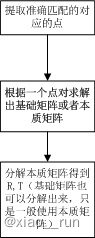
第二步:根据匹配点对,依据对极几何约束原理,求相机运动的R,t
- void pose_estimation_2d2d(
- const std::vector
&keypoints_1, - const std::vector
&keypoints_2, - const std::vector
&matches, - Mat &R, Mat &t) {
- // 相机内参,TUM Freiburg2
- Mat K = (Mat_<double>(3, 3) << 520.9, 0, 325.1, 0, 521.0, 249.7, 0, 0, 1);
- //-- 把匹配点转换为vector
的形式 - vector
points1; - vector
points2; - for (int i = 0; i < (int) matches.size(); i++) {
- points1.push_back(keypoints_1[matches[i].queryIdx].pt);
- points2.push_back(keypoints_2[matches[i].trainIdx].pt);
- }
- //-- 计算本质矩阵
- Point2d principal_point(325.1, 249.7); //相机主点, TUM dataset标定值
- int focal_length = 521; //相机焦距, TUM dataset标定值
- Mat essential_matrix;
- essential_matrix = findEssentialMat(points1, points2, focal_length, principal_point);
- //-- 从本质矩阵中恢复旋转和平移信息.
- recoverPose(essential_matrix, points1, points2, R, t, focal_length, principal_point);
- }
三、由R,T三角化空间坐标
第三步:根据针孔相机模型的公式,由 R,t估计特征点的空间坐标

- //三角化,根据匹配点和求解到的三维点。存储在points中
- void triangulation(
- const vector
&keypoint_1, - const vector
&keypoint_2, - const std::vector
&matches, - const Mat &R, const Mat &t,
- vector
&points) { - Mat T1 = (Mat_<float>(3, 4) <<
- 1, 0, 0, 0,
- 0, 1, 0, 0,
- 0, 0, 1, 0);
- //根据求解到的RT构造T2矩阵
- Mat T2 = (Mat_<float>(3, 4) <<
- R.at<double>(0, 0), R.at<double>(0, 1), R.at<double>(0, 2), t.at<double>(0, 0),
- R.at<double>(1, 0), R.at<double>(1, 1), R.at<double>(1, 2), t.at<double>(1, 0),
- R.at<double>(2, 0), R.at<double>(2, 1), R.at<double>(2, 2), t.at<double>(2, 0)
- );
- //相机内参
- Mat K = (Mat_<double>(3, 3) << 520.9, 0, 325.1, 0, 521.0, 249.7, 0, 0, 1);
- vector
pts_1, pts_2; - for (DMatch m:matches) {
- // 将像素坐标转换至相机坐标
- pts_1.push_back(pixel2cam(keypoint_1[m.queryIdx].pt, K));
- pts_2.push_back(pixel2cam(keypoint_2[m.trainIdx].pt, K));
- }
- Mat pts_4d;
- cv::triangulatePoints(T1, T2, pts_1, pts_2, pts_4d);
- // 转换成非齐次坐标
- for (int i = 0; i < pts_4d.cols; i++) {
- Mat x = pts_4d.col(i);
- x /= x.at<float>(3, 0); // 归一化
- Point3d p(
- x.at<float>(0, 0),
- x.at<float>(1, 0),
- x.at<float>(2, 0)
- );
- points.push_back(p);
- }
- }
其中 triangulatePoints()的具体用法为
- triangulatePoints(T1, T2, left, right, points_final) ;
- Mat T1 = (Mat_<float>(3, 4) <<
- 1, 0, 0, 0,
- 0, 1, 0, 0,
- 0, 0, 1, 0);
- Mat T2 = (Mat_<float>(3, 4) <<
- R.at<double>(0, 0), R.at<double>(0, 1), R.at<double>(0, 2), T.at<double>(0, 0),
- R.at<double>(1, 0), R.at<double>(1, 1), R.at<double>(1, 2), T.at<double>(1, 0),
- R.at<double>(2, 0), R.at<double>(2, 1), R.at<double>(2, 2), T.at<double>(2, 0)
- );`
- triangulatePoints(T1, T2, left, right, points_final) ;
- 其中T2为3x4的[R|T]矩阵,left、right为相机坐标系下的归一化坐标,
- 因此不能直接使用提取到的像素坐标。应首先将像素坐标通过相机内参转化到相机坐标系下。
所以通过函数pixel2cam可将像素坐标转换到归一化相机坐标系下
归一化坐标:X=(u-u0)/fx
- //像素坐标到归一化平面相机坐标的转换
- Point2f pixel2cam(const Point2f& p, const Mat& K)
- {
- return Point2f
- (
- (p.x - K.at<double>(0, 2)) / K.at<double>(0, 0),
- (p.y - K.at<double>(1, 2)) / K.at<double>(1, 1)
- );
- }
四、代码demo
总的代码为:
- #include
- #include
- // #include "extra.h" // used in opencv2
- using namespace std;
- using namespace cv;
- void find_feature_matches(
- const Mat &img_1, const Mat &img_2,
- std::vector
&keypoints_1, - std::vector
&keypoints_2, - std::vector
&matches) ; - void pose_estimation_2d2d(
- const std::vector
&keypoints_1, - const std::vector
&keypoints_2, - const std::vector
&matches, - Mat &R, Mat &t);
- void triangulation(
- const vector
&keypoint_1, - const vector
&keypoint_2, - const std::vector
&matches, - const Mat &R, const Mat &t,
- vector
&points - );
- /// 作图用
- inline cv::Scalar get_color(float depth) {
- float up_th = 50, low_th = 10, th_range = up_th - low_th;
- if (depth > up_th) depth = up_th;
- if (depth < low_th) depth = low_th;
- return cv::Scalar(255 * depth / th_range, 0, 255 * (1 - depth / th_range));
- }
- // 像素坐标转相机归一化坐标
- Point2f pixel2cam(const Point2d &p, const Mat &K);
- int main(int argc, char **argv) {
- if (argc != 3) {
- cout << "usage: triangulation img1 img2" << endl;
- return 1;
- }
- //-- 读取图像
- Mat img_1 = imread(argv[1], CV_LOAD_IMAGE_COLOR);
- Mat img_2 = imread(argv[2], CV_LOAD_IMAGE_COLOR);
- vector
keypoints_1, keypoints_2; - vector
matches; - find_feature_matches(img_1, img_2, keypoints_1, keypoints_2, matches);
- cout << "一共找到了" << matches.size() << "组匹配点" << endl;
- //-- 估计两张图像间运动
- Mat R, t;
- pose_estimation_2d2d(keypoints_1, keypoints_2, matches, R, t);
- //-- 三角化
- vector
points; - //tr是三维点
- triangulation(keypoints_1, keypoints_2, matches, R, t, tr);
- //-- 验证三角化点与特征点的重投影关系
- Mat K = (Mat_<double>(3, 3) << 520.9, 0, 325.1, 0, 521.0, 249.7, 0, 0, 1);
- Mat img1_plot = img_1.clone();
- Mat img2_plot = img_2.clone();
- for (int i = 0; i < matches.size(); i++) {
- // 第一个图
- float depth1 = points[i].z;
- cout << "depth: " << depth1 << endl;
- Point2d pt1_cam = pixel2cam(keypoints_1[matches[i].queryIdx].pt, K);
- cv::circle(img1_plot, keypoints_1[matches[i].queryIdx].pt, 2, get_color(depth1), 2);
- // 第二个图
- Mat pt2_trans = R * (Mat_<double>(3, 1) << points[i].x, points[i].y, points[i].z) + t;
- float depth2 = pt2_trans.at<double>(2, 0);
- cv::circle(img2_plot, keypoints_2[matches[i].trainIdx].pt, 2, get_color(depth2), 2);
- }
- cv::imshow("img 1", img1_plot);
- cv::imshow("img 2", img2_plot);
- cv::waitKey();
- return 0;
- }
- void find_feature_matches(const Mat &img_1, const Mat &img_2,
- std::vector
&keypoints_1, - std::vector
&keypoints_2, - std::vector
&matches) { - //-- 初始化
- Mat descriptors_1, descriptors_2;
- // used in OpenCV3
- Ptr
detector = ORB::create(); - Ptr
descriptor = ORB::create(); - // use this if you are in OpenCV2
- // Ptr
detector = FeatureDetector::create ( "ORB" ); - // Ptr
descriptor = DescriptorExtractor::create ( "ORB" ); - Ptr
matcher = DescriptorMatcher::create("BruteForce-Hamming"); - //-- 第一步:检测 Oriented FAST 角点位置
- detector->detect(img_1, keypoints_1);
- detector->detect(img_2, keypoints_2);
- //-- 第二步:根据角点位置计算 BRIEF 描述子
- descriptor->compute(img_1, keypoints_1, descriptors_1);
- descriptor->compute(img_2, keypoints_2, descriptors_2);
- //-- 第三步:对两幅图像中的BRIEF描述子进行匹配,使用 Hamming 距离
- vector
match; - // BFMatcher matcher ( NORM_HAMMING );
- matcher->match(descriptors_1, descriptors_2, match);
- //-- 第四步:匹配点对筛选
- double min_dist = 10000, max_dist = 0;
- //找出所有匹配之间的最小距离和最大距离, 即是最相似的和最不相似的两组点之间的距离
- for (int i = 0; i < descriptors_1.rows; i++) {
- double dist = match[i].distance;
- if (dist < min_dist) min_dist = dist;
- if (dist > max_dist) max_dist = dist;
- }
- printf("-- Max dist : %f \n", max_dist);
- printf("-- Min dist : %f \n", min_dist);
- //当描述子之间的距离大于两倍的最小距离时,即认为匹配有误.但有时候最小距离会非常小,设置一个经验值30作为下限.
- for (int i = 0; i < descriptors_1.rows; i++) {
- if (match[i].distance <= max(2 * min_dist, 30.0)) {
- matches.push_back(match[i]);
- }
- }
- }
- void pose_estimation_2d2d(
- const std::vector
&keypoints_1, - const std::vector
&keypoints_2, - const std::vector
&matches, - Mat &R, Mat &t) {
- // 相机内参,TUM Freiburg2
- Mat K = (Mat_<double>(3, 3) << 520.9, 0, 325.1, 0, 521.0, 249.7, 0, 0, 1);
- //-- 把匹配点转换为vector
的形式 - vector
points1; - vector
points2; - for (int i = 0; i < (int) matches.size(); i++) {
- points1.push_back(keypoints_1[matches[i].queryIdx].pt);
- points2.push_back(keypoints_2[matches[i].trainIdx].pt);
- }
- //-- 计算本质矩阵
- Point2d principal_point(325.1, 249.7); //相机主点, TUM dataset标定值
- int focal_length = 521; //相机焦距, TUM dataset标定值
- Mat essential_matrix;
- essential_matrix = findEssentialMat(points1, points2, focal_length, principal_point);
- //-- 从本质矩阵中恢复旋转和平移信息.
- recoverPose(essential_matrix, points1, points2, R, t, focal_length, principal_point);
- }
- //三角化,根据匹配点和求解到的三维点。存储在points中
- void triangulation(
- const vector
&keypoint_1, - const vector
&keypoint_2, - const std::vector
&matches, - const Mat &R, const Mat &t,
- vector
&points) { - Mat T1 = (Mat_<float>(3, 4) <<
- 1, 0, 0, 0,
- 0, 1, 0, 0,
- 0, 0, 1, 0);
- //根据求解到的RT构造T2矩阵
- Mat T2 = (Mat_<float>(3, 4) <<
- R.at<double>(0, 0), R.at<double>(0, 1), R.at<double>(0, 2), t.at<double>(0, 0),
- R.at<double>(1, 0), R.at<double>(1, 1), R.at<double>(1, 2), t.at<double>(1, 0),
- R.at<double>(2, 0), R.at<double>(2, 1), R.at<double>(2, 2), t.at<double>(2, 0)
- );
- //相机内参
- Mat K = (Mat_<double>(3, 3) << 520.9, 0, 325.1, 0, 521.0, 249.7, 0, 0, 1);
- vector
pts_1, pts_2; - for (DMatch m:matches) {
- // 将像素坐标转换至相机坐标
- pts_1.push_back(pixel2cam(keypoint_1[m.queryIdx].pt, K));
- pts_2.push_back(pixel2cam(keypoint_2[m.trainIdx].pt, K));
- }
- Mat pts_4d;
- cv::triangulatePoints(T1, T2, pts_1, pts_2, pts_4d);
- // 转换成非齐次坐标
- for (int i = 0; i < pts_4d.cols; i++) {
- Mat x = pts_4d.col(i);
- x /= x.at<float>(3, 0); // 归一化
- Point3d p(
- x.at<float>(0, 0),
- x.at<float>(1, 0),
- x.at<float>(2, 0)
- );
- points.push_back(p);
- }
- }
- Point2f pixel2cam(const Point2d &p, const Mat &K) {
- return Point2f
- (
- (p.x - K.at<double>(0, 2)) / K.at<double>(0, 0),
- (p.y - K.at<double>(1, 2)) / K.at<double>(1, 1)
- );
- }
-
相关阅读:
Numpy学习
k8s-实战——kubeadm二进制编译
第13章 网络安全漏洞防护技术原理与应用
vue项目中使用antvX6新手教程,附demo案例讲解(可拖拽流程图、网络拓扑图)
uniApp监听左右滑动事件
新库上线 | CnOpenData文化、体育和娱乐业工商注册企业基本信息数据
Python学习之CSDN21天学习挑战赛计划之11
ModStartBlog v6.1.0 界面显示优化,富文本升级
Python 页面解析:Beautiful Soup库的使用
助你成为专业终端人,阿里巴巴第三届终端练习生计划开启报名!
- 原文地址:https://blog.csdn.net/xiao__run/article/details/132736625
