-
openGauss 3.1企业版升级至5.0
📢📢📢📣📣📣
哈喽!大家好,我是【IT邦德】,江湖人称jeames007,10余年DBA及大数据工作经验
一位上进心十足的【大数据领域博主】!😜😜😜
中国DBA联盟(ACDU)成员,目前服务于工业互联网
擅长主流Oracle、MySQL、PG、高斯及GP 运维开发,备份恢复,安装迁移,性能优化、故障应急处理等。
✨ 如果有对【数据库】感兴趣的【小可爱】,欢迎关注【IT邦德】💞💞💞
❤️❤️❤️感谢各位大可爱小可爱!❤️❤️❤️前言
本篇结合企业实战介绍了openGauss企业版升级实战,版本从3.1升级到5.0版本
📣 1.概述
通过https://opengauss.org/zh/download/ 登录openGauss开源社区,选择3.1.1版本对应平台企业版安装包 本文将从企业实战角度,从3.1.1版升级到5.0.0版本,并对安装升级的过程中的问题点做了详细的说明- 1
- 2
- 3

📣 2.环境准备
✨ 2.1 关闭SeLinux
sed -i ‘s/^SELINUX=enforcing/SELINUX=disabled/g’ /etc/selinux/config setenforce 0 注:然后重启服务器 [root@opengauss ~]# /usr/sbin/sestatus SELinux status: disabled- 1
- 2
- 3
- 4
- 5
- 6
✨ 2.2 关闭防火墙
1.检查防火墙是否关闭 [root@opengauss ~]# systemctl status firewalld 若防火墙状态显示为active (running),则表示防火墙未关闭 若防火墙状态显示为inactive (dead),则无需再关闭防火墙 2.关闭防火墙并禁止开机重启 [root@opengauss ~]# systemctl disable firewalld.service [root@opengauss ~]# systemctl stop firewalld.service- 1
- 2
- 3
- 4
- 5
- 6
- 7
- 8
✨ 2.3 关闭RemoveIPC
1.修改/etc/systemd/logind.conf文件中的“RemoveIPC”值为“no” vi /etc/systemd/logind.conf RemoveIPC=no ##重新加载配置参数 systemctl daemon-reload systemctl restart systemd-logind- 1
- 2
- 3
- 4
- 5
- 6
- 7
✨ 2.4 关闭HISTORY记录
[root@opengauss ~]# vi /etc/profile 设置HISTSIZE值为0。例如,系统中HISTSIZE默认值为1000,将其修改为0 [root@opengauss ~]# source /etc/profile- 1
- 2
- 3
✨ 2.5 设置root用户远程登录
[root@opengauss ~]# vi /etc/ssh/sshd_config ## 将“PermitRootLogin”改为“yes” PermitRootLogin yes ## 注释掉“Banner”所在的行 #Banner none ## 重启生效 systemctl restart sshd.service- 1
- 2
- 3
- 4
- 5
- 6
- 7
- 8
- 9
✨ 2.6 yum安装依赖
##创建挂载目录 [root@opengauss ~]# mkdir /cdrom [root@opengauss ~]# ls -lrt /opt/CentOS-7-x86_64-DVD-1810.iso -rw-r--r-- 1 root root 4712300544 Apr 8 09:28 /opt/CentOS-7-x86_64-DVD-1810.iso ##挂载目录 [root@opengauss ~]# mount -o loop /opt/CentOS-7-x86_64-DVD-1810.iso /cdrom [root@opengauss ~]# umount -f /cdrom [root@opengauss ~]# df -TH Filesystem Type Size Used Avail Use% Mounted on devtmpfs devtmpfs 498M 0 498M 0% /dev tmpfs tmpfs 510M 0 510M 0% /dev/shm tmpfs tmpfs 510M 8.0M 502M 2% /run tmpfs tmpfs 510M 0 510M 0% /sys/fs/cgroup /dev/mapper/centos-root xfs 96G 6.5G 90G 7% / /dev/sda1 xfs 1.1G 144M 920M 14% /boot tmpfs tmpfs 102M 0 102M 0% /run/user/0 /dev/loop0 iso9660 4.8G 4.8G 0 100% /cdrom ##yum源配置文件 [root@opengauss ~]# cd /etc/yum.repos.d/ [root@opengauss yum.repos.d]# mkdir bak [root@opengauss yum.repos.d]# mv *.repo bak [root@opengauss5m yum.repos.d]# vi local.repo [base-local] name=CentOS7-local baseurl=file:///cdrom enabled=1 gpgcheck=0 #清空并重载yum yum clean all yum makecache ##测试yum安装 yum -y install tree ##安装依赖包 yum install libaio-devel flex bison ncurses-devel glibc-devel patch redhat-lsb-core readline-devel libnsl -y yum install net-tools -y yum install expect -y- 1
- 2
- 3
- 4
- 5
- 6
- 7
- 8
- 9
- 10
- 11
- 12
- 13
- 14
- 15
- 16
- 17
- 18
- 19
- 20
- 21
- 22
- 23
- 24
- 25
- 26
- 27
- 28
- 29
- 30
- 31
- 32
- 33
- 34
- 35
- 36
- 37
- 38
- 39
- 40
- 41
- 42
- 43
- 44
- 45
✨ 2.7 host设置
[root@opengauss ~]# cat /etc/hosts 127.0.0.1 localhost localhost.localdomain localhost4 localhost4.localdomain4 ::1 localhost localhost.localdomain localhost6 localhost6.localdomain6 192.168.6.30 opengauss- 1
- 2
- 3
- 4
- 5
✨ 2.8 Python安装
CentOS:支持Python 3.6.X,python需要通过--enable-shared方式编译 1.依赖包安装 [root@opengauss ~]# yum install -y zlib* [root@opengauss ~]# rpm -qa | grep zlib zlib-1.2.7-18.el7.x86_64 zlib-devel-1.2.7-18.el7.x86_64 2.安装包下载 python官网 https://www.python.org/downloads/release/python-3615/下载安装包即可 安装包为:Python-3.6.15.tgz 3.解压并编译 yum -y install openssl-devel bzip2-devel expat-devel gdbm-devel readline-devel zlib-devel cd /opt tar -zxvf Python-3.6.15.tgz cd Python-3.6.15/ ./configure --prefix=/usr/local/python3 --enable-shared CFLAGS=-fPIC 有以下报错,安装gcc即可 configure: error: in `/opt/Python-3.6.15': configure: error: no acceptable C compiler found in $PATH yum install gcc make -j4 make install 注意:make编译时间比较长,耐心等待 python3安装遇到 zipimport.ZipImportError: can't decompress data; zlib not available yum -y install zlib* 4.OS上设置python的软连接 ln -s /usr/local/python3/bin/python3.6 /usr/bin/python3 ln -s /usr/local/python3/bin/pip3 /usr/bin/pip python3: error while loading shared libraries: libpython3.6m.so.1.0: cannot open shared object file: No such file or directory 出现以上报错处理方法,libpython3.6m.so.1.0复制到/usr/lib64/目录下即可 cp /opt/Python-3.6.15/libpython3.6m.so.1.0 /usr/lib64/ 5.环境校验 [root@opengauss ~]# python3 Python 3.6.15 (default, Apr 8 2023, 11:45:45) [GCC 4.8.5 20150623 (Red Hat 4.8.5-44)] on linux Type "help", "copyright", "credits" or "license" for more information. >>> 此处注意有个个坑,在部署过程中,python升级后,结果导致了yum不可用 [root@opengauss ~]# which /usr/bin/yum /usr/bin/yum ##查看python版本 [root@opengauss ~]# whereis python python: /usr/bin/python2.7 /usr/lib/python2.7 /usr/lib64/python2.7 /etc/python /usr/include/python2.7 /usr/share/man/man1/python.1.gz [root@opengauss ~]# which yum /usr/bin/yum 修改/usr/bin/yum中的第一行,#!/usr/bin/python,替换为#!/usr/bin/python2.7即可。- 1
- 2
- 3
- 4
- 5
- 6
- 7
- 8
- 9
- 10
- 11
- 12
- 13
- 14
- 15
- 16
- 17
- 18
- 19
- 20
- 21
- 22
- 23
- 24
- 25
- 26
- 27
- 28
- 29
- 30
- 31
- 32
- 33
- 34
- 35
- 36
- 37
- 38
- 39
- 40
- 41
- 42
- 43
- 44
- 45
- 46
- 47
- 48
- 49
- 50
- 51
- 52
- 53
- 54
- 55
- 56
- 57
- 58
- 59
- 60
- 61
- 62
- 63

📣 3.目录创建
##创建数据库软件相关目录 mkdir -p /app chmod -R 755 /app- 1
- 2
- 3
📣 4.安装包解压
安装包下载地址: https://opengauss.org/zh/download/ 注:从以上网站下载企业版即可 上传到主库所在的目录:/opt [root@opengauss ~]# cd /opt [root@opengauss opt]# ll total 4752948 -rw-r--r--. 1 root root 4712300544 May 16 22:56 CentOS-7-x86_64-DVD-2009.iso -rw-r--r--. 1 root root 131677914 May 16 23:29 openGauss-3.1.1-CentOS-64bit-all.tar.gz drwxr-xr-x. 17 501 501 4096 May 16 23:19 Python-3.6.15 -rw-r--r--. 1 root root 23035095 May 16 23:02 Python-3.6.15.tgz drwxr-xr-x. 3 root root 23 May 16 23:28 software [root@opengauss opt]# cp openGauss-3.1.1-CentOS-64bit-all.tar.gz software/openGauss ##解压安装包 cd /opt tar -zxvf openGauss-3.1.1-CentOS-64bit-all.tar.gz tar -zxvf openGauss-3.1.1-CentOS-64bit-om.tar.gz- 1
- 2
- 3
- 4
- 5
- 6
- 7
- 8
- 9
- 10
- 11
- 12
- 13
- 14
- 15
- 16
- 17
- 18
- 19
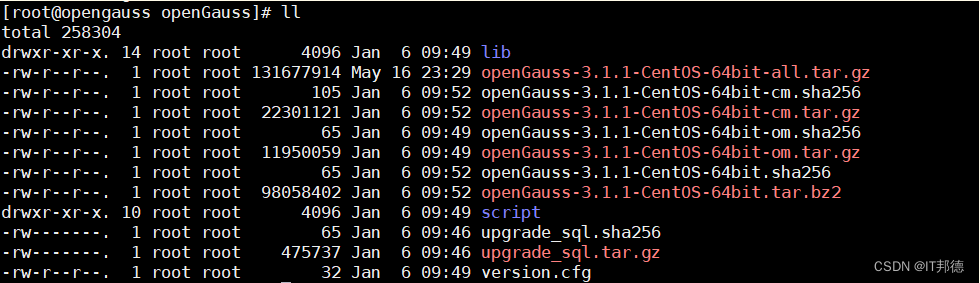
📣 5.XML配置文件
安装openGauss前需要创建cluster_config.xml文件。cluster_config.xml文件包含部署openGauss的服务器信息、安装路径、IP地址以及端口号等。 用于告知openGauss如何部署。用户需根据不同场景配置对应的XML文件。 本次部署以单机的方式创建XML配置文件 ## 配置数据库名称及各项目录 [root@opengauss ~]# find / -name cluster_config_template.xml /opt/software/openGauss/script/gspylib/etc/conf/cluster_config_template.xml 说明:获取XML文件模板,按照实际环境配置 编辑配置XML文件: vi /opt/cluster_config.xml <?xml version="1.0" encoding="UTF-8"?> <ROOT> <!-- openGauss整体信息 --> <CLUSTER> <!-- 数据库名称 --> <PARAM name="clusterName" value="rptdb" /> <!-- 数据库节点名称(hostname) --> <PARAM name="nodeNames" value="opengauss" /> <!-- 数据库安装目录--> <PARAM name="gaussdbAppPath" value="/app/openGauss/dbhome" /> <!-- 日志目录--> <PARAM name="gaussdbLogPath" value="/app/openGauss/log/omm" /> <!-- 临时文件目录--> <PARAM name="tmpMppdbPath" value="/app/openGauss/tmp" /> <!-- 数据库工具目录--> <PARAM name="gaussdbToolPath" value="/app/openGauss/install/om" /> <!-- 数据库core文件目录--> <PARAM name="corePath" value="/app/openGauss/corefile" /> <!-- 节点IP,与数据库节点名称列表一一对应 --> <PARAM name="backIp1s" value="192.168.6.30"/> </CLUSTER> <!-- 每台服务器上的节点部署信息 --> <DEVICELIST> <!-- 节点1上的部署信息 --> <DEVICE sn="opengauss"> <!-- 节点1的主机名称 --> <PARAM name="name" value="opengauss"/> <!-- 节点1所在的AZ及AZ优先级 --> <PARAM name="azName" value="AZ1"/> <PARAM name="azPriority" value="1"/> <!-- 节点1的IP,如果服务器只有一个网卡可用,将backIP1和sshIP1配置成同一个IP --> <PARAM name="backIp1" value="192.168.6.30"/> <PARAM name="sshIp1" value="192.168.6.30"/> <!--dbnode--> <PARAM name="dataNum" value="1"/> <PARAM name="dataPortBase" value="15400"/> <PARAM name="dataNode1" value="/app/openGauss/install/data/dn"/> <PARAM name="dataNode1_syncNum" value="0"/> </DEVICE> </DEVICELIST> </ROOT>- 1
- 2
- 3
- 4
- 5
- 6
- 7
- 8
- 9
- 10
- 11
- 12
- 13
- 14
- 15
- 16
- 17
- 18
- 19
- 20
- 21
- 22
- 23
- 24
- 25
- 26
- 27
- 28
- 29
- 30
- 31
- 32
- 33
- 34
- 35
- 36
- 37
- 38
- 39
- 40
- 41
- 42
- 43
- 44
- 45
- 46
- 47
- 48
- 49
- 50
- 51
- 52
- 53
- 54
- 55
📣 6.初始化安装
[root@opengauss ~]# cd /opt/script [root@opengauss script]# ./gs_preinstall -U omm -G dbgrp -X /opt/cluster_config.xml- 1
- 2

📣 7.执行安装
[omm@opengauss ~]$ gs_install -X /opt/cluster_config.xml- 1

📣 8.安装验证
## 通过openGauss提供的gs_om工具可以完成数据库状态检查 以omm用户身份登录服务器。 执行如下命令检查数据库状态是否正常,“cluster_state ”显示“Normal”表示数据库可正常使用 [root@opengauss ~]# su - omm Last login: Sat Apr 8 12:56:31 CST 2023 on pts/0 [omm@opengauss ~]$ gs_om -t status ----------------------------------------------------------------------- cluster_name : rptdb cluster_state : Normal redistributing : No ----------------------------------------------------------------------- [omm@opengauss ~]$ gs_om -t status --detail [ Cluster State ] cluster_state : Normal redistributing : No current_az : AZ_ALL [ Datanode State ] node node_ip port instance state --------------------------------------------------------------------------------------------------- 1 opengauss 192.168.6.30 15400 6001 /app/openGauss/install/data/dn P Primary Normal- 1
- 2
- 3
- 4
- 5
- 6
- 7
- 8
- 9
- 10
- 11
- 12
- 13
- 14
- 15
- 16
- 17
- 18
- 19
- 20
- 21
- 22
- 23
- 24
- 25
- 26
- 27
- 28
📣 9. 3.1升级到5.0版本
✨ 9.3.1 升级前注意事项
1.升级期间不要做增删改,生产环境务必按照要求执行。 2.建议升级期间需停止业务进行,一次性升级所有节点。 3.升级一旦失败,有可能会影响到业务的正常开展,故提前做好数据的备份。- 1
- 2
- 3
✨ 9.3.2 升级前准备
1.OS环境检查 [omm@opengauss ~]$ cat /etc/centos-release CentOS Linux release 7.6.1810 (Core) 2.高斯版本确认 [omm@opengauss ~]$ gsql --version gsql (openGauss 3.1.1 build 70980198) compiled at 2023-01-06 09:34:59 commit 0 last mr 3.数据磁盘使用空间检查 [omm@opengauss ~]$ df -TH Filesystem Type Size Used Avail Use% Mounted on /dev/mapper/centos-root xfs 49G 12G 38G 24% / devtmpfs devtmpfs 2.0G 0 2.0G 0% /dev tmpfs tmpfs 2.0G 13k 2.0G 1% /dev/shm tmpfs tmpfs 2.0G 14M 2.0G 1% /run tmpfs tmpfs 2.0G 0 2.0G 0% /sys/fs/cgroup /dev/sda1 xfs 1.1G 188M 876M 18% /boot tmpfs tmpfs 396M 50k 396M 1% /run/user/0 tmpfs tmpfs 396M 13k 396M 1% /run/user/42 /dev/loop0 iso9660 4.6G 4.6G 0 100% /cdrom 4.数据库状态确认 [omm@opengauss ~]$ gs_om -t status ----------------------------------------------------------------------- cluster_name : rptdb cluster_state : Normal redistributing : No ----------------------------------------------------------------------- 5.OS参数校验 以root用户执行如下命令对服务器的OS参数进行检查。 检查服务器的OS参数的目的是为了保证数据库正常通过预安装,并且在安装成功后可以安全高效的运行。 [root@opengauss ~]# cd /opt/script/ [root@opengauss script]# ./gs_checkos -i A Checking items: A1. [ OS version status ] : Normal A2. [ Kernel version status ] : Normal A3. [ Unicode status ] : Normal A4. [ Time zone status ] : Normal A5. [ Swap memory status ] : Warning A6. [ System control parameters status ] : Warning A7. [ File system configuration status ] : Warning A8. [ Disk configuration status ] : Normal A9. [ Pre-read block size status ] : Normal A10.[ IO scheduler status ] : Normal A11.[ Network card configuration status ] : Warning A12.[ Time consistency status ] : Warning A13.[ Firewall service status ] : Normal A14.[ THP service status ] : Normal Total numbers:14. Abnormal numbers:0. Warning numbers:5. 6.下载5.0安装包 https://opengauss.org/zh/download/- 1
- 2
- 3
- 4
- 5
- 6
- 7
- 8
- 9
- 10
- 11
- 12
- 13
- 14
- 15
- 16
- 17
- 18
- 19
- 20
- 21
- 22
- 23
- 24
- 25
- 26
- 27
- 28
- 29
- 30
- 31
- 32
- 33
- 34
- 35
- 36
- 37
- 38
- 39
- 40
- 41
- 42
- 43
- 44
- 45
- 46
- 47
- 48
- 49
- 50
- 51
- 52
- 53
- 54
- 55
- 56
✨ 9.3.3 数据库备份
使用gs_dumpall一次导出openGauss的所有数据库 [omm@opengauss ~]$ mkdir dump [omm@opengauss ~]$ gs_dumpall -f /home/omm/dump/bkpall.sql -p 15400- 1
- 2
- 3
✨ 9.3.4 升级操作
1.root用户创建新包目录 mkdir -p /opt/gaussdb_upgrade 2.解压5.0安装包 将需要更新的5.0新包上传至目录/opt/gaussdb_upgrade并解压。 [root@opengauss ~]# cd /opt/gaussdb_upgrade [root@opengauss gaussdb_upgrade]# tar -zxvf openGauss-5.0.0-CentOS-64bit-all.tar.gz [root@opengauss gaussdb_upgrade]# tar -zxvf openGauss-5.0.0-CentOS-64bit-om.tar.gz 3.执行前置脚本gs_preinstall cd /opt/gaussdb_upgrade/script ./gs_preinstall -U omm -G dbgrp -X /opt/cluster_config.xml 注意:root用戶下执行,cluster_config.xml配置为3.1版本的 4.就地升级 切换至omm用户 使用如下命令进行就地升级,最后提示successfully upgrade all nodes.就可以了。 gs_upgradectl -t auto-upgrade -X /opt/cluster_config.xml --grey Static configuration matched with old static configuration files. Successfully set upgrade_mode to 0. Checking upgrade environment. Successfully checked upgrade environment. Start to do health check. Successfully checked cluster status. Upgrade one node 'opengauss'. NOTICE: The directory /app/openGauss/dbhome_70980198 will be deleted after commit-upgrade, please make sure there is no personal data. Performing grey rollback. No need to rollback. The directory /app/openGauss/dbhome_70980198 will be deleted after commit-upgrade, please make sure there is no personal data. Installing new binary. copy certs from /app/openGauss/dbhome_70980198 to /app/openGauss/dbhome_a07d57c3. Successfully copy certs from /app/openGauss/dbhome_70980198 to /app/openGauss/dbhome_a07d57c3. Successfully backup hotpatch config file. Sync cluster configuration. Successfully synced cluster configuration. Switch symbolic link to new binary directory. Successfully switch symbolic link to new binary directory. Start check CMS parameter. Switching all db processes. Check cluster state. Cluster state: [ Cluster State ] cluster_state : Normal redistributing : No current_az : AZ_ALL [ Datanode State ] node node_ip port instance state ------------------------------------------------------------------------- 1 opengauss 192.168.6.30 15400 6001 P Primary Normal Create checkpoint before switching. Start to wait for om_monitor. Switching DN processes. Ready to grey start cluster. Grey start cluster successfully. Wait for the cluster status normal or degrade. Successfully switch all process version The nodes ['opengauss'] have been successfully upgraded to new version. Then do health check. Start to do health check. Successfully checked cluster status. Waiting for the cluster status to become normal. . The cluster status is normal. Upgrade main process has been finished, user can do some check now. Once the check done, please execute following command to commit upgrade: gs_upgradectl -t commit-upgrade -X /opt/cluster_config.xml Successfully upgrade all nodes- 1
- 2
- 3
- 4
- 5
- 6
- 7
- 8
- 9
- 10
- 11
- 12
- 13
- 14
- 15
- 16
- 17
- 18
- 19
- 20
- 21
- 22
- 23
- 24
- 25
- 26
- 27
- 28
- 29
- 30
- 31
- 32
- 33
- 34
- 35
- 36
- 37
- 38
- 39
- 40
- 41
- 42
- 43
- 44
- 45
- 46
- 47
- 48
- 49
- 50
- 51
- 52
- 53
- 54
- 55
- 56
- 57
- 58
- 59
- 60
- 61
- 62
- 63
- 64
- 65
- 66
- 67
- 68
- 69
- 70
- 71
- 72
✨ 9.3.5 升级验证
[omm@opengauss ~]$ gs_om -t status ----------------------------------------------------------------------- cluster_name : rptdb cluster_state : Normal redistributing : No ----------------------------------------------------------------------- [omm@opengauss ~]$ gs_ssh -c "gsql -V" Successfully execute command on all nodes. Output: [SUCCESS] opengauss: gsql (openGauss 5.0.0 build a07d57c3) compiled at 2023-03-29 03:07:56 commit 0 last mr- 1
- 2
- 3
- 4
- 5
- 6
- 7
- 8
- 9
- 10
- 11
- 12
- 13
- 14
- 15

✨ 9.3.6 提交升级
升级完成后,如果验证也没问题,接下来就可以提交升级,需要注意的是,一旦提交操作完成,则不能再执行回滚操作。 以数据库用户(如omm)执行如下命令完成升级提交。 [omm@opengauss ~]$ gs_upgradectl -t commit-upgrade -X /opt/cluster_config.xml Start to do health check. Successfully checked cluster status. Start check CMS parameter. Successfully cleaned old install path. Commit upgrade succeeded. 至此,openGauss3.1.0升级5.0.0版本完成。 如果数据库异常,需要强制回滚,可以使用如下命令: gs_upgradectl -t auto-rollback -X /opt/cluster_config.xml --force- 1
- 2
- 3
- 4
- 5
- 6
- 7
- 8
- 9
- 10
- 11
- 12
- 13
- 14


-
相关阅读:
2.求100-999之间的水仙花数
2042. 检查句子中的数字是否递增-力扣双百代码-设置前置数据
2022护网日记,护网工作内容、护网事件、告警流量分析
基于BM1684移植YOLOV7
Qt5开发从入门到精通——第六篇三节( 图像与图片——双缓冲机制)
记录下电脑windows安装Tina的过程
网络爬虫技术及应用
【学习日记】win64配置openni的vs2022编译环境
多线程代码中,如何查看各个线程的状态(JAVA)
Python(黄金时代)—— 让文字来说话
- 原文地址:https://blog.csdn.net/weixin_41645135/article/details/130907662
