-
博客系统(ssm版本)
在前面的文章中给大家介绍过博客系统的servlet版本,但是servlet的技术非常的老旧,我们在企业中用的都是springboot相关的框架,本章内容就是讲述如何一步一步的利用ssm的技术来实现博客系统。
目录
前期配置
当我们创建完一个spring项目之后我们首先就是要准备好相关的配置文件以及创建好数据库。
创建数据库
- -- 创建数据库
- drop database if exists mycnblog;
- create database mycnblog DEFAULT CHARACTER SET utf8mb4;
- -- 使用数据数据
- use mycnblog;
- -- 创建表[用户表]
- drop table if exists userinfo;
- create table userinfo(
- id int primary key auto_increment,
- username varchar(100) not null unique,
- password varchar(100) not null,
- photo varchar(500) default '',
- createtime datetime default now(),
- updatetime datetime default now(),
- `state` int default 1
- ) default charset 'utf8mb4';
- -- 创建文章表
- drop table if exists articleinfo;
- create table articleinfo(
- id int primary key auto_increment,
- title varchar(100) not null,
- content text not null,
- createtime datetime default now(),
- updatetime datetime default now(),
- uid int not null,
- rcount int not null default 1,
- `state` int default 1
- )default charset 'utf8mb4';
- -- 创建视频表
- drop table if exists videoinfo;
- create table videoinfo(
- vid int primary key,
- `title` varchar(250),
- `url` varchar(1000),
- createtime datetime default now(),
- updatetime datetime default now(),
- uid int
- )default charset 'utf8mb4';
- -- 添加一个用户信息
- INSERT INTO `mycnblog`.`userinfo` (`id`, `username`, `password`, `photo`, `createtime`, `updatetime`, `state`) VALUES
- (1, 'admin', 'admin', '', '2021-12-06 17:10:48', '2021-12-06 17:10:48', 1);
- -- 文章添加测试数据
- insert into articleinfo(title,content,uid)
- values('Java','Java正文',1);
- -- 添加视频
- insert into videoinfo(vid,title,url,uid) values(1,'java title','http://www.baidu.com',1);
配置文件
- # 生产环境配置文件
- spring:
- datasource:
- url: jdbc:mysql://127.0.0.1:3306/mycnblog?characterEncoding=utf8&useSSL=false
- username: "root"
- password:
- driver-class-name: com.mysql.cj.jdbc.Driver
- redis:
- host: 127.0.0.1
- port: 6379
- database: 1
- session:
- store-type: redis
- redis:
- flush-mode: on_save
- namespace: spring:session
- # 设置过期时间
- server:
- port: 8081
- servlet:
- session:
- timeout: 1800
- # 配置 mybatis xml 保存路径
- mybatis:
- mapper-locations: classpath:mybatis/**Mapper.xml
- configuration:
- log-impl: org.apache.ibatis.logging.stdout.StdOutImpl
- logging:
- level:
- com:
- example:
- demo: debug
接着将我们的前端文件给导入static中。
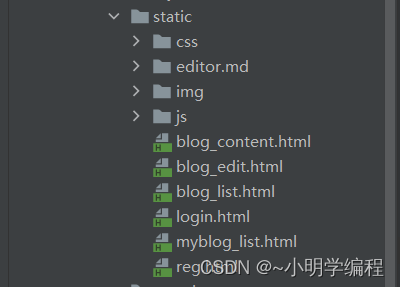
如此一来我们就创建完项目并且连接上我们的mysql数据库了,接下来就是去实现我们的相关的代码了。
公共文件
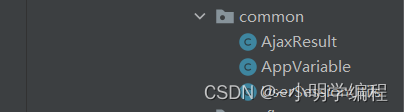
common包顾名思义就是存放我们的公共的类,这些类可能在不同的层面都会用到所以我们将这些都会用到的类放在了一起。
返回数据类
我们在实现前端的交互的时候,我们肯定需要规定好前后端数据传输的格式,我们后端传一个什么类型的数据,我们前端接受一个什么格式的数据,所以我们统一的规定好这些格式之后可以大大的减少前后端的联调时间。
- package com.example.demo.common;
- /**
- * Created with IntelliJ IDEA.
- * Description:
- * User: 86184
- * Date: 2023-05-16
- * Time: 22:27
- */
- import lombok.Data;
- import java.io.Serializable;
- /**
- * 统一数据格式返回
- */
- @Data
- public class AjaxResult implements Serializable { //实现序列化的接口
- //状态码
- private Integer code;
- //状态码描述信息
- private String msg;
- //返回的数据
- private Object data;
- /**
- * 操作成功返回的结果
- */
- public static AjaxResult success(Object data) {
- AjaxResult result = new AjaxResult();
- result.setCode(200);
- result.setMsg("");
- result.setData(data);
- return result;
- }
- public static AjaxResult success(int code, Object data) {
- AjaxResult result = new AjaxResult();
- result.setCode(code);
- result.setMsg("");
- result.setData(data);
- return result;
- }
- public static AjaxResult success(int code, String msg, Object data) {
- AjaxResult result = new AjaxResult();
- result.setCode(code);
- result.setMsg(msg);
- result.setData(data);
- return result;
- }
- /**
- * 返回失败的结果
- */
- public static AjaxResult fail(int code, String msg) {
- AjaxResult result = new AjaxResult();
- result.setCode(code);
- result.setMsg(msg);
- result.setData(null);
- return result;
- }
- public static AjaxResult fail(int code, String msg, Object data) {
- AjaxResult result = new AjaxResult();
- result.setCode(code);
- result.setMsg(msg);
- result.setData(data);
- return result;
- }
- }
这里我们定义了一个AjaxResult的类其中该类实现了Serializable接口,实现了这个接口表示该类的对象可以通过序列化机制转换为字节流,并且可以在网络上传输、存储到文件中或在不同的Java虚拟机之间进行传递。序列化是将对象转换为字节序列的过程,反序列化则是将字节序列转换回对象的过程。
- 该类包括我们的状态码,状态码的描述信息,以及返回的数据。
- 该类重载了一些静态的返回方法分别表示我们返回成功或者返回失败的情况。
全局变量
- package com.example.demo.common;
- /**
- * Created with IntelliJ IDEA.
- * Description:
- * User: 86184
- * Date: 2023-05-17
- * Time: 16:27
- */
- // 存放全局变量
- public class AppVariable {
- //session的名称
- public static final String USER_SESSION_KEY = "USER_SESSION_KEY";
- }
此类存放我们的全局变量。
Session类
- package com.example.demo.common;
- import com.example.demo.entity.Userinfo;
- import javax.servlet.http.HttpServletRequest;
- import javax.servlet.http.HttpSession;
- /**
- * Created with IntelliJ IDEA.
- * Description:当前登录用户相关的操作
- * User: 86184
- * Date: 2023-05-17
- * Time: 23:48
- */
- public class UserSessionUtils {
- public static Userinfo getSessionUser(HttpServletRequest request) {
- HttpSession session = request.getSession(false);
- if (session != null && session.getAttribute(AppVariable.USER_SESSION_KEY)!=null) {
- //说明用户已经正常登录了
- return (Userinfo) session.getAttribute(AppVariable.USER_SESSION_KEY);
- }
- return null;
- }
- }
这里我们准备了一个session工具类,该类主要是返回我们是否存储了session,然后将此session中的userinfo给取出来然后返回。这里我们可以看到我们用的是一个静态的方法这就方便我们的调用了,用的时候不需要去注入或者new了。
加密类——加盐加密
- package com.example.demo.common;
- import org.springframework.util.DigestUtils;
- import org.springframework.util.StringUtils;
- import java.util.UUID;
- /**
- * Created with IntelliJ IDEA.
- * Description:密码加密工具类
- * User: 86184
- * Date: 2023-05-21
- * Time: 21:40
- */
- public class PasswordUtils {
- // 1.加盐并且生成密码
- public static String encrypt(String password){
- // a.产生盐值(32)位
- String salt = UUID.randomUUID().toString().replace("-","");
- // b.生成加盐之后的密码
- String saltPassword = DigestUtils.md5DigestAsHex((salt+password).getBytes());
- // c.生成最终的密码(保存到数据库中的密钥)【约定格式为32位盐+$+32位加盐之后的密码】
- String finalPassword = salt+"$"+saltPassword;
- return finalPassword;
- }
- // 2.生成加盐的密码(重载方法一)
- public static String encrypt(String password, String salt){
- // 1.生成加盐之后的密码
- String saltPassword = DigestUtils.md5DigestAsHex((salt+password).getBytes());
- // 2.生成最终的密码(保存到数据库中的密钥)【约定格式为32位盐+$+32位加盐之后的密码】
- String finalPassword = salt+"$"+saltPassword;
- return finalPassword;
- }
- // 3.密码验证
- public static boolean check(String inputPassword, String finalPassword){
- if (StringUtils.hasLength(inputPassword)&&StringUtils.hasLength(finalPassword)&&finalPassword.length()==65){
- // 1.得到盐值
- String salt = finalPassword.split("\\$")[0];
- // 2.将输入的密码进行加盐加密
- String confirmPassword = PasswordUtils.encrypt(inputPassword,salt);
- // 3.对比两个最终密码是否相等
- return confirmPassword.equals(finalPassword);
- }
- return false;
- }
- }
加盐加密
一般情况下如果我们的密码没有进行加密的话是非常的危险的,一旦被拖库了是非常的危险的,我们的用户信息,特别是密码会全部被别人获取,所以我们就需要防止这种情况的产生,想要防止密码被人看到的话就得对我们的密码进行加密然后将加密后的密码存入数据库中去,这样的好处就是即使我的密码被你看到了你也不知道原密码是多少。
md5: md5是一种比较常用的加密方式它是将任意长度的输入通过一个算法然后生成一个128位的输出,通常情况下是用32位的16进制来表示,其特点其加密是不可逆的即加密之后不能通过加密的数据来推测出未加密的密码。
缺点:md5的加密虽然是不可逆的当时还是有一个致命的问题即我们每次对同一个密码的加密其结果是固定的那么如果我们穷举出所有的字符的话那么我们就可以推测出所有的密码了,这就是我们的彩虹表,彩虹表里面以类似键值对的方式将我们的密码以及md5加密的密码存储起来然后不断的去完善这各彩虹表,对于绝大多数的密码我们都可以通过彩虹表来找到的,这就存在一定的风险了。
加盐原理:加盐算法可以解决md5被暴力破解的问题,我们在用md5算法对我们的密码进行加密的时候会给原密码加上一个随机数也就是我们的盐,这样即使是同一个密码加盐之后生成的加密密码也不一样所以就大大增加了密码破译的成本。
统一处理
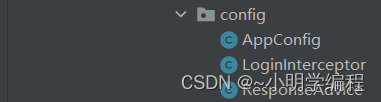
我们创建了一个config的包,这个包里面存放的是我们我么统一处理的相关类包括我们的统一登录验证,统一数据返回,统一异常处理等。
统一数据返回类
- package com.example.demo.config;
- /**
- * Created with IntelliJ IDEA.
- * Description:
- * User: 86184
- * Date: 2023-05-16
- * Time: 23:02
- */
- import com.example.demo.common.AjaxResult;
- import com.fasterxml.jackson.databind.ObjectMapper;
- import lombok.SneakyThrows;
- import org.springframework.beans.factory.annotation.Autowired;
- import org.springframework.core.MethodParameter;
- import org.springframework.http.MediaType;
- import org.springframework.http.server.ServerHttpRequest;
- import org.springframework.http.server.ServerHttpResponse;
- import org.springframework.web.bind.annotation.ControllerAdvice;
- import org.springframework.web.servlet.mvc.method.annotation.ResponseBodyAdvice;
- /**
- * 实现统一返回的保底类
- * 说明:在返回数据之前,检测数据类型是否为统一的对象,如果不是,封装成统一的对象
- */
- @ControllerAdvice
- public class ResponseAdvice implements ResponseBodyAdvice {
- @Autowired
- private ObjectMapper objectMapper;
- /**
- * 开关,如果是true才会调用beforeBodyWrite
- */
- @Override
- public boolean supports(MethodParameter returnType, Class converterType) {
- return true;
- }
- // 对数据的格式进行校验和封装
- @SneakyThrows
- @Override
- public Object beforeBodyWrite(Object body, MethodParameter returnType, MediaType selectedContentType, Class selectedConverterType, ServerHttpRequest request, ServerHttpResponse response) {
- if (body instanceof AjaxResult) return body;
- //对String类型进行特殊的处理
- if (body instanceof String) {
- return objectMapper.writeValueAsString(AjaxResult.success(body));
- }
- return AjaxResult.success(body);
- }
- }
先前我们只是准备好了统一返回的类,但是为了以防万一我们做了一个保底类通ControllerAdvice注解将其作用与我们的控制器中。
- 该类实现了ResponseBodyAdvice 接口允许在返回数据之前对返回的数据进行校验和修改。
- 对String类型的数据进行了特殊的处理,String类型不同与我们一般的类型我们注入了ObjectMapper对象将我们的String类型转换成json格式。
登录拦截器
- package com.example.demo.config;
- import com.example.demo.common.AppVariable;
- import com.example.demo.entity.Userinfo;
- import org.springframework.web.servlet.HandlerInterceptor;
- import javax.servlet.http.HttpServletRequest;
- import javax.servlet.http.HttpServletResponse;
- import javax.servlet.http.HttpSession;
- /**
- * Created with IntelliJ IDEA.
- * Description:
- * User: 86184
- * Date: 2023-05-17
- * Time: 16:34
- */
- /**
- * 登录拦截器
- */
- public class LoginInterceptor implements HandlerInterceptor {
- @Override
- public boolean preHandle(HttpServletRequest request, HttpServletResponse response, Object handler) throws Exception {
- HttpSession session = request.getSession(false);
- if (session!=null && session.getAttribute(AppVariable.USER_SESSION_KEY)!=null) {
- //用户已经登录
- // System.out.println(((Userinfo)session.getAttribute(AppVariable.USER_SESSION_KEY)).getUsername());
- return true;
- }
- //调整到登录界面
- response.sendRedirect("/login.html");
- return false;
- }
- }
我们在进入一个页面的时候可能需要查看我们当前的用户有没有登录,所以我们需要对我们的有误登录做一个拦截。
拦截处理如下:我们首先需要获取当前的session,然后判断有没有存储指定的session,如果存在的话那就返回true意味着继续执行后续的代码,如果不是那就直接跳转到登录的页面,后续的代码自然也就不执行了返回false。
拦截规则
- package com.example.demo.config;
- import org.springframework.context.annotation.Configuration;
- import org.springframework.web.servlet.config.annotation.InterceptorRegistry;
- import org.springframework.web.servlet.config.annotation.WebMvcConfigurer;
- /**
- * Created with IntelliJ IDEA.
- * Description:
- * User: 86184
- * Date: 2023-05-17
- * Time: 16:58
- */
- @Configuration
- public class AppConfig implements WebMvcConfigurer {
- @Override
- public void addInterceptors(InterceptorRegistry registry) {
- registry.addInterceptor(new LoginInterceptor())
- .addPathPatterns("/**")
- .excludePathPatterns("/css/**")
- .excludePathPatterns("/editor.md/**")
- .excludePathPatterns("/img/**")
- .excludePathPatterns("/js/**")
- .excludePathPatterns("/login.html")
- .excludePathPatterns("/reg.html")
- .excludePathPatterns("/art/detail")
- .excludePathPatterns("/blog_content.html")
- .excludePathPatterns("/user/login")
- .excludePathPatterns("/user/logout")
- .excludePathPatterns("/user/getuserbyid")
- .excludePathPatterns("/user/reg")
- .excludePathPatterns("/art/listbypage")
- .excludePathPatterns("/art/incr-rcount");
- }
- }
我们在实际的时候不是对所有的请求都去进行一个拦截的我们会拦截部分的请求然后同样的也是会放开一些的请求,此类就是用来处理我们需要拦截哪些放开哪些东西,并且我们加入congiguration的注解会随着框架的启动而生效。
信息类
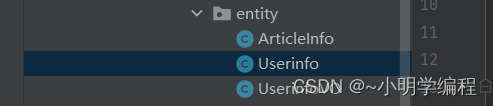
这里我们创建了一个entity的包,包里面的类对应着我们各个表的数据成员以及我们想要返回的特殊数据集合。
个人信息类
- package com.example.demo.entity;
- import lombok.Data;
- import java.time.LocalDateTime;
- /**
- * Created with IntelliJ IDEA.
- * Description:
- * User: 86184
- * Date: 2023-05-17
- * Time: 10:53
- */
- @Data
- public class Userinfo {
- private Integer id;
- private String username;
- private String password;
- private String photo;
- private LocalDateTime createtime;
- private LocalDateTime uptatetime;
- }
用户信息类顾名思义就是我们单个用户信息的类对应着我们数据库中的userinfo这张表。
文章类
- package com.example.demo.entity;
- import com.fasterxml.jackson.annotation.JsonFormat;
- import lombok.Data;
- import java.time.LocalDateTime;
- /**
- * Created with IntelliJ IDEA.
- * Description:
- * User: 86184
- * Date: 2023-05-18
- * Time: 10:47
- */
- @Data
- public class ArticleInfo {
- private Integer id;
- private String title;
- private String content;
- @JsonFormat(pattern = "yyyy-MM-dd HH:mm:ss",timezone = "GMT+8")
- private LocalDateTime createtime;
- @JsonFormat(pattern = "yyyy-MM-dd HH:mm:ss",timezone = "GMT+8")
- private LocalDateTime updatetime;
- private Integer uid;
- private Integer rcount;
- private Integer state;
- }
该类定义了我们的文章类,此类中是我们文章的相关信息,其中包括我们的文章id文章的目录还有文章的内容等。
个人文章类
- package com.example.demo.entity;
- import lombok.Data;
- /**
- * Created with IntelliJ IDEA.
- * Description:
- * User: 86184
- * Date: 2023-05-17
- * Time: 19:49
- */
- @Data
- public class UserinfoVO extends Userinfo{
- private Integer artCount;// 本人发表的文章总数
- }
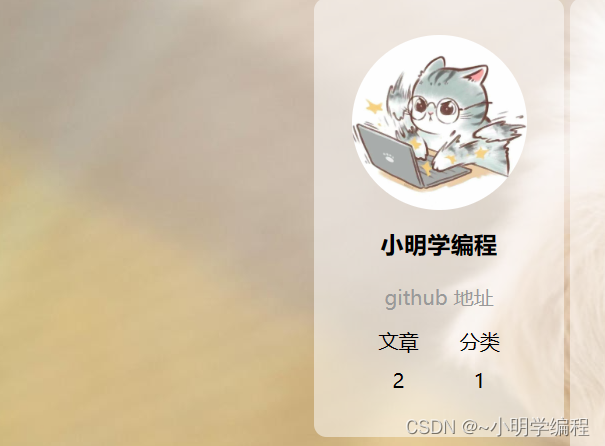
我们的个人文章类相比个人信息类多了一个artCount的字段用于记录我们当前用户的文章数量。
该类主要用于处理下面这个界面:
映射层mapper
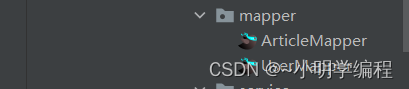
我们创建了一个mapper的包,包里面放了一些映射我们sql语句的接口。
UserMapper
- package com.example.demo.mapper;
- import com.example.demo.entity.Userinfo;
- import org.apache.ibatis.annotations.Mapper;
- import org.apache.ibatis.annotations.Param;
- /**
- * Created with IntelliJ IDEA.
- * Description:
- * User: 86184
- * Date: 2023-05-17
- * Time: 10:48
- */
- //定义响应的sql接口
- @Mapper
- public interface UserMapper {
- // 注册
- int reg(Userinfo userinfo);
- // 根据用户查询 userinfo 对象
- Userinfo getUserByName(@Param("username") String username);
- //根据用户信息查询用户的信息
- Userinfo getUserById(@Param("id") Integer id);
- }
userMapper里面存放着关于userinfo表的一些sql的接口。
ArticleMapper
- package com.example.demo.mapper;
- import com.example.demo.entity.ArticleInfo;
- import org.apache.ibatis.annotations.Mapper;
- import org.apache.ibatis.annotations.Param;
- import java.util.List;
- /**
- * Created with IntelliJ IDEA.
- * Description:定义sql接口
- * User: 86184
- * Date: 2023-05-17
- * Time: 19:30
- */
- @Mapper
- public interface ArticleMapper {
- //根据用户id返回作品的数量
- int getArtCountByUid(@Param("uid") Integer uid);
- //根据用户的id返回用户的所有文章
- List
getMyList(@Param("uid") Integer uid); - //删除文章
- int del(@Param("id")Integer id,@Param("uid")Integer uid);
- //得到文章详情
- ArticleInfo getDetail(@Param("id") Integer id);
- // 更新文章的数量+1
- int incrRCount(@Param("id") Integer id);
- // 添加文章操作
- int add(ArticleInfo articleInfo);
- // 更新文章操作
- int update(ArticleInfo articleInfo);
- // 实现分页的sql
- List
getListByPage(@Param("psize") Integer psize, @Param("offsize") Integer offsize); - // 查找总页数
- int getCount();
- }
此类用来处理我们关于文章sql的一些映射。
mybatis

mybatis包中存放着我们的xml文件也就是来实现我们的sql接口里面的查询。
ArticleMapper.xml
这是关于文章操作的sql语句。
- "1.0" encoding="UTF-8"?>
- mapper PUBLIC "-//mybatis.org//DTD Mapper 3.0//EN" "http://mybatis.org/dtd/mybatis-3-mapper.dtd">
- <mapper namespace="com.example.demo.mapper.ArticleMapper">
- <select id="getArtCountByUid" resultType="Integer">
- select count(*) from articleinfo where uid = #{uid};
- select>
- <select id="getMyList" resultType="com.example.demo.entity.ArticleInfo">
- select * from articleinfo where uid=#{uid}
- select>
- <delete id="del">
- delete from articleinfo where id=#{id} and uid=#{uid}
- delete>
- <select id="getDetail" resultType="com.example.demo.entity.ArticleInfo">
- select * from articleinfo where id=#{id}
- select>
- <update id="incrRCount">
- update articleinfo set rcount=rcount+1 where id=#{id}
- update>
- <insert id="add">
- insert into articleinfo(title,content,uid,updatetime,createtime) values(#{title},#{content},#{uid},#{updatetime},#{createtime})
- insert>
- <update id="update">
- update articleinfo set title=#{title},content=#{content},updatetime=#{updatetime}
- where id=#{id} and uid=#{uid}
- update>
- <select id="getListByPage" resultType="com.example.demo.entity.ArticleInfo">
- select * from articleinfo limit #{psize} offset #{offsize}
- select>
- <select id="getCount" resultType="Integer">
- select count(*) from articleinfo;
- select>
- mapper>
UserMapper.xml
这是关于用户操作的sql语句。
- "1.0" encoding="UTF-8"?>
- mapper PUBLIC "-//mybatis.org//DTD Mapper 3.0//EN" "http://mybatis.org/dtd/mybatis-3-mapper.dtd">
- <mapper namespace="com.example.demo.mapper.UserMapper">
- <insert id="reg">
- insert into userinfo(username,password) values(#{username},#{password})
- insert>
- <select id="getUserByName" resultType="com.example.demo.entity.Userinfo">
- select * from userinfo where username=#{username}
- select>
- <select id="getUserById" resultType="com.example.demo.entity.Userinfo">
- select * from userinfo where id=#{id}
- select>
- mapper>
服务层service
服务层负责将我们的写好sql语句封装成方法进而方便我们控制层的调用,因为我们的接口层一次性只处理一个sql操作,当我们某一个功能想要完成两个甚至以上的操作的时候就需要我们的service层将这些sql操作给封装起来然后调用起来将会很方便。
ArticleService
- package com.example.demo.service;
- import com.example.demo.entity.ArticleInfo;
- import com.example.demo.mapper.ArticleMapper;
- import org.springframework.stereotype.Service;
- import javax.annotation.Resource;
- import java.util.List;
- /**
- * Created with IntelliJ IDEA.
- * Description:服务层代码,提供sql查询结果
- * User: 86184
- * Date: 2023-05-17
- * Time: 19:45
- */
- @Service
- public class ArticleService {
- @Resource
- private ArticleMapper articleMapper;
- public int getArtCountByUid(Integer uid) {
- return articleMapper.getArtCountByUid(uid);
- }
- public List
getMyList(Integer uid) { - return articleMapper.getMyList(uid);
- }
- public int del(Integer id,Integer uid) {
- return articleMapper.del(id,uid);
- }
- public ArticleInfo getDetail(Integer id) {
- return articleMapper.getDetail(id);
- }
- public int incrRCount(Integer id) {
- return articleMapper.incrRCount(id);
- }
- public int add(ArticleInfo articleInfo) {
- return articleMapper.add(articleInfo);
- }
- public int update(ArticleInfo articleInfo) {
- return articleMapper.update(articleInfo);
- }
- public List
getListByPage(Integer psize, Integer offsize){ - return articleMapper.getListByPage(psize, offsize);
- }
- public int getCount() {
- return articleMapper.getCount();
- }
- }
UserService
- package com.example.demo.service;
- import com.example.demo.entity.Userinfo;
- import com.example.demo.mapper.UserMapper;
- import org.springframework.stereotype.Service;
- import javax.annotation.Resource;
- /**
- * Created with IntelliJ IDEA.
- * Description:
- * User: 86184
- * Date: 2023-05-17
- * Time: 11:45
- */
- //服务层的代码
- @Service
- public class UserService {
- @Resource
- private UserMapper userMapper;
- // 用户注册
- public int reg(Userinfo userinfo) {
- return userMapper.reg(userinfo);
- }
- // 根据用户姓名获取用户信息
- public Userinfo getUserByName(String username) {
- return userMapper.getUserByName(username);
- }
- // 根据用户id 获取用户信息
- public Userinfo getUserById(Integer id) {
- return userMapper.getUserById(id);
- }
- }
核心——控制层controller
控制层也是我们最为核心的一层,负责我们各种逻辑的时间。
UserController
注册功能
- @RequestMapping("/reg")
- public AjaxResult reg(Userinfo userinfo) {
- // 非空校验
- if (userinfo==null || !StringUtils.hasLength(userinfo.getUsername())||!StringUtils.hasLength(userinfo.getPassword())) {
- return AjaxResult.fail(-1,"非法参数");
- }
- return AjaxResult.success(userService.reg(userinfo));
- }
在实现注册功能的时候:
- 前端在经过一系列的校验之后会给我们传过来一组json数据。
- 我们用userinfo接受这个数据然后对其进行一个参数的校验。
- 调用数据库然后将数据插入其中。
插入语句:
- <insert id="reg">
- insert into userinfo(username,password) values(#{username},#{password})
- insert>
登录功能
- @RequestMapping("/login")
- public AjaxResult login(HttpServletRequest request, String username, String password) {
- // 1.非空校验
- if (!StringUtils.hasLength(username)||!StringUtils.hasLength(password)) {
- return AjaxResult.fail(-1,"非法请求");
- }
- // 2.查询数据库
- Userinfo userinfo = userService.getUserByName(username);
- if (userinfo != null && userinfo.getId()>0) {
- // 有效的用户名
- // 两个密码完全相同
- if (password.equals(userinfo.getPassword())) {
- // 登录成功
- // 将用户存储到session中
- HttpSession session = request.getSession();
- session.setAttribute(AppVariable.USER_SESSION_KEY,userinfo);
- userinfo.setPassword("");// 返回数据之前将敏感的信息给隐藏起来
- return AjaxResult.success(userinfo);
- }
- }
- return AjaxResult.success(0,null);
- }
对于登录功能:
- 首先先进行一个非空校验,判断一下我们传进来的用户名和密码是否为空。
- 拿着我们传进来的用户名进行一个查询,查询到我们当前用户的基本信息。
- 把我们拿到的用户的基本信息中的password与传给我们的password进行一个对比。
- 将用户的密码给置空然后返回数据到前端。
查询个人信息
- @RequestMapping("/showinfo")
- public AjaxResult showInfo(HttpServletRequest request) {
- UserinfoVO userinfoVO = new UserinfoVO();
- //1.得到当前登录的用户
- Userinfo userinfo = UserSessionUtils.getSessionUser(request);
- if (userinfo==null) {
- return AjaxResult.fail(-1,"非法请求");
- }
- //spring提供的深拷贝
- BeanUtils.copyProperties(userinfo, userinfoVO);
- //2.得到用户发表文章的总数
- int count = articleService.getArtCountByUid(userinfo.getId());
- userinfoVO.setArtCount(count);
- return AjaxResult.success(userinfoVO);
- }
这块代码实现的功能为返回我们当前登录用户的个人信息,包括用户名和当前的文章数量。
这里我们需要返回用户的文章数量,所以先从我们的session中获取到当前的用户,接着我们用了一个spring所提供的深拷贝的方法将我们的userinfo拷贝给userinfoVO类,接着利用我们的用户id通过sql语句查询到文章的数量。
sql语句:
- <select id="getArtCountByUid" resultType="Integer">
- select count(*) from articleinfo where uid = #{uid};
- select>
最后将我们的文章数给设置到userinfoVO中里面去。
注销功能
- //注销功能
- @RequestMapping("/logout")
- public AjaxResult logout(HttpSession session) {
- session.removeAttribute(AppVariable.USER_SESSION_KEY);
- return AjaxResult.success(1);
- }
在我们登录完了之后可能需要去注销我们的登录,这个时候我们就需要去实现我们的登录功能了,其实现的方式也很简单,就是将我们的session给移除就可以了。
根据用户id查找用户信息
- @RequestMapping("/getuserbyid")
- public AjaxResult getUserById(Integer id) {
- if (id==null || id<=0) {
- // 无参数
- return AjaxResult.fail(-1,"非法参数");
- }
- // 查询到当前用户的信息
- Userinfo userinfo = userService.getUserById(id);
- if (userinfo==null||userinfo.getId()<=0){
- // 无参数
- return AjaxResult.fail(-1,"非法参数");
- }
- // 去除userinfo中的敏感信息
- userinfo.setPassword("");
- UserinfoVO userinfoVO = new UserinfoVO();
- // 拷贝数据
- BeanUtils.copyProperties(userinfo,userinfoVO);
- // 查询当前用户发表的文章数
- userinfoVO.setArtCount(articleService.getArtCountByUid(id));
- return AjaxResult.success(userinfoVO);
- }
在我们的文章列表页面的时候会有很多的文章,当我们点击一条文章的时候然后我们就需要获取此用户的信息了。
ArticleController
我们的ArticleController主要是用来处理我们的文章信息的其对应的是我们的文章表,也就是说用来操作我们的文章表以此来返回我们的文章表中的相关的数据。
返回用户文章列表
- @Autowired
- private ArticleService articleService;
- @RequestMapping("/mylist")
- public AjaxResult getMyList(HttpServletRequest request) {
- Userinfo userinfo = UserSessionUtils.getSessionUser(request);
- if (userinfo==null) {
- return AjaxResult.fail(-1,"非法请求");
- }
- List
list = articleService.getMyList(userinfo.getId()); - return AjaxResult.success(list);
- }
在我们处理这个功能的时候我们的思路是首先通过session获取到我们当前用户的id然后拿着这个去查询我们当前用户的所有文章。
sql语句:
- <select id="getMyList" resultType="com.example.demo.entity.ArticleInfo">
- select * from articleinfo where uid=#{uid}
- select>
删除文章功能
- @RequestMapping("/del")
- public AjaxResult del(HttpServletRequest request,Integer id) {
- if (id==null||id<=0) {
- //参数有误
- return AjaxResult.fail(-1,"参数异常");
- }
- Userinfo userinfo = UserSessionUtils.getSessionUser(request);
- if (userinfo==null) {
- return AjaxResult.fail(-2,"用户未登录");
- }
- return AjaxResult.success(articleService.del(id,userinfo.getId()));
- }
删除文章的功能首先还是要先做相应的参数校验,接着就是通过sql去删除数据库中的数据了,我们在删除的时候需要传进来两个参数,一个是我们文章的id一个是我们当前登录用户的id,我们带着这两个id去数据库中去查询,也就是说我们文章id必须有对应的作者的id否则我们就会查询不到相应的数据所以删除的时候影响行数就是0了,我们前端在得到这个0后就会提示删除有误。
sql语句:
- <delete id="del">
- delete from articleinfo where id=#{id} and uid=#{uid}
- delete>
查看文章详情功能
- @RequestMapping("/detail")
- public AjaxResult getDetail(Integer id) {
- if (id==null||id<=0) {
- return AjaxResult.fail(-1,"非法参数");
- }
- return AjaxResult.success(articleService.getDetail(id));
- }
查看文章的详情功能就比较的容易了,我们只需要根据我们的用户id来查询当前的文章。
sql语句:
- <select id="getDetail" resultType="com.example.demo.entity.ArticleInfo">
- select * from articleinfo where id=#{id}
- select>
实现阅读量功能
- // 阅读加1
- @RequestMapping("incr-rcount")
- public AjaxResult incrRCount(Integer id) {
- if (id!=null&& id>0) {
- return AjaxResult.success(articleService.incrRCount(id));
- }
- return AjaxResult.success(-1,"未知错误");
- }
此接口用户处理我们的访问量的功能,当我们访问一篇文章的时候如果我们刷新该文章那么该文章的访问量就会加1,实现该功能的时候我们可以用一条sql完成。
update articleinfo set rcount=rcount+1 where id=#{id}添加文章
- //添加文章
- @RequestMapping("/add")
- public AjaxResult add(ArticleInfo articleInfo,HttpServletRequest request) {
- //1.非空校验
- if (articleInfo==null||!StringUtils.hasLength(articleInfo.getTitle())||!StringUtils.hasLength(articleInfo.getContent())){
- //非法参数
- return AjaxResult.fail(-1,"非法参数");
- }
- //2.数据库添加操作
- //a得到当前登录用户的uid
- Userinfo userinfo = UserSessionUtils.getSessionUser(request);
- if (userinfo==null||userinfo.getId()<=0) {
- //无效的登录用户
- return AjaxResult.fail(-2,"无效的登录用户");
- }
- //设置用户的id
- articleInfo.setUid(userinfo.getId());
- articleInfo.setUpdatetime(LocalDateTime.now());
- //b添加数据库并且返回结果
- return AjaxResult.success(articleService.add(articleInfo));
- }
添加文章的接口:先做一些非空校验然后通过session得到当前用户的一些信息,最后将请求中的相关信息写入数据库。
修改文章
- // 更新文章
- @RequestMapping("/update")
- public AjaxResult update(HttpServletRequest request,ArticleInfo articleInfo) {
- // 非空校验
- if (articleInfo==null||!StringUtils.hasLength(articleInfo.getTitle())||!StringUtils.hasLength(articleInfo.getContent())||articleInfo.getId()==null){
- // 非法参数
- return AjaxResult.fail(-1,"非法参数");
- }
- //得到当前用户的id
- Userinfo userinfo = UserSessionUtils.getSessionUser(request);
- if (userinfo==null&&userinfo.getId()==null){
- //无效用户
- return AjaxResult.fail(-2,"无效用户");
- }
- // 设置uid用户后面的查询判断文章是否是当前的作者
- articleInfo.setUid(userinfo.getId());
- articleInfo.setUpdatetime(LocalDateTime.now());
- return AjaxResult.success(articleService.update(articleInfo));
- }
根据分页来查询列表
- // 根据分页来查询列表
- @RequestMapping("/listbypage")
- public AjaxResult getListByPage(Integer pindex, Integer psize){
- // 1.参数矫正
- if (pindex == null || pindex <= 1){
- pindex = 1;
- }
- if (psize == null || psize <=1 ){
- psize = 2;
- }
- // 分页公式的值(即从何处开始查找)
- int offset = (pindex - 1) * psize;
- // 当前列表的信息
- List
list = articleService.getListByPage(psize,offset); - // 当前列表的总页数
- // 1.查询总条数
- int tatalCount = articleService.getCount();
- // 2.总数量/psize
- double pcountdb = tatalCount/(psize*1.0);
- // 3.得到总页数
- int pcount = (int) Math.ceil(pcountdb);
- HashMap
- result.put("list",list);
- result.put("pcount",pcount);
- return AjaxResult.success(result);
- }
在实现分页查询的时候我们首先需要知道我们一共有多少页,然后得知道我们当前的页面是多少还有我们每次查询的时候需要显示多少页,所以在实现这个功能的时候我们想要通过一条sql去实现是不现实的,所以我们可以通过两条sql其中一条语句返回我们数据库中文章的总数,还有一条语句负责查询我们当前页面的文章。
select * from articleinfo limit #{psize} offset #{offsize}psize用来控制我们查询的条数,offsize用来控制我们何处开始查询,最后通过hashmap将查询的数据和总条数一起返回。
-
相关阅读:
python虚拟环境
关于原型交互设计文档的一些建议
大数据驱动业务增长:数据分析和洞察力的新纪元
基于卷积神经网络的猫种类的识别
python socket编程1 - socket创建参数说明及参考规范
【智能优化算法】基于蝙蝠优化算法求解多目标优化问题附matlab代码
软件包管理—源码包管理—源码包与RPM包区别
python+pywinauto—PC端自动化(一)启动程序及菜单控件操作
电脑加域win10
stm32f4xx-GPIO
- 原文地址:https://blog.csdn.net/m0_56911284/article/details/130765390
