-
vue2中实现右键菜单
vue2中实现右键菜单
效果图-右键菜单
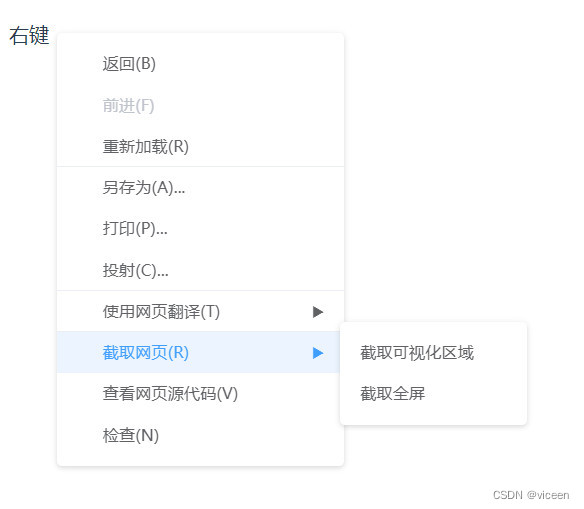
1、安装
npm install vue-contextmenujs yarn add vue-contextmenujs- 1
- 2
- 3
- CDN
<script src="https://unpkg.com/vue-contextmenujs/dist/contextmenu.umd.js">- 1
2、使用
2.1、引入
src/main.js
import Contextmenu from "vue-contextmenujs" Vue.use(Contextmenu);- 1
- 2
CDN引入则不需要
Vue.use(Contextmenu)2.2、代码
textMenu.vue
右键- 1
- 2
- 3
- 4
- 5
- 6
- 7
- 8
- 9
- 10
- 11
- 12
- 13
- 14
- 15
- 16
- 17
- 18
- 19
- 20
- 21
- 22
- 23
- 24
- 25
- 26
- 27
- 28
- 29
- 30
- 31
- 32
- 33
- 34
- 35
- 36
- 37
- 38
- 39
- 40
- 41
- 42
- 43
- 44
- 45
- 46
- 47
- 48
- 49
- 50
- 51
- 52
- 53
- 54
- 55
- 56
- 57
- 58
引入
HelloWorld.vue
- 1
- 2
- 3
- 4
- 5
- 6
- 7
- 8
- 9
- 10
- 11
- 12
- 13
- 14
- 15
- 16
- 17
- 18
- 19
- 20
- 21
自定义样式
打开控制台,查看元素即可查看到菜单的各个 class 名称。最外层的 class 为上面的
customClass属性设置的值,样式可根据需求自行调整。- 1
- 2
- 3
- 4
- 5
- 6
- 7
效果
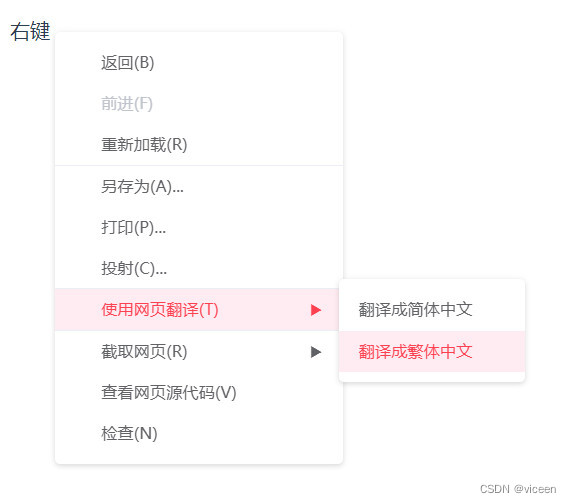
- 注意
菜单会在点击左键或者滚轮滚动时自动销毁,同时也可调用
this.$contextmenu.destroy()在其他场景自行销毁 。3、插件的参数配置:
1、MenuOptions 菜单属性
属性 描述 类型 可选值 默认值 items 菜单结构信息 MenuItemOptions[]— — event 鼠标事件信息 Event— — x 菜单显示X坐标, 存在 event则失效number— 0y 菜单显示Y坐标, 存在 event则失效number— 0zIndex 菜单样式 z-indexnumber— 2customClass 自定义菜单class string— — minWidth 主菜单最小宽度 number— 1502、MenuItemOptions 选项属性
属性 描述 类型 可选值 默认值 label 菜单项名称 string— — icon 菜单项图标, 生成 元素string— — disabled 是否禁用菜单项 boolean— falsedivided 是否显示分割线 boolean— falsecustomClass 自定义子菜单class string— — minWidth 子菜单最小宽度 number— 150onClick 菜单项点击事件 Function()— — children 子菜单结构信息 MenuItemOptions[]— — -
相关阅读:
Python 基于 urllib 使用 Handler 处理器(代理)
MySQL存储引擎
java-php-python-ssm文献管理平台计算机毕业设计
项目实战:中央控制器实现(3)-优化Controller,处理普通的请求参数
JAVA:实现已递归形式GCD最大公约数算法(附完整源码)
BFC详解
适合学生党的百元蓝牙耳机,蓝牙耳机平价推荐
结合Thrift示例详解网络服务模型(多线程阻塞IO、多线程非阻塞IO、多Reactor模型)
麒麟桌面虚拟机密码破解方法,qcow2格式麒麟操作系统忘记密码处理方法,麒麟qcow2镜像v10版本操作系统下载
数商云供应链系统深耕采购、物流多业务场景,打造家居建材企业智慧供应链体系
- 原文地址:https://blog.csdn.net/weixin_44867717/article/details/128211958
