-
第11章 初识IdentityServer4
1 构建IdentityServer4 服务
1.1 通过配置类配置类(Config)实例化IdentityServer4中间件
using IdentityServer4.Models;
namespace BuilderServer
{
///
/// 【配置--类】
///
/// 摘要:
/// 通过该中类的方法成员,对过“IdentityServer4”中间件进行配置设定,并根据这些配置设定。实例化“IdentityServer4”服务。
/// 说明:
/// 配置数据最好定义在“appsettings.json”文件中,而非直接嵌入定义在该配置类。
///
///
public static class Config
{
///
/// 【获取标识资源数组】
///
/// 摘要:
/// 获取认证用户的多个证件单元(Claims:包含:如用户ID、账户、电子邮件地址等)实例,并把这些实例存储到数组实例中,为通过“IdentityServer4”中间件实现身份认证服务提供数据支撑。
///
///
/// 返回:
/// 数组实例,该数组实例中存储着多个证件单元(Claims:包含:如用户ID、账户、电子邮件地址等)实例。
///
///
public static IEnumerable
GetIdentityResourceArray() {
return new IdentityResource[]
{
new IdentityResources.OpenId(),
new IdentityResources.Profile(),
};
}
///
/// 【获取作用数组】
///
/// 摘要:
/// 获取序中的Api控制器方法分类实例,并把这些实例存储到数组实例中,为通过“IdentityServer4”中间件实现身份认证服务提供数据支撑。
/// 应用场景:
/// 在由于前端版本迭代,而需要更新Api控制器方法时,为了兼容旧的前端就需要“Api版本”控制在不修改旧的Api控制器方法,而是定义新的Api控制器方法,来解决前端版本迭代的兼容性问题。
///
///
/// 返回:
/// 数组实例,该数组实例中存储着Api控制器方法分类的多个实例。
///
///
public static IEnumerable
GetApiScopeArray() {
return new ApiScope[]
{
new ApiScope("api1"),
};
}
///
/// 【获取客户端数组】
///
/// 摘要:
/// 通过“IdentityServer4”中间件,实例化多个客户端实例(客户端通过1个指定的客户端实例获取Token),并把实例存储到数组实例中。
///
///
/// 返回:
/// 数组实例,该数组实例中存储着多个客户端实例(客户端通过1个指定的客户端实例获取Token)。
///
///
public static IEnumerable
GetClientArray() {
return new Client[]
{
//客户端以“client_credentials”方式获取获取Token。
new Client
{
ClientId = "ClientCredential",
ClientName = "客户端凭证认证",
//grant_type:ClientCredential
//Postman->Body->x-www-form-urlencoded参数:
//client_id:ClientCredential
//client_secret:511536EF-F270-4058-80CA-1C89C192F69A
//grant_type:client_credentials
AllowedGrantTypes = GrantTypes.ClientCredentials,
ClientSecrets = { new Secret("511536EF-F270-4058-80CA-1C89C192F69A".Sha256()) },
AllowedScopes = { "api1" },
AccessTokenLifetime = 120 //过期时间=2分钟,默认值:3600秒=1小时。
},
//客户端以“password”方式获取获取Token。
new Client
{
ClientId = "PasswordClient",
ClientName = "客户端密码认证",
//grant_type:password
//Postman->Body->x-www-form-urlencoded参数:
//client_id:PasswordClient
//client_secret:511536EF-F270-4058-80CA-1C89C192F69A
//grant_type:password
//username:zz
//password :123456,
AllowedGrantTypes = GrantTypes.ResourceOwnerPassword,
ClientSecrets = { new Secret("511536EF-F270-4058-80CA-1C89C192F69A".Sha256()) },
AllowedScopes = { "api1" },
AccessTokenLifetime = 120 //过期时间=2分钟,默认值3600秒=1小时。
},
};
}
}
}
1.2 为“IdentityServer4”服务添加测试性用户
using IdentityModel;
using IdentityServer4.Test;
using IdentityServer4;
using System.Security.Claims;
using System.Text.Json;
namespace BuilderServer
{
///
/// 【测试用户--类】
///
/// 摘要:
/// 通过该类中的方法成员,获取测试用户类的多个实例,并把实例存储到列表实例中,为测试指定用户通过“IdentityServer4”服务获取Token,测试性的用户。
///
///
public class TestUsers
{
///
/// 【获取客户列表】
///
/// 摘要:
/// 获取测试用户类的多个实例,并把实例存储到列表实例中,为测试指定用户通过“IdentityServer4”服务获取Token,测试性的用户。
///
///
/// 返回:
/// 列表实例,该列表实例中存储着测试用户类的多个实例。
///
///
public static List
GetUserList() {
var address = new
{
street_address = "金水区",
locality = "郑州",
postal_code = 69118,//邮编。
country = "中国"
};
//把测试用户类的多个实例存储到列表实例中,为测试指定用户通过“IdentityServer4”服务获取Token,测试性的用户。
return new List
{
new TestUser
{
SubjectId = "1",
Username = "zz",
Password = "123456",
//通过证件单元,构建整个证件。
Claims =
{
new Claim(JwtClaimTypes.Name, "zz"),
new Claim(JwtClaimTypes.Email, "zz@email.com"),
new Claim(JwtClaimTypes.EmailVerified, "true", ClaimValueTypes.Boolean),
new Claim(JwtClaimTypes.Address, JsonSerializer.Serialize(address), IdentityServerConstants.ClaimValueTypes.Json)
}
}
};
}
}
}
1.3 重构Program类
//通过配置类中的数据实例,实例化过“IdentityServer4”中间件,最后把过“IdentityServer4”中间件依赖注入到内置容器中,实现当前程序据这些配置设定,实例化“IdentityServer4”服务。
builder.Services.AddIdentityServer()
.AddTestUsers(TestUsers.GetUserList())//为“IdentityServer4”服务添加测试性用户。
.AddInMemoryIdentityResources(Config.GetIdentityResourceArray()) // 为“IdentityServer4”服务添加测试性用户。
.AddInMemoryApiScopes(Config.GetApiScopeArray())//指定客户端所调用Api控件器方法的作用域(版本)
.AddInMemoryClients(Config.GetClientArray())//1个指定的客户端实例获取Token的认证方式。
.AddDeveloperSigningCredential();//临时生成的证书证书。
var app = builder.Build();
// 把“IdentityServer4”管道中间件集成到.Net7框架内置管道中,以实现前程序对“IdentityServer4”服务的支持。
app.UseIdentityServer();
// Configure the HTTP request pipeline.
if (app.Environment.IsDevelopment())
{
app.UseSwagger();
app.UseSwaggerUI();
}
app.UseHttpsRedirection();
app.UseAuthorization();
//把内置授权管道中间件集成到.Net7框架内置管道中。
//注意:
//内置授权管道中间件必须集成在“IdentityServer4”服务程序中,否则在使用Postman调试经过认证特性标记的Api控制器方法时会出现:“401Unauthorized”错误。
app.UseAuthentication();
1.4 通过Postman测试IdentityServer4服务

2 通过“IdentityServer4.AccessTokenValidation”中间件获取IdentityServer4服务所发送的“JwtBearer”令牌(Token)实例
2.1 TestController控制器
using IdentityModel.Client;
using Microsoft.AspNetCore.Authorization;
using Microsoft.AspNetCore.Mvc;
namespace AccessToken.Controllers
{
///
/// 【登录管Api控制器--类--无认证特性标记】
///
///
/// 摘要:
/// 通过该类中的方法成员,用于对IdentityServer4服务验证。
///
[Route("api/[controller]")]
[ApiController]
public class TestController : ControllerBase
{
///
/// 【Swagger登录--无认证特性标记】
///
///
/// 摘要:
/// 获取通过IdentityServer4服务所发送的“JwtBearer”令牌(Token)实例的字符串值。
///
///
/// 返回:
/// 令牌(Token)实例的字符串值。
///
[HttpGet("GetToken")]
public async Task<string> GetToken()
{
//获取IdentityServer4服务中的客户端实例。
var client = new HttpClient();
var config = new DiscoveryDocumentRequest()
{
Address = "https://localhost:44360/",
Policy = new DiscoveryPolicy() { RequireHttps = false }
}; //忽略IP或域名时Https请求
var disco = await client.GetDiscoveryDocumentAsync(config);
//根据IdentityServer4服务中的客户端实例,获取“JwtBearer”令牌(Token)实例。
var tokenResponse = await client.RequestClientCredentialsTokenAsync(
new ClientCredentialsTokenRequest
{
Address = disco.TokenEndpoint,
ClientId = "ClientCredential",
ClientSecret = "511536EF-F270-4058-80CA-1C89C192F69A",
Scope = "api1",
});
if (tokenResponse.IsError)
{
return tokenResponse.Error;
}
//返回“JwtBearer”令牌(Token)实例的字符串值。
return tokenResponse.AccessToken;
}
///
/// 【Swagger登录--有认证特性标记】
///
///
/// 摘要:
/// 在通过IdentityServer4服务所发送的“JwtBearer”令牌(Token)实例认证并授权后,获取当前Api方法的实例值。
///
///
/// 返回:
/// 当前Api方法的实例值。
///
[Authorize("api1")]
[HttpGet("GetValue")]
public IEnumerable<string> GetValue()
{
return new string[] { "value1", "value2" };
}
}
}
2.2 重构Program类
using Microsoft.IdentityModel.Tokens;
using Microsoft.OpenApi.Models;
using System.Reflection;
using System.Text;
var builder = WebApplication.CreateBuilder(args);
// Add services to the container.
builder.Services.AddControllers();
// Learn more about configuring Swagger/OpenAPI at https://aka.ms/aspnetcore/swashbuckle
builder.Services.AddEndpointsApiExplorer();
//通过“IdentityServer4.AccessTokenValidation”中间件,把“JwtBearer”中间件注入.Net7框架内置容器中,
builder.Services.AddAuthentication("Bearer")
.AddIdentityServerAuthentication(options =>
{
options.Authority = "https://localhost:44360/";//鉴权(认证)服务地址
options.RequireHttpsMetadata = false;
//缓冲过期时间,“JwtBearer”令牌(Token)的总有效时间等于该时间加上jwt的过期时间,缓冲过期时间的默认值为“5分钟”,
//当前把缓冲过期时间设定为:0,指定令牌(Token)的总有效时间即为jwt的过期时间。
//注意:
//如果不设定“JwtBearer”缓冲过期时间设定为:0,即在IdentityServer4服务中的时间(120秒之后)过期后,经过认证特性标记的Api控制器方法依然可以获取其值,因为还“5分钟”的缓冲过期。
options.JwtValidationClockSkew = TimeSpan.FromSeconds(0);
});
//通过.Net7框架内置认证中间件,把"api1"策略注入.Net7框架内置容器中,
builder.Services.AddAuthorization(option =>
{
option.AddPolicy("Api1", builder =>
{
builder.RequireAuthenticatedUser();
builder.RequireClaim("scope", "api1");
});
});
//通过AddSwaggerGen依赖注入中间,获取Api控制器方法的版本控制信息和注释等数据信息,依赖注入.Net7框架的内置容器中,为在“index.html”页面上渲染显示这些信息,作好预处理操作。
builder.Services.AddSwaggerGen(options =>
{
options.SwaggerDoc("v1", new OpenApiInfo { Title = "IdentityServer4.AccessTokenValidation", Version = "v1" });
//获取"AccessToken.xml"文件的文件名。
string _xmlFileName = $"{Assembly.GetExecutingAssembly().GetName().Name}.xml";
//获取"SecondPracticeServer.xml"文件的绝对路径。
string _xmlFilePath = Path.Combine(AppContext.BaseDirectory, _xmlFileName);
//把控件器行为方法中的注释信息加载到"Swagger/index.html"页面中的控件器行为方法进行渲染显示。
options.IncludeXmlComments(_xmlFilePath, true);
});
var app = builder.Build();
app.UseSwagger();
app.UseSwaggerUI();
app.UseHttpsRedirection();
app.UseAuthorization();
app.MapControllers();
app.Run();
2.3 通过Postman验证“IdentityServer4”服务及其授权
2.3.1 先通过Postman获取“JwtBearer”令牌(Token)

2.3.2 通过Headers授权认证特性标记的Api控制器方法

2.3.3通过Authorization授权认证特性标记的Api控制器方法
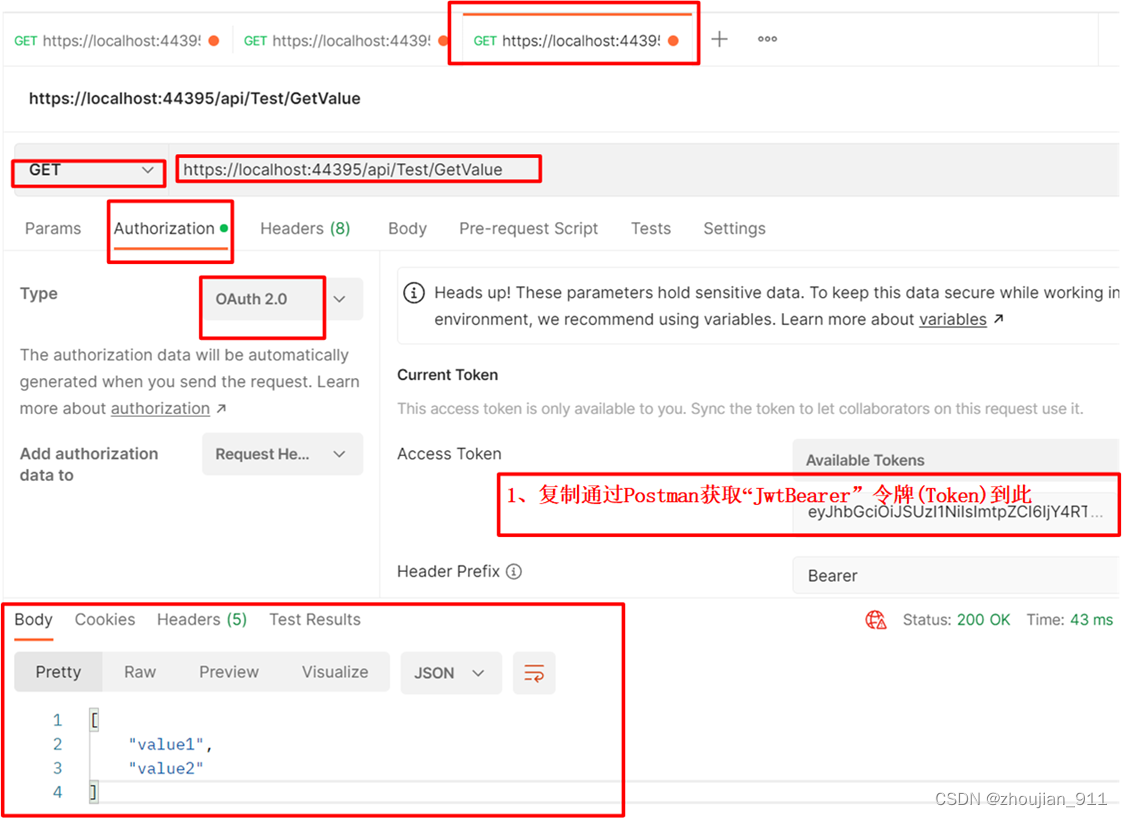
3 通过“IdentityModel”中间件获取IdentityServer4服务所发送的“JwtBearer”令牌(Token)实例
1、通过Nuget引用:IdentityModel包。
2、通过Nuget引用:Microsoft.AspNetCore.Authentication.JwtBearer包。
3.1 重构Program类
//通过“Microsoft.AspNetCore.Authentication.JwtBearer”中间件,把“JwtBearer”中间件注入.Net7框架内置容器中,
builder.Services.AddAuthentication("Bearer")
.AddJwtBearer("Bearer", options =>
{
options.Authority = "https://localhost:44360/";
options.RequireHttpsMetadata = false;
options.TokenValidationParameters = new TokenValidationParameters
{
//指示是否对指定令牌(Token)的过期时间进行限定,当前设定为:true,即限定。
RequireExpirationTime = true,
//指示是否对指定令牌(Token)的生命周期进行自动管理,当前设定为:true,即管理,
//当前指定令牌(Token)的生命周期结束时,程序必须重新生成1个新的指定令牌(Token)才能方法授权页面。
//使用当前时间与Token的Claims中的NotBefore和Expires对比后,进行管理。
ValidateLifetime = true,
//缓冲过期时间,“JwtBearer”令牌(Token)的总有效时间等于该时间加上jwt的过期时间,缓冲过期时间的默认值为“5分钟”,
//当前把缓冲过期时间设定为:0,指定令牌(Token)的总有效时间即为jwt的过期时间。
//注意:
//如果不设定“JwtBearer”缓冲过期时间设定为:0,即在IdentityServer4服务中的时间(120秒之后)过期后,经过认证特性标记的Api控制器方法依然可以获取其值,因为还“5分钟”的缓冲过期。
ClockSkew = TimeSpan.FromSeconds(0),
};
});
//通过.Net7框架内置认证中间件,把"api1"策略注入.Net7框架内置容器中,
builder.Services.AddAuthorization(option =>
{
option.AddPolicy("Api1", builder =>
{
builder.RequireAuthenticatedUser();
builder.RequireClaim("scope", "api1");
});
});
//通过AddSwaggerGen依赖注入中间,获取Api控制器方法的版本控制信息和注释等数据信息,依赖注入.Net7框架的内置容器中,为在“index.html”页面上渲染显示这些信息,作好预处理操作。
builder.Services.AddSwaggerGen(options =>
{
options.SwaggerDoc("v1", new OpenApiInfo { Title = "IdentityServer4.AccessTokenValidation", Version = "v1" });
//获取"AccessToken.xml"文件的文件名。
string _xmlFileName = $"{Assembly.GetExecutingAssembly().GetName().Name}.xml";
//获取"SecondPracticeServer.xml"文件的绝对路径。
string _xmlFilePath = Path.Combine(AppContext.BaseDirectory, _xmlFileName);
//把控件器行为方法中的注释信息加载到"Swagger/index.html"页面中的控件器行为方法进行渲染显示。
options.IncludeXmlComments(_xmlFilePath, true);
});
3.2 通过Postman验证“IdentityServer4”服务及其授权
同上
4 注意:
4.1 启动
把所有项目的启动方式修改为:“IIS Express”
4.2 设定“JwtBearer”令牌(Token)缓冲过期时间为:0
4.2.1 通过“IdentityServer4.AccessTokenValidation”中间件设定
//通过“IdentityServer4.AccessTokenValidation”中间件,把“JwtBearer”中间件注入.Net7框架内置容器中,
builder.Services.AddAuthentication("Bearer")
.AddIdentityServerAuthentication(options =>
{
options.Authority = "https://localhost:44360/";//鉴权(认证)服务地址
options.RequireHttpsMetadata = false;
//缓冲过期时间,“JwtBearer”令牌(Token)的总有效时间等于该时间加上jwt的过期时间,缓冲过期时间的默认值为“5分钟”,
//当前把缓冲过期时间设定为:0,指定令牌(Token)的总有效时间即为jwt的过期时间。
//注意:
//如果不设定“JwtBearer”缓冲过期时间设定为:0,即在IdentityServer4服务中的时间(120秒之后)过期后,经过认证特性标记的Api控制器方法依然可以获取其值,因为还“5分钟”的缓冲过期。
options.JwtValidationClockSkew = TimeSpan.FromSeconds(0);
});
4.2.2 通过“Microsoft.AspNetCore.Authentication.JwtBearer”中间件设定
//通过“Microsoft.AspNetCore.Authentication.JwtBearer”中间件,把“JwtBearer”中间件注入.Net7框架内置容器中,
builder.Services.AddAuthentication("Bearer")
.AddJwtBearer("Bearer", options =>
{
options.Authority = "https://localhost:44360/";
options.RequireHttpsMetadata = false;
options.TokenValidationParameters = new TokenValidationParameters
{
//指示是否对指定令牌(Token)的过期时间进行限定,当前设定为:true,即限定。
RequireExpirationTime = true,
//指示是否对指定令牌(Token)的生命周期进行自动管理,当前设定为:true,即管理,
//当前指定令牌(Token)的生命周期结束时,程序必须重新生成1个新的指定令牌(Token)才能方法授权页面。
//使用当前时间与Token的Claims中的NotBefore和Expires对比后,进行管理。
ValidateLifetime = true,
//缓冲过期时间,“JwtBearer”令牌(Token)的总有效时间等于该时间加上jwt的过期时间,缓冲过期时间的默认值为“5分钟”,
//当前把缓冲过期时间设定为:0,指定令牌(Token)的总有效时间即为jwt的过期时间。
//注意:
//如果不设定“JwtBearer”缓冲过期时间设定为:0,即在IdentityServer4服务中的时间(120秒之后)过期后,经过认证特性标记的Api控制器方法依然可以获取其值,因为还“5分钟”的缓冲过期。
ClockSkew = TimeSpan.FromSeconds(0),
};
});
4.3 内置授权管道中间件必须集成在“IdentityServer4”服务程序中
内置授权管道中间件必须集成在“IdentityServer4”服务项目中,否则在使用Postman调试经过认证特性标记的Api控制器方法时会出现:“401Unauthorized”错误,如下图所示。

对以上功能更为具体实现和注释见:221204_10IdentityServer4(初识IdentityServer4)。
-
相关阅读:
四舍五入(c++基础)
Linux指令(ls、pwd、cd、touch、mkdir、rm)
嵌入式知识总结:交叉编译、ARM汇编、驱动开发
iOS的应用生命周期
【C++初阶】--- C++入门(中)
YOLOv6:又快又准的目标检测框架开源啦
程序员挖“洞”致富:发现一个漏洞,获赏 1272 万元
【Python入门】Numpy基础
Linux CentOS8安装gitlab_ce步骤
基于Java毕业设计长鸟交易市场信息平台源码+系统+mysql+lw文档+部署软件
- 原文地址:https://blog.csdn.net/zhoujian_911/article/details/128174716