-
Vue3表单输入绑定&生命周期
官网:https://cn.vuejs.org/guide/essentials/forms.html#checkbox
复选框
在这个例子中,
checkedNames数组将始终包含所有当前被选中的框的值。const checkedNames = ref([]) <div>Checked names: {{ checkedNames }}</div> <input type="checkbox" id="jack" value="Jack" v-model="checkedNames"> <label for="jack">Jack</label> <input type="checkbox" id="john" value="John" v-model="checkedNames"> <label for="john">John</label> <input type="checkbox" id="mike" value="Mike" v-model="checkedNames"> <label for="mike">Mike</label>- 1
- 2
- 3
- 4
- 5
- 6
- 7
- 8
- 9
- 10
- 11
- 12
选择器
<div>Selected: {{ selected }}div> <select v-model="selected"> <option disabled value="">Please select oneoption> <option>Aoption> <option>Boption> <option>Coption> select>- 1
- 2
- 3
- 4
- 5
- 6
- 7
- 8
注意: 如果
v-model表达式的初始值不匹配任何一个选择项,元素会渲染成一个“未选择”的状态。在 iOS 上,这将导致用户无法选择第一项,因为 iOS 在这种情况下不会触发一个change事件。因此,我们建议提供一个空值的禁用选项,如上面的例子所示。处理
v-model修饰符在某些场景下,你可能想要一个自定义组件的
v-model支持自定义的修饰符。我们来创建一个自定义的修饰符capitalize,它会自动将v-model绑定输入的字符串值第一个字母转为大写:<MyComponent v-model.capitalize="myText" />- 1
组件的
v-model上所添加的修饰符,可以通过modelModifiers prop在组件内访问到。在下面的组件中,我们声明了modelModifiers这个prop,它的默认值是一个空对象:<script setup> const props = defineProps({ modelValue: String, modelModifiers: { default: () => ({}) } }) defineEmits(['update:modelValue']) console.log(props.modelModifiers) // { capitalize: true } script> <template> <input type="text" :value="modelValue" @input="$emit('update:modelValue', $event.target.value)" /> template>- 1
- 2
- 3
- 4
- 5
- 6
- 7
- 8
- 9
- 10
- 11
- 12
- 13
- 14
- 15
- 16
- 17
- 18
注意:这里组件的
modelModifiers prop包含了capitalize且其值为true,因为它在模板中的 v-model 绑定v-model.capitalize="myText"上被使用了有了这个
prop,我们就可以检查modelModifiers对象的键,并编写一个处理函数来改变抛出的值。在下面的代码里,我们就是在每次元素触发input事件时将值的首字母大写:<script setup> const props = defineProps({ modelValue: String, modelModifiers: { default: () => ({}) } }) const emit = defineEmits(['update:modelValue']) function emitValue(e) { let value = e.target.value if (props.modelModifiers.capitalize) { value = value.charAt(0).toUpperCase() + value.slice(1) } emit('update:modelValue', value) } script> <template> <input type="text" :value="modelValue" @input="emitValue" /> template>- 1
- 2
- 3
- 4
- 5
- 6
- 7
- 8
- 9
- 10
- 11
- 12
- 13
- 14
- 15
- 16
- 17
- 18
- 19
- 20
对于又有参数又有修饰符的
v-model绑定,生成的prop名将是arg + "Modifiers"。举例来说:<MyComponent v-model:title.capitalize="myText">- 1
相应的声明应该是:
const props = defineProps(['title', 'titleModifiers']) defineEmits(['update:title']) console.log(props.titleModifiers) // { capitalize: true }- 1
- 2
- 3
- 4
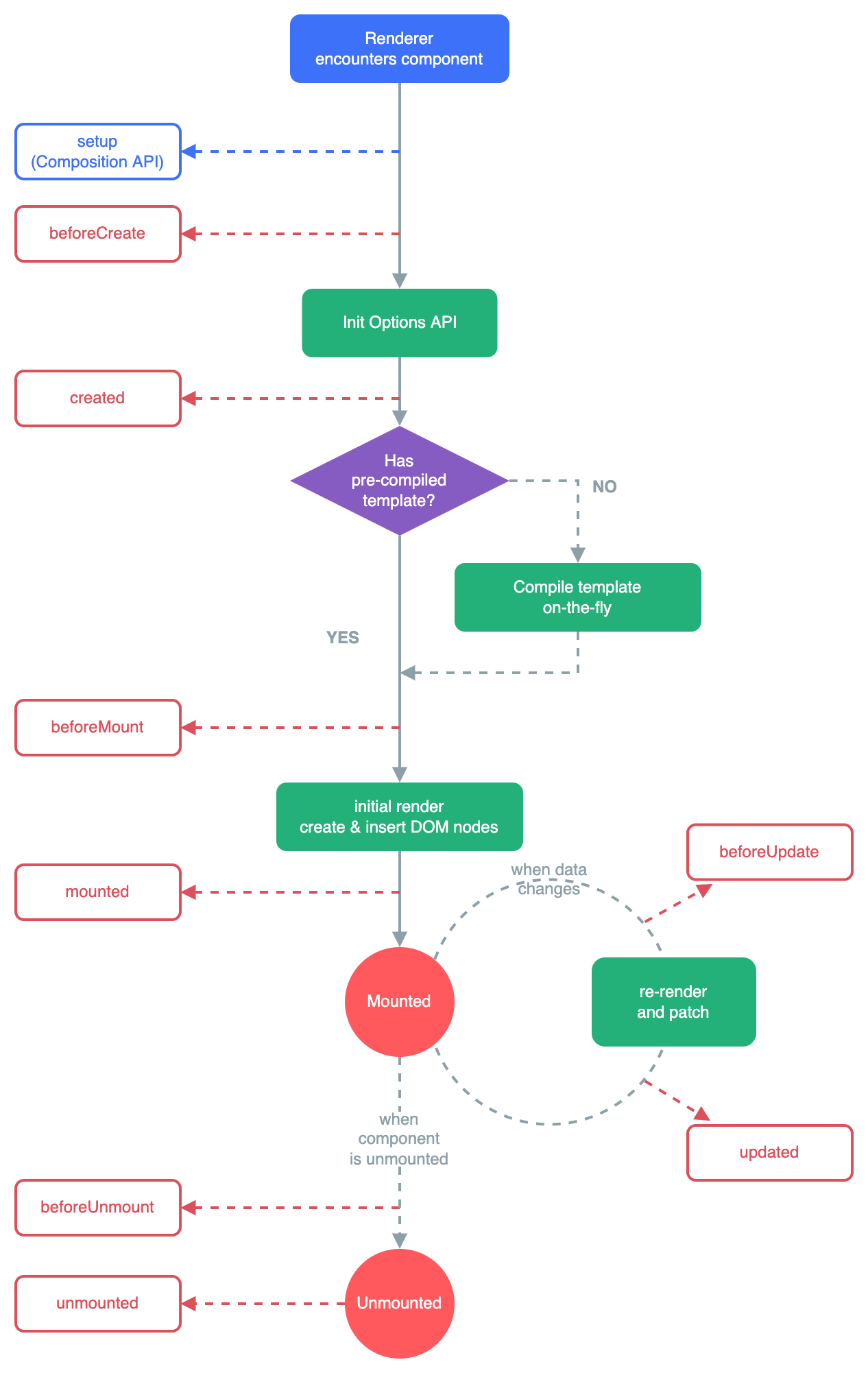
生命周期
API: https://cn.vuejs.org/api/composition-api-lifecycle.html#onupdated
<script setup> import { onMounted } from 'vue' onMounted(() => { console.log(`the component is now mounted.`) }) </script>- 1
- 2
- 3
- 4
- 5
- 6
- 7
-
相关阅读:
【圆满落幕】IDCF社区&天津理工大学华信软件学院校友会技术沙龙丨IDCF
JAVA8新特性- 函数式接口
叕跨域了...
机器学习课后习题 --- 逻辑回归
微信支付后页面跳转
AimBetter洞察您的数据库,DPM 和 APM 解决方案
浪潮云海首席科学家张东:面向一云多芯的系统设计方法
c++游戏常用函数
国开大学教育学形考任务
Web学习笔记-React(路由)
- 原文地址:https://blog.csdn.net/weixin_43960767/article/details/128135851
