-
K8S安装过程三:HAProxy负载均衡服务安装
1. 服务器准备
节点名称 机器IP OS版本 haproxy版本 node1 192.168.0.145 Centos 7.9 haproxy-2.6.1 node2 192.168.0.200 Centos 7.9 haproxy-2.6.1 node3 192.168.0.233 Centos 7.9 haproxy-2.6.1 2. haproxy 安装部署
在上述的三台机器上部署 haproxy 服务,每台机器上均执行下边的操作。
2.1 参数调整
- 基础环境配置 修改 /etc/sysctl.conf 配置文件,在文件中追加下边内容
net.ipv4.ip_nonlocal_bind=1- 1
保存 /etc/sysctl.conf 文件后,在命令行中执行
sysctl -p- 1
2.2下载 haproxy 源代码
su - root cd /opt wget https://www.haproxy.org/download/2.6/src/haproxy-2.6.1.tar.gz- 1
- 2
- 3
- 编译与安装 haproxy 服务
cd /opt tar -xvf haproxy-2.6.1.tar.gz cd haproxy-2.6.1 make clean make -j $(nproc) TARGET=linux-glibc USE_OPENSSL=1 make install- 1
- 2
- 3
- 4
- 5
- 6
- haproxy 初始化配置
cd /opt/haproxy-2.6.1 mkdir /etc/haproxy cp examples/basic-config-edge.cfg /etc/haproxy/haproxy.cfg cp examples/haproxy.init /etc/init.d/haproxy chmod +x /etc/init.d/haproxy ln -s /usr/local/sbin/haproxy /usr/sbin/haproxy mkdir /usr/share/haproxy- 1
- 2
- 3
- 4
- 5
- 6
- 7
- haproxy 业务规则配置 haproxy 业务规则配置文件在 /etc/haproxy/haproxy.cfg。将配置文件中的内容设置为如下内容:
global log 127.0.0.1 local0 log 127.0.0.1 local1 notice maxconn 8192 chroot /usr/share/haproxy user root group root daemon # default settings common to all HTTP proxies below defaults http mode http option httplog log global option dontlognull maxconn 8192 timeout client 1m timeout server 1m timeout connect 10s timeout http-keep-alive 2m timeout queue 15s timeout tunnel 4h # for websocket frontend k8sfrontend bind 192.168.0.110:8443 mode tcp option tcplog tcp-request inspect-delay 5s default_backend k8scluster backend k8scluster mode tcp option tcplog option tcp-check balance roundrobin default-server inter 10s downinter 5s rise 2 fall 2 slowstart 60s maxconn 250 maxqueue 256 weight 100 server k8s-cluster-145 192.168.0.145:6443 check server k8s-cluster-200 192.168.0.200:6443 check- 1
- 2
- 3
- 4
- 5
- 6
- 7
- 8
- 9
- 10
- 11
- 12
- 13
- 14
- 15
- 16
- 17
- 18
- 19
- 20
- 21
- 22
- 23
- 24
- 25
- 26
- 27
- 28
- 29
- 30
- 31
- 32
- 33
- 34
- 35
- 36
- 37
- 38
上边配置中 192.168.0.110 为 keepalived 中的 vip。192.168.0.200:6443、192.168.0.145:6443 是需要被负载均衡的后台服务地址信息,为后续 kube-spiserver 端口地址。
2.3 启动 haproxy 服务
systemctl enable haproxy systemctl start haproxy- 1
- 2
服务启动后,haproxy 将会通过 8443 开启负载均衡服务。向 192.168.0.1108443 发起的访问将会被自动负载均衡到 192.168.0.200:6443、192.168.0.145:6443 中任何一台服务上。
2.4 服务状态检查
systemctl status haproxy- 1
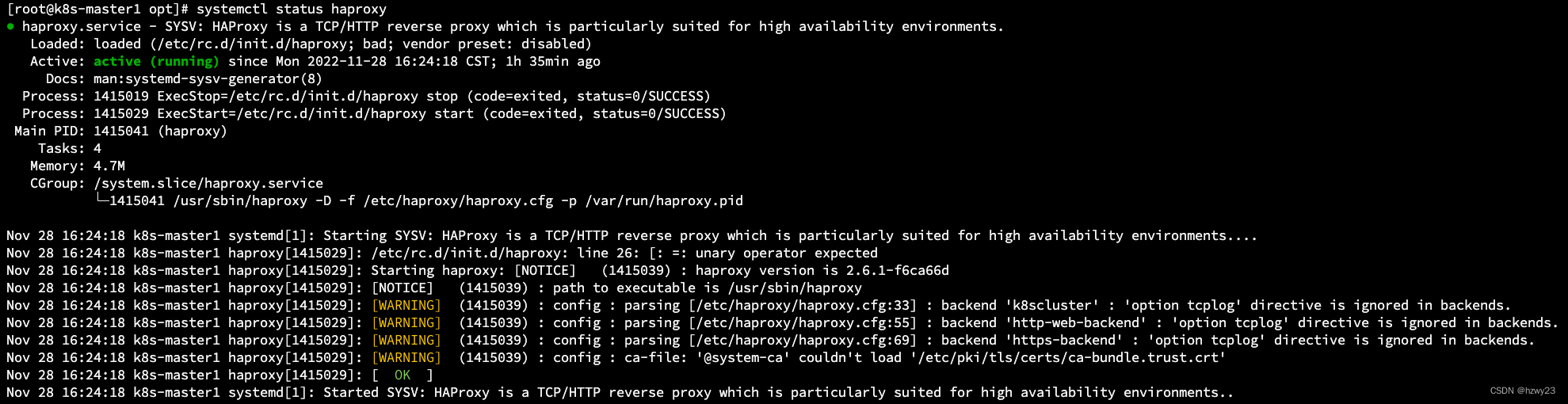
3. 负载均衡应用
在 /etc/haproxy/haproxy.cfg 中新增维护配置信息,让 HAProxy 给更多的服务提供负载均衡服务。
-
相关阅读:
C语言tips-字符串数组
Python 遍历字典的若干方法
从零开始学习Dubbo3——Dubbo实现
134.如何进行实时计算
一个json应该长什么样?Python如何使用json?
探索 Java 线程的创建
SqlServer 系统表
R语言学习笔记——入门篇:第四章-基本数据管理
Review Intro to NoSQL
Mysql学习笔记-临键锁实验
- 原文地址:https://blog.csdn.net/hzwy23/article/details/128084300