-
G-Ghost-RegNet实战:使用G-Ghost-RegNet实现图像分类任务(一)
摘要
论文地址:https://arxiv.org/abs/2201.03297
代码地址:https://github.com/huawei-noah/CV-Backbones
讲解视频:https://www.zhihu.com/zvideo/1584651719241363457
上篇实战介绍了华为的GhostNet,上面的论文中,将GhostNet成为C-GhostNet,C-GhostNet中为实现轻量化,使用了一些低运算密度的操作。低运算密度使得GPU的并行计算能力无法被充分利用,从而导致C-GhostNet在GPU等设备上糟糕的延迟,因此需要设计一种适用于GPU设备的Ghost模块。

作者等人发现,现有大多数CNN架构中,一个阶段通常包括几个卷积层/块,同时在每个阶段中的不同层/块,特征图的尺寸大小相同,因此一种猜想是:特征的相似性和冗余性不仅存在于一个层内,也存在于该阶段的多个层之间。下图的可视化结果验证了这种想法(如右边第三行第二列和第七行第三列的特征图存在一定相似性)。

作者等人利用观察到的阶段性特征冗余,设计G-Ghost模块并应用于GPU等设备,实现了一个在GPU上具有SOTA性能的轻量级CNN。G-Ghost中g_ghost_regnetx_160模型在ImageNet上取的了79.9%的成绩。
我这篇文章主要讲解如何使用G-Ghost完成图像分类任务,接下来我们一起完成项目的实战。经过测试,G-Ghost在植物幼苗数据集上实现了97+%的准确率。

通过这篇文章能让你学到:
- 如何使用数据增强,包括transforms的增强、CutOut、MixUp、CutMix等增强手段?
- 如何实现G-Ghost模型实现训练?
- 如何使用pytorch自带混合精度?
- 如何使用梯度裁剪防止梯度爆炸?
- 如何使用DP多显卡训练?
- 如何绘制loss和acc曲线?
- 如何生成val的测评报告?
- 如何编写测试脚本测试测试集?
- 如何使用余弦退火策略调整学习率?
- 如何使用AverageMeter类统计ACC和loss等自定义变量?
- 如何理解和统计ACC1和ACC5?
- 如何使用EMA?
安装包
安装timm
使用pip就行,命令:
pip install timm- 1
数据增强Cutout和Mixup
为了提高成绩我在代码中加入Cutout和Mixup这两种增强方式。实现这两种增强需要安装torchtoolbox。安装命令:
pip install torchtoolbox- 1
Cutout实现,在transforms中。
from torchtoolbox.transform import Cutout # 数据预处理 transform = transforms.Compose([ transforms.Resize((224, 224)), Cutout(), transforms.ToTensor(), transforms.Normalize([0.5, 0.5, 0.5], [0.5, 0.5, 0.5]) ])- 1
- 2
- 3
- 4
- 5
- 6
- 7
- 8
- 9
需要导入包:from timm.data.mixup import Mixup,
定义Mixup,和SoftTargetCrossEntropy
mixup_fn = Mixup( mixup_alpha=0.8, cutmix_alpha=1.0, cutmix_minmax=None, prob=0.1, switch_prob=0.5, mode='batch', label_smoothing=0.1, num_classes=12) criterion_train = SoftTargetCrossEntropy()- 1
- 2
- 3
- 4
- 5
参数详解:
mixup_alpha (float): mixup alpha 值,如果 > 0,则 mixup 处于活动状态。
cutmix_alpha (float):cutmix alpha 值,如果 > 0,cutmix 处于活动状态。
cutmix_minmax (List[float]):cutmix 最小/最大图像比率,cutmix 处于活动状态,如果不是 None,则使用这个 vs alpha。
如果设置了 cutmix_minmax 则cutmix_alpha 默认为1.0
prob (float): 每批次或元素应用 mixup 或 cutmix 的概率。
switch_prob (float): 当两者都处于活动状态时切换cutmix 和mixup 的概率 。
mode (str): 如何应用 mixup/cutmix 参数(每个’batch’,‘pair’(元素对),‘elem’(元素)。
correct_lam (bool): 当 cutmix bbox 被图像边框剪裁时应用。 lambda 校正
label_smoothing (float):将标签平滑应用于混合目标张量。
num_classes (int): 目标的类数。
EMA
EMA(Exponential Moving Average)是指数移动平均值。在深度学习中的做法是保存历史的一份参数,在一定训练阶段后,拿历史的参数给目前学习的参数做一次平滑。具体实现如下:
""" Exponential Moving Average (EMA) of model updates Hacked together by / Copyright 2020 Ross Wightman """ import logging from collections import OrderedDict from copy import deepcopy import torch import torch.nn as nn _logger = logging.getLogger(__name__) class ModelEma: def __init__(self, model, decay=0.9999, device='', resume=''): # make a copy of the model for accumulating moving average of weights self.ema = deepcopy(model) self.ema.eval() self.decay = decay self.device = device # perform ema on different device from model if set if device: self.ema.to(device=device) self.ema_has_module = hasattr(self.ema, 'module') if resume: self._load_checkpoint(resume) for p in self.ema.parameters(): p.requires_grad_(False) def _load_checkpoint(self, checkpoint_path): checkpoint = torch.load(checkpoint_path, map_location='cpu') assert isinstance(checkpoint, dict) if 'state_dict_ema' in checkpoint: new_state_dict = OrderedDict() for k, v in checkpoint['state_dict_ema'].items(): # ema model may have been wrapped by DataParallel, and need module prefix if self.ema_has_module: name = 'module.' + k if not k.startswith('module') else k else: name = k new_state_dict[name] = v self.ema.load_state_dict(new_state_dict) _logger.info("Loaded state_dict_ema") else: _logger.warning("Failed to find state_dict_ema, starting from loaded model weights") def update(self, model): # correct a mismatch in state dict keys needs_module = hasattr(model, 'module') and not self.ema_has_module with torch.no_grad(): msd = model.state_dict() for k, ema_v in self.ema.state_dict().items(): if needs_module: k = 'module.' + k model_v = msd[k].detach() if self.device: model_v = model_v.to(device=self.device) ema_v.copy_(ema_v * self.decay + (1. - self.decay) * model_v)- 1
- 2
- 3
- 4
- 5
- 6
- 7
- 8
- 9
- 10
- 11
- 12
- 13
- 14
- 15
- 16
- 17
- 18
- 19
- 20
- 21
- 22
- 23
- 24
- 25
- 26
- 27
- 28
- 29
- 30
- 31
- 32
- 33
- 34
- 35
- 36
- 37
- 38
- 39
- 40
- 41
- 42
- 43
- 44
- 45
- 46
- 47
- 48
- 49
- 50
- 51
- 52
- 53
- 54
- 55
- 56
加入到模型中。
#初始化 if use_ema: model_ema = ModelEma( model_ft, decay=model_ema_decay, device='cpu', resume=resume) # 训练过程中,更新完参数后,同步update shadow weights def train(): optimizer.step() if model_ema is not None: model_ema.update(model) # 将model_ema传入验证函数中 val(model_ema.ema, DEVICE, test_loader)- 1
- 2
- 3
- 4
- 5
- 6
- 7
- 8
- 9
- 10
- 11
- 12
- 13
- 14
- 15
- 16
- 17
导入g_ghost_regnet.py文件
文件的路径:https://github.com/huawei-noah/Efficient-AI-Backbones/tree/master/g_ghost_pytorch
将其导入到项目的根目录,然后,对其做修改:
由于我们使用g_ghost_regnetx_160,增加g_ghost_regnetx_160预训练模型配置字典。default_cfgs = { 'g_ghost_regnetx_160':'https://github.com/huawei-noah/Efficient-AI-Backbones/releases/tag/g_ghost_regnet/g_ghost_regnet_16.0g_79.9.pth', }- 1
- 2
- 3
然后对g_ghost_regnetx_160函数做修改,增加预训练模型参数的加载。由于预训练模型比g_ghost_regnetx_160多了
module.这个参数,所以要将这个参数去掉,否则无法正确加载。def g_ghost_regnetx_160(pretrained=False,**kwargs): model=GGhostRegNet(Bottleneck, [2, 6, 13, 1], [256, 512, 896, 2048], group_width=128, **kwargs) if pretrained: url = default_cfgs['g_ghost_regnetx_160'] checkpoint = torch.hub.load_state_dict_from_url(url=url, map_location="cpu") out_dict = collections.OrderedDict() for k, v in checkpoint.items(): k=k.replace('module.','') out_dict[k] = v print(out_dict.keys()) model.load_state_dict(out_dict) return model- 1
- 2
- 3
- 4
- 5
- 6
- 7
- 8
- 9
- 10
- 11
- 12
项目结构
G_Ghost_demo ├─data1 │ ├─Black-grass │ ├─Charlock │ ├─Cleavers │ ├─Common Chickweed │ ├─Common wheat │ ├─Fat Hen │ ├─Loose Silky-bent │ ├─Maize │ ├─Scentless Mayweed │ ├─Shepherds Purse │ ├─Small-flowered Cranesbill │ └─Sugar beet ├─mean_std.py ├─makedata.py ├─g_ghost_regnet.py ├─train.py └─test.py- 1
- 2
- 3
- 4
- 5
- 6
- 7
- 8
- 9
- 10
- 11
- 12
- 13
- 14
- 15
- 16
- 17
- 18
- 19
mean_std.py:计算mean和std的值。
makedata.py:生成数据集。为了能在DP方式中使用混合精度,还需要在模型的forward函数前增加@autocast()。

计算mean和std
为了使模型更加快速的收敛,我们需要计算出mean和std的值,新建mean_std.py,插入代码:
from torchvision.datasets import ImageFolder import torch from torchvision import transforms def get_mean_and_std(train_data): train_loader = torch.utils.data.DataLoader( train_data, batch_size=1, shuffle=False, num_workers=0, pin_memory=True) mean = torch.zeros(3) std = torch.zeros(3) for X, _ in train_loader: for d in range(3): mean[d] += X[:, d, :, :].mean() std[d] += X[:, d, :, :].std() mean.div_(len(train_data)) std.div_(len(train_data)) return list(mean.numpy()), list(std.numpy()) if __name__ == '__main__': train_dataset = ImageFolder(root=r'data1', transform=transforms.ToTensor()) print(get_mean_and_std(train_dataset))- 1
- 2
- 3
- 4
- 5
- 6
- 7
- 8
- 9
- 10
- 11
- 12
- 13
- 14
- 15
- 16
- 17
- 18
- 19
- 20
- 21
数据集结构:
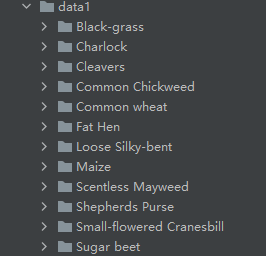
运行结果:
([0.3281186, 0.28937867, 0.20702125], [0.09407319, 0.09732835, 0.106712654])- 1
把这个结果记录下来,后面要用!
生成数据集
我们整理还的图像分类的数据集结构是这样的
data ├─Black-grass ├─Charlock ├─Cleavers ├─Common Chickweed ├─Common wheat ├─Fat Hen ├─Loose Silky-bent ├─Maize ├─Scentless Mayweed ├─Shepherds Purse ├─Small-flowered Cranesbill └─Sugar beet- 1
- 2
- 3
- 4
- 5
- 6
- 7
- 8
- 9
- 10
- 11
- 12
- 13
pytorch和keras默认加载方式是ImageNet数据集格式,格式是
├─data │ ├─val │ │ ├─Black-grass │ │ ├─Charlock │ │ ├─Cleavers │ │ ├─Common Chickweed │ │ ├─Common wheat │ │ ├─Fat Hen │ │ ├─Loose Silky-bent │ │ ├─Maize │ │ ├─Scentless Mayweed │ │ ├─Shepherds Purse │ │ ├─Small-flowered Cranesbill │ │ └─Sugar beet │ └─train │ ├─Black-grass │ ├─Charlock │ ├─Cleavers │ ├─Common Chickweed │ ├─Common wheat │ ├─Fat Hen │ ├─Loose Silky-bent │ ├─Maize │ ├─Scentless Mayweed │ ├─Shepherds Purse │ ├─Small-flowered Cranesbill │ └─Sugar beet- 1
- 2
- 3
- 4
- 5
- 6
- 7
- 8
- 9
- 10
- 11
- 12
- 13
- 14
- 15
- 16
- 17
- 18
- 19
- 20
- 21
- 22
- 23
- 24
- 25
- 26
- 27
新增格式转化脚本makedata.py,插入代码:
import glob import os import shutil image_list=glob.glob('data1/*/*.png') print(image_list) file_dir='data' if os.path.exists(file_dir): print('true') #os.rmdir(file_dir) shutil.rmtree(file_dir)#删除再建立 os.makedirs(file_dir) else: os.makedirs(file_dir) from sklearn.model_selection import train_test_split trainval_files, val_files = train_test_split(image_list, test_size=0.3, random_state=42) train_dir='train' val_dir='val' train_root=os.path.join(file_dir,train_dir) val_root=os.path.join(file_dir,val_dir) for file in trainval_files: file_class=file.replace("\\","/").split('/')[-2] file_name=file.replace("\\","/").split('/')[-1] file_class=os.path.join(train_root,file_class) if not os.path.isdir(file_class): os.makedirs(file_class) shutil.copy(file, file_class + '/' + file_name) for file in val_files: file_class=file.replace("\\","/").split('/')[-2] file_name=file.replace("\\","/").split('/')[-1] file_class=os.path.join(val_root,file_class) if not os.path.isdir(file_class): os.makedirs(file_class) shutil.copy(file, file_class + '/' + file_name)- 1
- 2
- 3
- 4
- 5
- 6
- 7
- 8
- 9
- 10
- 11
- 12
- 13
- 14
- 15
- 16
- 17
- 18
- 19
- 20
- 21
- 22
- 23
- 24
- 25
- 26
- 27
- 28
- 29
- 30
- 31
- 32
- 33
- 34
- 35
- 36
完成上面的内容就可以开启训练和测试了。
-
相关阅读:
思科CCNA实验配置-视频教程
mysql 5.7.31 创建账号并赋予权限
全栈开发提效神器——ApiFox(Postman + Swagger + Mock + JMeter)
CAD图在线Web测量工具代码实现(测量距离、面积、角度等)
Tensorflow亲妈级安装教程(CPU和GPU版)
C++&QT day10
win32-注册表-32位-64位-读写值-Qt-C++
18 计专
安阳旅游地图
智慧园区引领未来产业趋势:科技创新驱动园区发展,构建智慧化产业新体系
- 原文地址:https://blog.csdn.net/hhhhhhhhhhwwwwwwwwww/article/details/128086517
