-
框架体系——Spring
Spring IOC
IOC控制反转
- IOC 控制反转,全称Inverse of Control,是一种设计理念
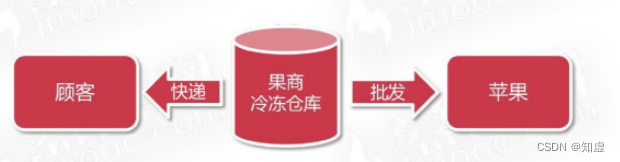
- 由代理人来创建和管理对象,消费者通过代理人来获取对象
- Ioc的目的是降低对象之间的耦合
- 通过加入Ioc容器将对象统一管理,将对象关联变为弱耦合。
DI依赖注入
- IoC是设计理念,是现代程序设计遵循的标准,是宏观目标
- DI(Dependency Injection)是具体技术实现,是微观实现。
- DI在java中就是利用反射技术实现对象注入(Injection)
Spring
- Spring可以从狭义和广义两个角度看待
- 狭义的Spring是指Spring框架(Spring Framework)
- 广义的Spring是指Spring生态体系
狭义的Spring框架
- Spring框架是企业开发复杂性的一站式解决方案
- Spring框架的核心是IoC容器与AoP面向切面编程
- Spring IoC负责创建与管理系统对象,并在此基础上拓展功能
广义的Spring框架
Spring 全家桶,包括Spring data,springboot,springcloud等等
传统开发方式
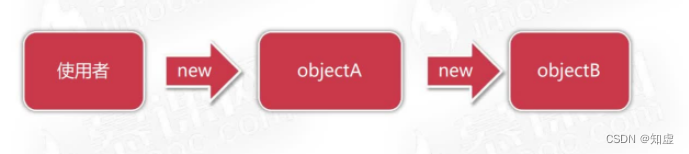
- 对象直接引用导致对象硬性关联,程序难以维护拓展
Spring IoC容器
- IoC容器是Spring生态的地基,用于统一创建与管理对象依赖

Spring IoC容器职责 - 对象的控制权交由第三方统一管理
- 利用Java反射技术实现运行时对象创建与关联(DI依赖注入)
- 基于配置提高应用程序的可维护性与拓展性
Spring IoC初体验
需求:
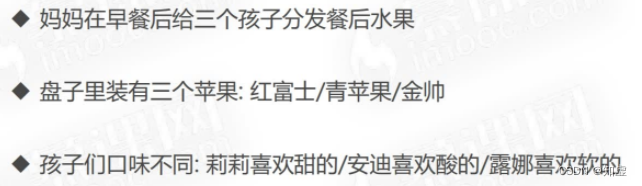
下面是普通的代码实现,将child和apple进行强关联,这就出现了一个问题,灵活性不高,如果我想修改,就必须改动源代码public static void main(String[] args) { Apple apple1 = new Apple("红富士", "红色", "欧洲"); Apple apple2 = new Apple("绿富士", "绿色", "绿大利"); Apple apple3 = new Apple("蓝富士", "蓝色", "兰博基尼"); Child lily = new Child("lily", apple1); Child andy = new Child("andy", apple2); Child luna = new Child("luna", apple3); lily.eat(); andy.eat(); luna.eat(); }- 1
- 2
- 3
- 4
- 5
- 6
- 7
- 8
- 9
- 10
- 11
针对这个问题,Spring应运而生,下面我们使用Spring来实现上述逻辑
Spring
首先,引入Spring的依赖<dependencies> <dependency> <groupId>org.springframeworkgroupId> <artifactId>spring-contextartifactId> <version>4.3.11.RELEASEversion> dependency> dependencies>- 1
- 2
- 3
- 4
- 5
- 6
- 7
下面是几大重要的包
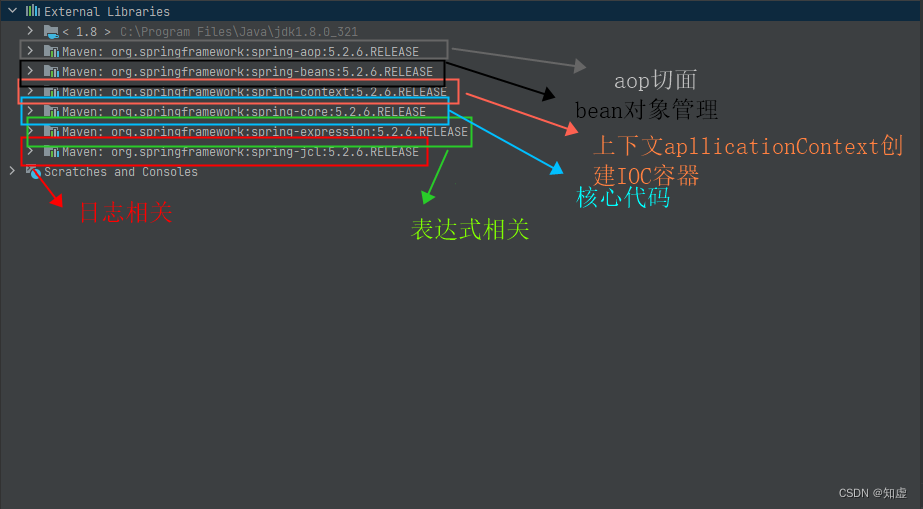
接着在resources下新建applicationContext.xml,增加配置如下:
<beans xmlns="http://www.springframework.org/schema/beans" xmlns:xsi="http://www.w3.org/2001/XMLSchema-instance" xsi:schemaLocation="http://www.springframework.org/schema/beans https://www.springframework.org/schema/beans/spring-beans.xsd"> <bean id="sweetApple" class="com.imooc.imooc.spring.ioc.eneity.Apple"> <property name="title" value="红富士">property> <property name="origin" value="欧洲">property> <property name="color" value="红色">property> bean> <bean id="sourApple" class="com.imooc.imooc.spring.ioc.eneity.Apple"> <property name="title" value="青苹果">property> <property name="origin" value="中亚">property> <property name="color" value="绿色">property> bean> <bean id="softApple" class="com.imooc.imooc.spring.ioc.eneity.Apple"> <property name="title" value="金帅">property> <property name="origin" value="中国">property> <property name="color" value="黄色">property> bean> beans>- 1
- 2
- 3
- 4
- 5
- 6
- 7
- 8
- 9
- 10
- 11
- 12
- 13
- 14
- 15
- 16
- 17
- 18
- 19
- 20
- 21
- 22
- 23
- 24
然后新建SpringApplication类,看看获取对象
package com.imooc.imooc.spring.ioc.eneity; import com.imooc.imooc.spring.ioc.Application; import org.springframework.context.ApplicationContext; import org.springframework.context.support.ClassPathXmlApplicationContext; /** * todo {类简要说明} * * @Author wangw * @Date 2022/11/22 19:34 * @Version 1.0 */ public class SpringApplication { public static void main(String[] args) { ApplicationContext context =new ClassPathXmlApplicationContext("classpath:applicationContext.xml"); Apple sweetApple = context.getBean("sweetApple",Apple.class); System.out.println(sweetApple.getTitle()); } }- 1
- 2
- 3
- 4
- 5
- 6
- 7
- 8
- 9
- 10
- 11
- 12
- 13
- 14
- 15
- 16
- 17
- 18
- 19
- 20
- 21
配置Bean的三种方式
Spring框架有三种配置Bean的方式,分别是 XML配置Bean) ,基于注解配置Bean,基于Java代码配置Bean
下面我们详细学习如何通过XML配置Bean;实例化bean的三种方法
而使用XML配置bean,也有三种实例化Bean方法 基于构造方法对象实例化、基于静态工厂实例化、基于工厂实例方法实例化

下面是通过工厂类实例化对象,优势在于隐藏了对象创建的细节。
首先是配置:<bean id="apple4" class="com.imooc.spring.ioc.factory.AppleStaticFactory" factory-method="CreateSweetApple"/> <bean id="factoryInstance" class="com.imooc.spring.ioc.factory.ApplyFactoryInstance">bean> <bean id="apple5" factory-bean="factoryInstance" factory-method="createSweetApple"/>- 1
- 2
- 3
- 4
- 5
然后是两个工厂及其方法:
public class ApplyFactoryInstance { public Apple createSweetApple(){ Apple apple =new Apple(); apple.setOrigin("欧洲"); apple.setColor("红色"); apple.setTitle("红富士"); return apple; } }- 1
- 2
- 3
- 4
- 5
- 6
- 7
- 8
- 9
- 10
public class AppleStaticFactory { public static Apple CreateSweetApple(){ Apple apple =new Apple(); apple.setOrigin("欧洲"); apple.setColor("红色"); apple.setTitle("红富士"); return apple; } }- 1
- 2
- 3
- 4
- 5
- 6
- 7
- 8
- 9
初始化完成后,我们如何从Ioc容器中获取bean呢?有两种方式,分别如下:

另外,其实在xml中 bean有ID和Name两个属性,这两个属性有什么区别呢?
首先,我们来看看他们的相同点:- bean id 和name都是设置对象在IoC容器中的唯一标识
- 两者在同一个配置文件中都不允许重复
- 两者允许在多个配置文件中出现重复,新对象覆盖旧对象
两者不同点:
- id要求更为严格,一次只能定义一个对象标识(推荐)
- name更为宽松,一次允许定义多个对象标识
- tips:id和name命名要求有意义,且驼峰命名
除此之外,其实Spring还支持无ID/name属性,此时使用类名全路径作为唯一标识。
对象依赖注入
- 依赖注入是指运行时将容器内对象利用反射赋给其他对象的操作
- 基于Setter注入对象
- 基于构造方法注入对象
IOC在项目中的重要用途
示例代码如下:

ApplicationContext-service.xml:
<beans xmlns="http://www.springframework.org/schema/beans" xmlns:xsi="http://www.w3.org/2001/XMLSchema-instance" xsi:schemaLocation="http://www.springframework.org/schema/beans https://www.springframework.org/schema/beans/spring-beans.xsd"> <bean id="bookService" class="com.imooc.spring.ioc.bookshop.service.BookService"> <property name="bookDao" ref="bookDao">property> bean> beans>- 1
- 2
- 3
- 4
- 5
- 6
- 7
- 8
- 9
ApplicationContext-dao.xml:
<beans xmlns="http://www.springframework.org/schema/beans" xmlns:xsi="http://www.w3.org/2001/XMLSchema-instance" xsi:schemaLocation="http://www.springframework.org/schema/beans https://www.springframework.org/schema/beans/spring-beans.xsd"> <bean id="bookDao" class="com.imooc.spring.ioc.bookshop.dao.BookDaoImpl">bean> beans>- 1
- 2
- 3
- 4
- 5
- 6
- 7
- 8
BookDao
package com.imooc.spring.ioc.bookshop.dao; /** * todo {类简要说明} * * @Author wangw * @Date 2022/11/24 22:42 * @Version 1.0 */ public interface BookDao { public void insert(); }- 1
- 2
- 3
- 4
- 5
- 6
- 7
- 8
- 9
- 10
- 11
- 12
- 13
BookDaoImpl
package com.imooc.spring.ioc.bookshop.dao; /** * todo {类简要说明} * * @Author wangw * @Date 2022/11/24 22:42 * @Version 1.0 */ public class BookDaoImpl implements BookDao{ public void insert() { System.out.println("向Mysql Book 表插入一条数据"); } }- 1
- 2
- 3
- 4
- 5
- 6
- 7
- 8
- 9
- 10
- 11
- 12
- 13
- 14
- 15
- 16
bookShopApplication
package com.imooc.spring.ioc.bookshop; import com.imooc.spring.ioc.bookshop.service.BookService; import org.springframework.context.ApplicationContext; import org.springframework.context.support.ClassPathXmlApplicationContext; /** * todo {类简要说明} * * @Author wangw * @Date 2022/11/24 22:47 * @Version 1.0 */ public class bookShopApplication { public static void main(String[] args) { ApplicationContext context = new ClassPathXmlApplicationContext("classpath:ApplicationContext-*.xml"); BookService bookService = context.getBean("bookService",BookService.class); bookService.purchase(); } }- 1
- 2
- 3
- 4
- 5
- 6
- 7
- 8
- 9
- 10
- 11
- 12
- 13
- 14
- 15
- 16
- 17
- 18
- 19
- 20
- 21
实现对象依赖注入有两种方式:setter方法注入/构造方法注入
区别在于xml‘中bean参数 一个使用 property 一个使用 constructor-arg
注入集合对象
1. 注入List:

2. 注入set

3. 注入map

- 注入Properties

示例代码:
<beans xmlns="http://www.springframework.org/schema/beans" xmlns:xsi="http://www.w3.org/2001/XMLSchema-instance" xsi:schemaLocation="http://www.springframework.org/schema/beans https://www.springframework.org/schema/beans/spring-beans.xsd"> <bean id="c1" class="com.imooc.spring.ioc.entity.Computer"> <constructor-arg name="brand" value="联想">constructor-arg> <constructor-arg name="type" value="台式机">constructor-arg> <constructor-arg name="sn" value="8389283012">constructor-arg> <constructor-arg name="price" value="3085">constructor-arg> bean> <bean id="company" class="com.imooc.spring.ioc.entity.Company"> <property name="rooms"> <set> <value>2001-总裁办value> <value>2003-总经理办公室value> <value>2010-研发部会议室value> <value>2010-研发部会议室value> set> property> <property name="computers"> <map> <entry key="dev-880172" value-ref="c1">entry> <entry key="dev-88173"> <bean class="com.imooc.spring.ioc.entity.Computer"> <constructor-arg name="brand" value="华为">constructor-arg> <constructor-arg name="type" value="笔记本">constructor-arg> <constructor-arg name="sn" value="8389283013">constructor-arg> <constructor-arg name="price" value="5085">constructor-arg> bean> entry> map> property> <property name="info"> <props> <prop key="phone">010-12345678prop> <prop key="address">湖北省武汉市xx中心prop> <prop key="website">http:www.baidu.comprop> props> property> bean> beans>- 1
- 2
- 3
- 4
- 5
- 6
- 7
- 8
- 9
- 10
- 11
- 12
- 13
- 14
- 15
- 16
- 17
- 18
- 19
- 20
- 21
- 22
- 23
- 24
- 25
- 26
- 27
- 28
- 29
- 30
- 31
- 32
- 33
- 34
- 35
- 36
- 37
- 38
- 39
- 40
- 41
- 42
- 43
- 44
- 45
- 46
- 47
- 48
- 49
- 50
- 51
- 52
- 53
- 54
- 55
- 56
- 57
- 58
- 59
查看容器内对象
示例代码:
package com.imooc.spring.ioc; import com.imooc.spring.ioc.entity.Company; import com.imooc.spring.ioc.entity.Computer; import javafx.application.Application; import org.springframework.context.ApplicationContext; import org.springframework.context.support.ClassPathXmlApplicationContext; /** * todo {类简要说明} * * @Author wangw * @Date 2022/11/24 23:09 * @Version 1.0 */ public class SpringApplication { public static void main(String[] args) { ApplicationContext context = new ClassPathXmlApplicationContext("classpath:ApplicationContext.xml"); Company company = context.getBean("company", Company.class); System.out.println(company); System.out.println(company.getInfo().getProperty("website")); // 获取容器内对象名称 String[] beanNames = context.getBeanDefinitionNames(); for (String beanName : beanNames) { System.out.println(beanName); System.out.println("类型:"+context.getBean(beanName).getClass().getName()); System.out.println("内容:"+context.getBean(beanName).toString()); } } }- 1
- 2
- 3
- 4
- 5
- 6
- 7
- 8
- 9
- 10
- 11
- 12
- 13
- 14
- 15
- 16
- 17
- 18
- 19
- 20
- 21
- 22
- 23
- 24
- 25
- 26
- 27
- 28
- 29
- 30
- 31
bean scope属性
- bean scope 属性用于决定对象核实被创建
- bean scope 配置将影响容器内对象的数量
- 默认情况下bean会在IoC容器创建后自动序列化,全局唯一
bean scope属性清单

singleton 与 prototype对比

bean的生命周期

配置示例:

实现极简IoC容器(模拟Spring实现流程)
首先是IOC容器类:
接口:package com.imooc.spring.ioc.context; /** * ApplicationContext 接口 * * @Author wangw * @Date 2022/11/26 22:15 * @Version 1.0 */ public interface ApplicationContext { public Object getBean(String beanId); }- 1
- 2
- 3
- 4
- 5
- 6
- 7
- 8
- 9
- 10
- 11
- 12
实现类:
package com.imooc.spring.ioc.context; import com.imooc.spring.ioc.entity.Apple; import org.dom4j.Document; import org.dom4j.Element; import org.dom4j.Node; import org.dom4j.io.SAXReader; import java.lang.reflect.Method; import java.net.URLDecoder; import java.util.HashMap; import java.util.List; import java.util.Map; /** * ApplicationContext 实现类,本质就是一个IOC容器 * * @Author wangw * @Date 2022/11/26 22:16 * @Version 1.0 */ public class ClassPathXmlApplicationContext implements ApplicationContext { private Map iocContainer = new HashMap(); public ClassPathXmlApplicationContext() { try { String filePath = this.getClass().getResource("/applicationContext.xml").getPath(); filePath = new URLDecoder().decode(filePath, "UTF-8"); SAXReader reader = new SAXReader(); Document document = reader.read(filePath); List<Node> nodes = document.getRootElement().selectNodes("bean"); for (Node node : nodes) { Element element = (Element) node; String id = element.attributeValue("id"); String className = element.attributeValue("class"); Class class1 = Class.forName(className); Object obj = class1.newInstance(); List<Node> list = element.selectNodes("property"); for (Node node1 : list) { Element property = (Element) node1; String propName = property.attributeValue("name"); String propValue = property.attributeValue("value"); String setMethodName ="set"+propName.substring(0,1).toUpperCase()+propName.substring(1); System.out.println("准备执行"+setMethodName+"方法注入数据"); Method method = class1.getMethod(setMethodName,String.class); method.invoke(obj,propValue); } iocContainer.put(id, obj); System.out.println("ioc容器初始化完毕"); System.out.println(iocContainer); } } catch (Exception e) { e.printStackTrace(); } } public Object getBean(String beanId) { return iocContainer.get(beanId); } }- 1
- 2
- 3
- 4
- 5
- 6
- 7
- 8
- 9
- 10
- 11
- 12
- 13
- 14
- 15
- 16
- 17
- 18
- 19
- 20
- 21
- 22
- 23
- 24
- 25
- 26
- 27
- 28
- 29
- 30
- 31
- 32
- 33
- 34
- 35
- 36
- 37
- 38
- 39
- 40
- 41
- 42
- 43
- 44
- 45
- 46
- 47
- 48
- 49
- 50
- 51
- 52
- 53
- 54
- 55
- 56
- 57
- 58
- 59
- 60
- 61
- 62
配置XML:
<beans> <bean id ="sweetApple" class="com.imooc.spring.ioc.entity.Apple"> <property name="title" value="红富士">property> <property name="origin" value="欧洲">property> <property name="color" value="红色">property> bean> beans>- 1
- 2
- 3
- 4
- 5
- 6
- 7
- 8
实体类:
package com.imooc.spring.ioc.entity; /** * todo {类简要说明} * * @Author wangw * @Date 2022/11/26 22:11 * @Version 1.0 */ public class Apple { private String title; private String color; private String origin; public Apple() { } public Apple(String title, String color, String origin) { this.title = title; this.color = color; this.origin = origin; } public String getTitle() { return title; } public void setTitle(String title) { this.title = title; } public String getColor() { return color; } public void setColor(String color) { this.color = color; } public String getOrigin() { return origin; } public void setOrigin(String origin) { this.origin = origin; } }- 1
- 2
- 3
- 4
- 5
- 6
- 7
- 8
- 9
- 10
- 11
- 12
- 13
- 14
- 15
- 16
- 17
- 18
- 19
- 20
- 21
- 22
- 23
- 24
- 25
- 26
- 27
- 28
- 29
- 30
- 31
- 32
- 33
- 34
- 35
- 36
- 37
- 38
- 39
- 40
- 41
- 42
- 43
- 44
- 45
- 46
- 47
- 48
启动类:
package com.imooc.spring.ioc; import com.imooc.spring.ioc.context.ApplicationContext; import com.imooc.spring.ioc.context.ClassPathXmlApplicationContext; import com.imooc.spring.ioc.entity.Apple; /** * todo {类简要说明} * * @Author wangw * @Date 2022/11/26 22:27 * @Version 1.0 */ public class Application { public static void main(String[] args) { ApplicationContext context =new ClassPathXmlApplicationContext(); Apple apple = (Apple) context.getBean("sweetApple"); System.out.println(apple); } }- 1
- 2
- 3
- 4
- 5
- 6
- 7
- 8
- 9
- 10
- 11
- 12
- 13
- 14
- 15
- 16
- 17
- 18
- 19
- 20
- 21
- 22
至此实现效果如下,可以看出其实Spring IoC容器就是通过反射实现的

基于注解和Java Config 配置 IoC容器
基于注解的优势
- 摆脱繁琐的XML形式的bean与依赖注入配置
- 基于"声明式"的原则,更适合轻量级的现代企业应用
- 让代码可读性变得更好,研发人员拥有更好的开发体验
三类注解
- 组件类型注解——声明当前类的功能和职责
- 自动装配注解——根据属性特征自动注入对象
- 元数据注解——更细化的辅助IoC容器管理对象的注解
四类组件类型注解

如果我们需要使用上面几个注解,有个前提条件是需要 开启组件扫描,即

在这里需要注意的是 基于注解配置和基于xml配置的applicationContext.xml有些不同,配置如下:<beans xmlns="http://www.springframework.org/schema/beans" xmlns:xsi="http://www.w3.org/2001/XMLSchema-instance" xmlns:context="http://www.springframework.org/schema/context" xsi:schemaLocation="http://www.springframework.org/schema/beans https://www.springframework.org/schema/beans/spring-beans.xsd http://www.springframework.org/schema/context https://www.springframework.org/schema/context/spring-context.xsd"> <context:component-scan base-package="com.imooc"/> beans>- 1
- 2
- 3
- 4
- 5
- 6
- 7
- 8
- 9
- 10
- 11
- 12
两类自动装配注解

在使用按类型装配过程中可能会存在一个问题,就是存在两个相同类型的对象,会存在装配失败的情况,此时可以使用@Primary注解标识其中一个为主要,当注入时就会优先选用这个。
或者我们可以按照名称装配完成注入。
需要注意的是当使用@Resource注解时,有以下情况:
当配置了name时候:直接按照name在IoC容器中注入bean
未配置name时,首先根据属性名称去IoC容器中匹配,匹配上则注入,如果没有匹配上则按照类型去匹配注入,此时同@Autowired其他元数据注解

我们使用@Value注解时有几个点需要注意:
第一是一般@Value数据从配置文件读取,所以首先需要增加配置文件,如:

第二是需要在applicationContext.xml增加:

第三则是引用配置,如下:

基于Java Config 配置IoC容器
基于Java Config的优势
- 完全摆脱了XML束缚,使用独立J啊v阿雷管理对象和依赖
- 注解配置相对分散,利用 Java Config 可以对配置集中管理
- 可以在编译时进行依赖检查,不容易出错
Java Config 核心注解

下面给出示例代码:
Config类:package com.imooc.spring.ioc; import com.imooc.spring.ioc.controller.UserController; import com.imooc.spring.ioc.dao.EmployeeDao; import com.imooc.spring.ioc.dao.UserDao; import com.imooc.spring.ioc.service.UserService; import org.springframework.context.annotation.Bean; import org.springframework.context.annotation.ComponentScan; import org.springframework.context.annotation.Configuration; /** * todo {类简要说明} * * @Author wangw * @Date 2022/11/28 22:36 * @Version 1.0 */ @Configuration //说明当前类是一个【配置类,用于替代applicationContext.xml @ComponentScan(basePackages = {"com.imooc"}) //配置这个等同于xml中的content:component-scan public class Config { @Bean public UserDao userDao() { UserDao userDao = new UserDao(); System.out.println(userDao); return userDao; } @Bean //先按name尝试注入,不存在则按照类型注入 public UserService userService(UserDao userDao , EmployeeDao employeeDao) { UserService userService = new UserService(); System.out.println(userService); System.out.println("注入userDao"+userDao); userService.setUserDao(userDao); userService.setEmployeeDao(employeeDao); return userService; } @Bean public UserController userController(UserService userService) { UserController userController = new UserController(); System.out.println("注入userService"+userService); userController.setUserService(userService); return userController; } }- 1
- 2
- 3
- 4
- 5
- 6
- 7
- 8
- 9
- 10
- 11
- 12
- 13
- 14
- 15
- 16
- 17
- 18
- 19
- 20
- 21
- 22
- 23
- 24
- 25
- 26
- 27
- 28
- 29
- 30
- 31
- 32
- 33
- 34
- 35
- 36
- 37
- 38
- 39
- 40
- 41
- 42
- 43
- 44
- 45
- 46
- 47
- 48
- 49
启动类:(首句发生改变,使用 new AnnotationConfigApplicationContext(Config.class))
package com.imooc.spring.ioc; import javafx.application.Application; import org.springframework.context.ApplicationContext; import org.springframework.context.annotation.AnnotationConfigApplicationContext; import java.lang.annotation.Annotation; /** * todo {类简要说明} * * @Author wangw * @Date 2022/11/28 22:42 * @Version 1.0 */ public class SpringApplication { public static void main(String[] args) { ApplicationContext context = new AnnotationConfigApplicationContext(Config.class); System.out.println("-------------------------------------------------------------"); String[] ids= context.getBeanDefinitionNames(); for (String id : ids) { System.out.println(id+":"+context.getBean(id)); } } }- 1
- 2
- 3
- 4
- 5
- 6
- 7
- 8
- 9
- 10
- 11
- 12
- 13
- 14
- 15
- 16
- 17
- 18
- 19
- 20
- 21
- 22
- 23
- 24
- 25
- 26
其余类无特殊配置,仅给出一个示例:
package com.imooc.spring.ioc.service; import com.imooc.spring.ioc.dao.EmployeeDao; import com.imooc.spring.ioc.dao.UserDao; /** * todo {类简要说明} * * @Author wangw * @Date 2022/11/28 22:36 * @Version 1.0 */ public class UserService { private UserDao userDao; private EmployeeDao employeeDao; public EmployeeDao getEmployeeDao() { return employeeDao; } public void setEmployeeDao(EmployeeDao employeeDao) { this.employeeDao = employeeDao; } public UserDao getUserDao() { return userDao; } public void setUserDao(UserDao userDao) { this.userDao = userDao; } }- 1
- 2
- 3
- 4
- 5
- 6
- 7
- 8
- 9
- 10
- 11
- 12
- 13
- 14
- 15
- 16
- 17
- 18
- 19
- 20
- 21
- 22
- 23
- 24
- 25
- 26
- 27
- 28
- 29
- 30
- 31
- 32
- 33
经过上面基于xml的配置以及基于java Config的配置,可以看出,xml便于维护,但是较复杂,Java Config的注解适用于开发,但不利于维护,所以xml更适合大型项目的协同合作,基于Java Config的注解更适合于敏捷开发,例如:springboot就默认使用这个
Spring Test 测试模块
- Spring Test 是Spring中用于测试的模块
- Spring Test 对JUnit单元测试框架有良好的整合
- 通过Spring Tets 可在JUnit在单元测试时初始化IoC容器
Spring与JUnit整合过程
- maven 依赖spring-test
- 利用 @RunWith 及 @ContextConfiguration描述测试用例类
- 测试用例类从容器获取对象完成测试用例的执行
import com.imooc.spring.ioc.servie.UserService; import org.junit.Test; import org.junit.runner.RunWith; import org.springframework.test.context.ContextConfiguration; import org.springframework.test.context.junit4.SpringJUnit4ClassRunner; import javax.annotation.Resource; /** * todo {类简要说明} * * @Author wangw * @Date 2022/11/28 23:20 * @Version 1.0 */ // 将Junit4的执行权加交由Spring Test,在测试用例执行前自动初始化IoC容器 @RunWith(SpringJUnit4ClassRunner.class) // ioc初始化过程中通知加载哪个配置文件 @ContextConfiguration(locations = {"classpath:applicationContext.xml"}) public class SpringTestor { @Resource private UserService userService; @Test public void testUserService(){ userService.createUser(); } }- 1
- 2
- 3
- 4
- 5
- 6
- 7
- 8
- 9
- 10
- 11
- 12
- 13
- 14
- 15
- 16
- 17
- 18
- 19
- 20
- 21
- 22
- 23
- 24
- 25
- 26
- 27
- 28
- 29
-
相关阅读:
时光倒流-第12届蓝桥杯Scratch选拔赛真题精选
【重装系统SSH连不上】 WARNING: REMOTE HOST IDENTIFICATION HAS CHANGED!
设计模式-桥接模式(Kotlin)
数字先锋 | 农业农村部大数据公共平台基座上线,天翼云擎起乡村振兴新希望!
关于HTTP/1.1,HTTP/2和HTTP/3的区别与联系
如何快速从 ETL 到 ELT?火山引擎 ByteHouse 做了这三件事
Mybatis-Plus中的and和or用法
java 企业工程管理系统软件源码+Spring Cloud + Spring Boot +二次开发+ MybatisPlus + Redis
如何在Python中实现找到两个未知特征来从其余样本中聚类已知样本?
DICOM图像像素值、灰度值与CT值的解释及关系
- 原文地址:https://blog.csdn.net/HBUT_WANGWEI/article/details/127973886
