-
第三章:CompletableFuture
Future接口复习
Future接口(FutureTask实现类)定义了操作异步任务的一些方法,如获取异步任务的执行结果、取消任务的执行、判断任务是否被取消、判断任务执行是否完毕等。(异步:可以被叫停,可以被取消)
一句话:Future接口可以为主线程开一个分支任务,专门为主线程处理耗时和费力的复杂业务。

比如主线程让一个子线程去执行任务,子线程可能比较耗时,启动子线程开始执行任务后,主线程就去做其他事情了,过了一会才去获取子任务的执行结果。
FutureTask 实现类
在我们学多线程时,创建多线程一共有四种方式:
- 继承 Thread类
- 实现 Runnable 接口
- 实现 Callable 接口
- 使用线程池
而我们要使用多线程实现
异步任务, 就需要具有以下三个特点:多线程/有返回/异步任务在以上的集中创建方式中,只有 实现Callable 接口,重写 call 方法才具有返回值,但是问题又来了,Thread 构造器中并没有提供带有 Callable 类型的参数;只支持传入 Runnable 接口以及实现类

因此我们就考虑有没有一个类,能够通过 Callable 来创建线程,并且又实现了
Runnable 、 Future接口。而 FutureTask 就是一个这样的类,FutureTask 的继承关系图:

FutureTask 不仅实现了 Runnable、Future 接口,并且还支持通过 Callable 创建实例:

代码演示:
public class FutureTaskTest { public static void main(String[] args) throws ExecutionException, InterruptedException { FutureTask<String> futureTask = new FutureTask<>(new MyThread()); Thread t1 = new Thread(futureTask); t1.start(); // 获取返回值 System.out.println(futureTask.get()); } } class MyThread implements Callable<String> { @Override public String call() throws Exception { return "hello, callable"; } }- 1
- 2
- 3
- 4
- 5
- 6
- 7
- 8
- 9
- 10
- 11
- 12
- 13
- 14
- 15
- 16
- 17
- 18
- 19
Future 编码的优缺点
优点
Future + 线程池 异步多线程任务配合,能显著提高程序的执行效率。
案例:
不使用 Future 的情况:
public class FutureTaskTest02 { public static void main(String[] args) { long begin = System.currentTimeMillis(); // 任务一耗时 try {Thread.sleep(500);} catch (InterruptedException e) {e.printStackTrace();} // 任务二耗时 try {Thread.sleep(300);} catch (InterruptedException e) {e.printStackTrace();} // 任务三耗时 try {Thread.sleep(700);} catch (InterruptedException e) {e.printStackTrace();} long end = System.currentTimeMillis(); System.out.println(" 程序耗时: " + (end - begin) + "毫秒"); } }- 1
- 2
- 3
- 4
- 5
- 6
- 7
- 8
- 9
- 10
- 11
- 12
- 13
- 14
输出结果:程序耗时: 1512毫秒
使用 Future + ThreadPool 的情况:
线程池用完一定要记着关闭!!!!
public class FutureTaskTest02 { public static void main(String[] args) throws ExecutionException, InterruptedException { long begin = System.currentTimeMillis(); // 创建线程池 ExecutorService threadPool = Executors.newFixedThreadPool(3); FutureTask<String> futureTask1 = new FutureTask<String>(() -> { try {Thread.sleep(500);} catch (InterruptedException e) {e.printStackTrace();} return "任务一"; }); FutureTask<String> futureTask2 = new FutureTask<String>(() -> { try {Thread.sleep(300);} catch (InterruptedException e) {e.printStackTrace();} return "任务二"; }); FutureTask<String> futureTask3 = new FutureTask<String>(() -> { try {Thread.sleep(300);} catch (InterruptedException e) {e.printStackTrace();} return "任务三"; }); // 提交任务 threadPool.submit(futureTask1); threadPool.submit(futureTask2); threadPool.submit(futureTask3); // 获取返回值 System.out.println(futureTask1.get()); System.out.println(futureTask2.get()); System.out.println(futureTask3.get()); long end = System.currentTimeMillis(); System.out.println(" 程序耗时: " + (end - begin) + "毫秒"); } // public static void m1 () { // // 任务一耗时 // try {Thread.sleep(500);} catch (InterruptedException e) {e.printStackTrace();} // // 任务二耗时 // try {Thread.sleep(300);} catch (InterruptedException e) {e.printStackTrace();} // // 任务三耗时 // try {Thread.sleep(700);} catch (InterruptedException e) {e.printStackTrace();} // } }- 1
- 2
- 3
- 4
- 5
- 6
- 7
- 8
- 9
- 10
- 11
- 12
- 13
- 14
- 15
- 16
- 17
- 18
- 19
- 20
- 21
- 22
- 23
- 24
- 25
- 26
- 27
- 28
- 29
- 30
- 31
- 32
- 33
- 34
- 35
- 36
- 37
- 38
- 39
- 40
- 41
- 42
- 43
- 44
- 45
- 46
输出结果:
任务一 任务二 任务三 程序耗时: 587毫秒- 1
- 2
- 3
- 4
通过测试可以看出,Future+ ThreadPool 异步任务的方式确实提高了效率
缺点
get() 方法导致阻塞
一旦调用get()方法,不管是否计算完成,都会导致阻塞(所以一般get方法放到最后)
代码演示:
public class FutureTaskTest03 { public static void main(String[] args) throws ExecutionException, InterruptedException { FutureTask<String> futureTask = new FutureTask<String>(() -> { System.out.println("异步任务开始计算....."); try {Thread.sleep(5000);} catch (InterruptedException e) {e.printStackTrace();} return "异步任务计算结束....."; }); new Thread(futureTask).start(); // get() 方法会阻塞线程的执行 System.out.println(futureTask.get()); System.out.println("main线程正在执行其他操作....."); } }- 1
- 2
- 3
- 4
- 5
- 6
- 7
- 8
- 9
- 10
- 11
- 12
- 13
- 14
- 15
- 16
- 17
输出结果:

从输出情况中可以看出,get方法确实有阻塞线程的缺点,因此一般建议放在代码的最后执行。
get() 方法中还可以传入时间参数,超过指定的时间未完成计算,会抛出异常:
TimeoutException
代码演示:
public class FutureTaskTest03 { public static void main(String[] args) throws ExecutionException, InterruptedException, TimeoutException { FutureTask<String> futureTask = new FutureTask<String>(() -> { System.out.println("异步任务开始计算....."); try {Thread.sleep(5000);} catch (InterruptedException e) {e.printStackTrace();} return "异步任务计算结束....."; }); new Thread(futureTask).start(); System.out.println("main线程正在执行其他操作....."); // get() 方法会阻塞线程的执行 System.out.println(futureTask.get(3, TimeUnit.SECONDS)); } }- 1
- 2
- 3
- 4
- 5
- 6
- 7
- 8
- 9
- 10
- 11
- 12
- 13
- 14
- 15
- 16
- 17
输出结果:

isDone() 轮询
轮询的方式会耗费无谓的CPU资源,而且也不见得能及时地得到计算结果.
如果想要异步获取结果,通常都会以轮询的方式去获取结果.尽量不要阻塞
代码演示:
public class FutureTaskTest03 { public static void main(String[] args) throws ExecutionException, InterruptedException, TimeoutException { FutureTask<String> futureTask = new FutureTask<String>(() -> { System.out.println("异步任务开始计算....."); try {Thread.sleep(5000);} catch (InterruptedException e) {e.printStackTrace();} return "异步任务计算结束....."; }); new Thread(futureTask).start(); System.out.println("main线程正在执行其他操作....."); // get() 方法会阻塞线程的执行 // System.out.println(futureTask.get()); // 设置规定时间内完成计算,否则会报异常,一般不会使用这种方式,有异常始终是不好的 // System.out.println(futureTask.get(3, TimeUnit.SECONDS)); // isDone 轮询:判断异步任务是否计算完成,会消耗CPU资源 while(true) { if (futureTask.isDone()) { System.out.println(futureTask.get()); break; }else{ try {Thread.sleep(500);} catch (InterruptedException e) {e.printStackTrace();} System.out.println("正在计算,请勿催促"); } } } }- 1
- 2
- 3
- 4
- 5
- 6
- 7
- 8
- 9
- 10
- 11
- 12
- 13
- 14
- 15
- 16
- 17
- 18
- 19
- 20
- 21
- 22
- 23
- 24
- 25
- 26
- 27
- 28
- 29
- 30
- 31
输出结果:

总结
Future 对于结果的获取不是很友好,只能通过阻塞或者轮询的方式获取结果
CompletableFuture
CompletableFuture 为什么会出现?
Future 对于一些简单的业务场景应用起来还是比较OK的,但是相对于一些复杂的任务或者需求,Future就显得无能为力了,比如:
- 回调通知
- Future通过阻塞或者轮询的方式极大的消耗CPU资源,对于真正的异步处理我们希望是可以通过传入回调函数,在Future 结束时自动调用该回调函数,这样,我们就不用等待结果。
- 多个任务前后依赖可以组合处理
- 我们使用 Future 创建异步任务时,几个任务之间是没有关系的。
- 如果我们想将多个异步任务的计算结果组合起来,后一个异步任务的计算结果需要前一个异步任务的值,这时 Future 就无能为力了。
- 对计算速度选最快完成的(并返回结果)
- 当异步任务中某个任务最快结束时,返回结果,返回第一名处理结果。
- …
阻塞的方式和异步编程的设计理念相违背,而轮询的方式会耗费无谓的CPU资源。因此在 jdk1.8 引入了 CompletableFuture, Future能干的它都能干,Future不能干的,它也能干,O(∩_∩)O哈哈~
CompletableFuture 架构图
public class CompletableFuture<T> implements Future<T>, CompletionStage<T> {}- 1

CompletionStage
- Completion Stage代表异步计算过程中的某一个阶段, 一个阶段完成以后可能会触发另外一个阶段
- 一个阶段的计算执行可以是一个Function, Consumer或者Runnable。
- 比如:stage.then Apply(x->square(x) ) .then Accept(x->System.out.print(x) ) .then Run() ->System.out.print In() ),一个阶段的执行可能是被单个阶段的完成触发,也可能是由多个阶段一起触发。
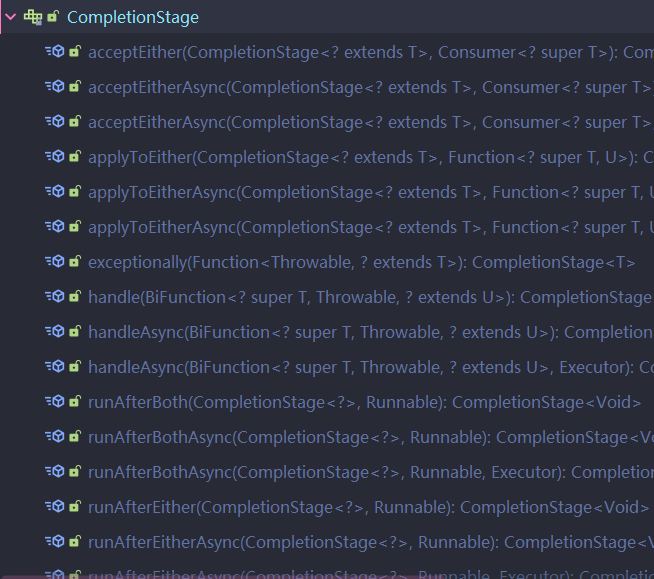
CompletionStage 中提供了大量的操作方法,这也是比 Future 功能强大的原因:
CompletableFuture 四个静态方法
不推荐使用 new 的方式创建 CompletableFuture 对象,在 jdk 帮助文档中也明确说明了: 是一个不完整的 CompletableFuture

推荐使用 CompletableFuture 中的四个静态方法 创建异常任务:
runAsync 无返回值
public static CompletableFuturerunAsync(Runnable runnable) public static CompletableFuturerunAsync(Runnable runnable, Executor executor)
supplyAsync 有返回值
public static CompletableFuture supplyAsync(Supplier supplier)public static CompletableFuture supplyAsync(Supplier supplier, Executor executor)
关于 Executor 参数说明:
- 没有指定Executor的方法,直接使用默认的
ForkJoinPool.commPool()作为它的线程池执行异步代码。 - 如果指定线程池,则使用我们定义的或者特别指定的线程池执行异步代码。
代码演示 runAsync :
public class CompletableFutureTest01 { public static void main(String[] args) throws ExecutionException, InterruptedException { // Void 表示没有返回值 CompletableFuture<Void> completableFuture = CompletableFuture.runAsync(() -> { System.out.println("异步任务开始执行。。。。"); }); System.out.println(completableFuture.get()); } }- 1
- 2
- 3
- 4
- 5
- 6
- 7
- 8
- 9
- 10
runAsync + 线程池:
public class CompletableFutureTest01 { public static void main(String[] args) throws ExecutionException, InterruptedException { // 创建线程池 ExecutorService threadPool = Executors.newFixedThreadPool(3); // Void 表示没有返回值 CompletableFuture<Void> completableFuture = CompletableFuture.runAsync(() -> { System.out.println(Thread.currentThread().getName() + "异步任务开始执行。。。。"); },threadPool); System.out.println(completableFuture.get()); } }- 1
- 2
- 3
- 4
- 5
- 6
- 7
- 8
- 9
- 10
- 11
- 12
supplyAsync :
CompletableFuture<String> uCompletableFuture = CompletableFuture.supplyAsync(() -> { System.out.println(Thread.currentThread().getName() + "异步任务开始执行。。。。"); return " hello, supplyAsync"; }); System.out.println(uCompletableFuture.get());- 1
- 2
- 3
- 4
- 5
- 6
supplyAsync+ 线程池;
ExecutorService threadPool = Executors.newFixedThreadPool(3); CompletableFuture<String> uCompletableFuture = CompletableFuture.supplyAsync(() -> { System.out.println(Thread.currentThread().getName() + "异步任务开始执行。。。。"); return " hello, supplyAsync"; },threadPool); System.out.println(uCompletableFuture.get()); }- 1
- 2
- 3
- 4
- 5
- 6
- 7
- 8
- 9
CompletableFuture 减少阻塞和轮询
在上面的演示中,CompletableFuture 不仅可以完成 Future 的功能,并且能够通过
whenComplete来减少阻塞和轮询(自动回调)whenComplete() 方法演示:
public CompletableFuture<T> whenComplete(BiConsumer<? super T, ? super Throwable> action)- 1
参数是一个消费类型参数,其中有俩个参数:v 和 e。
v 表示 异步任务返回的值,就是计算结果
e 表示 异步任务出现的异常信息
public class CompletableFutureTest02 { public static void main(String[] args) throws ExecutionException, InterruptedException { CompletableFuture.supplyAsync(() -> { System.out.println(Thread.currentThread().getName() + " 异步任务正在计算....."); try {Thread.sleep(1000);} catch (InterruptedException e) {e.printStackTrace();} int result = new Random().nextInt(); return result; }).whenComplete((v,e)-> { // 回调函数 if (e == null) { System.out.println("计算后的结果为: " + v); } }).exceptionally((e) -> { // 打印异常信息 System.out.println(e.getCause() + "\t" + e.getMessage()); return null; }); System.out.println(Thread.currentThread().getName() + " 正在执行其他任务....."); } }- 1
- 2
- 3
- 4
- 5
- 6
- 7
- 8
- 9
- 10
- 11
- 12
- 13
- 14
- 15
- 16
- 17
- 18
- 19
注意事项
由于我们使用的是默认的
ForkJoinPool线程池, 该线程池就像一个守护线程,主线程结束,该线程池就会关闭,因此主线程结束太快,获取不到异步任务的返回值。针对此情况,俩种解决方案:- 使用自定义的线程池
- 在 main 方法末尾,使用 sleep
使用自定义线程池:
public class CompletableFutureTest02 { public static void main(String[] args) throws ExecutionException, InterruptedException { // 创建线程池 ExecutorService threadPool = Executors.newFixedThreadPool(3); CompletableFuture.supplyAsync(() -> { System.out.println(Thread.currentThread().getName() + " 异步任务正在计算....."); try {Thread.sleep(1000);} catch (InterruptedException e) {e.printStackTrace();} int result = new Random().nextInt(); return result; },threadPool).whenComplete((v,e)-> { // 回调函数 if (e == null) { System.out.println("计算后的结果为: " + v); } }).exceptionally((e) -> { // 打印异常信息 System.out.println(e.getCause() + "\t" + e.getMessage()); return null; }); System.out.println(Thread.currentThread().getName() + " 正在执行其他任务....."); // 睡眠一会,避免由于main线程执行太快,获取不到异步任务的计算结果 // try {Thread.sleep(2000);} catch (InterruptedException e) {e.printStackTrace();} threadPool.shutdown(); } }- 1
- 2
- 3
- 4
- 5
- 6
- 7
- 8
- 9
- 10
- 11
- 12
- 13
- 14
- 15
- 16
- 17
- 18
- 19
- 20
- 21
- 22
- 23
- 24
- 25
演示异常发生的情况:
public class CompletableFutureTest02 { public static void main(String[] args) throws ExecutionException, InterruptedException { // 创建线程池 ExecutorService threadPool = Executors.newFixedThreadPool(3); CompletableFuture.supplyAsync(() -> { System.out.println(Thread.currentThread().getName() + " 异步任务正在计算....."); try {Thread.sleep(1000);} catch (InterruptedException e) {e.printStackTrace();} // 异常 int i = 10/0 ; int result = new Random().nextInt(); return result; },threadPool).whenComplete((v,e)-> { // 回调函数 if (e == null) { System.out.println("计算后的结果为: " + v); } }).exceptionally((e) -> { // 打印异常信息 System.out.println("异常信息: " + e.getCause() + "\t" + e.getMessage()); return null; }); System.out.println(Thread.currentThread().getName() + " 正在执行其他任务....."); // 睡眠一会,避免由于main线程执行太快,获取不到异步任务的计算结果 // try {Thread.sleep(2000);} catch (InterruptedException e) {e.printStackTrace();} threadPool.shutdown(); }- 1
- 2
- 3
- 4
- 5
- 6
- 7
- 8
- 9
- 10
- 11
- 12
- 13
- 14
- 15
- 16
- 17
- 18
- 19
- 20
- 21
- 22
- 23
- 24
- 25
- 26
- 27
- 28
输出结果:

总结
- 异步任务结束时,会自动回调某个对象的方法 whenComplete;
- 主线程设置好毁掉后,不再关心异步任务的执行,异步任务之间可以顺序执行
- 异步任务出错时,会自动回调某个对象的方法。 exceptionally
CompletableFuture 案例
讲解案例之前,需要的知识点:
- jdk8新特性:Lambda、Stream、函数式接口编程…
- 在我另一篇博客中有讲解:https://blog.csdn.net/aetawt/article/details/127949647
- 链式编程
- join 和 get 的区别
- get 会抛出
ExecutionException, InterruptedException异常, join 不会抛出异常。
- get 会抛出
链式编程:将多个方法用链子 “串起来”
public class ChainTest { public static void main(String[] args) { // 普通写法 Student student = new Student(); student.setAge(1); student.setId(1); student.setName("aa"); // 链式编程 student.setName("aa").setAge(1).setId(2); } } @Data @Accessors(chain = true) // 开启链式编程 class Student { private String name; private int age; private int id; }- 1
- 2
- 3
- 4
- 5
- 6
- 7
- 8
- 9
- 10
- 11
- 12
- 13
- 14
- 15
- 16
- 17
- 18
- 19
- 20
- 21
电商网站比价需求分析
1需求说明
1.1同一款产品,同时搜索出同款产品在各大电商平台的售价;
1.2同一款产品,同时搜索出本产品在同一个电商平台下,各个入驻卖家售价是多少2输出返回
出来结果希望是同款产品的在不同地方的价格清单列表, 返回一个List
《mysql》in jd price is 88.05
《mysql》in dang dang price is 86.11
《mysql》in tao bao price is 90.433解决方案
比对同一个商品在各个平台上的价格,要求获得一个清单列表
1 stepbystep , 按部就班, 查完京东查淘宝, 查完淘宝查天猫…
2 all in ,万箭齐发,一口气多线程异步任务同时查询。。。第一种方案
/** * * Author: YZG * Date: 2022/11/20 16:06 * Description: */ public class NetMallCase { // 平台集合 static List<NetMall> list = Arrays.asList( new NetMall("jd"), new NetMall("dangdang"), new NetMall("taobao") ); /** * step to step * @description 在不同平台中搜索商品的价格 * @date 2022/11/20 16:16 * @param list 平台集合 * @param productName 商品名字 * @return java.lang.String * 返回格式: * 《mysql》in jd price is 88.05 * 《mysql》in dang dang price is 86.11 * 《mysql》in tao bao price is 90.43 */ public static List<String> getPrice(List<NetMall> list, String productName) { // % 占位符,相当于 jdbc里面的 ? return list.stream().map(netMall -> String.format( productName + " in %s is %.2f", netMall.getNetName(), netMall.calcPrice(productName))) .collect(Collectors.toList()); } public static void main(String[] args) { long begin = System.currentTimeMillis(); List<String> mysqlList = getPrice(list, "mysql"); for (String s : mysqlList) { System.out.println(s); } long end = System.currentTimeMillis(); System.out.println("程序耗时: " + (end - begin) + "毫秒"); } } // 平台类 @Data class NetMall { private String netName; public NetMall(String netName) { this.netName = netName; } // 根据商品名搜索价格 public Double calcPrice(String productName) { try { Thread.sleep(1000); } catch (InterruptedException e) { e.printStackTrace(); } return new Random().nextDouble() * 2 + productName.charAt(0); } }- 1
- 2
- 3
- 4
- 5
- 6
- 7
- 8
- 9
- 10
- 11
- 12
- 13
- 14
- 15
- 16
- 17
- 18
- 19
- 20
- 21
- 22
- 23
- 24
- 25
- 26
- 27
- 28
- 29
- 30
- 31
- 32
- 33
- 34
- 35
- 36
- 37
- 38
- 39
- 40
- 41
- 42
- 43
- 44
- 45
- 46
- 47
- 48
- 49
- 50
- 51
- 52
- 53
- 54
- 55
- 56
- 57
- 58
- 59
- 60
- 61
- 62
- 63
- 64
- 65
- 66
输出结果:
mysql in jd is 109.22 mysql in dangdang is 109.67 mysql in taobao is 110.81 程序耗时: 3085毫秒- 1
- 2
- 3
- 4
第二种方案
使用 异步任务
public class NetMallCase { // 平台集合 static List<NetMall> list = Arrays.asList( new NetMall("jd"), new NetMall("dangdang"), new NetMall("taobao") ); /** * step to step * @description 在不同平台中搜索商品的价格 * @date 2022/11/20 16:16 * @param list 平台集合 * @param productName 商品名字 * @return * 返回格式: * 《mysql》in jd price is 88.05 * 《mysql》in dang dang price is 86.11 * 《mysql》in tao bao price is 90.43 */ public static List<String> getPrice(List<NetMall> list, String productName) { // % 占位符,相当于 jdbc里面的 ? return list.stream().map(netMall -> String.format( productName + " in %s is %.2f", netMall.getNetName(), netMall.calcPrice(productName))) .collect(Collectors.toList()); } // 异步任务处理 public static List<String> getPriceByCompletableFuture(List<NetMall> list, String productName) { // map 映射:会将异步任务的处理应用到 流中的每一个元素上 return list.stream().map(netMall -> CompletableFuture.supplyAsync(() -> { return String.format( productName + " in %s is %.2f", netMall.getNetName(), netMall.calcPrice(productName)); })) //Stream.collect(Collectors.toList()); // List } public static void main(String[] args) { long begin = System.currentTimeMillis(); List<String> mysqlList = getPrice(list, "mysql"); for (String s : mysqlList) { System.out.println(s); } long end = System.currentTimeMillis(); System.out.println("程序耗时: " + (end - begin) + "毫秒"); System.out.println("---------------异步任务处理-------------"); long begin1 = System.currentTimeMillis(); List<String> mysqlList1 = getPriceByCompletableFuture(list, "mysql"); for (String s : mysqlList1) { System.out.println(s); } long end1 = System.currentTimeMillis(); System.out.println("程序耗时: " + (end1 - begin1) + "毫秒"); } } // 平台类 @Data class NetMall { private String netName; public NetMall(String netName) { this.netName = netName; } // 根据商品名搜索价格 public Double calcPrice(String productName) { try { Thread.sleep(1000); } catch (InterruptedException e) { e.printStackTrace(); } return new Random().nextDouble() * 2 + productName.charAt(0); } } - 1
- 2
- 3
- 4
- 5
- 6
- 7
- 8
- 9
- 10
- 11
- 12
- 13
- 14
- 15
- 16
- 17
- 18
- 19
- 20
- 21
- 22
- 23
- 24
- 25
- 26
- 27
- 28
- 29
- 30
- 31
- 32
- 33
- 34
- 35
- 36
- 37
- 38
- 39
- 40
- 41
- 42
- 43
- 44
- 45
- 46
- 47
- 48
- 49
- 50
- 51
- 52
- 53
- 54
- 55
- 56
- 57
- 58
- 59
- 60
- 61
- 62
- 63
- 64
- 65
- 66
- 67
- 68
- 69
- 70
- 71
- 72
- 73
- 74
- 75
- 76
- 77
- 78
- 79
- 80
- 81
- 82
- 83
- 84
- 85
- 86
输出结果:
mysql in jd is 109.93 mysql in dangdang is 109.78 mysql in taobao is 109.48 程序耗时: 3109毫秒 ---------------异步任务处理------------- mysql in jd is 110.42 mysql in dangdang is 109.43 mysql in taobao is 110.04 程序耗时: 1012毫秒 Process finished with exit code 0- 1
- 2
- 3
- 4
- 5
- 6
- 7
- 8
- 9
- 10
- 11
- 12
CompletableFuture 常用的方法
获得结果和触发计算
获取结果
public T get()不见不散,容易阻塞public T get(long timeout,TimeUnit unit)过时不候,超过时间会爆异常public T join() 类似于get(),区别在于是否需要抛出异常public T getNow(T valueIfAbsent)- 获取计算结果时,如果异步任务没有完成计算,返回指定的 valueIfAbsent。
主动触发计算
public boolean complete(T value)是否立即打断异步任务的计算- true:打断异步任务的计算,并将 value 作为返回值
- false: 没有打断异步任务计算,将计算结果返回
public class CompletableFutureAPITest { public static void main(String[] args) throws Exception { CompletableFuture<String> completableFuture = CompletableFuture.supplyAsync(() -> { try {Thread.sleep(2000);} catch (InterruptedException e) {e.printStackTrace();} return "abc"; }); // System.out.println(completableFuture.get()); // 超过 1s 没有获取到计算结果,就会抛出异常: TimeoutException // System.out.println(completableFuture.get(1, TimeUnit.SECONDS)); // 和 get() 方法一样,唯一区别就是该方法不需要抛异常 // System.out.println(completableFuture.join()); // 如果获取时没有计算完成,将返回指定的值 // System.out.println(completableFuture.getNow("new Value") ); // complete 返回 boolean类型,是否打断了 异步任务的计算。 // true:打断了计算,并将指定的值作为返回结果返回 // false :没有打断计算,返回计算好的结果 // 等待 3s 计算需要 2s,没有打断,返回 abc try {Thread.sleep(3000);} catch (InterruptedException e) {e.printStackTrace();} System.out.println(completableFuture.complete("newValue") + "\t" + completableFuture.join()); } }- 1
- 2
- 3
- 4
- 5
- 6
- 7
- 8
- 9
- 10
- 11
- 12
- 13
- 14
- 15
- 16
- 17
- 18
- 19
- 20
- 21
- 22
- 23
- 24
- 25
- 26
- 27
对计算结果进行处理
thenApply计算结果存在在依赖关系,使得线程串行化。- 出现异常不会继续往下执行。
handle计算结果存在在依赖关系,使得线程串行化。- 出现异常,也会继续执行。根据异常参数进行调整
俩个方法的区别就是对异常的处理不同
thenApply 演示:
/** * * Author: YZG * Date: 2022/11/20 17:17 * Description: */ public class CompletableFutureAPI2Test { public static void main(String[] args) throws Exception { CompletableFuture.supplyAsync(() -> { System.out.println("第一步"); return 1; }).thenApply(f -> { System.out.println("第二步"); // 出现异常 // 由于出现异常,不会继续执行第三步 int i = 10/0; return f + 2; }).thenApply(f -> { System.out.println("第三步"); return f + 3; }).whenComplete((v, e) -> { System.out.println("最终的计算结果: " + v); }).exceptionally(e -> { System.out.println(e.getCause() + "\t" + e.getMessage()); return null; }); } }- 1
- 2
- 3
- 4
- 5
- 6
- 7
- 8
- 9
- 10
- 11
- 12
- 13
- 14
- 15
- 16
- 17
- 18
- 19
- 20
- 21
- 22
- 23
- 24
- 25
- 26
- 27
- 28
- 29
- 30
- 31
- 32
输出结果:

handle 方法演示:
/** * * Author: YZG * Date: 2022/11/20 17:17 * Description: */ public class CompletableFutureAPI2Test { public static void main(String[] args) throws Exception { // handle方法演示 CompletableFuture.supplyAsync(() -> { System.out.println("第一步"); return 1; }).handle((f, e) -> { System.out.println("第二步"); // 出现异常 // 即使出现异常,也会继续执行第三步 int i = 10 / 0; return f + 2; }).handle((f, e) -> { System.out.println("第三步"); return f + 3; }).whenComplete((f, e) -> { System.out.println("最终的计算结果: " + f); }).exceptionally(e -> { System.out.println(e.getCause() + "\t" + e.getMessage()); return null; }); } }- 1
- 2
- 3
- 4
- 5
- 6
- 7
- 8
- 9
- 10
- 11
- 12
- 13
- 14
- 15
- 16
- 17
- 18
- 19
- 20
- 21
- 22
- 23
- 24
- 25
- 26
- 27
- 28
- 29
- 30
- 31
- 32
- 33
输出结果:
第一步 第二步 第三步 最终的计算结果: null java.lang.NullPointerException java.lang.NullPointerException Process finished with exit code 0- 1
- 2
- 3
- 4
- 5
- 6
- 7
- 8
对计算结果进行消费
- thenAccept 接收任务的处理结果,并消费处理,无返回结果|消费型函数式接口,之前的是Function
演示:
public class CompletableFutureAPI3Test { public static void main(String[] args) throws Exception { CompletableFuture.supplyAsync(() -> { System.out.println("第一步"); return 1; }).thenApply(f -> { System.out.println("第二步"); return f + 2; }).thenApply(f -> { System.out.println("第三步"); return f + 3; }).thenAccept(System.out::println); } }- 1
- 2
- 3
- 4
- 5
- 6
- 7
- 8
- 9
- 10
- 11
- 12
- 13
- 14
- 15
多个任务之间的顺序执行:
-
thenRun(Runnable runnable)
- 任务A执行完执行B,并且B不需要A的结果,没有返回值
-
thenAccept(Consumer action)
- 任务A执行完执行B,B需要A的结果,但是任务B无返回值
-
thenApply(Function fn)
- 任务A执行完执行B,B需要A的结果,同时任务B有返回值
// 多个任务间的执行顺序 System.out.println(CompletableFuture.supplyAsync(() -> 1).thenRun(() -> {}).join()); // null System.out.println(CompletableFuture.supplyAsync(() -> 1).thenApply(f -> f + 2).join()); // 3 System.out.println(CompletableFuture.supplyAsync(() -> 1).thenAccept(f -> {}).join()); // null- 1
- 2
- 3
- 4
- 5
- 6
- 7
- 8
CompletableFuture 对线程池的选择
以上的几个方法:
thenApply、thenRun、thenAccept都有另外一个版本,就是后面加 Async 这俩种有什么区别呢?以
thenRun和thenRunAsync为例:- 没有传入自定义线程池,都用默认线程池ForkJoinPool
- 传入了一个自定义线程池如果你执行第一个任务的时候,传入了一个自定义线程池
- 调用
thenRun方法执行第二个任务的时候,则第二个任务和第一个任务是用同一个线程池 - 调用
thenRunAsync执行第二个任务的时候,则第一个任务使用的是你自己传入的线程池,第二个任务使用的是ForkJoin线程池
- 调用
- 也有可能处理太快,系统优化切换原则,直接使用main线程处理(把sleep去掉)
**代码演示 1 **:
public class CompletableFutureThreadPoolTest { public static void main(String[] args) throws Exception { CompletableFuture.supplyAsync(() -> { try {Thread.sleep(30);} catch (InterruptedException e) {e.printStackTrace();} System.out.println(Thread.currentThread().getName() + " 任务1"); return 1; }).thenRun(() -> { try {Thread.sleep(20);} catch (InterruptedException e) {e.printStackTrace();} System.out.println(Thread.currentThread().getName() + " 任务2"); }).thenRun(() -> { try {Thread.sleep(10);} catch (InterruptedException e) {e.printStackTrace();} System.out.println(Thread.currentThread().getName() + " 任务3"); }).thenRun(() -> { try {Thread.sleep(30);} catch (InterruptedException e) {e.printStackTrace();} System.out.println(Thread.currentThread().getName() + " 任务4"); }); // 避免主线程结束太快而导致 关闭 ForkJoinPool try {Thread.sleep(2000);} catch (InterruptedException e) {e.printStackTrace();} } }- 1
- 2
- 3
- 4
- 5
- 6
- 7
- 8
- 9
- 10
- 11
- 12
- 13
- 14
- 15
- 16
- 17
- 18
- 19
- 20
- 21
- 22
输出结果:
ForkJoinPool.commonPool-worker-1 任务1 ForkJoinPool.commonPool-worker-1 任务2 ForkJoinPool.commonPool-worker-1 任务3 ForkJoinPool.commonPool-worker-1 任务4- 1
- 2
- 3
- 4
代码演示 2.1 :
public class CompletableFutureThreadPoolTest { public static void main(String[] args) throws Exception { // 创建线程池 ExecutorService threadPool = Executors.newFixedThreadPool(5); try { CompletableFuture.supplyAsync(() -> { try {Thread.sleep(30);} catch (InterruptedException e) {e.printStackTrace();} System.out.println(Thread.currentThread().getName() + " 任务1"); return 1; },threadPool).thenRun(() -> { try {Thread.sleep(20);} catch (InterruptedException e) {e.printStackTrace();} System.out.println(Thread.currentThread().getName() + " 任务2"); }).thenRun(() -> { try {Thread.sleep(10);} catch (InterruptedException e) {e.printStackTrace();} System.out.println(Thread.currentThread().getName() + " 任务3"); }).thenRun(() -> { try {Thread.sleep(30);} catch (InterruptedException e) {e.printStackTrace();} System.out.println(Thread.currentThread().getName() + " 任务4"); }); } finally { threadPool.shutdown(); } // 避免主线程结束太快而导致 关闭 ForkJoinPool // try {Thread.sleep(2000);} catch (InterruptedException e) {e.printStackTrace();} } }- 1
- 2
- 3
- 4
- 5
- 6
- 7
- 8
- 9
- 10
- 11
- 12
- 13
- 14
- 15
- 16
- 17
- 18
- 19
- 20
- 21
- 22
- 23
- 24
- 25
- 26
- 27
- 28
- 29
- 30
输出结果:
pool-1-thread-1 任务1 pool-1-thread-1 任务2 pool-1-thread-1 任务3 pool-1-thread-1 任务4- 1
- 2
- 3
- 4
代码演示 2.2 :
public class CompletableFutureThreadPoolTest { public static void main(String[] args) throws Exception { // 创建线程池 ExecutorService threadPool = Executors.newFixedThreadPool(5); try { CompletableFuture.supplyAsync(() -> { try {Thread.sleep(30);} catch (InterruptedException e) {e.printStackTrace();} System.out.println(Thread.currentThread().getName() + " 任务1"); return 1; },threadPool).thenRunAsync(() -> { try {Thread.sleep(20);} catch (InterruptedException e) {e.printStackTrace();} System.out.println(Thread.currentThread().getName() + " 任务2"); }).thenRun(() -> { try {Thread.sleep(10);} catch (InterruptedException e) {e.printStackTrace();} System.out.println(Thread.currentThread().getName() + " 任务3"); }).thenRun(() -> { try {Thread.sleep(30);} catch (InterruptedException e) {e.printStackTrace();} System.out.println(Thread.currentThread().getName() + " 任务4"); }); } finally { threadPool.shutdown(); } // 避免主线程结束太快而导致 关闭 ForkJoinPool try {Thread.sleep(2000);} catch (InterruptedException e) {e.printStackTrace();} }- 1
- 2
- 3
- 4
- 5
- 6
- 7
- 8
- 9
- 10
- 11
- 12
- 13
- 14
- 15
- 16
- 17
- 18
- 19
- 20
- 21
- 22
- 23
- 24
- 25
- 26
- 27
- 28
输出结果:
pool-1-thread-1 任务1 ForkJoinPool.commonPool-worker-1 任务2 ForkJoinPool.commonPool-worker-1 任务3 ForkJoinPool.commonPool-worker-1 任务4- 1
- 2
- 3
- 4
代码演示 3 :
public class CompletableFutureThreadPoolTest { public static void main(String[] args) throws Exception { // 创建线程池 ExecutorService threadPool = Executors.newFixedThreadPool(5); try { CompletableFuture.supplyAsync(() -> { // try {Thread.sleep(30);} catch (InterruptedException e) {e.printStackTrace();} System.out.println(Thread.currentThread().getName() + " 任务1"); return 1; },threadPool).thenRunAsync(() -> { // try {Thread.sleep(20);} catch (InterruptedException e) {e.printStackTrace();} System.out.println(Thread.currentThread().getName() + " 任务2"); }).thenRun(() -> { // try {Thread.sleep(10);} catch (InterruptedException e) {e.printStackTrace();} System.out.println(Thread.currentThread().getName() + " 任务3"); }).thenRun(() -> { // try {Thread.sleep(30);} catch (InterruptedException e) {e.printStackTrace();} System.out.println(Thread.currentThread().getName() + " 任务4"); }); } finally { threadPool.shutdown(); } // 避免主线程结束太快而导致 关闭 ForkJoinPool try {Thread.sleep(2000);} catch (InterruptedException e) {e.printStackTrace();} } }- 1
- 2
- 3
- 4
- 5
- 6
- 7
- 8
- 9
- 10
- 11
- 12
- 13
- 14
- 15
- 16
- 17
- 18
- 19
- 20
- 21
- 22
- 23
- 24
- 25
- 26
- 27
- 28
- 29
- 30
输出结果:
pool-1-thread-1 任务1 ForkJoinPool.commonPool-worker-1 任务2 main 任务3 main 任务4- 1
- 2
- 3
- 4
对计算速度进行选用
public CompletableFuture applyToEither方法,快的那个掌权
public class CompletableFutureAPI4Test { public static void main(String[] args) throws Exception { CompletableFuture<String> playerA = CompletableFuture.supplyAsync(() -> { System.out.println("Player A come in"); try {Thread.sleep(2000);} catch (InterruptedException e) {e.printStackTrace();} return "Player A"; }); CompletableFuture<String> playerB = CompletableFuture.supplyAsync(() -> { System.out.println("Player B come in"); try {Thread.sleep(1000);} catch (InterruptedException e) {e.printStackTrace();} return "Player B"; }); // 哪个异步任务先完成,就先返回哪个异步任务的计算结果 CompletableFuture<String> future = playerA.applyToEither(playerB, f -> { return f + " is win"; }); System.out.println(Thread.currentThread().getName() + " " +future.join()); } }- 1
- 2
- 3
- 4
- 5
- 6
- 7
- 8
- 9
- 10
- 11
- 12
- 13
- 14
- 15
- 16
- 17
- 18
- 19
- 20
- 21
- 22
- 23
- 24
输出结果:
Player A come in Player B come in main Player B is win- 1
- 2
- 3
对计算结果进行合并
thenCombine合并- 两个CompletionStage任务都完成后,最终能把两个任务的结果一起交给thenCOmbine来处理
- 先完成的先等着,等待其它分支任务
拆分版:
public class CompletableFutureAPI5Test { public static void main(String[] args) throws Exception { CompletableFuture<Integer> futureA = CompletableFuture.supplyAsync(() -> { System.out.println(Thread.currentThread().getName() + " 开始计算..."); try {Thread.sleep(2000);} catch (InterruptedException e) {e.printStackTrace();} return 10; }); CompletableFuture<Integer> futureB = CompletableFuture.supplyAsync(() -> { System.out.println(Thread.currentThread().getName() + " 开始计算..."); try {Thread.sleep(1000);} catch (InterruptedException e) {e.printStackTrace();} return 20; }); // 对俩个异步任务的计算结果进行合并 CompletableFuture<Integer> future = futureA.thenCombine(futureB, Integer::sum); System.out.println(Thread.currentThread().getName() + " 开始进行合并,结果为: " + future.join()); } }- 1
- 2
- 3
- 4
- 5
- 6
- 7
- 8
- 9
- 10
- 11
- 12
- 13
- 14
- 15
- 16
- 17
- 18
- 19
- 20
- 21
- 22
合并版:
public class CompletableFutureAPI5Test { public static void main(String[] args) throws Exception { // 合并版 CompletableFuture<Integer> integerCompletableFuture = CompletableFuture.supplyAsync(() -> { System.out.println(Thread.currentThread().getName() + " 开始计算..."); try { Thread.sleep(1000); } catch (InterruptedException e) { e.printStackTrace(); } return 10; }).thenCombine(CompletableFuture.supplyAsync(() -> { System.out.println(Thread.currentThread().getName() + " 开始计算..."); try { Thread.sleep(2000); } catch (InterruptedException e) { e.printStackTrace(); } return 20; }), (x, y) -> { System.out.println(Thread.currentThread().getName() + " 第一次开始合并..."); try { Thread.sleep(1000); } catch (InterruptedException e) { e.printStackTrace(); } return x + y; }).thenCombine(CompletableFuture.supplyAsync(() -> { return 30; }), (x, y) -> { System.out.println(Thread.currentThread().getName() + " 第二次开始合并..."); try { Thread.sleep(1000); } catch (InterruptedException e) { e.printStackTrace(); } return x + y; }); System.out.println(Thread.currentThread().getName() + " 合并结果: " + integerCompletableFuture.join()); } }- 1
- 2
- 3
- 4
- 5
- 6
- 7
- 8
- 9
- 10
- 11
- 12
- 13
- 14
- 15
- 16
- 17
- 18
- 19
- 20
- 21
- 22
- 23
- 24
- 25
- 26
- 27
- 28
- 29
- 30
- 31
- 32
- 33
- 34
- 35
- 36
- 37
- 38
- 39
- 40
- 41
- 42
- 43
输出结果:
ForkJoinPool.commonPool-worker-1 开始计算... ForkJoinPool.commonPool-worker-2 开始计算... ForkJoinPool.commonPool-worker-2 第一次开始合并... ForkJoinPool.commonPool-worker-2 第二次开始合并... main 合并结果: 60 Process finished with exit code 0- 1
- 2
- 3
- 4
- 5
- 6
- 7
- 8
各位彭于晏,如有收获点个赞不过分吧…✌✌✌

扫码关注公众号 【我不是秃神】 回复 JUC 可下载 MarkDown 笔记
-
相关阅读:
二刷力扣--链表
H3CNE-6-ICMP数据包分析
树莓派(三)linux分文件编程和静态库与动态库编程
统一建模语言UML图
剑指offer刷题【链表篇】
基础说明 Reset Vector
数据治理-数据管理角色
简单的kafka&redis学习之redis
vue模板语法(下)
【微服务】SpringCloud中使用Ribbon实现负载均衡的原理
- 原文地址:https://blog.csdn.net/aetawt/article/details/128044870
