-
Java基础深化和提高-------多线程与并发编程
目录
多线程与并发编程

多线程介绍
什么是程序?
程序(Program)是一个静态的概念,一般对应于操作系统中的一 个可执行文件。
什么是进程?
执行中的程序叫做进程(Process),是一个动态的概念。其实进程就 是一个在内存中独立运行的程序空间 。
现代操作系统比如Mac OS X,Linux,Windows等,都是支持 “多任务”的操作系统,叫“多任务”呢?简单地说,就是操作系统 可以同时运行多个任务。打个比方,你一边在用逛淘宝,一边 在听音乐,一边在用微信聊天,这就是多任务,至少同时有3个 任务正在运行。还有很多任务悄悄地在后台同时运行着,只是 桌面上没有显示而已。

什么是线程?
线程(Thread)是操作系统能够进行运算调度的最小单位。它被包 含在进程之中,是进程中的实际运作单位。
有些进程还不止同时干一件事,比如微信,它可以同时进行打 字聊天,视频聊天,朋友圈等事情。在一个进程内部,要同时 干多件事,就需要同时运行多个“子任务”,我们把进程内的这些 “子任务”称为线程(Thread)。

进程、线程的区别
一个故事说明进程、线程的关系

乔布斯想开工厂生产手机,费劲力气,制作一条生产线,这个 生产线上有很多的器件以及材料。一条生产线就是一个进程。 只有生产线是不够的,所以找五个工人来进行生产,这个工人 能够利用这些材料最终一步步的将手机做出来,这五个工人就 是五个线程。
为了提高生产率,有两种办法:
1 一条生产线上多招些工人,一起来做手机,这样效率是成倍増长,即单进程多线程方式
2 多条生产线,每个生产线上多个工人,即多进程多线程

1 线程是程序执行的最小单位,而进程是操作系统分配资源的最小单位;
2 一个进程由一个或多个线程组成,线程是一个进程中代码的不同执行路线;
3 进程之间相互独立,但同一进程下的各个线程之间共享程序的内存空间(包括代码段、数据集、堆 等)及一些进程级的资源(如打开文件和信号),某进程内的线程在其它进程不可见;
4 调度和切换:线程上下文切换比进程上下文切换要快得多。
什么是并发
并发是指在一段时间内同时做多个事情。当有多个线程在运行时,如 果只有一个CPU,这种情况下计算机操作系统会采用并发技术实现并 发运行,具体做法是采用“ 时间片轮询算法”,在一个时间段的线程 代码运行时,其它线程处于就绪状。这种方式我们称之为并发。 (Concurrent)。

1 串行(serial):一个CPU上,按顺序完成多个任务
2 并行(parallelism):指的是任务数小于等于cpu核数,即任务真的是一起执行的
3 并发(concurrency):一个CPU采用时间片管理方式,交替的处理多个任务。一般是是任务数多余 cpu核数,通过操作系统的各种任务调度算法,实现用多个任务“一起”执行(实际上总有一些任务 不在执行,因为切换任务的速度相当快,看上去一起执行而已)
线程和方法的执行特点
方法的执行特点

线程的执行特点

什么是主线程以及子线程
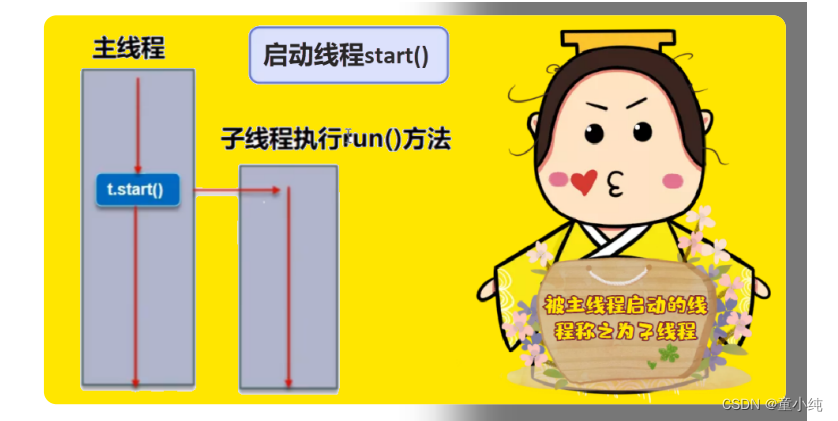
主线程
当Java程序启动时,一个线程会立刻运行,该线程通常叫做程序的 主线程(main thread),即main方法对应的线程,它是程序开始 时就执行的。 Java应用程序会有一个main方法,是作为某个类的方法出现的。当 程序启动时,该方法就会第一个自动的得到执行,并成为程序的主 线程。也就是说,main方法是一个应用的入口,也代表了这个应用 的主线程。JVM在执行main方法时,main方法会进入到栈内存,JVM 会通过操作系统开辟一条main方法通向cpu的执行路径,cpu就可以 通过这个路径来执行main方法,而这个路径有一个名字,叫main(主) 线程
主线程的特点
它是产生其他子线程的线程。 它不一定是最后完成执行的线程,子线程可能在它结束之后还在运 行。
子线程
在主线程中创建并启动的线程,一般称之为子线程。
线程的创建
通过继承Thread类实现多线程

继承Thread类实现多线程的步骤:
1 在Java中负责实现线程功能的类是java.lang.Thread 类。
此种方式的缺点:如果我们的类已经继承了一个类(如小程 序必须继承自 Applet 类),则无法再继承 Thread 类。
2 可以通过创建 Thread的实例来创建新的线程。
3 每个线程都是通过某个特定的Thread对象所对应的方法run( )来 完成其操作的,方法run( )称为线程体。
4 通过调用Thread类的start()方法来启动一个线程。
通过继承Thread类实现多线程
- public class TestThread extends Thread {
- //自定义类继承Thread类
- //run()方法里是线程体
- public void run() {
- for (int i = 0; i < 10; i++) {
- System.out.println(this.getName() + ":" + i);//getName()方法是返回线程名称
- }
- }
- public static void main(String[] args) {
- TestThread thread1 = new TestThread();//创建线程对象
- thread1.start();//启动线程
- TestThread thread2 = new TestThread();
- thread2.start();
- }
- }
通过Runnable接口实现多线程

在开发中,我们应用更多的是通过Runnable接口实现多线程。这种 方式克服了继承Thread类的缺点,即在实现Runnable接口的同时 还可以继承某个类。 从源码角度看,Thread类也是实现了Runnable接口。Runnable接 口的源码如下:
- public interface Runnable {
- void run();
- }
两种方式比较看,实现Runnable接口的方式要通用一些。
通过Runnable接口实现多线程
- public class TestThread2 implements Runnable
- {
- //自定义类实现Runnable接口;
- //run()方法里是线程体;
- public void run() {
- for (int i = 0; i < 10; i++) {
- System.out.println(Thread.currentThread().getName() + ":" + i);
- }
- }
- public static void main(String[] args) {
- //创建线程对象,把实现了Runnable接口的对象作为参数传入;
- Thread thread1 = new Thread(new TestThread2());
- thread1.start();//启动线程;
- Thread thread2 = new Thread(new TestThread2());
- thread2.start();
- }
- }
线程的执行流程

线程状态和生命周期

一个线程对象在它的生命周期内,需要经历5个状态。
1 新生状态(New)
用new关键字建立一个线程对象后,该线程对象就处于新生状 态。处于新生状态的线程有自己的内存空间,通过调用start方法 进入就绪状态。
2 就绪状态(Runnable)
处于就绪状态的线程已经具备了运行条件,但是还没有被分配到 CPU,处于“线程就绪队列”,等待系统为其分配CPU。就绪状态 并不是执行状态,当系统选定一个等待执行的Thread对象后, 它就会进入执行状态。一旦获得CPU,线程就进入运行状态并自 动调用自己的run方法。有4种原因会导致线程进入就绪状态:
2.1 新建线程:调用start()方法,进入就绪状态;
2.2 阻塞线程:阻塞解除,进入就绪状态;
2.3 运行线程:调用yield()方法,直接进入就绪状态;
2.4 运行线程:JVM将CPU资源从本线程切换到其他线程。
3 运行状态(Running)
在运行状态的线程执行自己run方法中的代码,直到调用其他方 法而终止或等待某资源而阻塞或完成任务而死亡。如果在给定的 时间片内没有执行结束,就会被系统给换下来回到就绪状态。也 可能由于某些“导致阻塞的事件”而进入阻塞状态。
4 阻塞状态(Blocked)
阻塞指的是暂停一个线程的执行以等待某个条件发生(如某资源 就绪)。
有4种原因会导致阻塞:
4.1 执行sleep(int millsecond)方法,使当前线程休眠,进入阻塞状态。当指定的时间到了 后,线程进入就绪状态。
4.2 执行wait()方法,使当前线程进入阻塞状态。当使用nofity()方法唤醒这个线程后,它进 入就绪状态。
4.3 线程运行时,某个操作进入阻塞状态,比如执行IO流操作(read()/write()方法本身就是 阻塞的方法)。只有当引起该操作阻塞的原因消失后,线程进入就绪状态。
4.4 join()线程联合: 当某个线程等待另一个线程执行结束后,才能继续执行时,使用join()方 法。
5 死亡状态(Terminated)
死亡状态是线程生命周期中的最后一个阶段。线程死亡的原因有 两个。一个是正常运行的线程完成了它run()方法内的全部工 作; 另一个是线程被强制终止,如通过执行stop()或destroy()方 法来终止一个线程(注:stop()/destroy()方法已经被JDK废弃, 不推荐使用)。 当一个线程进入死亡状态以后,就不能再回到其它状态了。
线程的使用
终止线程的典型方式

终止线程我们一般不使用JDK提供的stop()/destroy()方法(它们本身 也被JDK废弃了)。通常的做法是提供一个boolean型的终止变量, 当这个变量置为false,则终止线程的运行。
终止线程的典型方法
- public class StopThread implements Runnable
- {
- private boolean flag = true;
- @Override
- public void run() {
- System.out.println(Thread.currentThread().getName()+" 线程开始");
- int i= 0;
- while(flag){
- System.out.println(Thread.currentThread().getName()+" "+i++);
- try {
- Thread.sleep(1000);
- } catch(InterruptedException e) {
- e.printStackTrace();
- }
- }
- System.out.println(Thread.currentThread().getName()+" 线程结束");
- }
- public void stop(){
- this.flag = false;
- }
- public static void main(String[]args)throws Exception {
- System.out.println("主线程开始");
- StopThread st = new StopThread();
- Thread t1 = new Thread(st);
- t1.start();
- System.in.read();
- st.stop();
- System.out.println("主线程结束");
- }
- }
线程休眠

sleep()方法:可以让正在运行的线程进入阻塞状态,直到休眠时间 满了,进入就绪状态。sleep方法的参数为休眠的毫秒数。
- public class SleepThread implements Runnable
- {
- @Override
- public void run() {
- System.out.println(Thread.currentThread().getName()+" 线程开始");
- for(int i=0;i<20;i++){
- System.out.println(Thread.currentThread().getName()+" "+i);
- try {
- //线程休眠1秒
- Thread.sleep(1000);
- } catch(InterruptedException e) {
- e.printStackTrace();
- }
- }
- System.out.println(Thread.currentThread().getName()+" 线程结束");
- }
- public static void main(String[] args) {
- System.out.println("主线程开始");
- Thread t = new Thread(newSleepThread());
- t.start();
- System.out.println("主线程结束");
- }
- }
线程让步

yield()让当前正在运行的线程回到就绪状态,以允许具有相同优先 级的其他线程获得运行的机会。因此,使用yield()的目的是让具有 相同优先级的线程之间能够适当的轮换执行。但是,实际中无法保 证yield()达到让步的目的,因为,让步的线程可能被线程调度程序 再次选中。
使用yield方法时要注意的几点:
1 yield是一个静态的方法。
2 调用yield后,yield告诉当前线程把运行机会交给具有相同优先级的线程。
3 yield不能保证,当前线程迅速从运行状态切换到就绪状态。
4 yield只能是将当前线程从运行状态转换到就绪状态,而不能是等待或者阻塞状态。
- public class TestyieldThread implements Runnable {
- @Override
- public void run() {
- for(int i=0;i<30;i++){
- if("Thread0".equals(Thread.currentThread().getName())){
- if(i == 0){
- Thread.yield();
- }
- }
- System.out.println(Thread.currentThread().getName()+" "+i);
- }
- }
- public static void main(String[] args) {
- Thread t1 = new Thread(newTestyieldThread());
- Thread t2 = new Thread(newTestyieldThread());
- t1.start();
- t2.start();
- }
- }
线程联合

当前线程邀请调用方法的线程优先执行,在调用方法的线程执行结 束之前,当前线程不能再次执行。线程A在运行期间,可以调用线程 B的join()方法,让线程B和线程A联合。这样,线程A就必须等待线 程B执行完毕后,才能继续执行。
join方法的使用
join()方法就是指调用该方法的线程在执行完run()方法后,再执行 join方法后面的代码,即将两个线程合并,用于实现同步控制。
- class A implements Runnable{
- private Thread b;
- public A(Thread b){
- this.b = b;
- }
- @Override
- public void run() {
- for(int i=0;i<10;i++){
- System.out.println(Thread.currentThread().getName()+" A "+i);
- if(i == 5){
- try {
- this.b.join();
- } catch(InterruptedException e) {
- e.printStackTrace();
- }
- }
- try {
- Thread.sleep(1000);} catch (InterruptedException e){
- e.printStackTrace();
- }
- }
- }
- }
- class B implements Runnable{
- @Override
- public void run() {
- for(int i=0;i<20;i++){
- System.out.println(Thread.currentThread().getName()+" B "+i);
- try {
- Thread.sleep(1000);
- } catch (InterruptedException e){
- e.printStackTrace();
- }
- }
- }
- }
- public class TestJoinThread {
- public static void main(String[] args) {
- Thread t1 = new Thread(new B());
- Thread t = new Thread(new A(t1));
- t.start();
- t1.start();
- for(int i=0;i<10;i++){
- System.out.println(Thread.currentThread().getName()+" "+i);
- if(i ==2){
- try {
- t.join();
- } catch(InterruptedException e) {
- e.printStackTrace();
- }
- }
- try {
- Thread.sleep(1000);
- } catch (InterruptedException e){
- e.printStackTrace();
- }
- }
- }
- }
线程联合案例
需求: 实现爸爸让儿子买烟。
- /**
- * 儿子买烟线程
- */
- class SonThread implements Runnable{
- @Override
- public void run() {
- System.out.println("儿子出门买烟");
- System.out.println("儿子买烟需要10分钟");
- for(int i=0;i<10;i++){
- System.out.println("第"+i+"分钟");
- try {
- Thread.sleep(1000);
- } catch (InterruptedException e){
- e.printStackTrace();
- }
- }
- System.out.println("儿子买烟回来了");
- }
- }
- /**
- * 爸爸抽烟线程
- */
- class FatherThread implements Runnable{
- @Override
- public void run() {
- System.out.println("爸爸想抽烟,发现烟抽完了");
- System.out.println("爸爸让儿子去买一包红塔山");
- Thread t = new Thread(new SonThread());
- t.start();
- System.out.println("等待儿子买烟回来");
- try {
- t.join();
- } catch (InterruptedException e) {
- e.printStackTrace();
- System.out.println("爸爸出门找儿子");
- System.exit(1);
- }
- System.out.println("爸爸高兴的接过烟,并把零钱给了儿子");
- }
- }
- public class TestJoinDemo {
- public static void main(String[] args) {
- System.out.println("爸爸和儿子买烟的故事");
- Thread t = new Thread(new FatherThread());
- t.start();
- }
- }
Thread类中的其他常用方法
获取当前线程名称
方式一 this.getName()获取线程名称,该方法适用于继承Thread实现多线 程方式。
- class GetName1 extends Thread{
- @Override
- public void run() {
- System.out.println(this.getName());
- }
- }
方式二 Thread.currentThread().getName()获取线程名称,该方法适用于 实现Runnable接口实现多线程方式。
- class GetName2 implements Runnable{
- @Override
- public void run() {
- System.out.println(Thread.currentThread().getName());
- }
- }
设置线程的名称
方式一 通过构造方法设置线程名称。
- class SetName1 extends Thread{
- public SetName1(String name){
- super(name);
- }
- @Override
- public void run() {
- System.out.println(this.getName());
- }
- }
- public class SetNameThread {
- public static void main(String[] args) {
- SetName1 setName1 = new SetName1("SetName1");
- setName1.start();
- }
- }
方式二 通过setName()方法设置线程名称。
- class SetName2 implements Runnable{
- @Override
- public void run() {
- System.out.println(Thread.currentThread().getName());
- }
- }
- public class SetNameThread {
- public static void main(String[] args) {
- Thread thread = new Thread(new SetName2());
- thread.setName("SetName2");
- thread.start();
- }
- }
判断线程是否存活

isAlive()方法: 判断当前的线程是否处于活动状态。 活动状态是指线程已经启动且尚未终止,线程处于正在运行或准备 开始运行的状态,就认为线程是存活的。
- class Alive implements Runnable{
- @Override
- public void run() {
- for(int i=0;i<4;i++){
- System.out.println(Thread.currentThread().getName()+" "+i);
- try {
- Thread.sleep(500);
- } catch (InterruptedException e){
- e.printStackTrace();
- }
- }
- }
- }
- public class TestAliveThread {
- public static void main(String[] args) {
- Thread thread = new Thread(newAlive());
- thread.setName("Alive");
- thread.start();
- System.out.println(thread.getName()+" "+thread.isAlive());
- try {
- Thread.sleep(4000);
- } catch (InterruptedException e) {
- e.printStackTrace();
- }
- System.out.println(thread.getName()+""+thread.isAlive());
- }
- }
线程的优先级

什么是线程的优先级
每一个线程都是有优先级的,我们可以为每个线程定义线程的优先 级,但是这并不能保证高优先级的线程会在低优先级的线程前执 行。线程的优先级用数字表示,范围从1到10,一个线程的缺省优 先级是5。 Java 的线程优先级调度会委托给操作系统去处理,所以与具体的操 作系统优先级有关,如非特别需要,一般无需设置线程优先级。
注意
线程的优先级,不是说哪个线程优先执行,如果设置某个线程 的优先级高。那就是有可能被执行的概率高。并不是优先执 行。
线程优先级的使用
使用下列方法获得或设置线程对象的优先级。
1 int getPriority();
2 void setPriority(int newPriority);
注意:优先级低只是意味着获得调度的概率低。并不是绝对先 调用优先级高的线程后调用优先级低的线程。
- class Priority implements Runnable{
- private int num = 0;
- private boolean flag = true;
- @Override
- public void run() {
- while(this.flag){
- System.out.println(Thread.currentThread().getName()+" "+num++);
- }
- }
- public void stop(){
- this.flag = false;
- }
- }
- public class PriorityThread {
- public static void main(String[] args)throws Exception {
- Priority p1 = new Priority();
- Priority p2 = new Priority();
- Thread t1 = new Thread(p1,"线程1");
- Thread t2 = new Thread(p2,"线程2");
- System.out.println(t1.getPriority());
- //Thread.MAX_PRIORITY = 10
- t1.setPriority(Thread.MAX_PRIORITY);
- //Thread.MAX_PRIORITY = 1
- t2.setPriority(Thread.MIN_PRIORITY);
- t1.start();
- t2.start();
- Thread.sleep(1000);
- p1.stop();
- p2.stop();
- }
- }
守护线程

什么是守护线程
在Java中有两类线程:
User Thread(用户线程):就是应用程序里的自定义线程。
Daemon Thread(守护线程):比如垃圾回收线程,就是最典型的守护线程。
守护线程(即Daemon Thread),是一个服务线程,准确地来说 就是服务其他的线程,这是它的作用,而其他的线程只有一种,那 就是用户线程。
守护线程特点:
守护线程会随着用户线程死亡而死亡。
守护线程与用户线程的区别:
用户线程,不随着主线程的死亡而死亡。用户线程只有两种情况会 死掉,1在run中异常终止。2正常把run执行完毕,线程死亡。
守护线程,随着用户线程的死亡而死亡,当用户线程死亡守护线程 也会随之死亡。
守护线程的使用
- /**
- * 守护线程类
- */
- class Daemon implements Runnable{
- @Override
- public void run() {
- for(int i=0;i<20;i++){
- System.out.println(Thread.currentThread().getName()+" "+i);
- try {
- Thread.sleep(2000);
- } catch (InterruptedException e){
- e.printStackTrace();
- }
- }
- }
- }
- class UsersThread implements Runnable{
- @Override
- public void run() {
- Thread t = new Thread(new Daemon(),"Daemon");
- //将该线程设置为守护线程
- t.setDaemon(true);
- t.start();
- for(int i=0;i<5;i++){
- System.out.println(Thread.currentThread().getName()+" "+i);
- try {
- Thread.sleep(500);
- } catch (InterruptedException e){
- e.printStackTrace();
- }
- }
- }
- }
- public class DaemonThread {
- public static void main(String[] args)throws Exception {
- Thread t = new Thread(new UsersThread(),"UsersThread");
- t.start();
- Thread.sleep(1000);
- System.out.println("主线程结束");
- }
- }
线程同步
什么是线程同步
线程冲突现象

同步问题的提出
现实生活中,我们会遇到“同一个资源,多个人都想使用”的问题。 比如:教室里,只有一台电脑,多个人都想使用。天然的解决办法 就是,在电脑旁边,大家排队。前一人使用完后,后一人再使用。
线程同步的概念
处理多线程问题时,多个线程访问同一个对象,并且某些线程还想 修改这个对象。 这时候,我们就需要用到“线程同步”。 线程同步其 实就是一种等待机制,多个需要同时访问此对象的线程进入这个对 象的等待池形成队列,等待前面的线程使用完毕后,下一个线程再 使用。
线程冲突案例演示
我们以银行取款经典案例来演示线程冲突现象。 银行取钱的基本流程基本上可以分为如下几个步骤。
(1)用户输入账户、密码,系统判断用户的账户、密码是否匹配。
(2)用户输入取款金额
(3)系统判断账户余额是否大于或等于取款金额
(4)如果余额大于或等于取款金额,则取钱成功;如果余额小于取 款金额,则取钱失败。
- /**
- * 账户类
- */
- class Account{
- //账号
- private String accountNo;
- //账户的余额
- private double balance;
- public Account() {
- }
- public Account(String accountNo, double balance) {
- this.accountNo = accountNo;
- this.balance = balance;
- }
- public String getAccountNo() { return accountNo;
- }
- public void setAccountNo(String accountNo) {
- this.accountNo = accountNo;
- }
- public double getBalance() {
- return balance;
- }
- public void setBalance(double balance) {
- this.balance = balance;
- }
- }
- /**
- * 取款线程
- */
- class DrawThread implements Runnable{
- //账户对象
- private Account account;
- //取款金额
- private double drawMoney;
- public DrawThread(Account account,double drawMoney){
- this.account = account;
- this.drawMoney = drawMoney;
- }
- /**
- * 取款线程
- */
- @Override
- public void run() {
- //判断当前账户余额是否大于或等于取款金额
- if(this.account.getBalance() >= this.drawMoney){
- System.out.println(Thread.currentThread().getName()+" 取钱成功!吐出钞
- 票:"+this.drawMoney);
- try {
- Thread.sleep(1000);
- } catch (InterruptedException e){
- e.printStackTrace();
- }
- //更新账户余额
- this.account.setBalance(this.account.getBalance()- this.drawMoney);
- System.out.println("\t 余额为:"+this.account.getBalance());
- }else{
- System.out.println(Thread.currentThread().getName()+" 取钱失败,余额不足");
- }
- }
- }
- public class TestDrawMoneyThread {
- public static void main(String[] args) {
- Account account = new Account("1234",1000);
- new Thread(new DrawThread(account,800),"老公").start();
- new Thread(new DrawThread(account,800),"老婆").start();
- }
- }
实现线程同步
由于同一进程的多个线程共享同一块存储空间,在带来方便的同 时,也带来了访问冲突的问题。Java语言提供了专门机制以解决这 种冲突,有效避免了同一个数据对象被多个线程同时访问造成的这 种问题。这套机制就是synchronized关键字。
synchronized语法结构:
- synchronized(锁对象){
- 同步代码
- }
synchronized关键字使用时需要考虑的问题:
需要对那部分的代码在执行时具有线程互斥的能力(线程互斥:并行变串行)。
需要对哪些线程中的代码具有互斥能力(通过synchronized锁对象来决定)。
它包括两种用法:
synchronized 方法和 synchronized 块。
1 synchronized 方法
通过在方法声明中加入 synchronized关键字来声明,语法如 下:
public synchronized void accessVal(int newVal);synchronized 在方法声明时使用:放在访问控制符(public)之前 或之后。这时同一个对象下synchronized方法在多线程中执行 时,该方法是同步的,即一次只能有一个线程进入该方法,其他 线程要想在此时调用该方法,只能排队等候,当前线程(就是在 synchronized方法内部的线程)执行完该方法后,别的线程才能 进入。
2 synchronized块
synchronized 方法的缺陷:若将一个大的方法声明为 synchronized 将会大大影响效率。 Java 为我们提供了更好的解决办法,那就是 synchronized 块。 块可以让我们精确地控制到具体的“成员变量”,缩小同步的范 围,提高效率。
修改线程冲突案例演示
- /**
- * 账户类
- */
- class Account{
- //账号
- private String accountNO;
- //账户余额
- private double balance;
- public Account() {
- }
- public Account(String accountNO, double balance) {
- this.accountNO = accountNO;
- this.balance = balance;
- }
- public String getAccountNO() {
- return accountNO;
- }
- public void setAccountNO(String accountNO) {
- this.accountNO = accountNO;
- }
- public double getBalance() {
- return balance;
- }
- public void setBalance(double balance) {
- this.balance = balance;
- }
- }
- /**
- * 取款线程
- */
- class DrawThread implements Runnable{
- //账户对象
- private Account account;
- //取款金额
- private double drawMoney;
- public DrawThread(){
- }
- public DrawThread(Account account,double drawMoney){
- this.account = account;
- this.drawMoney = drawMoney;
- }
- /**
- * 取款线程体
- */
- @Override
- public void run() {
- synchronized (this.account){
- //判断当前账户余额是否大于或等于取款金额
- if(this.account.getBalance() >= this.drawMoney){
- System.out.println(Thread.currentThread().getName()+" 取钱成功!突出钞票"+this.drawMoney);
- try {
- Thread.sleep(1000);
- } catch(InterruptedException e) {
- e.printStackTrace();
- }
- //更新账户余额
- this.account.setBalance(this.account.getBalance() - this.drawMoney);
- System.out.println("\t 余额为:"+this.account.getBalance());
- }else{
- System.out.println(Thread.currentThread().getName()+" 取钱失败,余额不足");
- }
- }
- }
- }
- public class TestDrawMoneyThread {
- public static void main(String[] args) {
- Account account = new Account("1234",1000);
- new Thread(new DrawThread(account,800),"老公").start();
- new Thread(new DrawThread(account,800),"老婆").start();
- }
- }
线程同步的使用
使用this作为线程对象锁

语法结构:
- synchronized(this){
- //同步代码
- }
或
- public synchronized void accessVal(int newVal){
- //同步代码
- }
- /**
- * 定义程序员类
- */
- class Programmer{
- private String name;
- public Programmer(String name){
- this.name = name;
- }
- /**
- * 打开电脑
- */
- synchronized public void computer(){
- try {
- System.out.println(this.name + " 接通电源");
- Thread.sleep(500);
- System.out.println(this.name + " 按开机按键");
- Thread.sleep(500);
- System.out.println(this.name + " 系统启动中");
- Thread.sleep(500);
- System.out.println(this.name + " 系统启动成功");
- } catch (InterruptedException e){
- e.printStackTrace();
- }
- }
- /**
- * 编码
- */
- synchronized public void coding(){
- try {
- System.out.println(this.name + " 双击Idea");
- Thread.sleep(500);
- System.out.println(this.name + " Idea启动完毕");
- Thread.sleep(500);
- System.out.println(this.name + " 开开心心的写代码");
- } catch (InterruptedException e){
- e.printStackTrace();
- }
- }
- }
- /**
- * 打开电脑的工作线程
- */
- class Working1 extends Thread{
- private Programmer p;
- public Working1(Programmer p){
- this.p = p;
- }
- @Override
- public void run() {
- this.p.computer();
- }
- }
- /**
- * 编写代码的工作线程
- */
- class Working2 extends Thread{
- private Programmer p;
- public Working2(Programmer p){
- this.p = p;
- }
- @Override
- public void run() {
- this.p.coding();
- }
- }
- public class TestSyncThread {
- public static void main(String[] args) {
- Programmer p = new Programmer("张三");
- new Working1(p).start();
- new Working2(p).start();
- }
- }
使用字符串作为线程对象锁

语法结构:
- synchronized(“字符串”){
- //同步代码
- }
- /**
- * 定义程序员类
- */
- class Programmer{
- private String name;
- public Programmer(String name){
- this.name = name;
- }
- /**
- * 打开电脑
- */
- synchronized public void computer(){
- try {
- System.out.println(this.name + " 接通电源");
- Thread.sleep(500);
- System.out.println(this.name + " 按开机按键");
- Thread.sleep(500);
- System.out.println(this.name + " 系统启动中");
- Thread.sleep(500);
- System.out.println(this.name + " 系统启动成功");
- } catch (InterruptedExceptione) {
- e.printStackTrace();
- }
- }
- /**
- * 编码
- */
- synchronized public void coding(){
- try {
- System.out.println(this.name + " 双击Idea");
- Thread.sleep(500);System.out.println(this.name + " Idea启动完毕");
- Thread.sleep(500);
- System.out.println(this.name + " 开开心心的写代码");
- } catch (InterruptedExceptione) {
- e.printStackTrace();
- }
- }
- /**
- * 去卫生间
- */
- public void wc(){
- synchronized ("suibian") {
- try {
- System.out.println(this.name + " 打开卫生间门");
- Thread.sleep(500);
- System.out.println(this.name + " 开始排泄");
- Thread.sleep(500);
- System.out.println(this.name + " 冲水");
- Thread.sleep(500);
- System.out.println(this.name + " 离开卫生间");
- } catch (InterruptedExceptione) {
- e.printStackTrace();
- }
- }
- }
- }
- /**
- * 打开电脑的工作线程
- */
- class Working1 extends Thread{
- private Programmer p;
- public Working1(Programmer p){
- this.p = p;
- }
- @Override
- public void run() {
- this.p.computer();
- }
- }
- /**
- * 编写代码的工作线程
- */
- class Working2 extends Thread{
- private Programmer p;
- public Working2(Programmer p){
- this.p = p;
- }
- @Override
- public void run() {
- this.p.coding();
- }
- }
- /**
- * 去卫生间的线程
- */
- class WC extends Thread{
- private Programmer p;
- public WC(Programmer p){
- this.p = p;
- }
- @Override
- public void run() {
- this.p.wc();
- }
- }
- public class TestSyncThread {
- public static void main(String[] args)
- {
- Programmer p = new Programmer("张三");
- Programmer p1 = new Programmer("李四");
- Programmer p2 = new Programmer("王五");
- new WC(p).start();
- new WC(p1).start();
- new WC(p2).start();
- }
- }
使用Class作为线程对象锁

语法结构:
- synchronized(XX.class){
- //同步代码
- }
或
synchronized public static void accessVal()- /**
- * 定义销售员工类
- */
- class Sale{
- private String name;
- public Sale(String name){
- this.name = name;
- }
- /**
- * 领取奖金
- */
- synchronized public static void money(){
- try {
- System.out.println(Thread.currentThread().getName() + " 被领导表扬");
- Thread.sleep(500);
- System.out.println(Thread.currentThread().getName() + " 拿钱");
- Thread.sleep(500);
- System.out.println(Thread.currentThread().getName() + " 对公司表示感谢");
- Thread.sleep(500);
- System.out.println(Thread.currentThread().getName() + " 开开心心的拿钱走人");
- } catch (InterruptedExceptione) {
- e.printStackTrace();
- }
- }
- }
- class Programmer{
- private String name;
- public Programmer(String name){
- this.name = name;
- }
- /**
- * 打开电脑
- */
- synchronized public void computer(){
- try {
- System.out.println(this.name + " 接通电源");
- Thread.sleep(500);
- System.out.println(this.name + " 按开机按键");
- Thread.sleep(500);
- System.out.println(this.name + " 系统启动中");
- Thread.sleep(500);
- System.out.println(this.name + " 系统启动成功");
- } catch (InterruptedExceptione) {
- e.printStackTrace();
- }
- }
- /**
- * 编码
- */
- synchronized public void coding(){
- try {
- System.out.println(this.name + " 双击Idea");
- Thread.sleep(500);
- System.out.println(this.name + " Idea启动完毕");
- Thread.sleep(500);
- System.out.println(this.name + " 开开心心的写代码");
- } catch (InterruptedExceptione) {
- e.printStackTrace();
- }
- }
- /**
- * 去卫生间
- */
- public void wc(){
- synchronized ("suibian") {
- try {
- System.out.println(this.name + " 打开卫生间门");
- Thread.sleep(500);
- System.out.println(this.name + " 开始排泄");
- Thread.sleep(500);
- System.out.println(this.name + " 冲水");
- Thread.sleep(500);System.out.println(this.name + " 离开卫生间");
- } catch (InterruptedExceptione) {
- e.printStackTrace();
- }
- }
- }
- /**
- * 领取奖金
- */
- public void money(){
- synchronized (Programmer.class) {
- try {
- System.out.println(this.name + " 被领导表扬");
- Thread.sleep(500);
- System.out.println(this.name + " 拿钱");
- Thread.sleep(500);
- System.out.println(this.name + " 对公司表示感谢");
- Thread.sleep(500);
- System.out.println(this.name + " 开开心心的拿钱走人");
- } catch (InterruptedExceptione) {
- e.printStackTrace();
- }
- }
- }
- }
- /**
- * 打开电脑的工作线程
- */
- class Working1 extends Thread{
- private Programmer p;
- public Working1(Programmer p){
- this.p = p;
- }
- @Override
- public void run() {
- this.p.computer();
- }
- }
- /**
- * 编写代码的工作线程
- */
- class Working2 extends Thread{
- private Programmer p;
- public Working2(Programmer p){
- this.p = p;
- }
- @Override
- public void run() {
- this.p.coding();
- }
- }
- /**
- * 去卫生间的线程
- */
- class WC extends Thread{
- private Programmer p;
- public WC(Programmer p){
- this.p = p;
- }
- @Override
- public void run() {
- this.p.wc();
- }
- }
- /**
- * 程序员领取奖金
- */
- class ProgrammerMoney extends Thread{
- private Programmer p;
- public ProgrammerMoney(Programmer p){
- this.p = p;
- }
- @Override
- public void run() {
- this.p.money();
- }
- }
- /**
- * 销售部门领取奖金
- */
- class SaleMoney extends Thread{
- private Sale p;
- public SaleMoneyThread(Sale p){
- this.p = p;
- }
- @Override
- public void run() {
- this.p.money();
- }
- }
- public class TestSyncThread {
- public static void main(String[] args)
- {
- /* Programmer p = new Programmer("张三");
- Programmer p1 = new Programmer("李四");
- new ProgrammerMoney(p).start();
- new ProgrammerMoney(p1).start();*/
- Sale s = new Sale("张晓丽");
- Sale s1 = new Sale("王晓红");
- new SaleMoney(s).start();
- new SaleMoney(s1).start();
- }
- }
使用自定义对象作为线程对象锁
 语法结构:
语法结构:- synchronized(自定义对象){
- //同步代码
- }
- /**
- * 定义销售员工类
- */
- class Sale{
- private String name;
- public Sale(String name){
- this.name = name;
- }
- /**
- * 领取奖金
- */
- synchronized public static void money(){
- try {
- System.out.println(Thread.currentThread(). getName() + " 被领导表扬");
- Thread.sleep(500);
- System.out.println(Thread.currentThread().getName() + " 拿钱");
- Thread.sleep(500);
- System.out.println(Thread.currentThread().getName() + " 对公司表示感谢");
- Thread.sleep(500);
- System.out.println(Thread.currentThread().getName() + " 开开心心的拿钱走人");
- } catch (InterruptedExceptione) {
- e.printStackTrace();
- }
- }
- }
- class Programmer{
- private String name;
- public Programmer(String name){
- this.name = name;
- }
- /**
- * 打开电脑
- */
- synchronized public void computer(){
- try {
- System.out.println(this.name + " 接通电源");
- Thread.sleep(500);
- System.out.println(this.name + " 按开机按键");
- Thread.sleep(500);
- System.out.println(this.name + " 系统启动中");
- Thread.sleep(500);
- System.out.println(this.name + " 系统启动成功");
- } catch (InterruptedException e) {
- e.printStackTrace();
- }
- }
- /**
- * 编码
- */
- synchronized public void coding(){
- try {
- System.out.println(this.name + " 双击Idea");
- Thread.sleep(500);
- System.out.println(this.name + " Idea启动完毕");
- Thread.sleep(500);
- System.out.println(this.name + " 开开心心的写代码");
- } catch (InterruptedException e) {
- e.printStackTrace();
- }
- }
- /**
- * 去卫生间
- */
- public void wc(){
- synchronized ("suibian") {
- try {
- System.out.println(this.name + " 打开卫生间门");
- Thread.sleep(500);
- System.out.println(this.name + " 开始排泄");
- Thread.sleep(500);
- System.out.println(this.name + " 冲水");
- Thread.sleep(500);
- System.out.println(this.name + " 离开卫生间");
- } catch (InterruptedException e) {
- e.printStackTrace();
- }
- }
- }
- /**
- * 领取奖金
- */
- public void money(){
- synchronized (Programmer.class) {
- try {
- System.out.println(this.name + " 被领导表扬");
- Thread.sleep(500);
- System.out.println(this.name + " 拿钱");
- Thread.sleep(500);
- System.out.println(this.name + " 对公司表示感谢");
- Thread.sleep(500);
- System.out.println(this.name + " 开开心心的拿钱走人");
- } catch (InterruptedException e) {
- e.printStackTrace();
- }
- }
- }
- }
- class Manager{
- private String name;
- public Manager(String name){
- this.name = name;
- }
- public String getName(){
- return this.name;
- }
- /**
- * 敬酒
- */
- public void cheers(String mName,String eName){
- try {
- System.out.println(mName + " 来到 " + eName + " 面前");
- Thread.sleep(500);
- System.out.println(eName + " 拿起酒杯");
- Thread.sleep(500);
- System.out.println(mName + " 和 " + eName + " 干杯");
- } catch (InterruptedException e) {
- e.printStackTrace();
- }
- }
- }
- /**
- * 打开电脑的工作线程
- */
- class Working1 extends Thread{
- private Programmer p;
- public Working1(Programmer p){
- this.p = p;
- }
- @Override
- public void run() {
- this.p.computer();
- }
- }
- /**
- * 编写代码的工作线程
- */
- class Working2 extends Thread{
- private Programmer p;
- public Working2(Programmer p){
- this.p = p;
- }
- @Override
- public void run() {
- this.p.coding();
- }
- }
- /**
- * 去卫生间的线程
- */
- class WC extends Thread{
- private Programmer p;
- public WC(Programmer p){
- this.p = p;
- }
- @Override
- public void run() {
- this.p.wc();
- }
- }
- /**
- * 程序员领取奖金
- */
- class ProgrammerMoney extends Thread{
- private Programmer p;
- public ProgrammerMoney(Programmer p){
- this.p = p;
- }
- @Override
- public void run() {
- this.p.money();
- }
- }
- /**
- * 销售部门领取奖金
- */
- class SaleMoneyThread extends Thread{
- private Sale p;
- public SaleMoneyThread(Sale p){
- this.p = p;
- }
- @Override
- public void run() {
- this.p.money();
- }
- }
- /**
- * 敬酒线程类
- */
- class CheersThread extends Thread{
- private Manager manager;
- private String name;
- public CheersThread(String name,Manager manager){
- this.name = name;
- this.manager = manager;
- }
- @Override
- public void run() {
- synchronized (this.manager) {
- this.manager.cheers(this.manager.getName() , name);
- }
- }
- }
- public class TestSyncThread {
- public static void main(String[] args)
- {
- Manager manager = new Manager("张三丰");
- new CheersThread("张三",manager).start();
- new CheersThread("李四",manager).start();
- }
- }
死锁及解决方案
死锁的概念

“死锁”指的是: 多个线程各自占有一些共享资源,并且互相等待其他线程占有的资 源才能进行,而导致两个或者多个线程都在等待对方释放资源,都 停止执行的情形。
某一个同步块需要同时拥有“两个以上对象的锁”时,就可能会发 生“死锁”的问题。比如,“化妆线程”需要同时拥有“镜子对象”、 “口红对象”才能运行同步块。那么,实际运行时,“小丫的化妆 线程”拥有了“镜子对象”,“大丫的化妆线程”拥有了“口红对象”, 都在互相等待对方释放资源,才能化妆。这样,两个线程就形 成了互相等待,无法继续运行的“死锁状态”。
死锁案例演示
- /**
- * 口红类
- */
- class Lipstick{
- }
- /**
- * 镜子类
- */
- class Mirror{
- }
- /**
- * 化妆线程类
- */
- class Makeup extends Thread{
- private int flag; //flag=0:拿着口红。 flag!=0:拿着镜子
- private String girlName;
- static Lipstick lipstick = new Lipstick();
- static Mirror mirror = new Mirror();
- public Makeup(int flag,String girlName){
- this.flag = flag;
- this.girlName = girlName;
- }
- @Override
- public void run() {
- this.doMakeup();
- }
- /**
- * 开始化妆
- */
- public void doMakeup(){
- if(flag == 0){
- synchronized (lipstick){
- System.out.println(this.girlName+" 拿着口红");
- try {
- Thread.sleep(1000);
- } catch (InterruptedException e) {
- e.printStackTrace();
- }
- synchronized (mirror){
- System.out.println(this.girlName+" 拿着镜子");
- }
- }
- }else{
- synchronized (mirror){
- System.out.println(this.girlName+" 拿着镜子");
- try {
- Thread.sleep(2000);
- } catch(InterruptedException e) {
- e.printStackTrace();
- }
- synchronized (lipstick){
- System.out.println(this.girlName+" 拿着口红");
- }
- }
- }
- }
- }
- public class DeadLockThread {
- public static void main(String[] args) {
- new Makeup(0,"大丫").start();
- new Makeup(1,"小丫").start();
- }
- }
死锁问题的解决
死锁是由于 “同步块需要同时持有多个对象锁造成”的,要解决这个 问题,思路很简单,就是:同一个代码块,不要同时持有两个对象 锁。
- /**
- * 口红类
- */
- class Lipstick{
- }
- /**
- * 镜子类
- */
- class Mirror{
- }
- /**
- * 化妆线程类
- */
- class Makeup extends Thread{
- private int flag; //flag=0:拿着口红。 flag!=0:拿着镜子
- private String girlName;
- static Lipstick lipstick = new Lipstick();
- static Mirror mirror = new Mirror();
- public void setFlag(int flag) {
- this.flag = flag;
- }
- public void setGirlName(String girlName)
- {
- this.girlName = girlName;
- }
- @Override
- public void run() {
- this.doMakeup();
- }
- /**
- * 开始化妆
- */
- public void doMakeup(){
- if(flag == 0){
- synchronized (lipstick){
- System.out.println(this.girlName+" 拿着口红");
- try {
- Thread.sleep(1000);
- } catch(InterruptedException e) {
- e.printStackTrace();
- }
- }
- synchronized (mirror){
- System.out.println(this.girlName+" 拿着镜子");
- }
- }else{
- synchronized (mirror){
- System.out.println(this.girlName+" 拿着镜子");
- try {
- Thread.sleep(2000);
- } catch(InterruptedException e) {
- e.printStackTrace();
- }
- }
- synchronized (lipstick){
- System.out.println(this.girlName+" 拿着口红");
- }
- }
- }
- }
- public class DeadLockThread {
- public static void main(String[] args) {
- Makeup makeup = new Makeup();
- makeup.setFlag(0);
- makeup.setGirlName("大丫");
- Makeup makeup1 = new Makeup();
- makeup1.setFlag(1);
- makeup1.setGirlName("小丫");
- makeup.start();
- makeup1.start();
- }
- }
死锁问题的解决
死锁是由于 “同步块需要同时持有多个对象锁造成”的,要解决这个 问题,思路很简单,就是:同一个代码块,不要同时持有两个对象 锁。
- /**
- * 口红类
- */
- class Lipstick{
- }
- /**
- * 镜子类
- */
- class Mirror{
- }
- /**
- * 化妆线程类
- */
- class Makeup extends Thread{
- private int flag; //flag = 0 :拿着口红,flag != 0 :拿着镜子
- private String girlName;
- static Lipstick lipstick = new Lipstick();
- static Mirror mirror = new Mirror();
- public Makeup(int flag,String girlName){
- this.flag = flag;
- this.girlName = girlName;
- }
- @Override
- public void run() {
- this.doMakeup();
- }
- /**
- * 开始化妆
- */
- public void doMakeup(){
- if(this.flag == 0){
- synchronized (lipstick){
- System.out.println(this.girlName+" 拿着口红");
- try {
- Thread.sleep(1000);
- } catch(InterruptedException e) {
- e.printStackTrace();
- }
- }
- synchronized (mirror){
- System.out.println(this.girlName+" 拿着镜子");
- }
- }else{
- synchronized (mirror){
- System.out.println(this.girlName+" 拿着镜子");
- try {
- Thread.sleep(2000);
- } catch(InterruptedException e) {
- e.printStackTrace();
- }
- }
- synchronized (lipstick){
- System.out.println(this.girlName+" 拿着口红");
- }
- }
- }
- }
- public class DeadLockThread {
- public static void main(String[] args) {
- new Makeup(0,"小丫").start();
- new Makeup(1,"大丫").start();
- }
- }
线程并发协作(生产者/消费者模式)

多线程环境下,我们经常需要多个线程的并发和协作。这个时候, 就需要了解一个重要的多线程并发协作模型“生产者/消费者模式”。
角色介绍
什么是生产者?
生产者指的是负责生产数据的模块(这里模块可能是:方法、对 象、线程、进程)。
什么是消费者?
消费者指的是负责处理数据的模块(这里模块可能是:方法、对 象、线程、进程)。
什么是缓冲区?
消费者不能直接使用生产者的数据,它们之间有个“缓冲区”。生 产者将生产好的数据放入“缓冲区”,消费者从“缓冲区”拿要处理 的数据。
缓冲区是实现并发的核心,缓冲区的设置有两个好处:
1 实现线程的并发协作
有了缓冲区以后,生产者线程只需要往缓冲区里面放置数据,而 不需要管消费者消费的情况;同样,消费者只需要从缓冲区拿数 据处理即可,也不需要管生产者生产的情况。 这样,就从逻辑 上实现了“生产者线程”和“消费者线程”的分离,解除了生产者与 消费者之间的耦合。
2 解决忙闲不均,提高效率
生产者生产数据慢时,缓冲区仍有数据,不影响消费者消费;消 费者处理数据慢时,生产者仍然可以继续往缓冲区里面放置数据 。
实现生产者与消费者模式
创建缓冲区
- /**
- * 定义馒头类
- */
- class ManTou{
- private int id;
- public ManTou(int id){
- this.id = id;
- }
- public int getId(){
- return this.id;
- }
- }
- /**
- * 定义缓冲区类
- */
- class SyncStack{
- //定义存放馒头的盒子
- private ManTou[] mt = new ManTou[10];
- //定义操作盒子的索引
- private int index;
- /**
- * 放馒头
- */
- public synchronized void push(ManTou manTou){
- //判断盒子是否已满
- while(this.index == this.mt.length){
- try {
- /**
- * 语法:wait(),该方法必须要在 synchronized块中调用。
- * wait执行后,线程会将持有的对象锁释放,并进入阻塞状态,
- * 其他需要该对象锁的线程就可以继续运行了。
- */
- this.wait();
- } catch (InterruptedException e){
- e.printStackTrace();
- }
- }
- //唤醒取馒头的线程
- /**
- * 语法:该方法必须要在synchronized块中调用。
- * 该方法会唤醒处于等待状态队列中的一个线程。
- */
- this.notify();
- this.mt[this.index] = manTou;
- this.index++;
- }
- /**
- * 取馒头
- */
- public synchronized ManTou pop(){
- while(this.index == 0){
- try {
- /**
- * 语法:wait(),该方法必须要在synchronized块中调用。
- * wait执行后,线程会将持有的对象锁释放,并进入阻塞状态,
- * 其他需要该对象锁的线程就可以继续运行了。
- */
- this.wait();
- } catch (InterruptedException e)
- {
- e.printStackTrace();
- }
- }
- this.notify();
- this.index--;
- return this.mt[this.index];
- }
- }
- public class TestProduceThread {
- public static void main(String[] args) {
- }
- }
创建生产者消费者线程
- /**
- * 定义馒头类
- */
- class ManTou{
- private int id;
- public ManTou(int id){
- this.id = id;
- }
- public int getId(){
- return this.id;
- }
- }
- /**
- * 定义缓冲区类
- */
- class SyncStack{
- //定义存放馒头的盒子
- private ManTou[] mt = new ManTou[10];
- //定义操作盒子的索引
- private int index;
- /**
- * 放馒头
- */
- public synchronized void push(ManTou manTou){
- //判断盒子是否已满
- while(this.index == this.mt.length)
- {
- try {
- /**
- * 语法:wait(),该方法必须要在 synchronized块中调用。
- * wait执行后,线程会将持有的对象锁释放,并进入阻塞状态,
- * 其他需要该对象锁的线程就可以继续运行了。
- */
- this.wait();
- } catch (InterruptedException e) {
- e.printStackTrace();
- }
- }
- //唤醒取馒头的线程
- /**
- * 语法:该方法必须要在synchronized块中调用。
- * 该方法会唤醒处于等待状态队列中的一个线程。
- */
- this.notify();
- this.mt[this.index] = manTou;
- this.index++;
- }
- /**
- * 取馒头
- */
- public synchronized ManTou pop(){
- while(this.index == 0){
- try {
- /**
- * 语法:wait(),该方法必须要在synchronized块中调用。
- * wait执行后,线程会将持有的对象锁释放,并进入阻塞状态,
- * 其他需要该对象锁的线程就可以继续运行了。
- */
- this.wait();
- } catch (InterruptedException e) {
- e.printStackTrace();
- }
- }
- this.notify();
- this.index--;
- return this.mt[this.index];
- }
- }
- /**
- * 定义生产者线程类
- */
- class ShengChan extends Thread{
- private SyncStack ss;
- public ShengChan(SyncStack ss){
- this.ss = ss;
- }
- @Override
- public void run() {
- for(int i=0;i<10;i++){
- System.out.println("生产馒头:"+i);
- ManTou manTou = new ManTou(i);
- this.ss.push(manTou);
- }
- }
- }
- /**
- * 定义消费者线程类
- */
- class XiaoFei extends Thread{
- private SyncStack ss;
- public XiaoFei(SyncStack ss){
- this.ss = ss;
- }
- @Override
- public void run() {
- for(int i=0;i<10;i++){
- ManTou manTou = this.ss.pop();
- System.out.println("消费馒头:"+i);
- }
- }
- }
- public class ProduceThread {
- public static void main(String[] args)
- {
- SyncStack ss = new SyncStack();
- new ShengChan(ss).start();
- new XiaoFei(ss).start();
- }
- }
线程并发协作总结
线程并发协作(也叫线程通信)
生产者消费者模式:
1 生产者和消费者共享同一个资源,并且生产者和消费者之间相互 依赖,互为条件。
2 对于生产者,没有生产产品之前,消费者要进入等待状态。而生 产了产品之后,又需要马上通知消费者消费。
3 对于消费者,在消费之后,要通知生产者已经消费结束,需要继 续生产新产品以供消费。4 在生产者消费者问题中,仅有synchronized是不够的。 synchronized可阻止并发更新同一个共享资源,实现了同步但 是synchronized不能用来实现不同线程之间的消息传递(通 信)。
5 那线程是通过哪些方法来进行消息传递(通信)的呢?见如下总 结:

6 以上方法均是java.lang.Object类的方法;
都只能在同步方法或者同步代码块中使用,否则会抛出异常。
OldLu建议 在实际开发中,尤其是“架构设计”中,会大量使用这个模式。 对于初学者了解即可,如果晋升到中高级开发人员,这就是必 须掌握的内容。
-
相关阅读:
asp.net毕业设计家电维修保养信息系统
使用 JDBC 和 MySQL 进行Spring Boot Security 表单身份验证
Web前端:CSS篇(二)背景,文本,链接
前端react入门day01-了解react和JSX基础
1141 PAT Ranking of Institutions
C#修改默认参数settings文件
java--程序流控制
目前期货开户手续费比较透明
【Linux】shell命令与用户/文件权限
【TypeScript笔记】04 - 在React中使用TypeScript
- 原文地址:https://blog.csdn.net/m0_58719994/article/details/127959565