-
【云原生 | Kubernetes 系列】--Gitops持续交付 ArgoCD 部署与概念
1. Pull Pipeline
使用Pull Pipeline可以不在集群以外的地方保存凭据,避免凭据泄露的风险
工作模式:
-
两个Git仓库.
-
程序代码 程序员维护
分支策略
Hotfix
Feature
Develop
Release
Master -
部署配置 基于OAM管理
-
-
Updater
CI流水线交付了新的Image
-
Operator
-
Spec 期望状态
- 当分支提交合并,那么部署配置中的相应配置也应随之改变.
-
Status 实际状态
- 从实际状态去读期望状态.
-
环境
- 根据不同分支,对应不同的环境(develoy,stage,production)
-
2. Stages in Gitops Ci Pipeline 分支策略
- Pre-build Stage构建预备阶段
- Pull Request
- Code Review
- Vulnerability Scan(漏扫)
- Code Analysis
- Build Stage
- Build
- Unit Test
- Code Coverage
- Docker Build
- Docker Push
- GitOps CI Stage
- Git Clone Config Repo
- Update Mainfests
- Git Commit & Git Push
- Post-build Stage
- Publish CI Metrics
- Build Notification
- GitOps CD Stage
- Git Clone Config Repo
- Discover Manifests
- kubectl apply Helm Install
- Post-deployment Stage
- Function Test
- Runtime Vulnerability
- Publish CD Metrics
3. 分支策略
3.1 单分支策略
通常单分支策略也称为Featrue Branch Workflow,其中Master Branch承载项目变更历史.
研发人员创建短生命周期的Featrue分支,完成Feature目标相关的研发任务.
Feature开发完成后,通过PR流程,请求将代码合并至Master Branch
PR得到确认后,CI Pipeline即被触发,直至最后将Image推送至Registry
测试,预发布,生产使用同一个镜像.所有代码变更都生成在master分支上.3.2 多分支策略
多分支策略较适用于需要多团队或外部协作的大型项目的管理场景,并且存在多个不同的变种,较为主流是Gitflow模型
Gitflow模型使用Develop Branch保存项目变更历史,而使用Master Branch承载生产发布历史
Feature开发依然使用短生命周期的Feature Branch进行,并在开发目标达成后将代码合并到Develop Branch
计划发布时,将从最新的Develop Branch创建一个短生命周期的Release Branch,基于该分支进行持续测试和Bug修复,直到满足生产标准
Gitflow策略中,仅Release Branch CI过程中生成的镜像才允许部署到生产环境,Develop Branch CI生成的镜像只能用于发布前测试及集成测试,显然.回滚时,也只能使用Release Branch此前的CI Pipeline生成的镜像
用于修复Bug的Hotfix Branch要基于Master Branch创建,同时也需要一个独立CI Pipeline完成必要的CI过程4. 主流交付方式
交付方式 含义 缺陷 Deployment 滚动 仅适用于无状态服务,向后兼容存在问题 Blue-Green 蓝绿 需要2个环境,可以适用有状态服务 Canary 金丝雀 较长的部署时间,一段较长的时间内并存2个版本,仅适用于无状态服务 Progressive 渐进 需要引入监控指标来判定部署结果,较为复杂,仅适用于无状态服务 5. Argocd
Argo:
CD Gitops
Rollouts -->> 取代Deployment,是ArgoCD的高级交付策略工具
Workflow 工作流编排
Events 触发k8s中的Argo工作流和其他操作Gitops 基于pull pipeline需要依赖于部署并运行在k8s中的Operator.Operator始终监视着配置仓库,并把配置仓库中定义的以声明式的资源部署到目标集群上.确保status始终接近甚至等同spec中的定义.
Argocd部署并运行在k8s环境上的一个应用.其本身就是一个Operator.
它能够读取Git配置仓库中的定义的部署配置清单.
根据配置清单进行分析,并将其部署到目标集群上.Argocd会为每一个Application Controller提供一组CRD,用于描述某一个应用程序相关的所有资源应用程序的CRD叫做Application
以特定Repository(配置仓库)作为应用程序部署和管理的唯一可信源,该Repository负责定义Application的期望状态
Application Controller负责将Repository中定义的Application运行于一个特定的目标k8s cluster之上.
Application Controller持续监视,对比Application的期望状态和实际状态,并确保实际状态与期望状态一致.5.1 ArgoCD主要功能
可以协同使用各种配置管理工具(如Ksonnet/jsonnet,Helm和Kustomize)确保应用程序的真实状态与GitRepo中定义的期望状态保持一致
将应用程序自动部署到指定的目标环境
持续监控已部署的应用程序
基于web和cli的操作接口,以及应用程序可视化
部署或回滚到GitRepo仓库中提交的应用程序的任何状态
PreSync,Sync,PostSync Hooks以支持复杂的应用程序部署策略
例如:blue/green和canarySSO集成
劫持OIDC,LDAP,SAML2.0,GitLab,Microsoft,LinkedIn等Webhook集成
GitHub,BitBucket和GitLab可以独立使用,也可以作为现有Pipeline的一部分使用,例如与Argo Workflow,Jenkins,以及GitLab CI等配合使用
5.2 ArgoCD CRD
- Application CRD
定义由ArgoCD管理的应用程序
定义的这些应用程序受控于Application Controller- ApplicationSet CRD
以模板化形式自动生成由ArgoCD管理的应用程序
支持从多个不同的角度构建模板,例如不同的Git Repo或者不同的Kubernetes Cluster等
ApplicationSet受控于专用的ApplicationSet Controller- AppProject CRD
为Application提供逻辑分组,同时提供:
1. 限制可用部署内容(白名单)
1. 限制应用程序可以部署到的目标位置(集群或名称空间)
1. 限制可以部署或不能部署的资源类型(RBAC,CRD,DaemonSet等)每个Application都必须隶属于AppProject,未指定时,则隶属于名为"default"的默认项目
default项目可以被修改,但不能被删除
5.3 ArgoCd的两种状态
- Sync Status
- synced 一致
- OutofSync 不一致
- Health Status
- Healthy 健康
- Processing 处于尝试转为健康状态的进程中
- Degraded 降级
- Missing 缺失,在GitRepo中存在资源定义,但未完成部署
6. ArgoCD部署
https://argo-cd.readthedocs.io/en/stable/
镜像获取(这里就不再重复了,可以参考之前的文章)
6.1 部署ArgoCD
kubectl create namespace argocd wget https://raw.githubusercontent.com/argoproj/argo-cd/stable/manifests/install.yaml sed -i 's#quay.io#harbor.intra.com#g' -i 's#ghcr.io/dexidp#harbor.intra.com/argoproj#g' install.yaml sed -i 's#ghcr.io/dexidp#harbor.intra.com/argoproj#g' install.yaml sed -i 's#redis:7.0.5-alpine#harbor.intra.com/argoproj/redis:7.0.5-alpine#g' install.yaml kubectl apply -n argocd -f install.yaml- 1
- 2
- 3
- 4
- 5
- 6
一堆被创建
root@k8s-master-01:~/argocd# kubectl create namespace argocd namespace/argocd created root@k8s-master-01:~/argocd# kubectl apply -n argocd -f install.yaml customresourcedefinition.apiextensions.k8s.io/applications.argoproj.io created customresourcedefinition.apiextensions.k8s.io/applicationsets.argoproj.io created customresourcedefinition.apiextensions.k8s.io/appprojects.argoproj.io created serviceaccount/argocd-application-controller created serviceaccount/argocd-applicationset-controller created serviceaccount/argocd-dex-server created serviceaccount/argocd-notifications-controller created serviceaccount/argocd-redis created serviceaccount/argocd-repo-server created serviceaccount/argocd-server created role.rbac.authorization.k8s.io/argocd-application-controller created role.rbac.authorization.k8s.io/argocd-applicationset-controller created role.rbac.authorization.k8s.io/argocd-dex-server created role.rbac.authorization.k8s.io/argocd-notifications-controller created role.rbac.authorization.k8s.io/argocd-server created clusterrole.rbac.authorization.k8s.io/argocd-application-controller created clusterrole.rbac.authorization.k8s.io/argocd-server created rolebinding.rbac.authorization.k8s.io/argocd-application-controller created rolebinding.rbac.authorization.k8s.io/argocd-applicationset-controller created rolebinding.rbac.authorization.k8s.io/argocd-dex-server created rolebinding.rbac.authorization.k8s.io/argocd-notifications-controller created rolebinding.rbac.authorization.k8s.io/argocd-redis created rolebinding.rbac.authorization.k8s.io/argocd-server created clusterrolebinding.rbac.authorization.k8s.io/argocd-application-controller created clusterrolebinding.rbac.authorization.k8s.io/argocd-server created configmap/argocd-cm created configmap/argocd-cmd-params-cm created configmap/argocd-gpg-keys-cm created configmap/argocd-notifications-cm created configmap/argocd-rbac-cm created configmap/argocd-ssh-known-hosts-cm created configmap/argocd-tls-certs-cm created secret/argocd-notifications-secret created secret/argocd-secret created service/argocd-applicationset-controller created service/argocd-dex-server created service/argocd-metrics created service/argocd-notifications-controller-metrics created service/argocd-redis created service/argocd-repo-server created service/argocd-server created service/argocd-server-metrics created deployment.apps/argocd-applicationset-controller created deployment.apps/argocd-dex-server created deployment.apps/argocd-notifications-controller created deployment.apps/argocd-redis created deployment.apps/argocd-repo-server created deployment.apps/argocd-server created statefulset.apps/argocd-application-controller created networkpolicy.networking.k8s.io/argocd-application-controller-network-policy created networkpolicy.networking.k8s.io/argocd-applicationset-controller-network-policy created networkpolicy.networking.k8s.io/argocd-dex-server-network-policy created networkpolicy.networking.k8s.io/argocd-notifications-controller-network-policy created networkpolicy.networking.k8s.io/argocd-redis-network-policy created networkpolicy.networking.k8s.io/argocd-repo-server-network-policy created networkpolicy.networking.k8s.io/argocd-server-network-policy created root@k8s-master-01:~/argocd# kubectl get pods -n argocd NAME READY STATUS RESTARTS AGE argocd-application-controller-0 1/1 Running 0 39s argocd-applicationset-controller-c76998cc5-dd9x7 1/1 Running 0 40s argocd-dex-server-746dbc4fbb-cntg6 1/1 Running 0 40s argocd-notifications-controller-66dbfdb64c-djrcw 1/1 Running 0 40s argocd-redis-846547fb9-vb86p 1/1 Running 0 40s argocd-repo-server-6d4cb54bd6-fkg2n 1/1 Running 0 40s argocd-server-54fdfb8dbc-ghd6s 1/1 Running 0 39s root@k8s-master-01:~/argocd# kubectl api-resources --api-group=argoproj.io NAME SHORTNAMES APIVERSION NAMESPACED KIND applications app,apps argoproj.io/v1alpha1 true Application applicationsets appset,appsets argoproj.io/v1alpha1 true ApplicationSet appprojects appproj,appprojs argoproj.io/v1alpha1 true AppProject root@k8s-master-01:~/argocd# kubectl get svc -n argocd NAME TYPE CLUSTER-IP EXTERNAL-IP PORT(S) AGE argocd-applicationset-controller ClusterIP 10.200.151.251 <none> 7000/TCP,8080/TCP 86s argocd-dex-server ClusterIP 10.200.63.154 <none> 5556/TCP,5557/TCP,5558/TCP 85s argocd-metrics ClusterIP 10.200.109.51 <none> 8082/TCP 85s argocd-notifications-controller-metrics ClusterIP 10.200.6.84 <none> 9001/TCP 85s argocd-redis ClusterIP 10.200.186.15 <none> 6379/TCP 85s argocd-repo-server ClusterIP 10.200.156.235 <none> 8081/TCP,8084/TCP 85s argocd-server ClusterIP 10.200.51.93 <none> 80/TCP,443/TCP 85s argocd-server-metrics ClusterIP 10.200.49.65 <none> 8083/TCP 85s- 1
- 2
- 3
- 4
- 5
- 6
- 7
- 8
- 9
- 10
- 11
- 12
- 13
- 14
- 15
- 16
- 17
- 18
- 19
- 20
- 21
- 22
- 23
- 24
- 25
- 26
- 27
- 28
- 29
- 30
- 31
- 32
- 33
- 34
- 35
- 36
- 37
- 38
- 39
- 40
- 41
- 42
- 43
- 44
- 45
- 46
- 47
- 48
- 49
- 50
- 51
- 52
- 53
- 54
- 55
- 56
- 57
- 58
- 59
- 60
- 61
- 62
- 63
- 64
- 65
- 66
- 67
- 68
- 69
- 70
- 71
- 72
- 73
- 74
- 75
- 76
- 77
- 78
- 79
- 80
- 81
- 82
- 83
6.2 部署ArgoCD UI
argocd-dashboard-virtualservice.yaml
apiVersion: networking.istio.io/v1beta1 kind: Gateway metadata: name: argocd-dashboard-gateway namespace: istio-system spec: selector: app: istio-ingressgateway servers: - hosts: - "argocd.intra.com" port: number: 80 name: http protocol: HTTP tls: httpsRedirect: true - hosts: - "argocd.intra.com" port: number: 443 name: https protocol: HTTPS tls: mode: PASSTHROUGH --- apiVersion: networking.istio.io/v1beta1 kind: VirtualService metadata: name: argocd-dashboard-virtualservice namespace: argocd spec: hosts: - "argocd.intra.com" gateways: - istio-system/argocd-dashboard-gateway tls: - match: - port: 443 sniHosts: - argocd.intra.com route: - destination: host: argocd-server port: number: 443- 1
- 2
- 3
- 4
- 5
- 6
- 7
- 8
- 9
- 10
- 11
- 12
- 13
- 14
- 15
- 16
- 17
- 18
- 19
- 20
- 21
- 22
- 23
- 24
- 25
- 26
- 27
- 28
- 29
- 30
- 31
- 32
- 33
- 34
- 35
- 36
- 37
- 38
- 39
- 40
- 41
- 42
- 43
- 44
- 45
- 46
部署
# kubectl apply -f argocd-dashboard-virtualservice.yaml gateway.networking.istio.io/argocd-dashboard-gateway created virtualservice.networking.istio.io/argocd-dashboard-virtualservice created # kubectl get vs -n argocd NAME GATEWAYS HOSTS AGE argocd-dashboard-virtualservice ["istio-system/argocd-dashboard-gateway"] ["argocd.intra.com"] 89s- 1
- 2
- 3
- 4
- 5
- 6
6.3 部署ArgoCD CLI
wget https://github.com/argoproj/argo-cd/releases/download/v2.5.2/argocd-linux-amd64 chmod +x argocd-linux-amd64 mv argocd-linux-amd64 argocd ln -sf /root/argocd/argocd /usr/local/bin/argocd- 1
- 2
- 3
- 4
argocd命令补全
echo "source <(argocd completion bash)" >> ~/.bashrc source ~/.bashrc- 1
- 2
6.4 使用命令行登录
# kubectl -n argocd get secret argocd-initial-admin-secret -o jsonpath="{.data.password}" | base64 -d; echo EuOxjuuJ4R2kJd2A- 1
- 2
确保域名能被解析
# ping argocd.intra.com -c 1 PING kiali.intra.com (192.168.31.163) 56(84) bytes of data. 64 bytes from kiali.intra.com (192.168.31.163): icmp_seq=1 ttl=64 time=0.052 ms --- kiali.intra.com ping statistics --- 1 packets transmitted, 1 received, 0% packet loss, time 0ms rtt min/avg/max/mdev = 0.052/0.052/0.052/0.000 ms- 1
- 2
- 3
- 4
- 5
- 6
- 7
登录argocd
# argocd login argocd.intra.com WARNING: server certificate had error: x509: certificate is valid for localhost, argocd-server, argocd-server.argocd, argocd-server.argocd.svc, argocd-server.argocd.svc.cluster.local, not argocd.intra.com. Proceed insecurely (y/n)? y Username: admin Password: 'admin:login' logged in successfully Context 'argocd.intra.com' updated- 1
- 2
- 3
- 4
- 5
- 6
修改默认密码(密码8-32位,所以不能太短)
# argocd account update-password *** Enter password of currently logged in user (admin): #这里输入之前的密码 *** Enter new password for user admin: # 新密码8-32位 *** Confirm new password for user admin: # 新密码8-32位 Password updated Context 'argocd.intra.com' updated- 1
- 2
- 3
- 4
- 5
- 6
此时再次查看argocd版本
# argocd version argocd: v2.5.2+148d8da BuildDate: 2022-11-07T17:06:04Z GitCommit: 148d8da7a996f6c9f4d102fdd8e688c2ff3fd8c7 GitTreeState: clean GoVersion: go1.18.7 Compiler: gc Platform: linux/amd64 argocd-server: v2.5.2+148d8da BuildDate: 2022-11-07T16:42:47Z GitCommit: 148d8da7a996f6c9f4d102fdd8e688c2ff3fd8c7 GitTreeState: clean GoVersion: go1.18.8 Compiler: gc Platform: linux/amd64 Kustomize Version: v4.5.7 2022-08-02T16:35:54Z Helm Version: v3.10.1+g9f88ccb Kubectl Version: v0.24.2 Jsonnet Version: v0.18.0- 1
- 2
- 3
- 4
- 5
- 6
- 7
- 8
- 9
- 10
- 11
- 12
- 13
- 14
- 15
- 16
- 17
- 18
- 19
此时可以在客户端绑定hosts后通过浏览器访问到argocd的dashboard了

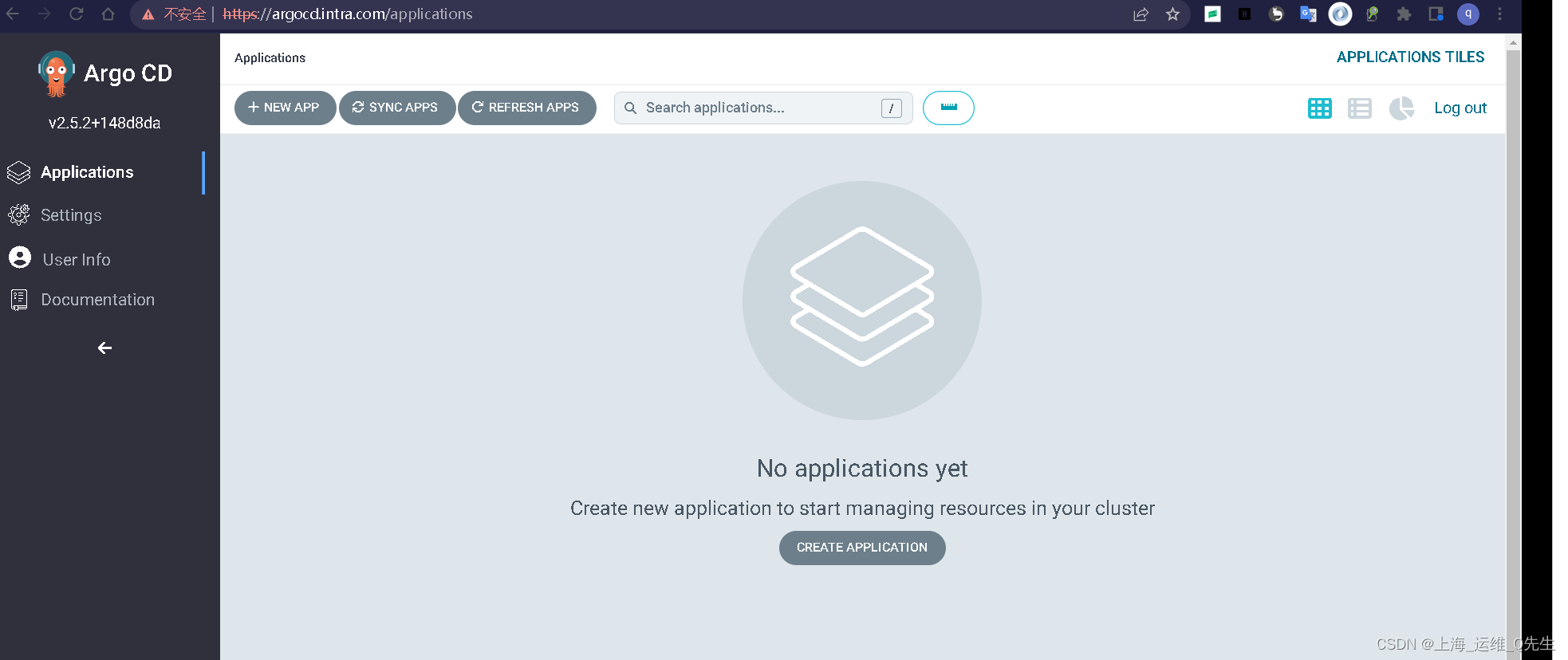
到此为止Argocd安装完成
# argocd app create guestbook --repo http://192.168.31.199/root/argocd-example-apps.git --path guestbook --dest-server https://kubernetes.default.svc --dest-namespace default application 'guestbook' created # kubectl get applications -n argocd NAME SYNC STATUS HEALTH STATUS guestbook OutOfSync Missing- 1
- 2
- 3
- 4
- 5
由于还没有进行操作,所以状态是OutOfSync
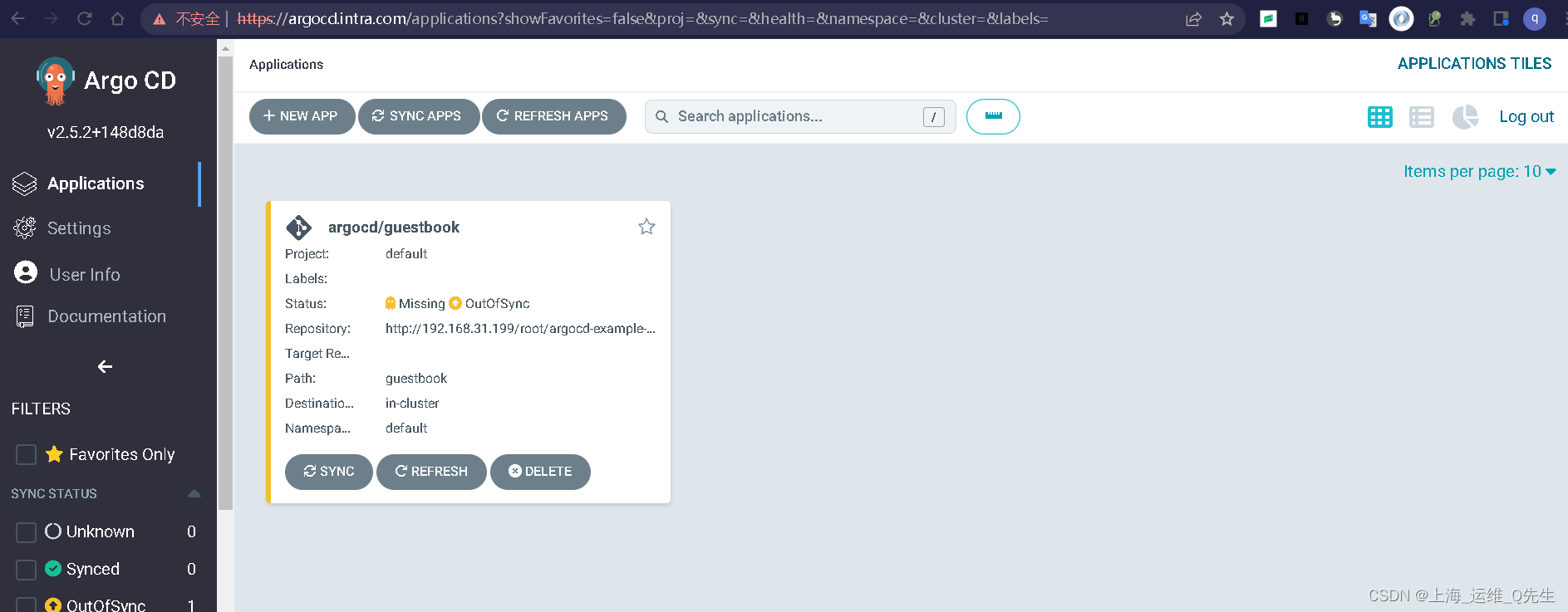


此时
root@k8s-master-01:~/git/argocd-example-apps# kubectl get pods NAME READY STATUS RESTARTS AGE ehelp-7f6b554776-v4ph4 0/1 ContainerCreating 0 15d el-gitlab-event-listener-75497dbb79-2mgjf 1/1 Running 3 (10d ago) 10d el-s2i-listener-7c78cc48c-5jzmg 1/1 Running 0 10d guestbook-ui-85985d774c-2tl8w 1/1 Running 0 20m test-centos-pod 1/1 Running 3 (10d ago) 17d # kubectl get app -n argocd NAME SYNC STATUS HEALTH STATUS guestbook Synced Healthy # argocd app list NAME CLUSTER NAMESPACE PROJECT STATUS HEALTH SYNCPOLICY CONDITIONS REPO PATH TARGET argocd/guestbook https://kubernetes.default.svc default default Synced Healthy <none> <none> http://192.168.31.199/root/argocd-example-apps.git guestbook # argocd app get guestbook Name: argocd/guestbook Project: default Server: https://kubernetes.default.svc Namespace: default URL: https://argocd.intra.com/applications/guestbook Repo: http://192.168.31.199/root/argocd-example-apps.git Target: Path: guestbook SyncWindow: Sync Allowed Sync Policy: <none> Sync Status: Synced to (58982ea) Health Status: Healthy GROUP KIND NAMESPACE NAME STATUS HEALTH HOOK MESSAGE Service default guestbook-ui Synced Healthy service/guestbook-ui created apps Deployment default guestbook-ui Synced Healthy deployment.apps/guestbook-ui created- 1
- 2
- 3
- 4
- 5
- 6
- 7
- 8
- 9
- 10
- 11
- 12
- 13
- 14
- 15
- 16
- 17
- 18
- 19
- 20
- 21
- 22
- 23
- 24
- 25
- 26
- 27
- 28
- 29
- 30
7. 手动创建一个ArgoCD App

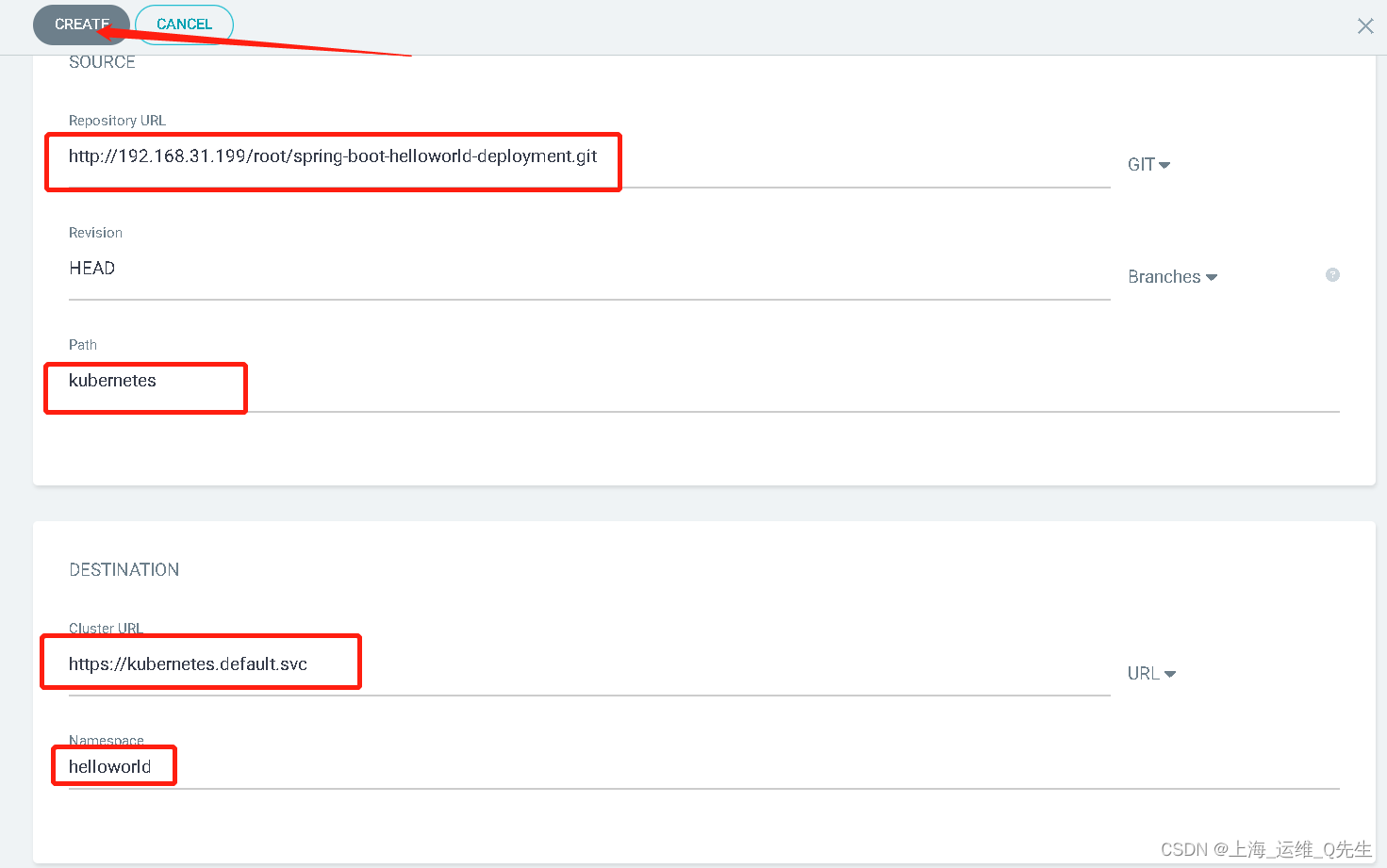
root@k8s-master-01:~/git/argocd-example-apps# kubectl get pods -n helloworld NAME READY STATUS RESTARTS AGE spring-boot-helloworld-766794dd78-44j4m 1/1 Running 0 48s spring-boot-helloworld-766794dd78-7tbmf 1/1 Running 0 48s spring-boot-helloworld-766794dd78-c48kx 1/1 Running 0 48s # kubectl get svc -n helloworld NAME TYPE CLUSTER-IP EXTERNAL-IP PORT(S) AGE spring-boot-helloworld ClusterIP 10.200.229.42 <none> 80/TCP 5m47s # curl 10.200.229.42 Hello Spring Boot 2.0!- 1
- 2
- 3
- 4
- 5
- 6
- 7
- 8
- 9
- 10

由于这里没有自动health
同步前Pod中的镜像为V0.8.0
# kubectl get pods spring-boot-helloworld-766794dd78-44j4m -n helloworld -o yaml|grep v0.8 - image: harbor.intra.com/argocd/spring-boot-helloworld:v0.8.0 image: harbor.intra.com/argocd/spring-boot-helloworld:v0.8.0- 1
- 2
- 3
手动同步
root@k8s-master-01:~/git/argocd-example-apps# argocd app list NAME CLUSTER NAMESPACE PROJECT STATUS HEALTH SYNCPOLICY CONDITIONS REPO PATH TARGET argocd/guestbook https://kubernetes.default.svc default default Synced Healthy <none> <none> http://192.168.31.199/root/argocd-example-apps.git guestbook argocd/spring-boot-helloworld https://kubernetes.default.svc default Synced Healthy Auto <none> http://192.168.31.199/root/spring-boot-helloworld-deployment.git kubernetes HEAD root@k8s-master-01:~/git/argocd-example-apps# argocd app sync argocd/spring-boot-helloworld TIMESTAMP GROUP KIND NAMESPACE NAME STATUS HEALTH HOOK MESSAGE 2022-11-18T16:35:43+08:00 Namespace helloworld Synced 2022-11-18T16:35:43+08:00 Service helloworld spring-boot-helloworld Synced Healthy 2022-11-18T16:35:43+08:00 apps Deployment helloworld spring-boot-helloworld Synced Healthy 2022-11-18T16:35:43+08:00 Namespace helloworld Synced namespace/helloworld unchanged 2022-11-18T16:35:43+08:00 Service helloworld spring-boot-helloworld Synced Healthy service/spring-boot-helloworld unchanged 2022-11-18T16:35:43+08:00 apps Deployment helloworld spring-boot-helloworld Synced Healthy deployment.apps/spring-boot-helloworld configured 2022-11-18T16:35:43+08:00 apps Deployment helloworld spring-boot-helloworld OutOfSync Progressing deployment.apps/spring-boot-helloworld configured Name: argocd/spring-boot-helloworld Project: default Server: https://kubernetes.default.svc Namespace: URL: https://argocd.intra.com/applications/argocd/spring-boot-helloworld Repo: http://192.168.31.199/root/spring-boot-helloworld-deployment.git Target: HEAD Path: kubernetes SyncWindow: Sync Allowed Sync Policy: Automated Sync Status: Synced to HEAD (bbf73a3) Health Status: Progressing Operation: Sync Sync Revision: bbf73a31cb13c11dc9d82717119bc03df7aac040 Phase: Succeeded Start: 2022-11-18 16:35:42 +0800 CST Finished: 2022-11-18 16:35:43 +0800 CST Duration: 1s Message: successfully synced (all tasks run) GROUP KIND NAMESPACE NAME STATUS HEALTH HOOK MESSAGE Namespace helloworld Synced namespace/helloworld unchanged Service helloworld spring-boot-helloworld Synced Healthy service/spring-boot-helloworld unchanged apps Deployment helloworld spring-boot-helloworld Synced Progressing deployment.apps/spring-boot-helloworld configured- 1
- 2
- 3
- 4
- 5
- 6
- 7
- 8
- 9
- 10
- 11
- 12
- 13
- 14
- 15
- 16
- 17
- 18
- 19
- 20
- 21
- 22
- 23
- 24
- 25
- 26
- 27
- 28
- 29
- 30
- 31
- 32
- 33
- 34
- 35
- 36
- 37
- 38
- 39
同步后镜像版本成为v0.8.1
# kubectl get pods spring-boot-helloworld-6db9d64d49-8mbt8 -n helloworld -o yaml|grep v0.8 - image: harbor.intra.com/argocd/spring-boot-helloworld:v0.8.1 image: harbor.intra.com/argocd/spring-boot-helloworld:v0.8.1- 1
- 2
- 3
再次修改将image改为v0.8.2,一段时间后自动更新了images
# argocd app history argocd/spring-boot-helloworld ID DATE REVISION 0 2022-11-18 16:22:17 +0800 CST HEAD (d3f19ac) 1 2022-11-18 16:35:43 +0800 CST HEAD (bbf73a3) # argocd app history argocd/spring-boot-helloworld ID DATE REVISION 0 2022-11-18 16:22:17 +0800 CST HEAD (d3f19ac) 1 2022-11-18 16:35:43 +0800 CST HEAD (bbf73a3) 2 2022-11-18 16:45:39 +0800 CST HEAD (b82bb4a)- 1
- 2
- 3
- 4
- 5
- 6
- 7
- 8
- 9
-
-
相关阅读:
C++ Reference: Standard C++ Library reference: Containers: array: array: rend
什么是独立IP,独立IP主机怎么样?
计算机毕业设计Java健身房管理系统设计(源码+系统+mysql数据库+lw文档)
7、Lock的生产者消费者问题
字符串相关算法操作
SpringMVC工作流程 --通透较详细
delphi 自带的dbgrid表格控件增加下选框
LeetCode - 1162 地图分析
IP地址和端口
websocket 封装在vue中使用
- 原文地址:https://blog.csdn.net/qq_29974229/article/details/127926078