-
Vue3基础看这一篇就够了(万字长篇,附实例代码及效果演示)
目录
前言
vue3已经出了好长一段时间了,最近闲来无事简单学习了一下,新增的东西还是挺多的,写一篇文章来记录一下。
概述
Vue3组合式api VS Vue2选项式api
谈到 vue3,首先想到的就是组合式api,很大程度的解决了vue2选项式api的缺点,那有啥缺点?当文件中的业务代码非常多的时候,阅读修改代码的时候是非常痛苦的,data,method,watch还有计算属性之间来回跳转, 我已经准备拔刀了。
下面这些图被疯转,很形象的展现了vue2和vue3的区别,可以看到组合式api就是将单个功能的状态,方法,计算属性等等需要用到的东西都组合在一起抽离成一个hook,也就是对应图4的function,最终再统一引入组合到一起。这样做的好处就是单个功能的代码都在一起,方便调式修改。


基础部分
setup
setup是vue3的一个新的配置项,只在初始化的时候执行一次,所有的组合式函数都在此使用。setup可以在选项式api的风格中使用也可以通过组合式api的风格 。通过代码简单对比一下。vue3推荐使用组合式。
选项式api的风格
- <template>
- <div>
- <h1>v3h1>
- <h3>{{ sum }}h3>
- <button @click="sum++">+1button>
- div>
- template>
- <style scoped>style>
组合式api的风格
- <template>
- <div>
- <h1>v3h1>
- <h3>{{ sum }}h3>
- <button @click="sum++">+1button>
- div>
- template>
- <style scoped>style>
区别
- <template>
- <div>
- <h1>v3h1>
- <h3>{{ sum }}h3>
- <button @click="add">+1button>
- div>
- template>
- <style scoped>style>

reactive
为对象做深层!!!!响应式代理, 也就是如果对象有多层依旧是响应式的,返回一个Proxy实例, 如果传入一个字符串或者数字,它将不是响应式的。Proxy 对象用于创建一个对象的代理,从而实现基本操作的拦截和自定义(如属性查找、赋值、枚举、函数调用等)Proxy - JavaScript | MDN。Vue使用 Proxy 进行数据劫持, Reflect 进行反射修改 Reflect - JavaScript | MDN

-
- <template>
- <div>
- <h1>v3h1>
- <h1>{{ sum }}h1>
- <h3>姓名:{{ person.name }}h3>
- <h3>年龄:{{ person.age }}h3>
- <h3>工作:{{ person.job.j1.jname }}h3>
- <h3 v-if="person.hobby">爱好: {{ person.hobby }}h3>
- <button @click="person.name += '-'">修改姓名button>
- <button @click="person.age++">修改年龄button>
- <button @click="person.job.j1.jname += '!'">修改工作button>
- <button @click="add">增加爱好button>
- <button @click="deleteHB">删除爱好button>
- div>
- template>
-
- <style scoped>style>
shallowReactive 与 shallowRef
shallowRef 直译过来意思是浅层的 ref,shallowRef 传入对象不会求助 reactive,仅仅对ref对象的 value 属性具有响应式。
shallowReactive 只处理对象第一层的响应式, 如果修改了深层的数据页面是不会响应的,但是会在下次页面更新中渲染出来。

-
- <template>
- <div>
- <h1>v3h1>
- <h3>
- shallowRef_jack: {{ shallowRef_jack }}
- <button @click="shallowRef_jack = {}">修改整个对象button>
- <button @click="shallowRef_jack.name += '!'">修改对象属性button>
- h3>
- <h3>
- ref_jack: {{ ref_jack }}
- <button @click="ref_jack = {}">修改整个对象button>
- <button @click="ref_jack.name += '!'">修改对象属性button>
- h3>
- <h3>
- shallowReactive_ben: {{ shallowReactive_ben }}
- <button @click="shallowReactive_ben.child.son.name = '!'">
- 修改对象的第三层属性
- button>
- <button @click="shallowReactive_ben.name += '!'">
- 修改对象第一层属性
- button>
- h3>
- <h3>
- reactive_ben: {{ reactive_ben }}
- <button @click="reactive_ben.child.son.name += '!'">
- 修改对象的第三层属性
- button>
- <button @click="reactive_ben.name += '!'">修改对象第一层属性button>
- h3>
- div>
- template>
-
- <style scoped>
- h3 {
- font-size: 26px;
- border: 1px solid #ccc;
- padding: 20px;
- margin: 20px;
- }
- button {
- float: right;
- padding: 10px;
- font-size: 20px;
- }
- style>
计算属性和监听
computed 函数
计算属性有两种写法,作用和vue2一样,通过监听某个值的变化计算出一个新值
- 只读的写法 :computed(() => xxxxxx),
- 可读可写的写法: computed({ get: () => xxxx, set: (val) => { xxxx } })
-
- <template>
- <div>
- <h1>v3h1>
- <h2>
- ref 定义的 count: {{ count }} <button @click="count++">count++button>
- h2>
- <h2>计算属性 num1: {{ num1 }} <button @click="num1++">num1++button>h2>
- <h2>计算属性 num2: {{ num2 }} <button @click="num2++">num2++button>h2>
- div>
- template>
-
- <style scoped>style>

watch 函数
watch 函数用来监听数据的变化,和vue2大体上都是相同的。
参数列表:
- 参数1为需要监听的响应式对象(可以是单个对象,也可以是一个数组,也可以是一个getter函数),
- 参数2为监听对象发生变化时所执行的回调
- 参数3是一些配置项:
immediate是否开启立即监听,deep是否开启深度监听,flush回调的触发时机,onTrack / onTrigger用于调试的两个函数

注意点:
- 直接监听 reactive 定义的响应式对象默认开启了深度监听
- 通过 getter 形式监听响应式对象默认是浅层监听
-
- <template>
- <div>
- <h1>v3h1>
- <h2>
- ref 定义的 count: {{ count }} <button @click="count++">count++button>
- h2>
- <h2>
- reactive 定义的 person: {{ person }}
- <button @click="person.name += '!'">修改姓名button>
- <button @click="person.child.son.name += '___'">修改儿子姓名button>
- h2>
- div>
- template>
-
- <style scoped>style>
watchEffect
watchEffect 函数用于监听传入的函数内访问的所有响应式数据的变化。白话一点就是回调里我用了谁我就监听谁,监听ref定义的响应式数据时,不要忘记 .value ,哥们就是这么智能。
watch 和 watchEffect 都是监听数据变化的函数,和 react 中的 useState 放入依赖项有着异曲同工之妙。
例子:切换下拉框中的 name ,模拟请求后台接口
-
- <template>
- <div>
- <h1>v3h1>
- <el-select v-model="name" placeholder="请选择">
- <el-option
- v-for="item in info"
- :key="item.name"
- :label="item.name"
- :value="item.name"
- >
- el-option>
- el-select>
- <div v-for="item in data" :key="item.id">
- {{ item.name }}的个人信息 {{ item }}
- div>
- div>
- template>
-
- <style scoped>style>

生命周期
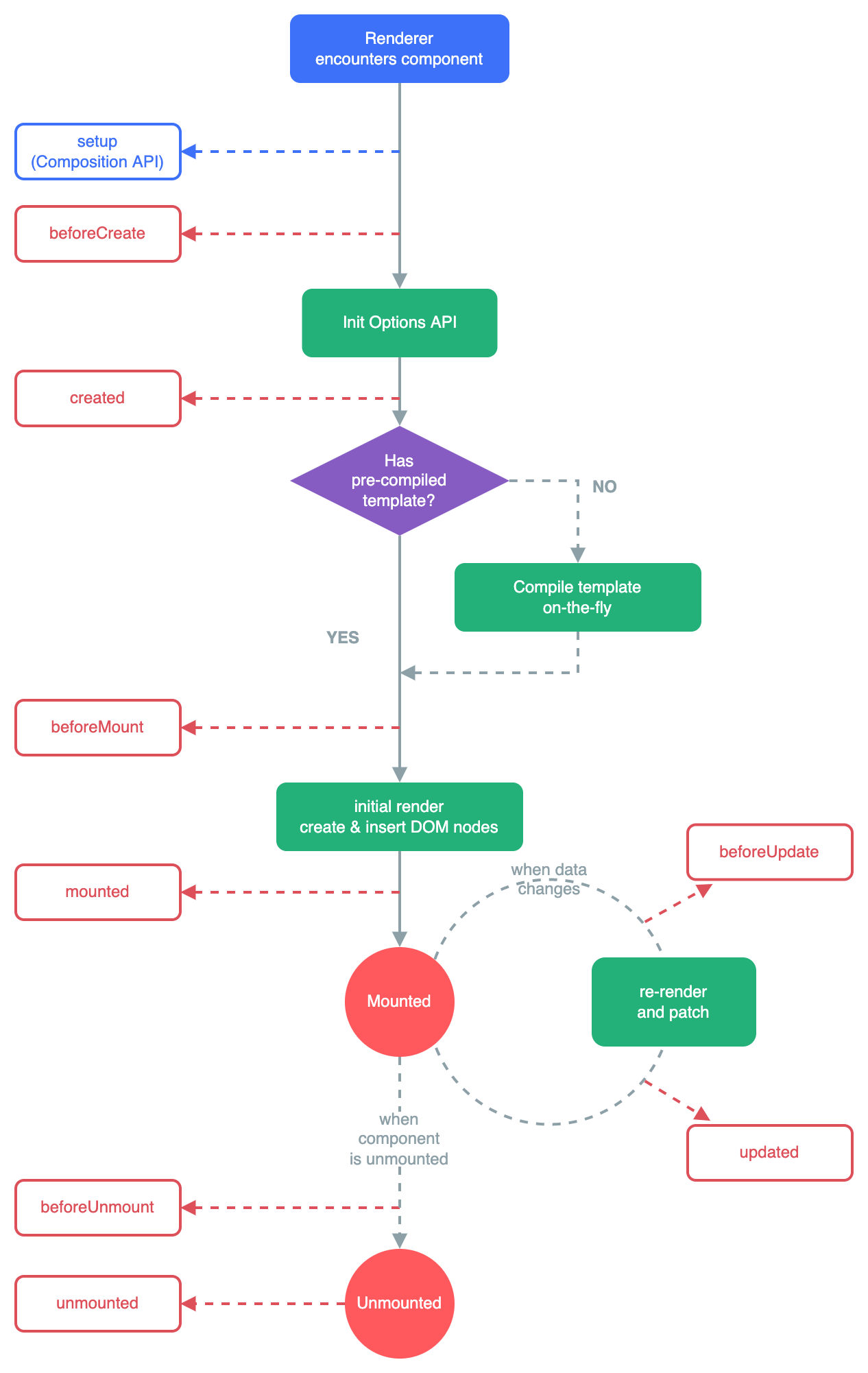
vue3的生命周期稍有变动,增加了 setup 钩子,且销毁前和销毁后的钩子命名更改为 beforeUnmount 和 unmounted,以下代码是验证的一些示例
App.vue
-
- <template>
- <div>
- <h1>
- v3
- <button @click="isComDestory = false">引入组合式子组件button>
- <button @click="isComDestory = true">销毁组合式子组件button>
- <button @click="isOptionDestory = false">引入选项式子组件button>
- <button @click="isOptionDestory = true">销毁选项式子组件button>
- h1>
- <Demo v-if="!isComDestory">Demo>
- <Demo2 v-if="!isOptionDestory">Demo2>
- div>
- template>
-
- <style scoped>
- button {
- padding: 20px;
- font-size: 16px;
- }
- style>
Demo.vue
-
- <template>
- <div>
- <h2>我是子组件1h2>
- <h2>{{ sum }} <button @click="sum++">+1button>h2>
- div>
- template>
-
- <style scoped>
- div {
- border: 1px solid #ccc;
- }
- style>
Demo2.vue
-
- <template>
- <div>
- <h2>我是子组件2h2>
- <h2>{{ sum }} <button @click="sum++">+1button>h2>
- div>
- template>
-
- <style scoped>
- div {
- border: 1px solid #ccc;
- }
- style>

由于录频录不了控制台,打印结果看下图


响应式数据只读
vue3提供了两个api,限制响应式数据为只读,不可修改。分别为 readonly(深层只读) 和shallowReadonly (浅层只读)

-
- <template>
- <div>
- <h1>v3h1>
- <h2>readonly: {{ sum }}h2>
- <h2>readonly: {{ p1 }}h2>
- <h2>shallowReadonly: {{ p2 }}h2>
- <button @click="edit">修改深层只读数据button>
- <button @click="editShallow">修改浅层只读数据button>
- div>
- template>
-
- <style scoped>style>
toRaw 返回代理的源
toRaw的功能官网的解释很清晰, 可以返回由 reactive()、readonly()、shallowReactive() 或者 shallowReadonly() 创建的代理对应的原始对象
-
- <template>
- <div>div>
- template>
-
- <style scoped>style>

markRaw 标记对象拒绝代理
markRaw()将对象标记为不可代理,返回其本身。本身上多了一个 __v_skip 属性表示忽略代理。强行代理代理是无效的,返回的还是其本身而不是响应式对象。
-
- <template>
- <div>div>
- template>
-
- <style scoped>style>

provide 与 inject 跨组件传值
使用 provide 与 inject 进行跨组件传值十分方便。以父子孙为例,父组件 provide ('name',value) 子组件 inject ('name') 即可

父组件
-
- <template>
- <div class="father">
- <h1>父组件h1>
- <h3>{{ person }}h3>
- <Demo>Demo>
- div>
- template>
-
- <style scoped>
- .father {
- padding: 10px;
- background: orange;
- }
- style>
子组件
-
- <template>
- <div>
- <h2>子组件h2>
- <Demo2>Demo2>
- div>
- template>
-
- <style scoped>
- div {
- padding: 10px;
- background: salmon;
- border: 1px solid #ccc;
- }
- style>
孙组件
-
- <template>
- <div class="sonson">
- <h2>孙组件h2>
- <h3>{{ person }}h3>
- div>
- template>
-
- <style scoped>
- .sonson {
- background: sandybrown;
- border: 1px solid #ccc;
- }
- style>
判断是否为响应式数据
- isRef(data)判断data是否是通过ref创建的响应式数据
- isReactive(data)判断data是否是通过reactive创建的响应式数据
- isReadonly(data)判断data是否是通过readOnly创建的只读数据
- isProxy(data)判断data是否为Proxy代理对象

-
- <template>template>
-
- <style scoped>style>
toRef 和 toRefs 解构响应式数据
当响应式对象的属性过多且页面用到很多次的时候, toRef 和 toRefs 可以进行响应式解构,解构出来的数据依旧具备响应式的能力。下面的例子是在

toRefs
-
- <template>
- <div>
- <h3>toRefs 解构出 person的name ----- {{ name }}h3>
- <h3>toRefs 解构出 person的age ----- {{ age }}h3>
- <h3>toRefs 解构出 person的child的son的name ----- {{ child.son.name }}h3>
- <h3>toRefs 解构出 person的name ----- {{ name }}h3>
- <h3>toRefs 解构出 person的age ----- {{ age }}h3>
- <h3>toRefs 解构出 person的child的son的name ----- {{ child.son.name }}h3>
- <h3>toRefs 解构出 person的name ----- {{ name }}h3>
- <h3>toRefs 解构出 person的age ----- {{ age }}h3>
- <h3>toRefs 解构出 person的child的son的name ----- {{ child.son.name }}h3>
- <button @click="name += '!'">修改person的namebutton>
- <button @click="age += 1">修改person的agebutton>
- <button @click="child.son.name += '*'">person的child的son的namebutton>
- div>
- template>
-
- <style scoped>style>

新组件
Fragment
在vue2中模板标签内必须包裹一层根标签,vue3中则不需要。vue3会为多个跟标签包裹一层Fragment。这是写法上的优化。前面很多例子的代码中我都包裹了一层根标签,这是由于我的编辑器的eslint的问题,去掉根标签也可以正常运行。
有根标签的编译结果
 没有根标签的编译结果

Teleport
Teleport 组件的功能是将元素渲染到任意的页面位置中,直接扣过来官网的例子。
下列代码主要表达的是:点击按钮将弹框插入到 body 标签下
ModalButton.vue
- <button @click="modalOpen = true">
- Open full screen modal! (With teleport!)
- button>
-
- <teleport to="body">
- <div v-if="modalOpen" class="modal">
- <div>
- I'm a teleported modal! (My parent is "body")
- <button @click="modalOpen = false">Closebutton>
- div>
- div>
- teleport>
-
- <script>
- import { ref } from 'vue'
- export default {
- name: 'modal-button',
- setup() {
- const modalOpen = ref(false)
- return {
- modalOpen,
- }
- },
- }
- script>
-
- <style>
- .modal {
- position: absolute;
- top: 0;
- right: 0;
- bottom: 0;
- left: 0;
- background-color: rgba(0, 0, 0, 0.5);
- display: flex;
- flex-direction: column;
- align-items: center;
- justify-content: center;
- }
-
- .modal div {
- display: flex;
- flex-direction: column;
- align-items: center;
- justify-content: center;
- background-color: white;
- width: 300px;
- height: 300px;
- padding: 5px;
- }
- style>
App.vue
- <h2>Apph2>
- <modal-button>modal-button>
-
- <script lang="ts">
- import ModalButton from './ModalButton.vue'
-
- export default {
- setup() {
- return {}
- },
-
- components: {
- ModalButton,
- },
- }
- script>


Suspense
Suspense 组件用于将异步组件包裹,提供一个过渡UI在异步完成之前。
Suspense 组件提供两个插槽:
- #default 默认插槽 存放异步组件
- #fallback 备用插槽 存放过渡UI
异步组件:
带有异步
setup()钩子的组件。这也包含了使用


