-
React 中 useState 清理的必须性
React 中 useState 清理的必须性
最近踩到了一个坑,属于以前没有碰到过的问题,就是在本地测试的时候,docker 的 API 不知道为什么突然有了延迟,以至于在状态更新的时候,之前调用的数据重写了后来调用的数据。
本地写了一个可以复刻这个情况的代码,服务端:
const express = require('express'); const cors = require('cors'); // remove cors error const corsOptions = { origin: 'http://localhost:3001', credentials: true, //access-control-allow-credentials:true optionSuccessStatus: 200, }; const app = express(); app.use(cors(corsOptions)); // respond with "hello world" when a GET request is made to the homepage app.get('/products/1', (req, res) => { setTimeout(() => { res.json({ id: 1, }); }, 1000); }); app.get('/products/2', (req, res) => { res.json({ id: 2, }); }); app.listen(3030, () => { console.log('port listening to 3030'); });- 1
- 2
- 3
- 4
- 5
- 6
- 7
- 8
- 9
- 10
- 11
- 12
- 13
- 14
- 15
- 16
- 17
- 18
- 19
- 20
- 21
- 22
- 23
- 24
- 25
- 26
- 27
- 28
- 29
- 30
- 31
本来想找个 Mock API 用的,不过没有延迟的设置,所以只能这么做了(叹气)。这个 dummy 服务端是只能接受
/products/1/products/2这两个 endpoints,对于 demo 来说够用了。主要用到的 packages 就 express 和 cors,如果想跑,就 init 一个项目直接npm i上面俩包就行。客户端:
import { useEffect, useState } from 'react'; import './App.css'; function App() { const [timer, setTimer] = useState(1); const [data, setData] = useState(null); useEffect(() => { const controller = new AbortController(); fetch(`http://localhost:3030/products/${timer}`, { signal: controller.signal, }) .then((data) => { if (data.ok) return data.json(); }) .then((res) => { console.log(res); setData(res); }) .catch((e) => { console.log(e); }); }, [timer]); return ( <div className="App"> <input type="text" value={timer} onChange={(e) => { setTimer(e.target.value); }} /> <br /> {JSON.stringify(data)} </div> ); } export default App;- 1
- 2
- 3
- 4
- 5
- 6
- 7
- 8
- 9
- 10
- 11
- 12
- 13
- 14
- 15
- 16
- 17
- 18
- 19
- 20
- 21
- 22
- 23
- 24
- 25
- 26
- 27
- 28
- 29
- 30
- 31
- 32
- 33
- 34
- 35
- 36
- 37
- 38
- 39
- 40
- 41
效果如下:

尽管输入的 id 是 2,理论上来说我想显示的内容就是 2,不过因为 1 有延迟,所以延迟的数据重写了本来应有的数据,导致渲染是正常的,数据是异常的这种事情。
这也说明了之前的项目有可能会出现同样的问题(心虚),这也算是切身体会了,对于所有 useEffect 中的异步操作,清理都是非常必要的事情。
解决方案也比较简单,fetch 支持 AbortController,在清理函数中调用即可。
实现效果如下:
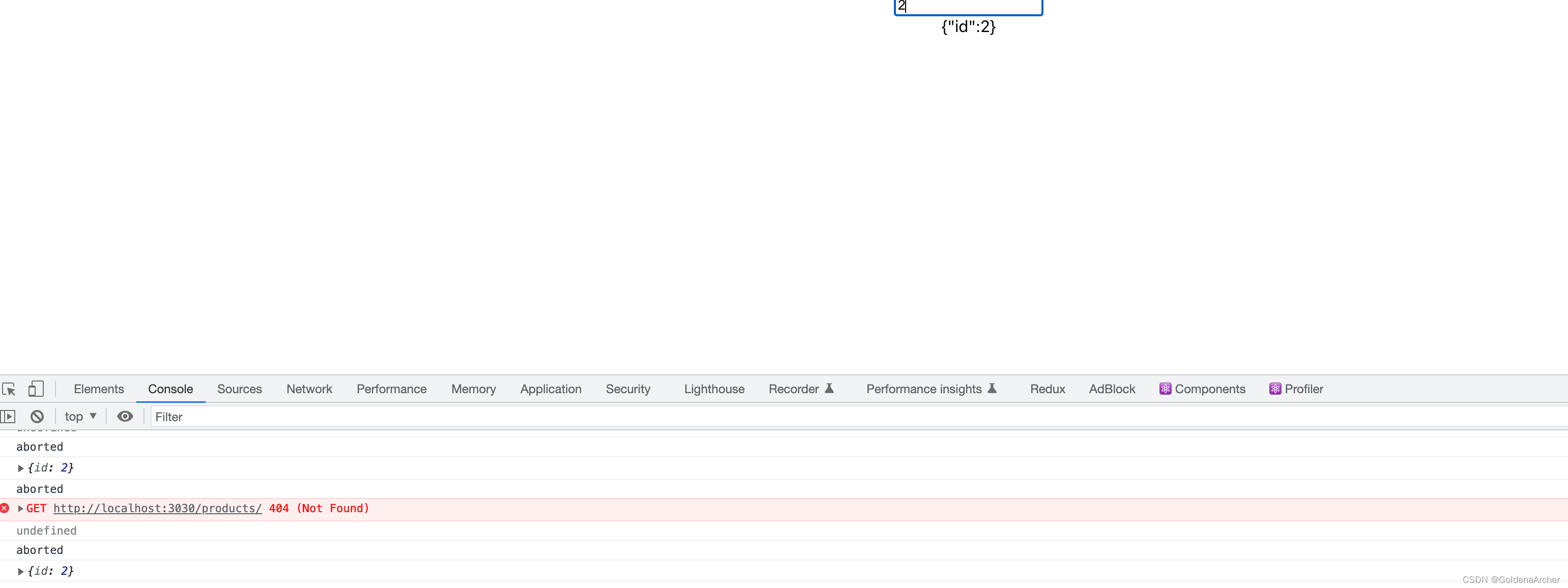
代码如下:
// 其他一致 useEffect(() => { const controller = new AbortController(); fetch(`http://localhost:3030/products/${timer}`, { signal: controller.signal, }) .then((data) => { if (data.ok) return data.json(); }) .then((res) => { console.log(res); setData(res); }) .catch((e) => { console.log(e); }); // 主要就是这里 return () => { console.log('aborted'); controller.abort(); }; }, [timer]);- 1
- 2
- 3
- 4
- 5
- 6
- 7
- 8
- 9
- 10
- 11
- 12
- 13
- 14
- 15
- 16
- 17
- 18
- 19
- 20
- 21
- 22
- 23
axios 部分也可以一样使用——axios 在 v0.22.0 之后就支持 AbortController 去取消 API 的调用:
useEffect(() => { const controller = new AbortController(); axios .get(`/products/${timer}`, { signal: controller.signal }) .then((data) => { setData(data); }); return () => { console.log('aborted'); controller.abort(); }; }, [timer]);- 1
- 2
- 3
- 4
- 5
- 6
- 7
- 8
- 9
- 10
- 11
- 12
- 13
关于 Axios 其他的简易封装,可以参考这篇:axios 的简易封装,这里不多赘述。
初始化是必须的,不初始化会导致出错……至于为什么……我还得找下资料……
这个可运行的案例写的……真的是为了这碟醋,特地包了这盘饺子 -
相关阅读:
基于SpringBoot+MyBatisPlus+DynamicDatasource+mysql的多数据源本地事务方案
泰迪云课堂《Python中文自然语言处理基础与实战》
nginx-ingress多控制器部署
Ros noetic 机器人坐标记录运动路径和发布 实战教程(A)
五大网络IO模型
INS 、AHRS、VRU、IMU的区别与联系
gitlab Activating and deactivating users
Spark基础【RDD转换算子】
简单易懂的时序数据压缩算法分析
物联网应用技术综合实训室解决方案
- 原文地址:https://blog.csdn.net/weixin_42938619/article/details/127877174
