目录
1、背景
我们知道在sql中是可以实现 group by 字段a,字段b,那么这种效果在elasticsearch中该如何实现呢?此处我们记录在elasticsearch中的3种方式来实现这个效果。
2、实现多字段聚合的思路
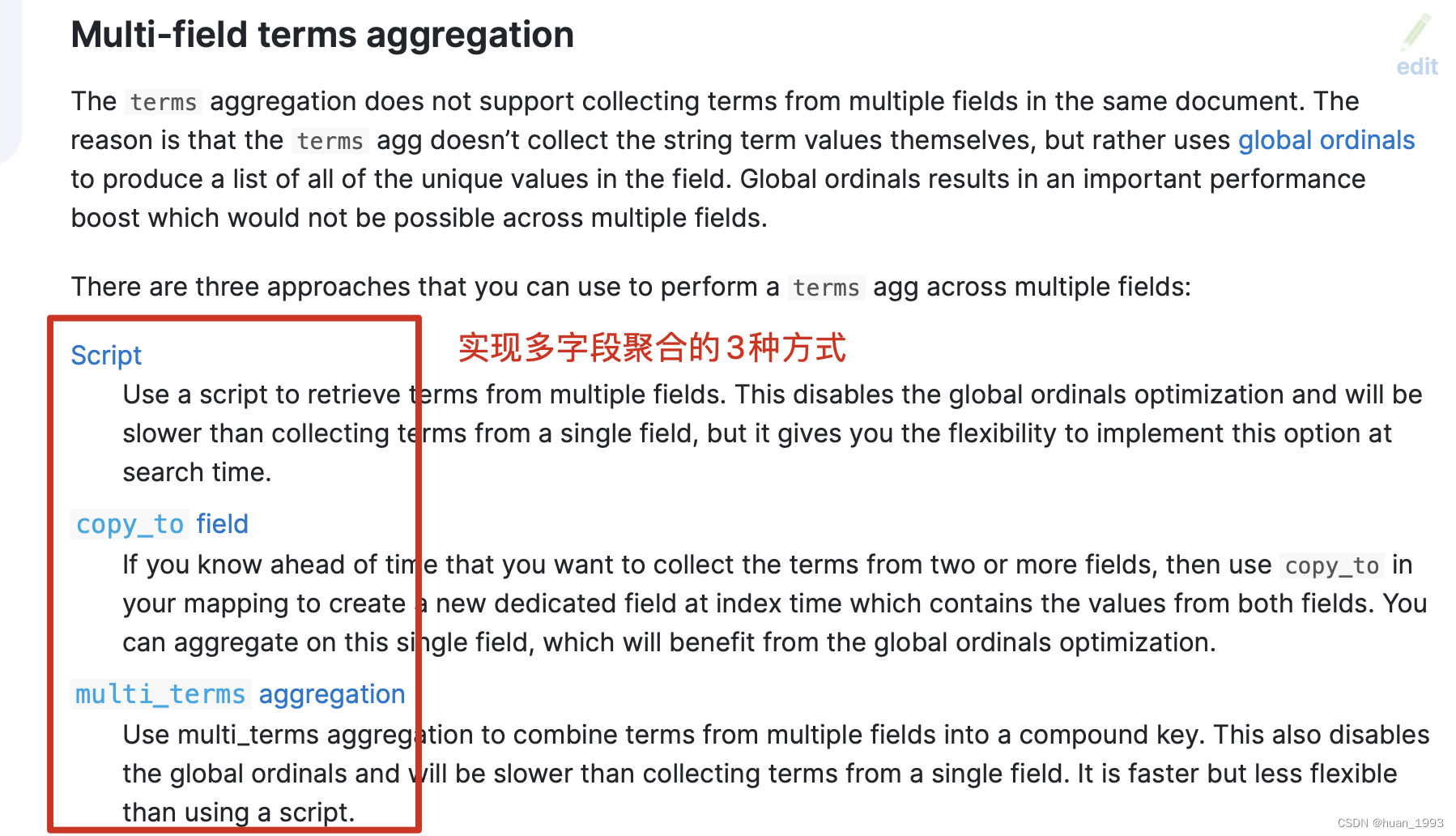
图片来源:https://www.elastic.co/guide/en/elasticsearch/reference/current/search-aggregations-bucket-terms-aggregation.html
从上图中,我们可以知道,可以通过3种方式来实现 多字段的聚合操作。
3、需求
根据省(province)和性别(sex)来进行聚合,然后根据聚合后的每个桶的数据,在根据每个桶中的最大年龄(age)来进行倒序排序。
4、数据准备
4.1 创建索引
PUT /index_person { "settings": { "number_of_shards": 1 }, "mappings": { "properties": { "id": { "type": "long" }, "name": { "type": "keyword" }, "province": { "type": "keyword" }, "sex": { "type": "keyword" }, "age": { "type": "integer" }, "address": { "type": "text", "analyzer": "ik_max_word", "fields": { "keyword": { "type": "keyword", "ignore_above": 256 } } } } } }
4.2 准备数据
PUT /_bulk {"create":{"_index":"index_person","_id":1}} {"id":1,"name":"张三","sex":"男","age":20,"province":"湖北","address":"湖北省黄冈市罗田县匡河镇"} {"create":{"_index":"index_person","_id":2}} {"id":2,"name":"李四","sex":"男","age":19,"province":"江苏","address":"江苏省南京市"} {"create":{"_index":"index_person","_id":3}} {"id":3,"name":"王武","sex":"女","age":25,"province":"湖北","address":"湖北省武汉市江汉区"} {"create":{"_index":"index_person","_id":4}} {"id":4,"name":"赵六","sex":"女","age":30,"province":"北京","address":"北京市东城区"} {"create":{"_index":"index_person","_id":5}} {"id":5,"name":"钱七","sex":"女","age":16,"province":"北京","address":"北京市西城区"} {"create":{"_index":"index_person","_id":6}} {"id":6,"name":"王八","sex":"女","age":45,"province":"北京","address":"北京市朝阳区"}
5、实现方式
5.1 multi_terms实现
5.1.1 dsl
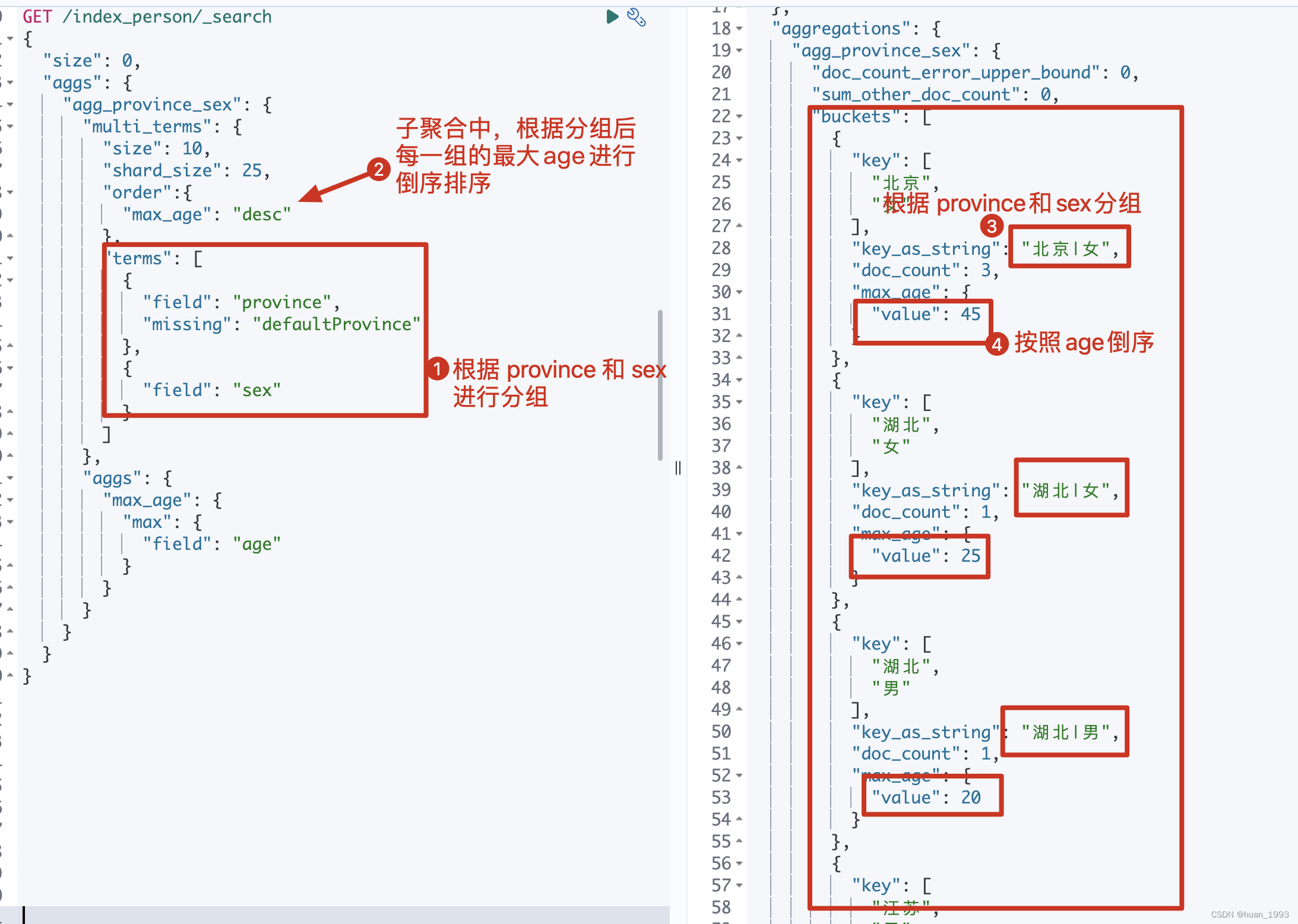
GET /index_person/_search { "size": 0, "aggs": { "agg_province_sex": { "multi_terms": { "size": 10, "shard_size": 25, "order":{ "max_age": "desc" }, "terms": [ { "field": "province", "missing": "defaultProvince" }, { "field": "sex" } ] }, "aggs": { "max_age": { "max": { "field": "age" } } } } } }
5.1.2 java 代码
@Test @DisplayName("多term聚合-根据省和性别聚合,然后根据最大年龄倒序") public void agg01() throws IOException { SearchRequest searchRequest = new SearchRequest.Builder() .size(0) .index("index_person") .aggregations("agg_province_sex", agg -> agg.multiTerms(multiTerms -> multiTerms.terms(term -> term.field("province")) .terms(term -> term.field("sex")) .order(new NamedValue<>("max_age", SortOrder.Desc)) ) .aggregations("max_age", ageAgg -> ageAgg.max(max -> max.field("age"))) ) .build(); System.out.println(searchRequest); SearchResponse System.out.println(response); }
5.1.3 运行结果
5.2 script实现
5.2.1 dsl
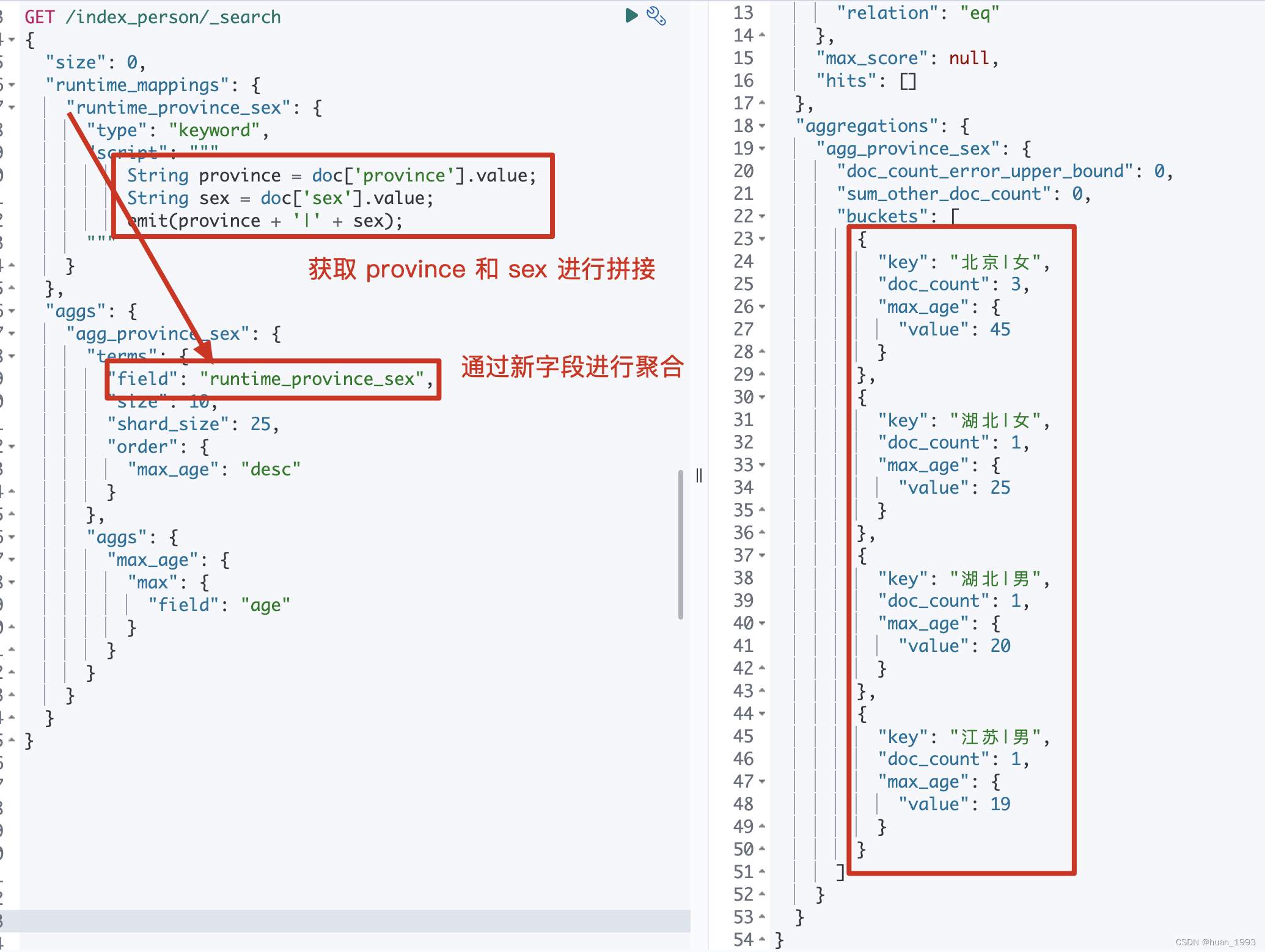
GET /index_person/_search { "size": 0, "runtime_mappings": { "runtime_province_sex": { "type": "keyword", "script": """ String province = doc['province'].value; String sex = doc['sex'].value; emit(province + '|' + sex); """ } }, "aggs": { "agg_province_sex": { "terms": { "field": "runtime_province_sex", "size": 10, "shard_size": 25, "order": { "max_age": "desc" } }, "aggs": { "max_age": { "max": { "field": "age" } } } } } }
5.2.2 java代码
@Test @DisplayName("多term聚合-根据省和性别聚合,然后根据最大年龄倒序") public void agg02() throws IOException { SearchRequest searchRequest = new SearchRequest.Builder() .size(0) .index("index_person") .runtimeMappings("runtime_province_sex", field -> { field.type(RuntimeFieldType.Keyword); field.script(script -> script.inline(new InlineScript.Builder() .lang(ScriptLanguage.Painless) .source("String province = doc['province'].value;\n" + " String sex = doc['sex'].value;\n" + " emit(province + '|' + sex);") .build())); return field; }) .aggregations("agg_province_sex", agg -> agg.terms(terms -> terms.field("runtime_province_sex") .size(10) .shardSize(25) .order(new NamedValue<>("max_age", SortOrder.Desc)) ) .aggregations("max_age", minAgg -> minAgg.max(max -> max.field("age"))) ) .build(); System.out.println(searchRequest); SearchResponse System.out.println(response); }
5.2.3 运行结果
5.3 通过copyto实现
我本地测试过,通过copyto没实现,此处故先不考虑
5.5 通过pipeline来实现
实现思路:
创建mapping时,多创建一个字段pipeline_province_sex,该字段的值由创建数据时指定pipeline来生产。
5.4.1 创建mapping
PUT /index_person { "settings": { "number_of_shards": 1 }, "mappings": { "properties": { "id": { "type": "long" }, "name": { "type": "keyword" }, "province": { "type": "keyword" }, "sex": { "type": "keyword" }, "age": { "type": "integer" }, "pipeline_province_sex":{ "type": "keyword" }, "address": { "type": "text", "analyzer": "ik_max_word", "fields": { "keyword": { "type": "keyword", "ignore_above": 256 } } } } } }
此处指定了一个字段pipeline_province_sex,该字段的值会由pipeline来处理。
5.4.2 创建pipeline
PUT _ingest/pipeline/pipeline_index_person_provice_sex { "description": "将provice和sex的值拼接起来", "processors": [ { "set": { "field": "pipeline_province_sex", "value": ["{{province}}", "{{sex}}"] }, "join": { "field": "pipeline_province_sex", "separator": "|" } } ] }
5.4.3 插入数据
PUT /_bulk?pipeline=pipeline_index_person_provice_sex {"create":{"_index":"index_person","_id":1}} {"id":1,"name":"张三","sex":"男","age":20,"province":"湖北","address":"湖北省黄冈市罗田县匡河镇"} {"create":{"_index":"index_person","_id":2}} {"id":2,"name":"李四","sex":"男","age":19,"province":"江苏","address":"江苏省南京市"} {"create":{"_index":"index_person","_id":3}} {"id":3,"name":"王武","sex":"女","age":25,"province":"湖北","address":"湖北省武汉市江汉区"} {"create":{"_index":"index_person","_id":4}} {"id":4,"name":"赵六","sex":"女","age":30,"province":"北京","address":"北京市东城区"} {"create":{"_index":"index_person","_id":5}} {"id":5,"name":"钱七","sex":"女","age":16,"province":"北京","address":"北京市西城区"} {"create":{"_index":"index_person","_id":6}} {"id":6,"name":"王八","sex":"女","age":45,"province":"北京","address":"北京市朝阳区"}
注意: 此处的插入需要指定上一步的pipeline
PUT /_bulk?pipeline=pipeline_index_person_provice_sex
5.4.4 聚合dsl
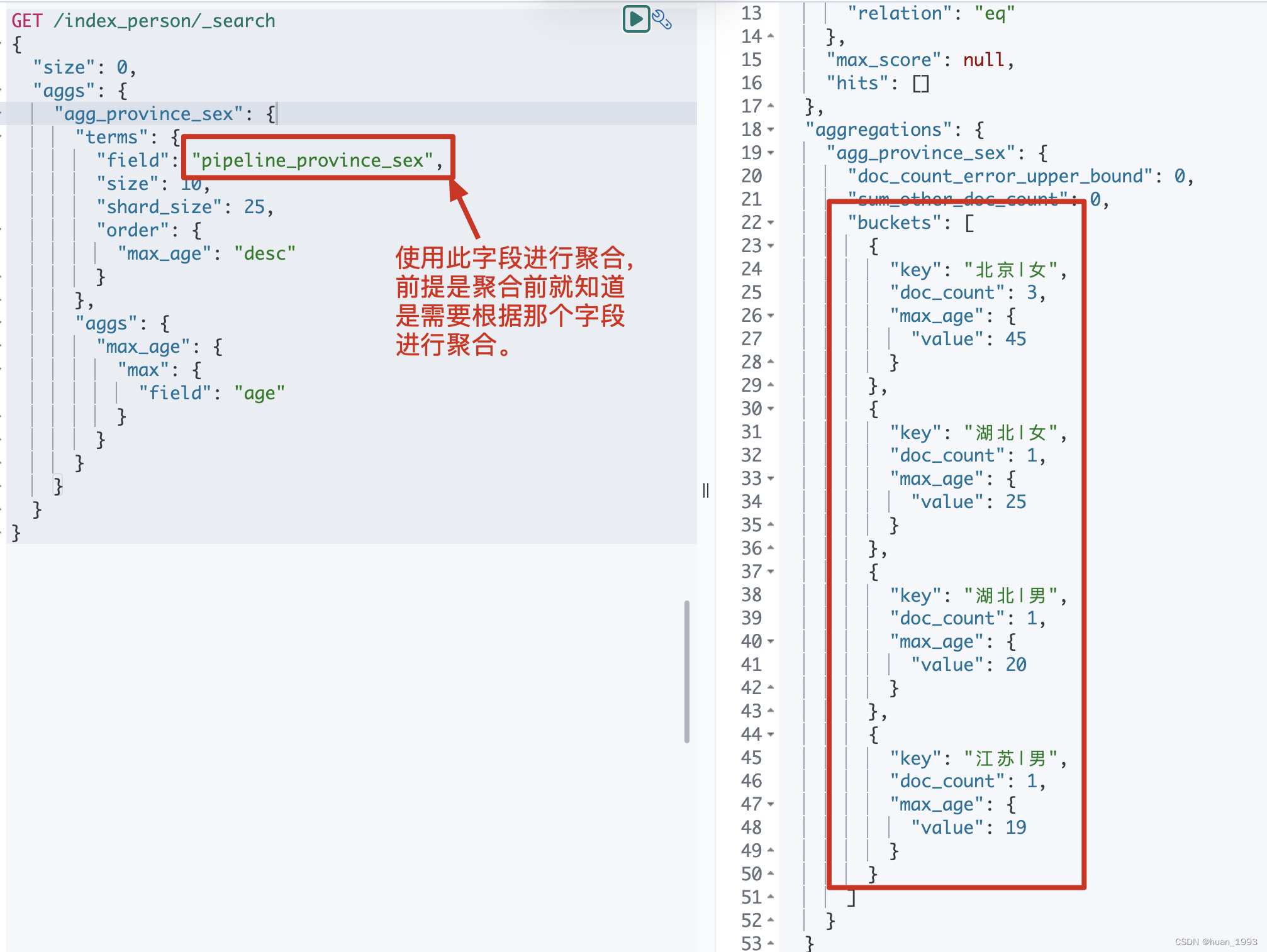
GET /index_person/_search { "size": 0, "aggs": { "agg_province_sex": { "terms": { "field": "pipeline_province_sex", "size": 10, "shard_size": 25, "order": { "max_age": "desc" } }, "aggs": { "max_age": { "max": { "field": "age" } } } } } }
5.4.5 运行结果