-
AndroidStudio案例——简单计算器
效果展示
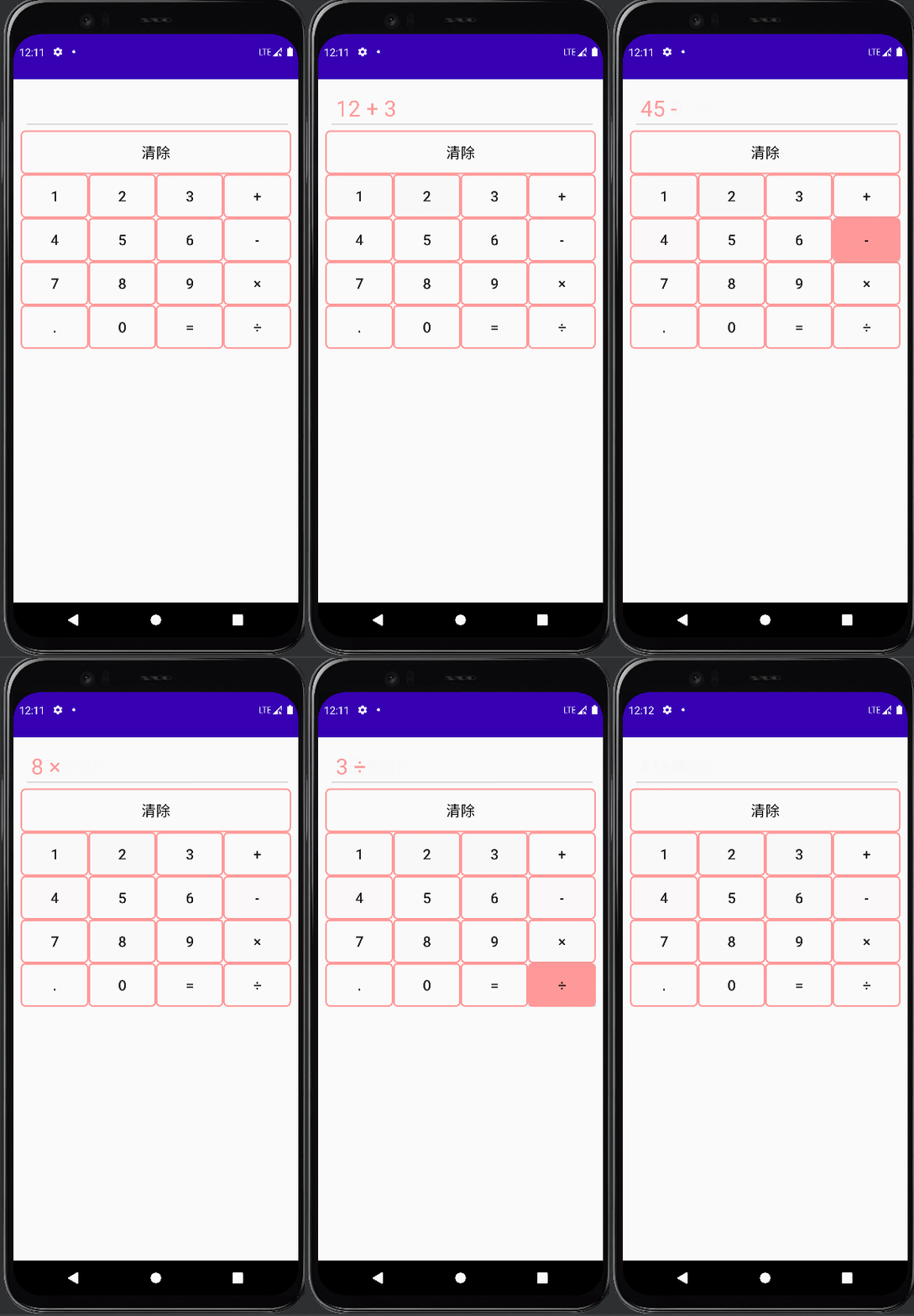
实验内容及步骤
设计一款带有可视化界面的简单计算器,供用户输入数据并查看结果。用户通过点击相应按钮(加减乘除运算符、等号、数字)输入正确的表达式,计算器进行相应的加减乘除运算,且可以进行小数和整数的运算;长按清除按钮3秒,可以清除已录入的内容。
步骤:
- 在Layout文件夹中建立布局文件activity_main.xml,完成计算器界面的网格布局设计,包括了一个文本编辑框和17个按钮。
- 为每一个按钮编写单击事件,实现对应功能;点击数字和加减乘除按钮实现表达式的录入,并显示在TextView中;点击等号按钮,根据表达式计算结果;长按清除按钮3秒以上,清除录入的表达式
代码
activity_main.xml
- "1.0" encoding="utf-8"?>
- <LinearLayout xmlns:android="http://schemas.android.com/apk/res/android"
- xmlns:app="http://schemas.android.com/apk/res-auto"
- xmlns:tools="http://schemas.android.com/tools"
- android:layout_width="match_parent"
- android:layout_height="match_parent"
- tools:context=".MainActivity"
- android:orientation="vertical"
- android:padding="10dp">
- <EditText
- android:id="@+id/result"
- android:layout_width="match_parent"
- android:layout_height="60dp"
- android:layout_marginLeft="4dp"
- android:paddingLeft="10dp"
- android:textSize="30dp"
- android:textColor="@color/colorPrimary"
- android:enabled="false"
- />
- <GridLayout
- android:layout_width="match_parent"
- android:layout_height="wrap_content"
- android:rowCount="5"
- android:columnCount="4"
- >
- <Button
- android:id="@+id/cls"
- android:layout_width="match_parent"
- android:layout_height="60dp"
- android:text="清除"
- android:textSize="20dp"
- android:textColor="@color/black"
- android:layout_columnSpan="4"
- android:background="@drawable/btn"
- />
- <Button
- android:id="@+id/one"
- android:layout_width="wrap_content"
- android:layout_height="60dp"
- android:text="1"
- android:textSize="20dp"
- android:layout_columnWeight="1"
- android:background="@drawable/btn"
- />
- <Button
- android:id="@+id/two"
- android:layout_width="wrap_content"
- android:layout_height="60dp"
- android:text="2"
- android:textSize="20dp"
- android:layout_columnWeight="1"
- android:background="@drawable/btn"
- />
- <Button
- android:id="@+id/three"
- android:layout_width="wrap_content"
- android:layout_height="60dp"
- android:text="3"
- android:textSize="20dp"
- android:layout_columnWeight="1"
- android:background="@drawable/btn"
- />
- <Button
- android:id="@+id/plus"
- android:layout_width="wrap_content"
- android:layout_height="60dp"
- android:text="+"
- android:textSize="20dp"
- android:layout_columnWeight="1"
- android:background="@drawable/btn"
- />
- <Button
- android:id="@+id/four"
- android:layout_width="wrap_content"
- android:layout_height="60dp"
- android:text="4"
- android:textSize="20dp"
- android:layout_columnWeight="1"
- android:background="@drawable/btn"
- />
- <Button
- android:id="@+id/five"
- android:layout_width="wrap_content"
- android:layout_height="60dp"
- android:text="5"
- android:textSize="20dp"
- android:layout_columnWeight="1"
- android:background="@drawable/btn"
- />
- <Button
- android:id="@+id/six"
- android:layout_width="wrap_content"
- android:layout_height="60dp"
- android:text="6"
- android:textSize="20dp"
- android:layout_columnWeight="1"
- android:background="@drawable/btn"
- />
- <Button
- android:id="@+id/min"
- android:layout_width="wrap_content"
- android:layout_height="60dp"
- android:text="-"
- android:textSize="20dp"
- android:layout_columnWeight="1"
- android:background="@drawable/btn"
- />
- <Button
- android:id="@+id/seven"
- android:layout_width="wrap_content"
- android:layout_height="60dp"
- android:text="7"
- android:textSize="20dp"
- android:layout_columnWeight="1"
- android:background="@drawable/btn"
- />
- <Button
- android:id="@+id/eight"
- android:layout_width="wrap_content"
- android:layout_height="60dp"
- android:text="8"
- android:textSize="20dp"
- android:layout_columnWeight="1"
- android:background="@drawable/btn"
- />
- <Button
- android:id="@+id/nine"
- android:layout_width="wrap_content"
- android:layout_height="60dp"
- android:text="9"
- android:textSize="20dp"
- android:layout_columnWeight="1"
- android:background="@drawable/btn"
- />
- <Button
- android:id="@+id/mul"
- android:layout_width="wrap_content"
- android:layout_height="60dp"
- android:text="×"
- android:textSize="20dp"
- android:layout_columnWeight="1"
- android:background="@drawable/btn"
- />
- <Button
- android:id="@+id/spot"
- android:layout_width="wrap_content"
- android:layout_height="60dp"
- android:text="."
- android:textSize="20dp"
- android:layout_columnWeight="1"
- android:background="@drawable/btn"
- />
- <Button
- android:id="@+id/zero"
- android:layout_width="wrap_content"
- android:layout_height="60dp"
- android:text="0"
- android:textSize="20dp"
- android:layout_columnWeight="1"
- android:background="@drawable/btn"
- />
- <Button
- android:id="@+id/equal"
- android:layout_width="wrap_content"
- android:layout_height="60dp"
- android:text="="
- android:textSize="20dp"
- android:layout_columnWeight="1"
- android:background="@drawable/btn"
- />
- <Button
- android:id="@+id/div"
- android:layout_width="wrap_content"
- android:layout_height="60dp"
- android:text="÷"
- android:textSize="20dp"
- android:layout_columnWeight="1"
- android:background="@drawable/btn"
- />
- GridLayout>
- LinearLayout>
btn.xml(按钮的样式)
- "1.0" encoding="utf-8"?>
- <selector xmlns:android="http://schemas.android.com/apk/res/android">
- <item android:state_pressed="true" android:drawable="@drawable/btn_pink_bg"/>
- <item android:drawable="@drawable/btn_pink"/>
- selector>
btn_pink.xml(按钮点击前)
- "1.0" encoding="utf-8"?>
- <shape xmlns:android="http://schemas.android.com/apk/res/android"
- android:shape="rectangle">
- <stroke
- android:width="2dp"
- android:color="#ff9999" />
- <corners
- android:radius="5dp"/>
- shape>
btn_pink_bg.xml(按钮点击后)
- "1.0" encoding="utf-8"?>
- <shape xmlns:android="http://schemas.android.com/apk/res/android"
- android:shape="rectangle">
- <solid android:color="#ff9999"/>
- <stroke
- android:width="2dp"
- android:color="#ff9999" />
- <corners
- android:radius="5dp"/>
- shape>
效果如下

JAVA代码部分
MainActivity.java
- package com.example.a1108;
- import androidx.appcompat.app.AppCompatActivity;
- import android.os.Bundle;
- import android.view.MotionEvent;
- import android.view.View;
- import android.widget.Button;
- import android.widget.EditText;
- import java.util.Date;
- public class MainActivity extends AppCompatActivity implements View.OnClickListener{
- EditText result;
- // 定义数字按钮
- Button zero,one,two,three,four,five,six,seven,eight,nine,spot;
- // 定义加减乘除按钮
- Button plus,min,mul,div;
- // 定义等号按钮
- Button equals;
- // 标识符,标识运算完成
- Boolean clr_flag=false;
- // 清除按钮
- Button cls;
- @Override
- protected void onCreate(Bundle savedInstanceState) {
- super.onCreate(savedInstanceState);
- setContentView(R.layout.activity_main);
- result=(EditText) findViewById(R.id.result);
- zero=findViewById(R.id.zero);
- one=findViewById(R.id.one);
- two=findViewById(R.id.two);
- three=findViewById(R.id.three);
- four=findViewById(R.id.four);
- five=findViewById(R.id.five);
- six=findViewById(R.id.six);
- seven=findViewById(R.id.seven);
- eight=findViewById(R.id.eight);
- nine=findViewById(R.id.nine);
- spot=findViewById(R.id.spot);
- zero.setOnClickListener(this);
- one.setOnClickListener(this);
- two.setOnClickListener(this);
- three.setOnClickListener(this);
- four.setOnClickListener(this);
- five.setOnClickListener(this);
- six.setOnClickListener(this);
- seven.setOnClickListener(this);
- eight.setOnClickListener(this);
- nine.setOnClickListener(this);
- spot.setOnClickListener(this);
- plus=findViewById(R.id.plus);
- min=findViewById(R.id.min);
- mul=findViewById(R.id.mul);
- div=findViewById(R.id.div);
- plus.setOnClickListener(this);
- min.setOnClickListener(this);
- mul.setOnClickListener(this);
- div.setOnClickListener(this);
- equals=findViewById(R.id.equal);
- equals.setOnClickListener(this);
- cls=findViewById(R.id.cls);
- // 为清除设置事件
- cls.setOnTouchListener(new View.OnTouchListener() {
- Date curDate=new Date(System.currentTimeMillis());
- Date endDate=new Date(System.currentTimeMillis());
- @Override
- public boolean onTouch(View view, MotionEvent motionEvent) {
- switch (motionEvent.getAction()){
- // 按下
- case MotionEvent.ACTION_DOWN:
- curDate=new Date((System.currentTimeMillis()));
- break;
- // 抬起
- case MotionEvent.ACTION_UP:
- endDate=new Date(System.currentTimeMillis());
- long durationMS=endDate.getTime()-curDate.getTime();
- if(durationMS>3000)
- result.setText("");
- break;
- }
- return true;
- }
- });
- }
- @Override
- public void onClick(View view) {
- // getText()获取的内容是一个对象,所以要转换一下
- String str=result.getText().toString();
- // 根据当前按钮按下的id进行判断
- switch (view.getId())
- {
- case R.id.zero:
- case R.id.one:
- case R.id.two:
- case R.id.three:
- case R.id.four:
- case R.id.five:
- case R.id.six:
- case R.id.seven:
- case R.id.eight:
- case R.id.nine:
- case R.id.spot:
- // 如果标识符为真,让值为空
- if(clr_flag)
- str="";
- // 把现在的内容追加上,现在的内容来自于按钮的文本
- // 按钮这个view对象先转换为Button
- result.setText(str+((Button)view).getText());
- clr_flag=false;
- break;
- case R.id.plus:
- case R.id.min:
- case R.id.mul:
- case R.id.div:
- // 如果标识符为真,让值为空
- if(clr_flag)
- str="";
- if(str.contains("+")||str.contains("-")||str.contains("×")||str.contains("÷"))
- // 从起始位置开始,我们只要运算符之前的内容
- str=str.substring(0,str.indexOf(" "));
- // 所以在运算符的前面和后面都追加一个“ ”
- result.setText(str+" "+((Button)view).getText()+" ");
- clr_flag=false;
- break;
- case R.id.equal:
- getResult();
- break;
- }
- }
- // 点了等号后
- private void getResult(){
- clr_flag=true;
- // 获取到字符串
- String exp=result.getText().toString();
- // 按照空格分隔字符串,形成字符串数组,第一个元素是左侧操作数,第二个元素是运算符,第三个元素是右侧操作数
- String [] exp_arr=exp.split(" ");
- // 定义结果
- double cnt=0;
- // 定义操作数
- double d1=Double.parseDouble(exp_arr[0]);
- double d2=Double.parseDouble(exp_arr[2]);
- // 判断运算符
- if(exp_arr[1].equals("+"))
- cnt=d1+d2;
- else if(exp_arr[1].equals("-"))
- cnt=d1-d2;
- else if(exp_arr[1].equals("×"))
- cnt=d1*d2;
- else if(exp_arr[1].equals("÷"))
- cnt=d1/d2;
- // 设置结果
- result.setText(String.valueOf(cnt));
- }
- }
注释都写在里面了
-
相关阅读:
jQuery用DOM遍历实现商城结算系统
An overview of IfM Engage
驱动开发:内核LoadLibrary实现DLL注入
完美解决api-ms-win-crt-runtime-l1-1-0.dll详细步骤
Qt 容器类
OA项目之会议通知(查询&是否参会&反馈详情)
实验室预约|实验室预约小程序|基于微信小程序的实验室预约管理系统设计与实现(源码+数据库+文档)
代码随想录算法训练营第36期DAY46
新版HI3559AV100开发注意事项
深入Java集合:ArrayList 源码解析 - JDK8
- 原文地址:https://blog.csdn.net/m0_52177571/article/details/127833822
