-
[Linux]------动静态库的模拟实现和简单使用
前言
正文开始!一、概念
- 静态库(.a):程序在编译链接的时候把库的代码链接到可执行文件中。程序运行的时候将不再需要静
态库 - 动态库(.so):程序在运行的时候才去链接动态库的代码,多个程序共享使用库的代码。
- 一个与动态库链接的可执行文件仅仅包含它用到的函数入口地址的一个表,而不是外部函数所在目标文
件的整个机器码 - 在可执行文件开始运行以前,外部函数的机器码由操作系统从磁盘上的该动态库中复制到内存中,这个
过程称为动态链接(dynamic linking) - 动态库可以在多个程序间共享,所以动态链接使得可执行文件更小,节省了磁盘空间。操作系统采用虚
拟内存机制允许物理内存中的一份动态库被要用到该库的所有进程共用,节省了内存和磁盘空间
安装C语言静态库
yum install -y glibc -static
二、生成静态库
首先我们库里面是不需要包含main函数的!
链接:就是把所有的.o链接形成一个可执行程序!!!
如果我把我的所有的.o给别人,别人能链接使用吗??—> 当然是可以的!
测试程序
/mymath.h// #pragma once #include#include //[from,to]-->累加-->result--->return extern int addToVal(int from,int to); /mymath.c// #include"mymath.h" int addToVal(int from,int to) { assert(from<=to); int result=0; for(int i=from;i<=to;i++) { result+=i; } return result; } /myprint.h// #pragma once #include #include extern void Print(const char* msg); /myprint.c// #include"myprint.h" void Print(const char* msg) { printf("%s : %lld\n",msg,(long long)time(NULL)); } - 1
- 2
- 3
- 4
- 5
- 6
- 7
- 8
- 9
- 10
- 11
- 12
- 13
- 14
- 15
- 16
- 17
- 18
- 19
- 20
- 21
- 22
- 23
- 24
- 25
- 26
- 27
- 28
- 29
- 30
- 31
- 32
- 33
生成
命令
ar -rc [文件]
(ar是gnu的归档工具,rc表示(replace and create))libmymath.a:mymath.o myprint.o ar -rc libmymath.a mymath.o myprint.o mymath.o:mymath.c gcc -c mymath.c -o mymath.o -std=c99 myprint.o:myprint.c gcc -c myprint.c -o myprint.o -std=c99 .PHONY:clean clean: rm -f *.o *.a- 1
- 2
- 3
- 4
- 5
- 6
- 7
- 8
- 9

发布
问题:我们在用库的时候需要什么东西呢??
答:库文件和头文件!!—>就可以给别人使用了
命令
.PHONY:static static: mkdir -p lib-static/lib;\ mkdir -p lib-static/include;\ cp *.a lib-static/lib;\ cp *.h lib-static/include- 1
- 2
- 3
- 4
- 5
- 6

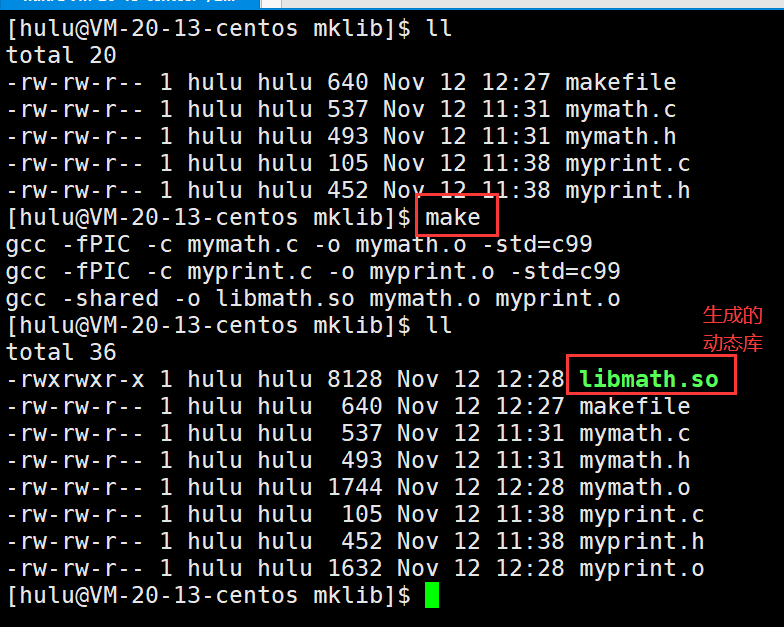
三、生成动态库
- shared: 表示生成共享库格式
- fPIC:产生位置无关码(position independent code)—>以后编译的源代码无论生成的.o文件在哪里都可以执行
- 库名规则:libxxx.so
libmymath.so:mymath.o myprint.o gcc -shared -o libmath.so mymath.o myprint.o mymath.o:mymath.c gcc -fPIC -c mymath.c -o mymath.o -std=c99 myprint.o:myprint.c gcc -fPIC -c myprint.c -o myprint.o -std=c99 .PHONY:clean clean: rm -rf *.o *.so- 1
- 2
- 3
- 4
- 5
- 6
- 7
- 8
- 9
- 10
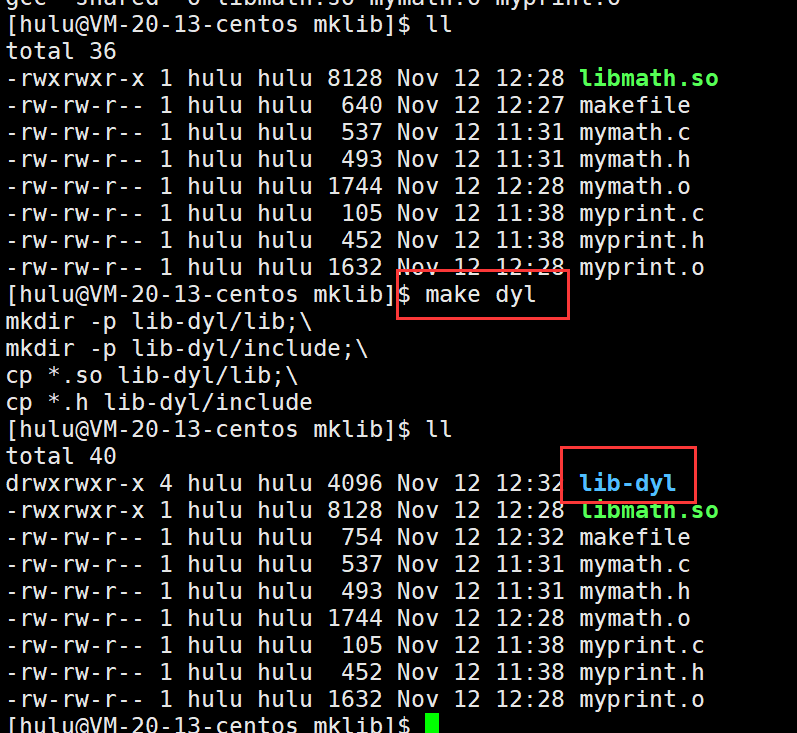
发布
.PHONY:dyl dyl: mkdir -p lib-dyl/lib;\ mkdir -p lib-dyl/include;\ cp *.so lib-dyl/lib;\ cp *.h lib-dyl/include- 1
- 2
- 3
- 4
- 5
- 6
四、使用库
1. 使用静态库
#include"mymath.h" #include"myprint.h" int main() { int start=0; int end=100; int result=addToVal(start,end); printf("%d\n",result); Print("hello world"); return 0; }- 1
- 2
- 3
- 4
- 5
- 6
- 7
- 8
- 9
- 10
- 11
- 12
- 13
首先我们先来回顾C语言头文件的搜索路径: “” <>
- 在当前路径下查找头文件
- 在系统头文件路径下查找头文件
- 指定路径头文件的搜索路径(-I(include) 你的头文件搜索路径 -L(link) 你的库路径 -l 具体哪一个库文件)
谁在头文件呢???—>编译器---->进程

系统头文件路径
ls /usr/include/

系统库文件路径
ls /lib64/

使用库文件和头文件
将自己的头文件和库文件,拷贝到系统路径下即可!!!(库的安装)
sudo cp lib-static/include/* /usr/include/
sudo cp lib-static/lib/* /usr/lib64/
其实我们之前没有用过任何第三方库!
gcc -l(指明我要链接的第三方库的名称)

但是不推荐这种做法,因为这种做法会污染系统的头文件和库文件!
指定路径搜索头文件
gcc mytest.c -o mytest -I ./lib-static/include/

虽然有错误,但并不是说头文件找不到了,现在还需要我们链接库文件!gcc mytest.c -o mytest -I ./lib-static/include/ -L ./lib-static/lib/ -lmymath


如果安装到系统就没有这么麻烦了。卸载库
sudo rm /usr/include/mymath.h
sudo rm /usr/include/myprint.h
sudo rm /lib64/libmymath.a
2. 使用动态库
第一种方法和静态库的使用一模一样:将自己的头文件和库文件,拷贝到系统路径下即可!!!
这里就不做演示了!
第二种指定路径包含头文件和库文件

但是我们运行程序去报错了!!

查看我们程序所依赖的库ldd mytest

问题来了:编译的时候gcc所带的-I,-L,-l选项是给谁带的? ---->gcc所以形成可执行程序后,与编译器gcc就没有任何关系了。
所以./mytest运行进程后,并没有告诉进程这个库链接在哪里!!
动态库的运行搜索路径
根据上面的问题,进程找不到对应的动态库!
- 那么静态库的时候,怎么没有这个问题呢?–>形成可执行程序之后,已经把需要的代码拷贝进我的代码中!运行时不依赖你的库!—>不需要运行时查找了
- 为什么动态库会有这个问题呢?—>程序和动态库是分开加载的!
那么如何解决找不到动态库的问题呢??
想办法让进城找到动态库即可!- 动态库拷贝到系统路径下/lib64/ —>安装
- 通过导入环境变量的方式---->程序运行的时候,会在环境变量中查找自己需要的动态库路径(LD_LIBRARY_PATH)
- 系统配置文件来做
- 其他方式
通过导入环境变量的方式
echo L D L I B R A R Y P A T H e x p o r t L D L I B R A R Y P A T H = LD_LIBRARY_PATH export LD_LIBRARY_PATH= LDLIBRARYPATHexportLDLIBRARYPATH=LD_LIBRARY_PATH:[绝对路径]


这个解决办法重启Xshell就不可以了,因为Xshell默认重启后会还原环境变量!
系统配置文件来做
[root@localhost linux]# cat /etc/ld.so.conf.d/bit.conf
/root/tools/linux
[root@localhost linux]# ldconfig
查看还是发现没有我们需要链接的动态库
sudo ldconfig
现在我们就能找到动态库并且运行了

这个解决方法Xshell关闭后也不受影响!!其他方式
sudo ln -s /home/hulu/2022_10_27/mklib/test/lib-dyl/lib/libmath.so /lib64/libmath.so

该方法就是在系统库创建了一个软链接!

进程为什么找不到对应的动态库

总结
(本章完)
- 静态库(.a):程序在编译链接的时候把库的代码链接到可执行文件中。程序运行的时候将不再需要静
-
相关阅读:
【高速数字化仪应用案例系列】虹科数字化仪在通信领域的应用
如何注册Liberty大学并获取Perplexity Pro
QCN9024 vs. QCN9274: Performance comparison of wireless network chips
excel系列【统计一列中的不重复项】
python使用PIL模块加载图像、通过resize函数改变图像的大小、使用save函数保存处理过的图像、并自定义指定保存后的格式
【Java-LangChain:使用 ChatGPT API 搭建系统-9】评估(上)-存在一个简单的正确答案时
爬虫(六)
(笔记)Kotlin——Android封装ViewBinding之二 优化
element-ui和element-plus的自定义列表格用法
MyBatis 操作数据库
- 原文地址:https://blog.csdn.net/m0_61560468/article/details/127817383
