-
进程替换(跑路人笔记)
进程替换
这个部分我们讲进程替换,主要讲函数的使用和进程替换的使用
进程替换非常好使,我们进程替换甚至可以在C++语言里调用Python语言或者其他语言的进程👍.
我们讲完这部分的函数就可以创建一个简易的shell了。
函数介绍
我们先来看看函数都有哪些
#includeint execl(const char *path, const char *arg, ...); int execlp(const char *file, const char *arg, ...); int execle(const char *path, const char *arg,..., char * const envp[]); int execv(const char *path, char *const argv[]); int execvp(const char *file, char *const argv[]); int execvpe(const char *file, char *const argv[],char *const envp[]); - 1
- 2
- 3
- 4
- 5
- 6
- 7
execl
我们先介绍最简单的execl函数。来见见他是如何使用的。
#include#include #include #include int main() { int id = fork(); if(id ==0) { //sl是在屏幕上生成一个移动的小火车.我们用它演示可以更好的看效果.(有的linux中可能没有) printf("我是子进程我将要被sl替换,我的pid为%d 我的ppid是%d\n",getpid(),getppid()); // 进程地址 命令 以NULL结尾 execl("/bin/sl","sl",NULL); // 命令选择 //execl("/bin/ls","ls","-l",NULL); printf("\n替换未成功\n");//替换成功之后子进程的后续内容不在执行 } else if(id>0) { printf("我是父进程我的pid是%d\n",getpid()); } return 0; } - 1
- 2
- 3
- 4
- 5
- 6
- 7
- 8
- 9
- 10
- 11
- 12
- 13
- 14
- 15
- 16
- 17
- 18
- 19
- 20
- 21
- 22
- 23
来看看效果
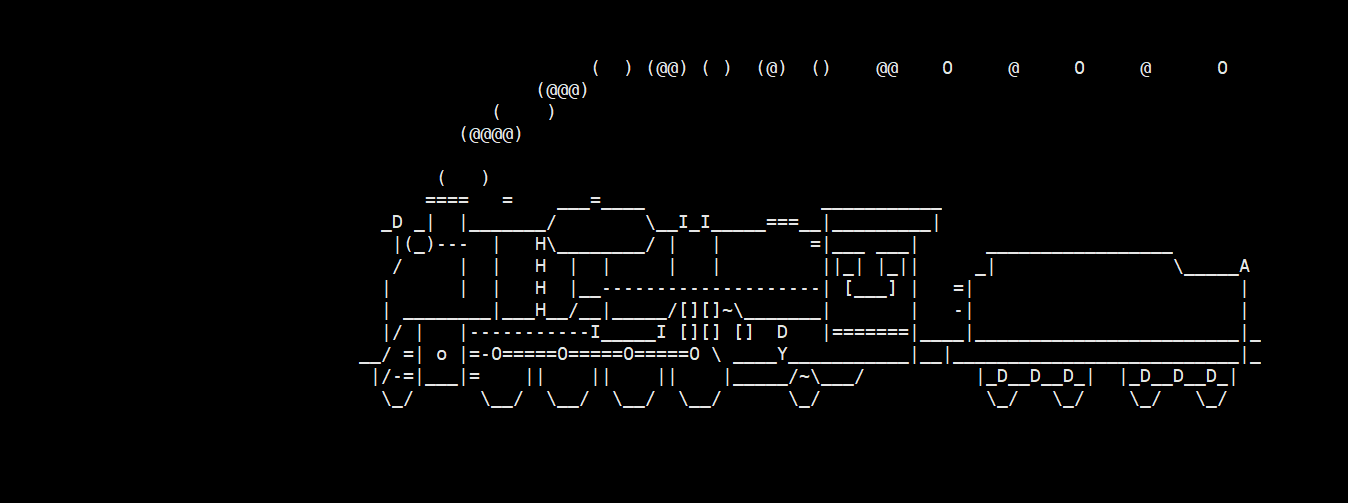

我们再来看看我们的execl能不能调用我们自己的进程.
我们生成一个proc进程来验证一下.
#include#include int main() { printf("\n我是被替换程序,我的pid为:%d 我的ppid为:%d\n",getpid(),getppid()); return 0; } - 1
- 2
- 3
- 4
- 5
- 6
- 7
并修改我们的test1进程代码
#include#include #include #include int main() { int id = fork(); if(id ==0) { printf("我是子进程我将要被myproc替换,我的pid为%d 我的ppid是%d\n",getpid(),getppid()); execl("./myproc","./myproc",NULL); printf("\n替换未成功\n"); } else if(id>0) { printf("我是父进程我的pid是%d\n",getpid()); int status; wait(&status); } return 0; } - 1
- 2
- 3
- 4
- 5
- 6
- 7
- 8
- 9
- 10
- 11
- 12
- 13
- 14
- 15
- 16
- 17
- 18
- 19
- 20
- 21
- 22

替换程序的pid和我们被替换程序的pid相同ppid也相同所以我们的父进程可以通过等待来得到我们被替换进程的返回信息.
ok,有了execl函数的铺垫之后我们后面的函数其实就很好讲了.
execel小结
- 替换之后被替换进程的后续代码就不会再被执行了.
- 替换进程的pid和ppid和替换进程相同
- 第二部分的可变参数要以NULL结尾
剩余函数
其实我们可以通过函数名来推断这些函数的区别并不大.事实也雀氏如此.
execlp
来看看execlp函数
int execlp(const char *file, const char *arg, ...);- 1
相比于execl这个函数后面多了一个p这个p的意思就是PATH(环境变量)这个函数会在PATH这个环境变量里寻找你要替换的命令,比如我想用sl来替换我这个test进程,我们就不用输入路径了
使用如下:
#include#include #include #include int main() { int id = fork(); if(id ==0) { printf("我是子进程我将要被myproc替换,我的pid为%d 我的ppid是%d\n",getpid(),getppid()); execlp("sl","sl",NULL);//我们可以将系统里的命令或者PATH保存的命令, 省略路径 printf("\n替换未成功\n"); } else if(id>0) { printf("我是父进程我的pid是%d\n",getpid()); wait(NULL); } } - 1
- 2
- 3
- 4
- 5
- 6
- 7
- 8
- 9
- 10
- 11
- 12
- 13
- 14
- 15
- 16
- 17
- 18
- 19
- 20
execle函数
相比于execl后面多了一个e
这个e表示环境变量
int execle(const char *path, const char *arg,..., char * const envp[]); //int execl(const char *path, const char *arg, ...);- 1
- 2
与execl相比也就多了一个后面的参数这个函数是我们自己定义的环境变量.但是这个函数有一个值得注意的一点是,他的环境变量不是在原来的基础上新增变量而是将之前进程的环境变量覆盖.我们来验证一下.
我们用myproc.cpp来当代替函数
#include#include #include int main() { std::cout<<"我是myproc进程我已经被运行"<<std::endl; std::cout<<getenv("PATH")<<std::endl; std::cout<<"-------------------------"<<std::endl; std::cout<<getenv("MYPATH")<<std::endl; std::cout<<"Hello cpp"<<std::endl; std::cout<<"Hello cpp"<<std::endl; std::cout<<"Hello cpp"<<std::endl; std::cout<<"Hello cpp"<<std::endl; std::cout<<"Hello cpp"<<std::endl; return 0; } - 1
- 2
- 3
- 4
- 5
- 6
- 7
- 8
- 9
- 10
- 11
- 12
- 13
- 14
- 15
- 16
来运行一下:

可以看出只运行了PATH部分没有到MYPATH部分.因为进程奔溃了----getenv找不到环境变量后会返回NULL值.
于是我们使用execle来弄环境变量.
#include#include #include #include int main() { int id = fork(); if(id ==0) { printf("我是子进程我将要被myproc替换,我的pid为%d 我的ppid是%d\n",getpid(),getppid()); char* const env[] = {(char*)"MYPATH=/home/ssw/test"}; execle("/home/ssw/test/myproc","./myporc",NULL,env);//相比之下就只多了一个env printf("\n替换未成功\n"); } else if(id>0) { printf("我是父进程我的pid是%d\n",getpid()); wait(NULL); } return 0; } - 1
- 2
- 3
- 4
- 5
- 6
- 7
- 8
- 9
- 10
- 11
- 12
- 13
- 14
- 15
- 16
- 17
- 18
- 19
- 20
- 21

运行后发现我们甚至连PATH的内容都得不到了.
这就是我们execle的覆盖式给予环境变量.
execv
int execv(const char *path, char *const argv[]);- 1
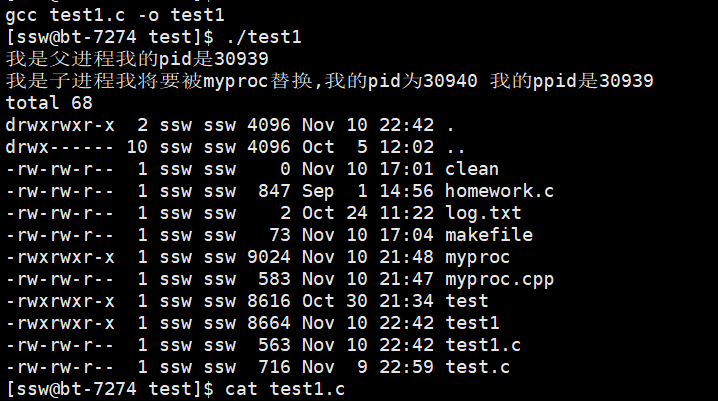
几乎和execl没有区别只有在传参的时候有一些区别.
只有第二部分的参数需要改变而已.
#include#include #include #include int main() { int id = fork(); if(id ==0) { printf("我是子进程我将要被myproc替换,我的pid为%d 我的ppid是%d\n",getpid(),getppid()); char* const argv[] = {"ls","-a","-l",NULL};//记得NULL结尾 //execle("/home/ssw/test/myproc","./myporc",NULL,env); execv("/bin/ls",argv);//唯一改变的地方 printf("\n替换未成功\n"); } else if(id>0) { printf("我是父进程我的pid是%d\n",getpid()); wait(NULL); } return 0; } - 1
- 2
- 3
- 4
- 5
- 6
- 7
- 8
- 9
- 10
- 11
- 12
- 13
- 14
- 15
- 16
- 17
- 18
- 19
- 20
- 21
- 22
- 23
execvp
相比于execv多了一个p可以对标execl和execlp.
execvpe
这个也很简单啊.p表示会在PATH路径里寻找像ls pwd等系统命令或已安装命令.然后e表示自己维护替换进程的所有环境变量.
注:之前有疑惑过为啥PATH被覆盖了还能不用加路径就可以ls这种命令-------其实也很简单在没有被替换的时候我们的进程是有PATH的,在后面替换后没有了.而我们寻找ls这种命令就是在替换前完成的所以可以找到.
小结
- l(list): 表示参数采用列表
- v(vector): 表示参数用数组传递
- p(path): 会自动搜索环境变量PATH
- e(env): 表示维护环境变量
-
相关阅读:
29.9.3 使用mysql命令导出数据
AIGC:引领人工智能和游戏产业融合的里程碑
快鲸scrm推出教育培训行业私域运营解决方案
vue组件传参
Vue/React实现路由鉴权/导航守卫/路由拦截(react-router v6)
CockroachDB-备份与恢复(1)备份架构
暑假加餐|有钱人和你想的不一样(第9天)+NSGAⅡ与MOEAD算法Matlab代码
linux的man命令
WEB使用百度地图展示某地地址
代码随想录算法训练营|五十七天
- 原文地址:https://blog.csdn.net/qq_61434711/article/details/127811682
