• 😊SpringBoot 整合 Elasticsearch (超详细).md


    SpringBoot 整合 Elasticsearch (超详细)

    注意:

    1、环境搭建

    安装es

    🔗Elasticsearch 6.4.3 下载链接

    为了方便,环境使用Windows

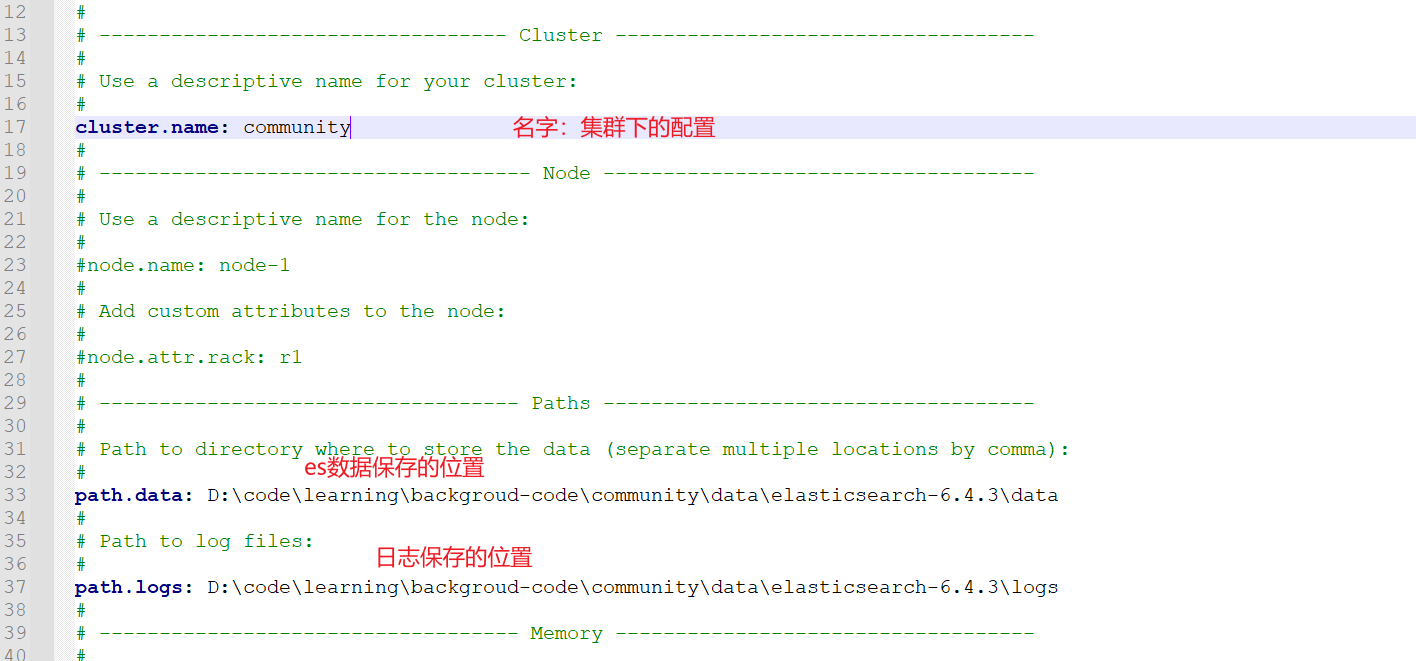
    配置

    🍑解压后配置

    • 找到config目录的elasticsearch.yml
    • image-20221109152237692

    分词器

    下图所示,解压后的分词器放在plugins目录下,ik目录需要自己创建

    image-20221109154446235

    启动

    • 🍈 由于我是在Windows环境下,找到bin目录的elasticsearch.bat双击即可。

    命令测试

    • 🚆 查看健康状态
      • curl -X GET “localhost:9200/_cat/health?v“
    • 🚖 查看所有节点
      • curl -X GET “localhost:9200/_cat/nodes?v“
    • 🏅 新建索引
      • curl -X PUT "localhost:9200/test"
    • ☀️ 查看索引
      • curl -X GET "localhost:9200/_cat/indices?v"
    • 🌈 删除索引
      • curl -X DELETE "localhost:9200/test"

    2、整合 Es

    依赖 & 配置

    • ❌ 我这里使用的是SpringBoot 2.1.5.RELEASE,根据实际情况选择版本。
    		
            <dependency>
                <groupId>org.springframework.datagroupId>
                <artifactId>spring-data-elasticsearchartifactId>
                <version>2.1.6.RELEASEversion>
            dependency>
    • yaml配置

    image-20221109233533596

    • properties配置
    spring.data.elasticsearch.cluster-name=community
    spring.data.elasticsearch.cluster-nodes=127.0.0.1:9300

    启动项目:

    • ❌ 不出意外肯定会出意外

    image-20221109234157966

    • ❓ 这个问题是由于Es底层的问题,这里就不展开解释,会提供思路,自行了解

    解决办法:
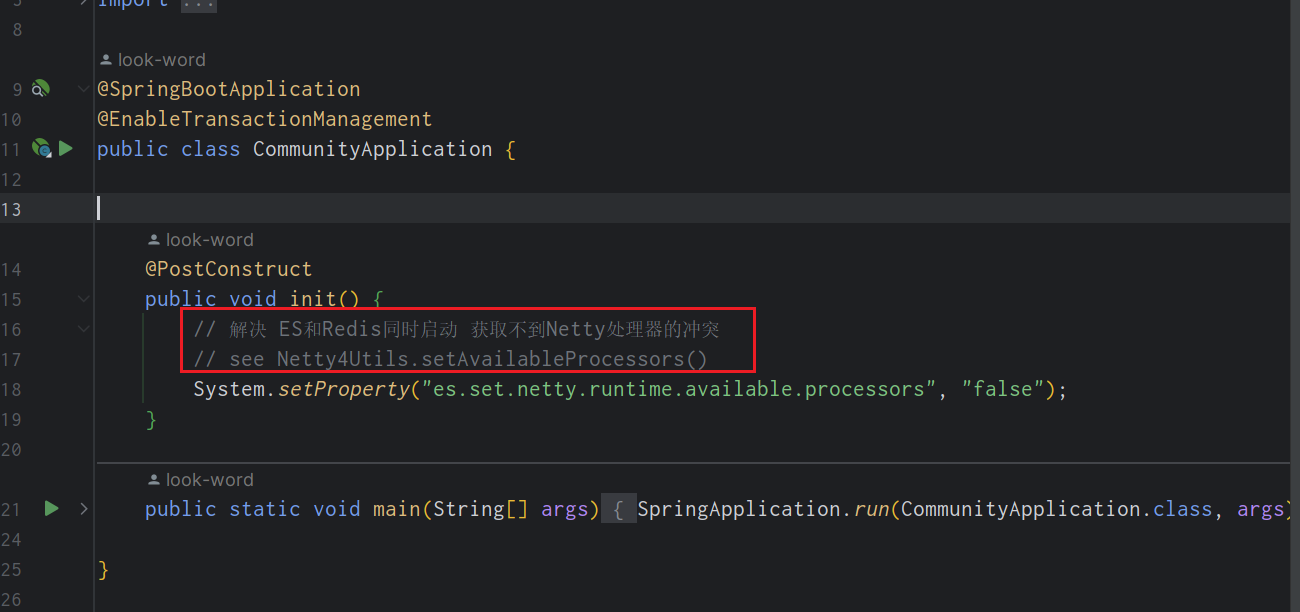
    image-20221109234326083

    3、使用

    SpringBoot 整合 Elasticsearch视频教程

    实体类

    • ❌ 相信之前学过Jpa的同学,对于以下配置很熟悉。
    import lombok.Data;
    import org.springframework.data.annotation.Id;
    import org.springframework.data.elasticsearch.annotations.Document;
    import org.springframework.data.elasticsearch.annotations.Field;
    import org.springframework.data.elasticsearch.annotations.FieldType;
    // 指定Es 索引 类型 分片 备份
    @Document(indexName = "discusspost", type = "_doc", shards = 6, replicas = 3)
    @Data
    public class DiscussPost implements Serializable {
        private static final long serialVersionUID = 114809849189593294L;
    
        // 标识主键
        @Id
        private Integer id;
    	
        // 对应文档类型
        @Field(type = FieldType.Integer)
        private Integer userId;
    
        /**
         * type 类型
         * analyzer 存储解析器
         * searchAnalyzer 查询解析器
         */
        @Field(type = FieldType.Text, analyzer = "ik_max_word", searchAnalyzer = "ik_smart")
        private String title;
        @Field(type = FieldType.Text, analyzer = "ik_max_word", searchAnalyzer = "ik_smart")
        private String content;
    }

    持久层

    • ElasticsearchRepository 里面有许多常用方法
    @Repository
    public interface DiscussPostRepository extends ElasticsearchRepository<DiscussPost, Integer> {
    }

    测试代码

    • ❌ 查询数据层的代码就不展示了,我会在代码中说明
    • 😊 时间足够,建议把视频看完
    /**
     * @author : look-word
     * 2022-11-03 18:56
     **/
    @SpringBootTest
    @RunWith(SpringRunner.class)
    public class ElasticSearchTest {
    
        @Resource
        private DiscussPostRepository discussPostRepository;
    
        @Resource
        private DiscussPostMapper discussPostMapper;
    
        @Resource
        private ElasticsearchTemplate elasticsearchTemplate;
    
        @Test
        public void testInsert() {
            // 将查询的结果,同步到Es中
            discussPostRepository.save(discussPostMapper.selectDiscussPostById(241));
        }
    
        @Test
        public void testInsertAll() {
            // 批量导入 discussPostRepository.saveAll()
            discussPostRepository.saveAll(discussPostMapper.selectDiscussPosts(101, 0, 100));
        }
    
        /**
         * 测试更新
         */
        @Test
        public void testUpdate() {
            DiscussPost discussPost = discussPostMapper.selectDiscussPostById(241);
            discussPost.setContent("我爱中华人民共和国,我是中国人");
            discussPostRepository.save(discussPost);
        }
    
        /**
         * 测试修改
         */
        @Test
        public void testDelete() {
            discussPostRepository.deleteById(241);
        }
    
        /**
         * 测试查询
         */
        @Test
        public void testSelect() {
            // 构造查询条件
            SearchQuery searchQuery = new NativeSearchQueryBuilder()
                	// (查询的值,查询字段1,查询字段1) 匹配title或者title里面是否含有互联网寒冬
                    .withQuery(QueryBuilders.multiMatchQuery("互联网寒冬", "title", "title"))
                    .withSort(SortBuilders.fieldSort("type").order(SortOrder.DESC)) // 排序
                    .withSort(SortBuilders.fieldSort("score").order(SortOrder.DESC))
                    .withSort(SortBuilders.fieldSort("createTime").order(SortOrder.DESC))
                    .withPageable(PageRequest.of(0, 10)) // 分页
                    .withHighlightFields(
                            new HighlightBuilder.Field("title").preTags("").postTags(""),
                            new HighlightBuilder.Field("content").preTags("").postTags("")
                    ).build(); //高亮
            Page page = discussPostRepository.search(searchQuery);
            page.get().forEach(System.out::println);
        }
    
        /**
         * 测试查询高亮显示
         */
        @Test
        public void testSelectHighlight() {
            // 构造查询条件
            SearchQuery searchQuery = new NativeSearchQueryBuilder()
                    .withQuery(QueryBuilders.multiMatchQuery("互联网寒冬", "title", "content"))
                    .withSort(SortBuilders.fieldSort("type").order(SortOrder.DESC)) // 排序
                    .withSort(SortBuilders.fieldSort("score").order(SortOrder.DESC))
                    .withSort(SortBuilders.fieldSort("createTime").order(SortOrder.DESC))
                    .withPageable(PageRequest.of(0, 10)) // 分页
                    .withHighlightFields(
                            new HighlightBuilder.Field("title").preTags("").postTags(""),
                            new HighlightBuilder.Field("content").preTags("").postTags("")
                    ).build(); //高亮
    
            Page page = elasticsearchTemplate.queryForPage(searchQuery, DiscussPost.class, new SearchResultMapper() {
                @Override
                public  AggregatedPage mapResults(SearchResponse response, Class aClass, Pageable pageable) {
                    SearchHits hits = response.getHits();
                    if (hits.getTotalHits() <= 0) {
                        return null;
                    }
                    List list = new ArrayList<>();
                    for (SearchHit hit : hits) {
                        DiscussPost post = new DiscussPost();
    
                        String id = hit.getSourceAsMap().get("id").toString();
                        post.setId(Integer.parseInt(id));
    
                        String userId = hit.getSourceAsMap().get("userId").toString();
                        post.setUserId(Integer.parseInt(userId));
    
                        String title = hit.getSourceAsMap().get("title").toString();
                        post.setTitle(title);
    
                        String content = hit.getSourceAsMap().get("content").toString();
                        post.setContent(content);
    
                        String type = hit.getSourceAsMap().get("type").toString();
                        post.setType(Integer.parseInt(type));
    
                        String status = hit.getSourceAsMap().get("status").toString();
                        post.setStatus(Integer.parseInt(status));
    
                        String createTime = hit.getSourceAsMap().get("createTime").toString();
                        post.setCreateTime(new Date(Long.parseLong(createTime)));
    
                        String commentCount = hit.getSourceAsMap().get("commentCount").toString();
                        post.setCommentCount(Integer.parseInt(commentCount));
    
                        String score = hit.getSourceAsMap().get("score").toString();
                        post.setScore(Double.parseDouble(score));
    
                        // 处理高亮
                        HighlightField titleField = hit.getHighlightFields().get("title");
                        // 页面有多个高亮字 只显示第一个
                        if (titleField != null) {
                            post.setTitle(titleField.getFragments()[0].toString());
                        }
                        HighlightField contentField = hit.getHighlightFields().get("content");
                        if (contentField != null) {
                            post.setTitle(contentField.getFragments()[0].toString());
                        }
                        list.add(post);
                    }
                    return new AggregatedPageImpl(list, pageable, hits.getTotalHits(), response.getAggregations(), response.getScrollId(), hits.getMaxScore());
                }
            });
            page.get().forEach(System.out::println);
        }
    }
    

    __EOF__

  • 本文作者: look-word
  • 本文链接: https://www.cnblogs.com/look-word/p/16875658.html
  • 关于博主: 评论和私信会在第一时间回复。或者直接私信我。
  • 版权声明: 本博客所有文章除特别声明外,均采用 BY-NC-SA 许可协议。转载请注明出处!
  • 声援博主: 如果您觉得文章对您有帮助,可以点击文章右下角推荐一下。
  • 相关阅读:
    laravel-admin联动选择展示时ueditor样式错乱
    springCloud_Gateway服务网关
    Python百日进阶-WEB开发】Day151 - 前端基础 之 Javascript
    企业电子招标采购系统源码Spring Boot + Mybatis + Redis + Layui + 前后端分离 构建企业电子招采平台之立项流程图
    获取地址和区块链切换
    CCF CSP认证 历年题目自练Day36
    一文掌握GitHub Actions基本概念与配置
    【电源专题】负载瞬变测试--为什么要进行电源的瞬态响应测试
    【常见开发问题】阿里云无法登录的问题
    Java NIO原理 (Selector、Channel、Buffer、零拷贝、IO多路复用)
  • 原文地址:https://www.cnblogs.com/look-word/p/16875658.html