-
RHCE之路防火墙,iptables
第十二天
iptables
[root@localhost ~]# mount /dev/sr0 /mnt
[root@localhost ~]# systemctl stop firewalld
[root@localhost ~]# yum install iptables-services.x86_64 -y
[root@localhost ~]# systemctl restart iptables.service
[root@localhost ~]# iptables -L
Chain INPUT (policy ACCEPT)
target prot opt source destination
ACCEPT all -- anywhere anywhere state RELATED,ESTABLISHED
ACCEPT icmp -- anywhere anywhere
ACCEPT all -- anywhere anywhere
ACCEPT tcp -- anywhere anywhere state NEW tcp dpt:ssh
REJECT all -- anywhere anywhere reject-with icmp-host-prohibitedChain FORWARD (policy ACCEPT)
target prot opt source destination
REJECT all -- anywhere anywhere reject-with icmp-host-prohibitedChain OUTPUT (policy ACCEPT)
target prot opt source destination[root@localhost ~]# iptables -F --- 将默认的数据清空
[root@localhost ~]# iptables -L
Chain INPUT (policy ACCEPT)
target prot opt source destinationChain FORWARD (policy ACCEPT)
target prot opt source destinationChain OUTPUT (policy ACCEPT)
target prot opt source[root@localhost ~]# iptables -t filter -A INPUT -p tcp --dport 22 -s 192.168.10.0/24 -d 192.168.10.129 -j REJECT
过滤操作,在INPUT里,协议类型为tcp,目标端口为22,源ip网段为10/24,目的ip为192.168.10.129,做拒绝操作
以下在vm图形界面操作
[root@localhost ~]# iptables -nL
Chain INPUT (policy ACCEPT)
target prot opt source destination
REJECT tcp -- 192.168.10.0/24 192.168.10.129 tcp dpt:22 reject-with icmp-port-unreachableChain FORWARD (policy ACCEPT)
target prot opt source destinationChain OUTPUT (policy ACCEPT)
target prot opt source destination[root@localhost ~]# iptables -t filter -I INPUT -p tcp --dport 22 -j ACCEPT --- 做允许操作
[root@localhost ~]# iptables -I INPUT -p tcp --dport 22 -m state --state NEW -m recent --set --name SsH
[root@localhost ~]# iptables -A INPUT -p tcp --dport 22 -m state --state NEW -m recent --update --seconds 60 --hitcount 3 --name SsH -j DROP
在60秒内最多进行3个会话
[root@localhost ~]# iptables --line-numbers -nL -- 查看已有的规则编号
Chain INPUT (policy ACCEPT)
num target prot opt source destination
1 tcp -- 0.0.0.0/0 0.0.0.0/0 tcp dpt:22 state NEW recent: SET name: SsH side: source mask: 255.255.255.255
2 REJECT tcp -- 192.168.10.0/24 192.168.10.129 tcp dpt:22 reject-with icmp-port-unreachableChain FORWARD (policy ACCEPT)
num target prot opt source destinationChain OUTPUT (policy ACCEPT)
num target prot opt source destinationChain L (0 references)
num target prot opt source destination
[root@localhost ~]# iptables -D INPUT 2 --- 删除INPUT里编号为2的规则[root@localhost ~]# iptables -I INPUT -p icmp --icmp-type 8 -j REJECT --- 禁用ping命令
注:以上的iptables的操作均为临时修改
[root@localhost ~]# systemctl restart iptables.service 后配置全都清空
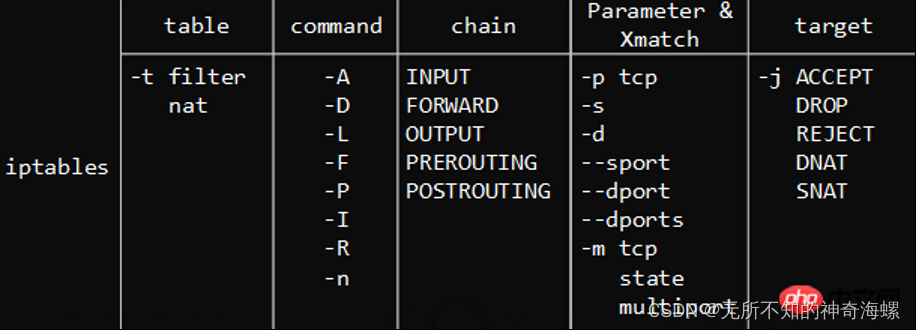
四表五链


-
相关阅读:
SpringBoot +WebSocket应用
Hyper-V 简介
Git企业开发级讲解(四)
Matlab:多变量数据
ChatGPT桌面客户端支持gpt4模型,附使用说明
短视频seo抖音矩阵源码开发搭建技术解析
HTML5七夕情人节表白网页制作【满天星空3D相册】HTML+CSS+JavaScript 3D动态相册网页代码
Threejs汽车展厅
vivado FFT IP仿真(3)FFT IP选项说明
ZZNUOJ_用C语言编写程序实现1342:支配值数目(附完整源码)
- 原文地址:https://blog.csdn.net/qq_39744805/article/details/127755862