-
Word控件Spire.Doc 【文本】教程(10) ;在 word 文档中的字符或句子周围应用边框
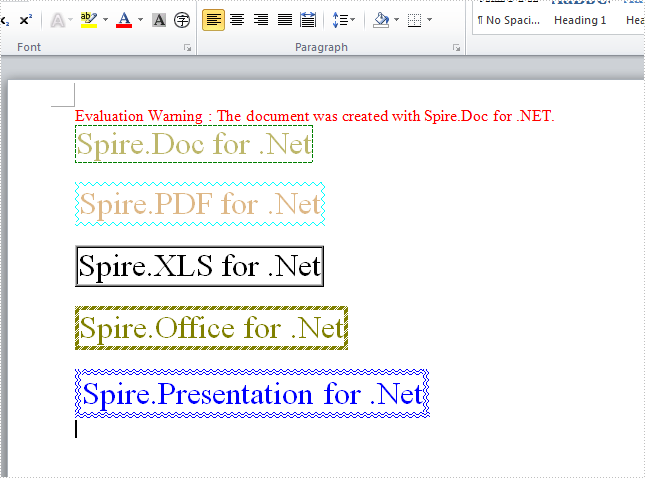
为了强调和美化一组字符或句子,在字符或句子周围应用边框是一个不错的选择。Spire.Doc 使开发人员能够在 C# 中实现此功能。并且有很多内置的边框样式可用,例如:Wave、Hairline、DotDash、DashSmallGap、DashLargeGap、DoubleWave、DashDotStroker、Emboss3D、Engrave3D、TwistedLines1 等等。下面的代码展示了如何使用上面提到的一些边框样式来实现字符边框:
Spire.Doc for.NET 最新下载
 https://www.evget.com/product/3368/download
注意:开始之前,请确保 Visual Studio 和 Spire.Doc 已正确安装。我们将使用 Spire.Doc .dll 作为参考。
第一步:加载word文档
Document doc = new Document();
Section section = doc.AddSection();
第 2 步:添加应用边框所需的字符并设置边框样式
//DashSmallGap Border
Paragraph para = section.AddParagraph();
para.Format.HorizontalAlignment = HorizontalAlignment.Left;
TextRange tr = para.AppendText("Spire.Doc for .Net");
tr.CharacterFormat.Border.BorderType = Spire.Doc.Documents.BorderStyle.DashSmallGap;
tr.CharacterFormat.Border.Color = Color.Green;
tr.CharacterFormat.FontSize = 24;
tr.CharacterFormat.TextColor = Color.DarkKhaki;
para.AppendBreak(BreakType.LineBreak);

//Wave Border
para = section.AddParagraph();
para.Format.HorizontalAlignment = HorizontalAlignment.Left;
tr = para.AppendText("Spire.PDF for .Net");
tr.CharacterFormat.Border.BorderType = Spire.Doc.Documents.BorderStyle.Wave;
tr.CharacterFormat.Border.Color = Color.Aqua;
tr.CharacterFormat.FontSize = 24;
tr.CharacterFormat.TextColor = Color.BurlyWood;
para.AppendBreak(BreakType.LineBreak);

//Emboss3D Border
para = section.AddParagraph();
para.Format.HorizontalAlignment = HorizontalAlignment.Left;
tr = para.AppendText("Spire.XLS for .Net");
tr.CharacterFormat.Border.BorderType = Spire.Doc.Documents.BorderStyle.Emboss3D;
tr.CharacterFormat.FontSize = 24;
para.AppendBreak(BreakType.LineBreak);

//DashDotStroker Border
para = section.AddParagraph();
para.Format.HorizontalAlignment = HorizontalAlignment.Left;
tr = para.AppendText("Spire.Office for .Net");
tr.CharacterFormat.Border.BorderType = Spire.Doc.Documents.BorderStyle.DashDotStroker;
tr.CharacterFormat.Border.Color = Color.Olive;
tr.CharacterFormat.FontSize = 24;
tr.CharacterFormat.TextColor = Color.Olive;
para.AppendBreak(BreakType.LineBreak);

//DoubleWave Border
para = section.AddParagraph();
para.Format.HorizontalAlignment = HorizontalAlignment.Left;
tr = para.AppendText("Spire.Presentation for .Net");
tr.CharacterFormat.Border.BorderType = Spire.Doc.Documents.BorderStyle.DoubleWave;
tr.CharacterFormat.Border.Color = Color.Blue;
tr.CharacterFormat.FontSize = 24;
tr.CharacterFormat.TextColor = Color.Blue;
para.AppendBreak(BreakType.LineBreak);
第 3 步:保存并启动 word 文档
doc.SaveToFile("S1.docx", FileFormat.Docx); System.Diagnostics.Process.Start("S1.docx");截图效果:
完整代码:
using System;
using System.Collections.Generic;
using System.Linq;
using System.Text;
using Spire.Doc;
using Spire.Doc.Documents;
using Spire.Doc.Fields;
using System.Drawing;

namespace ConsoleApplication1
{
class Program
{
static void Main(string[] args)
{
Document doc = new Document();
Section section = doc.AddSection();

//DashSmallGap Border
Paragraph para = section.AddParagraph();
para.Format.HorizontalAlignment = HorizontalAlignment.Left;
TextRange tr = para.AppendText("Spire.Doc for .Net");
tr.CharacterFormat.Border.BorderType = Spire.Doc.Documents.BorderStyle.DashSmallGap;
tr.CharacterFormat.Border.Color = Color.Green;
tr.CharacterFormat.FontSize = 24;
tr.CharacterFormat.TextColor = Color.DarkKhaki;
para.AppendBreak(BreakType.LineBreak);

//Wave Border
para = section.AddParagraph();
para.Format.HorizontalAlignment = HorizontalAlignment.Left;
tr = para.AppendText("Spire.PDF for .Net");
tr.CharacterFormat.Border.BorderType = Spire.Doc.Documents.BorderStyle.Wave;
tr.CharacterFormat.Border.Color = Color.Aqua;
tr.CharacterFormat.FontSize = 24;
tr.CharacterFormat.TextColor = Color.BurlyWood;
para.AppendBreak(BreakType.LineBreak);

//Emboss3D Border
para = section.AddParagraph();
para.Format.HorizontalAlignment = HorizontalAlignment.Left;
tr = para.AppendText("Spire.XLS for .Net");
tr.CharacterFormat.Border.BorderType = Spire.Doc.Documents.BorderStyle.Emboss3D;
tr.CharacterFormat.FontSize = 24;
para.AppendBreak(BreakType.LineBreak);

//DashDotStroker Border
para = section.AddParagraph();
para.Format.HorizontalAlignment = HorizontalAlignment.Left;
tr = para.AppendText("Spire.Office for .Net");
tr.CharacterFormat.Border.BorderType = Spire.Doc.Documents.BorderStyle.DashDotStroker;
tr.CharacterFormat.Border.Color = Color.Olive;
tr.CharacterFormat.FontSize = 24;
tr.CharacterFormat.TextColor = Color.Olive;
para.AppendBreak(BreakType.LineBreak);

//DoubleWave Border
para = section.AddParagraph();
para.Format.HorizontalAlignment = HorizontalAlignment.Left;
tr = para.AppendText("Spire.Presentation for .Net");
tr.CharacterFormat.Border.BorderType = Spire.Doc.Documents.BorderStyle.DoubleWave;
tr.CharacterFormat.Border.Color = Color.Blue;
tr.CharacterFormat.FontSize = 24;
tr.CharacterFormat.TextColor = Color.Blue;
para.AppendBreak(BreakType.LineBreak);

doc.SaveToFile("S1.docx", FileFormat.Docx);
System.Diagnostics.Process.Start("S1.docx");

}
}
}
如有产品相关需求,欢迎私聊我或者搜索[慧都]前往下载~
-
相关阅读:
微信小程序开发校园第二课堂+后台管理系统|前后分离VUE.js在线学习网
【Redis】基于Spring Cache + Redis + Jackson的注解式自动缓存方案保姆式教程(2022最新)
Golang开发-new关键字
【JavaWeb】Filter
适合航天航空的国产FTP替代软件
周公解梦易语言代码
阿里巴巴Java面试题、笔试题(含答案)
大数据必学Java基础(四十八):包装类和日期类的讲解
SSM+智慧养老服务平台 毕业设计-附源码211709
【Vue 路由(vue—router)二】路由传参(params的类型 、Query参数的类型、路由name)
- 原文地址:https://blog.csdn.net/m0_67129275/article/details/127647626