-
Understanding Entity Relationship Behaviors in Microsoft Dynamics 365/CRM
Relationships are one of the core pieces of functionality in Microsoft Dynamics CRM. From time-to-time, I see customers who end up getting surprised by how an action they apply to a record, affects the related records.
A common example of this would be re-assigning an account and how it affects the ownership of the related contacts.
By default, this relationship is configured as a Parental relationship, so in this scenario, all the related contacts are also assigned to the new account owner. In many instances, this is the desired outcome, but in some cases, you’d rather keep the contact ownership the same.
Luckily you are not locked into this behavior if it doesn’t suit your organization’s needs.
In the customization’s area under each entity, you’ll see the lists of 1:N relationships and N:1 relationships. In the earlier example you would find the relationship under 1:N, and then you’d be looking for the relationship whose parent entity is account and related entity is contact.
Once you’ve opened that up you can see the type of behavior for the relationship is configurable. In this case, we can change the behavior from Parental to Configurable Cascading. This would allow you to alter the Assign behavior to another option so it doesn’t update the owners of the child records.
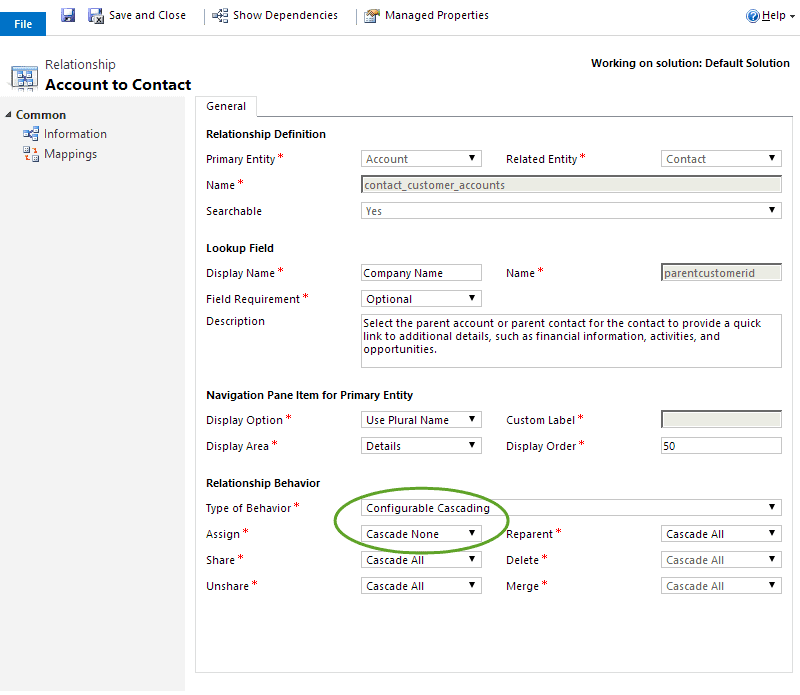
Here are the options that are available, but keep in mind that not all types are available for all relationships in the system.
- Parental: this forces the Cascade All effect to all the individual behaviors
- Referential: this forces the Cascade None effect to all the individual behaviors except Delete which is locked to Remove Link
- Referential, Restrict Delete: this forces the Cascade None effect to all the individual behaviors except Delete which is locked to Restrict
- Configurable Cascading: this allows you to define the individual behaviors independently
- Assign – the record owner changes
- Share – the record is shared with another user
- Unshare – the record is unshared with another user
- Reparent – the referencing attribute of a parental relationship is changed
- Delete – the record is deleted
- Merge – the record is merged with another record
For Assign, Share, Unshare, and Reparent the options are:
- Cascade All – the change is applied to all associated records
- Cascade Active – the change is applied to all associated records that are active
- Cascade User Owned – the change is applied to all associated records owned by the user who owns the original record
- Cascade None – the change is not applied to any other records
For Delete the options are:
- Cascade All
- Remove Link – the link between the original and referenced records is removed
- Restrict – prevents the original record from being deleted when related to child records
For Merge the options are:
- Cascade All
- Cascade None
-
相关阅读:
【Stable Diffusion】入门-02:AI绘画提示词+参数设置攻略
【易错题】数据可视化基础练习题(30道选择题)#CDA Level 1
数字转型 | 论指标解析在数据治理中的作用
Qt 5.9.5 2D图形汇总
传奇服务端MirServer文件有何作用
CentOS7如何设置开机自启动程序、开机自启动脚本?
网络编程面试题
ROS学习(十八)机器人SLAM功能包——cartographer的安装与测试
(七)CSharp-CSharp图解教程版-事件
uniapp - 电商优购项目
- 原文地址:https://blog.csdn.net/lsysunbow/article/details/127646024