-
jQuery网页开发案例:jQuery常用API--jQuery 尺寸、位置操作及 电梯导航案例和节流阀(互斥锁)
jQuery 尺寸
 以上参数为空,则是获取相应 值,返回的是数字型。如果参数为数字,则是修改相应值 。参数 可以不必写单位。
这个width方法不包含边框
 innerWidth()包含width+padding 注意这个要大写
outerWidth()包含width + padding + border
outerWidth(true)包含width + padding + border+magin
jQuery 位置
位置主要有三个: offset()、position()、scrollTop()/scrollLeft()
1. offset() 设置或获取元素偏移
①offset() 方法设置或返回被选元素相对于文档的偏移坐标,跟父级没有关系。
②该方法有2个属性 left、top 。offset().top 用于获取距离文档顶部的距离,offset().left 用于获取距离文档左侧的距离。
③可以设置元素的偏移:offset({ top: 10, left: 30 });
2. position() 获取元素偏移
position() 方法用于返回被选元素相对于带有定位的父级偏移坐标,如果父级都没有定位,则以文档为准。
该方法有2个属性 left、top。position().top 用于获取距离定位父级顶部的距离,position().left 用于获取距离定位父级左侧的距离。
该方法只能获取。

scrollTop()/scrollLeft() 设置或获取元素被卷去的头部和左侧
scrollTop() 方法设置或返回被选元素被卷去的头部。
不跟参数是获取,参数为不带单位的数字则是设置被卷去的头部
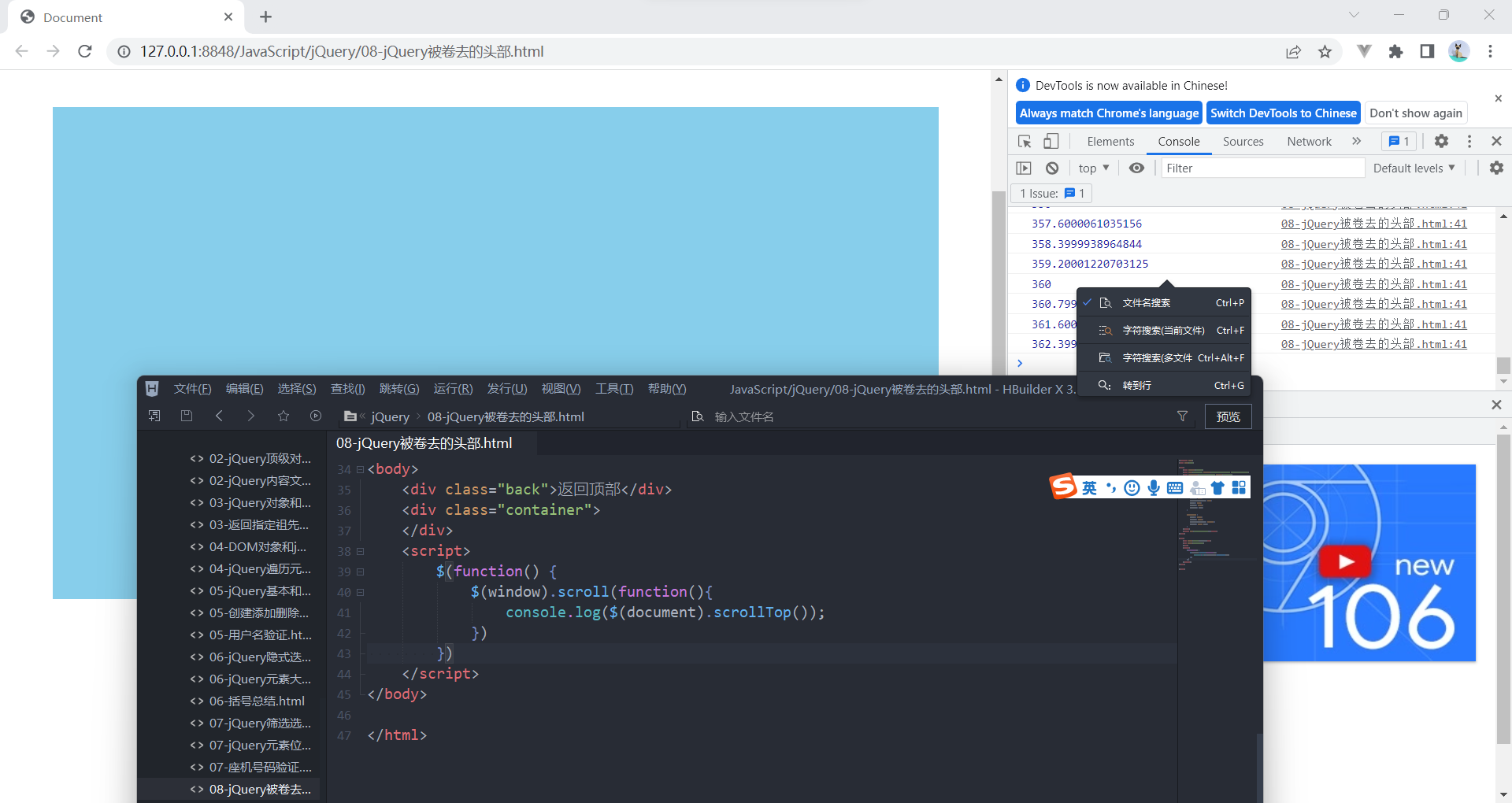
获取被卷起的头部距离
案例:带有动画的返回顶部
核心原理: 使用animate动画返回顶部。
animate动画函数里面有个scrollTop 属性,可以设置位置
但是是元素做动画,因此 $(“body,html”).animate({scrollTop: 0})

- <!DOCTYPE html>
- <html lang="en">
- <head>
- <meta charset="UTF-8">
- <meta name="viewport" content="width=device-width, initial-scale=1.0">
- <meta http-equiv="X-UA-Compatible" content="ie=edge">
- <title>Document</title>
- <style>
- body {
- height: 2000px;
- }
- .back {
- position: fixed;
- width: 50px;
- height: 50px;
- background-color: pink;
- right: 30px;
- bottom: 100px;
- display: none;
- }
- .container {
- width: 900px;
- height: 500px;
- background-color: skyblue;
- margin: 400px auto;
- }
- </style>
- <script src="jquery.min.js"></script>
- </head>
- <body>
- <div class="back">返回顶部</div>
- <div class="container">
- </div>
- <script>
- $(function() {
- $(document).scrollTop(100);
- var boxTop=$(".container").offset().top;
- $(window).scroll(function(){
- // console.log($(document).scrollTop());
- if($(document).scrollTop()>=boxTop){
- $(".back").fadeIn();
- }else{
- $(".back").fadeOut();
- }
- })
- // 返回顶部
- $(".back").click(function(){
- $("body,html").stop().animate({
- scrollTop:0
- })
- })
- // $(".back").click(function(){
- // $("body,html").stop().animate({
- // scrollTop:0
- // }) 不能是文档而是body html元素做动画
- // })
- })
- </script>
- </body>
- </html>
案例: 品优购电梯导航
①当我们滚动到 今日推荐 模块,就让电梯导航显示出来
②点击电梯导航页面可以滚动到相应内容区域
③核心算法:因为电梯导航模块和内容区模块一一对应的
④当我们点击电梯导航某个小模块,就可以拿到当前小模块的索引号
⑤就可以把animate要移动的距离求出来:当前索引号内容区模块它的offset().top
⑥然后执行动画即可


- $(function(){
- // 显示隐藏电梯导航
- var toolTop=$(".recommend").offset().top;
- $(window).scroll(function(){
- if($(document).scrollTop()>=toolTop){
- $(".fixedtool").show()
- }else{
- $(".fixedtool").hide()
- }
- })
- // 2.点击电梯导航页面就可以滚动到响应内容区域
- $(".fixedtool li").click(function(){
- // 当我们点击小li就要计算前往的位置
- // 选出对应索引号的内容区的盒子 计算它的。offset().top值
- var current=$(".floor .w").eq($(this).index()).offset().top;
- // 页面动画滚动效果
- $("body,html").stop().animate({
- scrollTop:current
- })
- })
- })
现在存在bug,当页面刷新他就会消失
- $(function(){
- // 显示隐藏电梯导航
- var toolTop=$(".recommend").offset().top;
- toggleTool();
- function toggleTool(){
- if($(document).scrollTop()>=toolTop){
- $(".fixedtool").show()
- }else{
- $(".fixedtool").hide()
- }
- }
- $(window).scroll(function(){
- toggleTool();
- })
- // 2.点击电梯导航页面就可以滚动到响应内容区域
- $(".fixedtool li").click(function(){
- // 当我们点击小li就要计算前往的位置
- // 选出对应索引号的内容区的盒子 计算它的。offset().top值
- var current=$(".floor .w").eq($(this).index()).offset().top;
- // 页面动画滚动效果
- $("body,html").stop().animate({
- scrollTop:current
- })
- // 点击之后,让当前小li添加current类名,姐妹移除current类名
- $(this).addClass("current").siblings().removeClass("current")
- })
- })
现在实现效果,封装到函数,页面刷新调用一次,点击之后调用一次,并同时让当前小li添加current类名,姐妹移除current类名
添加动画
①当我们点击电梯导航某个小li, 当前小li 添加current类,兄弟移除类名
②当我们页面滚动到内容区域某个模块, 左侧电梯导航,相对应的小li模块,也会添加current类, 兄弟移除current类。
③触发的事件是页面滚动,因此这个功能要写到页面滚动事件里面。
④需要用到each,遍历内容区域大模块。 each里面能拿到内容区域每一个模块元素和索引号
⑤判断的条件: 被卷去的头部 大于等于 内容区域里面每个模块的offset().top
⑥就利用这个索引号找到相应的电梯导航小li添加类。

- $(window).scroll(function(){
- toggleTool();
- // 3.当我们页面滚动到内容区域某个模块, 左侧电梯导航,相对应的小li模块,也会添加current类, 兄弟移除current类。
- $(".floor .w").each(function(i,ele){
- if($(document).scrollTop()>=$(ele).offset().top){
- $(".fixedtool li").eq(i).addClass("current").siblings().removeClass("current")
- }
- })
- })
电梯导航案例节流阀(互斥锁)
正如上图,我们滑动没有问题,但是当点击时,它会每次都重新的滑动
完整代码
- $(function(){
- // 当我们点击了小li此时不需要执行 页面滚动事件里面的li的背景选择 添加current
- var flag=true;
- // 显示隐藏电梯导航
- var toolTop=$(".recommend").offset().top;
- toggleTool();
- function toggleTool(){
- if($(document).scrollTop()>=toolTop){
- $(".fixedtool").show()
- }else{
- $(".fixedtool").hide()
- }
- }
- $(window).scroll(function(){
- toggleTool();
- // 3.当我们页面滚动到内容区域某个模块, 左侧电梯导航,相对应的小li模块,也会添加current类, 兄弟移除current类。
- if(flag){
- $(".floor .w").each(function(i,ele){
- if($(document).scrollTop()>=$(ele).offset().top){
- $(".fixedtool li").eq(i).addClass("current").siblings().removeClass("current")
- }
- })
- }
- })
- // 2.点击电梯导航页面就可以滚动到响应内容区域
- $(".fixedtool li").click(function(){
- flag=false;
- // 当我们点击小li就要计算前往的位置
- // 选出对应索引号的内容区的盒子 计算它的。offset().top值
- var current=$(".floor .w").eq($(this).index()).offset().top;
- // 页面动画滚动效果
- $("body,html").stop().animate({
- scrollTop:current
- },function(){
- flag=true
- })
- // 点击之后,让当前小li添加current类名,姐妹移除current类名
- $(this).addClass("current").siblings().removeClass("current")
- })
- })
-
相关阅读:
0.Linux环境搭建
Maven
【方案】软件实施方案(word原件)
Python灰帽编程——初识Python上篇
MYSQL——JBDC实现增删改查
文件批量重命名:自定义命名与扩展名更改
以太坊硬分叉愈演愈烈:为了分叉而分叉or保全矿工利益?
美食杰项目(二)首页
【数据结构与算法】之深入解析“并行课程”的求解思路与算法示例
spring cloud之负载均衡
- 原文地址:https://blog.csdn.net/weixin_64612659/article/details/127363427
