-
pandas常用操作
DataFrame
增
创建
可以利用- 列表(list)
- 字典(dict)
- 系列(series)
- Numpy ndarrays
- 其他数据帧(DataFrame)
来创建DataFrame对象
如:
a = pd.DataFrame(np.random.normal(0, 1, (3, 3)))- 1
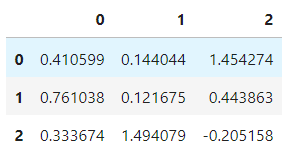
增加列
a['new'] = ['鹅', '鹅', '鹅']- 1

增加行
a.loc[3]=[0, 0, 0, '鹅']- 1

删
目标DataFrame
b = a.copy()- 1

万能删除function
df.drop()- 1
添加 inplace=True 则在原数据修改,默认为False
删列
①
b.drop(columns='new')- 1

②
c = b.pop('new') b c- 1
- 2
- 3
赋值并在原数据中删除

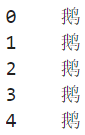
③del b['new']- 1

删行
b.drop(index=3)- 1

改查
这里改查放在一起,因为查到即可更改
目标DataFrame
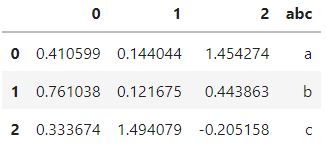
a = np.random.normal(0, 1, (3, 3)) a = pd.DataFrame(np.random.normal(0, 1, (3, 3))) a['abc'] = ['a', 'b', 'c']- 1
- 2
- 3

loc
Access a group of rows and columns by label(s) or a boolean array.
a = np.random.normal(0, 1, (3, 3)) a = pd.DataFrame(np.random.normal(0, 1, (3, 3))) a['abc'] = ['a', 'b', 'c']- 1
- 2
- 3

a.loc[0, 0]- 1
0.41059850193837233
a.loc[0, 'abc']- 1
‘a’
a.loc[a.abc != 'b', 'abc']- 1

iloc
Purely integer-location based indexing for selection by position.
a.iloc[0, 3]- 1

a.iloc[0]- 1

a.iloc[[0, 1]]- 1

a.iloc[0:3]- 1
a.iloc[:, 3]- 1

[ ]
使用[ ]进行查找
a = np.random.normal(0, 1, (3, 3)) a = pd.DataFrame(np.random.normal(0, 1, (3, 3))) a['abc'] = ['a', 'b', 'c']- 1
- 2
- 3

查单列
a[1]- 1

查多列
a[[1, 'abc']]- 1

按单个条件查询
a[a[1] > 0.1]- 1

a[a.index != 1]- 1

按多个条件查询
# Satisfying multiple conditions simultaneously a[(a[1] > 0.1) & (a[0] > 0)]- 1
- 2
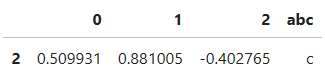
# At least one condition is met a[(a[1] > 0.1) | (a[0] > 0)]- 1
- 2

索引和字段操作
重置
Reset the index of the DataFrame, and use the default one instead. If the DataFrame has a MultiIndex, this method can remove one or more levels.
a- 1

a.index = ['c', 'd', 'e']- 1

a.reset_index(drop=True, inplace=True)- 1

重命名
Function / dict values must be unique (1-to-1). Labels not contained in a dict / Series will be left as-is. Extra labels listed don’t throw an error.
a.rename(index={0:9, 1:8}, inplace=True)- 1

a.rename(columns={0:'cba', 1:'nba'}, inplace=True)- 1

-
相关阅读:
【操作系统笔记五】内存布局&内存映射
几类步进电机的原理
CSDN21天学习挑战赛——File类、IO流(08)
List-有序集合
web前端期末大作业:基于HTML+CSS+JavaScript实现网上鲜花店网站设计(14页)
C语言百日刷题第九天
Win11没有应用商店怎么办?Win11没有应用商店的解决方法
(十一)Java算法:计数排序(详细图解)
Tcl-5. format 命令
minio文件上传
- 原文地址:https://blog.csdn.net/sinat_28916141/article/details/127492798