-
【Linux】权限
1.权限
基本的用户认识:
在Linux中存在两类用户,一个是root用户 ,可以称它为超级管理员,root不受权限的约束。还有一个就是普通用户,受权限约束。
- 超级用户:可以再linux系统下做任何事情,不受限制
- 普通用户:在linux下做有限的事情。
- 超级用户的命令提示符是“#”,普通用户的命令提示符是“$”
创建普通用户:
[root@VM-4-13-centos ~]# adduser test_106 [root@VM-4-13-centos ~]# passwd test_106 Changing password for user test_106. New password: Retype new password: passwd: all authentication tokens updated successfully.- 1
- 2
- 3
- 4
- 5
- 6
要从root用户切换到普通用户user,则使用 su user。 要从普通用户user切换到root用户则使用 su root(root可以省略),此时系统会提示输入root用户的口令。
普通用户切换成root用户的方法:
- 输入su的话 不改变原来的路径直接换成root用户
[test_106@VM-4-13-centos ~]$ su然后输入root密码登录。- 输入su - 的话直接退出,重新登陆成root用户
[test_106@VM-4-13-centos ~]$ su -
root用户变成普通用户的方法:不受权限约束
[root@VM-4-13-centos ~]# su test_106[test_106@VM-4-13-centos root]$
sudo: 不切换用户,想让普通用户以root的身份执行命令,给指令无脑在前面加上sudo
[test_106@VM-4-13-centos root]$ sudo whoami [sudo] password for test_106: root [test_106@VM-4-13-centos root]$ whoami test_106 [test_106@VM-4-13-centos root]$ sudo whoami root- 1
- 2
- 3
- 4
- 5
- 6
- 7
我们在输入指令的时候可能会有下面问题,

根本原因是系统不相信你这个用户,需要将当前用户添加到/etc/sudoers中。[test_106@VM-4-13-centos root]$ ls /etc/sudoers -al -r--r----- 1 root root 4363 Sep 16 22:11 /etc/sudoers- 1
- 2
还有一个问题:我们在提权的时候,输入普通用户的密码是为什么?
- 给受信任的用户,提供最少的执行障碍。
2.什么是权限?
- 权限是约束人的(一个或者某些群体)
问题:我能不能去腾讯视频上做OJ题?
目标对象(腾讯视频),本来就没有对应的属性(业务),所以如果一个目标对象属性当中天然不具备某种属性或者业务,所以人也就不具备这个权限。- 权限:一件事情是否允许被谁做。
我们今天谈论的权限是Linux权限,更多的是文件权限。 - 文件权限 = 人 + 文件的属性,权限约束两个,一个是人,第二个是文件属性。
人 -> 角色,你能做很多事情是因为你的角色。(学生、老师)

为什么要存在所属组?
一个公司有团队A和团队B,两个团队同时做一个项目,谁做的好,老板就选用谁的项目,但是只有一台Linux机器,两个团队的代码只能让自己团队的人看,那如果只有owner和other的话,目的就达不到,所以就引入了grouper的概念,owner把grouper的权限打开,组内的人员就可以看代码了,不用去管other,如果把other的权限打开,另一个部门就有可能去偷看另一组的代码,去优化他们的代码。文件属性:
- 文件属性:r(读权限) w(写权限) x(执行权限)


3.如何操作权限?
- 设置文件属性
- 设置文件所属角色
3.1改文件属性
给拥有者加权限:
chmod u+r test.txtchmod u+w test.txtchmod u+x test.txt- 加上所有权限:
chmod u+rwx test.txt
给拥有者去权限把
+换成-即可。给所属组加权限:
chmod g+r test.txtchmod g+w test.txtchmod g+x test.txt- 加上所有权限:
chmod g+rwx test.txt
给所属组去权限把
+换成-即可。给other加权限:
chmod o+r test.txtchmod o+w test.txtchmod o+x test.txt- 加上所有权限:
chmod o+rwx test.txt
给other去权限把
+换成-即可。结合上面写法:可结合自身需求去完成对权限的操作。
chmod u-rw,g-rx,o-rwx test.txt
批量化的给所有人的权限修改:
- a- 或者 a+ ,a就相当于all的意思
[root@VM-4-13-centos 20221007lesson6]# chmod a-rwx test.txt [root@VM-4-13-centos 20221007lesson6]# ll total 4 ---------- 1 root root 1 Oct 17 18:42 test.txt [root@VM-4-13-centos 20221007lesson6]# chmod a+rwx test.txt [root@VM-4-13-centos 20221007lesson6]# ll total 4 -rwxrwxrwx 1 root root 1 Oct 17 18:42 test.txt- 1
- 2
- 3
- 4
- 5
- 6
- 7
- 8
3.2改角色的权限:
- 拥有者:
sudo chown lkx test.txt - 所属组:
sudo chgrp lkx test.txt - 拥有者和所属组都改:
sudo chown lkx:lkx test.txt
3.3八进制方案:
我们在用
ll查看文件属性的时候,三三为一组,以拥有者为例,它的位置上rwx第一列要么是r要么是-,同理其他列也是,所以我们对拥有者,所属组和other,表示他们的权限,有rwx的写法,还可以用01表示。
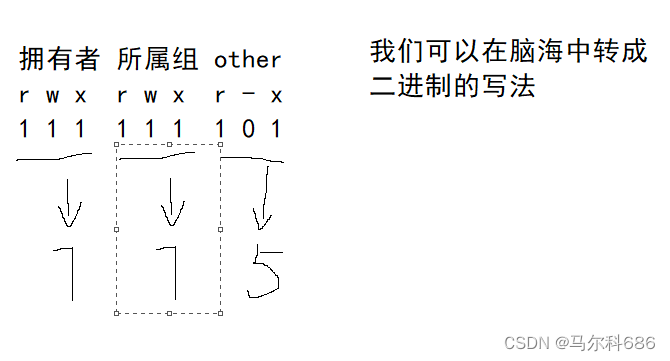
- 所有人的权限都有:
chmod 777 test.txt - 所有人只保留读权限
chmod 444 test.txt
4.为什么要有权限?
- 便于我们系统进行安全管理
问题1:
为什么我们创建的目录或者普通文件,默认权限是我们所看到的样子?(为什么创一个目录权限是775,为什么创建一个普通文件权限是664)
- Linux规定,目录起始权限777,普通文件起始权限666
- 在起始权限之下系统还有一个权限掩码
[root@VM-4-13-centos ~]# umask 0002- 1
- 2
- 0002–系统默认会配置好umask 权限掩码:凡是在umask中出现的权限,都必须在起始权限中去掉。
002 转化成二进制后是 000 000 010 ,然后在777 和 666 转换成2进制后与 000 000 010取反,然后按位与,最后得到的分别是775 和 664

问题2:
如果我们要进入一个目录,需要什么权限??- 必须需要
x权限!
问题3:
为什么系统要规定一个目录必须是777开始的?- 所有的目录被创建出来,一般都要能被进入!
-
相关阅读:
java-php-python-ssm-数字化网上报修平台-计算机毕业设计
Windows OpenGL ES 图像曝光度调节
极坐标和直角坐标的雅克比矩阵推导
1.8 工程相关解析(各种文件,资源访问
设计模式之享元模式
NFT协议OMNI因重入攻击损失1300ETH
一比一还原axios源码(二)—— 请求响应处理
浅谈设计模式(六)
使用css形变实现一个立方体
Jmeter工具二次开发
- 原文地址:https://blog.csdn.net/m0_68800221/article/details/127429794