-
使用Code Chart绘制流程图
Code Chart介绍
Code Chart是一个基于 Javascript 的图表和图表工具,它基于 markdown 语法来简化和加速生成流程图的过程,也不止于生成流程图。
工具地址:https://www.iodraw.com/codechart

图形
头部用
graph
或flowchart
关键字来声明流程图。两者用法基本一致,使用graph
声明时,链接线上的文字会附带白底;使用flowchart
声明时,连接线更平滑,并且似乎可以支持更新的语法。更多区别详见源码,以下内容不加区分地使用两种声明方式。- graph TD
- A[Christmas] -->|Get money| B(Go shopping)
- B --> C{Let me think}
- C -->|One| D[Laptop]
- C -->|Two| E[iPhone]
- C -->|Three| F[fa:fa-car Car]
- graph TD
- A[Christmas] -->|Get money| B(Go shopping)
- B --> C{Let me think}
- C -->|One| D[Laptop]
- C -->|Two| E[iPhone]
- C -->|Three| F[fa:fa-car Car]

一个节点(默认)
- graph LR
- id

带有文字的节点
- graph LR
- id[文字]

流程图方向
方向 代码 从上到下 TB/TD 从下到上 BT 从左到右 LR 从右到左 RL - graph TB
- start --> stop

- graph LR
- start --> stop

节点样式
矩形
id[text]
圆角矩形
id(text)
体育场形
id([text])
子程序形
id[[text]]
圆柱形
id[(text)]
圆形
id((text))
不对称矩形
id>text]
菱形
id{text}
六边形
- id{{text}}

平行四边形
- id1[/text/]
- id2[\text\]

梯形
id[/text\]
含特殊字符
含有
()[]{}
等特殊字符时,可用双引号""
包裹处理。id["[特殊字符]"]小结

节点之间的连接
连接线样式
连接线样式 命令 实线 --- 虚线 -.- 加粗实线 === - a---b
- a-.-b
- a===b

箭头样式
箭头样式 命令 右键头 --> 圆形箭头 --o 叉形箭头 --x 双向箭头 <-->
o--o
x--x- a --> b
- a --ob
- a --x b
- a <--> b
- a o--o b

连接上的文本
a-->|text|b
连接长度
- a1---a2
- b1----b2
- a---->b

小结
长度 1 2 3 Normal --- ---- ----- Normal with arrow --> ---> ----> Thick == === ===== Thick with arrow ==> ===> ====> Dotted -.- -..- -...- Dotted with arrow -.- -..-> -...-> 链式连接
a --- b1 & b2--- c
a1 & a2 --- b1 & b2 & b3
示例
- graph TD
- A[Start] --> B{Is it?} -->|Yes| C[OK];
- C --> D[Rethink];
- D --> B;
- B ---->|No| E[End];

节点上的超链接
可以将单击事件绑定到节点,单击可以使 javascript 回调或将在新浏览器选项卡中打开链接。
- graph LR;
- A-->B;
- B-->C;
- click A "http://www.github.com" _blank
- click B "http://www.github.com" "Open this in a new tab" _blank
子图
- graph TB
- subgraph one
- a1-->a2
- subgraph subone
- a11-->a21
- end
- end
- subgraph two
- b1-->b2
- end
- subgraph three
- c1-->c2
- end
- c1-->a2
- one-->two
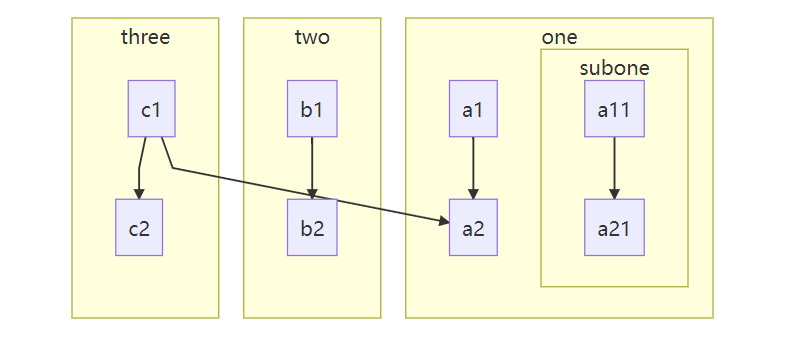
测试功能:子图连接
当图像类型选择
flowchart
时,可以设置子图之间的边的连接。- %% Bata:With the graphtype flowcharts it is also possible to set edges to and from subgraphs as in the flowchart below.
- flowchart TB
- c1-->a2
- subgraph one
- a1-->a2
- end
- subgraph two
- b1-->b2
- end
- subgraph three
- c1-->c2
- end
- one --> two
- three --> two
- two --> c2

子图的方向
- flowchart LR
- subgraph TOP
- direction TB
- subgraph B1
- direction RL
- i1 -->f1
- end
- subgraph B2
- direction BT
- i2 -->f2
- end
- end
- A --> TOP --> B
- B1 --> B2

注释
注释以
%%
开头并且独占一行- graph LR
- %% this is a comment A -- text --> B{node}
- A -- text --> B -- text2 --> C
节点样式
可以对节点应用特定样式,例如较粗的边框或不同的背景颜色。
- graph LR
- id1(Start)-->id2(Stop)
- style id1 fill:#f9f,stroke:#333,stroke-width:4px
- style id2 fill:#bbf,stroke:#f66,stroke-width:2px,color:#fff,stroke-dasharray: 5 5
更多样式参考可以Code Chart官方文档。

附录:相关链接
-
相关阅读:
基于Windows 的 VS Code C/C++ 编译环境搭建
经典网络学习-ResNet代码实现
机器学习笔记之指数族分布——充分统计量与模型参数的关系
alibaba.fastjson的使用(五)-- Json数组字符串 ==》 JSONArray
Django——数据库
设计模式 煎饼果子和装饰者模式
1、Elasticsearch 8.X 概述与安装
六、回归与聚类算法 - K-means算法
【附源码】计算机毕业设计JAVA宠物医院管理
应用层如何感知传输层链路故障
- 原文地址:https://blog.csdn.net/ixiaoyang/article/details/127436554
