-
基于Springboot+Vue开发前后端端分离农产品进销存系统
项目编号:BS-XX-145
引言:
目前整个社会已经进入到一个商品异常丰富的商品时代,商业化的高度发展也加速了商品流通的速度,很多的生产企业和商贸公司也遍地开花似的蓬勃发展起来了。而如何去有效的管理这些琳琅满目的商品的采购、销售、库存信息,是面临的一大难题,传统的靠人工去管理的方式即效率低下,又容易出错,造成损耗,还无法及时统计信息。在当今信息化技术普遍应用的今天,如何利用信息化和数字化去管理商品的进销存信息,是一个值得研究的问题。
本次经过调研走访开发设计的这套进销存管理系统,它的设计与开发主要基于Java开发语言平台,采用Spring 全家桶技术中的轻量级Springboot框架技术,并结合JPA第三方持久层框架开发实现,前端页面使用ElementsUI进行页面的开发布局,并同时使用了Vue等前端技术进行页面美化和图形报表开发。进销存系统的业务数据存储则使用MySQL8数据库。系统使用Tomcat8.5.31来部署运行。
这套进销存管理系统的开发主要是采用产品设计开发的思路去做,尽量做的功能具有普遍适用性,经过走访调查,得出大多数商家的基本功能需求进而进行抽取整合,开发实现了这套进销存管理系统,它具有一定的社会推广性,对整个社会的商业化进行有着广泛而积极的意义。
一,项目简介
农产品进销存系统是针对商店、商场、超市的进销存业务处理的计算机化而设计,为进销存业务的处理人员提供计算机化的服务,改变以往的手工操作,提高工作效率,进而增强竞争力。本系统提供的服务主要有商品的进货、销售、库存管理以及相应的报表、查询功能等。系统使用前后端分离模式开发实现,后台使用springboot+mybatis开发,前端使用vue+nodejs实现,通过接口远程调用。系统前端主要实现产品的展销功能,后台主要实现相关的数据管理功能,具体的功能实现如下:
- 系统用户管理
- 商品管理
- 客户管理
- 供应商管理
- 进货管理
- 销售管理
- 统计报表
- 前台轮播广告图管理
二,环境介绍
语言环境:Java: jdk1.8
数据库:Mysql: mysql5.7
应用服务器:Tomcat: tomcat8.5.31
开发工具:IDEA或eclipse
后台开发技术:Springboot+mybatis
前台开发技术:nodejs+vue
三,系统展示
前端页面及功能展示

产品购买:

后台用户登陆

用户管理
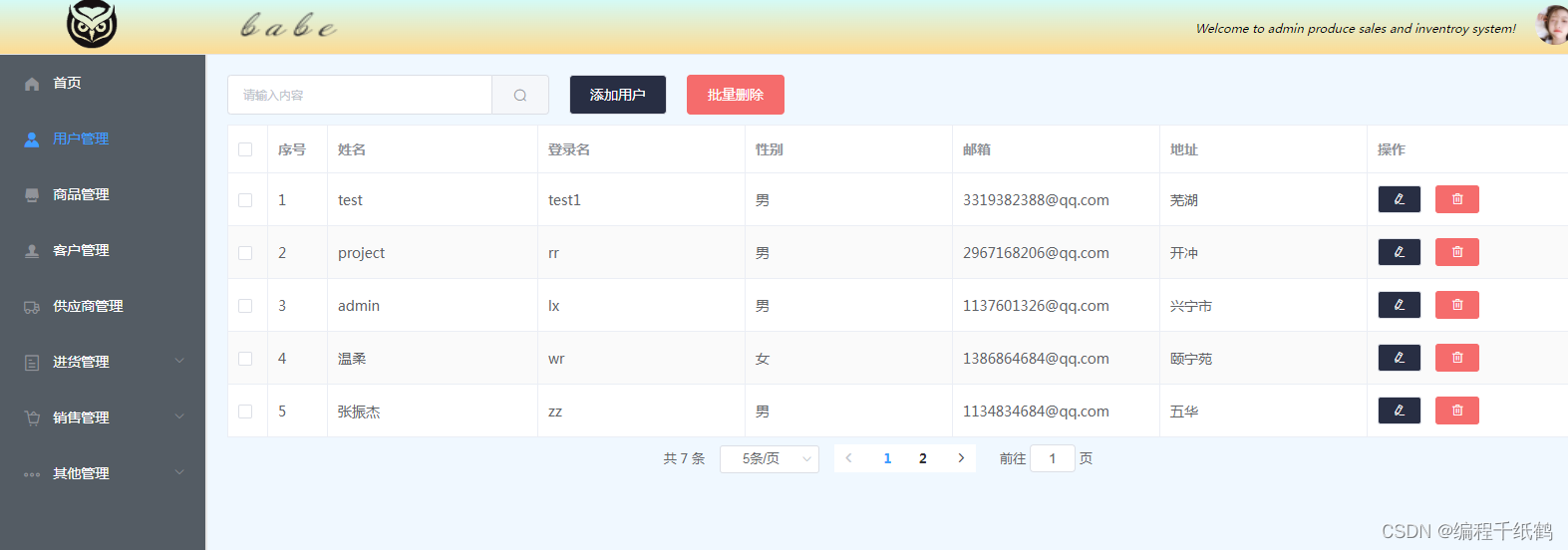
商品管理

客户管理

供应商管理

商品进货

退货查询

商品销售

商品退货查询

统计报表

轮播图管理

四,核心代码展示
- package com.example.demo.controller;
- import com.baomidou.mybatisplus.core.conditions.query.QueryWrapper;
- import com.example.demo.dto.QueryDTO;
- import com.example.demo.entity.Customer;
- import com.example.demo.entity.Good;
- import com.example.demo.result.DataGridViewResult;
- import com.example.demo.result.Result;
- import com.example.demo.service.CustomerService;
- import org.springframework.beans.factory.annotation.Autowired;
- import org.springframework.web.bind.annotation.PostMapping;
- import org.springframework.web.bind.annotation.RequestBody;
- import org.springframework.web.bind.annotation.RequestMapping;
- import org.springframework.web.bind.annotation.RestController;
- import java.util.List;
- /**
- * Description: 客户
- * date: 2022/9/30 23:46
- * @author: znz
- * @since JDK 1.8
- */
- @RestController
- public class CustomerController {
- @Autowired
- private CustomerService customerService;
- /**
- * 分页查询
- * @param queryDTO
- * @return
- */
- @PostMapping("api/cust/list")
- public Result customerList(@RequestBody QueryDTO queryDTO){
- return new Result(200,"",customerService.selectCustomerPage(queryDTO));
- }
- /**
- * 添加
- * @param customer
- * @return
- */
- @PostMapping("api/cust/add")
- public Result addCustomer(@RequestBody Customer customer){
- return new Result(200,"",customerService.addCustomer(customer));
- }
- /**
- * 更新/修改
- * @param customer
- * @return
- */
- @PostMapping("api/cust/update")
- public Result updateCustomer(@RequestBody Customer customer){
- System.out.println(customer);
- return new Result(200,"",customerService.updateCustomer(customer));
- }
- /**
- * 删除
- * @param custid
- * @return
- */
- @PostMapping("api/cust/delete")
- public Result deleteCustomer(Integer custid){
- return new Result(200,"",customerService.deleteCustomer(custid));
- }
- /**
- * 批量删除
- * @param custids
- * @return
- */
- @PostMapping("api/cust/delete/batch")
- public Result batchDeleteCustomer(@RequestBody List
custids) { - customerService.batchDelete(custids);
- return new Result(200,"","");
- }
- /**
- * 加载下拉框
- *
- * @return
- */
- @RequestMapping("api/cust/AllCust")
- public DataGridViewResult loadAllCust() {
- QueryWrapper
queryWrapper = new QueryWrapper<>(); - List
list = customerService.list(queryWrapper); - return new DataGridViewResult(list);
- }
- /**
- * 根据客户id加载客户名称
- * @param
- * @return
- */
- @PostMapping("api/cust/loadCustById")
- public DataGridViewResult loadCustById(Integer custid) {
- QueryWrapper
goodsQueryWrapper = new QueryWrapper<>(); - goodsQueryWrapper.eq(custid != 0, "custid", custid);
- Customer customer = customerService.getById(custid);
- return new DataGridViewResult(customer);
- }
- }
- package com.example.demo.controller;
- import com.baomidou.mybatisplus.core.conditions.query.QueryWrapper;
- import com.baomidou.mybatisplus.core.metadata.IPage;
- import com.baomidou.mybatisplus.extension.plugins.pagination.Page;
- import com.example.demo.dto.QueryDTO;
- import com.example.demo.entity.Good;
- import com.example.demo.entity.Provider;
- import com.example.demo.mapper.GoodMapper;
- import com.example.demo.result.DataGridViewResult;
- import com.example.demo.result.Result;
- import com.example.demo.service.GoodService;
- import com.example.demo.service.ProviderService;
- import org.apache.commons.lang3.RandomStringUtils;
- import org.springframework.beans.factory.annotation.Autowired;
- import org.springframework.util.StringUtils;
- import org.springframework.web.bind.annotation.*;
- import javax.servlet.http.HttpServletRequest;
- import java.util.List;
- /**
- * Description:
- * date: 2022/9/18 23:56
- * @author: znz
- * @since JDK 1.8
- */
- @RestController
- public class GoodController {
- @Autowired
- private GoodService service;
- @Autowired
- private GoodMapper goodMapper;
- /**
- * 分页查询
- * @param queryDTO
- * @return
- */
- @PostMapping("api/good/list")
- public Result goodList(@RequestBody QueryDTO queryDTO){
- return new Result(200,"",service.selectGoodPage(queryDTO));
- }
- @PostMapping("api/good/listpro")
- public Result goodProList(String keyword){
- return new Result(200,"",goodMapper.selectname(keyword));
- }
- /**
- * 前台显示
- * @return
- */
- @PostMapping("api/good/lists")
- public Result goodLists(){
- return new Result(200,"",service.list());
- }
- /**
- * 前台查询商品名称
- * @return
- */
- @PostMapping("api/good/selectlists")
- public Result goodSelectLists(String keyword){
- return new Result(200,"",goodMapper.selectgood(keyword));
- }
- /**
- * 添加
- * @param good
- * @return
- */
- @PostMapping("api/good/add")
- public Result addGood(@RequestBody Good good){
- // 随机的商品编号
- String bering = RandomStringUtils.randomAlphanumeric(8);
- good.setCommbering(bering);
- good.setInventory(0);
- return new Result(200,"",service.addGood(good));
- }
- /**
- * 更新/修改
- * @param good
- * @return
- */
- @PostMapping("api/good/update")
- public Result updateGoods(@RequestBody Good good){
- return new Result(200,"",service.updateGood(good));
- }
- /**
- * 删除
- * @param commid
- * @return
- */
- @PostMapping("api/good/delete")
- public Result deleteGood(Integer commid){
- return new Result(200,"",service.deleteGood(commid));
- }
- /**
- * 批量删除
- * @param commids
- * @return
- */
- @PostMapping("api/good/delete/batch")
- public Result batchDeleteGood(@RequestBody List
commids) { - service.batchDelete(commids);
- return new Result(200,"","");
- }
- /**
- * 根据商品id加载商品信息
- * @param
- * @return
- */
- @PostMapping("api/good/loadGoodById")
- public DataGridViewResult loadGoodsById(Integer commid) {
- QueryWrapper
goodsQueryWrapper = new QueryWrapper<>(); - goodsQueryWrapper.eq(commid != 0, "commid", commid);
- Good good = service.getById(commid);
- System.out.println(good);
- return new DataGridViewResult(good);
- }
- /**
- * 根据供应商id加载商品信息
- * @param
- * @return
- */
- @PostMapping("api/good/loadProById")
- public DataGridViewResult loadProById(Integer providerid) {
- QueryWrapper
goodsQueryWrapper = new QueryWrapper<>(); - goodsQueryWrapper.eq(providerid != 0, "providerid", providerid);
- Good good = service.getById(providerid);
- System.out.println(good);
- return new DataGridViewResult(good);
- }
- /**
- * 加载下拉框
- *
- * @return
- */
- @RequestMapping("api/good/AllGood")
- public DataGridViewResult loadAllGoods() {
- QueryWrapper
queryWrapper = new QueryWrapper<>(); - List
list = service.list(queryWrapper); - return new DataGridViewResult(list);
- }
- }
- package com.example.demo.controller;
- import com.example.demo.result.SysResult;
- import org.apache.tomcat.util.http.fileupload.FileUtils;
- import org.springframework.http.MediaType;
- import org.springframework.util.ResourceUtils;
- import org.springframework.web.bind.annotation.PostMapping;
- import org.springframework.web.bind.annotation.RequestMapping;
- import org.springframework.web.bind.annotation.RequestParam;
- import org.springframework.web.bind.annotation.RestController;
- import org.springframework.web.multipart.MultipartFile;
- import javax.servlet.http.HttpServletRequest;
- import java.io.File;
- import java.io.IOException;
- import java.text.SimpleDateFormat;
- import java.util.Date;
- @RestController
- public class ImageudController {
- /**
- * 文件上传
- * @param picture
- * @param request
- * @return
- */
- @RequestMapping("/api/good/upload")
- public SysResult upload(@RequestParam("picture") MultipartFile picture, HttpServletRequest request) {
- // 获取文件在服务器的储存位置
- // String path = request.getSession().getServletContext().getRealPath("/upload");
- // 将文件存储到vue的static文件方便修改整理
- String path = "E:/vue/demo-vue/static/upload";
- File filePath = new File(path);
- System.out.println("文件的保存路径:" + path);
- if (!filePath.exists() && !filePath.isDirectory()) {
- System.out.println("目录不存在,创建目录:" + filePath);
- filePath.mkdir();
- }
- //获取原始文件名称(包含格式)
- String originalFileName = picture.getOriginalFilename();
- System.out.println("原始文件名称:" + originalFileName);
- //获取文件类型,以最后一个`.`为标识
- String type = originalFileName.substring(originalFileName.lastIndexOf(".") + 1);
- System.out.println("文件类型:" + type);
- //获取文件名称(不包含格式)
- String name = originalFileName.substring(0, originalFileName.lastIndexOf("."));
- //设置文件新名称: 当前时间+文件名称(不包含格式)
- Date d = new Date();
- SimpleDateFormat sdf = new SimpleDateFormat("yyyyMMddHHmmss");
- String date = sdf.format(d);
- String fileName = date + name + "." + type;
- System.out.println("新文件名称:" + fileName);
- //在指定路径下创建一个文件
- File targetFile = new File(path, fileName);
- //将文件保存到指定位置
- try {
- picture.transferTo(targetFile);
- System.out.println("上传成功");
- //将文件在指定存储路径返回
- return new SysResult(true,"/upload/" + fileName);
- } catch (IOException e) {
- System.out.println("上传失败");
- e.printStackTrace();
- return new SysResult(false, "上传失败");
- }
- }
- /**
- * 文件上传
- * @param image
- * @param request
- * @return
- */
- @RequestMapping("/api/sildeshow/upload")
- public SysResult uploads(@RequestParam("image") MultipartFile image, HttpServletRequest request) {
- // 获取文件在服务器的储存位置
- // String path = request.getSession().getServletContext().getRealPath("/upload");
- // 将文件存储到vue的static文件方便修改整理
- String path = "E:/vue/demo-vue/static/upload";
- File filePath = new File(path);
- System.out.println("文件的保存路径:" + path);
- if (!filePath.exists() && !filePath.isDirectory()) {
- System.out.println("目录不存在,创建目录:" + filePath);
- filePath.mkdir();
- }
- //获取原始文件名称(包含格式)
- String originalFileName = image.getOriginalFilename();
- System.out.println("原始文件名称:" + originalFileName);
- //获取文件类型,以最后一个`.`为标识
- String type = originalFileName.substring(originalFileName.lastIndexOf(".") + 1);
- System.out.println("文件类型:" + type);
- //获取文件名称(不包含格式)
- String name = originalFileName.substring(0, originalFileName.lastIndexOf("."));
- //设置文件新名称: 当前时间+文件名称(不包含格式)
- Date d = new Date();
- SimpleDateFormat sdf = new SimpleDateFormat("yyyyMMddHHmmss");
- String date = sdf.format(d);
- String fileName = date + name + "." + type;
- System.out.println("新文件名称:" + fileName);
- //在指定路径下创建一个文件
- File targetFile = new File(path, fileName);
- //将文件保存到指定位置
- try {
- image.transferTo(targetFile);
- System.out.println("上传成功");
- //将文件在指定存储路径返回
- return new SysResult(true,"/upload/" + fileName);
- } catch (IOException e) {
- System.out.println("上传失败");
- e.printStackTrace();
- return new SysResult(false, "上传失败");
- }
- }
- }
- package com.example.demo.controller;
- import com.baomidou.mybatisplus.core.conditions.query.QueryWrapper;
- import com.example.demo.dto.QueryDTO;
- import com.example.demo.entity.Good;
- import com.example.demo.entity.Provider;
- import com.example.demo.entity.User;
- import com.example.demo.result.DataGridViewResult;
- import com.example.demo.result.Result;
- import com.example.demo.service.ProviderService;
- import org.springframework.beans.factory.annotation.Autowired;
- import org.springframework.web.bind.annotation.PostMapping;
- import org.springframework.web.bind.annotation.RequestBody;
- import org.springframework.web.bind.annotation.RequestMapping;
- import org.springframework.web.bind.annotation.RestController;
- import java.util.List;
- /**
- * @Author znz
- * @Date 2022/10/3 0:06
- * @Version 1.0
- */
- @RestController
- public class ProviderController {
- @Autowired
- private ProviderService service;
- /**
- * 分页查询
- * @param queryDTO
- * @return
- */
- @PostMapping("api/provider/list")
- public Result providerList(@RequestBody QueryDTO queryDTO){
- return new Result(200,"",service.selectProviderPage(queryDTO));
- }
- /**
- * 添加
- * @param provider
- * @return
- */
- @PostMapping("api/provider/add")
- public Result addProvider(@RequestBody Provider provider){
- return new Result(200,"",service.addProvider(provider));
- }
- /**
- * 更新/修改
- * @param provider
- * @return
- */
- @PostMapping("api/provider/update")
- public Result updateProvider(@RequestBody Provider provider){
- return new Result(200,"",service.updateProvider(provider));
- }
- /**
- * 删除
- * @param providerid
- * @return
- */
- @PostMapping("api/provider/delete")
- public Result deleteProvider(Integer providerid){
- return new Result(200,"",service.deleteProvider(providerid));
- }
- /**
- * 批量删除
- * @param providerids
- * @return
- */
- @PostMapping("api/provider/delete/batch")
- public Result batchDeleteProvider(@RequestBody List
providerids) { - service.batchDelete(providerids);
- return new Result(200,"","");
- }
- /**
- * 根据供应商id加载供应商信息
- * @param
- * @return
- */
- @PostMapping("api/provider/loadProviderById")
- public DataGridViewResult loadProviderById(Integer providerid) {
- QueryWrapper
goodsQueryWrapper = new QueryWrapper<>(); - goodsQueryWrapper.eq(providerid != 0, "providerid", providerid);
- Provider provider = service.getById(providerid);
- System.out.println(provider);
- return new DataGridViewResult(provider);
- }
- /**
- * 根据供应商id加载供应商信息
- * @param
- * @return
- */
- @PostMapping("api/provider/loadProviderByIds")
- public DataGridViewResult loadProviderByIds(Integer providerid) {
- QueryWrapper
goodsQueryWrapper = new QueryWrapper<>(); - goodsQueryWrapper.eq(providerid != 0, "providerid", providerid);
- Provider provider = service.getById(providerid);
- System.out.println(provider);
- return new DataGridViewResult(provider);
- }
- /**
- * 加载下拉框
- *
- * @return
- */
- @RequestMapping("api/provider/AllProvider")
- public DataGridViewResult loadAllProvider() {
- QueryWrapper
queryWrapper = new QueryWrapper<>(); - List
list = service.list(queryWrapper); - return new DataGridViewResult(list);
- }
- }
五,项目总结
本项目功能齐全,基于前后端开发模式,前端和后台分别独立运行,并且提供了进销存商品展销的前端页面来供浏览,比较适合做毕业设计使用。
-
相关阅读:
Arthas(阿尔萨斯)--(四)
Kubernetes Replicaset
《Oracle系列》Oracle 通过触发器记录一张表所有数据的增删改操作,然后插入到另外一张表中
详解SurfaceView和TextureView
如何在Ubuntu 20.04.6 LTS系统上运行Playwright自动化测试
go 内存泄露
读书笔记:Effective C++ 2.0 版 1997年Scott Meyers,条款1、2、3、4
Java项目:SSM健身房俱乐部管理系统
RuoYi_Cloud本地搭建
springboot 使用多线程和线程池
- 原文地址:https://blog.csdn.net/BS009/article/details/127115216