想到英语四级考了两次都没过,我觉得要多使用英文,所以本文使用英文书写。
本文讲述了遇到的问题,解决的思路,并讲述了解决方案,也许对你会有帮助。
2022年9月25日凌晨3点20分@萌狼蓝天
Problem description
when we want to use input of file type, it has a very serious problem : the text content(文本内容) displayed (显示)cannot be set by us , And the default text display varies(不同) from browser to browser!
- It displays on Edge as shown below
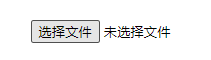
- It displays on Webstorm default preview browser(Webstorm默认预览浏览器) as shown below

Solution
We can use a button to select file and use a text box to show selected file's name , instead of file type input.
This does not mean that we discard input of file type , just hide it and use other elements to control it , it's still the one that actually works.(这并不意味着我们抛弃了文件类型的 "input",只是隐藏了它并使用其他元素来控制它,它仍然是真正起作用的)
Example
1.Use Button to select file
Use
display:noneto hiden file typeinput
- <input id="selectFile" type="button" value="选择文件" onclick="document.getElementById('fileUp').click()">
- <input type="file" style="display: none" name="fileUp" id="fileUp">
When we click on the button with the id selectFile, Javascript will get the element of file type input, and then execute its click event(点击事件).
2.Use a box to show selected file‘s name
You can use a text type input、p tags、 div tags and so on.
Now,I'll use a text type input as case to write a demo
Prefor a text type input and set it read only, the code is as follows:
<input type="text" readonly id="fileSelected" value="未选择任何文件" >Now, we have to thinking about how to get the selected file'name.
Obviously, we need to read the name of the uploaded file from the input of the file type, the code is as follows:
<input type="text" readonly id="fileSelected" value="未选择任何文件" onclick="document.getElementById('fileUp').click()" style="border: none;">tips : you can use
outline:noneto make the element outline hiden.
The complete code
- <input id="selectFile" type="button" value="选择文件" onclick="document.getElementById('fileUp').click()">
- <label for="selectFile">
- <input type="text" readonly id="fileSelected" value="未选择任何文件" onclick="document.getElementById('fileUp').click()" style="border: none;">
- label>
- <input type="file" style="display: none" name="fileUp" id="fileUp"
- onchange="document.getElementById('fileSelected').value=this.value">
