-
Vuex怎么使用?来看看吧~
目录
Vuex的核心组件:
1.1 安装
npm install vuex -s 【下载Vuex最新的版本】
1.2 导入Vuex的核心4个组件,然后通过index.js加载进来
1.3 将Vuex对应的index,js 挂载到 main.js 中的vue实例中
一、Vuex的简介
1、为什么要学习Vuex?
解决了前端组件传参的问题。
组件传参:
①子传父:$emit
②父传子:props
③总线:vue根实例中定义变量,这个变量也是vue实例
2、什么是Vuex?
官方图解Vuex:

图解Vuex各组件:

变量传值的演变方式:

Vuex的核心组件:
sate.js 存储变量
Getters.js 获取变量值、
mutations.js 改变变量值(同步)
actions.js 改变变量值(异步)
二、Vuex的安装以及store.js的使用
1、vuex使用步骤
1.1 安装
npm install vuex -s 【下载Vuex最新的版本】

下载之后【package.json】 里会出现vuex
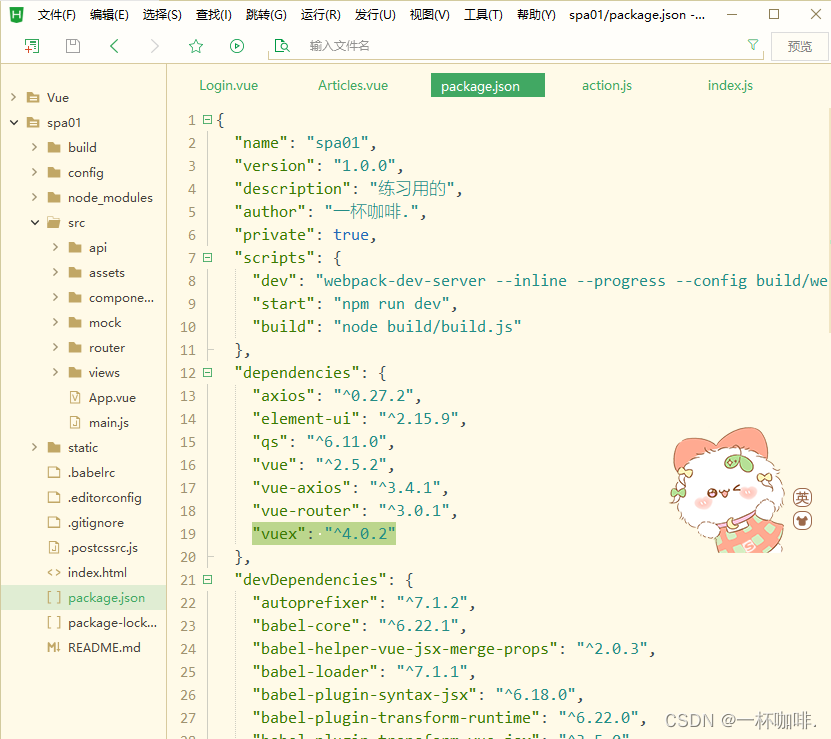
1.2 导入Vuex的核心4个组件,然后通过index.js加载进来
建立store文件,将【actions.js】、【index.js】、【mutations.js】、【state.js】、【getters.js】添加进去

1.3 将Vuex对应的index,js 挂载到 main.js 中的vue实例中

1.4 测试Vuex的存储变量的功能
记得更改vuex依赖的版本 运行一下命令
npm i -S vuex@3.6.2
【state.js】
- export default{
- resName4:'cc咖啡馆'
- }
【router/index.js】
- import Vue from 'vue'
- import Router from 'vue-router'
- import HelloWorld from '@/components/HelloWorld'
- import AppMain from '@/components/AppMain'
- import TopNav from '@/components/TopNav'
- import LeftNav from '@/components/LeftNav'
- import Login from '@/views/Login'
- import Reg from '@/views/Reg'
- import Articles from '@/views/sys/Articles'
- import VuexPage1 from '@/views/sys/VuexPage1'
- Vue.use(Router)
- export default new Router({
- routes: [{
- path: '/',
- name: 'Login',
- component: Login
- },
- {
- path: '/Login',
- name: 'Login',
- component: Login
- },
- {
- path: '/Reg',
- name: 'Reg',
- component: Reg
- }
- ,
- {
- path: '/AppMain',
- name: 'AppMain',
- component: AppMain,
- children: [{
- path: '/LeftNav',
- name: 'LeftNav',
- component: LeftNav
- },
- {
- path: '/TopNav',
- name: 'TopNav',
- component: TopNav
- },
- {
- path: '/sys/Articles',
- name: 'Articles',
- component: Articles
- },
- {
- path: '/sys/VuexPage1',
- name: 'VuexPage1',
- component: VuexPage1
- }
- ]
- }
- ]
- })
【VuexPage1.vue】
- <template>
- <div>
- <p>欢迎来到{{msg}}p>
- div>
- template>
- <script>
- export default {
- name: 'VuexPage1',
- data () {
- return {
- }
- },
- computed:{
- msg(){
- console.log(this.$store)
- // 从vuex 的 state 文件中获取值
- return this.$store.state.resName;
- // this.$router.push()...
- // this.$root
- }
- }
- }
- script>
- <style>
- style>
运行效果展示:

三、Vuex中的设置及获取变量值
是通过方法去获取值。
【VuexPage2.vue】
- <template>
- <div>
- <p>页面2:欢迎来到{{msg}}p>
- div>
- template>
- <script>
- export default {
- name: 'VuexPage2',
- data () {
- return {
- }
- },
- computed:{
- msg(){
- // 从vuex的state文件中获取值
- // return this.$store.state.resName;——>不推荐,不安全
- // 通过getters.js文件获取state.js中定义的变量值
- return this.$store.getters.getResName;
- }
- }
- }
- script>
- <style scoped>
- style>
【router/index.js】
- import Vue from 'vue'
- import Router from 'vue-router'
- import HelloWorld from "../components/HelloWorld";
- import AppMain from "../components/AppMain";
- import LeftNav from "../components/LeftNav";
- import TopNav from "../components/TopNav";
- import Login from "../views/Login";
- import Reg from "../views/Reg";
- import Articles from "../views/sys/Articles";
- import VuexPage1 from "../views/sys/VuexPage1";
- import VuexPage2 from "../views/sys/VuexPage2";
- Vue.use(Router)
- export default new Router({
- routes: [
- {
- path: '/',
- name: 'Login',
- component: Login
- },
- {
- path: '/Login',
- name: 'Login',
- component: Login
- },
- {
- path: '/Reg',
- name: 'Reg',
- component: Reg
- },
- {
- path: '/AppMain',
- name: 'AppMain',
- component: AppMain,
- children:[
- {
- path: '/LeftNav',
- name: 'LeftNav',
- component: LeftNav
- },
- {
- path: '/TopNav',
- name: 'TopNav',
- component: TopNav
- },
- {
- path: '/sys/Articles',
- name: 'Articles',
- component: Articles
- },
- {
- path: '/sys/VuexPage1',
- name: 'VuexPage1',
- component: VuexPage1
- },
- {
- path: '/sys/VuexPage2',
- name: 'VuexPage2',
- component: VuexPage2
- }
- ]
- }
- ]
- })
【mutations.vue】
- export default{
- // 定义一个setResName的方法
- setResName:(state,payload)=>{
- // sate对象就对应了sate.js中的对象
- // payload载荷 对应的 传递的 josn对象参数(name:zs,age:12)
- state.resName = payload.resName;
- }
- }
【getters.js】
- // 拿
- export default{
- getResName:(state)=>{/* 这里的sate代表的是sate.js整个文件 */
- return state.resName;
- }
- }
效果运行: 点击按钮
 就会出现以下效果:
(角色管理)VuexPage2.vue

点击按钮 之后:

四、Vuex中的异步同步操作
【VuexPage1.vue】
- <template>
- <div>
- <p>页面1:欢迎来到{{msg}}p>
- <button @click="buy">买下它button>
- <button @click="buyAsync">最终店长button>
- div>
- template>
- <script>
- export default {
- name: 'VuexPage1',
- data () {
- return {
- }
- },
- methods:{
- buy(){
- // 通过commit方法会调用mutation.js中定义好的方法
- this.$store.commit("setResName",{
- resName:'KFC'
- })
- },
- buyAsync(){
- this.$store.dispatch("setResNameAsync",{
- resName:'麦当劳'
- })
- }
- },
- computed:{
- msg(){
- // 从vuex的state文件中获取值
- // return this.$store.state.resName; 不推荐,不安全
- // 通过 getters.js文件获取 state.js中定义的变量值
- return this.$store.getters.getResName;
- }
- }
- }
- script>
- <style scoped>
- style>
【actions.js】
- export default{
- setResNameAsync:(context,payload)=>{
- // 异步修改值 在异步的方法里调用同步方法
- // context 指的是Vuex的上下文,相当于 this.$store
- // 此代码6秒钟后执行
- setTimeout(function(){
- context.commit("setResName",payload);
- },6000);
- }
- }
效果演示:
先点按钮最终的店长,然后点按钮盘它:

时隔6秒之后,发生改变:

五、Vuex后台交互
【actions.js】
- export default {
- setResNameAsync:(context,payload)=>{
- // 异步修改值 在异步方法中调用了同步方法
- // context指的是Vuex的上下文,相当于 this.$store
- // 死代码,6秒后执行
- setTimeout(function (){
- context.commit("setResName",payload);
- },6000);
- let _this=payload._this;
- let url=_this.axios.urls.SYSTEM_MENU_TREE;
- _this.axios.post(url,{}).then(r=>{
- console.log(r);
- }).catch(e=>{
- });
- }
- }
【VuexPage1.vue】
- <template>
- <div>
- <p>页面1:欢迎来到{{msg}}p>
- <button @click="buy">盘它button>
- <button @click="buyAsync">最终的店长button>
- div>
- template>
- <script>
- export default {
- name: 'VuexPage1',
- data () {
- return {
- }
- },
- methods:{
- buy(){
- //通过commit方法 会 调用 mutations.js文件中定义好的方法
- this.$store.commit("setResName",{
- resName:'鸡肉味的猫粮'
- })
- },
- buyAsync(){
- this.$store.dispatch("setResNameAsync",{
- resName:'杨总',
- _this:this
- })
- }
- },
- computed:{
- msg(){
- // 从vuex的state文件中获取值
- // return this.$store.state.resName;——>不推荐,不安全
- // 通过getters.js文件获取state.js中定义的变量值
- return this.$store.getters.getResName;
- }
- }
- }
- script>
- <style scoped>
- style>
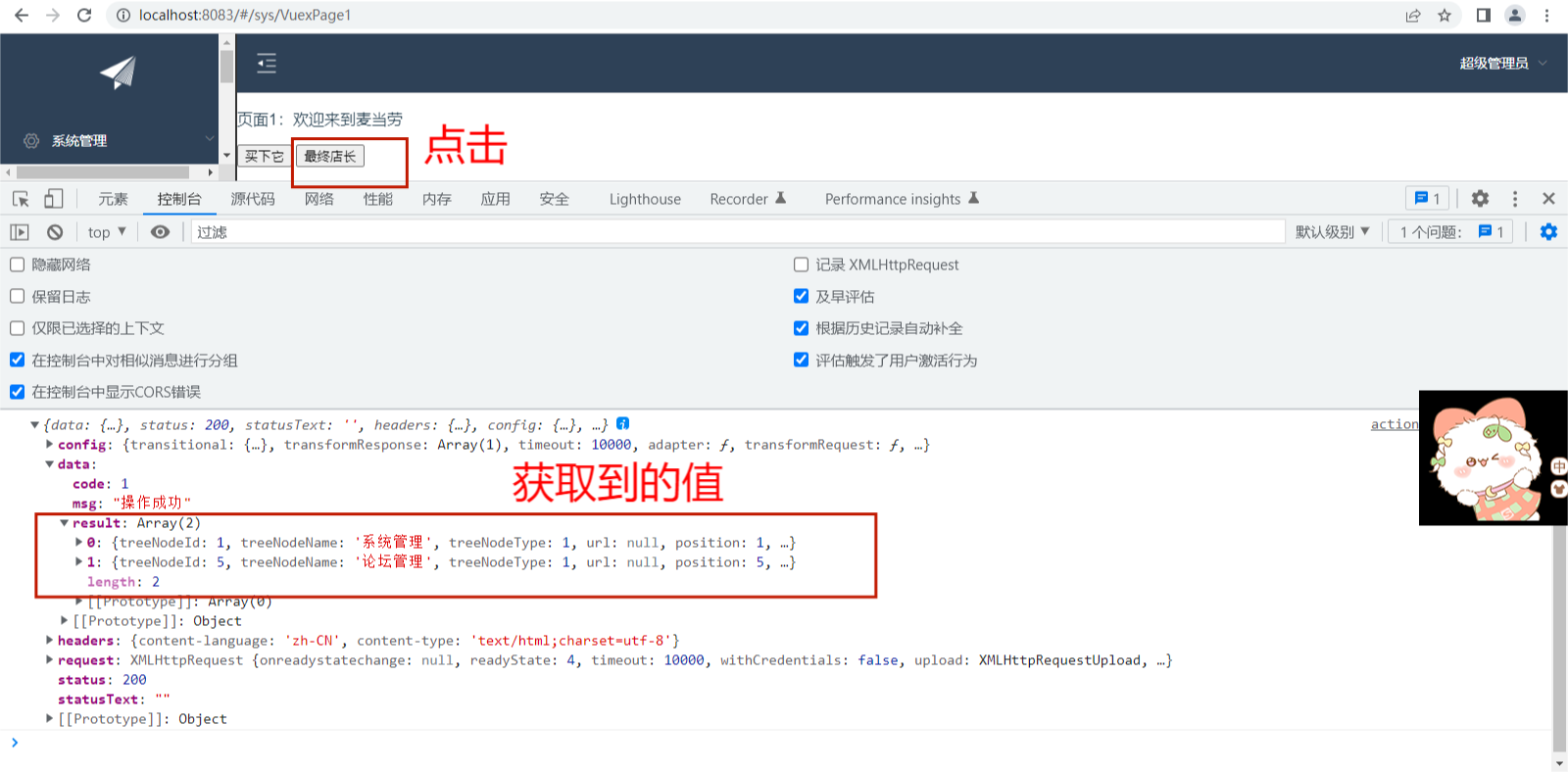
运行:
本篇内容分享到此结束,我们下期再见!
-
相关阅读:
基于stm32单片机的光照检测智能台灯
第8讲:Python中列表的概念与基本使用
【力扣练习题】加一
【WEB前端2024】3D智体编程:乔布斯3D纪念馆-第46课-使用json文件
运维自动化之域名系统
【Qt】之【项目】整理可参考学习的git项目链接(持续更新)
JS逆向 | 推特x-guest-token
Node18.x基础使用总结(二)
STM32自学☞DMA数据转运以及DMA+AD多通道案例
SVN安装教程
- 原文地址:https://blog.csdn.net/m0_67094505/article/details/126896259
