-
深度学习项目部署遇到的错误【记录】
深度学习项目部署遇到的错误:
一、Votenet论文项目复现(代码最近2/6/2020更新)
使用pycharm1、unsupported Microsoft Visual Studio version! Only the versions be tween 2013 and 2017 (inclusive) are supported!错误返回值2
解决:我电脑环境中装的是VS2019,这个项目有很多c++文件需要编译(Compile the CUDA layers for PointNet++, which we used in the backbone network),而且需要2013-2017版本的VS支持,于是卸载重装个2017,就编译通过了。
(是在进入pointnet2 下执行 python setup.py install命令报的错)运行成功会显示如下:
正在创建库 build\temp.win-amd64-3.7\Release\_ext_src/src\_ext.lib 和对象 build\temp.win-amd64-3.7\Release\_ext_src/src\_ext.exp 正在生成代码 已完成代码的生成 creating build\bdist.win-amd64 creating build\bdist.win-amd64\egg creating build\bdist.win-amd64\egg\pointnet2 copying build\lib.win-amd64-3.7\pointnet2\_ext.pyd -> build\bdist.win-amd64\egg\pointnet2 creating stub loader for pointnet2\_ext.pyd byte-compiling build\bdist.win-amd64\egg\pointnet2\_ext.py to _ext.cpython-37.pyc creating build\bdist.win-amd64\egg\EGG-INFO copying pointnet2.egg-info\PKG-INFO -> build\bdist.win-amd64\egg\EGG-INFO copying pointnet2.egg-info\SOURCES.txt -> build\bdist.win-amd64\egg\EGG-INFO copying pointnet2.egg-info\dependency_links.txt -> build\bdist.win-amd64\egg\EGG-INFO copying pointnet2.egg-info\top_level.txt -> build\bdist.win-amd64\egg\EGG-INFO writing build\bdist.win-amd64\egg\EGG-INFO\native_libs.txt zip_safe flag not set; analyzing archive contents... pointnet2.__pycache__._ext.cpython-37: module references __file__ creating dist creating 'dist\pointnet2-0.0.0-py3.7-win-amd64.egg' and adding 'build\bdist.win-amd64\egg' to it removing 'build\bdist.win-amd64\egg' (and everything under it) Processing pointnet2-0.0.0-py3.7-win-amd64.egg creating w:\conda\envs\votenet\lib\site-packages\pointnet2-0.0.0-py3.7-win-amd64.egg Extracting pointnet2-0.0.0-py3.7-win-amd64.egg to w:\conda\envs\votenet\lib\site-packages Adding pointnet2 0.0.0 to easy-install.pth file Installed w:\conda\envs\votenet\lib\site-packages\pointnet2-0.0.0-py3.7-win-amd64.egg Processing dependencies for pointnet2==0.0.0 Finished processing dependencies for pointnet2==0.0.0- 1
- 2
- 3
- 4
- 5
- 6
- 7
- 8
- 9
- 10
- 11
- 12
- 13
- 14
- 15
- 16
- 17
- 18
- 19
- 20
- 21
- 22
- 23
- 24
- 25
- 26
- 27
- 28
- 29
生成一些编译好的文件
2、CUDA_VISIBLE_DEVICES=0 : 无法将“CUDA_VISIBLE_DEVICES=0”项识别为 cmdlet、函数、脚本文件或可运行程序的名称。请检查名称的拼写,如果包括路径,请确保路径正确,然后再试一次。
所在位置 行:1 字符: 1
具体报错如下:CUDA_VISIBLE_DEVICES=0 : 无法将“CUDA_VISIBLE_DEVICES=0”项识别为 cmdlet、函数、脚本文件或可运行程序的名称。请检查名称的拼写,如果包括路径,请确保路径正确,然后再试一次。 所在位置 行:1 字符: 1 + CUDA_VISIBLE_DEVICES=0 python train.py --dataset sunrgbd --log_dir lo ... + ~~~~~~~~~~~~~~~~~~~~~~ + CategoryInfo : ObjectNotFound: (CUDA_VISIBLE_DEVICES=0:String) [], CommandNotFoundException + FullyQualifiedErrorId : CommandNotFoundException- 1
- 2
- 3
- 4
- 5
- 6
- 7
是下载好SUN RGB-D数据集后,根据步骤执行命令:CUDA_VISIBLE_DEVICES=0 python train.py --dataset sunrgbd --log_dir log_sunrgbd 报的错
首先参考其它博文试着把gpu指定语句部分CUDA_VISIBLE_DEVICES=0配到系统环境变量里,我这没用
、、、、、2022.7.1又有用了
而后试着把这段代码删了,直接运行python train.py --dataset sunrgbd --log_dir log_sunrgbd ,报别的错了:PS W:\pycharmprogram\votenet-main> python train.py --dataset sunrgbd --log_dir log_sunrgbd Traceback (most recent call last): File "train.py", line 40, in <module> from tf_visualizer import Visualizer as TfVisualizer File "W:\pycharmprogram\votenet-main\utils\tf_visualizer.py", line 12, in <module> import tf_logger File "W:\pycharmprogram\votenet-main\utils\tf_logger.py", line 6, in <module> import tensorflow as tf ModuleNotFoundError: No module named 'tensorflow' PS W:\pycharmprogram\votenet-main>- 1
- 2
- 3
- 4
- 5
- 6
- 7
- 8
- 9
- 10
- 11
装错版本了,改GPU版
3、论文代码格式现有更新
WARNING:tensorflow:From W:\pycharmprogram\votenet-main\utils\tf_logger.py:19: The name tf.summary.FileWriter is deprecated. Please use tf.compat.v1.summary.FileWriter instead.- 1
WARNING:tensorflow:From W:\pycharmprogram\votenet-main\utils\tf_logger.py:19: The name tf.summary.FileWriter is deprecated. Please use tf.compat.v1.summary.FileWriter instead.
4、显存不足
RuntimeError: CUDA out of memory. Tried to allocate 512.00 MiB (GPU 0; 4.00 GiB total capacity; 1.54 GiB already allocated; 400.76 MiB free; 12.59 MiB cached)- 1
- 2
RuntimeError: CUDA out of memory. Tried to allocate 512.00 MiB (GPU 0; 4.00 GiB total capacity; 1.54 GiB already allocated; 400.76 MiB free; 12.59 MiB cached)
11111111111111111111

111111111111111111111111111111

升级版本即可
缺失数据数据文件夹没放好
IA-SSD遇到的问题:
(iassd) root@container-b8cd11b252-a9f12073:~/autodl-tmp/IA-SSD# git clone https://github.com/yifanzhang713/spconv1.0.git Cloning into 'spconv1.0'... fatal: unable to access 'https://github.com/yifanzhang713/spconv1.0.git/': gnutls_handshake() failed: The TLS connection was non-properly terminated.- 1
- 2
- 3
第一步:apt-get update
第二步:apt-get install curl
就可以了。解析数据的一个小问题,中间有的数据无

///
test.py之后出现的问题

numba.cuda.cudadrv.error.NvvmSupportError: No supported GPU compute capabilities found. Please check your cudatoolkit version matches your CUDA version.- 1
在这里插入图片描述

关于这个问题的解决:
首先 ,训练时能正常调用GPU,说明cuda10.0以及pytorch1.1等安装是没问题的,而提示cudatoolkit版本有问题,费解。定位错误文件夹,是numba文件里报错,进入nvvm.py里 ,发现是要求最低cuda版本10.2
而服务器又是cuda10.0的,动不得,于是降低numba版本

numba官方依赖搭配

运行验证的test.py,出了测试数据
2022-09-24 21:19:44,252 INFO Result is save to /root/autodl-tmp/output/kitti_models/IA-SSD/default/eval/epoch_no_number/val/default
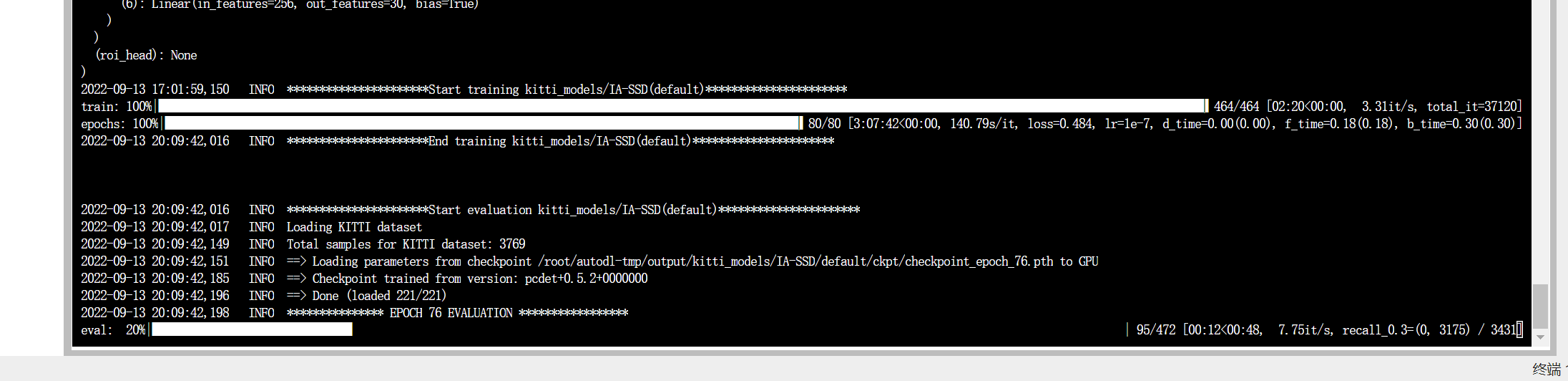
2022-09-24 21:19:44,252 INFO Evaluation done.*train.py训练截图



-
相关阅读:
技术干货|昇思MindSpore NLP模型迁移之Bert模型—文本匹配任务(二):训练和评估
【Manim CE】常用Mobject与使用
戏说领域驱动设计(十)——杂谈
云原生加速器企业维格表创始人陈霈霖:提供人人可用的数字化转型全新方案,真正驱动组织创新
第8章:系统质量属性与架构评估
JavaScript -- 正则表达式及示例代码介绍
flink集群与资源@k8s源码分析-运行时
模型预测控制(MPC)十一:变量约束的预测控制
C# 正则表达式大全
简单博客网页
- 原文地址:https://blog.csdn.net/qq_44114055/article/details/125434986
