-
数据可视化项目1
目录
1. 数据可视化项目适配方案
1.1 项目需求
设计稿是1920px
PC端适配: 宽度在 1024~1920之间页面元素宽高自适应
1.2 适配方案
- flexible.js 检测浏览器宽度 修改html 文字大小
- rem单位 页面元素根据 rem 适配大小 配合 cssrem 插件
- flex布局 页面快速布局

- flexible.js 把屏幕分为 10 等份
- PC端的效果图是 1920px
- cssrem 插件的基准值是 192px
- rem值自动生成
要把屏幕宽度约束在1024~1920之间有适配
- @media screen and (max-width: 1024px) {
- html {
- font-size: 42.66px!important;
- }
- }
- @media screen and (min-width: 1920px) {
- html {
- font-size: 80px!important;
- }
- }
2. 数据可视化项目开发
2.1 项目基础布局
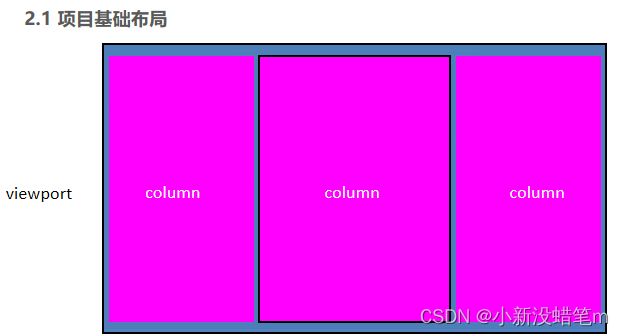

1-body
准备背景图
- body {
- background: url(../images/bg.jpg) no-repeat 0 0 / cover;
- /* background-size: cover; 适配*/
- }
- /* // 实现rem适配 */
- @media screen and (max-width: 1024px) {
- html {
- font-size: 42.66px !important;
- }
- }
- @media screen and (min-width: 1920px) {
- html {
- font-size: 80px !important;
- }
- }
- 效果图:1920px * 1078px
- body设置背景图
- viewport主体容器,限制最小宽度1024px,与最大宽度1920px,最小高度780px.
- 需要居中显示
- 使用logo.png做为背景图,在容器内显示
- 内间距88px 20px 0
- column列容器,分三列,占比3 : 4: 3
- 中间容器外间距32px 20px 0
2-viewport
- .viewport {
- display: flex;
- min-width: 1024px;
- max-width: 1920px;
- margin: 0 auto;
- padding: 1.1rem 0.25rem 0;
- background: url(../images/logo.png) no-repeat 0 0 / contain;//contain logo背景全部显示
- min-height: 780px;
- }
column列容器,分三列,占比3 : 4: 3
- .viewport .column {
- flex: 3;
- }
- .viewport .column:nth-child(2) {
- flex: 4;
- margin: 0.4rem 0.25rem 0;
- }
2.2 边框图片
- 边框图片的使用场景

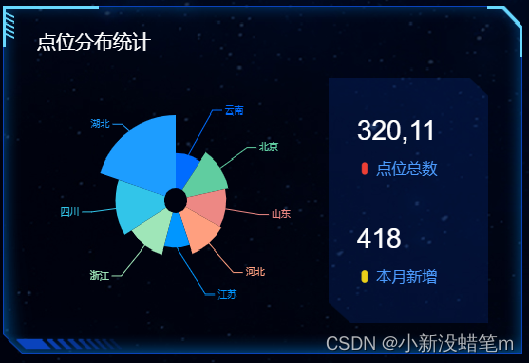
 盒子大小不一,但是边框样式相同,此时就需要边框图片来完成
 - 边框图片的切割原理 把四个角切出去(九宫格的由来),中间部分可以铺排、拉伸或者环绕。按照 上右下左 顺序切割
- 边框图片语法规范
属性
描述
border-image-source
用在边框的图片的路径。(那个图片?)
border-image-slice
图片边框向内偏移。(裁剪的尺寸,一定不加单位, 上右下左顺序)
border-image-width
图片边框的宽度(需要加单位)
border-image-repeat
图像边框是否应平铺(repeat)、铺满(round)或拉伸(stretch) 默认拉伸

边框图片
2.3 公共面板样式开发
面板类: .panel


解决切割后内容靠下的问题
子元素采用绝对定位,父元素采用相对定位,通过padding值设置覆盖边框
- /* 公共面板样式 */
- .panel {
- /*父元素相对定位*/
- position: relative;
- border: 15px solid transparent;
- border-width: 0.6375rem 0.475rem 0.25rem 1.65rem;
- border-image-source: url(../images/border.png);
- border-image-slice: 51 38 20 132;
- margin-bottom: 0.25rem;
- }
- .inner {
- /*字元素绝对定位*/
- position: absolute;
- top: -0.6375rem;
- left: -1.65rem;
- right: -0.475rem;
- bottom: -0.25rem;
- padding: 0.3rem 0.45rem;
- }
- .panel h3 {
- font-size: 0.25rem;
- color: #fff;
- font-weight: 400;
- }
2.4 通过类名调用字体图标
1.HTML页面引入字体图标中css文件。
<link rel="stylesheet" href="fonts/style.css">2.标签直接调用图标对应的类名即可。(类名在css文件中标注)
<span class="icon-angellist">span> -
相关阅读:
【计算机毕设之基于Java的贫困生资助管理系统-哔哩哔哩】 https://b23.tv/LrumkKI
git学习
docker 搭建rknn转换环境
STC89C51基础及项目第13天:小车go、软件调速
阿里云分布式文件系统OSS实现文件上传与下载
基于Php美妆商城
C#.NET ORM 如何访问 Access 数据库 [FreeSql]
Invalid value type for attribute ‘factoryBeanObjectType‘: java.lang.String
测试除了点点点,还有哪些内容呢?
EFK部署centos7.9(二)head插件部署
- 原文地址:https://blog.csdn.net/m0_66506641/article/details/126908489
