-
时间序列预测:用电量预测 02 KNN(K邻近算法)
🌮开发平台:jupyter lab
🍖运行环境:python3、TensorFlow2.x
----------------------------------------------- 2022.9.16 测验成功 ----------------------------------------------------------------
1. 时间序列预测:用电量预测 01 数据分析与建模
2. 时间序列预测:用电量预测 02 KNN(K邻近算法)
3. 时间序列预测:用电量预测 03 Linear(多元线性回归算法 & 数据未标准化)
4.时间序列预测:用电量预测 04 Std_Linear(多元线性回归算法 & 数据标准化)
5. 时间序列预测:用电量预测 05 BP神经网络
6.时间序列预测:用电量预测 06 长短期记忆网络LSTM
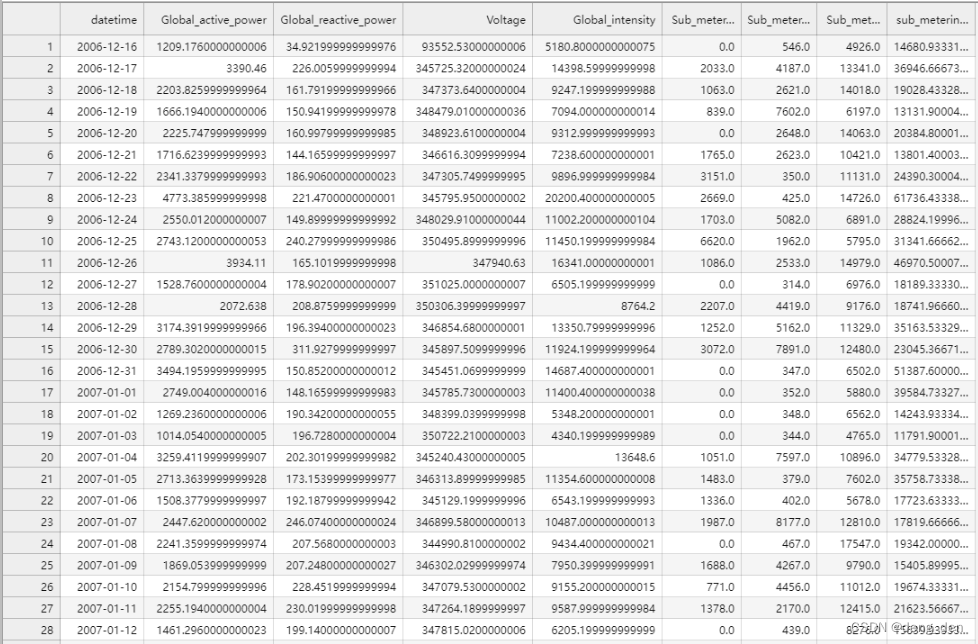
7. 时间序列预测:用电量预测 07 灰色预测算法说明:根据上述列表中 1.时间序列预测:用电量预测 01 数据分析与建模 进行数据整理,得到household_power_consumption_days.csv文件,部分数据展示如下:
1.导包
### KNN ## 测试数据:表格的后150个数据为测试数据 import pandas as pd import warnings warnings.filterwarnings('ignore')- 1
- 2
- 3
- 4
- 5
2. 拆分数据集和训练集
### 2.1 将日期变作index dataset = pd.read_csv('../household_power_consumption_days.csv',engine='python',encoding='utf8') dataset.head(15) ### 2.2 防止后续需要用到原始数据逆标准化,得关键字 data = dataset.copy() data.keys() ## Index(['datetime', 'Global_active_power','Global_reactive_power', 'Voltage','Global_intensity', 'Sub_metering_1', 'Sub_metering_2','Sub_metering_3', 'sub_metering_4'],dtype='object') ### 2.3 定义自变量和因变量 ## 定义自变量 x_keys = ['Global_active_power', 'Global_reactive_power', 'Voltage', 'Global_intensity', 'Sub_metering_1', 'Sub_metering_2', 'Sub_metering_3'] x = data[x_keys] ## 定义因变量 y_keys = ['sub_metering_4'] y = data[y_keys] ### 2.4 导包,划分训练集和测试集 from sklearn.model_selection import train_test_split ##把数据集分为测试集和训练集 x_train,x_test,y_train,y_test = train_test_split(x,y,test_size=0.1)- 1
- 2
- 3
- 4
- 5
- 6
- 7
- 8
- 9
- 10
- 11
- 12
- 13
- 14
- 15
- 16
- 17
- 18
- 19
- 20
- 21
- 22
- 23

3.构建模型,进行测试集数据预测
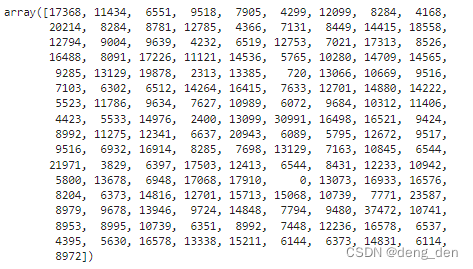
from sklearn.neighbors import KNeighborsClassifier ## n_neighbors=3最优参数可以自己去调 knnModel = KNeighborsClassifier(n_neighbors=3) knnModel.fit(x_train,y_train.astype('int')) knnModel.score(x_test,y_test.astype('int')) # out:0.006896551724137931 ## 预测测试集数据 y_test_predict = knnModel.predict(x_test) y_test_predict # out: array([17368, 11434, 6551, 9518, 7905, 4299, 12099, 8284, ...,8972])- 1
- 2
- 3
- 4
- 5
- 6
- 7
- 8
- 9
- 10
- 11
4.数据展示
4.1 以表格形式对比测试集原始目标数据和预测目标数据
len(y_test),len(y_test_predict) #(145, 145) #将df中的数据转换为array格式 col=y_test.iloc[:,-1] y_test=col.values y_test ## array([17656.5999984 , ... , 8708.0333376]) ## 将array列合并成df表格 compare = pd.DataFrame({ "原数据":y_test, "预测数据":y_test_predict }) compare- 1
- 2
- 3
- 4
- 5
- 6
- 7
- 8
- 9
- 10
- 11
- 12
- 13

4.2 以可视化图的形式对比测试集原始目标数据和预测目标数据
import matplotlib.pyplot as plt # 绘制 预测与真值结果 plt.figure(figsize=(16,8)) plt.plot(y_test, label="True value") plt.plot(y_test_predict, label="Predict value") plt.legend(loc='best') plt.show()- 1
- 2
- 3
- 4
- 5
- 6
- 7

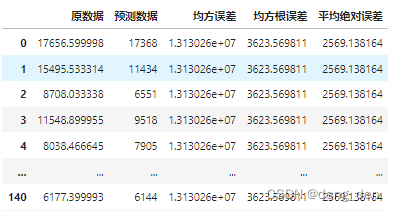
5.拓展:评估参数
import math def get_mse(records_real, records_predict): """ 均方误差 估计值与真值 偏差 """ if len(records_real) == len(records_predict): return sum([(x - y) ** 2 for x, y in zip(records_real, records_predict)]) / len(records_real) else: return None def get_rmse(records_real, records_predict): """ 均方根误差:是均方误差的算术平方根 """ mse = get_mse(records_real, records_predict) if mse: return math.sqrt(mse) else: return None def get_mae(records_real, records_predict): """ 平均绝对误差 """ if len(records_real) == len(records_predict): return sum([abs(x - y) for x, y in zip(records_real, records_predict)]) / len(records_real) else: return None ## 以表格形式展示 compare['均方误差'] = get_mse(y_test,y_test_predict) compare['均方根误差'] = get_rmse(y_test,y_test_predict) compare['平均绝对误差'] = get_mae(y_test,y_test_predict) compare- 1
- 2
- 3
- 4
- 5
- 6
- 7
- 8
- 9
- 10
- 11
- 12
- 13
- 14
- 15
- 16
- 17
- 18
- 19
- 20
- 21
- 22
- 23
- 24
- 25
- 26
- 27
- 28
- 29
- 30
- 31
- 32
- 33
- 34
- 35
-
相关阅读:
koa2学习和使用
DevOps自动化测试的原则和实践
SimSiam:Exploring Simple Siamese Representation Learning
驱动开发:内核枚举ShadowSSDT基址
node.js - 路由、中间件、mysql
高级数据结构——红黑树
vue3渲染函数(h函数)的变化
做个清醒的程序员之成为少数派
【项目开发】成长与收获
【开源】SpringBoot框架开发创意工坊双创管理系统
- 原文地址:https://blog.csdn.net/d_eng_/article/details/126903728
