-
SPA项目开发之CRUD+表单验证
一、表单验证
1.1 出现表单组件 el-form
这里我们参照官网可以去form组件中kopi,然后进行对应的值改变
<el-dialog :title="title" :visible.sync="editFormVisible" width="30%" @click="closeDialog"> <el-form label-width="120px" :model="editForm" :rules="rules" ref="editForm"> <el-form-item label="文章标题" prop="title"> <el-input size="small" v-model="editForm.title" auto-complete="off" placeholder="请输入文章标题">el-input> el-form-item> <el-form-item label="文章内容" prop="body"> <el-input size="small" v-model="editForm.body" auto-complete="off" placeholder="请输入内容">el-input> el-form-item> el-form> <div slot="footer" class="dialog-footer"> <el-button size="small" @click="closeDialog">取消el-button> <el-button size="small" type="primary" class="title" @click="submitForm('editForm')">保存el-button> div> el-dialog>- 1
- 2
- 3
- 4
- 5
- 6
- 7
- 8
- 9
- 10
- 11
- 12
- 13
- 14
- 15
1.2 通过点击 新增/编辑将表单对应窗口弹出
通过写方法让其对应的表单显示出来
handleEdit() { //展示新增文章的表单窗体 this.editFormVisible = true; }- 1
- 2
- 3
- 4
1.3 给表单设置规则 rules
给表单增加校验规则
rules: { title: [{ required: true, message: '请输入文章标题', trigger: 'blur' }, { min: 5, max: 10, message: '长度在 5 到 10 个字符', trigger: 'blur' } ], body: [{ required: true, message: '请输入文章内容', trigger: 'blur' }], }- 1
- 2
- 3
- 4
- 5
- 6
- 7
- 8
- 9
- 10
- 11
- 12
- 13
- 14
- 15
- 16
- 17
- 18
- 19
1.4 当表单提交时要校验规则
submitForm(formName) { this.$refs[formName].validate((valid) => { if (valid) { alert('submit!'); } else { console.log('error submit!!'); return false; } });- 1
- 2
- 3
- 4
- 5
- 6
- 7
- 8
- 9
最后总页面
Articles.vue<template> <div> <el-form :inline="true" :model="formInline" class="user-search"> <el-form-item label="搜索:"> <el-input size="small" v-model="formInline.title" placeholder="请输入文章标题">el-input> el-form-item> <el-form-item> <el-button size="small" type="primary" icon="el-icon-search" @click="search">搜索el-button> <el-button size="small" type="primary" icon="el-icon-plus" @click="handleEdit()">添加el-button> el-form-item> el-form> <el-table size="small" :data="listData" highlight-current-row style="width: 100%;"> <el-table-column align="center" type="selection" width="60"> el-table-column> <el-table-column sortable prop="id" label="文章id" width="300"> el-table-column> <el-table-column sortable prop="title" label="文章标题" width="300"> el-table-column> <el-table-column sortable prop="body" label="文章内容" width="300"> el-table-column> <el-table-column align="center" label="操作" min-width="300"> <template slot-scope="scope"> <el-button size="mini" @click="handleEdit(scope.$index, scope.row)">编辑el-button> <el-button size="mini" type="danger" @click="deleteUser(scope.$index, scope.row)">删除el-button> template> el-table-column> el-table> <el-pagination style="margin-top: 20px;" @size-change="handleSizeChange" @current-change="handleCurrentChange" :current-page="formInline.page" :page-sizes="[10, 20, 30, 50]" :page-size="100" layout="total, sizes, prev, pager, next, jumper" :total="formInline.total"> el-pagination> <el-dialog :title="title" :visible.sync="editFormVisible" width="30%" @click="closeDialog"> <el-form label-width="120px" :model="editForm" :rules="rules" ref="editForm"> <el-form-item label="文章标题" prop="title"> <el-input size="small" v-model="editForm.title" auto-complete="off" placeholder="请输入文章标题">el-input> el-form-item> <el-form-item label="文章内容" prop="body"> <el-input size="small" v-model="editForm.body" auto-complete="off" placeholder="请输入内容">el-input> el-form-item> el-form> <div slot="footer" class="dialog-footer"> <el-button size="small" @click="closeDialog">取消el-button> <el-button size="small" type="primary" class="title" @click="submitForm('editForm')">保存el-button> div> el-dialog> div> template> <script> export default { name: 'Articles', data() { return { title: '', editFormVisible: false, // 可见 editForm: { title: '', body: '' }, rules: { title: [{ required: true, message: '请输入文章标题', trigger: 'blur' }, { min: 5, max: 10, message: '长度在 5 到 10 个字符', trigger: 'blur' } ], body: [{ required: true, message: '请输入文章内容', trigger: 'blur' }], }, listData: [], formInline: { page: 1, total: 10, title: '' } }; }, methods: { handleEdit() { //展示新增文章的表单窗体 this.editFormVisible = true; }, deleteUser() { }, handleSizeChange(rows) { console.log("页面大小发送改变"); this.formInline.page = 1; this.formInline.rows = rows; this.search(); }, handleCurrentChange(page) { console.log("当前页发送改变"); this.formInline.page = page; this.search(); }, //代码复用 doSearch(param) { let url = this.axios.urls.SYSTEM_ARTICLE_LIST; this.axios.post(url, param) .then(resp => { //箭头函数 jdk8的语法 //成功的回调函数 console.log(resp); this.listData = resp.data.result; this.formInline = resp.data.pageBean; }) .catch(function() { // 代表失败 }); }, search() { //按照条件进行查询 this.doSearch(this.formInline); }, closeDialog() { //关闭窗体 }, submitForm(formName) { this.$refs[formName].validate((valid) => { if (valid) { alert('submit!'); } else { console.log('error submit!!'); return false; } }); } }, //钩子函数 created() { this.doSearch({}); } } script> <style> style>- 1
- 2
- 3
- 4
- 5
- 6
- 7
- 8
- 9
- 10
- 11
- 12
- 13
- 14
- 15
- 16
- 17
- 18
- 19
- 20
- 21
- 22
- 23
- 24
- 25
- 26
- 27
- 28
- 29
- 30
- 31
- 32
- 33
- 34
- 35
- 36
- 37
- 38
- 39
- 40
- 41
- 42
- 43
- 44
- 45
- 46
- 47
- 48
- 49
- 50
- 51
- 52
- 53
- 54
- 55
- 56
- 57
- 58
- 59
- 60
- 61
- 62
- 63
- 64
- 65
- 66
- 67
- 68
- 69
- 70
- 71
- 72
- 73
- 74
- 75
- 76
- 77
- 78
- 79
- 80
- 81
- 82
- 83
- 84
- 85
- 86
- 87
- 88
- 89
- 90
- 91
- 92
- 93
- 94
- 95
- 96
- 97
- 98
- 99
- 100
- 101
- 102
- 103
- 104
- 105
- 106
- 107
- 108
- 109
- 110
- 111
- 112
- 113
- 114
- 115
- 116
- 117
- 118
- 119
- 120
- 121
- 122
- 123
- 124
- 125
- 126
- 127
- 128
- 129
- 130
- 131
- 132
- 133
- 134
- 135
- 136
- 137
- 138
- 139
- 140
- 141
- 142
- 143
- 144
- 145
- 146
- 147
- 148
- 149
- 150
- 151
效果
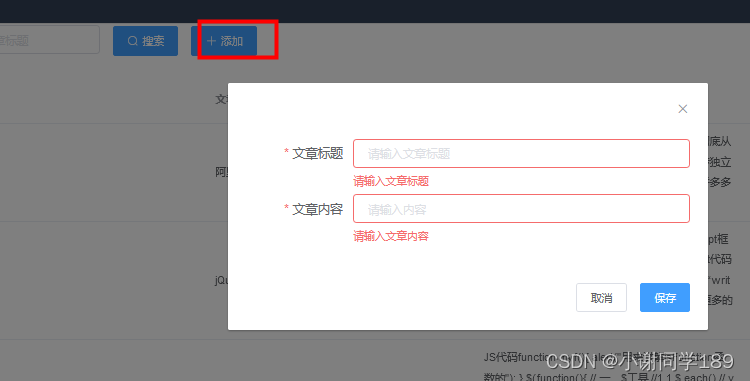


存在问题:有缓存,而且后期我们编辑和增加弹出的是同一个窗口,要进行判断(后面CRUD优化)
二、CRUD
2.1 保障编辑窗体正常弹出
因为我们编辑和新增用的是同一个方法,所有我们要再其进行判断弹框,因为我们有缓存问题,所有我们还要新增一个清除缓存的方法,在关闭窗体调用
Articles.vue
<template> <div> <el-form :inline="true" :model="formInline" class="user-search"> <el-form-item label="搜索:"> <el-input size="small" v-model="formInline.title" placeholder="请输入文章标题">el-input> el-form-item> <el-form-item> <el-button size="small" type="primary" icon="el-icon-search" @click="search">搜索el-button> <el-button size="small" type="primary" icon="el-icon-plus" @click="handleEdit()">添加el-button> el-form-item> el-form> <el-table size="small" :data="listData" highlight-current-row style="width: 100%;"> <el-table-column align="center" type="selection" width="60"> el-table-column> <el-table-column sortable prop="id" label="文章id" width="300"> el-table-column> <el-table-column sortable prop="title" label="文章标题" width="300"> el-table-column> <el-table-column sortable prop="body" label="文章内容" width="300"> el-table-column> <el-table-column align="center" label="操作" min-width="300"> <template slot-scope="scope"> <el-button size="mini" @click="handleEdit(scope.$index, scope.row)">编辑el-button> <el-button size="mini" type="danger" @click="deleteUser(scope.$index, scope.row)">删除el-button> template> el-table-column> el-table> <el-pagination style="margin-top: 20px;" @size-change="handleSizeChange" @current-change="handleCurrentChange" :current-page="formInline.page" :page-sizes="[10, 20, 30, 50]" :page-size="100" layout="total, sizes, prev, pager, next, jumper" :total="formInline.total"> el-pagination> <el-dialog :title="title" :visible.sync="editFormVisible" width="30%" @click="closeDialog"> <el-form label-width="120px" :model="editForm" :rules="rules" ref="editForm"> <el-form-item label="文章标题" prop="title"> <el-input size="small" v-model="editForm.title" auto-complete="off" placeholder="请输入文章标题">el-input> el-form-item> <el-form-item label="文章内容" prop="body"> <el-input size="small" v-model="editForm.body" auto-complete="off" placeholder="请输入内容">el-input> el-form-item> el-form> <div slot="footer" class="dialog-footer"> <el-button size="small" @click="closeDialog">取消el-button> <el-button size="small" type="primary" class="title" @click="submitForm('editForm')">保存el-button> div> el-dialog> div> template> <script> export default { name: 'Articles', data() { return { title: '', editFormVisible: false, // 可见 editForm: { title: '', body: '', id:'' }, rules: { title: [{ required: true, message: '请输入文章标题', trigger: 'blur' }, { min: 5, max: 10, message: '长度在 5 到 10 个字符', trigger: 'blur' } ], body: [{ required: true, message: '请输入文章内容', trigger: 'blur' }], }, listData: [], formInline: { page: 1, total: 10, title: '' } }; }, methods: { handleEdit(index,row) { //展示新增文章的表单窗体 this.editFormVisible = true; if(row){ //编辑 this.title = '编辑窗体'; this.editForm.id = row.id; this.editForm.title = row.title; this.editForm.body = row.body; } else{ //新增 this.title = '新增窗体'; } }, deleteUser() { }, handleSizeChange(rows) { console.log("页面大小发送改变"); this.formInline.page = 1; this.formInline.rows = rows; this.search(); }, handleCurrentChange(page) { console.log("当前页发送改变"); this.formInline.page = page; this.search(); }, //代码复用 doSearch(param) { let url = this.axios.urls.SYSTEM_ARTICLE_LIST; this.axios.post(url, param) .then(resp => { //箭头函数 jdk8的语法 //成功的回调函数 console.log(resp); this.listData = resp.data.result; this.formInline = resp.data.pageBean; }) .catch(function() { // 代表失败 }); }, search() { //按照条件进行查询 this.doSearch(this.formInline); }, closeDialog() { //关闭窗体 this.clearData(); }, clearData(){ //清除编辑窗体的缓存数据 this.editForm.title = ''; this.editForm.body = ''; this.editForm.id = ''; //当点击取消时,我们就 this.title = ''; this.editFormVisible = false; }, submitForm(formName) { this.$refs[formName].validate((valid) => { if (valid) { //进行增加 let url = this.axios.urls.SYSTEM_ARTICLE_ADD; } else { console.log('error submit!!'); return false; } }); } }, //钩子函数 created() { this.doSearch({}); } } script> <style> style>- 1
- 2
- 3
- 4
- 5
- 6
- 7
- 8
- 9
- 10
- 11
- 12
- 13
- 14
- 15
- 16
- 17
- 18
- 19
- 20
- 21
- 22
- 23
- 24
- 25
- 26
- 27
- 28
- 29
- 30
- 31
- 32
- 33
- 34
- 35
- 36
- 37
- 38
- 39
- 40
- 41
- 42
- 43
- 44
- 45
- 46
- 47
- 48
- 49
- 50
- 51
- 52
- 53
- 54
- 55
- 56
- 57
- 58
- 59
- 60
- 61
- 62
- 63
- 64
- 65
- 66
- 67
- 68
- 69
- 70
- 71
- 72
- 73
- 74
- 75
- 76
- 77
- 78
- 79
- 80
- 81
- 82
- 83
- 84
- 85
- 86
- 87
- 88
- 89
- 90
- 91
- 92
- 93
- 94
- 95
- 96
- 97
- 98
- 99
- 100
- 101
- 102
- 103
- 104
- 105
- 106
- 107
- 108
- 109
- 110
- 111
- 112
- 113
- 114
- 115
- 116
- 117
- 118
- 119
- 120
- 121
- 122
- 123
- 124
- 125
- 126
- 127
- 128
- 129
- 130
- 131
- 132
- 133
- 134
- 135
- 136
- 137
- 138
- 139
- 140
- 141
- 142
- 143
- 144
- 145
- 146
- 147
- 148
- 149
- 150
- 151
- 152
- 153
- 154
- 155
- 156
- 157
- 158
- 159
- 160
- 161
- 162
- 163
- 164
- 165
- 166
- 167
- 168
- 169
- 170
- 171
- 172
- 173
- 174
- 175
- 176
效果


2.2 增加修改
这里因为我们用的是同一个方法,所有我们通过判断id来看是删除还是修改,在通过axios调用接口来完成
<template> <div> <el-form :inline="true" :model="formInline" class="user-search"> <el-form-item label="搜索:"> <el-input size="small" v-model="formInline.title" placeholder="请输入文章标题">el-input> el-form-item> <el-form-item> <el-button size="small" type="primary" icon="el-icon-search" @click="search">搜索el-button> <el-button size="small" type="primary" icon="el-icon-plus" @click="handleEdit()">添加el-button> el-form-item> el-form> <el-table size="small" :data="listData" highlight-current-row style="width: 100%;"> <el-table-column align="center" type="selection" width="60"> el-table-column> <el-table-column sortable prop="id" label="文章id" width="300"> el-table-column> <el-table-column sortable prop="title" label="文章标题" width="300"> el-table-column> <el-table-column sortable prop="body" label="文章内容" width="300"> el-table-column> <el-table-column align="center" label="操作" min-width="300"> <template slot-scope="scope"> <el-button size="mini" @click="handleEdit(scope.$index, scope.row)">编辑el-button> <el-button size="mini" type="danger" @click="deleteUser(scope.$index, scope.row)">删除el-button> template> el-table-column> el-table> <el-pagination style="margin-top: 20px;" @size-change="handleSizeChange" @current-change="handleCurrentChange" :current-page="formInline.page" :page-sizes="[10, 20, 30, 50]" :page-size="100" layout="total, sizes, prev, pager, next, jumper" :total="formInline.total"> el-pagination> <el-dialog :title="title" :visible.sync="editFormVisible" width="30%" @click="closeDialog"> <el-form label-width="120px" :model="editForm" :rules="rules" ref="editForm"> <el-form-item label="文章标题" prop="title"> <el-input size="small" v-model="editForm.title" auto-complete="off" placeholder="请输入文章标题">el-input> el-form-item> <el-form-item label="文章内容" prop="body"> <el-input size="small" v-model="editForm.body" auto-complete="off" placeholder="请输入内容">el-input> el-form-item> el-form> <div slot="footer" class="dialog-footer"> <el-button size="small" @click="closeDialog">取消el-button> <el-button size="small" type="primary" class="title" @click="submitForm('editForm')">保存el-button> div> el-dialog> div> template> <script> export default { name: 'Articles', data() { return { title: '', editFormVisible: false, // 可见 editForm: { title: '', body: '', id: '' }, rules: { title: [{ required: true, message: '请输入文章标题', trigger: 'blur' }, { min: 5, max: 10, message: '长度在 5 到 10 个字符', trigger: 'blur' } ], body: [{ required: true, message: '请输入文章内容', trigger: 'blur' }], }, listData: [], formInline: { page: 1, total: 10, title: '' } }; }, methods: { handleEdit(index, row) { //展示新增文章的表单窗体 this.editFormVisible = true; if (row) { //编辑 this.title = '编辑窗体'; this.editForm.id = row.id; this.editForm.title = row.title; this.editForm.body = row.body; } else { //新增 this.title = '新增窗体'; } }, deleteUser() { }, handleSizeChange(rows) { console.log("页面大小发送改变"); this.formInline.page = 1; this.formInline.rows = rows; this.search(); }, handleCurrentChange(page) { console.log("当前页发送改变"); this.formInline.page = page; this.search(); }, //代码复用 doSearch(param) { let url = this.axios.urls.SYSTEM_ARTICLE_LIST; this.axios.post(url, param) .then(resp => { //箭头函数 jdk8的语法 //成功的回调函数 console.log(resp); this.listData = resp.data.result; this.formInline = resp.data.pageBean; }) .catch(function() { // 代表失败 }); }, search() { //按照条件进行查询 this.doSearch(this.formInline); }, closeDialog() { //关闭窗体 this.clearData(); }, clearData() { //清除编辑窗体的缓存数据 this.editForm.title = ''; this.editForm.body = ''; this.editForm.id = ''; //当点击取消时,我们就 this.title = ''; this.editFormVisible = false; }, submitForm(formName) { this.$refs[formName].validate((valid) => { if (valid) { //进行增加 let url; // if (this.editForm.id == 0) { //新增 url = this.axios.urls.SYSTEM_ARTICLE_ADD; } else { //编辑 url = this.axios.urls.SYSTEM_ARTICLE_EDIT; } this.axios.post(url, this.editForm).then(t => { //新增成功后 1.关闭窗体-清空数据 2.重新查询 this.$message({ message: t.data.msg, type: 'success' }); this.clearData(); //关闭清空 this.search(); //查询 }).catch(e => { }) } else { console.log('error submit!!'); return false; } }); } }, //钩子函数 created() { this.doSearch({}); } } script> <style> style>- 1
- 2
- 3
- 4
- 5
- 6
- 7
- 8
- 9
- 10
- 11
- 12
- 13
- 14
- 15
- 16
- 17
- 18
- 19
- 20
- 21
- 22
- 23
- 24
- 25
- 26
- 27
- 28
- 29
- 30
- 31
- 32
- 33
- 34
- 35
- 36
- 37
- 38
- 39
- 40
- 41
- 42
- 43
- 44
- 45
- 46
- 47
- 48
- 49
- 50
- 51
- 52
- 53
- 54
- 55
- 56
- 57
- 58
- 59
- 60
- 61
- 62
- 63
- 64
- 65
- 66
- 67
- 68
- 69
- 70
- 71
- 72
- 73
- 74
- 75
- 76
- 77
- 78
- 79
- 80
- 81
- 82
- 83
- 84
- 85
- 86
- 87
- 88
- 89
- 90
- 91
- 92
- 93
- 94
- 95
- 96
- 97
- 98
- 99
- 100
- 101
- 102
- 103
- 104
- 105
- 106
- 107
- 108
- 109
- 110
- 111
- 112
- 113
- 114
- 115
- 116
- 117
- 118
- 119
- 120
- 121
- 122
- 123
- 124
- 125
- 126
- 127
- 128
- 129
- 130
- 131
- 132
- 133
- 134
- 135
- 136
- 137
- 138
- 139
- 140
- 141
- 142
- 143
- 144
- 145
- 146
- 147
- 148
- 149
- 150
- 151
- 152
- 153
- 154
- 155
- 156
- 157
- 158
- 159
- 160
- 161
- 162
- 163
- 164
- 165
- 166
- 167
- 168
- 169
- 170
- 171
- 172
- 173
- 174
- 175
- 176
- 177
- 178
- 179
- 180
- 181
- 182
- 183
- 184
- 185
- 186
- 187
- 188
- 189
- 190
- 191
- 192
- 193
- 194
效果
 点击新增
点击新增
 点击编辑
点击编辑

2.3 删除
注意删除只要传入相对应的id即可
删除方法
在deleteUser(index, row) { this.$confirm('此操作将永久删除该文件, 是否继续?', '提示', { confirmButtonText: '确定', cancelButtonText: '取消', type: 'warning' }).then(() => { let url = this.axios.urls.SYSTEM_ARTICLE_DEL; this.axios.post(url, {id:row.id}).then(t => { this.$message({ type: 'success', message: '删除成功!' }); this.clearData(); //关闭清空 this.search(); //查询 }).catch(e => { }) }).catch(() => { this.$message({ type: 'info', message: '已取消删除' }); }); },- 1
- 2
- 3
- 4
- 5
- 6
- 7
- 8
- 9
- 10
- 11
- 12
- 13
- 14
- 15
- 16
- 17
- 18
- 19
- 20
- 21
- 22
- 23
- 24
- 25
- 26
- 27
点击删除


-
相关阅读:
Servlet入门
OpenMV与Arduino通信——IIC
面经——C++语言1
云计算概述
16位简单ASM题的记录——[HGAME 2022 week1]easyasm
Spring详解及具体使用
黄金代理前景如何,有得搞吗?
WPF控件模板
MySQL8窗口函数应用
论文阅读—— CEASC(cvpr2023)
- 原文地址:https://blog.csdn.net/qq_63531917/article/details/126882020
