-
Java基础进阶线程中的常用方法
一、获取线程的名字
String name = 线程对象.getName(); 修改线程对象的名字 线程对象.setName("线程名字"); 当线程没有设置名字的时候,默认的名字有什么规律?(了解一下) Thread-0 Thread-1 Thread-2 Thread-3- 1
- 2
- 3
- 4
- 5
- 6
- 7
- 8
二、获取当前线程对象
Thread t = Thread.currentThread(); 返回值t就是当前线程。- 1
- 2
示例代码01:
public class ThreadTest05 { public static void doSome(){ //这样就不行了 //this.getName(); //super.getName(); // 但是这样可以 String name = Thread.currentThread().getName(); System.out.println("-->" + name); } public static void main(String[] args) { //创建分支线程对象 MyThread2 t1 = new MyThread2(); //调用doSome方法() ThreadTest05.doSome(); //获取当前的线程对象 // currentThread就是当前线程对象 // 这个代码出现在main方法当中,所以当前线程就是主线程。 Thread currentThread = Thread.currentThread(); System.out.println(currentThread.getName()); //获取线程名字 String n1 = t1.getName(); System.out.println(n1); //修改线程名字 t1.setName("tttt"); System.out.println(t1.getName()); //创建第二个多线程对象 MyThread2 t2 = new MyThread2(); System.out.println(t2.getName()); t2.setName("ssss"); System.out.println(t2.getName()); t2.start(); //启动线程 t1.start(); } } class MyThread2 extends Thread{ public void run(){ for(int i=0;i<100;i++){ //当前线程对象 Thread currentThread = Thread.currentThread(); System.out.println(currentThread().getName() + "-->" + i); } } }- 1
- 2
- 3
- 4
- 5
- 6
- 7
- 8
- 9
- 10
- 11
- 12
- 13
- 14
- 15
- 16
- 17
- 18
- 19
- 20
- 21
- 22
- 23
- 24
- 25
- 26
- 27
- 28
- 29
- 30
- 31
- 32
- 33
- 34
- 35
- 36
- 37
- 38
- 39
- 40
- 41
- 42
- 43
- 44
- 45
- 46
- 47
- 48
- 49
- 50
- 51
- 52
- 53
- 54
运行结果:

三、线程的sleep方法
关于线程的sleep方法:
static void sleep(long millis)- 1
1、静态方法:Thread.sleep(1000);
2、参数是毫秒
3、作用:让当前线程进入休眠,进入“阻塞状态”,放弃占有CPU时间片,让给其它线程使用。- 这行代码出现在A线程中,A线程就会进入休眠。
- 这行代码出现在B线程中,B线程就会进入休眠。
4、Thread.sleep()方法,可以做到这种效果:
- 间隔特定的时间,去执行一段特定的代码,每隔多久执行一次。
示例代码02:
public class ThreadTest06 { public static void main(String[] args) { //sleep方法让当前线程休眠指定时间,此处休眠5秒 /*try { // 让当前线程进入休眠,睡眠5秒 // 当前线程是主线程!!! Thread.sleep(1000 * 5); } catch (InterruptedException e) { e.printStackTrace(); } System.out.println("HelloWorld!");*/ //此处每循环一次,就休眠一秒 for(int i=0;i<10;i++){ System.out.println(Thread.currentThread().getName() + "--->" + i); try { Thread.sleep(1000); } catch (InterruptedException e) { e.printStackTrace(); } } } }- 1
- 2
- 3
- 4
- 5
- 6
- 7
- 8
- 9
- 10
- 11
- 12
- 13
- 14
- 15
- 16
- 17
- 18
- 19
- 20
- 21
- 22
- 23
- 24
- 25
- 26
- 27
运行结果:

四、sleep方法的面试题
分支线程调用sleep方法,会休眠分支线程吗?
示例代码03:
public class ThreadTest07 { public static void main(String[] args) { //多态 Thread t= new MyThread3(); //修改名字 t.setName("t"); //启动分支线程 t.start(); try { // 问题:这行代码会让线程t进入休眠状态吗? // 在执行的时候还是会转换成:Thread.sleep(1000 * 5); // 这行代码的作用是:让当前线程进入休眠,也就是说main线程进入休眠。 // 这样代码出现在main方法中,main线程睡眠。 t.sleep(1000 * 5); } catch (InterruptedException e) { e.printStackTrace(); } System.out.println("HeloWorld!"); } } class MyThread3 extends Thread{ public void run(){ for(int i=0;i<10;i++){ System.out.println(Thread.currentThread().getName() + "--->" + i); } } }- 1
- 2
- 3
- 4
- 5
- 6
- 7
- 8
- 9
- 10
- 11
- 12
- 13
- 14
- 15
- 16
- 17
- 18
- 19
- 20
- 21
- 22
- 23
- 24
- 25
- 26
- 27
- 28
- 29
- 30
- 31
运行结果:

五、终止线程的休眠
-
sleep睡眠太久了,如果希望半道上醒来,你应该怎么办?也就是说怎么叫醒一个正在睡眠的线程??
-
注意:这个不是终断线程的执行,是终止线程的睡眠。
-
调用interrupt方法终止休眠的线程
示例代码04:
public class ThreadTest08 { public static void main(String[] args) { //创建线程接口实现类对象 Thread t = new Thread(new MyRunnable2()); t.setName("t"); t.start(); // 希望5秒之后,t线程醒来(5秒之后主线程手里的活儿干完了。) try { Thread.sleep(1000 * 5); } catch (InterruptedException e) { e.printStackTrace(); } // 终断t线程的睡眠(这种终断睡眠的方式依靠了java的异常处理机制。) t.interrupt();// 干扰,一盆冷水过去! } } class MyRunnable2 implements Runnable{ // 重点:run()当中的异常不能throws,只能try catch // 因为run()方法在父类中没有抛出任何异常,子类不能比父类抛出更多的异常。 @Override public void run() { System.out.println(Thread.currentThread().getName() + "---> begin"); try { // 睡眠1年 Thread.sleep(1000 * 60 * 60 * 24 * 365); } catch (InterruptedException e) { // 打印异常信息 //e.printStackTrace(); // e.printStackTrace(); } System.out.println(Thread.currentThread().getName() + "---> end"); // 调用doOther //doOther(); } // 其它方法可以throws /*public void doOther() throws Exception{ }*/ }- 1
- 2
- 3
- 4
- 5
- 6
- 7
- 8
- 9
- 10
- 11
- 12
- 13
- 14
- 15
- 16
- 17
- 18
- 19
- 20
- 21
- 22
- 23
- 24
- 25
- 26
- 27
- 28
- 29
- 30
- 31
- 32
- 33
- 34
- 35
- 36
- 37
- 38
- 39
- 40
- 41
- 42
- 43
- 44
运行结果:

六、强行终止线程的执行
调用现成的stop方法(此方法已过时)
在java中怎么强行终止一个线程的执行。
这种方式存在很大的缺点:容易丢失数据。因为这种方式是直接将线程杀死了,
线程没有保存的数据将会丢失。不建议使用。示例代码05:
public class ThreadTest09 { public static void main(String[] args) { Thread t = new Thread(new MyRunnable3());//出错点,看清构造器中的实现类,别写错 t.setName("t"); t.start(); //模拟5秒,设置5秒终止 try { Thread.sleep(1000 * 5); } catch (InterruptedException e) { e.printStackTrace(); } //强制终止线程t//5秒后强制终止线程 t.stop();//已过时 } } class MyRunnable3 implements Runnable{ @Override public void run() { for(int i=0;i<10;i++){ System.out.println(Thread.currentThread().getName() + "--->" + i); //休眠一秒 try { Thread.sleep(1000); } catch (InterruptedException e) { e.printStackTrace(); } } } }- 1
- 2
- 3
- 4
- 5
- 6
- 7
- 8
- 9
- 10
- 11
- 12
- 13
- 14
- 15
- 16
- 17
- 18
- 19
- 20
- 21
- 22
- 23
- 24
- 25
- 26
- 27
- 28
- 29
- 30
- 31
- 32
- 33
运行结果:
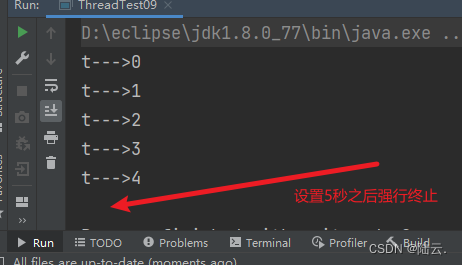
七、合理的终止一个线程的方法
使用if()循环的Return方法合理终止一个线程
示例代码06:
public class ThreadTest10 { public static void main(String[] args) { MyRunnable4 m = new MyRunnable4(); Thread t = new Thread(m); t.setName("t"); t.start(); //模拟5秒 try { Thread.sleep(1000 * 5); } catch (InterruptedException e) { e.printStackTrace(); } //当5秒后把线程休眠标记设置为false,线程终止,不会导致数据丢失 m.run = false; } } class MyRunnable4 implements Runnable{ //定义线程休眠标记 boolean run = true; @Override public void run() { for(int i=0;i<10;i++){ if(run){ System.out.println(Thread.currentThread().getName() + "--->" + i); try { Thread.sleep(1000); } catch (InterruptedException e) { e.printStackTrace(); } }else{ // return就结束了,你在结束之前还有什么没保存的。 // 在这里可以保存呀。 //save.... //终止当前线程 return; } } }- 1
- 2
- 3
- 4
- 5
- 6
- 7
- 8
- 9
- 10
- 11
- 12
- 13
- 14
- 15
- 16
- 17
- 18
- 19
- 20
- 21
- 22
- 23
- 24
- 25
- 26
- 27
- 28
- 29
- 30
- 31
- 32
- 33
- 34
- 35
- 36
- 37
- 38
- 39
- 40
- 41
- 42
- 43
运行结果:

八、线程调度概述
常见的线程调度模型有哪些?
1、抢占式调度模型:
- 那个线程的优先级比较高,抢到的CPU时间片的概率就高一些/多一些。
- java采用的就是抢占式调度模型。
2、均分式调度模型:
- 平均分配CPU时间片。每个线程占有的CPU时间片时间长度一样。
- 平均分配,一切平等。
- 有一些编程语言,线程调度模型采用的是这种方式。
3、线程调度的方法
实例方法:
- void setPriority(int newPriority) 设置线程的优先级
- int getPriority() 获取线程优先级
- 最低优先级1
- 默认优先级是5
- 最高优先级10
- 优先级比较高的获取CPU时间片可能会多一些。(但也不完全是,大概率是多的。)
示例代码07:
public class ThreadTest11 { public static void main(String[] args) { System.out.println("线程的最高优先级:" + Thread.MAX_PRIORITY); System.out.println("线程的最低优先级:" + Thread.MIN_PRIORITY); System.out.println("线程的默认优先级:" + Thread.NORM_PRIORITY); Thread.currentThread().setPriority(1); System.out.println(Thread.currentThread().getPriority()); // main线程的默认优先级是:5 //System.out.println(currentThread.getName() + "线程的默认优先级是:" + currentThread.getPriority()); Thread t = new Thread(new MyRunnable5()); t.setPriority(10); t.setName("t"); t.start(); // 优先级较高的,只是抢到的CPU时间片相对多一些。 // 大概率方向更偏向于优先级比较高的。 for(int i=0;i<10;i++){ System.out.println(Thread.currentThread().getName() + "--->" + i); } } } class MyRunnable5 implements Runnable{ public void run(){ // 获取线程优先级 //System.out.println(Thread.currentThread().getName() + "线程的默认优先级:" + Thread.currentThread().getPriority()); for(int i=0;i<10;i++){ System.out.println(Thread.currentThread().getName() + "--->" + i); } } }- 1
- 2
- 3
- 4
- 5
- 6
- 7
- 8
- 9
- 10
- 11
- 12
- 13
- 14
- 15
- 16
- 17
- 18
- 19
- 20
- 21
- 22
- 23
- 24
- 25
- 26
- 27
- 28
- 29
- 30
- 31
- 32
- 33
- 34
- 35
- 36
运行结果:

九、线程让位
让位,当前线程暂停,回到就绪状态,让给其它线程。
静态方法:
- static void yield() 让位方法
暂停当前正在执行的线程对象,并执行其他线程
yield()方法不是阻塞方法。让当前线程让位,让给其它线程使用。
yield()方法的执行会让当前线程从“运行状态”回到“就绪状态”。
注意:在回到就绪之后,有可能还会再次抢到。
示例代码08:
public class ThreadTest12 { public static void main(String[] args) { Thread t = new Thread(new MyRunnable6()); t.setName("t"); t.start(); for(int i=1;i<1000;i++){ System.out.println(Thread.currentThread().getName() + "--->" + i); } } } class MyRunnable6 implements Runnable{ @Override public void run() { for(int i=1;i<1000;i++){ //每100个让位一次。 if(i % 100 == 0){ Thread.yield();// 当前线程暂停一下,让给主线程。v } System.out.println(Thread.currentThread().getName() + "--->" + i); } } }- 1
- 2
- 3
- 4
- 5
- 6
- 7
- 8
- 9
- 10
- 11
- 12
- 13
- 14
- 15
- 16
- 17
- 18
- 19
- 20
- 21
- 22
- 23
- 24
- 25
运行结果:

十、线程合并
实例方法:void join()
示例代码09:
public class ThreadTest13 { public static void main(String[] args) { System.out.println("main ---> begin!"); Thread t = new Thread(new MyRunnable7()); t.setName("t"); t.start(); //合并线程 try { t.join();//t合并到当前线程中,当前线程受阻塞,t线程执行直到结束 } catch (InterruptedException e) { e.printStackTrace(); } System.out.println("main ---> over"); } } class MyRunnable7 implements Runnable{ @Override public void run() { for(int i=0;i<1000;i++){ System.out.println(Thread.currentThread().getName() + "--->" + i); } } }- 1
- 2
- 3
- 4
- 5
- 6
- 7
- 8
- 9
- 10
- 11
- 12
- 13
- 14
- 15
- 16
- 17
- 18
- 19
- 20
- 21
- 22
- 23
- 24
- 25
- 26
运行结果:

-
相关阅读:
C语言—指针进阶(详解篇)
Unity学习——碰撞器
数据结构面试专题
【C语言简单实现数据结构】排序之交换排序和归并排序
桌面软件开发框架大赏
ES系列十二、ES的scroll Api及分页实例
【机器学习】实验3布置:贝叶斯垃圾邮件识别
Finclip车载小程序提供最优解决方案
uView 对象操作
Python 下载的 11 种姿势,一种比一种高级
- 原文地址:https://blog.csdn.net/qq_46096136/article/details/126805112
