-
springboot基础(67):利用切面编程实现自定义的@MyCacheable
前言
什么是切面编程?
如何实现切面编程?什么是切面编程?
AOP 为 Aspect Oriented Programming 的缩写,意思为面向切面编程,是通过预编译方式和运行期动态代理实现程序功能的统一维护的一种技术。
实际上,AOP 的底层是通过 Spring 提供的的动态代理技术实现的。在运行期间,Spring通过动态代理技术动态的生成代理对象,代理对象方法执行时进行增强功能的介入,在去调用目标对象的方法,从而完成功能的增强。

实现自己的@Cacheable
需求说明

需求- 根据输入的参数,缓存返回值,第二次调用该方法时,直接使用缓存内容
- 可以使用自定义keyGenerator的生成器
- 支持自定义key的规则,需要支持SPEL表达式
- 如果没有自定义key,并且也没有设定keyGenerator,则需要内置一套生成器策略。
- 如果返回值为null时,可以单独设置缓存的时间或者不缓存。
实现@MyCacheable
- 引入依赖
<dependency> <groupId>org.projectlombokgroupId> <artifactId>lombokartifactId> <optional>trueoptional> dependency> <dependency> <groupId>org.springframework.bootgroupId> <artifactId>spring-boot-starter-data-redisartifactId> dependency> <dependency> <groupId>redis.clientsgroupId> <artifactId>jedisartifactId> dependency> <dependency> <groupId>org.aspectjgroupId> <artifactId>aspectjweaverartifactId> dependency> <dependency> <groupId>com.alibabagroupId> <artifactId>fastjsonartifactId> <version>1.2.83_noneautotypeversion> dependency> <dependency> <groupId>commons-codecgroupId> <artifactId>commons-codecartifactId> <version>1.15version> dependency> <dependency> <groupId>commons-langgroupId> <artifactId>commons-langartifactId> <version>2.6version> dependency>- 1
- 2
- 3
- 4
- 5
- 6
- 7
- 8
- 9
- 10
- 11
- 12
- 13
- 14
- 15
- 16
- 17
- 18
- 19
- 20
- 21
- 22
- 23
- 24
- 25
- 26
- 27
- 28
- 29
- 30
- 31
- 32
- 33
- 定义注解@MyCacheable
package com.it2.springbootmybatisplus.cache; import java.lang.annotation.*; /** * 自定义的cache注解 */ @Target(ElementType.METHOD) @Retention(RetentionPolicy.RUNTIME) @Documented public @interface MyCacheable { /** * 默认不过期 -1 单位秒 * * @return */ long expire() default -1; /** * 缓存的标识 * * @return */ String name() default ""; /** * 指定缓存的key * * @return */ String key() default ""; /** * 返回null过期时间,单位秒,默认60 * * @return */ long nullResultExpire() default 60; /** * 空间 * * @return */ String cacheName() default ""; /** * key的生成器 * * @return */ String keyGenerator() default ""; }- 1
- 2
- 3
- 4
- 5
- 6
- 7
- 8
- 9
- 10
- 11
- 12
- 13
- 14
- 15
- 16
- 17
- 18
- 19
- 20
- 21
- 22
- 23
- 24
- 25
- 26
- 27
- 28
- 29
- 30
- 31
- 32
- 33
- 34
- 35
- 36
- 37
- 38
- 39
- 40
- 41
- 42
- 43
- 44
- 45
- 46
- 47
- 48
- 49
- 50
- 51
- 52
- 53
- 54
- 定义并实现默认的myDefaultKeyGenerator
package com.it2.springbootmybatisplus.cache; public class MyCacheConstant { /** * 默认的key生成器 */ public static final String DEFAULT_KEY_GENERATOR = "myDefaultKeyGenerator"; }- 1
- 2
- 3
- 4
- 5
- 6
- 7
- 8
package com.it2.springbootmybatisplus.config; import com.alibaba.fastjson.JSON; import com.it2.springbootmybatisplus.cache.MyCacheConstant; import lombok.extern.slf4j.Slf4j; import org.apache.commons.codec.digest.DigestUtils; import org.springframework.cache.interceptor.KeyGenerator; import org.springframework.context.annotation.Bean; import org.springframework.context.annotation.Configuration; import java.lang.reflect.Method; import java.util.Arrays; @Configuration @Slf4j public class MyCacheKeyGenerator { @Bean(MyCacheConstant.DEFAULT_KEY_GENERATOR) public KeyGenerator keyGenerator() { KeyGenerator keyGenerator = new KeyGenerator() { @Override public Object generate(Object target, Method method, Object... params) { String className = target.getClass().getName(); String methodName = method.getName(); StringBuffer cacheKey = new StringBuffer(); cacheKey.append(className).append(".").append(methodName).append("():"); if (null != params) { for (Object obj : params) { cacheKey.append(obj.getClass().getSimpleName()).append("=").append(JSON.toJSONString(obj)).append("&"); } } // log.info("------生成key:" + cacheKey.toString()); return DigestUtils.md5Hex(cacheKey.toString()); } }; return keyGenerator; } }- 1
- 2
- 3
- 4
- 5
- 6
- 7
- 8
- 9
- 10
- 11
- 12
- 13
- 14
- 15
- 16
- 17
- 18
- 19
- 20
- 21
- 22
- 23
- 24
- 25
- 26
- 27
- 28
- 29
- 30
- 31
- 32
- 33
- 34
- 35
- 36
- 37
- 38
- SpEL解析(工具类,用于解析SpEL表达式)
package com.it2.springbootmybatisplus.cache; import org.springframework.expression.Expression; import org.springframework.expression.ExpressionParser; import org.springframework.expression.spel.standard.SpelExpressionParser; import org.springframework.expression.spel.support.StandardEvaluationContext; import java.util.Map; /** * spel工具 */ public class SpELUtil { /** * spel转换 * @param spelExpression * @param variables * @param clazz * @param* @return */ public static <T> T parse(String spelExpression, Map<String, Object> variables, Class<T> clazz) { ExpressionParser parser = new SpelExpressionParser(); StandardEvaluationContext context = new StandardEvaluationContext(); context.setVariables(variables); Expression exp = parser.parseExpression(spelExpression); return exp.getValue(context, clazz); } }- 1
- 2
- 3
- 4
- 5
- 6
- 7
- 8
- 9
- 10
- 11
- 12
- 13
- 14
- 15
- 16
- 17
- 18
- 19
- 20
- 21
- 22
- 23
- 24
- 25
- 26
- 27
- 28
- 29
- 30
- 定义切入点,并实现@Cacheable的核心业务
package com.it2.springbootmybatisplus.cache; import com.alibaba.fastjson.JSON; import lombok.extern.slf4j.Slf4j; import org.apache.commons.lang.StringUtils; import org.aspectj.lang.ProceedingJoinPoint; import org.aspectj.lang.Signature; import org.aspectj.lang.annotation.Around; import org.aspectj.lang.annotation.Aspect; import org.aspectj.lang.annotation.Pointcut; import org.springframework.beans.BeansException; import org.springframework.beans.factory.annotation.Autowired; import org.springframework.cache.interceptor.KeyGenerator; import org.springframework.context.ApplicationContext; import org.springframework.context.ApplicationContextAware; import org.springframework.data.redis.core.RedisTemplate; import org.springframework.data.redis.core.ValueOperations; import org.springframework.stereotype.Component; import java.lang.reflect.Method; import java.lang.reflect.Parameter; import java.util.HashMap; import java.util.Map; import java.util.concurrent.TimeUnit; @Component @Aspect @Slf4j public class MyCacheAspect implements ApplicationContextAware { @Autowired private RedisTemplate<String, String> redisTemplate; /** * 设置切入点,拦截被指定注解修饰的方法 */ @Pointcut("@annotation(com.it2.springbootmybatisplus.cache.MyCacheable)") public void cache() { } /** * 缓存操作 * * @param proceedingJoinPoint * @return */ @Around("cache()") public Object putCache(ProceedingJoinPoint proceedingJoinPoint) { try { log.info("进入切面方法"); Signature signature = proceedingJoinPoint.getSignature(); String className = proceedingJoinPoint.getTarget().getClass().getName(); System.out.println("className:" + className); String methodName = signature.getName(); System.out.println("methodName=" + methodName); Object[] objects = proceedingJoinPoint.getArgs(); Class[] parameterTypes = new Class[objects.length]; /** * 打印输入的参数 */ for (int i = 0; i < objects.length; i++) { Object obj = objects[i]; System.out.println("type:" + obj.getClass().getSimpleName() + ", value:" + obj); parameterTypes[i] = obj.getClass(); } System.out.println("-------打印方法相关的内容--------"); Method method = signature.getDeclaringType().getMethod(methodName, parameterTypes); Parameter[] parameters = method.getParameters(); for (Parameter parameter : parameters) { System.out.println(parameter.getName() + "," + parameter.getType() + ","); } MyCacheable myCacheable = method.getAnnotation(MyCacheable.class); long expire = myCacheable.expire();//缓存时间(秒) long nullResultExpire = myCacheable.nullResultExpire();//空值缓存时间(秒) String cacheName = myCacheable.cacheName(); String keyGenerator = myCacheable.keyGenerator(); if (expire == 0) { //0不缓存 return proceedingJoinPoint.proceed(); } String key = myCacheable.key();//缓存的key StringBuffer cacheKey = new StringBuffer(); String rKey = null; if (!keyGenerator.equals("")) { //自定义key生成器优先 //未设置key,则按照默认规则生成key KeyGenerator kg = applicationContext.getBean(keyGenerator, KeyGenerator.class); rKey = kg.generate(proceedingJoinPoint.getTarget(), method, objects).toString(); } else if (StringUtils.isEmpty(key)) {//未设置key,则使用默认的key生成器 KeyGenerator kg = applicationContext.getBean(MyCacheConstant.DEFAULT_KEY_GENERATOR, KeyGenerator.class); rKey = kg.generate(proceedingJoinPoint.getTarget(), method, objects).toString(); } else { //利用spel表达式转换key Map<String, Object> variables = new HashMap<>(); for (int i = 0; i < parameters.length; i++) { variables.put(parameters[i].getName(), objects[i]); } rKey = SpELUtil.parse(key, variables, String.class); } if (!cacheName.equals("")) {//命名空间或者前缀 rKey = cacheName + "::" + rKey; } ValueOperations<String, String> operations = redisTemplate.opsForValue(); String val = operations.get(rKey); if (null != val) { return JSON.parseObject(val, method.getReturnType()); //从缓存中取值 } Object result = proceedingJoinPoint.proceed(); System.out.println("-----result:" + result); if (null == result) { //空值结果的缓存策略 if (nullResultExpire == 0) { //不缓存结果 } else if (nullResultExpire > 0) {//设置失效时间 operations.set(rKey, "null", nullResultExpire, TimeUnit.SECONDS); } else { //长久保存不失效 operations.set(rKey, "null"); } } else { //有值结果的缓存策略 if (expire > 0) {//设置失效时间 operations.set(rKey, JSON.toJSONString(result), expire, TimeUnit.SECONDS); } else { //不失效 operations.set(rKey, JSON.toJSONString(result)); } } return result; } catch (Throwable throwable) { throwable.printStackTrace(); throw new RuntimeException("发生错误"); } } private static ApplicationContext applicationContext; @Override public void setApplicationContext(ApplicationContext applicationContext) throws BeansException { this.applicationContext = applicationContext; } }- 1
- 2
- 3
- 4
- 5
- 6
- 7
- 8
- 9
- 10
- 11
- 12
- 13
- 14
- 15
- 16
- 17
- 18
- 19
- 20
- 21
- 22
- 23
- 24
- 25
- 26
- 27
- 28
- 29
- 30
- 31
- 32
- 33
- 34
- 35
- 36
- 37
- 38
- 39
- 40
- 41
- 42
- 43
- 44
- 45
- 46
- 47
- 48
- 49
- 50
- 51
- 52
- 53
- 54
- 55
- 56
- 57
- 58
- 59
- 60
- 61
- 62
- 63
- 64
- 65
- 66
- 67
- 68
- 69
- 70
- 71
- 72
- 73
- 74
- 75
- 76
- 77
- 78
- 79
- 80
- 81
- 82
- 83
- 84
- 85
- 86
- 87
- 88
- 89
- 90
- 91
- 92
- 93
- 94
- 95
- 96
- 97
- 98
- 99
- 100
- 101
- 102
- 103
- 104
- 105
- 106
- 107
- 108
- 109
- 110
- 111
- 112
- 113
- 114
- 115
- 116
- 117
- 118
- 119
- 120
- 121
- 122
- 123
- 124
- 125
- 126
- 127
- 128
- 129
- 130
- 131
- 132
- 133
- 134
- 135
- 136
- 137
- 138
- 139
- 140
- 141
- 142
- 使用方式
- 设置缓存key的规则
@MyCacheable(key = "#id") public Book queryById3(Integer id) { System.out.println("读取数据库:id="+id); return bookMapper.selectById(id); }- 1
- 2
- 3
- 4
- 5
- 设置缓存前缀或者空间
@MyCacheable( cacheName = "cachespace") public Book queryById3(Integer id) { System.out.println("读取数据库:id="+id); return bookMapper.selectById(id); }- 1
- 2
- 3
- 4
- 5
- 设置缓存有效期 nullResultExpire 返回空值时只缓存30秒,返回不为null则缓存60秒
@MyCacheable(nullResultExpire =30,expire =60) public Book queryById3(Integer id) { System.out.println("读取数据库:id="+id); return bookMapper.selectById(id); }- 1
- 2
- 3
- 4
- 5
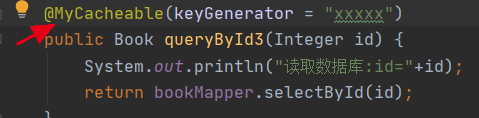
- 设置自定义的key生成器
@MyCacheable(keyGenerator = "myKeyGenerator2") public Book queryById3(Integer id) { System.out.println("读取数据库:id="+id); return bookMapper.selectById(id); }- 1
- 2
- 3
- 4
- 5
如何自定义KeyGenerator
@Bean("myKeyGenerator2") public KeyGenerator keyGenerator2(){ KeyGenerator keyGenerator=new KeyGenerator(){ @Override public Object generate(Object target, Method method, Object... params) { // System.out.println(target);//实现类本身 // System.out.println(method.getName());//调用的方法名 // System.out.println(params); //形参 String key=target.getClass().getName()+"["+ Arrays.asList(params).toString() +"]"; return key; } }; return keyGenerator; }- 1
- 2
- 3
- 4
- 5
- 6
- 7
- 8
- 9
- 10
- 11
- 12
- 13
- 14
- 15
- 16
- 启动服务器测试缓存,发起多次请求,可以看到只有第一次请求落入到数据库,而其它请求则访问redis缓存。


-
相关阅读:
【c语言】迷宫游戏
Docker基础知识
CEF | CEF浏览器客户端能扩展:实现下载列表
MongoDB从入门到实战之MongoDB工作常用操作命令
02矩阵01 —— 基本矩阵 : 对角矩阵、方幂、数量矩阵、转置矩阵、对称矩阵、逆矩阵、奇异矩阵、三角矩阵
AJAX【AJAX实现省市联动 、AJAX跨域问题、AJAX实现搜索联想 自动补全、 附录:HTTP状态信息】
uniapp 基础
JavaNIO——多线程以及IO模型(笔记)
HWI的安装及使用
在android中使用java反射机制的利弊分别是那些?与导入包名类名,androidmk追加对应jar包相比,二者差异是什么?
- 原文地址:https://blog.csdn.net/u011628753/article/details/126788000