-
Elasticsearch script在reindex与script_fields script get当中的应用
本篇博客主要介绍了Elasticsearch script在reindex与script_fields script get当中的应用,主要是通过原有的字段拼接得到想要的新字段,同时在使用reindex时,指定dest_index的"_d"的值。
1、Elasticsearch script在_reindex中的应用
POST _reindex?wait_for_completion=false { "source": { "index": "source_index", "query": { "bool": { "must": [ { "range": { "snapshot_time": { "gte": "2022-06-01", "lte": "2022-07-01" } } } ] } } }, "dest": { "index": "dest_index", "op_type": "index" }, "script": { "inline": """ ctx._source.bvid_page_time=ctx._source.bvid+'_'+ctx._source.page+'_'+ctx._source.snapshot_time; ctx._id=ctx._source.bvid_page_time; ctx._source.id=0 """, "lang": "painless" }, "conflicts": "proceed" }- 1
- 2
- 3
- 4
- 5
- 6
- 7
- 8
- 9
- 10
- 11
- 12
- 13
- 14
- 15
- 16
- 17
- 18
- 19
- 20
- 21
- 22
- 23
- 24
- 25
- 26
- 27
- 28
- 29
- 30
- 31
- 32
- 33
script中参数解释
ctx._source.bvid_page_time=ctx._source.bvid+'_'+ctx._source.page+'_'+ctx._source.snapshot_time 表示在迁移时,在source_index中增加字段"bvid_page_time",它是由source_index中的"bvid" "page" "snapshot_time"三个字段构成的,并在dest_index中也会有“bvid_page_time”字段。 ctx._id=ctx._source.bvid_page_time 表示将dest_index中的"_id"在迁移时指定为source_index中的"bvid_page_time"构成,而不是默认 ctx._source.id=0 表示在迁移过程中将source_index中的字段"id"设置为0,即dest_index中的"id"变为0,而source_index中的"id"不变- 1
- 2
- 3
- 4
- 5
- 6
- 7
- 8
例子如下:
注意,这里使用的语句就是上面的"POST _reindex"

图一 source_index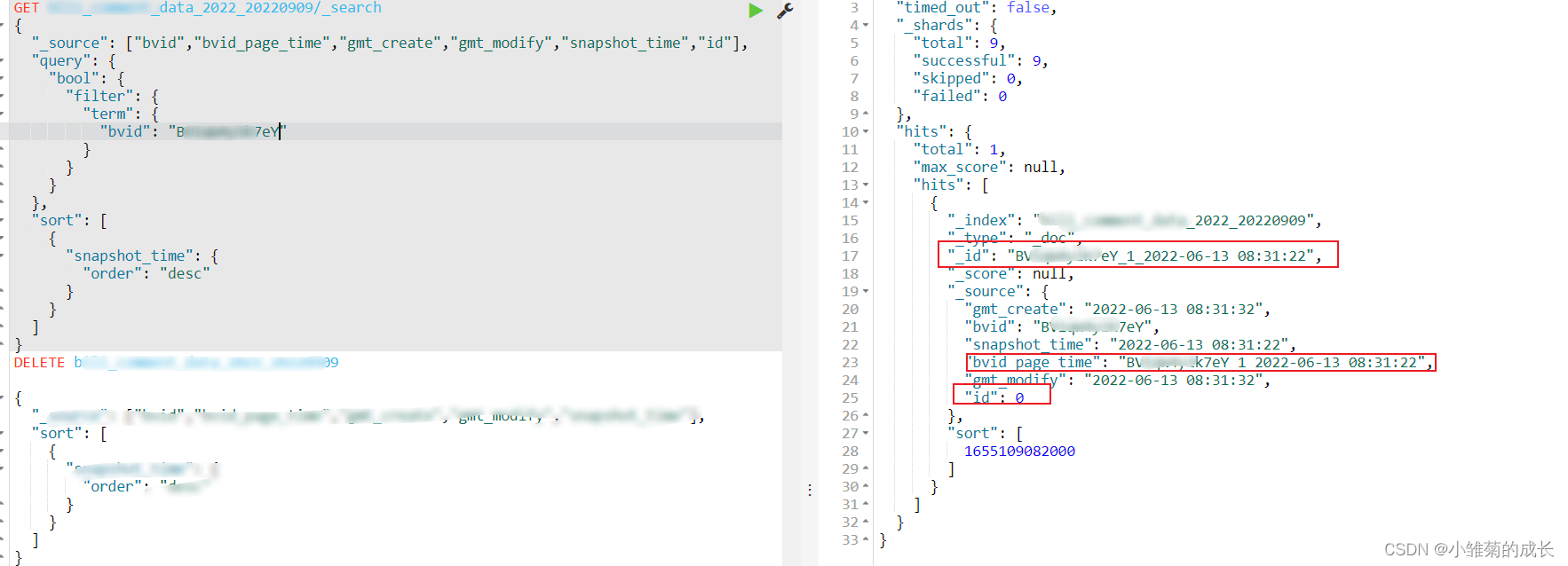
图二 dest_index
2、Elasticsearch script_fields script在get当中的应用
GET bili_comment_data_20220520/_search { "query": { "bool": { "must": [ { "term": { "bvid": { "value": "BV1******7Me" } } }, { "term": { "id": { "value": "3045078" } } } ] } }, "size": 12, "script_fields": { "bvid_page_time": { "script": { "lang": "painless", "source": "doc['bvid'].value+'_'+doc['page'].value+'_'+doc.snapshot_time.date.year+doc.snapshot_time.date.monthOfYear+doc.snapshot_time.date.dayOfMonth+doc.snapshot_time.date.hourOfDay+doc.snapshot_time.date.minuteOfHour+doc.snapshot_time.date.secondOfMinute" } } } }- 1
- 2
- 3
- 4
- 5
- 6
- 7
- 8
- 9
- 10
- 11
- 12
- 13
- 14
- 15
- 16
- 17
- 18
- 19
- 20
- 21
- 22
- 23
- 24
- 25
- 26
- 27
- 28
- 29
- 30
- 31
- 32
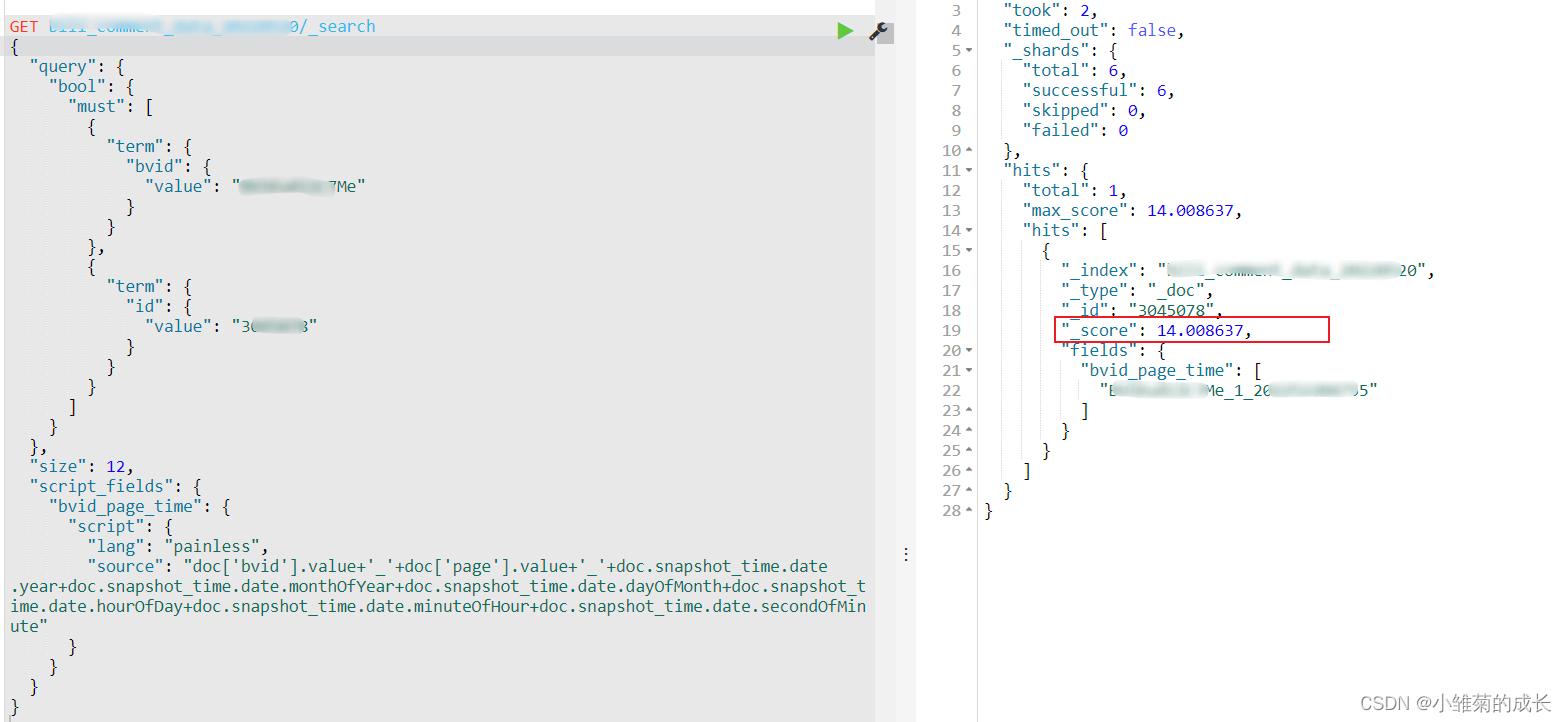
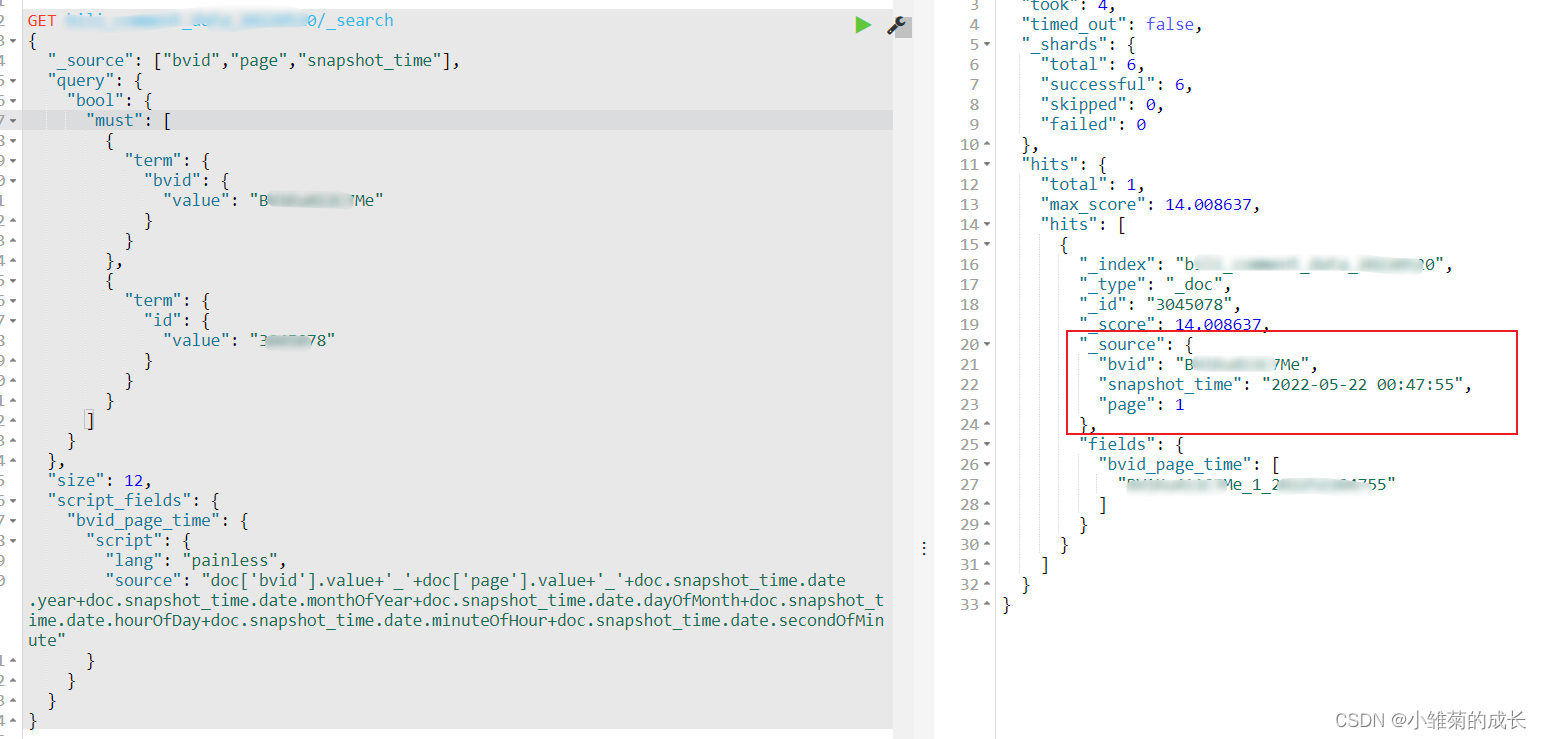
参数说明
表示查询是构建新的字段"bvid_page_time"返回,且仅返回构建的字段;
列子如下:
-
相关阅读:
SpringSecurity (六) --------- 杂项
Linux —— 文件操作
【C++】map&set利用红黑树进行简单封装
AI为锚,创新为帆,谱写数实融合发展新篇章
攻防世界-pwnCTFM-Off_By_one漏洞与Tcachebin绕过
装饰模式~
1.2 HTML5
【uni-app】—3.新建一个uni-app项目
有了 C 语言的基础,怎么学 Java ?
VUE封装-自定义权限控制指令
- 原文地址:https://blog.csdn.net/qq_43224174/article/details/126789578