-
mits6.081_lab1
lab1
环境配置
1.安装依赖
sudo apt-get install git build-essential gdb-multiarch qemu-system-misc gcc-riscv64-linux-gnu binutils-riscv64-linux-gnu- 1
本系统采用的是Vmvare + ubuntu20.04
2.克隆源码
git clone可能会有问题
直接上baidu网盘链接 自己copy到ubuntu中去
链接:https://pan.baidu.com/s/1jOxR5WIGsBzoJaxkP-m1Cg
提取码:r88b
–来自百度网盘超级会员V4的分享源码目录解析

kernel:内核源码,system call的实现
user:系统自带工具源码 shell、echo、cat等工具的实现
grade-lab-util:python实现的代码测试工具
Makefile:make配置文件
git分支说明

课程笔记
实验
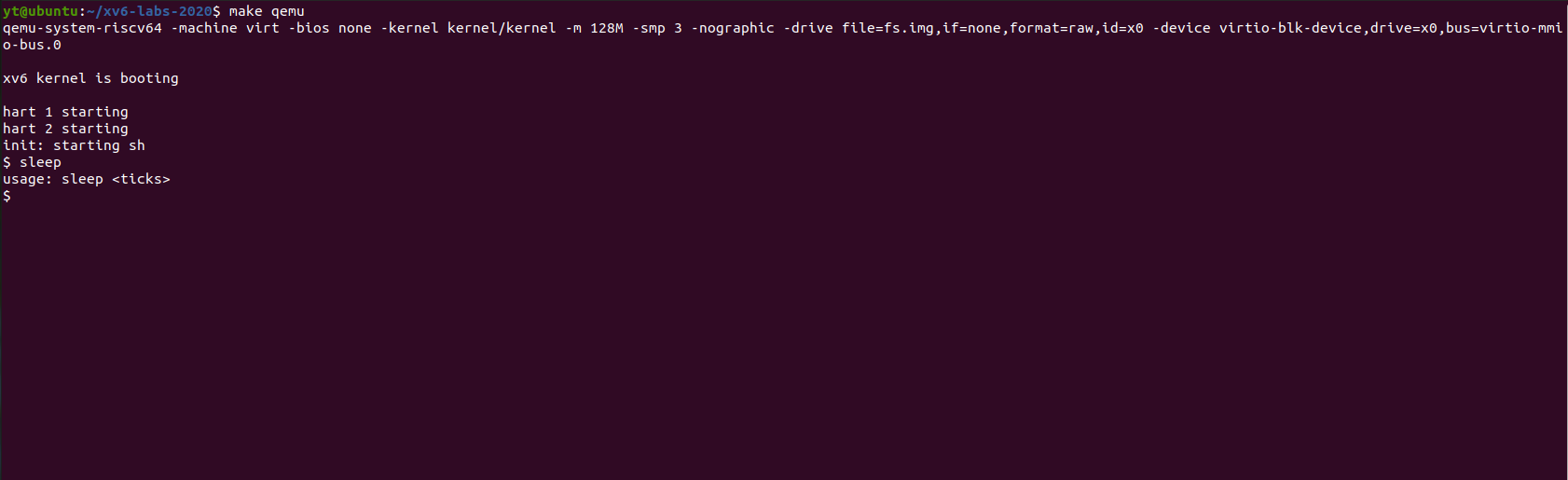
sleep实验
提供练手的实验 主要了解配置过程 其他的shell命令添加步骤同理
在写完
sleep.c代码后,需要在Makefile文件中的UPROGS字段中添加$U/_[xxx]\,然后才能使用./grade-lab-util进行测试。
代码
#include "kernel/types.h" #include "kernel/stat.h" #include "user/user.h" int main(int argc, char **argv) { if (argc < 2) { printf("usage: sleep\n" ); } sleep(atoi(argv[1])); exit(0); }- 1
- 2
- 3
- 4
- 5
- 6
- 7
- 8
- 9
- 10
- 11
测试结果

运行结果
ping pong实验
管道练手题
// pingpong.c #include "kernel/types.h" #include "kernel/stat.h" #include "user/user.h" int main(int argc, char **argv) { // 创建管道会得到一个长度为 2 的 int 数组 // 其中 0 为用于从管道读取数据的文件描述符,1 为用于向管道写入数据的文件描述符 int pp2c[2], pc2p[2]; pipe(pp2c); // 创建用于 父进程 -> 子进程 的管道 parent->child pipe(pc2p); // 创建用于 子进程 -> 父进程 的管道 if(fork() != 0) { // parent process write(pp2c[1], "!", 1); // 1. 父进程首先向发出该字节 char buf; read(pc2p[0], &buf, 1); // 2. 父进程发送完成后,开始等待子进程的回复 printf("%d: received pong\n", getpid()); // 5. 子进程收到数据,read 返回,输出 pong wait(0); } else { // child process fork()返回0时 启动子进程 char buf; read(pp2c[0], &buf, 1); // 3. 子进程读取管道,收到父进程发送的字节数据 printf("%d: received ping\n", getpid()); write(pc2p[1], &buf, 1); // 4. 子进程通过 子->父 管道,将字节送回父进程 } exit(0); }- 1
- 2
- 3
- 4
- 5
- 6
- 7
- 8
- 9
- 10
- 11
- 12
- 13
- 14
- 15
- 16
- 17
- 18
- 19
- 20
- 21
- 22
- 23
- 24
- 25
- 26
运行结果
父发 子读 子输出ping 子发 父读 父输出pong

primes实验
每一个 stage 以当前数集中最小的数字作为素数输出(每个 stage 中数集中最小的数一定是一个素数,因为它没有被任何比它小的数筛掉),并筛掉输入中该素数的所有倍数(必然不是素数),然后将剩下的数传递给下一 stage。最后会形成一条子进程链,而由于每一个进程都调用了
wait(0);等待其子进程,所以会在最末端也就是最后一个 stage 完成的时候,沿着链条向上依次退出各个进程。// primes.c #include "kernel/types.h" #include "kernel/stat.h" #include "user/user.h" // 一次 sieve 调用是一个筛子阶段,会从 pleft 获取并输出一个素数 p,筛除 p 的所有倍数 // 同时创建下一 stage 的进程以及相应输入管道 pright,然后将剩下的数传到下一 stage 处理 void sieve(int pleft[2]) { // pleft 是来自该 stage 左端进程的输入管道 int p; read(pleft[0], &p, sizeof(p)); // 读第一个数,必然是素数 if(p == -1) { // 如果是哨兵 -1,则代表所有数字处理完毕,退出程序 exit(0); } printf("prime %d\n", p); int pright[2]; pipe(pright); // 创建用于输出到下一 stage 的进程的输出管道 pright if(fork() == 0) { // 子进程 (下一个 stage) close(pright[1]); // 子进程只需要对输入管道 pright 进行读,而不需要写,所以关掉子进程的输入管道写文件描述符,降低进程打开的文件描述符数量 close(pleft[0]); // 这里的 pleft 是*父进程*的输入管道,子进程用不到,关掉 sieve(pright); // 子进程以父进程的输出管道作为输入,开始进行下一个 stage 的处理。 } else { // 父进程 (当前 stage) close(pright[0]); // 同上,父进程只需要对子进程的输入管道进行写而不需要读,所以关掉父进程的读文件描述符 int buf; while(read(pleft[0], &buf, sizeof(buf)) && buf != -1) { // 从左端的进程读入数字 if(buf % p != 0) { // 筛掉能被该进程筛掉的数字 write(pright[1], &buf, sizeof(buf)); // 将剩余的数字写到右端进程 } } buf = -1; write(pright[1], &buf, sizeof(buf)); // 补写最后的 -1,标示输入完成。 wait(0); // 等待该进程的子进程完成,也就是下一 stage exit(0); } } int main(int argc, char **argv) { // 主进程 int input_pipe[2]; pipe(input_pipe); // 准备好输入管道,输入 2 到 35 之间的所有整数。 if(fork() == 0) { // 第一个 stage 的子进程 close(input_pipe[1]); // 子进程只需要读输入管道,而不需要写,关掉子进程的管道写文件描述符 sieve(input_pipe); exit(0); } else { // 主进程 close(input_pipe[0]); // 同上 int i; for(i=2;i<=35;i++){ // 生成 [2, 35],输入管道链最左端 write(input_pipe[1], &i, sizeof(i)); } i = -1; write(input_pipe[1], &i, sizeof(i)); // 末尾输入 -1,用于标识输入完成 } wait(0); // 等待第一个 stage 完成。注意:这里无法等待子进程的子进程,只能等待直接子进程,无法等待间接子进程。在 sieve() 中会为每个 stage 再各自执行 wait(0),形成等待链。 exit(0); }- 1
- 2
- 3
- 4
- 5
- 6
- 7
- 8
- 9
- 10
- 11
- 12
- 13
- 14
- 15
- 16
- 17
- 18
- 19
- 20
- 21
- 22
- 23
- 24
- 25
- 26
- 27
- 28
- 29
- 30
- 31
- 32
- 33
- 34
- 35
- 36
- 37
- 38
- 39
- 40
- 41
- 42
- 43
- 44
- 45
- 46
- 47
- 48
- 49
- 50
- 51
- 52
- 53
- 54
- 55
- 56
- 57
- 58
- 59
- 60
- 61
- 62
- 63
运行结果

find实验
基本原理与ls相同,基本上可以从ls.c改造
// find.c #include "kernel/types.h" #include "kernel/stat.h" #include "user/user.h" #include "kernel/fs.h" void find(char *path, char *target) { char buf[512], *p; int fd; struct dirent de; struct stat st; if((fd = open(path, 0)) < 0){ fprintf(2, "find: cannot open %s\n", path); return; } if(fstat(fd, &st) < 0){ fprintf(2, "find: cannot stat %s\n", path); close(fd); return; } switch(st.type){ case T_FILE: // 如果文件名结尾匹配 `/target`,则视为匹配 if(strcmp(path+strlen(path)-strlen(target), target) == 0) { printf("%s\n", path); } break; case T_DIR: if(strlen(path) + 1 + DIRSIZ + 1 > sizeof buf){ printf("find: path too long\n"); break; } strcpy(buf, path); p = buf+strlen(buf); *p++ = '/'; while(read(fd, &de, sizeof(de)) == sizeof(de)){ if(de.inum == 0) continue; memmove(p, de.name, DIRSIZ); p[DIRSIZ] = 0; if(stat(buf, &st) < 0){ printf("find: cannot stat %s\n", buf); continue; } // 不要进入 `.` 和 `..` if(strcmp(buf+strlen(buf)-2, "/.") != 0 && strcmp(buf+strlen(buf)-3, "/..") != 0) { find(buf, target); // 递归查找 } } break; } close(fd); } int main(int argc, char *argv[]) { if(argc < 3){ exit(0); } char target[512]; target[0] = '/'; // 为查找的文件名添加 / 在开头 strcpy(target+1, argv[2]); find(argv[1], target); exit(0); }- 1
- 2
- 3
- 4
- 5
- 6
- 7
- 8
- 9
- 10
- 11
- 12
- 13
- 14
- 15
- 16
- 17
- 18
- 19
- 20
- 21
- 22
- 23
- 24
- 25
- 26
- 27
- 28
- 29
- 30
- 31
- 32
- 33
- 34
- 35
- 36
- 37
- 38
- 39
- 40
- 41
- 42
- 43
- 44
- 45
- 46
- 47
- 48
- 49
- 50
- 51
- 52
- 53
- 54
- 55
- 56
- 57
- 58
- 59
- 60
- 61
- 62
- 63
- 64
- 65
- 66
- 67
- 68
运行结果

xargs实验
编写 xargs 工具,从标准输入读入数据,将每一行当作参数,加入到传给 xargs 的程序名和参数后面作为额外参数,然后执行。
// xargs.c #include "kernel/types.h" #include "kernel/stat.h" #include "user/user.h" #include "kernel/fs.h" // 带参数列表,执行某个程序 void run(char *program, char **args) { if(fork() == 0) { // child exec exec(program, args); exit(0); } return; // parent return } int main(int argc, char *argv[]){ char buf[2048]; // 读入时使用的内存池 char *p = buf, *last_p = buf; // 当前参数的结束、开始指针 char *argsbuf[128]; // 全部参数列表,字符串指针数组,包含 argv 传进来的参数和 stdin 读入的参数 char **args = argsbuf; // 指向 argsbuf 中第一个从 stdin 读入的参数 for(int i=1;i<argc;i++) { // 将 argv 提供的参数加入到最终的参数列表中 *args = argv[i]; args++; } char **pa = args; // 开始读入参数 while(read(0, p, 1) != 0) { if(*p == ' ' || *p == '\n') { // 读入一个参数完成(以空格分隔,如 `echo hello world`,则 hello 和 world 各为一个参数) *p = '\0'; // 将空格替换为 \0 分割开各个参数,这样可以直接使用内存池中的字符串作为参数字符串 // 而不用额外开辟空间 *(pa++) = last_p; last_p = p+1; if(*p == '\n') { // 读入一行完成 *pa = 0; // 参数列表末尾用 null 标识列表结束 run(argv[1], argsbuf); // 执行最后一行指令 pa = args; // 重置读入参数指针,准备读入下一行 } } p++; } if(pa != args) { // 如果最后一行不是空行 // 收尾最后一个参数 *p = '\0'; *(pa++) = last_p; // 收尾最后一行 *pa = 0; // 参数列表末尾用 null 标识列表结束 // 执行最后一行指令 run(argv[1], argsbuf); } while(wait(0) != -1) {}; // 循环等待所有子进程完成,每一次 wait(0) 等待一个 exit(0); }- 1
- 2
- 3
- 4
- 5
- 6
- 7
- 8
- 9
- 10
- 11
- 12
- 13
- 14
- 15
- 16
- 17
- 18
- 19
- 20
- 21
- 22
- 23
- 24
- 25
- 26
- 27
- 28
- 29
- 30
- 31
- 32
- 33
- 34
- 35
- 36
- 37
- 38
- 39
- 40
- 41
- 42
- 43
- 44
- 45
- 46
- 47
- 48
- 49
- 50
- 51
- 52
- 53
- 54
- 55
运行结果
最后一行指令
pa = args; // 重置读入参数指针,准备读入下一行
}
}
p++;
}
if(pa != args) { // 如果最后一行不是空行
// 收尾最后一个参数
*p = ‘\0’;
*(pa++) = last_p;
// 收尾最后一行
*pa = 0; // 参数列表末尾用 null 标识列表结束
// 执行最后一行指令
run(argv[1], argsbuf);
}
while(wait(0) != -1) {}; // 循环等待所有子进程完成,每一次 wait(0) 等待一个
exit(0);
}运行结果 - 1
- 2
- 3
- 4
-
相关阅读:
openCV初级实践项目:银行卡卡号识别
密码学与网络安全:量子计算的威胁与解决方案
ASP.NET Core 6.0 基于模型验证的数据验证
iOS NSKeyedUnarchiver归档和读取
ArcGIS 10.2 自定义添加工具箱后工具箱显示XML错误
Java的三种技术架构是什么?
Java------Stream流式编程高级API【mapTo、Collectors】(五)
spider 网页爬虫中的 AWS 实例数据获取问题及解决方案
[多媒体] 多媒体封装格式 —— MP4 vs MKV
vue3基础语法
- 原文地址:https://blog.csdn.net/qq_41945053/article/details/126759358
