-
03 | 更换ubuntu 的内核
1 查看磁盘的使用
1.1 执行:
fdisk -lroot@prd-devel-00:~# fdisk -l Disk /dev/xvda: 80 GiB, 85899345920 bytes, 167772160 sectors Units: sectors of 1 * 512 = 512 bytes Sector size (logical/physical): 512 bytes / 512 bytes I/O size (minimum/optimal): 512 bytes / 512 bytes Disklabel type: gpt Disk identifier: 220A9CAE-DBE1-4257-B914-ED96A7341E70 Device Start End Sectors Size Type /dev/xvda1 2048 4095 2048 1M BIOS boot /dev/xvda2 4096 167770111 167766016 80G Linux filesystem Disk /dev/xvdb: 50 GiB, 53687091200 bytes, 104857600 sectors Units: sectors of 1 * 512 = 512 bytes Sector size (logical/physical): 512 bytes / 512 bytes I/O size (minimum/optimal): 512 bytes / 512 bytes Disklabel type: dos Disk identifier: 0xb5162423 Device Boot Start End Sectors Size Id Type /dev/xvdb1 2048 104857599 104855552 50G 83 Linux Disk /dev/xvdc: 80 GiB, 85899345920 bytes, 167772160 sectors Units: sectors of 1 * 512 = 512 bytes Sector size (logical/physical): 512 bytes / 512 bytes I/O size (minimum/optimal): 512 bytes / 512 bytes Disklabel type: dos Disk identifier: 0x30a2dd50 Device Boot Start End Sectors Size Id Type /dev/xvdc1 2048 1953791 1951744 953M 83 Linux /dev/xvdc2 1953792 167770111 165816320 79.1G 83 Linux- 1
- 2
- 3
- 4
- 5
- 6
- 7
- 8
- 9
- 10
- 11
- 12
- 13
- 14
- 15
- 16
- 17
- 18
- 19
- 20
- 21
- 22
- 23
- 24
- 25
- 26
- 27
- 28
- 29
- 30
- 31
- 32
1.2 查看是否有挂载:df -h
root@prd-devel-00:~# df -h Filesystem Size Used Avail Use% Mounted on udev 7.8G 0 7.8G 0% /dev tmpfs 1.6G 772K 1.6G 1% /run /dev/xvda2 79G 35G 41G 46% / tmpfs 7.9G 0 7.9G 0% /dev/shm tmpfs 5.0M 0 5.0M 0% /run/lock tmpfs 7.9G 0 7.9G 0% /sys/fs/cgroup /dev/xvdb1 49G 355M 47G 1% /data tmpfs 1.6G 0 1.6G 0% /run/user/0- 1
- 2
- 3
- 4
- 5
- 6
- 7
- 8
- 9
- 10
1.3 查看内核版本
cat /proc/version- 1
版本信息:
Linux version 4.15.0-194-generic (buildd@lcy02-amd64-052) (gcc version7.5.0 (Ubuntu 7.5.0-3ubuntu1~18.04)) #205-Ubuntu SMP Fri Sep 16 19:49:27 UTC 2022- 1
2 安装linux-image-4.15.0.112-generic
2.1 第一次安装
apt-get install linux-image-4.15.0.112-generic- 1
提示:
E: dpkg was interrupted, you must manually run ‘dpkg --configure -a’ to correct the problem.通过执行
dpkg --configure -a- 1
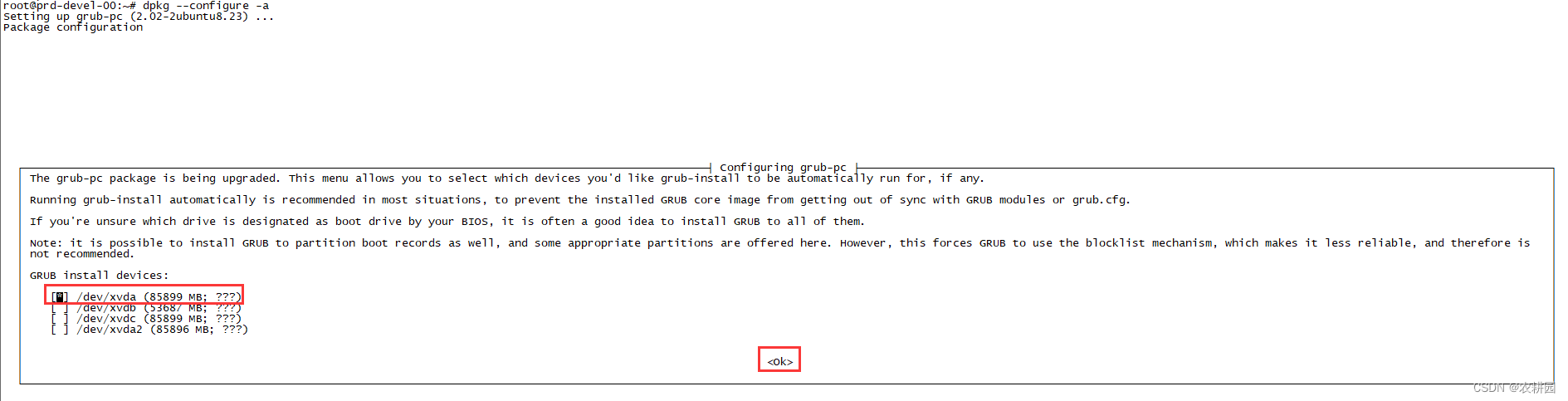
根据1中磁盘使用情况,选中【xvda】,点击【OK】Installing for i386-pc platform. Installation finished. No error reported. Sourcing file `/etc/default/grub' Generating grub configuration file ... Found linux image: /boot/vmlinuz-4.15.0-144-generic Found initrd image: /boot/initrd.img-4.15.0-144-generic Found linux image: /boot/vmlinuz-4.15.0-143-generic Found initrd image: /boot/initrd.img-4.15.0-143-generic Found linux image: /boot/vmlinuz-4.15.0-142-generic Found initrd image: /boot/initrd.img-4.15.0-142-generic Found linux image: /boot/vmlinuz-4.15.0-112-generic Found Ubuntu 16.04.7 LTS (16.04) on /dev/xvdc2 done Processing triggers for linux-image-4.15.0-112-generic (4.15.0-112.113) ... /etc/kernel/postinst.d/initramfs-tools: update-initramfs: Generating /boot/initrd.img-4.15.0-112-generic /etc/kernel/postinst.d/x-grub-legacy-ec2: Searching for GRUB installation directory ... found: /boot/grub Searching for default file ... found: /boot/grub/default Testing for an existing GRUB menu.lst file ... found: /boot/grub/menu.lst Searching for splash image ... none found, skipping ... Found kernel: /boot/vmlinuz-4.15.0-144-generic Found kernel: /boot/vmlinuz-4.15.0-143-generic Found kernel: /boot/vmlinuz-4.15.0-142-generic dpkg-query: error: package 'grub-legacy-ec2' is not installed run-parts: /etc/kernel/postinst.d/x-grub-legacy-ec2 exited with return code 10 dpkg: error processing package linux-image-4.15.0-112-generic (--configure): installed linux-image-4.15.0-112-generic package post-installation script subprocess returned error exit status 1 Processing triggers for mime-support (3.60ubuntu1) ... Processing triggers for initramfs-tools (0.130ubuntu3.13) ... update-initramfs: Generating /boot/initrd.img-4.15.0-144-generic Errors were encountered while processing: linux-image-4.15.0-112-generic root@prd-devel-00:~#- 1
- 2
- 3
- 4
- 5
- 6
- 7
- 8
- 9
- 10
- 11
- 12
- 13
- 14
- 15
- 16
- 17
- 18
- 19
- 20
- 21
- 22
- 23
- 24
- 25
- 26
- 27
- 28
- 29
- 30
- 31
- 32
- 33
- 34
2.2 第二次安装
执行:
apt-get install linux-image-4.15.0.112-generic- 1
2.3 /etc/default/grub(没有修改前)
root@prd-devel-00:~# cat /etc/default/grub # If you change this file, run 'update-grub' afterwards to update # /boot/grub/grub.cfg. # For full documentation of the options in this file, see: # info -f grub -n 'Simple configuration' GRUB_DEFAULT=0 GRUB_TIMEOUT_STYLE=hidden GRUB_TIMEOUT=0 GRUB_DISTRIBUTOR=`lsb_release -i -s 2> /dev/null || echo Debian` GRUB_CMDLINE_LINUX_DEFAULT="maybe-ubiquity" GRUB_CMDLINE_LINUX="" # Uncomment to enable BadRAM filtering, modify to suit your needs # This works with Linux (no patch required) and with any kernel that obtains # the memory map information from GRUB (GNU Mach, kernel of FreeBSD ...) #GRUB_BADRAM="0x01234567,0xfefefefe,0x89abcdef,0xefefefef" # Uncomment to disable graphical terminal (grub-pc only) #GRUB_TERMINAL=console # The resolution used on graphical terminal # note that you can use only modes which your graphic card supports via VBE # you can see them in real GRUB with the command `vbeinfo' #GRUB_GFXMODE=640x480 # Uncomment if you don't want GRUB to pass "root=UUID=xxx" parameter to Linux #GRUB_DISABLE_LINUX_UUID=true # Uncomment to disable generation of recovery mode menu entries #GRUB_DISABLE_RECOVERY="true" # Uncomment to get a beep at grub start #GRUB_INIT_TUNE="480 440 1"- 1
- 2
- 3
- 4
- 5
- 6
- 7
- 8
- 9
- 10
- 11
- 12
- 13
- 14
- 15
- 16
- 17
- 18
- 19
- 20
- 21
- 22
- 23
- 24
- 25
- 26
- 27
- 28
- 29
- 30
- 31
- 32
- 33
- 34
2.4 修改/etc/default/grub
2.4.1 /etc/default/grub(第一次修改)
注意:#把GRUB_DEFAULT=0 修改成Ubuntu, with Linux 4.15.0-112-generic
root@prd-devel-00:~# vim /etc/default/grub # If you change this file, run 'update-grub' afterwards to update # /boot/grub/grub.cfg. # For full documentation of the options in this file, see: # info -f grub -n 'Simple configuration' #GRUB_DEFAULT=0 GRUB_DEFAULT="Ubuntu, with Linux 4.15.0-112-generic" GRUB_TIMEOUT_STYLE=hidden GRUB_TIMEOUT=0 GRUB_DISTRIBUTOR=`lsb_release -i -s 2> /dev/null || echo Debian` GRUB_CMDLINE_LINUX_DEFAULT="maybe-ubiquity" GRUB_CMDLINE_LINUX="" # Uncomment to enable BadRAM filtering, modify to suit your needs # This works with Linux (no patch required) and with any kernel that obtains # the memory map information from GRUB (GNU Mach, kernel of FreeBSD ...) #GRUB_BADRAM="0x01234567,0xfefefefe,0x89abcdef,0xefefefef" # Uncomment to disable graphical terminal (grub-pc only) #GRUB_TERMINAL=console # The resolution used on graphical terminal # note that you can use only modes which your graphic card supports via VBE # you can see them in real GRUB with the command `vbeinfo' #GRUB_GFXMODE=640x480 # Uncomment if you don't want GRUB to pass "root=UUID=xxx" parameter to Linux #GRUB_DISABLE_LINUX_UUID=true # Uncomment to disable generation of recovery mode menu entries #GRUB_DISABLE_RECOVERY="true" # Uncomment to get a beep at grub start #GRUB_INIT_TUNE="480 440 1" ~ "/etc/default/grub" 34L, 1265C written root@prd-devel-00:~#- 1
- 2
- 3
- 4
- 5
- 6
- 7
- 8
- 9
- 10
- 11
- 12
- 13
- 14
- 15
- 16
- 17
- 18
- 19
- 20
- 21
- 22
- 23
- 24
- 25
- 26
- 27
- 28
- 29
- 30
- 31
- 32
- 33
- 34
- 35
- 36
- 37
- 38
2.4.2 执行sudo update-grub
执行:
sudo update-grubroot@prd-devel-00:~# sudo update-grub Sourcing file `/etc/default/grub' Generating grub configuration file ... Found linux image: /boot/vmlinuz-4.15.0-144-generic Found initrd image: /boot/initrd.img-4.15.0-144-generic Found linux image: /boot/vmlinuz-4.15.0-143-generic Found initrd image: /boot/initrd.img-4.15.0-143-generic Found linux image: /boot/vmlinuz-4.15.0-142-generic Found initrd image: /boot/initrd.img-4.15.0-142-generic Found linux image: /boot/vmlinuz-4.15.0-112-generic Found initrd image: /boot/initrd.img-4.15.0-112-generic Warning: Please don't use old title `Ubuntu, with Linux 4.15.0-112-generic' for GRUB_DEFAULT, use `Advanced options for Ubuntu>Ubuntu, with Linux 4.15.0-112-generic' (for versions before 2.00) or `gnulinux-advanced-38face64-c681-40da-bd85-89e309309888>gnulinux-4.15.0-112-generic-advanced-38face64-c681-40da-bd85-89e309309888' (for 2.00 or later) Found Ubuntu 16.04.7 LTS (16.04) on /dev/xvdc2- 1
- 2
- 3
- 4
- 5
- 6
- 7
- 8
- 9
- 10
- 11
- 12
- 13
2.4.3 /etc/default/grub(第二次修改)
root@prd-devel-00:~# vim /etc/default/grub # If you change this file, run 'update-grub' afterwards to update # /boot/grub/grub.cfg. # For full documentation of the options in this file, see: # info -f grub -n 'Simple configuration' #GRUB_DEFAULT=0 GRUB_DEFAULT='gnulinux-advanced-38face64-c681-40da-bd85-89e309309888>gnulinux-4.15.0-112-generic-advanced-38face64-c681-40da-bd85-89e309309888' GRUB_TIMEOUT_STYLE=hidden GRUB_TIMEOUT=0 GRUB_DISTRIBUTOR=`lsb_release -i -s 2> /dev/null || echo Debian` GRUB_CMDLINE_LINUX_DEFAULT="maybe-ubiquity" GRUB_CMDLINE_LINUX="" # Uncomment to enable BadRAM filtering, modify to suit your needs # This works with Linux (no patch required) and with any kernel that obtains # the memory map information from GRUB (GNU Mach, kernel of FreeBSD ...) #GRUB_BADRAM="0x01234567,0xfefefefe,0x89abcdef,0xefefefef" # Uncomment to disable graphical terminal (grub-pc only) #GRUB_TERMINAL=console # The resolution used on graphical terminal # note that you can use only modes which your graphic card supports via VBE # you can see them in real GRUB with the command `vbeinfo' #GRUB_GFXMODE=640x480 # Uncomment if you don't want GRUB to pass "root=UUID=xxx" parameter to Linux #GRUB_DISABLE_LINUX_UUID=true # Uncomment to disable generation of recovery mode menu entries #GRUB_DISABLE_RECOVERY="true" # Uncomment to get a beep at grub start #GRUB_INIT_TUNE="480 440 1" "/etc/default/grub" 34L, 1356C written root@prd-devel-00:~#- 1
- 2
- 3
- 4
- 5
- 6
- 7
- 8
- 9
- 10
- 11
- 12
- 13
- 14
- 15
- 16
- 17
- 18
- 19
- 20
- 21
- 22
- 23
- 24
- 25
- 26
- 27
- 28
- 29
- 30
- 31
- 32
- 33
- 34
- 35
- 36
- 37
- 38
2.4.4 执行sudo update-grub
sudo update-grub- 1
2.5 重启服务reboot
3 验证
查看内核:
uname -r

注意:遇到内核没有更新过来,那就需要多重启几次。
4 安装过程中遇到问题
4.1 提示:E: Sub-process /usr/bin/dpkg returned an error code (1)

解决方法:cd /var/lib/dpkg/ sudo mv info/ info-bak sudo mkdir info sudo apt-get update sudo apt-get -f install sudo mv info/* info-bak/ sudo rm -rf info sudo mv info-bak info- 1
- 2
- 3
- 4
- 5
- 6
- 7
- 8
-
相关阅读:
js 什么时候必须使用[‘属性名‘] 的方式??
Java常见注解及其使用汇总
二十五、商城 - 运营商后台审核上下架-注解式事务配置(13)
R语言提交后台任务Rstudio\nohup
【2023】Redis服务器与客户端操作
C#的反射Reflection
湖仓一体电商项目(九):业务实现之编写写入DIM层业务代码
【Python】进阶(学习笔记)
外贸客户开发信怎么写?如何撰写营销邮件?
Harbor企业级私服Docker镜像仓库搭建及应用
- 原文地址:https://blog.csdn.net/u013916029/article/details/126753613
