-
【电路理论】ArcGIS pro运行Linkage map3.0
首先,找到工具并加载工具。
![[外链图片转存失败,源站可能有防盗链机制,建议将图片保存下来直接上传(img-rNDzDFUs-1662558807252)(C:/Users/Administrator/AppData/Roaming/Typora/typora-user-images/image-20220831163341715.png)]](https://1000bd.com/contentImg/2023/11/04/194549517.png)
![[外链图片转存失败,源站可能有防盗链机制,建议将图片保存下来直接上传(img-WoA9JWOW-1662558807253)(C:/Users/Administrator/AppData/Roaming/Typora/typora-user-images/image-20220831163355920.png)]](https://1000bd.com/contentImg/2023/11/04/194549514.png)
找到Linkage map
![[外链图片转存失败,源站可能有防盗链机制,建议将图片保存下来直接上传(img-XTHhjfGs-1662558807254)(C:/Users/Administrator/AppData/Roaming/Typora/typora-user-images/image-20220831163556452.png)]](https://1000bd.com/contentImg/2023/11/04/194549499.png)
找到放阻力面和源地的文件。(note:文件尽量放浅一些)
![[外链图片转存失败,源站可能有防盗链机制,建议将图片保存下来直接上传(img-7n2smrRN-1662558807254)(C:/Users/Administrator/AppData/Roaming/Typora/typora-user-images/image-20220831163705803.png)]](https://1000bd.com/contentImg/2023/11/04/194549512.png)
加载阻力值,加载源地(Core Area Feature Class的字段需要是整数,且>9999,而且每个图斑对于的数字都是唯一的。)
![[外链图片转存失败,源站可能有防盗链机制,建议将图片保存下来直接上传(img-373SuPjK-1662558807254)(C:/Users/Administrator/AppData/Roaming/Typora/typora-user-images/image-20220831163838823.png)]](https://1000bd.com/contentImg/2023/11/04/194549784.png)
开始运行,然后就成功了。问题汇总
出现问题1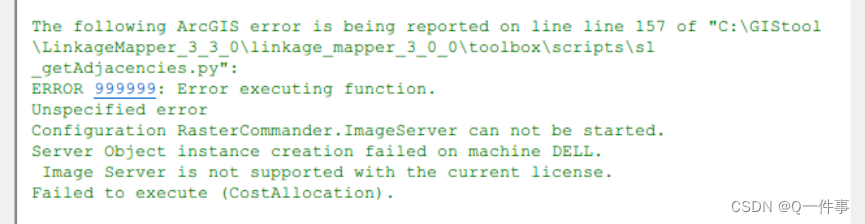
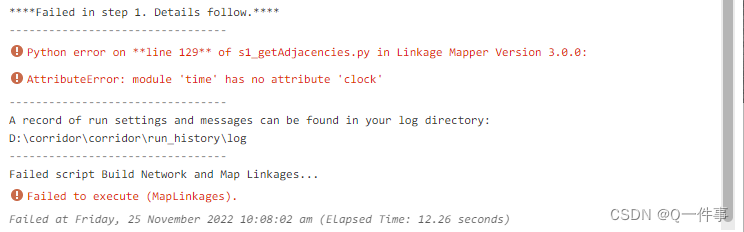
出现问题2
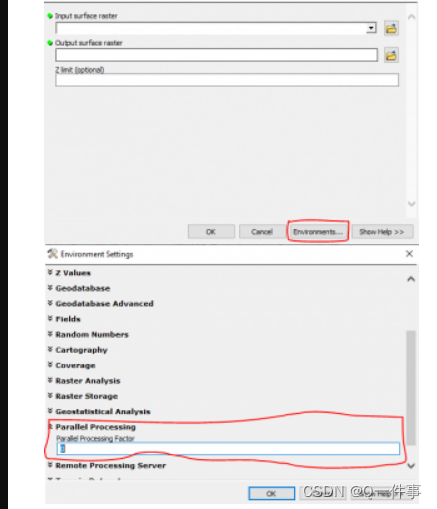
问题1和问题2的解决方案(并行处理设置为0)
本文用到的环境和资源
1、linkage_mapper3.0和对应Circuitscape
2、ArcGIS pro2.9试用版 -
相关阅读:
Linux权限管理(用户+文件)
【计算机组成原理】原码 反码 补码 移码
【C++】关联式容器-map和set
Toronto Research Chemicals 杀菌抗生素丨磷霉素-蔗糖醚二钠盐
Golang 程序漏洞检测利器 govulncheck(二):漏洞数据库详解
【案例】分页符el-pagination
vue2介绍(入门)
【frp实现内网穿透踩坑到成功篇】
可视化工具Datart踩(避)坑指南(4)——丢失的精度
【入门-07】GPIO
- 原文地址:https://blog.csdn.net/qq_45697428/article/details/126754737