-
nginx的配置
nginx的配置
文章目录
1. nginx作为web服务器时使用的配置:http{}段的配置参数
1.1
index file;默认主页面index index.php index.html;- 1
1.2 错误页面的状态码
-
error_page code […] [=code] URI | @name
根据http响应状态码来指明特用的错误页面,例如error_page 404 /404_customed.html -
[=code]:以指定的响应码进行响应,而不是默认的原来的响应,默认表示以新资源的响应码为其响应码,例如
error_page 404 =200 /404_customed.html
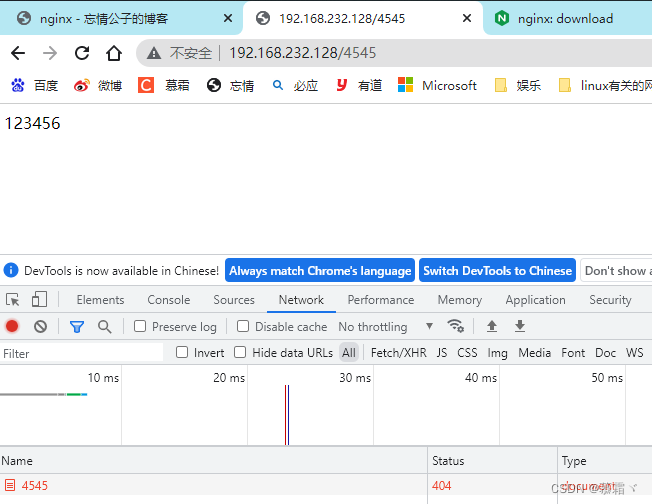
生成404界面: [root@node7 ~]# cd /usr/local/nginx/html/ [root@node7 html]# ls 50x.html index.html [root@node7 html]# echo "123456" > 404.html [root@node7 html]# cat 404.html 123456 [root@node7 html]# 配置文件: location / { root html; index index.html index.htm; } error_page 404 /404.html; [root@node7 conf]# nginx -s reload- 1
- 2
- 3
- 4
- 5
- 6
- 7
- 8
- 9
- 10
- 11
- 12
- 13
- 14
- 15
- 16
- 17
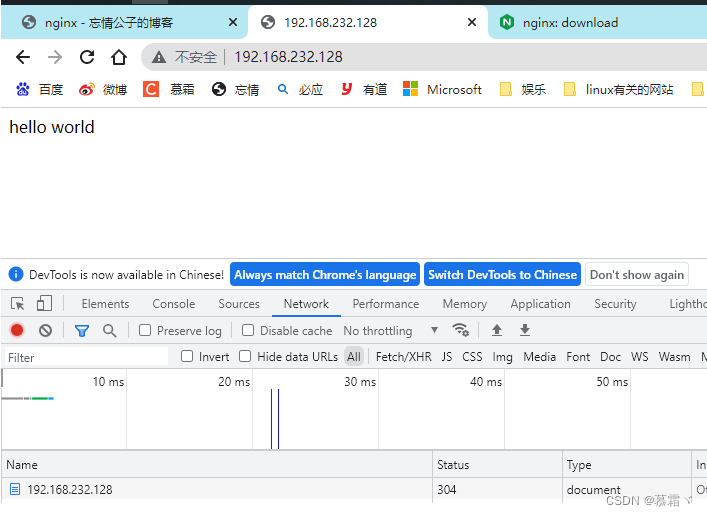
- 原网站:192.168.232.128
- 错误网站:192.168.232.128/4545
- 修改状态码之后
location / { root html; index index.html index.htm; } error_page 404 =200 /404.html;- 1
- 2
- 3
- 4
- 5
- 6
- 7

1.3
log_format定义日志格式log_format main '$remote_addr - $remote_user [$time_local] "$request" ' '$status $body_bytes_sent "$http_referer" ' '"$http_user_agent" "$http_x_forwarded_for"'; access_log logs/access.log main; //注意:此处可用变量为nginx各模块内建变量 [root@node7 ~]# cd /var/log/nginx/ [root@node7 nginx]# tail -1 access.log 192.168.232.1 - - [04/Sep/2022:17:27:10 +0800] "GET /4545 HTTP/1.1" 200 7 "-" "Mozilla/5.0 (Windows NT 10.0; Win64; x64) AppleWebKit/537.36 (KHTML, like Gecko) Chrome/106.0.0.0 Safari/537.36" [root@node7 nginx]# 192.168.232.1 从那个ip访问 - -本身 - 远程用户 [04/Sep/2022:17:27:10 +0800] 本地时间 GET 请求的方法 /4545 请求的资源 HTTP/1.1" http的协议和版本 200 状态码 7 发送主体的字节数 "-" "Mozilla/5.0 (Windows NT 10.0; Win64; x64) AppleWebKit/537.36 (KHTML, like Gecko) Chrome/106.0.0.0 Safari/537.36" 浏览器- 1
- 2
- 3
- 4
- 5
- 6
- 7
- 8
- 9
- 10
- 11
- 12
- 13
- 14
- 15
- 16
- 17
- 18
- 19
- 20
- 21
- 22
- 23
- 24
- 25
- 修改日志格式
[root@node7 nginx]# ls access.log error.log [root@node7 nginx]# pwd /var/log/nginx [root@node7 nginx]# cd /usr/local/nginx/logs/ [root@node7 logs]# ls error.log nginx.pid [root@node7 logs]# 配置文件: #log_format main '$remote_addr - $remote_user [$time_local] "$request" ' # '$status $body_bytes_sent "$http_referer" ' # '"$http_user_agent" "$http_x_forwarded_for"'; log_format mushuang '$remote_addr - [$time_local] "$request" ' '$status ' '"$http_user_agent" "$http_x_forwarded_for"'; access_log logs/access.log mushuang; [root@node7 conf]# nginx -s reload [root@node7 conf]# nginx -t nginx: the configuration file /usr/local/nginx/conf/nginx.conf syntax is ok nginx: configuration file /usr/local/nginx/conf/nginx.conf test is successful [root@node7 conf]# [root@node7 nginx]# cd /usr/local/nginx/logs/ [root@node7 logs]# ls error.log nginx.pid [root@node7 logs]# ls access.log error.log nginx.pid [root@node7 logs]# 浏览器访问之后查看日志: [root@node7 logs]# tail access.log 192.168.232.1 - [04/Sep/2022:17:47:41 +0800] "GET / HTTP/1.1" 304 "Mozilla/5.0 (Windows NT 10.0; Win64; x64) AppleWebKit/537.36 (KHTML, like Gecko) Chrome/106.0.0.0 Safari/537.36" "-" 192.168.232.1 - [04/Sep/2022:17:47:43 +0800] "GET / HTTP/1.1" 304 "Mozilla/5.0 (Windows NT 10.0; Win64; x64) AppleWebKit/537.36 (KHTML, like Gecko) Chrome/106.0.0.0 Safari/537.36" "-" 192.168.232.1 - [04/Sep/2022:17:47:50 +0800] "GET /4455 HTTP/1.1" 200 "Mozilla/5.0 (Windows NT 10.0; Win64; x64) AppleWebKit/537.36 (KHTML, like Gecko) Chrome/106.0.0.0 Safari/537.36" "-" [root@node7 logs]#- 1
- 2
- 3
- 4
- 5
- 6
- 7
- 8
- 9
- 10
- 11
- 12
- 13
- 14
- 15
- 16
- 17
- 18
- 19
- 20
- 21
- 22
- 23
- 24
- 25
- 26
- 27
- 28
- 29
- 30
- 31
- 32
- 33
- 34
- 35
- 36
- 37
- 38
- 39
- 40
2. 升级nginx
- 步骤

- 先下载源码包和echo模块
[root@node7 ~]# ls nginx-1.20.2 nginx-1.20.2.tar.gz nginx-1.22.0.tar.gz [root@node7 ~]# 拉取echo nginx代码 [root@node7 ~]# yum -y install git [root@node7 ~]# git clone https://github.com/openresty/echo-nginx-module.git Cloning into 'echo-nginx-module'... remote: Enumerating objects: 3047, done. remote: Counting objects: 100% (29/29), done. remote: Compressing objects: 100% (20/20), done. remote: Total 3047 (delta 11), reused 19 (delta 9), pack-reused 3018 Receiving objects: 100% (3047/3047), 1.17 MiB | 125.00 KiB/s, done. Resolving deltas: 100% (1635/1635), done. [root@node7 ~]# ls echo-nginx-module nginx-1.20.2.tar.gz nginx-1.20.2 nginx-1.22.0.tar.gz [root@node7 ~]# ls echo-nginx-module/ LICENSE config t valgrind.suppress README.markdown src util- 1
- 2
- 3
- 4
- 5
- 6
- 7
- 8
- 9
- 10
- 11
- 12
- 13
- 14
- 15
- 16
- 17
- 18
- 19
- 20
- 升级nginx
查看版本: [root@node7 ~]# nginx -V nginx version: nginx/1.20.2 built by gcc 8.5.0 20210514 (Red Hat 8.5.0-4) (GCC) built with OpenSSL 1.1.1k FIPS 25 Mar 2021 TLS SNI support enabled configure arguments: --prefix=/usr/local/nginx --user=nginx --group=nginx --with-debug --with-http_ssl_module --with-http_realip_module --with-http_image_filter_module --with-http_gunzip_module --with-http_gzip_static_module --with-http_stub_status_module --http-log-path=/var/log/nginx/access.log --error-log-path=/var/log/nginx/error.log [root@node7 ~]# 解压下载的nginx包,并且新增功能编译: [root@node7 ~]# ls echo-nginx-module nginx-1.20.2.tar.gz nginx-1.20.2 nginx-1.22.0.tar.gz [root@node7 ~]# tar xf nginx-1.22.0.tar.gz [root@node7 ~]# cd nginx-1.22.0 [root@node7 nginx-1.22.0]# ./configure --prefix=/usr/local/nginx --user=nginx --group=nginx --with-debug --with-http_ssl_module --with-http_realip_module --with-http_image_filter_module --with-http_gunzip_module --with-http_gzip_static_module --with-http_stub_status_module --http-log-path=/var/log/nginx/access.log --error-log-path=/var/log/nginx/error.log --add-module=../echo-nginx-module [root@node7 nginx-1.22.0]# ls CHANGES LICENSE README conf contrib man src CHANGES.ru Makefile auto configure html objs [root@node7 nginx-1.22.0]# ls objs/ Makefile autoconf.err ngx_auto_headers.h src addon ngx_auto_config.h ngx_modules.c [root@node7 nginx-1.22.0]# make [root@node7 nginx-1.22.0]# ls objs/ Makefile nginx ngx_auto_headers.h src addon nginx.8 ngx_modules.c autoconf.err ngx_auto_config.h ngx_modules.o 查看编译成功: [root@node7 nginx-1.22.0]# ./objs/nginx -V nginx version: nginx/1.22.0 built by gcc 8.5.0 20210514 (Red Hat 8.5.0-4) (GCC) built with OpenSSL 1.1.1k FIPS 25 Mar 2021 TLS SNI support enabled configure arguments: --prefix=/usr/local/nginx --user=nginx --group=nginx --with-debug --with-http_ssl_module --with-http_realip_module --with-http_image_filter_module --with-http_gunzip_module --with-http_gzip_static_module --with-http_stub_status_module --http-log-path=/var/log/nginx/access.log --error-log-path=/var/log/nginx/error.log --add-module=../echo-nginx-module [root@node7 nginx-1.22.0]# [root@node7 nginx-1.22.0]# nginx -s stop;./objs/nginx -c /usr/local/nginx/conf/nginx.conf [root@node7 nginx-1.22.0]# ss -antl State Recv-Q Send-Q Local Address:Port Peer Address:PortProcess LISTEN 0 128 0.0.0.0:80 0.0.0.0:* LISTEN 0 128 0.0.0.0:8080 0.0.0.0:* LISTEN 0 128 0.0.0.0:22 0.0.0.0:* LISTEN 0 128 [::]:22 [::]:* [root@node7 nginx-1.22.0]#- 1
- 2
- 3
- 4
- 5
- 6
- 7
- 8
- 9
- 10
- 11
- 12
- 13
- 14
- 15
- 16
- 17
- 18
- 19
- 20
- 21
- 22
- 23
- 24
- 25
- 26
- 27
- 28
- 29
- 30
- 31
- 32
- 33
- 34
- 35
- 36
- 37
- 38
- 39
- 40
- 41
- 42
- 43
- 44
- 45
- 46
- 47
- 48
- 访问

- 备份程序和数据
[root@node7 nginx-1.22.0]# mv /usr/local/nginx/sbin/nginx{,.bak};\cp objs/nginx /usr/local/nginx/sbin/;nginx -s stop;nginx [root@node7 nginx-1.22.0]# ps -ef|grep nginx root 496062 1 0 18:29 ? 00:00:00 nginx: master process nginx nginx 496063 496062 0 18:29 ? 00:00:00 nginx: worker process nginx 496064 496062 0 18:29 ? 00:00:00 nginx: worker process nginx 496065 496062 0 18:29 ? 00:00:00 nginx: worker process nginx 496066 496062 0 18:29 ? 00:00:00 nginx: worker process root 496798 4515 0 18:29 pts/2 00:00:00 grep --color=auto nginx [root@node7 nginx-1.22.0]# [root@node7 sbin]# pwd /usr/local/nginx/sbin [root@node7 sbin]# ls nginx nginx.bak [root@node7 sbin]# [root@node7 nginx-1.22.0]# ss -antl State Recv-Q Send-Q Local Address:Port Peer Address:PortProcess LISTEN 0 128 0.0.0.0:80 0.0.0.0:* LISTEN 0 128 0.0.0.0:8080 0.0.0.0:* LISTEN 0 128 0.0.0.0:22 0.0.0.0:* LISTEN 0 128 [::]:22 [::]:* [root@node7 nginx-1.22.0]# [root@node7 ~]# nginx -v nginx version: nginx/1.22.0 [root@node7 ~]#- 1
- 2
- 3
- 4
- 5
- 6
- 7
- 8
- 9
- 10
- 11
- 12
- 13
- 14
- 15
- 16
- 17
- 18
- 19
- 20
- 21
- 22
- 23
- 24
- 25
- 26
- 查看老版本和新版本echo功能能否使用:
老版本: server { listen 80; server_name localhost; #charset koi8-r; #access_log logs/host.access.log main; location / { echo "777777"; root html; index index.html index.htm; } error_page 404 =200 /404.html; [root@node7 conf]# nginx.bak -t nginx: [emerg] unknown directive "echo" in /usr/local/nginx/conf/nginx.conf:51 nginx: configuration file /usr/local/nginx/conf/nginx.conf test failed [root@node7 conf]# 新版本: [root@node7 conf]# nginx -t nginx: the configuration file /usr/local/nginx/conf/nginx.conf syntax is ok nginx: configuration file /usr/local/nginx/conf/nginx.conf test is successful [root@node7 conf]#- 1
- 2
- 3
- 4
- 5
- 6
- 7
- 8
- 9
- 10
- 11
- 12
- 13
- 14
- 15
- 16
- 17
- 18
- 19
- 20
- 21
- 22
- 23
- 24
- 25
- 26
- 27
- 测试新版本
配置文件: location / { echo "777777"; } error_page 404 =200 /404.html; [root@node7 conf]# nginx -s reload 另一台主机访问: [root@SYL4 ~]# curl 192.168.232.128 777777 [root@SYL4 ~]# 配置文件: #access_log logs/host.access.log main; location / { echo "777777"; } location /abc { echo "888888"; } location /abc1 { echo "999999"; } error_page 404 =200 /404.html; 访问: [root@SYL4 ~]# curl 192.168.232.128/abc 888888 [root@SYL4 ~]# curl 192.168.232.128/abc1 999999 [root@SYL4 ~]#- 1
- 2
- 3
- 4
- 5
- 6
- 7
- 8
- 9
- 10
- 11
- 12
- 13
- 14
- 15
- 16
- 17
- 18
- 19
- 20
- 21
- 22
- 23
- 24
- 25
- 26
- 27
- 28
- 29
- 30
- 31
- 32
- 33
- 34
- 35
- 36
- 37
- 38
3. location字段
3.1 location区段,通过指定模式来与客户端请求的URI相匹配
//功能:允许根据用户请求的URI来匹配定义的各location,匹配到时,此请求将被相应的location配置块中的配置所处理,例如做访问控制等功能 //语法:location [ 修饰符 ] pattern {......}- 1
- 2
- 3
- 没有修饰符表示必须以指定模式开始,如:
server { server_name www.idfsoft.com; location /abc { ...... } }- 1
- 2
- 3
- 4
- 5
- 6
- 两个不相同的location
配置文件: location / { echo "777777"; } location /abc1 { echo "999999"; } location /abc { echo "888888"; } [root@SYL4 ~]# curl 192.168.232.128/abc1 999999 [root@SYL4 ~]# curl 192.168.232.128/abc 888888 [root@SYL4 ~]#- 1
- 2
- 3
- 4
- 5
- 6
- 7
- 8
- 9
- 10
- 11
- 12
- 13
- 14
- 15
- 16
- 17
- 18
#access_log logs/host.access.log main; location / { echo "777777"; } location /abc1 { echo "999999"; } location /abc2 { echo "888888"; } 访问到跟下面的界面 [root@SYL4 ~]# curl 192.168.232.128/abc 777777 [root@SYL4 ~]#- 1
- 2
- 3
- 4
- 5
- 6
- 7
- 8
- 9
- 10
- 11
- 12
- 13
- 14
- 15
- 16
- 17
- 18
3.2 常用修饰符说明
修饰符 功能 = 精确匹配 ~ 正则表达式模式匹配,区分大小写 ~* 正则表达式模式匹配,不区分大小写 ^~ 前缀匹配,类似于无修饰符的行为,也是以指定模块开始,不同的是,如果模式匹配,那么就停止搜索其他模式了,不支持正则表达式 @ 定义命名location区段,这些区段客户端不能访问,只可以由内部产生的请求来访问,如try_files或error_page等 - 精确匹配
#access_log logs/host.access.log main; location / { echo "777777"; } location /abc { echo "999999"; } location = /abc { echo "888888"; } [root@node7 conf]# nginx -s reload [root@SYL4 ~]# curl 192.168.232.128/abc 777777 [root@SYL4 ~]# curl 192.168.232.128/abc 888888- 1
- 2
- 3
- 4
- 5
- 6
- 7
- 8
- 9
- 10
- 11
- 12
- 13
- 14
- 15
- 16
- 17
- 18
- 19
- 20
- 正则表达式模式匹配,区分大小写
location / { echo "777777"; } location = /abc { echo "999999"; } location ~ /abc { echo "888888"; } [root@SYL4 ~]# curl 192.168.232.128/abc 999999 [root@SYL4 ~]# location / { echo "777777"; } location ~ /abc* { echo "999999"; } location ~ /abc { echo "888888"; } [root@SYL4 ~]# curl 192.168.232.128/abc 999999 [root@SYL4 ~]# curl 192.168.232.128/abc1 999999 [root@SYL4 ~]# curl 192.168.232.128/abc45154 999999 [root@SYL4 ~]# #access_log logs/host.access.log main; location / { echo "777777"; } location ~ /abc { echo "888888"; } location ~ /abc* { echo "999999"; } 都是正则表达式,按顺序来,谁先找到,归谁 [root@SYL4 ~]# curl 192.168.232.128/abc 888888 [root@SYL4 ~]# curl 192.168.232.128/abc1 888888 [root@SYL4 ~]# curl 192.168.232.128/abc545 888888 [root@SYL4 ~]# [root@SYL4 ~]# curl 192.168.232.128/Abc 777777 [root@SYL4 ~]#- 1
- 2
- 3
- 4
- 5
- 6
- 7
- 8
- 9
- 10
- 11
- 12
- 13
- 14
- 15
- 16
- 17
- 18
- 19
- 20
- 21
- 22
- 23
- 24
- 25
- 26
- 27
- 28
- 29
- 30
- 31
- 32
- 33
- 34
- 35
- 36
- 37
- 38
- 39
- 40
- 41
- 42
- 43
- 44
- 45
- 46
- 47
- 48
- 49
- 50
- 51
- 52
- 53
- 54
- 55
- 56
- 57
- 58
- 59
- 60
- 61
- 62
- 63
- 64
- 65
- 正则表达式模式匹配,不区分大小写
#access_log logs/host.access.log main; location / { echo "777777"; } location ~* /abc { echo "888888"; } location ~ /abc* { echo "999999"; } [root@SYL4 ~]# curl 192.168.232.128/Abc 777777 [root@SYL4 ~]# curl 192.168.232.128/Abc 888888 [root@SYL4 ~]# curl 192.168.232.128/AbC 888888 [root@SYL4 ~]#- 1
- 2
- 3
- 4
- 5
- 6
- 7
- 8
- 9
- 10
- 11
- 12
- 13
- 14
- 15
- 16
- 17
- 18
- 19
- 20
- 21
-
前缀匹配,类似于无修饰符的行为,也是以指定模块开始,不同的是,如果模式匹配,那么就停止搜索其他模式了,不支持正则表达式
-
示例1
location = / { [ configuration A ] } location / { [ configuration B ] } location /documents/ { [ configuration C ] } location ^~ /images/ { [ configuration D ] } location ~* \.(gif|jpg|jpeg)$ { [ configuration E ] } location / { echo "777777"; } location = / { echo "888888"; } [root@SYL4 ~]# curl 192.168.232.128 888888 [root@SYL4 ~]# curl 192.168.232.128/ 888888 [root@SYL4 ~]# curl 192.168.232.128/1212 777777 [root@SYL4 ~]#- 1
- 2
- 3
- 4
- 5
- 6
- 7
- 8
- 9
- 10
- 11
- 12
- 13
- 14
- 15
- 16
- 17
- 18
- 19
- 20
- 21
- 22
- 23
- 24
- 25
- 26
- 27
- 28
- 29
- 30
- 31
- 32
- 33
- 34
- 35
- 36
- 37
- 示例2
#access_log logs/host.access.log main; location / { echo "777777"; } location = / { echo "888888"; } location /documents { echo "docu"; } [root@SYL4 ~]# curl 192.168.232.128/1212 777777 [root@SYL4 ~]# curl 192.168.232.128/docu 777777 [root@SYL4 ~]# curl 192.168.232.128/documents docu [root@SYL4 ~]# curl 192.168.232.128/documents/hjnkjnkd docu [root@SYL4 ~]# location /documents { echo "docu"; } location ^~ /images/ { echo [ configuration D ]; } location ~* \.(gif|jpg|jpeg)$ { echo [ configuration E ]; } error_page 404 =200 /404.html; [root@SYL4 ~]# curl 192.168.232.128/images/1.jpg [ configuration D ] [root@SYL4 ~]# curl 192.168.232.128/images/1.gif [ configuration D ] [root@SYL4 ~]# curl 192.168.232.128/documents/1.jpg [ configuration E ] [root@SYL4 ~]# curl 192.168.232.128/documents/1 docu [root@SYL4 ~]#- 1
- 2
- 3
- 4
- 5
- 6
- 7
- 8
- 9
- 10
- 11
- 12
- 13
- 14
- 15
- 16
- 17
- 18
- 19
- 20
- 21
- 22
- 23
- 24
- 25
- 26
- 27
- 28
- 29
- 30
- 31
- 32
- 33
- 34
- 35
- 36
- 37
- 38
- 39
- 40
- 41
- 42
- 43
- 44
- 45
- 46
- 47
- 48
3.3 使用修饰符说明
- 没有修饰符表示必须以指定模式开始
#access_log logs/host.access.log main; location / { echo "777777"; } location /abc { echo "abc"; } 那么如下内容就可正确匹配: [root@SYL4 ~]# curl 192.168.232.128/abc\?a\=10\&b\=20 abc [root@SYL4 ~]# curl 192.168.232.128/abc abc [root@SYL4 ~]# curl 192.168.232.128/abc\?username\=tom\&password\=123456 abc [root@SYL4 ~]# [root@SYL4 ~]# curl 192.168.232.128/abc/ abc [root@SYL4 ~]# curl 192.168.232.128/abcbbn abc [root@SYL4 ~]#- 1
- 2
- 3
- 4
- 5
- 6
- 7
- 8
- 9
- 10
- 11
- 12
- 13
- 14
- 15
- 16
- 17
- 18
- 19
- 20
- 21
- 22
- 23
- 24
- =:表示必须与指定的模式精确匹配
#access_log logs/host.access.log main; location / { echo "777777"; } location = /abc { echo "abc"; } 如下内容则无法匹配: [root@SYL4 ~]# curl 192.168.232.128/abcbbn 777777 [root@SYL4 ~]# curl 192.168.232.128/abc/ 777777 那么如下内容就可正确匹配: [root@SYL4 ~]# curl 192.168.232.128/abc abc [root@SYL4 ~]# curl 192.168.232.128/abc\?a\=10\&b\=20 abc [root@SYL4 ~]#- 1
- 2
- 3
- 4
- 5
- 6
- 7
- 8
- 9
- 10
- 11
- 12
- 13
- 14
- 15
- 16
- 17
- 18
- 19
- 20
- 21
- 22
- ~:表示指定的正则表达式要区分大小写
location / { echo "777777"; } location ~ ^/abc$ { echo "abc"; } 如下内容就可正确匹配 [root@SYL4 ~]# curl 192.168.232.128/abc abc [root@SYL4 ~]# curl 192.168.232.128/abc\?a\=10\&b\=20 abc [root@SYL4 ~]# 如下内容则无法匹配 [root@SYL4 ~]# curl 192.168.232.128/abc/ 777777 [root@SYL4 ~]# curl 192.168.232.128/abcb 777777 [root@SYL4 ~]# curl 192.168.232.128/abC 777777 [root@SYL4 ~]#- 1
- 2
- 3
- 4
- 5
- 6
- 7
- 8
- 9
- 10
- 11
- 12
- 13
- 14
- 15
- 16
- 17
- 18
- 19
- 20
- 21
- 22
- 23
- ~*:表示指定的正则表达式不区分大小写
#access_log logs/host.access.log main; location / { echo "777777"; } location ~* ^/abc$ { echo "abc"; } 如下内容就可正确匹配: [root@SYL4 ~]# curl 192.168.232.128/abC abc [root@SYL4 ~]# curl 192.168.232.128/abc abc [root@SYL4 ~]# curl 192.168.232.128/abc\?a\=10\&b\=20 abc 如下内容则无法匹配: [root@SYL4 ~]# curl 192.168.232.128/abc/ 777777 [root@SYL4 ~]# curl 192.168.232.128/abCd 777777 [root@SYL4 ~]#- 1
- 2
- 3
- 4
- 5
- 6
- 7
- 8
- 9
- 10
- 11
- 12
- 13
- 14
- 15
- 16
- 17
- 18
- 19
- 20
- 21
- 22
- 23
- 24
-
~:类似于无修饰符的行为,也是以指定模式开始,不同的是,如果模式匹配,则停止搜索其他模式
-
查找顺序和优先级:由高到底依次为
-
带有
=的精确匹配优先 -
正则表达式按照他们在配置文件中定义的顺序
-
带有
^~修饰符的,开头匹配 -
带有
~或~*修饰符的,如果正则表达式与URI匹配 -
没有修饰符的精确匹配
-
-
优先级次序如下:
( location = 路径 ) --> ( location ^~ 路径 ) --> ( location ~ 正则 ) --> ( location ~* 正则 ) --> ( location 路径 )- 1
4. 访问控制
4.1 用于location段
- allow:设定允许哪台或哪些主机访问,多个参数间用空格隔开
- deny:设定禁止哪台或哪些主机访问,多个参数间用空格隔开
拒绝在前,允许在后,是黑名单 拒绝在后,允许在前,是黑名单 allow 192.168.1.1/32 172.16.0.0/16; deny all; #access_log logs/host.access.log main; location / { # allow 192.168.232.1; # deny all; root html; index index.html; } [root@node7 ~]# curl 127.0.0.1 hello world [root@node7 ~]# #access_log logs/host.access.log main; location / { allow 192.168.232.1; deny all; root html; index index.html; } 虚拟机: [root@node7 ~]# curl 127.0.0.1 <html> <head><title>403 Forbidden</title></head> <body> <center><h1>403 Forbidden</h1></center> <hr><center>nginx/1.22.0</center> </body> </html> [root@node7 ~]# 真机上: C:\Users\Administrator>curl 192.168.232.128 hello world #access_log logs/host.access.log main; location / { deny 192.168.232.1; allow all; root html; index index.html; } error_page 404 =200 /404.html; [root@node7 ~]# curl 127.0.0.1 hello world [root@SYL4 ~]# curl 192.168.232.128 hello world [root@SYL4 ~]# 真机: C:\Users\Administrator>curl 192.168.232.128 <html> <head><title>403 Forbidden</title></head> <body> <center><h1>403 Forbidden</h1></center> <hr><center>nginx/1.22.0</center> </body> </html> C:\Users\Administrator>- 1
- 2
- 3
- 4
- 5
- 6
- 7
- 8
- 9
- 10
- 11
- 12
- 13
- 14
- 15
- 16
- 17
- 18
- 19
- 20
- 21
- 22
- 23
- 24
- 25
- 26
- 27
- 28
- 29
- 30
- 31
- 32
- 33
- 34
- 35
- 36
- 37
- 38
- 39
- 40
- 41
- 42
- 43
- 44
- 45
- 46
- 47
- 48
- 49
- 50
- 51
- 52
- 53
- 54
- 55
- 56
- 57
- 58
- 59
- 60
- 61
- 62
- 63
- 64
- 65
- 66
- 67
- 68
- 69
- 70
- 71
- 72
- 73
- 74
- 75
5. 基于用户认证
auth_basic "欢迎信息"; auth_basic_user_file "/path/to/user_auth_file" user_auth_file内容格式为: username:password 这里的密码为加密后的密码串,建议用htpasswd来创建此文件: htpasswd -c -m /path/to/.user_auth_file USERNAME htpasswd没有这个命令安装 [root@node7 ~]# yum -y install httpd-tools- 1
- 2
- 3
- 4
- 5
- 6
- 7
- 8
- 9
- 10
- 配置用户认证
[root@node7 ~]# cd /usr/local/nginx/html/ [root@node7 html]# ls 404.html 50x.html index.html [root@node7 html]# mkdir mushuang [root@node7 html]# echo '123456789' > mushuang/index.html [root@node7 html]# cat mushuang/index.html 123456789 [root@node7 html]# #access_log logs/host.access.log main; location / { root html; index index.html; } location /mushuang { auth_basic "789789"; auth_basic_user_file "/usr/local/nginx/conf/.pass"; root html; index index.html; } 设置密码: [root@node7 ~]# htpasswd -cm /usr/local/nginx/conf/.pass tom New password: 123123 Re-type new password: 123123 Adding password for user tom [root@node7 ~]# cat /usr/local/nginx/conf/.pass tom:$apr1$/GtpWELp$IW9BP9z4lGdmEnBbLtYl1. [root@node7 ~]#- 1
- 2
- 3
- 4
- 5
- 6
- 7
- 8
- 9
- 10
- 11
- 12
- 13
- 14
- 15
- 16
- 17
- 18
- 19
- 20
- 21
- 22
- 23
- 24
- 25
- 26
- 27
- 28
- 29
- 30
- 31
- 32
- 33
- 34
- 35

- 密码:123123


6. https配置
- 生成私钥,生成证书签署请求并获得证书,然后在nginx.conf中配置如下内容:
server { listen 443 ssl; server_name www.idfsoft.com; ssl_certificate /etc/nginx/ssl/nginx.crt; ssl_certificate_key /etc/nginx/ssl/nginx.key; ssl_session_cache shared:SSL:1m; ssl_session_timeout 5m; ssl_ciphers HIGH:!aNULL:!MD5; ssl_prefer_server_ciphers on; location / { root html; index index.html index.htm; } }- 1
- 2
- 3
- 4
- 5
- 6
- 7
- 8
- 9
- 10
- 11
- 12
- 13
- 14
- 生成私钥
CA生成一对密钥 [root@node7 ~]# cd /etc/pki/ [root@node7 pki]# mkdir CA [root@node7 pki]# cd CA/ [root@node7 CA]# mkdir private [root@node7 CA]# ls private [root@node7 CA]# (umask 077;openssl genrsa -out private/cakey.pem 2048) Generating RSA private key, 2048 bit long modulus (2 primes) .........................................................................................................................................................+++++ ........................................................+++++ e is 65537 (0x010001) [root@node7 CA]# ls private/ cakey.pem [root@node7 CA]# [root@node7 CA]# file private/cakey.pem private/cakey.pem: PEM RSA private key [root@node7 CA]# CA生成自签署证书 [root@node7 CA]# openssl req -new -x509 -key private/cakey.pem -out cacert.pem -days 365 You are about to be asked to enter information that will be incorporated into your certificate request. What you are about to enter is what is called a Distinguished Name or a DN. There are quite a few fields but you can leave some blank For some fields there will be a default value, If you enter '.', the field will be left blank. ----- Country Name (2 letter code) [XX]:CN State or Province Name (full name) []:HB Locality Name (eg, city) [Default City]:WH Organization Name (eg, company) [Default Company Ltd]:runtime Organizational Unit Name (eg, section) []:www.example.com Common Name (eg, your name or your server's hostname) []:www.example.com Email Address []: [root@node7 CA]# ls cacert.pem private [root@node7 CA]# mkdir certs newcerts crl [root@node7 CA]# touch index.txt && echo 01 > serial [root@node7 CA]# ls cacert.pem certs crl index.txt newcerts private serial [root@node7 CA]# 客户端(例如httpd服务器)生成密钥 [root@node7 ~]# cd /usr/local/nginx/conf/ [root@node7 conf]# mkdir ssl [root@node7 conf]# cd ssl/ [root@node7 ssl]# (umask 077;openssl genrsa -out nginx.key 2048) Generating RSA private key, 2048 bit long modulus (2 primes) ...........................................................................................................................................................................+++++ ..............................................................................+++++ e is 65537 (0x010001) [root@node7 ssl]# ls nginx.key [root@node7 ssl]# 客户端生成证书签署请求 [root@node7 ssl]# openssl req -new -key nginx.key -days 365 -out nginx.csr Ignoring -days; not generating a certificate You are about to be asked to enter information that will be incorporated into your certificate request. What you are about to enter is what is called a Distinguished Name or a DN. There are quite a few fields but you can leave some blank For some fields there will be a default value, If you enter '.', the field will be left blank. ----- Country Name (2 letter code) [XX]:CN State or Province Name (full name) []:HB Locality Name (eg, city) [Default City]:WH Organization Name (eg, company) [Default Company Ltd]:runtime Organizational Unit Name (eg, section) []:www.example.com Common Name (eg, your name or your server's hostname) []::www.example.com Email Address []: Please enter the following 'extra' attributes to be sent with your certificate request A challenge password []: An optional company name []: [root@node7 ssl]# ls nginx.csr nginx.key [root@node7 ssl]# CA签署客户端提交上来的证书 [root@node7 ssl]# openssl ca -in nginx.csr -out nginx.crt -days 365 Using configuration from /etc/pki/tls/openssl.cnf Check that the request matches the signature Signature ok Certificate Details: Serial Number: 1 (0x1) Validity Not Before: Sep 4 14:05:10 2022 GMT Not After : Sep 4 14:05:10 2023 GMT Subject: countryName = CN stateOrProvinceName = HB organizationName = runtime organizationalUnitName = www.example.com commonName = :www.example.com X509v3 extensions: X509v3 Basic Constraints: CA:FALSE Netscape Comment: OpenSSL Generated Certificate X509v3 Subject Key Identifier: 6F:7F:CF:C5:4F:8F:20:BB:07:8A:57:D1:CE:72:F5:FD:62:69:E2:65 X509v3 Authority Key Identifier: keyid:0E:80:8E:AA:D8:71:E1:8E:14:77:FB:E9:0D:EF:FD:32:0B:BA:CB:2F Certificate is to be certified until Sep 4 14:05:10 2023 GMT (365 days) Sign the certificate? [y/n]:y 1 out of 1 certificate requests certified, commit? [y/n]y Write out database with 1 new entries Data Base Updated [root@node7 ssl]# ls nginx.crt nginx.csr nginx.key [root@node7 ssl]# rm -f nginx.csr [root@node7 ssl]# ls nginx.crt nginx.key [root@node7 ssl]#- 1
- 2
- 3
- 4
- 5
- 6
- 7
- 8
- 9
- 10
- 11
- 12
- 13
- 14
- 15
- 16
- 17
- 18
- 19
- 20
- 21
- 22
- 23
- 24
- 25
- 26
- 27
- 28
- 29
- 30
- 31
- 32
- 33
- 34
- 35
- 36
- 37
- 38
- 39
- 40
- 41
- 42
- 43
- 44
- 45
- 46
- 47
- 48
- 49
- 50
- 51
- 52
- 53
- 54
- 55
- 56
- 57
- 58
- 59
- 60
- 61
- 62
- 63
- 64
- 65
- 66
- 67
- 68
- 69
- 70
- 71
- 72
- 73
- 74
- 75
- 76
- 77
- 78
- 79
- 80
- 81
- 82
- 83
- 84
- 85
- 86
- 87
- 88
- 89
- 90
- 91
- 92
- 93
- 94
- 95
- 96
- 97
- 98
- 99
- 100
- 101
- 102
- 103
- 104
- 105
- 106
- 107
- 108
- 109
- 110
- 111
- 112
- 113
- 114
- 115
- 116
- 117
- 118
- 119
- 120
- 121
- 122
- 123
- 124
- 配置证书
[root@node7 ~]# cd /usr/local/nginx/conf/ [root@node7 conf]# vim nginx.conf # HTTPS server # server { listen 443 ssl; server_name www.example.com; ssl_certificate /usr/local/nginx/conf/ssl/nginx.crt; ssl_certificate_key /usr/local/nginx/conf/ssl/nginx.key; ssl_session_cache shared:SSL:1m; ssl_session_timeout 5m; ssl_ciphers HIGH:!aNULL:!MD5; ssl_prefer_server_ciphers on; location / { root html; index index.html index.htm; } } [root@node7 conf]# nginx -s reload [root@node7 conf]# ss -antl State Recv-Q Send-Q Local Address:Port Peer Address:PortProcess LISTEN 0 128 0.0.0.0:443 0.0.0.0:* LISTEN 0 128 0.0.0.0:80 0.0.0.0:* LISTEN 0 128 0.0.0.0:22 0.0.0.0:* LISTEN 0 128 [::]:22 [::]:* [root@node7 conf]#- 1
- 2
- 3
- 4
- 5
- 6
- 7
- 8
- 9
- 10
- 11
- 12
- 13
- 14
- 15
- 16
- 17
- 18
- 19
- 20
- 21
- 22
- 23
- 24
- 25
- 26
- 27
- 28
- 29
- 30
- 31
- 32
- 33
- 访问:https://192.168.232.128/

7. 开启状态界面
- 开启status:
location /status { stub_status {on | off}; allow 172.16.0.0/16; deny all; }- 1
- 2
- 3
- 4
- 5
- 访问状态页面的方式:
http://server_ip/status - 状态页面信息详解:
状态码 表示的意义 Active connections 2 当前所有处于打开状态的连接数 accepts 总共处理了多少个连接 handled 成功创建多少握手 requests 总共处理了多少个请求 Reading nginx读取到客户端的Header信息数,表示正处于接收请求状态的连接数 Writing nginx返回给客户端的Header信息数,表示请求已经接收完成, 且正处于处理请求或发送响应的过程中的连接数 Waiting 开启keep-alive的情况下,这个值等于active - (reading + writing), 意思就是Nginx已处理完正在等候下一次请求指令的驻留连接 #access_log logs/host.access.log main; location /status { stub_status on; } [root@SYL4 ~]# curl http://192.168.232.128/status Active connections: 3 server accepts handled requests 3 3 3 Reading: 0 Writing: 1 Waiting: 2 [root@SYL4 ~]# [root@SYL4 ~]# curl http://192.168.232.128/status Active connections: 1 server accepts handled requests 13 13 15 Reading: 0 Writing: 1 Waiting: 0 [root@SYL4 ~]# curl http://192.168.232.128/status|awk 'NR==3{print $1}' % Total % Received % Xferd Average Speed Time Time Time Current Dload Upload Total Spent Left Speed 0 0 0 0 0 0 0 0 --:--:-- --:--:-- 100 100 100 100 0 0 97k 0 --:--:-- --:--:-- --:--:-- 97k 14 [root@SYL4 ~]# [root@SYL4 ~]# curl -s http://192.168.232.128/status|awk 'NR==3{print $1}' 15 [root@SYL4 ~]#- 1
- 2
- 3
- 4
- 5
- 6
- 7
- 8
- 9
- 10
- 11
- 12
- 13
- 14
- 15
- 16
- 17
- 18
- 19
- 20
- 21
- 22
- 23
- 24
- 25
- 26
- 27
- 28
- 29
7.1 监控nginx状态页面
- 环境
主机 ip 安装的服务 node7 192.168.232.128 nginx,zabbix客户端 zabbix_server 192.168.232.132 zabbix服务端,lamp - 配置客户端:192.168.232.128
location /test { proxy_pass http://static; } location /status { stub_status on; } [root@node7 conf]# nginx -s reload- 1
- 2
- 3
- 4
- 5
- 6
- 7
- 8
- 访问

- 安装zabbix客户端并配置
[root@node7 etc]# vim zabbix_agentd.conf Server=192.168.232.132 ServerActive=192.168.232.132 Hostname=mushuang [root@node7 etc]# zabbix_agentd [root@node7 etc]# ss -antl State Recv-Q Send-Q Local Address:Port Peer Address:Port Process LISTEN 0 128 0.0.0.0:80 0.0.0.0:* LISTEN 0 128 0.0.0.0:22 0.0.0.0:* LISTEN 0 128 0.0.0.0:443 0.0.0.0:* LISTEN 0 128 0.0.0.0:10050 0.0.0.0:* LISTEN 0 128 [::]:22 [::]:* [root@node7 etc]#- 1
- 2
- 3
- 4
- 5
- 6
- 7
- 8
- 9
- 10
- 11
- 12
- 13
- 14
- 客户端
[root@node7 ~]# cd /scripts/ [root@node7 scripts]# vim check_nginx.sh [root@node7 scripts]# chmod +x check_nginx.sh [root@node7 scripts]# cat check_nginx.sh #!/bin/bash HOST="127.0.0.1" PORT="80" function ping { /sbin/pidof nginx | wc -l } function active { /usr/bin/curl "http://$HOST:$PORT/status/" 2>/dev/null| grep 'Active' | awk '{print $NF}' } function reading { /usr/bin/curl "http://$HOST:$PORT/status/" 2>/dev/null| grep 'Reading' | awk '{print $2}' } function writing { /usr/bin/curl "http://$HOST:$PORT/status/" 2>/dev/null| grep 'Writing' | awk '{print $4}' } function waiting { /usr/bin/curl "http://$HOST:$PORT/status/" 2>/dev/null| grep 'Waiting' | awk '{print $6}' } function accepts { /usr/bin/curl "http://$HOST:$PORT/status/" 2>/dev/null| awk NR==3 | awk '{print $1}' } function handled { /usr/bin/curl "http://$HOST:$PORT/status/" 2>/dev/null| awk NR==3 | awk '{print $2}' } function requests { /usr/bin/curl "http://$HOST:$PORT/status/" 2>/dev/null| awk NR==3 | awk '{print $3}' } $1 [root@node7 scripts]#- 1
- 2
- 3
- 4
- 5
- 6
- 7
- 8
- 9
- 10
- 11
- 12
- 13
- 14
- 15
- 16
- 17
- 18
- 19
- 20
- 21
- 22
- 23
- 24
- 25
- 26
- 27
- 28
- 29
- 30
- 31
- 32
- 33
- 34
- 35
- 36
- 开启自定义监控
[root@node7 scripts]# vim /usr/local/etc/zabbix_agentd.conf [root@node7 scripts]# pkill zabbix [root@node7 scripts]# zabbix_agentd UnsafeUserParameters=1 UserParameter=check_nginx[*],/bin/bash /scripts/check_nginx.sh $1- 1
- 2
- 3
- 4
- 5
- 服务端测试
[root@zabbix_server ~]# zabbix_get -s 192.168.232.128 -k check_nginx[active] 1 [root@zabbix_server ~]# zabbix_get -s 192.168.232.128 -k check_nginx[handled] 92 [root@zabbix_server ~]#- 1
- 2
- 3
- 4
- 5
- zabbix服务端
[root@zabbix_server ~]# ss -antl State Recv-Q Send-Q Local Address:Port Peer Address:PortProcess LISTEN 0 128 127.0.0.1:9000 0.0.0.0:* LISTEN 0 128 0.0.0.0:22 0.0.0.0:* LISTEN 0 80 *:3306 *:* LISTEN 0 128 *:80 *:* LISTEN 0 128 [::]:22 [::]:* [root@zabbix_server ~]# zabbix_agentd [root@zabbix_server ~]# zabbix_server [root@zabbix_server ~]# ss -antl State Recv-Q Send-Q Local Address:Port Peer Address:Port Process LISTEN 0 128 0.0.0.0:10051 0.0.0.0:* LISTEN 0 128 127.0.0.1:9000 0.0.0.0:* LISTEN 0 128 0.0.0.0:22 0.0.0.0:* LISTEN 0 128 0.0.0.0:10050 0.0.0.0:* LISTEN 0 80 *:3306 *:* LISTEN 0 128 *:80 *:* LISTEN 0 128 [::]:22 [::]:* [root@zabbix_server ~]#- 1
- 2
- 3
- 4
- 5
- 6
- 7
- 8
- 9
- 10
- 11
- 12
- 13
- 14
- 15
- 16
- 17
- 18
- 19
7.2 服务端网络界面
- 添加主机

-
添加监控项
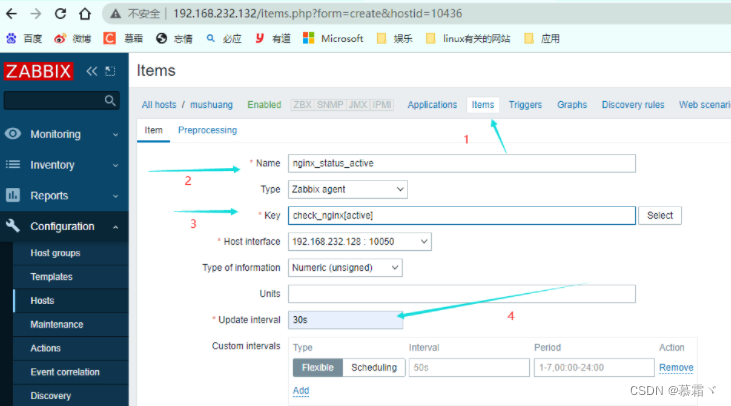
-
创建组

-
监控组


8. rewrite URL重写/重定向
-
使用的场景:
- 1.访问http然后转换成https
- 2.资源位置换了,不希望用户访问的地变化,不改变用户访问方式
-
语法:
rewrite regex replacement flag;
rewrite ^/images/(.*\.jpg)$ /imgs/$1 break; 此处的$1用于引用(.*.jpg)匹配到的内容 rewrite ^/bbs/(.*)$ http://www.idfsoft.com/index.html redirect; replacement可以是某个路径,也可以是某个URL- 1
- 2
- 3
- 4
- 5
- 6
- 7
- 示例:
上传图片 [root@node7 ~]# cd /usr/local/nginx/html/ [root@node7 html]# mkdir images [root@node7 html]# cd images/ [root@node7 images]# ls 'u=3039972918,1763345442&fm=193&f=GIF.jpg' [root@node7 images]# mv 'u=3039972918,1763345442&fm=193&f=GIF.jpg' 1.jpg [root@node7 images]# ls 1.jpg [root@node7 images]# ls 1.jpg 'u=1886064666,916980701&fm=193&f=GIF.jpg' [root@node7 images]# mv 'u=1886064666,916980701&fm=193&f=GIF.jpg' 2.jpg [root@node7 images]# ls 1.jpg 2.jpg- 1
- 2
- 3
- 4
- 5
- 6
- 7
- 8
- 9
- 10
- 11
- 12
- 13
- 14

- 更换名字
[root@node7 images]# cd .. [root@node7 html]# ls 404.html 50x.html images index.html mushuang [root@node7 html]# mv images imgs [root@node7 html]# ls 404.html 50x.html imgs index.html mushuang [root@node7 html]#- 1
- 2
- 3
- 4
- 5
- 6
- 7

- 配置重写
#access_log logs/host.access.log main; location / { root html; index index.html; } location /images { rewrite ^/images/(.*\.jpg)$ /imgs/$1 break; } location /status { stub_status on; }- 1
- 2
- 3
- 4
- 5
- 6
- 7
- 8
- 9
- 10
- 11
- 12
- 13
- 14
- 15
- http://192.168.232.128/images/1.jpg

- http://192.168.232.128/imgs/1.jpg

- 指向某个链接
#access_log logs/host.access.log main; location / { root html; index index.html; } location /images { rewrite ^/images/(.*\.jpg)$ https://t7.baidu.com/it/u=1886064666,916980701&fm=193&f=GIF break; }- 1
- 2
- 3
- 4
- 5
- 6
- 7
- 8
- 9
- 10
- 访问 http://192.168.232.128/images/1.jpg转成 https://t7.baidu.com/it/u=1886064666,916980701&fm=193&f=GIF

8.1 常见的flag
flag 作用 last 基本上都用这个flag,表示当前的匹配结束,继续下一个匹配,最多匹配10个到20个 一旦此rewrite规则重写完成后,就不再被后面其它的rewrite规则进行处理 而是由UserAgent重新对重写后的URL再一次发起请求,并从头开始执行类似的过程 break 中止Rewrite,不再继续匹配 一旦此rewrite规则重写完成后,由UserAgent对新的URL重新发起请求, 且不再会被当前location内的任何rewrite规则所检查 redirect 以临时重定向的HTTP状态302返回新的URL permanent 以永久重定向的HTTP状态301返回新的URL - last,当前匹配结束,继续匹配,找最后一个
location / { root html; index index.html; } location /images { rewrite ^/images/(.*\.jpg) /imgs/$1 last; } location /imgs { rewrite ^/imgs/(.*\.jpg) http://www.baidu.com break; }- 1
- 2
- 3
- 4
- 5
- 6
- 7
- 8
- 9
- 10
- 11
- 12
-
访问这个 http://192.168.232.128/images/1.jpg 转成 https://www.baidu.com/
-
break,终止
location / { root html; index index.html; } location /images { rewrite ^/images/(.*\.jpg) /imgs/$1 break; } location /imgs { rewrite ^/imgs/(.*\.jpg) http://www.baidu.com break; }- 1
- 2
- 3
- 4
- 5
- 6
- 7
- 8
- 9
- 10
- 11
- 12
- 13
- 访问:http://192.168.232.128/images/1.jpg

- redirect 302
location / { root html; index index.html; } location /images { rewrite ^/images/(.*\.jpg) /imgs/$1 redirect; }- 1
- 2
- 3
- 4
- 5
- 6
- 7
- 8
- 9
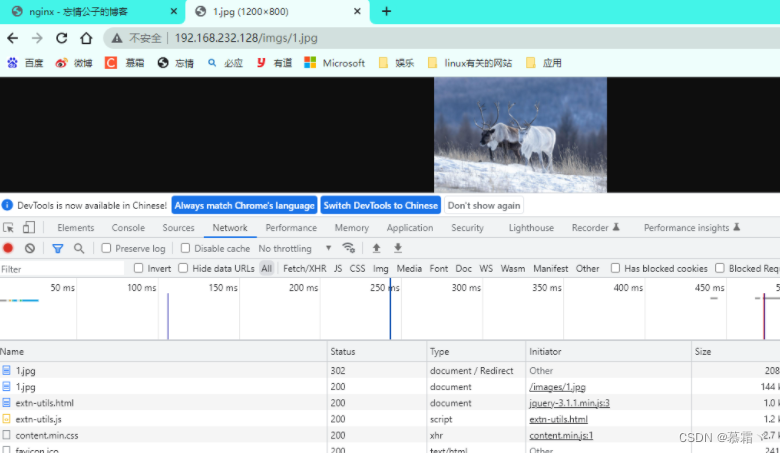
- permanent 301
location / { root html; index index.html; } location /images { rewrite ^/images/(.*\.jpg) /imgs/$1 permanent; }- 1
- 2
- 3
- 4
- 5
- 6
- 7
- 8
- 9

8.2 rewrite模块的作用是用来执行URL重定向。这个机制有利于去掉恶意访问的url,也有利于搜索引擎优化(SEO)
- 可以跳转,从 http://www.baidu.com/跳转到 https://www.baidu.com/?tn=02003390_19_hao_pg
8.3 nginx使用的语法源于Perl兼容正则表达式(PCRE)库,基本语法如下:
标识符 意义 ^ 必须以^后的实体开头 $ 必须以$前的实体结尾 . 匹配任意字符 [] 匹配指定字符集内的任意字符 [^] 匹配任何不包括在指定字符集内的任意字符串 | 匹配 | 之前或之后的实体 () 分组,组成一组用于匹配的实体,通常会有 | 来协助 - 捕获子表达式,可以捕获放在()之间的任何文本
^(hello|sir)$ //字符串为“hi sir”捕获的结果:$1=hi$2=sir hello|sir 都是$1 //这些被捕获的数据,在后面就可以当变量一样使用了- 1
- 2
- 3
- 4
- 5
9. if
-
语法:
if (condition) {...}应用场景:
- server段
- location段
-
常见的condition
变量名(变量值为空串,或者以“0”开始,则为false,其它的均为true) 以变量为操作数构成的比较表达式(可使用=,!=类似的比较操作符进行测试) 正则表达式的模式匹配操作: ~:区分大小写的模式匹配检查 ~*:不区分大小写的模式匹配检查 !~和!~*:对上面两种测试取反 测试指定路径为文件的可能性(-f,!-f) 测试指定路径为目录的可能性(-d,!-d) 测试文件的存在性(-e,!-e) 检查文件是否有执行权限(-x,!-x)- 1
- 2
- 3
- 4
- 5
- 6
- 7
- 8
- 9
- 10
- 11
- 12
- 13
- 14
- 15
- 16
9.1 基于浏览器实现分离案例
if ($http_user_agent ~ Firefox) { rewrite ^(.*)$ /firefox/$1 break; } if ($http_user_agent ~ MSIE) { rewrite ^(.*)$ /msie/$1 break; } if ($http_user_agent ~ Chrome) { rewrite ^(.*)$ /chrome/$1 break; }- 1
- 2
- 3
- 4
- 5
- 6
- 7
- 8
- 9
- 10
- 11
9.2 防盗链案例
location ~* \.(jpg|gif|jpeg|png)$ { valid_referers none blocked www.idfsoft.com; if ($invalid_referer) { rewrite ^/ http://www.idfsoft.com/403.html; } }- 1
- 2
- 3
- 4
- 5
- 6
-
盗链:内容在本地没有,在另一个地方有,盗图片的链接,会产生带宽
-
防盗链:直接访问资源,是不是从网站首页跳转过来的。是从网站直接跳转的,就是正常访问,不是就直接拒绝
9.3 反向代理与负载均衡
-
nginx通常被用作后端服务器的反向代理,这样就可以很方便的实现动静分离以及负载均衡,从而大大提高服务器的处理能力。 -
nginx实现动静分离,其实就是在反向代理的时候,如果是静态资源,就直接从nginx发布的路径去读取,而不需要从后台服务器获取了。 -
这种情况下需要保证后端跟前端的程序保持一致,可以使用
Rsync做服务端自动同步或者使用NFS、MFS分布式共享存储 -
Http Proxy模块,功能很多,最常用的是proxy_pass和`proxy_cache -
要使用
proxy_cache,需要集成第三方的ngx_cache_purge模块,用来清除指定的URL缓存。这个集成需要在安装nginx的时候去做,如:
./configure --add-module=../ngx_cache_purge-1.0 ...... -
nginx通过upstream模块来实现简单的负载均衡,upstream需要定义在http段内 -
在
upstream段内,定义一个服务器列表,默认的方式是轮询,如果要确定同一个访问者发出的请求总是由同一个后端服务器来处理,可以设置ip_hash,如:
upstream idfsoft.com { ip_hash; server 127.0.0.1:9080 weight=5; server 127.0.0.1:8080 weight=5; server 127.0.0.1:1111; }- 1
- 2
- 3
- 4
- 5
- 6
-
这个方法本质还是轮询,而且由于客户端的ip可能是不断变化的,比如动态ip,代理,翻墙等,因此ip_hash并不能完全保证同一个客户端总是由同一个服务器来处理。
-
定义好
upstream后,需要在server段内添加如下内容:
server { location / { proxy_pass http://idfsoft.com; } }- 1
- 2
- 3
- 4
- 5
9.3.1 负载均衡
- 环境
主机 ip 安装的服务 node7 192.168.232.128 nginx web1 192.168.232.132 nginx web2 192.168.232.134 httpd - 提供两台rs的网站内容
web1: [root@web1 ~]# yum -y install nginx [root@web1 ~]# cd /usr/share/nginx/html/ [root@web1 html]# echo "asdasdasd 1234566" > index.html [root@web1 html]# cat index.html asdasdasd 1234566 [root@web1 html]# ss -antl State Recv-Q Send-Q Local Address:Port Peer Address:PortProcess LISTEN 0 128 0.0.0.0:80 0.0.0.0:* LISTEN 0 128 0.0.0.0:22 0.0.0.0:* LISTEN 0 128 [::]:80 [::]:* LISTEN 0 128 [::]:22 [::]:* [root@web1 html]# web2: [root@web2 ~]# cd /usr/share/nginx/html/ [root@web2 html]# ls 404.html 50x.html index.html nginx-logo.png poweredby.png [root@web2 html]# echo "1234561234560" > index.html [root@web2 html]# cat index.html 1234561234560 [root@web2 html]# systemctl start nginx [root@web2 html]# ss -antl State Recv-Q Send-Q Local Address:Port Peer Address:PortProcess LISTEN 0 128 0.0.0.0:22 0.0.0.0:* LISTEN 0 128 0.0.0.0:80 0.0.0.0:* LISTEN 0 128 [::]:22 [::]:* LISTEN 0 128 [::]:80 [::]:* [root@web2 html]#- 1
- 2
- 3
- 4
- 5
- 6
- 7
- 8
- 9
- 10
- 11
- 12
- 13
- 14
- 15
- 16
- 17
- 18
- 19
- 20
- 21
- 22
- 23
- 24
- 25
- 26
- 27
- 28
- 29
- 30
- 31
- 32
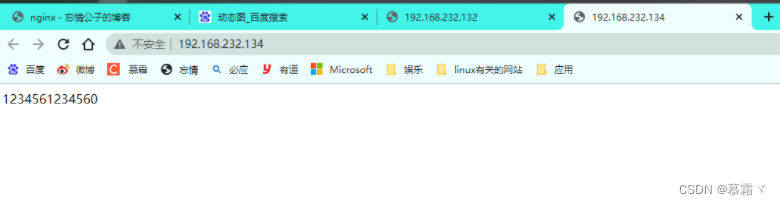
- web1 192.168.232.132

- web2 192.168.232.134
- 在node7进行配置
#gzip on; upstream backend { server 192.168.232.132; server 192.168.232.134; } server { listen 80; server_name localhost; #charset koi8-r; #access_log logs/host.access.log main; location / { proxy_pass http://backend; }- 1
- 2
- 3
- 4
- 5
- 6
- 7
- 8
- 9
- 10
- 11
- 12
- 13
- 14
- 15
- 16
- 17
- 18
-
访问:192.168.232.128
-
第一次

- 第二次

- 配置权重
#gzip on; upstream backend { server 192.168.232.132 weight=2; server 192.168.232.134; } server { listen 80; server_name localhost; #charset koi8-r; #access_log logs/host.access.log main; location / { proxy_pass http://backend; }- 1
- 2
- 3
- 4
- 5
- 6
- 7
- 8
- 9
- 10
- 11
- 12
- 13
- 14
- 15
- 16
- 17
- 18
- 访问 2次132,1次134
C:\Users\Administrator>curl 192.168.232.128 asdasdasd 1234566 C:\Users\Administrator>curl 192.168.232.128 asdasdasd 1234566 C:\Users\Administrator>curl 192.168.232.128 1234561234560 C:\Users\Administrator>curl 192.168.232.128 asdasdasd 1234566 C:\Users\Administrator>curl 192.168.232.128 asdasdasd 1234566 C:\Users\Administrator>curl 192.168.232.128 1234561234560- 1
- 2
- 3
- 4
- 5
- 6
- 7
- 8
- 9
- 10
- 11
- 12
- 13
- 14
- 15
- 16
- 17
-
要确定同一个访问者发出的请求总是由同一个后端服务器来处理,可以设置ip_hash
-
这台主机谁处理的,后面就由他一直处理
#gzip on; upstream backend { ip_hash; server 192.168.232.132 weight=2; server 192.168.232.134; } server { listen 80; server_name localhost; #charset koi8-r; #access_log logs/host.access.log main; location / { proxy_pass http://backend; }- 1
- 2
- 3
- 4
- 5
- 6
- 7
- 8
- 9
- 10
- 11
- 12
- 13
- 14
- 15
- 16
- 17
- 18
- 访问,一直访问第一次所访问的

9.3.2 动静分离
- 配置动态资源:
[root@node7 imgs]# ls 1.jpg 2.jpg [root@node7 imgs]# scp 1.jpg 192.168.232.132:/usr/share/nginx/html/images [root@web1 images]# pwd /usr/share/nginx/html/images [root@web1 images]# ls [root@web1 images]# ls 1.jpg [root@web1 images]#- 1
- 2
- 3
- 4
- 5
- 6
- 7
- 8
- 9
- 10
- 11
- 配置静态资源
[root@web2 httpd]# cd /usr/share/nginx/html/ [root@web2 html]# ls 404.html 50x.html index.html nginx-logo.png poweredby.png [root@web2 html]# cat index.html 1234561234560 [root@web2 html]# mkdir test [root@web2 html]# cp index.html test/ [root@web2 html]# ls test/ index.html [root@web2 html]#- 1
- 2
- 3
- 4
- 5
- 6
- 7
- 8
- 9
- 10
- 配置node7主机
#gzip on; upstream dynamic { server 192.168.232.132; } upstream static { server 192.168.232.134; } server { listen 80; server_name localhost; #charset koi8-r; #access_log logs/host.access.log main; location /test { proxy_pass http://static; } # proxy the PHP scripts to Apache listening on 127.0.0.1:80 # location /images { proxy_pass http://dynamic; }- 1
- 2
- 3
- 4
- 5
- 6
- 7
- 8
- 9
- 10
- 11
- 12
- 13
- 14
- 15
- 16
- 17
- 18
- 19
- 20
- 21
- 22
- 23
- 24
- 25
- 26
- 27
- 28
- 访问动态资源 http://192.168.232.128/images/1.jpg

- 访问静态资源 http://192.168.232.128/test/

-
相关阅读:
STM32驱动美上美(SIQ-02FVC3)拨盘编码器硬件
K8S ingress nginx性能优化
如何有效取代FTP来帮助企业快速传输大文件
[导弹打飞机H5动画制作]飞机路线的随机起飞及自爆模拟
day01 spring
[附源码]计算机毕业设计人事系统Springboot程序
大型项目中 MSAA 的方案参考
一键实现冒泡排序算法,代码质量有保障!
软件包管理—源码包管理—源码包与RPM包区别
若依 ruoyi 分离版 vue 简单的行内编辑实现
- 原文地址:https://blog.csdn.net/mushuangpanny/article/details/126703315
